
 English
 Deutsch
 Español
 Italiano
 Nederlands
 Polski
' d='M48 28h24v18a12 12 0 0 1-24 0z'/%3E%3Cpath fill='%230093DD' d='M47.5 21.5h4.6V28h-4.6zm10.2-2.5h4.6v9h-4.6zm10.2 2.5h4.6V28h-4.6z'/%3E%3Cpath fill='%23171796' d='M52.6 20h4.6v8h-4.6zm10.2 0h4.6v8h-4.6z'/%3E%3C/svg%3E) Hrvatski
 עברית
Pour les applications
Une API et un SDK de chat pour votre application
Ajoutez le chat à Next.js, Laravel, Django et toute autre stack : conversations à deux et discussions de groupe, avec saisie en cours, qui est en ligne, accusés de lecture, réactions et fichiers. Le chat prêt à l’emploi fonctionne tel quel sur le web, les messages arrivent aussitôt chez tous les participants, et votre serveur les conserve dans votre propre base de données.
Ou essayez la démo en direct : une petite boutique où un client écrit à la boutique, chacun dans sa propre fenêtre.
Les meilleurs tarifs pour les WebSockets, des appels 1 à 1 illimités avec des serveurs TURN dans le monde entier, et des appels de groupe et la diffusion en direct avec un quota inclus. À partir de $11.99 par mois pour 1 000 connexions simultanées, facturé à l’année, ou $14.99 facturé au mois.
Next.js sur le serveur et React sur la page.
// What every chat carries: what pages send, what your webhook
// gets to keep, and the last 50 for a page that reconnects.
const chat = {
    emit: [ 'message', 'typing', 'read', 'reaction' ],
    webhook: [ 'message', 'reaction' ],
    history: 50,
};

// Two people, such as chat:34:42: the two in its name alone.
realtime.room( 'chat:{pair}', chat );

// A group, such as group:7: its members, who see each other.
realtime.room(
    'group:{id}',
    ( user, { id } ) => isMemberOf( id, user ),
    { ...chat, presence: true },
);// What every chat carries: what pages send, what your webhook
// gets to keep, and the last 50 for a page that reconnects.
const chat = {
emit: [ 'message', 'typing', 'read', 'reaction' ],
webhook: [ 'message', 'reaction' ],
history: 50,
};
// Two people, such as chat:34:42: the two in its name alone.
realtime.room( 'chat:{pair}', chat );
// A group, such as group:7: its members, who see each other.
realtime.room(
'group:{id}',
( user, { id } ) => isMemberOf( id, user ),
{ ...chat, presence: true },
);// What every chat carries: what pages send, what your webhook
// gets to keep, and the last 50 for a page that reconnects.
const chat = {
emit: [ 'message', 'typing', 'read', 'reaction' ],
webhook: [ 'message', 'reaction' ],
history: 50,
};
// Two people, such as chat:34:42: the two in its name alone.
realtime.room( 'chat:{pair}', chat );
// A group, such as group:7: its members, who see each other.
realtime.room(
'group:{id}',
( user, { id } ) => isMemberOf( id, user ),
{ ...chat, presence: true },
);$this->callAfterResolving( Realtime::class, function ( Realtime $realtime ) {
// What every chat carries: what pages send, what your webhook
// gets to keep, and the last 50 for a page that reconnects.
$chat = [
'emit' => [ 'message', 'typing', 'read', 'reaction' ],
'webhook' => [ 'message', 'reaction' ],
'history' => 50,
];
// Two people, such as chat:34:42: the two in its name alone.
$realtime->room( 'chat:{pair}', null, $chat );
// A group, such as group:7: its members, who see each other.
$realtime->room(
'group:{id}',
fn ( $user, array $p ) => is_member_of( $p['id'], $user ),
[ ...$chat, 'presence' => true ],
);
} );// What every chat carries: what pages send, what your webhook
// gets to keep, and the last 50 for a page that reconnects.
$chat = [
'emit' => [ 'message', 'typing', 'read', 'reaction' ],
'webhook' => [ 'message', 'reaction' ],
'history' => 50,
];
// Two people, such as chat:34:42: the two in its name alone.
$realtime->room( 'chat:{pair}', null, $chat );
// A group, such as group:7: its members, who see each other.
$realtime->room(
'group:{id}',
fn ( $user, array $p ) => is_member_of( $p['id'], $user ),
[ ...$chat, 'presence' => true ],
);# What every chat carries: what pages send, what your webhook
# gets to keep, and the last 50 for a page that reconnects.
chat = {
"emit": ["message", "typing", "read", "reaction"],
"webhook": ["message", "reaction"],
"history": 50,
}
# Two people, such as chat:34:42: the two in its name alone.
realtime.room("chat:{pair}", **chat)
# A group, such as group:7: its members, who see each other.
realtime.room(
"group:{id}",
lambda user, p: is_member_of(p["id"], user),
presence=True,
**chat,
)# What every chat carries: what pages send, what your webhook
# gets to keep, and the last 50 for a page that reconnects.
chat = {
"emit": ["message", "typing", "read", "reaction"],
"webhook": ["message", "reaction"],
"history": 50,
}
# Two people, such as chat:34:42: the two in its name alone.
realtime.room("chat:{pair}", **chat)
# A group, such as group:7: its members, who see each other.
realtime.room(
"group:{id}",
lambda user, p: is_member_of(p["id"], user),
presence=True,
**chat,
)# What every chat carries: what pages send, what your webhook
# gets to keep, and the last 50 for a page that reconnects.
chat = {
"emit": ["message", "typing", "read", "reaction"],
"webhook": ["message", "reaction"],
"history": 50,
}
# Two people, such as chat:34:42: the two in its name alone.
realtime.room("chat:{pair}", **chat)
# A group, such as group:7: its members, who see each other.
realtime.room(
"group:{id}",
lambda user, p: is_member_of(p["id"], user),
presence=True,
**chat,
)// Your /auth route asks this for each room a page wants.
func roomRule(room, user string) (*wordplus.Room, string) {
chat := wordplus.Room{
Emit: []string{"message", "typing", "read", "reaction"},
Webhook: []string{"message", "reaction"},
History: 50,
Info: profile(user),
}
part := strings.Split(room, ":")
// Two people, such as chat:34:42: the two in its name alone.
if len(part) == 3 && part[0] == "chat" {
if user != part[1] && user != part[2] {
return nil, "forbidden"
}
return &chat, ""
}
// A group, such as group:7: its members, who see each other.
if len(part) == 2 && part[0] == "group" {
if !isMemberOf(part[1], user) {
return nil, "forbidden"
}
chat.Presence = true
return &chat, ""
}
return nil, "no_rule"
}Des hooks et des composants pour toute app React, avec n'importe lequel des serveurs ci-dessus.
import { connect } from '@wordplus/realtime';
const rt = await connect();
// The chat, who is online and typing, with no calls.
await rt.ui();
// And in the page of Ben, writing to Ann:
// <chat-room room="chat:34:42" to="34" name="Ann"
// style="height: 520px"></chat-room>
//
// And in a group, beside who is in it now:
// <chat-room room="group:7"></chat-room>
// <online-list room="group:7" title="In the group"></online-list>import { connect } from '@wordplus/realtime';
const rt = await connect();
// The chat, who is online and typing, with no calls.
await rt.ui();
// And in the page of Ben, writing to Ann:
// <chat-room room="chat:34:42" to="34" name="Ann"
// style="height: 520px"></chat-room>
//
// And in a group, beside who is in it now:
// <chat-room room="group:7"></chat-room>
// <online-list room="group:7" title="In the group"></online-list>import { connect } from '@wordplus/realtime';
const rt = await connect();
// The chat, who is online and typing, with no calls.
await rt.ui();
// And in the page of Ben, writing to Ann:
// <chat-room room="chat:34:42" to="34" name="Ann"
// style="height: 520px"></chat-room>
//
// And in a group, beside who is in it now:
// <chat-room room="group:7"></chat-room>
// <online-list room="group:7" title="In the group"></online-list>import { connect } from '@wordplus/realtime';
const rt = await connect();
// The chat, who is online and typing, with no calls.
await rt.ui();
// And in the page of Ben, writing to Ann:
// <chat-room room="chat:34:42" to="34" name="Ann"
// style="height: 520px"></chat-room>
//
// And in a group, beside who is in it now:
// <chat-room room="group:7"></chat-room>
// <online-list room="group:7" title="In the group"></online-list>import { connect } from '@wordplus/realtime';
const rt = await connect();
// The chat, who is online and typing, with no calls.
await rt.ui();
// And in the page of Ben, writing to Ann:
// <chat-room room="chat:34:42" to="34" name="Ann"
// style="height: 520px"></chat-room>
//
// And in a group, beside who is in it now:
// <chat-room room="group:7"></chat-room>
// <online-list room="group:7" title="In the group"></online-list>import { connect } from '@wordplus/realtime';
const rt = await connect();
// The chat, who is online and typing, with no calls.
await rt.ui();
// And in the page of Ben, writing to Ann:
// <chat-room room="chat:34:42" to="34" name="Ann"
// style="height: 520px"></chat-room>
//
// And in a group, beside who is in it now:
// <chat-room room="group:7"></chat-room>
// <online-list room="group:7" title="In the group"></online-list>import { connect } from '@wordplus/realtime';
const rt = await connect();
// The chat, who is online and typing, with no calls.
await rt.ui();
// And in the page of Ben, writing to Ann:
// <chat-room room="chat:34:42" to="34" name="Ann"
// style="height: 520px"></chat-room>
//
// And in a group, beside who is in it now:
// <chat-room room="group:7"></chat-room>
// <online-list room="group:7" title="In the group"></online-list>import { connect } from '@wordplus/realtime';
const rt = await connect();
// The chat, who is online and typing, with no calls.
await rt.ui();
// And in the page of Ben, writing to Ann:
// <chat-room room="chat:34:42" to="34" name="Ann"
// style="height: 520px"></chat-room>
//
// And in a group, beside who is in it now:
// <chat-room room="group:7"></chat-room>
// <online-list room="group:7" title="In the group"></online-list>import { connect } from '@wordplus/realtime';
const rt = await connect();
// The chat, who is online and typing, with no calls.
await rt.ui();
// And in the page of Ben, writing to Ann:
// <chat-room room="chat:34:42" to="34" name="Ann"
// style="height: 520px"></chat-room>
//
// And in a group, beside who is in it now:
// <chat-room room="group:7"></chat-room>
// <online-list room="group:7" title="In the group"></online-list><chat-room room="chat:34:42" to="34" name="Ann"
style="height: 520px"></chat-room>
<script type="module">
// The chat, who is online and typing, with no calls.
await window.Echo.connector.rt.ui();
</script>'use client'; // in Next.js
import { Chat, RealtimeUi } from '@wordplus/realtime/react';
// Inside <RealtimeProvider>, once for the whole app.
export function Conversation() {
return (
<>
<RealtimeUi />
<div style={ { height: 520 } }>
<Chat room="chat:34:42" to={ 34 } name="Ann" />
</div>
</>
);
}<script setup>
import { watchEffect } from 'vue';
import { useRealtime } from '@wordplus/realtime/vue';
// provideRealtime() once, in your root component.
const rt = useRealtime();
watchEffect( () => rt.value?.ui() );
</script>
<!-- isCustomElement for this tag, in vite.config.js -->
<template>
<chat-room room="chat:34:42" to="34" name="Ann"
style="height: 520px"></chat-room>
</template><script>
import { useRealtime } from '@wordplus/realtime/svelte';
// provideRealtime() once, in your root component.
const rt = useRealtime();
$effect( () => { rt.current?.ui(); } );
</script>
<chat-room room="chat:34:42" to="34" name="Ann"
style="height: 520px"></chat-room>import {
Component, CUSTOM_ELEMENTS_SCHEMA, effect,
} from '@angular/core';
import { injectRealtime } from '@wordplus/realtime/angular';
@Component( {
selector: 'app-conversation',
schemas: [ CUSTOM_ELEMENTS_SCHEMA ],
template: `<chat-room room="chat:34:42" to="34" name="Ann"
style="height: 520px"></chat-room>`,
} )
export class Conversation {
readonly rt = injectRealtime();
constructor() {
effect( () => void this.rt()?.ui() );
}
}// No ready-made chat on iOS: your own, on the same room.
let chat = rt.join("chat:34:42")
chat.on("message") { data, meta in
draw(meta.from, data["text"]?.string ?? "")
}
try await chat.emitWithAck("message", ["text": "Hi Ann"])// No ready-made chat on Android: your own, on the same room.
val chat = rt.join("chat:34:42")
chat.on("message") { data, meta ->
draw(meta.from, data.jsonObject["text"])
}
chat.emitWithAck("message", buildJsonObject { put("text", "Hi") })import { useRoom } from '@wordplus/realtime/react';
// No ready-made chat in React Native: your own, on the room.
export function Conversation() {
const chat = useRoom( 'chat:34:42', {
message: ( data, meta ) => draw( meta.from, data.text ),
} );
const send = ( text ) => chat.emitWithAck( 'message', { text } );
return <SendBox onSend={ send } />;
}// No ready-made chat in Flutter: your own, on the same room.
final chat = rt.join('chat:34:42');
chat.on('message', (data, meta) => draw(meta.from, data['text']));
await chat.emitWithAck('message', {'text': 'Hi Ann'});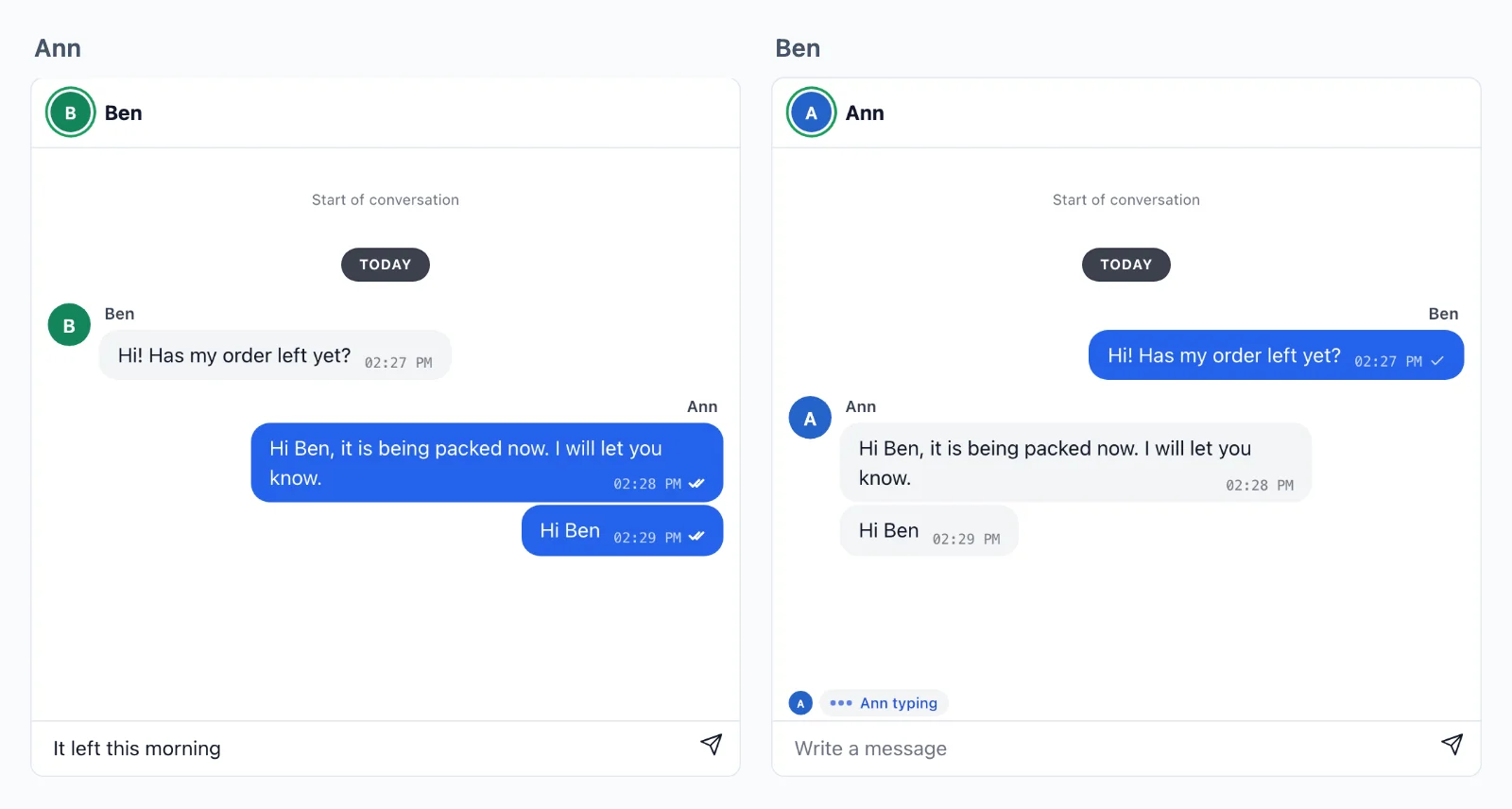
Vos messages
Vos messages restent dans votre base de données
Nous transportons une conversation, et votre serveur la conserve. Une salle garde ses derniers événements environ cinq minutes, seulement pour qu’une page qui se reconnecte ne manque rien, et votre base de données garde la conversation elle-même.
Aussitôt, sur chaque appareil
Un message passe de page en page par nos serveurs dès son envoi, sans requête vers le vôtre, vers chaque onglet et chaque application de tous les participants.
Conservé par votre serveur
Votre webhook reçoit chaque message et chaque réaction dès leur envoi et les conserve dans votre propre base de données. Votre propre route donne au chat son historique à l’ouverture, si bien que la conversation est à vous pour la rechercher, la modérer et l’afficher à nouveau.
Scellé en chemin
Une conversation privée voyage scellée avec des clés que fabrique votre serveur : ses messages, son historique et la liste de ses participants. Le cloud la transporte sans pouvoir la lire.
Votre serveur décide
Construire un chat, une tâche à la fois
Un chat est une salle : chat:34:42 quand Ben écrit à Ann, qui vend, ou group:7 pour un groupe. Une règle sur votre serveur dit qui s’y trouve, et les pages s’y envoient messages, saisie en cours et accusés de lecture. Voici les deux, du chat prêt à l’emploi jusqu’à l’appel.
Next.js sur le serveur et React sur la page.
Ajouter le chat prêt à l’emploi
Une règle sur votre serveur pour chaque type de chat : un chat à deux laisse entrer les deux personnes que porte son nom, et un groupe ses membres, en lisant vos propres données. Puis le chat va dans la page, avec saisie en cours, accusés de lecture et réactions. isMemberOf est votre propre recherche.
// What every chat carries: what pages send, what your webhook
// gets to keep, and the last 50 for a page that reconnects.
const chat = {
    emit: [ 'message', 'typing', 'read', 'reaction' ],
    webhook: [ 'message', 'reaction' ],
    history: 50,
};

// Two people, such as chat:34:42: the two in its name alone.
realtime.room( 'chat:{pair}', chat );

// A group, such as group:7: its members, who see each other.
realtime.room(
    'group:{id}',
    ( user, { id } ) => isMemberOf( id, user ),
    { ...chat, presence: true },
);// What every chat carries: what pages send, what your webhook
// gets to keep, and the last 50 for a page that reconnects.
const chat = {
emit: [ 'message', 'typing', 'read', 'reaction' ],
webhook: [ 'message', 'reaction' ],
history: 50,
};
// Two people, such as chat:34:42: the two in its name alone.
realtime.room( 'chat:{pair}', chat );
// A group, such as group:7: its members, who see each other.
realtime.room(
'group:{id}',
( user, { id } ) => isMemberOf( id, user ),
{ ...chat, presence: true },
);// What every chat carries: what pages send, what your webhook
// gets to keep, and the last 50 for a page that reconnects.
const chat = {
emit: [ 'message', 'typing', 'read', 'reaction' ],
webhook: [ 'message', 'reaction' ],
history: 50,
};
// Two people, such as chat:34:42: the two in its name alone.
realtime.room( 'chat:{pair}', chat );
// A group, such as group:7: its members, who see each other.
realtime.room(
'group:{id}',
( user, { id } ) => isMemberOf( id, user ),
{ ...chat, presence: true },
);$this->callAfterResolving( Realtime::class, function ( Realtime $realtime ) {
// What every chat carries: what pages send, what your webhook
// gets to keep, and the last 50 for a page that reconnects.
$chat = [
    'emit' => [ 'message', 'typing', 'read', 'reaction' ],
    'webhook' => [ 'message', 'reaction' ],
    'history' => 50,
];

// Two people, such as chat:34:42: the two in its name alone.
$realtime->room( 'chat:{pair}', null, $chat );

// A group, such as group:7: its members, who see each other.
$realtime->room(
    'group:{id}',
    fn ( $user, array $p ) => is_member_of( $p['id'], $user ),
    [ ...$chat, 'presence' => true ],
);
} );// What every chat carries: what pages send, what your webhook
// gets to keep, and the last 50 for a page that reconnects.
$chat = [
'emit' => [ 'message', 'typing', 'read', 'reaction' ],
'webhook' => [ 'message', 'reaction' ],
'history' => 50,
];
// Two people, such as chat:34:42: the two in its name alone.
$realtime->room( 'chat:{pair}', null, $chat );
// A group, such as group:7: its members, who see each other.
$realtime->room(
'group:{id}',
fn ( $user, array $p ) => is_member_of( $p['id'], $user ),
[ ...$chat, 'presence' => true ],
);# What every chat carries: what pages send, what your webhook
# gets to keep, and the last 50 for a page that reconnects.
chat = {
"emit": ["message", "typing", "read", "reaction"],
"webhook": ["message", "reaction"],
"history": 50,
}
# Two people, such as chat:34:42: the two in its name alone.
realtime.room("chat:{pair}", **chat)
# A group, such as group:7: its members, who see each other.
realtime.room(
"group:{id}",
lambda user, p: is_member_of(p["id"], user),
presence=True,
**chat,
)# What every chat carries: what pages send, what your webhook
# gets to keep, and the last 50 for a page that reconnects.
chat = {
"emit": ["message", "typing", "read", "reaction"],
"webhook": ["message", "reaction"],
"history": 50,
}
# Two people, such as chat:34:42: the two in its name alone.
realtime.room("chat:{pair}", **chat)
# A group, such as group:7: its members, who see each other.
realtime.room(
"group:{id}",
lambda user, p: is_member_of(p["id"], user),
presence=True,
**chat,
)# What every chat carries: what pages send, what your webhook
# gets to keep, and the last 50 for a page that reconnects.
chat = {
"emit": ["message", "typing", "read", "reaction"],
"webhook": ["message", "reaction"],
"history": 50,
}
# Two people, such as chat:34:42: the two in its name alone.
realtime.room("chat:{pair}", **chat)
# A group, such as group:7: its members, who see each other.
realtime.room(
"group:{id}",
lambda user, p: is_member_of(p["id"], user),
presence=True,
**chat,
)// Your /auth route asks this for each room a page wants.
func roomRule(room, user string) (*wordplus.Room, string) {
chat := wordplus.Room{
Emit: []string{"message", "typing", "read", "reaction"},
Webhook: []string{"message", "reaction"},
History: 50,
Info: profile(user),
}
part := strings.Split(room, ":")
// Two people, such as chat:34:42: the two in its name alone.
if len(part) == 3 && part[0] == "chat" {
if user != part[1] && user != part[2] {
return nil, "forbidden"
}
return &chat, ""
}
// A group, such as group:7: its members, who see each other.
if len(part) == 2 && part[0] == "group" {
if !isMemberOf(part[1], user) {
return nil, "forbidden"
}
chat.Presence = true
return &chat, ""
}
return nil, "no_rule"
}Des hooks et des composants pour toute app React, avec n'importe lequel des serveurs ci-dessus.
import { connect } from '@wordplus/realtime';

const rt = await connect();

// The chat, who is online and typing, with no calls.
await rt.ui();

// And in the page of Ben, writing to Ann:
// <chat-room room="chat:34:42" to="34" name="Ann"
//            style="height: 520px"></chat-room>
//
// And in a group, beside who is in it now:
// <chat-room room="group:7"></chat-room>
// <online-list room="group:7" title="In the group"></online-list>import { connect } from '@wordplus/realtime';
const rt = await connect();
// The chat, who is online and typing, with no calls.
await rt.ui();
// And in the page of Ben, writing to Ann:
// <chat-room room="chat:34:42" to="34" name="Ann"
// style="height: 520px"></chat-room>
//
// And in a group, beside who is in it now:
// <chat-room room="group:7"></chat-room>
// <online-list room="group:7" title="In the group"></online-list>import { connect } from '@wordplus/realtime';
const rt = await connect();
// The chat, who is online and typing, with no calls.
await rt.ui();
// And in the page of Ben, writing to Ann:
// <chat-room room="chat:34:42" to="34" name="Ann"
// style="height: 520px"></chat-room>
//
// And in a group, beside who is in it now:
// <chat-room room="group:7"></chat-room>
// <online-list room="group:7" title="In the group"></online-list>import { connect } from '@wordplus/realtime';
const rt = await connect();
// The chat, who is online and typing, with no calls.
await rt.ui();
// And in the page of Ben, writing to Ann:
// <chat-room room="chat:34:42" to="34" name="Ann"
// style="height: 520px"></chat-room>
//
// And in a group, beside who is in it now:
// <chat-room room="group:7"></chat-room>
// <online-list room="group:7" title="In the group"></online-list>import { connect } from '@wordplus/realtime';
const rt = await connect();
// The chat, who is online and typing, with no calls.
await rt.ui();
// And in the page of Ben, writing to Ann:
// <chat-room room="chat:34:42" to="34" name="Ann"
// style="height: 520px"></chat-room>
//
// And in a group, beside who is in it now:
// <chat-room room="group:7"></chat-room>
// <online-list room="group:7" title="In the group"></online-list>import { connect } from '@wordplus/realtime';
const rt = await connect();
// The chat, who is online and typing, with no calls.
await rt.ui();
// And in the page of Ben, writing to Ann:
// <chat-room room="chat:34:42" to="34" name="Ann"
// style="height: 520px"></chat-room>
//
// And in a group, beside who is in it now:
// <chat-room room="group:7"></chat-room>
// <online-list room="group:7" title="In the group"></online-list>import { connect } from '@wordplus/realtime';
const rt = await connect();
// The chat, who is online and typing, with no calls.
await rt.ui();
// And in the page of Ben, writing to Ann:
// <chat-room room="chat:34:42" to="34" name="Ann"
// style="height: 520px"></chat-room>
//
// And in a group, beside who is in it now:
// <chat-room room="group:7"></chat-room>
// <online-list room="group:7" title="In the group"></online-list>import { connect } from '@wordplus/realtime';
const rt = await connect();
// The chat, who is online and typing, with no calls.
await rt.ui();
// And in the page of Ben, writing to Ann:
// <chat-room room="chat:34:42" to="34" name="Ann"
// style="height: 520px"></chat-room>
//
// And in a group, beside who is in it now:
// <chat-room room="group:7"></chat-room>
// <online-list room="group:7" title="In the group"></online-list>import { connect } from '@wordplus/realtime';
const rt = await connect();
// The chat, who is online and typing, with no calls.
await rt.ui();
// And in the page of Ben, writing to Ann:
// <chat-room room="chat:34:42" to="34" name="Ann"
// style="height: 520px"></chat-room>
//
// And in a group, beside who is in it now:
// <chat-room room="group:7"></chat-room>
// <online-list room="group:7" title="In the group"></online-list>{{-- In the page of Ben, writing to Ann. --}}
<chat-room room="chat:34:42" to="34" name="Ann"
           style="height: 520px"></chat-room>

<script type="module">
    // The chat, who is online and typing, with no calls.
    await window.Echo.connector.rt.ui();
</script>'use client'; // in Next.js
import { Chat, RealtimeUi } from '@wordplus/realtime/react';
// Inside <RealtimeProvider>, once for the whole app.
// In the page of Ben, writing to Ann.
export function Conversation() {
return (
<>
<RealtimeUi />
<div style={ { height: 520 } }>
<Chat room="chat:34:42"
to={ 34 }
name="Ann" />
</div>
</>
);
}<script setup>
import { watchEffect } from 'vue';
import { useRealtime } from '@wordplus/realtime/vue';
// provideRealtime() once, in your root component.
const rt = useRealtime();
// The chat, who is online and typing, with no calls.
watchEffect( () => rt.value?.ui() );
</script>
<!-- isCustomElement for this tag, in vite.config.js. In the page of Ben, writing to Ann. -->
<template>
<chat-room room="chat:34:42" to="34" name="Ann"
style="height: 520px"></chat-room>
</template><script>
import { useRealtime } from '@wordplus/realtime/svelte';
// provideRealtime() once, in your root component.
const rt = useRealtime();
// The chat, who is online and typing, with no calls.
$effect( () => { rt.current?.ui(); } );
</script>
<!-- In the page of Ben, writing to Ann. -->
<chat-room room="chat:34:42" to="34" name="Ann"
style="height: 520px"></chat-room>import { Component, CUSTOM_ELEMENTS_SCHEMA } from '@angular/core';
// realtime.ts, one connection for the whole app:
// export const realtime = connect();
import { realtime } from './realtime';
@Component( {
selector: 'app-conversation',
schemas: [ CUSTOM_ELEMENTS_SCHEMA ],
template: `
<!-- In the page of Ben, writing to Ann. -->
<chat-room room="chat:34:42" to="34" name="Ann"
style="height: 520px"></chat-room>
`,
} )
export class Conversation {
async ngOnInit() {
const rt = await realtime;
// The chat, who is online and typing, with no calls.
await rt.ui();
}
}Envoyer et conserver un message
Le chat prêt à l’emploi le fait tout seul. Sur un écran à vous, une page envoie un message à la salle, et tous ceux qui s’y trouvent le reçoivent aussitôt. Votre webhook le conserve par son id et prévient l’autre personne, sur quelque page qu’elle soit. saveMessage est votre propre fonction.
// Each message pages send, kept once by its id, however often the webhook brings it.
realtime.on( 'message', async ( { room, from, data, event_id, at } ) => {
    await saveMessage( { id: event_id, room, from, text: data.text, at } );

    // A notice to the other of the two, on whatever page or app they have open.
    const [ kind, a, b ] = room.split( ':' );
    if ( kind === 'chat' ) {
        const to = String( from ) === a ? b : a;
        await realtime.toUser( to ).emit( 'new_message', { room, from, text: data.text } );
    }
} );// Each message pages send, kept once by its id, however often the webhook brings it.
realtime.on( 'message', async ( { room, from, data, event_id, at } ) => {
await saveMessage( { id: event_id, room, from, text: data.text, at } );
// A notice to the other of the two, on whatever page or app they have open.
const [ kind, a, b ] = room.split( ':' );
if ( kind === 'chat' ) {
const to = String( from ) === a ? b : a;
await realtime.toUser( to ).emit( 'new_message', { room, from, text: data.text } );
}
} );// Each message pages send, kept once by its id, however often the webhook brings it.
realtime.on( 'message', async ( { room, from, data, event_id, at } ) => {
await saveMessage( { id: event_id, room, from, text: data.text, at } );
// A notice to the other of the two, on whatever page or app they have open.
const [ kind, a, b ] = room.split( ':' );
if ( kind === 'chat' ) {
const to = String( from ) === a ? b : a;
await realtime.toUser( to ).emit( 'new_message', { room, from, text: data.text } );
}
} );$this->callAfterResolving( Realtime::class, function ( Realtime $realtime ) {
// Each message pages send, kept once by its id, however often the webhook brings it.
$realtime->on( 'message', function ( array $e ) use ( $realtime ) {
Message::updateOrCreate( [ 'id' => $e['event_id'] ], [ 'room' => $e['room'], 'from' => $e['from'], 'text' => $e['data']['text'] ] );
// A notice to the other of the two, on whatever page or app they have open.
[ $kind, $a, $b ] = explode( ':', $e['room'] ) + [ '', '', '' ];
if ( 'chat' === $kind ) {
$to = (string) $e['from'] === $a ? $b : $a;
$realtime->toUser( $to )->emit( 'new_message', [ 'room' => $e['room'], 'from' => $e['from'], 'text' => $e['data']['text'] ] );
}
} );
} );// Each message pages send, kept once by its id, however often the webhook brings it.
$realtime->on( 'message', function ( array $e ) use ( $realtime ) {
save_message( $e['event_id'], $e['room'], $e['from'], $e['data']['text'], $e['at'] );
// A notice to the other of the two, on whatever page or app they have open.
[ $kind, $a, $b ] = explode( ':', $e['room'] ) + [ '', '', '' ];
if ( 'chat' === $kind ) {
$to = (string) $e['from'] === $a ? $b : $a;
$realtime->toUser( $to )->emit( 'new_message', [ 'room' => $e['room'], 'from' => $e['from'], 'text' => $e['data']['text'] ] );
}
} );# Each message pages send, kept once by its id, however often the webhook brings it.
def keep_message(e):
save_message(e["event_id"], e["room"], e["from"], e["data"]["text"], e["at"])
# A notice to the other of the two, on whatever page or app they have open.
kind, a, b = (e["room"].split(":") + ["", "", ""])[:3]
if kind == "chat":
to = b if str(e["from"]) == a else a
realtime.to_user(to).emit("new_message", {"room": e["room"], "from": e["from"], "text": e["data"]["text"]})
realtime.on("message", keep_message)# Each message pages send, kept once by its id, however often the webhook brings it.
def keep_message(e):
save_message(e["event_id"], e["room"], e["from"], e["data"]["text"], e["at"])
# A notice to the other of the two, on whatever page or app they have open.
kind, a, b = (e["room"].split(":") + ["", "", ""])[:3]
if kind == "chat":
to = b if str(e["from"]) == a else a
realtime.to_user(to).emit("new_message", {"room": e["room"], "from": e["from"], "text": e["data"]["text"]})
realtime.on("message", keep_message)# Each message pages send, kept once by its id, however often the webhook brings it.
def keep_message(e):
save_message(e["event_id"], e["room"], e["from"], e["data"]["text"], e["at"])
# A notice to the other of the two, on whatever page or app they have open.
kind, a, b = (e["room"].split(":") + ["", "", ""])[:3]
if kind == "chat":
to = b if str(e["from"]) == a else a
realtime.to_user(to).emit("new_message", {"room": e["room"], "from": e["from"], "text": e["data"]["text"]})
realtime.on("message", keep_message)// In your webhook route: app.Webhook() checks it and opens what each page sent.
for _, event := range events {
if event["type"] != "emit" || event["event"] != "message" {
continue
}
room, _ := event["room"].(string)
from := fmt.Sprint(event["from"])
data, _ := event["data"].(map[string]any)
// Kept once, by the id the pages saw, however often the webhook brings it.
saveMessage(event["event_id"], room, from, data["text"], event["at"])
// A notice to the other of the two, on whatever page or app they have open.
if part := strings.Split(room, ":"); len(part) == 3 && part[0] == "chat" {
to := part[1]
if from == part[1] {
to = part[2]
}
app.EmitToUser(to, "new_message", map[string]any{"room": room, "from": from, "text": data["text"]})
}
}Des hooks et des composants pour toute app React, avec n'importe lequel des serveurs ci-dessus.
import { connect } from '@wordplus/realtime';

const rt = await connect();

const chat = rt.join( 'chat:34:42' );

// Every page in the conversation gets it at once, the sender's other tabs too.
chat.on( 'message', ( data, meta ) => draw( meta.id, meta.from, data.text ) );

// Checked, kept for a reconnect and sent on. id is the one your webhook gets.
const text = 'Has my order left yet?';
const { id } = await chat.emitWithAck( 'message', { text } );
draw( id, rt.user, text );   // this tab does not get its own back

// On any page: a message in a chat that is not open there.
rt.on( 'new_message', ( m ) => showNotice( m.room, m.text ) );import { connect } from '@wordplus/realtime';
const rt = await connect();
const chat = rt.join( 'chat:34:42' );
// Every page in the conversation gets it at once, the sender's other tabs too.
chat.on( 'message', ( data, meta ) => draw( meta.id, meta.from, data.text ) );
// Checked, kept for a reconnect and sent on. id is the one your webhook gets.
const text = 'Has my order left yet?';
const { id } = await chat.emitWithAck( 'message', { text } );
draw( id, rt.user, text ); // this tab does not get its own back
// On any page: a message in a chat that is not open there.
rt.on( 'new_message', ( m ) => showNotice( m.room, m.text ) );import { connect } from '@wordplus/realtime';
const rt = await connect();
const chat = rt.join( 'chat:34:42' );
// Every page in the conversation gets it at once, the sender's other tabs too.
chat.on( 'message', ( data, meta ) => draw( meta.id, meta.from, data.text ) );
// Checked, kept for a reconnect and sent on. id is the one your webhook gets.
const text = 'Has my order left yet?';
const { id } = await chat.emitWithAck( 'message', { text } );
draw( id, rt.user, text ); // this tab does not get its own back
// On any page: a message in a chat that is not open there.
rt.on( 'new_message', ( m ) => showNotice( m.room, m.text ) );import { connect } from '@wordplus/realtime';
const rt = await connect();
const chat = rt.join( 'chat:34:42' );
// Every page in the conversation gets it at once, the sender's other tabs too.
chat.on( 'message', ( data, meta ) => draw( meta.id, meta.from, data.text ) );
// Checked, kept for a reconnect and sent on. id is the one your webhook gets.
const text = 'Has my order left yet?';
const { id } = await chat.emitWithAck( 'message', { text } );
draw( id, rt.user, text ); // this tab does not get its own back
// On any page: a message in a chat that is not open there.
rt.on( 'new_message', ( m ) => showNotice( m.room, m.text ) );import { connect } from '@wordplus/realtime';
const rt = await connect();
const chat = rt.join( 'chat:34:42' );
// Every page in the conversation gets it at once, the sender's other tabs too.
chat.on( 'message', ( data, meta ) => draw( meta.id, meta.from, data.text ) );
// Checked, kept for a reconnect and sent on. id is the one your webhook gets.
const text = 'Has my order left yet?';
const { id } = await chat.emitWithAck( 'message', { text } );
draw( id, rt.user, text ); // this tab does not get its own back
// On any page: a message in a chat that is not open there.
rt.on( 'new_message', ( m ) => showNotice( m.room, m.text ) );import { connect } from '@wordplus/realtime';
const rt = await connect();
const chat = rt.join( 'chat:34:42' );
// Every page in the conversation gets it at once, the sender's other tabs too.
chat.on( 'message', ( data, meta ) => draw( meta.id, meta.from, data.text ) );
// Checked, kept for a reconnect and sent on. id is the one your webhook gets.
const text = 'Has my order left yet?';
const { id } = await chat.emitWithAck( 'message', { text } );
draw( id, rt.user, text ); // this tab does not get its own back
// On any page: a message in a chat that is not open there.
rt.on( 'new_message', ( m ) => showNotice( m.room, m.text ) );import { connect } from '@wordplus/realtime';
const rt = await connect();
const chat = rt.join( 'chat:34:42' );
// Every page in the conversation gets it at once, the sender's other tabs too.
chat.on( 'message', ( data, meta ) => draw( meta.id, meta.from, data.text ) );
// Checked, kept for a reconnect and sent on. id is the one your webhook gets.
const text = 'Has my order left yet?';
const { id } = await chat.emitWithAck( 'message', { text } );
draw( id, rt.user, text ); // this tab does not get its own back
// On any page: a message in a chat that is not open there.
rt.on( 'new_message', ( m ) => showNotice( m.room, m.text ) );import { connect } from '@wordplus/realtime';
const rt = await connect();
const chat = rt.join( 'chat:34:42' );
// Every page in the conversation gets it at once, the sender's other tabs too.
chat.on( 'message', ( data, meta ) => draw( meta.id, meta.from, data.text ) );
// Checked, kept for a reconnect and sent on. id is the one your webhook gets.
const text = 'Has my order left yet?';
const { id } = await chat.emitWithAck( 'message', { text } );
draw( id, rt.user, text ); // this tab does not get its own back
// On any page: a message in a chat that is not open there.
rt.on( 'new_message', ( m ) => showNotice( m.room, m.text ) );import { connect } from '@wordplus/realtime';
const rt = await connect();
const chat = rt.join( 'chat:34:42' );
// Every page in the conversation gets it at once, the sender's other tabs too.
chat.on( 'message', ( data, meta ) => draw( meta.id, meta.from, data.text ) );
// Checked, kept for a reconnect and sent on. id is the one your webhook gets.
const text = 'Has my order left yet?';
const { id } = await chat.emitWithAck( 'message', { text } );
draw( id, rt.user, text ); // this tab does not get its own back
// On any page: a message in a chat that is not open there.
rt.on( 'new_message', ( m ) => showNotice( m.room, m.text ) );const rt = window.Echo.connector.rt; // the connection Echo made
const chat = rt.join( 'chat:34:42' );
// Every page in the conversation gets it at once, the sender's other tabs too.
chat.on( 'message', ( data, meta ) => draw( meta.id, meta.from, data.text ) );
// Checked, kept for a reconnect and sent on. id is the one your webhook gets.
const text = 'Has my order left yet?';
const { id } = await chat.emitWithAck( 'message', { text } );
draw( id, rt.user, text ); // this tab does not get its own back
// On any page: a message in a chat that is not open there.
rt.on( 'new_message', ( m ) => showNotice( m.room, m.text ) );'use client'; // in Next.js
import { useRoom, useUserEvent } from '@wordplus/realtime/react';
// Inside <RealtimeProvider>, once for the whole app.
export function Conversation() {
const chat = useRoom( 'chat:34:42', {
message: ( data, meta ) => draw( meta.id, meta.from, data.text ),
} );
// Checked, kept for a reconnect and sent on. id is the one your webhook gets.
const send = async ( text ) => {
const { id } = await chat.emitWithAck( 'message', { text } );
draw( id, 'me', text ); // this tab does not get its own back
};
return <SendBox onSend={ send } />;
}
// In your layout: a message in a chat that is not open there.
export function NewMessages() {
useUserEvent( 'new_message', ( m ) => showNotice( m.room, m.text ) );
return null;
}<script setup>
import { useRoom, useUserEvent } from '@wordplus/realtime/vue';
// provideRealtime() once, in your root component.
const { emitWithAck } = useRoom( 'chat:34:42', {
message: ( data, meta ) => draw( meta.id, meta.from, data.text ),
} );
// A message in a chat that is not open here.
useUserEvent( 'new_message', ( m ) => showNotice( m.room, m.text ) );
// Checked, kept for a reconnect and sent on. id is the one your webhook gets.
const send = async ( text ) => {
const { id } = await emitWithAck( 'message', { text } );
draw( id, 'me', text );
};
</script>
<template>
<SendBox @send="send" />
</template><script>
import { useRoom, useUserEvent } from '@wordplus/realtime/svelte';
import SendBox from './SendBox.svelte';
// provideRealtime() once, in your root component.
const chat = useRoom( 'chat:34:42', {
message: ( data, meta ) => draw( meta.id, meta.from, data.text ),
} );
// A message in a chat that is not open here.
useUserEvent( 'new_message', ( m ) => showNotice( m.room, m.text ) );
// Checked, kept for a reconnect and sent on. id is the one your webhook gets.
const send = async ( text ) => {
const { id } = await chat.emitWithAck( 'message', { text } );
draw( id, 'me', text );
};
</script>
<SendBox onsend={ send } />import { Component } from '@angular/core';
import { injectRoom, injectUserEvent } from '@wordplus/realtime/angular';
import { SendBox } from './send-box';
// provideRealtime() once, in your application's providers.
@Component( {
selector: 'app-conversation',
imports: [ SendBox ],
template: '<app-send-box (send)="send( $event )" />',
} )
export class Conversation {
readonly chat = injectRoom( 'chat:34:42', {
message: ( data, meta ) => draw( meta.id, meta.from, data.text ),
} );
constructor() {
// A message in a chat that is not open here.
injectUserEvent( 'new_message', ( m ) => showNotice( m.room, m.text ) );
}
// Checked, kept for a reconnect and sent on. id is the one your webhook gets.
async send( text: string ) {
const { id } = await this.chat.emitWithAck( 'message', { text } );
draw( id, 'me', text );
}
}let chat = rt.join("chat:34:42")
// Every page and app in the conversation gets it at once.
chat.on("message") { data, meta in draw(meta.id, meta.from, data["text"]?.string ?? "") }
// Checked, kept for a reconnect and sent on. ack.id is the one your webhook gets.
let ack = try await chat.emitWithAck("message", ["text": "Has my order left yet?"])
// A message in a chat that is not open here.
rt.on("new_message") { m, _ in showNotice(m["room"]?.string ?? "", m["text"]?.string ?? "") }val chat = rt.join("chat:34:42")
// Every page and app in the conversation gets it at once.
chat.on("message") { data, meta -> draw(meta.id, meta.from, data.jsonObject["text"]?.jsonPrimitive?.content ?: "") }
// Checked, kept for a reconnect and sent on. ack.id is the one your webhook gets.
val ack = chat.emitWithAck("message", buildJsonObject { put("text", "Has my order left yet?") })
// A message in a chat that is not open here.
rt.on("new_message") { m, _ -> showNotice(m.jsonObject["room"]?.jsonPrimitive?.content ?: "", m.jsonObject["text"]?.jsonPrimitive?.content ?: "") }import { useRoom, useUserEvent } from '@wordplus/realtime/react';
// Inside <RealtimeProvider>, once for the whole app.
export function Conversation() {
const chat = useRoom( 'chat:34:42', {
message: ( data, meta ) => draw( meta.id, meta.from, data.text ),
} );
// A message in a chat that is not open here.
useUserEvent( 'new_message', ( m ) => showNotice( m.room, m.text ) );
// Checked, kept for a reconnect and sent on. id is the one your webhook gets.
const send = async ( text ) => {
const { id } = await chat.emitWithAck( 'message', { text } );
draw( id, 'me', text );
};
return <SendBox onSend={ send } />;
}final chat = rt.join('chat:34:42');
// Every page and app in the conversation gets it at once.
chat.on('message', (data, meta) => draw(meta.id, meta.from, data['text']));
// Checked, kept for a reconnect and sent on. ack.id is the one your webhook gets.
final ack = await chat.emitWithAck('message', {'text': 'Has my order left yet?'});
// A message in a chat that is not open here.
rt.on('new_message', (m, _) => showNotice(m['room'], m['text']));Qui est en ligne et qui écrit
La saisie est un événement volatile, jamais mis en file ni conservé. Qui est en ligne fonctionne partout dans votre application, et un groupe liste qui s’y trouve en ce moment. Le chat prêt à l’emploi montre les deux, et une liste prête à l’emploi montre les membres d’un groupe.
Des hooks et des composants pour toute app React, avec n'importe lequel des serveurs ci-dessus.
import { connect } from '@wordplus/realtime';

const rt = await connect();

const chat = rt.join( 'chat:34:42' );

// Typing is volatile: dropped rather than queued while offline, and never kept.
input.oninput = () => chat.volatile.emit( 'typing', { on: input.value !== '' } );
chat.on( 'typing', ( data, meta ) => showTyping( meta.from, data.on ) );

// Ann online now, or when she was last, on any page or app of hers.
rt.online.watch( [ 34 ] ).on( 'change', ( { id, online, at } ) => showOnline( id, online, at ) );

// Who is in the group now, as its rule says presence: true.
const group = rt.join( 'group:7' );
group.on( 'joined', () => showMembers( [ ...group.members ] ) );   // [ id, info ]
group.on( 'join', ( { id, info } ) => addMember( id, info.name ) );
group.on( 'leave', ( { id } ) => removeMember( id ) );import { connect } from '@wordplus/realtime';
const rt = await connect();
const chat = rt.join( 'chat:34:42' );
// Typing is volatile: dropped rather than queued while offline, and never kept.
input.oninput = () => chat.volatile.emit( 'typing', { on: input.value !== '' } );
chat.on( 'typing', ( data, meta ) => showTyping( meta.from, data.on ) );
// Ann online now, or when she was last, on any page or app of hers.
rt.online.watch( [ 34 ] ).on( 'change', ( { id, online, at } ) => showOnline( id, online, at ) );
// Who is in the group now, as its rule says presence: true.
const group = rt.join( 'group:7' );
group.on( 'joined', () => showMembers( [ ...group.members ] ) ); // [ id, info ]
group.on( 'join', ( { id, info } ) => addMember( id, info.name ) );
group.on( 'leave', ( { id } ) => removeMember( id ) );import { connect } from '@wordplus/realtime';
const rt = await connect();
const chat = rt.join( 'chat:34:42' );
// Typing is volatile: dropped rather than queued while offline, and never kept.
input.oninput = () => chat.volatile.emit( 'typing', { on: input.value !== '' } );
chat.on( 'typing', ( data, meta ) => showTyping( meta.from, data.on ) );
// Ann online now, or when she was last, on any page or app of hers.
rt.online.watch( [ 34 ] ).on( 'change', ( { id, online, at } ) => showOnline( id, online, at ) );
// Who is in the group now, as its rule says presence: true.
const group = rt.join( 'group:7' );
group.on( 'joined', () => showMembers( [ ...group.members ] ) ); // [ id, info ]
group.on( 'join', ( { id, info } ) => addMember( id, info.name ) );
group.on( 'leave', ( { id } ) => removeMember( id ) );import { connect } from '@wordplus/realtime';
const rt = await connect();
const chat = rt.join( 'chat:34:42' );
// Typing is volatile: dropped rather than queued while offline, and never kept.
input.oninput = () => chat.volatile.emit( 'typing', { on: input.value !== '' } );
chat.on( 'typing', ( data, meta ) => showTyping( meta.from, data.on ) );
// Ann online now, or when she was last, on any page or app of hers.
rt.online.watch( [ 34 ] ).on( 'change', ( { id, online, at } ) => showOnline( id, online, at ) );
// Who is in the group now, as its rule says presence: true.
const group = rt.join( 'group:7' );
group.on( 'joined', () => showMembers( [ ...group.members ] ) ); // [ id, info ]
group.on( 'join', ( { id, info } ) => addMember( id, info.name ) );
group.on( 'leave', ( { id } ) => removeMember( id ) );import { connect } from '@wordplus/realtime';
const rt = await connect();
const chat = rt.join( 'chat:34:42' );
// Typing is volatile: dropped rather than queued while offline, and never kept.
input.oninput = () => chat.volatile.emit( 'typing', { on: input.value !== '' } );
chat.on( 'typing', ( data, meta ) => showTyping( meta.from, data.on ) );
// Ann online now, or when she was last, on any page or app of hers.
rt.online.watch( [ 34 ] ).on( 'change', ( { id, online, at } ) => showOnline( id, online, at ) );
// Who is in the group now, as its rule says presence: true.
const group = rt.join( 'group:7' );
group.on( 'joined', () => showMembers( [ ...group.members ] ) ); // [ id, info ]
group.on( 'join', ( { id, info } ) => addMember( id, info.name ) );
group.on( 'leave', ( { id } ) => removeMember( id ) );import { connect } from '@wordplus/realtime';
const rt = await connect();
const chat = rt.join( 'chat:34:42' );
// Typing is volatile: dropped rather than queued while offline, and never kept.
input.oninput = () => chat.volatile.emit( 'typing', { on: input.value !== '' } );
chat.on( 'typing', ( data, meta ) => showTyping( meta.from, data.on ) );
// Ann online now, or when she was last, on any page or app of hers.
rt.online.watch( [ 34 ] ).on( 'change', ( { id, online, at } ) => showOnline( id, online, at ) );
// Who is in the group now, as its rule says presence: true.
const group = rt.join( 'group:7' );
group.on( 'joined', () => showMembers( [ ...group.members ] ) ); // [ id, info ]
group.on( 'join', ( { id, info } ) => addMember( id, info.name ) );
group.on( 'leave', ( { id } ) => removeMember( id ) );import { connect } from '@wordplus/realtime';
const rt = await connect();
const chat = rt.join( 'chat:34:42' );
// Typing is volatile: dropped rather than queued while offline, and never kept.
input.oninput = () => chat.volatile.emit( 'typing', { on: input.value !== '' } );
chat.on( 'typing', ( data, meta ) => showTyping( meta.from, data.on ) );
// Ann online now, or when she was last, on any page or app of hers.
rt.online.watch( [ 34 ] ).on( 'change', ( { id, online, at } ) => showOnline( id, online, at ) );
// Who is in the group now, as its rule says presence: true.
const group = rt.join( 'group:7' );
group.on( 'joined', () => showMembers( [ ...group.members ] ) ); // [ id, info ]
group.on( 'join', ( { id, info } ) => addMember( id, info.name ) );
group.on( 'leave', ( { id } ) => removeMember( id ) );import { connect } from '@wordplus/realtime';
const rt = await connect();
const chat = rt.join( 'chat:34:42' );
// Typing is volatile: dropped rather than queued while offline, and never kept.
input.oninput = () => chat.volatile.emit( 'typing', { on: input.value !== '' } );
chat.on( 'typing', ( data, meta ) => showTyping( meta.from, data.on ) );
// Ann online now, or when she was last, on any page or app of hers.
rt.online.watch( [ 34 ] ).on( 'change', ( { id, online, at } ) => showOnline( id, online, at ) );
// Who is in the group now, as its rule says presence: true.
const group = rt.join( 'group:7' );
group.on( 'joined', () => showMembers( [ ...group.members ] ) ); // [ id, info ]
group.on( 'join', ( { id, info } ) => addMember( id, info.name ) );
group.on( 'leave', ( { id } ) => removeMember( id ) );import { connect } from '@wordplus/realtime';
const rt = await connect();
const chat = rt.join( 'chat:34:42' );
// Typing is volatile: dropped rather than queued while offline, and never kept.
input.oninput = () => chat.volatile.emit( 'typing', { on: input.value !== '' } );
chat.on( 'typing', ( data, meta ) => showTyping( meta.from, data.on ) );
// Ann online now, or when she was last, on any page or app of hers.
rt.online.watch( [ 34 ] ).on( 'change', ( { id, online, at } ) => showOnline( id, online, at ) );
// Who is in the group now, as its rule says presence: true.
const group = rt.join( 'group:7' );
group.on( 'joined', () => showMembers( [ ...group.members ] ) ); // [ id, info ]
group.on( 'join', ( { id, info } ) => addMember( id, info.name ) );
group.on( 'leave', ( { id } ) => removeMember( id ) );const rt = window.Echo.connector.rt; // the connection Echo made
const chat = rt.join( 'chat:34:42' );
// Typing is volatile: dropped rather than queued while offline, and never kept.
input.oninput = () => chat.volatile.emit( 'typing', { on: input.value !== '' } );
chat.on( 'typing', ( data, meta ) => showTyping( meta.from, data.on ) );
// Ann online now, or when she was last, on any page or app of hers.
rt.online.watch( [ 34 ] ).on( 'change', ( { id, online, at } ) => showOnline( id, online, at ) );
// Who is in the group now, as its rule says presence: true.
const group = rt.join( 'group:7' );
group.on( 'joined', () => showMembers( [ ...group.members ] ) ); // [ id, info ]
group.on( 'join', ( { id, info } ) => addMember( id, info.name ) );
group.on( 'leave', ( { id } ) => removeMember( id ) );'use client'; // in Next.js
import { OnlineList, useOnline, usePresence, useRoom, useTyping } from '@wordplus/realtime/react';
// Inside <RealtimeProvider>, once for the whole app.
export function Conversation() {
const chat = useRoom( 'chat:34:42' );
const typing = useTyping( chat ); // the ids typing now, gone as they stop
const { online, lastSeen } = useOnline( [ 34 ] ); // Ann online, or when she was last
// Volatile: dropped rather than queued while offline, and never kept.
const onKey = () => chat.room?.volatile.emit( 'typing', { on: true } );
// draw them your way
}
// Who is in the group now: [ { id, info } ], or the ready-made list.
export function GroupMembers() {
const members = usePresence( 'group:7' );
return <OnlineList room="group:7" title="In the group" />;
}<script setup>
import { useOnline, usePresence, useRoom, useTyping } from '@wordplus/realtime/vue';
// provideRealtime() once, in your root component.
const chat = useRoom( 'chat:34:42' );
const typing = useTyping( chat ); // the ids typing now, gone as they stop
const { online, lastSeen } = useOnline( [ 34 ] ); // Ann online, or when she was last
const members = usePresence( 'group:7' ); // who is in the group now: [ { id, info } ]
// Volatile: dropped rather than queued while offline, and never kept.
const onKey = () => chat.room.value?.volatile.emit( 'typing', { on: true } );
</script><script>
import { useOnline, usePresence, useRoom, useTyping } from '@wordplus/realtime/svelte';
// provideRealtime() once, in your root component.
const chat = useRoom( 'chat:34:42' );
const typing = useTyping( chat ); // typing.current: the ids typing now
const status = useOnline( [ 34 ] ); // status.online[ 34 ], status.lastSeen[ 34 ]
const members = usePresence( 'group:7' ); // members.current: who is in the group now
// Volatile: dropped rather than queued while offline, and never kept.
const onKey = () => chat.room?.volatile.emit( 'typing', { on: true } );
</script>import { Component } from '@angular/core';
import { injectOnline, injectPresence, injectRoom, injectTyping } from '@wordplus/realtime/angular';
// provideRealtime() once, in your application's providers.
@Component( {
selector: 'app-conversation',
template: `
<p>Ann is {{ status.online()[ 34 ] ? 'online' : 'away' }}</p>
@if ( typing().length > 0 ) { <p>Typing…</p> }
<input (input)="chat.room()?.volatile?.emit( 'typing', { on: true } )">
`,
} )
export class Conversation {
readonly chat = injectRoom( 'chat:34:42' );
readonly typing = injectTyping( this.chat ); // the ids typing now, gone as they stop
readonly status = injectOnline( [ 34 ] ); // Ann online, or when she was last
readonly members = injectPresence( 'group:7' ); // who is in the group now
}let chat = rt.join("chat:34:42")
// Typing is volatile: dropped rather than queued while offline, and never kept.
chat.volatile.emit("typing", ["on": true])
chat.on("typing") { data, meta in showTyping(meta.from, data["on"]?.bool ?? false) }
// Ann online now, or when she was last.
rt.online.watch(["34"]).on("change") { change in showOnline(change["id"]?.string, change["online"]?.bool ?? false) }
// Who is in the group now, as its rule says presence: true.
let group = rt.join("group:7")
group.on("join") { member, _ in addMember(member["id"]?.string ?? "") }
group.on("leave") { member, _ in removeMember(member["id"]?.string ?? "") }val chat = rt.join("chat:34:42")
// Typing is volatile: dropped rather than queued while offline, and never kept.
chat.volatile.emit("typing", buildJsonObject { put("on", true) })
chat.on("typing") { data, meta -> showTyping(meta.from, data.jsonObject["on"]) }
// Ann online now, or when she was last.
rt.online.watch(listOf("34")).on("change") { change -> showOnline(change.jsonObject["id"], change.jsonObject["online"]) }
// Who is in the group now, as its rule says presence: true.
val group = rt.join("group:7")
group.on("join") { member, _ -> addMember(member.jsonObject["id"]) }
group.on("leave") { member, _ -> removeMember(member.jsonObject["id"]) }import { useOnline, usePresence, useRoom, useTyping } from '@wordplus/realtime/react';
// Inside <RealtimeProvider>, once for the whole app.
export function Conversation() {
const chat = useRoom( 'chat:34:42' );
const typing = useTyping( chat ); // the ids typing now, gone as they stop
const { online, lastSeen } = useOnline( [ 34 ] ); // Ann online, or when she was last
const members = usePresence( 'group:7' ); // who is in the group now
// Volatile: dropped rather than queued while offline, and never kept.
const onChangeText = () => chat.room?.volatile.emit( 'typing', { on: true } );
// draw them your way
}final chat = rt.join('chat:34:42');
// Typing is volatile: dropped rather than queued while offline, and never kept.
chat.volatile.emit('typing', {'on': true});
chat.on('typing', (data, meta) => showTyping(meta.from, data['on']));
// Ann online now, or when she was last.
rt.online.watch(['34']).on('change', (change) => showOnline(change['id'], change['online']));
// Who is in the group now, as its rule says presence: true.
final group = rt.join('group:7');
group.on('join', (member, _) => addMember(member['id']));
group.on('leave', (member, _) => removeMember(member['id']));L’historique à l’ouverture du chat
La conversation est dans votre base de données, pas chez nous. Une route à vous renvoie ses 50 messages les plus récents, et les 50 précédents quand le lecteur remonte, à ceux que votre règle laisse entrer. La salle complète ce qui est arrivé depuis. messagesOf est votre propre requête.
// GET /api/messages?room=chat:34:42, and &before=<id> as the reader scrolls up.
export async function GET( request: Request ) {
    const me = await currentUserId();
    const query = new URL( request.url ).searchParams;
    const room = query.get( 'room' ) ?? '';

    // The room's own rule: whoever may be in the conversation may read it.
    if ( ! me || ! await realtime.mayJoin( room, me ) ) {
        return new Response( null, { status: 403 } );
    }

    // Your own query: the newest 50, or the 50 before that id, oldest first,
    // as { messages: [ { id, from, text, at, files, reactions } ], more }.
    return Response.json( await messagesOf( room, query.get( 'before' ) ) );
}// GET /api/messages?room=chat:34:42, and &before=<id> as the reader scrolls up.
app.get( '/api/messages', async ( req, res ) => {
const me = userOf( req );
const { room = '', before } = req.query;
// The room's own rule: whoever may be in the conversation may read it.
if ( ! me || ! await realtime.mayJoin( room, me ) ) {
return res.sendStatus( 403 );
}
// Your own query: the newest 50, or the 50 before that id, oldest first,
// as { messages: [ { id, from, text, at, files, reactions } ], more }.
res.json( await messagesOf( room, before ) );
} );// In your createServer(): GET /api/messages?room=chat:34:42, and &before=<id>.
if ( url.pathname === '/api/messages' ) {
const me = userOf( req );
const room = url.searchParams.get( 'room' ) ?? '';
// The room's own rule: whoever may be in the conversation may read it.
if ( ! me || ! await realtime.mayJoin( room, me ) ) {
res.writeHead( 403 );
return res.end();
}
// Your own query: the newest 50, or the 50 before that id, oldest first,
// as { messages: [ { id, from, text, at, files, reactions } ], more }.
const page = await messagesOf( room, url.searchParams.get( 'before' ) );
res.writeHead( 200, { 'Content-Type': 'application/json' } );
return res.end( JSON.stringify( page ) );
}use Illuminate\Http\Request;
use WordPlus\Realtime\Laravel\Facades\Realtime;
// GET /api/messages?room=chat:34:42, and &before=<id> as the reader scrolls up.
Route::get( '/api/messages', function ( Request $request ) {
$room = (string) $request->query( 'room' );
// The room's own rule: whoever may be in the conversation may read it.
abort_unless( Realtime::mayJoin( $room, $request->user()->id ), 403 );
// Your own query: the newest 50, or the 50 before that id, oldest first,
// as [ 'messages' => [ [ 'id', 'from', 'text', 'at', 'files', 'reactions' ] ], 'more' ].
return messages_of( $room, $request->query( 'before' ) );
} )->middleware( 'auth' );require __DIR__ . '/../../src/realtime.php';
// GET /api/messages?room=chat:34:42, and &before=<id> as the reader scrolls up.
$me = current_user_id();
$room = (string) ( $_GET['room'] ?? '' );
// The room's own rule: whoever may be in the conversation may read it.
if ( ! $me || ! $realtime->mayJoin( $room, $me ) ) {
http_response_code( 403 );
exit;
}
// Your own query: the newest 50, or the 50 before that id, oldest first,
// as [ 'messages' => [ [ 'id', 'from', 'text', 'at', 'files', 'reactions' ] ], 'more' ].
header( 'Content-Type: application/json' );
echo json_encode( messages_of( $room, $_GET['before'] ?? null ) );from django.contrib.auth.decorators import login_required
from django.http import HttpResponseForbidden, JsonResponse
from .realtime import realtime
# In urls.py: path("api/messages", views.messages)
@login_required
def messages(request):
room = request.GET.get("room", "")
# The room's own rule: whoever may be in the conversation may read it.
if not realtime.may_join(room, request.user.id):
return HttpResponseForbidden()
# Your own query: the newest 50, or the 50 before that id, oldest first,
# as {"messages": [{"id", "from", "text", "at", "files", "reactions"}], "more"}.
return JsonResponse(messages_of(room, request.GET.get("before")))from fastapi import Depends, HTTPException
from realtime import realtime
# GET /api/messages?room=chat:34:42, and &before=<id> as the reader scrolls up.
@app.get("/api/messages")
def messages(room: str, before: str | None = None, me: int = Depends(current_user_id)):
# The room's own rule: whoever may be in the conversation may read it.
if not me or not realtime.may_join(room, me):
raise HTTPException(403)
# Your own query: the newest 50, or the 50 before that id, oldest first,
# as {"messages": [{"id", "from", "text", "at", "files", "reactions"}], "more"}.
return messages_of(room, before)from flask import abort, request, session
from realtime import realtime
# GET /api/messages?room=chat:34:42, and &before=<id> as the reader scrolls up.
@app.get("/api/messages")
def messages():
me = session.get("user_id")
room = request.args.get("room", "")
# The room's own rule: whoever may be in the conversation may read it.
if not me or not realtime.may_join(room, me):
abort(403)
# Your own query: the newest 50, or the 50 before that id, oldest first,
# as {"messages": [{"id", "from", "text", "at", "files", "reactions"}], "more"}.
return messages_of(room, request.args.get("before"))// http.HandleFunc("GET /api/messages", messages)
func messages(w http.ResponseWriter, r *http.Request) {
me := userOf(r)
room := r.URL.Query().Get("room")
// The room's own rule: whoever may be in the conversation may read it.
if allowed, _ := roomRule(room, me); me == "" || allowed == nil {
w.WriteHeader(403)
return
}
// Your own query: the newest 50, or the 50 before that id, oldest first.
list, more := messagesOf(room, r.URL.Query().Get("before"))
reply(w, map[string]any{"messages": list, "more": more})
}Des hooks et des composants pour toute app React, avec n'importe lequel des serveurs ci-dessus.
import { connect } from '@wordplus/realtime';

const rt = await connect();

// The ready-made chat asks your route as it opens, and for the page before
// as the reader scrolls up. What came since, the room fills in.
await rt.ui();
// <chat-room room="chat:34:42" to="34" name="Ann"
//            messages="/api/messages?room=chat:34:42"></chat-room>

// Or on a screen of your own.
const answer = await fetch( '/api/messages?room=chat:34:42' );
const { messages, more } = await answer.json();
drawAll( messages );

// Back after more than the room keeps: some were missed, so ask your route again.
rt.join( 'chat:34:42' ).on( 'error', ( e ) => e.code === 'gap' && reload() );import { connect } from '@wordplus/realtime';
const rt = await connect();
// The ready-made chat asks your route as it opens, and for the page before
// as the reader scrolls up. What came since, the room fills in.
await rt.ui();
// <chat-room room="chat:34:42" to="34" name="Ann"
// messages="/api/messages?room=chat:34:42"></chat-room>
// Or on a screen of your own.
const answer = await fetch( '/api/messages?room=chat:34:42' );
const { messages, more } = await answer.json();
drawAll( messages );
// Back after more than the room keeps: some were missed, so ask your route again.
rt.join( 'chat:34:42' ).on( 'error', ( e ) => e.code === 'gap' && reload() );import { connect } from '@wordplus/realtime';
const rt = await connect();
// The ready-made chat asks your route as it opens, and for the page before
// as the reader scrolls up. What came since, the room fills in.
await rt.ui();
// <chat-room room="chat:34:42" to="34" name="Ann"
// messages="/api/messages?room=chat:34:42"></chat-room>
// Or on a screen of your own.
const answer = await fetch( '/api/messages?room=chat:34:42' );
const { messages, more } = await answer.json();
drawAll( messages );
// Back after more than the room keeps: some were missed, so ask your route again.
rt.join( 'chat:34:42' ).on( 'error', ( e ) => e.code === 'gap' && reload() );import { connect } from '@wordplus/realtime';
const rt = await connect();
// The ready-made chat asks your route as it opens, and for the page before
// as the reader scrolls up. What came since, the room fills in.
await rt.ui();
// <chat-room room="chat:34:42" to="34" name="Ann"
// messages="/api/messages?room=chat:34:42"></chat-room>
// Or on a screen of your own.
const answer = await fetch( '/api/messages?room=chat:34:42' );
const { messages, more } = await answer.json();
drawAll( messages );
// Back after more than the room keeps: some were missed, so ask your route again.
rt.join( 'chat:34:42' ).on( 'error', ( e ) => e.code === 'gap' && reload() );import { connect } from '@wordplus/realtime';
const rt = await connect();
// The ready-made chat asks your route as it opens, and for the page before
// as the reader scrolls up. What came since, the room fills in.
await rt.ui();
// <chat-room room="chat:34:42" to="34" name="Ann"
// messages="/api/messages?room=chat:34:42"></chat-room>
// Or on a screen of your own.
const answer = await fetch( '/api/messages?room=chat:34:42' );
const { messages, more } = await answer.json();
drawAll( messages );
// Back after more than the room keeps: some were missed, so ask your route again.
rt.join( 'chat:34:42' ).on( 'error', ( e ) => e.code === 'gap' && reload() );import { connect } from '@wordplus/realtime';
const rt = await connect();
// The ready-made chat asks your route as it opens, and for the page before
// as the reader scrolls up. What came since, the room fills in.
await rt.ui();
// <chat-room room="chat:34:42" to="34" name="Ann"
// messages="/api/messages?room=chat:34:42"></chat-room>
// Or on a screen of your own.
const answer = await fetch( '/api/messages?room=chat:34:42' );
const { messages, more } = await answer.json();
drawAll( messages );
// Back after more than the room keeps: some were missed, so ask your route again.
rt.join( 'chat:34:42' ).on( 'error', ( e ) => e.code === 'gap' && reload() );import { connect } from '@wordplus/realtime';
const rt = await connect();
// The ready-made chat asks your route as it opens, and for the page before
// as the reader scrolls up. What came since, the room fills in.
await rt.ui();
// <chat-room room="chat:34:42" to="34" name="Ann"
// messages="/api/messages?room=chat:34:42"></chat-room>
// Or on a screen of your own.
const answer = await fetch( '/api/messages?room=chat:34:42' );
const { messages, more } = await answer.json();
drawAll( messages );
// Back after more than the room keeps: some were missed, so ask your route again.
rt.join( 'chat:34:42' ).on( 'error', ( e ) => e.code === 'gap' && reload() );import { connect } from '@wordplus/realtime';
const rt = await connect();
// The ready-made chat asks your route as it opens, and for the page before
// as the reader scrolls up. What came since, the room fills in.
await rt.ui();
// <chat-room room="chat:34:42" to="34" name="Ann"
// messages="/api/messages?room=chat:34:42"></chat-room>
// Or on a screen of your own.
const answer = await fetch( '/api/messages?room=chat:34:42' );
const { messages, more } = await answer.json();
drawAll( messages );
// Back after more than the room keeps: some were missed, so ask your route again.
rt.join( 'chat:34:42' ).on( 'error', ( e ) => e.code === 'gap' && reload() );import { connect } from '@wordplus/realtime';
const rt = await connect();
// The ready-made chat asks your route as it opens, and for the page before
// as the reader scrolls up. What came since, the room fills in.
await rt.ui();
// <chat-room room="chat:34:42" to="34" name="Ann"
// messages="/api/messages?room=chat:34:42"></chat-room>
// Or on a screen of your own.
const answer = await fetch( '/api/messages?room=chat:34:42' );
const { messages, more } = await answer.json();
drawAll( messages );
// Back after more than the room keeps: some were missed, so ask your route again.
rt.join( 'chat:34:42' ).on( 'error', ( e ) => e.code === 'gap' && reload() );{{-- The conversation from your route as it opens, and the page before as the reader scrolls up. --}}
<chat-room room="chat:34:42" to="34" name="Ann"
messages="/api/messages?room=chat:34:42"
style="height: 520px"></chat-room>
<script type="module">
// The chat, who is online and typing, with no calls.
await window.Echo.connector.rt.ui();
</script>'use client'; // in Next.js
import { Chat, RealtimeUi } from '@wordplus/realtime/react';
// Inside <RealtimeProvider>, once for the whole app.
// The conversation from your route as it opens, and the page before as the reader scrolls up.
export function Conversation() {
return (
<>
<RealtimeUi />
<div style={ { height: 520 } }>
<Chat room="chat:34:42"
to={ 34 }
name="Ann"
messages="/api/messages?room=chat:34:42" />
</div>
</>
);
}<script setup>
import { watchEffect } from 'vue';
import { useRealtime } from '@wordplus/realtime/vue';
// provideRealtime() once, in your root component.
const rt = useRealtime();
// The chat, who is online and typing, with no calls.
watchEffect( () => rt.value?.ui() );
</script>
<!-- isCustomElement for this tag, in vite.config.js. The conversation from your route as it opens, and the page before as the reader scrolls up. -->
<template>
<chat-room room="chat:34:42" to="34" name="Ann"
messages="/api/messages?room=chat:34:42"
style="height: 520px"></chat-room>
</template><script>
import { useRealtime } from '@wordplus/realtime/svelte';
// provideRealtime() once, in your root component.
const rt = useRealtime();
// The chat, who is online and typing, with no calls.
$effect( () => { rt.current?.ui(); } );
</script>
<!-- The conversation from your route as it opens, and the page before as the reader scrolls up. -->
<chat-room room="chat:34:42" to="34" name="Ann"
messages="/api/messages?room=chat:34:42"
style="height: 520px"></chat-room>import { Component, CUSTOM_ELEMENTS_SCHEMA } from '@angular/core';
// realtime.ts, one connection for the whole app:
// export const realtime = connect();
import { realtime } from './realtime';
@Component( {
selector: 'app-conversation',
schemas: [ CUSTOM_ELEMENTS_SCHEMA ],
template: `
<!-- The conversation from your route as it opens, and the page before as the reader scrolls up. -->
<chat-room room="chat:34:42" to="34" name="Ann"
messages="/api/messages?room=chat:34:42"
style="height: 520px"></chat-room>
`,
} )
export class Conversation {
async ngOnInit() {
const rt = await realtime;
// The chat, who is online and typing, with no calls.
await rt.ui();
}
}// No ready-made chat on iOS: ask your route as the screen opens,
// and with before: as the reader scrolls up.
let page = try await api.messages(room: "chat:34:42", before: oldest?.id) // your own request
drawAll(page.messages)
// Back after more than the room keeps: some were missed, so ask your route again.
chat.on("error") { error, _ in if error["code"]?.string == "gap" { reload() } }// No ready-made chat on Android: ask your route as the screen opens,
// and with before = as the reader scrolls up.
val page = api.messages(room = "chat:34:42", before = oldest?.id) // your own request
drawAll(page.messages)
// Back after more than the room keeps: some were missed, so ask your route again.
chat.on("error") { error, _ -> if (error.jsonObject["code"]?.jsonPrimitive?.content == "gap") reload() }import { useEffect } from 'react';
import { useRoom } from '@wordplus/realtime/react';
// Your server, in full, as an app has no address of its own.
const API = 'https://app.example.com/api';
export function Conversation() {
// Back after more than the room keeps: some were missed, so ask your route again.
useRoom( 'chat:34:42', { error: ( e ) => e.code === 'gap' && reload() } );
// No ready-made chat in React Native: ask your route as the screen opens,
// and with &before= as the reader scrolls up.
useEffect( () => {
fetch( API + '/messages?room=chat:34:42', { headers: { Authorization: 'Bearer ' + session.token } } )
.then( ( answer ) => answer.json() )
.then( ( { messages } ) => drawAll( messages ) );
}, [] );
// draw them your way
}// No ready-made chat in Flutter: ask your route as the screen opens,
// and with before as the reader scrolls up.
final page = await api.messages(room: 'chat:34:42', before: oldest?.id); // your own request
drawAll(page.messages);Accusés de lecture et réactions
Le chat prêt à l’emploi envoie les deux et les affiche. Un accusé de lecture est volatile : il atteint les pages ouvertes en ce moment et fait passer les coches de l’expéditeur. Une réaction arrive avec un accusé de réception, et votre webhook la conserve.
// Each reaction, by the message and the person: an empty key takes it back.
realtime.on( 'reaction', ( { from, data } ) => saveReaction( data.id, from, data.key ) );// Each reaction, by the message and the person: an empty key takes it back.
realtime.on( 'reaction', ( { from, data } ) => saveReaction( data.id, from, data.key ) );// Each reaction, by the message and the person: an empty key takes it back.
realtime.on( 'reaction', ( { from, data } ) => saveReaction( data.id, from, data.key ) );$this->callAfterResolving( Realtime::class, function ( Realtime $realtime ) {
// Each reaction, by the message and the person: an empty key takes it back.
$realtime->on( 'reaction', fn ( array $e ) => save_reaction( $e['data']['id'], $e['from'], $e['data']['key'] ) );
} );// Each reaction, by the message and the person: an empty key takes it back.
$realtime->on( 'reaction', fn ( array $e ) => save_reaction( $e['data']['id'], $e['from'], $e['data']['key'] ) );# Each reaction, by the message and the person: an empty key takes it back.
realtime.on("reaction", lambda e: save_reaction(e["data"]["id"], e["from"], e["data"]["key"]))# Each reaction, by the message and the person: an empty key takes it back.
realtime.on("reaction", lambda e: save_reaction(e["data"]["id"], e["from"], e["data"]["key"]))# Each reaction, by the message and the person: an empty key takes it back.
realtime.on("reaction", lambda e: save_reaction(e["data"]["id"], e["from"], e["data"]["key"]))// In your webhook route, beside the messages.
// Each reaction, by the message and the person: an empty key takes it back.
if event["type"] == "emit" && event["event"] == "reaction" {
data, _ := event["data"].(map[string]any)
saveReaction(data["id"], event["from"], data["key"])
}Des hooks et des composants pour toute app React, avec n'importe lequel des serveurs ci-dessus.
import { connect } from '@wordplus/realtime';

const rt = await connect();

const chat = rt.join( 'chat:34:42' );

// Seen: volatile, so it reaches the pages open now and is never kept.
chat.on( 'message', ( data, meta ) => {
    draw( meta.id, meta.from, data.text );
    if ( document.visibilityState === 'visible' ) chat.volatile.emit( 'read', { id: meta.id } );
} );

// Ann has seen up to this one: tick it, and every message of Ben's before it.
chat.on( 'read', ( data, meta ) => markSeen( meta.from, data.id ) );

// One reaction each, by its code point, as the ready-made chat names them.
await chat.emitWithAck( 'reaction', { id: messageId, key: '1f44d' } );   // 👍, or '' to take it back
chat.on( 'reaction', ( data, meta ) => showReaction( data.id, meta.from, data.key ) );import { connect } from '@wordplus/realtime';
const rt = await connect();
const chat = rt.join( 'chat:34:42' );
// Seen: volatile, so it reaches the pages open now and is never kept.
chat.on( 'message', ( data, meta ) => {
draw( meta.id, meta.from, data.text );
if ( document.visibilityState === 'visible' ) chat.volatile.emit( 'read', { id: meta.id } );
} );
// Ann has seen up to this one: tick it, and every message of Ben's before it.
chat.on( 'read', ( data, meta ) => markSeen( meta.from, data.id ) );
// One reaction each, by its code point, as the ready-made chat names them.
await chat.emitWithAck( 'reaction', { id: messageId, key: '1f44d' } ); // 👍, or '' to take it back
chat.on( 'reaction', ( data, meta ) => showReaction( data.id, meta.from, data.key ) );import { connect } from '@wordplus/realtime';
const rt = await connect();
const chat = rt.join( 'chat:34:42' );
// Seen: volatile, so it reaches the pages open now and is never kept.
chat.on( 'message', ( data, meta ) => {
draw( meta.id, meta.from, data.text );
if ( document.visibilityState === 'visible' ) chat.volatile.emit( 'read', { id: meta.id } );
} );
// Ann has seen up to this one: tick it, and every message of Ben's before it.
chat.on( 'read', ( data, meta ) => markSeen( meta.from, data.id ) );
// One reaction each, by its code point, as the ready-made chat names them.
await chat.emitWithAck( 'reaction', { id: messageId, key: '1f44d' } ); // 👍, or '' to take it back
chat.on( 'reaction', ( data, meta ) => showReaction( data.id, meta.from, data.key ) );import { connect } from '@wordplus/realtime';
const rt = await connect();
const chat = rt.join( 'chat:34:42' );
// Seen: volatile, so it reaches the pages open now and is never kept.
chat.on( 'message', ( data, meta ) => {
draw( meta.id, meta.from, data.text );
if ( document.visibilityState === 'visible' ) chat.volatile.emit( 'read', { id: meta.id } );
} );
// Ann has seen up to this one: tick it, and every message of Ben's before it.
chat.on( 'read', ( data, meta ) => markSeen( meta.from, data.id ) );
// One reaction each, by its code point, as the ready-made chat names them.
await chat.emitWithAck( 'reaction', { id: messageId, key: '1f44d' } ); // 👍, or '' to take it back
chat.on( 'reaction', ( data, meta ) => showReaction( data.id, meta.from, data.key ) );import { connect } from '@wordplus/realtime';
const rt = await connect();
const chat = rt.join( 'chat:34:42' );
// Seen: volatile, so it reaches the pages open now and is never kept.
chat.on( 'message', ( data, meta ) => {
draw( meta.id, meta.from, data.text );
if ( document.visibilityState === 'visible' ) chat.volatile.emit( 'read', { id: meta.id } );
} );
// Ann has seen up to this one: tick it, and every message of Ben's before it.
chat.on( 'read', ( data, meta ) => markSeen( meta.from, data.id ) );
// One reaction each, by its code point, as the ready-made chat names them.
await chat.emitWithAck( 'reaction', { id: messageId, key: '1f44d' } ); // 👍, or '' to take it back
chat.on( 'reaction', ( data, meta ) => showReaction( data.id, meta.from, data.key ) );import { connect } from '@wordplus/realtime';
const rt = await connect();
const chat = rt.join( 'chat:34:42' );
// Seen: volatile, so it reaches the pages open now and is never kept.
chat.on( 'message', ( data, meta ) => {
draw( meta.id, meta.from, data.text );
if ( document.visibilityState === 'visible' ) chat.volatile.emit( 'read', { id: meta.id } );
} );
// Ann has seen up to this one: tick it, and every message of Ben's before it.
chat.on( 'read', ( data, meta ) => markSeen( meta.from, data.id ) );
// One reaction each, by its code point, as the ready-made chat names them.
await chat.emitWithAck( 'reaction', { id: messageId, key: '1f44d' } ); // 👍, or '' to take it back
chat.on( 'reaction', ( data, meta ) => showReaction( data.id, meta.from, data.key ) );import { connect } from '@wordplus/realtime';
const rt = await connect();
const chat = rt.join( 'chat:34:42' );
// Seen: volatile, so it reaches the pages open now and is never kept.
chat.on( 'message', ( data, meta ) => {
draw( meta.id, meta.from, data.text );
if ( document.visibilityState === 'visible' ) chat.volatile.emit( 'read', { id: meta.id } );
} );
// Ann has seen up to this one: tick it, and every message of Ben's before it.
chat.on( 'read', ( data, meta ) => markSeen( meta.from, data.id ) );
// One reaction each, by its code point, as the ready-made chat names them.
await chat.emitWithAck( 'reaction', { id: messageId, key: '1f44d' } ); // 👍, or '' to take it back
chat.on( 'reaction', ( data, meta ) => showReaction( data.id, meta.from, data.key ) );import { connect } from '@wordplus/realtime';
const rt = await connect();
const chat = rt.join( 'chat:34:42' );
// Seen: volatile, so it reaches the pages open now and is never kept.
chat.on( 'message', ( data, meta ) => {
draw( meta.id, meta.from, data.text );
if ( document.visibilityState === 'visible' ) chat.volatile.emit( 'read', { id: meta.id } );
} );
// Ann has seen up to this one: tick it, and every message of Ben's before it.
chat.on( 'read', ( data, meta ) => markSeen( meta.from, data.id ) );
// One reaction each, by its code point, as the ready-made chat names them.
await chat.emitWithAck( 'reaction', { id: messageId, key: '1f44d' } ); // 👍, or '' to take it back
chat.on( 'reaction', ( data, meta ) => showReaction( data.id, meta.from, data.key ) );import { connect } from '@wordplus/realtime';
const rt = await connect();
const chat = rt.join( 'chat:34:42' );
// Seen: volatile, so it reaches the pages open now and is never kept.
chat.on( 'message', ( data, meta ) => {
draw( meta.id, meta.from, data.text );
if ( document.visibilityState === 'visible' ) chat.volatile.emit( 'read', { id: meta.id } );
} );
// Ann has seen up to this one: tick it, and every message of Ben's before it.
chat.on( 'read', ( data, meta ) => markSeen( meta.from, data.id ) );
// One reaction each, by its code point, as the ready-made chat names them.
await chat.emitWithAck( 'reaction', { id: messageId, key: '1f44d' } ); // 👍, or '' to take it back
chat.on( 'reaction', ( data, meta ) => showReaction( data.id, meta.from, data.key ) );const rt = window.Echo.connector.rt; // the connection Echo made
const chat = rt.join( 'chat:34:42' );
// Seen: volatile, so it reaches the pages open now and is never kept.
chat.on( 'message', ( data, meta ) => {
draw( meta.id, meta.from, data.text );
if ( document.visibilityState === 'visible' ) chat.volatile.emit( 'read', { id: meta.id } );
} );
// Ann has seen up to this one: tick it, and every message of Ben's before it.
chat.on( 'read', ( data, meta ) => markSeen( meta.from, data.id ) );
// One reaction each, by its code point, as the ready-made chat names them.
await chat.emitWithAck( 'reaction', { id: messageId, key: '1f44d' } ); // 👍, or '' to take it back
chat.on( 'reaction', ( data, meta ) => showReaction( data.id, meta.from, data.key ) );'use client'; // in Next.js
import { useRoom } from '@wordplus/realtime/react';
// Inside <RealtimeProvider>, once for the whole app.
export function Conversation() {
const chat = useRoom( 'chat:34:42', {
// Seen: volatile, so it reaches the pages open now and is never kept.
message: ( data, meta ) => {
draw( meta.id, meta.from, data.text );
chat.room?.volatile.emit( 'read', { id: meta.id } );
},
// Ann has seen up to this one: tick it, and every message before it.
read: ( data, meta ) => markSeen( meta.from, data.id ),
reaction: ( data, meta ) => showReaction( data.id, meta.from, data.key ),
} );
// One reaction each, by its code point: 👍, or '' to take it back.
const react = ( id ) => chat.emitWithAck( 'reaction', { id, key: '1f44d' } );
// draw them your way
}<script setup>
import { useRoom } from '@wordplus/realtime/vue';
// provideRealtime() once, in your root component.
const chat = useRoom( 'chat:34:42', {
// Seen: volatile, so it reaches the pages open now and is never kept.
message: ( data, meta ) => {
draw( meta.id, meta.from, data.text );
chat.room.value?.volatile.emit( 'read', { id: meta.id } );
},
// Ann has seen up to this one: tick it, and every message before it.
read: ( data, meta ) => markSeen( meta.from, data.id ),
reaction: ( data, meta ) => showReaction( data.id, meta.from, data.key ),
} );
// One reaction each, by its code point: 👍, or '' to take it back.
const react = ( id ) => chat.emitWithAck( 'reaction', { id, key: '1f44d' } );
</script><script>
import { useRoom } from '@wordplus/realtime/svelte';
// provideRealtime() once, in your root component.
const chat = useRoom( 'chat:34:42', {
// Seen: volatile, so it reaches the pages open now and is never kept.
message: ( data, meta ) => {
draw( meta.id, meta.from, data.text );
chat.room?.volatile.emit( 'read', { id: meta.id } );
},
// Ann has seen up to this one: tick it, and every message before it.
read: ( data, meta ) => markSeen( meta.from, data.id ),
reaction: ( data, meta ) => showReaction( data.id, meta.from, data.key ),
} );
// One reaction each, by its code point: 👍, or '' to take it back.
const react = ( id ) => chat.emitWithAck( 'reaction', { id, key: '1f44d' } );
</script>import { Component } from '@angular/core';
import { injectRoom } from '@wordplus/realtime/angular';
// provideRealtime() once, in your application's providers.
@Component( { selector: 'app-conversation', template: '<!-- your messages -->' } )
export class Conversation {
readonly chat = injectRoom( 'chat:34:42', {
// Seen: volatile, so it reaches the pages open now and is never kept.
message: ( data, meta ) => {
draw( meta.id, meta.from, data.text );
this.chat.room()?.volatile.emit( 'read', { id: meta.id } );
},
// Ann has seen up to this one: tick it, and every message before it.
read: ( data, meta ) => markSeen( meta.from, data.id ),
reaction: ( data, meta ) => showReaction( data.id, meta.from, data.key ),
} );
// One reaction each, by its code point: 👍, or '' to take it back.
react( id: string ) {
return this.chat.emitWithAck( 'reaction', { id, key: '1f44d' } );
}
}// Seen: volatile, so it reaches the pages and apps open now and is never kept.
chat.on("message") { data, meta in
draw(meta.id, meta.from, data["text"]?.string ?? "")
chat.volatile.emit("read", ["id": .string(meta.id ?? "")])
}
// Ann has seen up to this one: tick it, and every message before it.
chat.on("read") { data, meta in markSeen(meta.from, data["id"]?.string ?? "") }
// One reaction each, by its code point: 👍, or "" to take it back.
_ = try await chat.emitWithAck("reaction", ["id": .string(messageId), "key": "1f44d"])// Seen: volatile, so it reaches the pages and apps open now and is never kept.
chat.on("message") { data, meta ->
draw(meta.id, meta.from, data.jsonObject["text"]?.jsonPrimitive?.content ?: "")
chat.volatile.emit("read", buildJsonObject { put("id", meta.id) })
}
// Ann has seen up to this one: tick it, and every message before it.
chat.on("read") { data, meta -> markSeen(meta.from, data.jsonObject["id"]?.jsonPrimitive?.content) }
// One reaction each, by its code point: 👍, or "" to take it back.
chat.emitWithAck("reaction", buildJsonObject { put("id", messageId); put("key", "1f44d") })import { useRoom } from '@wordplus/realtime/react';
// Inside <RealtimeProvider>, once for the whole app.
export function Conversation() {
const chat = useRoom( 'chat:34:42', {
// Seen: volatile, so it reaches the pages and apps open now and is never kept.
message: ( data, meta ) => {
draw( meta.id, meta.from, data.text );
chat.room?.volatile.emit( 'read', { id: meta.id } );
},
// Ann has seen up to this one: tick it, and every message before it.
read: ( data, meta ) => markSeen( meta.from, data.id ),
} );
// One reaction each, by its code point: 👍, or '' to take it back.
const react = ( id ) => chat.emitWithAck( 'reaction', { id, key: '1f44d' } );
// draw them your way
}// Seen: volatile, so it reaches the pages and apps open now and is never kept.
chat.on('message', (data, meta) {
draw(meta.id, meta.from, data['text']);
chat.volatile.emit('read', {'id': meta.id});
});
// Ann has seen up to this one: tick it, and every message before it.
chat.on('read', (data, meta) => markSeen(meta.from, data['id']));
// One reaction each, by its code point: 👍, or '' to take it back.
await chat.emitWithAck('reaction', {'id': messageId, 'key': '1f44d'});Envoyer des fichiers
Le chat envoie chaque fichier à une route à vous, qui le conserve dans votre propre stockage, et le message ne porte que l’endroit où il se trouve. Nous n’avons jamais le fichier. Ne conservez avec un message que les fichiers que votre route a acceptés pour sa salle, et n’ouvrez un fichier qu’aux participants de sa conversation.
// POST /api/files: a form of the file and the room, sent as the file is picked.
export async function POST( request: Request ) {
    const me = await currentUserId();
    const form = await request.formData();
    const room = String( form.get( 'room' ) ?? '' );
    const file = form.get( 'file' );

    // The room's own rule: whoever may be in the conversation may send it a file.
    if ( ! me || ! ( file instanceof File ) || ! await realtime.mayJoin( room, me ) ) {
        return Response.json( { error: 'Not for this conversation.' }, { status: 403 } );
    }
    if ( file.size > 10_000_000 ) {
        return Response.json( { error: 'Larger than 10 MB.' }, { status: 413 } );
    }

    // Your own storage: keep it, and answer { id, url, name, type, size }.
    return Response.json( await saveFile( room, me, file ), { status: 201 } );
}// The webhook keeps the files with their message: those your route took
// for this room alone, as a page may write anything into a message of its own.
realtime.on( 'message', async ( { room, from, data, event_id, at } ) => {
const files = await filesOf( room, ( data.files ?? [] ).map( ( file ) => file.id ) );
await saveMessage( { id: event_id, room, from, text: data.text, files, at } );
} );// POST /api/files: a form of the file and the room, sent as the file is picked.
// upload is multer: multer( { limits: { fileSize: 10_000_000 } } )
app.post( '/api/files', upload.single( 'file' ), async ( req, res ) => {
const me = userOf( req );
const room = req.body.room ?? '';
// The room's own rule: whoever may be in the conversation may send it a file.
if ( ! me || ! req.file || ! await realtime.mayJoin( room, me ) ) {
return res.status( 403 ).json( { error: 'Not for this conversation.' } );
}
// Your own storage: keep it, and answer { id, url, name, type, size }.
res.status( 201 ).json( await saveFile( room, me, req.file ) );
} );// The webhook keeps the files with their message: those your route took
// for this room alone, as a page may write anything into a message of its own.
realtime.on( 'message', async ( { room, from, data, event_id, at } ) => {
const files = await filesOf( room, ( data.files ?? [] ).map( ( file ) => file.id ) );
await saveMessage( { id: event_id, room, from, text: data.text, files, at } );
} );// In your createServer(): POST /api/files, a form of the file and the room.
// import { Readable } from 'node:stream';
if ( url.pathname === '/api/files' && req.method === 'POST' ) {
const me = userOf( req );
const headers = { 'Content-Type': req.headers[ 'content-type' ] ?? '' };
const form = await new Response( Readable.toWeb( req ), { headers } ).formData();
const room = String( form.get( 'room' ) ?? '' );
const file = form.get( 'file' );
// The room's own rule: whoever may be in the conversation may send it a file.
if ( ! me || ! ( file instanceof File ) || ! await realtime.mayJoin( room, me ) ) {
res.writeHead( 403, { 'Content-Type': 'application/json' } );
return res.end( JSON.stringify( { error: 'Not for this conversation.' } ) );
}
// Your own storage: keep it, and answer { id, url, name, type, size }.
res.writeHead( 201, { 'Content-Type': 'application/json' } );
return res.end( JSON.stringify( await saveFile( room, me, file ) ) );
}// The webhook keeps the files with their message: those your route took
// for this room alone, as a page may write anything into a message of its own.
realtime.on( 'message', async ( { room, from, data, event_id, at } ) => {
const files = await filesOf( room, ( data.files ?? [] ).map( ( file ) => file.id ) );
await saveMessage( { id: event_id, room, from, text: data.text, files, at } );
} );// POST /api/files: a form of the file and the room, sent as the file is picked.
Route::post( '/api/files', function ( Request $request ) {
$room = (string) $request->input( 'room' );
$file = $request->file( 'file' );
// The room's own rule: whoever may be in the conversation may send it a file.
if ( ! $file || ! Realtime::mayJoin( $room, $request->user()->id ) ) {
return response()->json( [ 'error' => 'Not for this conversation.' ], 403 );
}
if ( $file->getSize() > 10_000_000 ) {
return response()->json( [ 'error' => 'Larger than 10 MB.' ], 413 );
}
// Your own storage: keep it, and answer [ 'id', 'url', 'name', 'type', 'size' ].
return response()->json( save_file( $room, $request->user()->id, $file ), 201 );
} )->middleware( 'auth' );$this->callAfterResolving( Realtime::class, function ( Realtime $realtime ) {
// The webhook keeps the files with their message: those your route took
// for this room alone, as a page may write anything into a message of its own.
$realtime->on( 'message', function ( array $e ) {
    $files = files_of( $e['room'], array_column( $e['data']['files'] ?? [], 'id' ) );
    save_message( $e['event_id'], $e['room'], $e['from'], $e['data']['text'], $e['at'], $files );
} );
} );require __DIR__ . '/../../src/realtime.php';
// POST /api/files: a form of the file and the room, sent as the file is picked.
header( 'Content-Type: application/json' );
$me = current_user_id();
$room = (string) ( $_POST['room'] ?? '' );
$file = $_FILES['file'] ?? null;
// The room's own rule: whoever may be in the conversation may send it a file.
if ( ! $me || ! $file || ! $realtime->mayJoin( $room, $me ) ) {
http_response_code( 403 );
exit( json_encode( [ 'error' => 'Not for this conversation.' ] ) );
}
if ( $file['size'] > 10_000_000 ) {
http_response_code( 413 );
exit( json_encode( [ 'error' => 'Larger than 10 MB.' ] ) );
}
// Your own storage: keep it, and answer [ 'id', 'url', 'name', 'type', 'size' ].
http_response_code( 201 );
echo json_encode( save_file( $room, $me, $file ) );// The webhook keeps the files with their message: those your route took
// for this room alone, as a page may write anything into a message of its own.
$realtime->on( 'message', function ( array $e ) {
$files = files_of( $e['room'], array_column( $e['data']['files'] ?? [], 'id' ) );
save_message( $e['event_id'], $e['room'], $e['from'], $e['data']['text'], $e['at'], $files );
} );# In urls.py: path("api/files", views.files)
@login_required
def files(request):
room = request.POST.get("room", "")
file = request.FILES.get("file")
# The room's own rule: whoever may be in the conversation may send it a file.
if file is None or not realtime.may_join(room, request.user.id):
return JsonResponse({"error": "Not for this conversation."}, status=403)
if file.size > 10_000_000:
return JsonResponse({"error": "Larger than 10 MB."}, status=413)
# Your own storage: keep it, and answer {"id", "url", "name", "type", "size"}.
return JsonResponse(save_file(room, request.user.id, file), status=201)# The webhook keeps the files with their message: those your route took
# for this room alone, as a page may write anything into a message of its own.
def keep_message(e):
files = files_of(e["room"], [file["id"] for file in e["data"].get("files", [])])
save_message(e["event_id"], e["room"], e["from"], e["data"]["text"], e["at"], files)
realtime.on("message", keep_message)from fastapi import File, Form, UploadFile
from fastapi.responses import JSONResponse
# POST /api/files: a form of the file and the room, sent as the file is picked.
@app.post("/api/files")
def files(room: str = Form(...), file: UploadFile = File(...), me: int = Depends(current_user_id)):
# The room's own rule: whoever may be in the conversation may send it a file.
if not me or not realtime.may_join(room, me):
return JSONResponse({"error": "Not for this conversation."}, status_code=403)
if file.size and file.size > 10_000_000:
return JSONResponse({"error": "Larger than 10 MB."}, status_code=413)
# Your own storage: keep it, and answer {"id", "url", "name", "type", "size"}.
return JSONResponse(save_file(room, me, file), status_code=201)# The webhook keeps the files with their message: those your route took
# for this room alone, as a page may write anything into a message of its own.
def keep_message(e):
files = files_of(e["room"], [file["id"] for file in e["data"].get("files", [])])
save_message(e["event_id"], e["room"], e["from"], e["data"]["text"], e["at"], files)
realtime.on("message", keep_message)# POST /api/files: a form of the file and the room, sent as the file is picked.
@app.post("/api/files")
def files():
me = session.get("user_id")
room = request.form.get("room", "")
file = request.files.get("file")
# The room's own rule: whoever may be in the conversation may send it a file.
if not me or file is None or not realtime.may_join(room, me):
return {"error": "Not for this conversation."}, 403
# Your own storage: keep it, and answer {"id", "url", "name", "type", "size"}.
return save_file(room, me, file), 201# The webhook keeps the files with their message: those your route took
# for this room alone, as a page may write anything into a message of its own.
def keep_message(e):
files = files_of(e["room"], [file["id"] for file in e["data"].get("files", [])])
save_message(e["event_id"], e["room"], e["from"], e["data"]["text"], e["at"], files)
realtime.on("message", keep_message)// http.HandleFunc("POST /api/files", files)
func files(w http.ResponseWriter, r *http.Request) {
me := userOf(r)
room := r.FormValue("room")
file, header, err := r.FormFile("file")
// The room's own rule: whoever may be in the conversation may send it a file.
if allowed, _ := roomRule(room, me); me == "" || err != nil || allowed == nil {
w.WriteHeader(403)
reply(w, map[string]string{"error": "Not for this conversation."})
return
}
defer file.Close()
// Your own storage: keep it, and answer {id, url, name, type, size}.
w.WriteHeader(201)
reply(w, saveFile(room, me, file, header))
}
// In your webhook route: the files with their message, those your route took
// for this room alone, as a page may write anything into a message of its own.
if event["type"] == "emit" && event["event"] == "message" {
data, _ := event["data"].(map[string]any)
files := filesOf(event["room"], data["files"])
saveMessage(event["event_id"], event["room"], event["from"], data["text"], event["at"], files)
}Des hooks et des composants pour toute app React, avec n'importe lequel des serveurs ci-dessus.
import { connect } from '@wordplus/realtime';

const rt = await connect();

await rt.ui();

// The paperclip, a paste or a drop sends each file to your route as it is picked,
// and the message carries only where it is, its name, type and size.
// <chat-room room="chat:34:42" to="34" name="Ann"
//            messages="/api/messages?room=chat:34:42"
// upload="/api/files" accept="image/*,.pdf" max-file-size="10000000"></chat-room>import { connect } from '@wordplus/realtime';
const rt = await connect();
await rt.ui();
// The paperclip, a paste or a drop sends each file to your route as it is picked,
// and the message carries only where it is, its name, type and size.
// <chat-room room="chat:34:42" to="34" name="Ann"
// messages="/api/messages?room=chat:34:42"
// upload="/api/files" accept="image/*,.pdf" max-file-size="10000000"></chat-room>import { connect } from '@wordplus/realtime';
const rt = await connect();
await rt.ui();
// The paperclip, a paste or a drop sends each file to your route as it is picked,
// and the message carries only where it is, its name, type and size.
// <chat-room room="chat:34:42" to="34" name="Ann"
// messages="/api/messages?room=chat:34:42"
// upload="/api/files" accept="image/*,.pdf" max-file-size="10000000"></chat-room>import { connect } from '@wordplus/realtime';
const rt = await connect();
await rt.ui();
// The paperclip, a paste or a drop sends each file to your route as it is picked,
// and the message carries only where it is, its name, type and size.
// <chat-room room="chat:34:42" to="34" name="Ann"
// messages="/api/messages?room=chat:34:42"
// upload="/api/files" accept="image/*,.pdf" max-file-size="10000000"></chat-room>import { connect } from '@wordplus/realtime';
const rt = await connect();
await rt.ui();
// The paperclip, a paste or a drop sends each file to your route as it is picked,
// and the message carries only where it is, its name, type and size.
// <chat-room room="chat:34:42" to="34" name="Ann"
// messages="/api/messages?room=chat:34:42"
// upload="/api/files" accept="image/*,.pdf" max-file-size="10000000"></chat-room>import { connect } from '@wordplus/realtime';
const rt = await connect();
await rt.ui();
// The paperclip, a paste or a drop sends each file to your route as it is picked,
// and the message carries only where it is, its name, type and size.
// <chat-room room="chat:34:42" to="34" name="Ann"
// messages="/api/messages?room=chat:34:42"
// upload="/api/files" accept="image/*,.pdf" max-file-size="10000000"></chat-room>import { connect } from '@wordplus/realtime';
const rt = await connect();
await rt.ui();
// The paperclip, a paste or a drop sends each file to your route as it is picked,
// and the message carries only where it is, its name, type and size.
// <chat-room room="chat:34:42" to="34" name="Ann"
// messages="/api/messages?room=chat:34:42"
// upload="/api/files" accept="image/*,.pdf" max-file-size="10000000"></chat-room>import { connect } from '@wordplus/realtime';
const rt = await connect();
await rt.ui();
// The paperclip, a paste or a drop sends each file to your route as it is picked,
// and the message carries only where it is, its name, type and size.
// <chat-room room="chat:34:42" to="34" name="Ann"
// messages="/api/messages?room=chat:34:42"
// upload="/api/files" accept="image/*,.pdf" max-file-size="10000000"></chat-room>import { connect } from '@wordplus/realtime';
const rt = await connect();
await rt.ui();
// The paperclip, a paste or a drop sends each file to your route as it is picked,
// and the message carries only where it is, its name, type and size.
// <chat-room room="chat:34:42" to="34" name="Ann"
// messages="/api/messages?room=chat:34:42"
// upload="/api/files" accept="image/*,.pdf" max-file-size="10000000"></chat-room>{{-- Each file goes to your route as it is picked, and the message carries where it is. --}}
<chat-room room="chat:34:42" to="34" name="Ann"
messages="/api/messages?room=chat:34:42"
upload="/api/files" accept="image/*,.pdf" max-file-size="10000000"
style="height: 520px"></chat-room>
<script type="module">
// The chat, who is online and typing, with no calls.
await window.Echo.connector.rt.ui();
</script>'use client'; // in Next.js
import { Chat, RealtimeUi } from '@wordplus/realtime/react';
// Inside <RealtimeProvider>, once for the whole app.
// Each file goes to your route as it is picked, and the message carries where it is.
export function Conversation() {
return (
<>
<RealtimeUi />
<div style={ { height: 520 } }>
<Chat room="chat:34:42"
to={ 34 }
name="Ann"
messages="/api/messages?room=chat:34:42"
upload="/api/files"
accept="image/*,.pdf"
maxFileSize={ 10_000_000 } />
</div>
</>
);
}<script setup>
import { watchEffect } from 'vue';
import { useRealtime } from '@wordplus/realtime/vue';
// provideRealtime() once, in your root component.
const rt = useRealtime();
// The chat, who is online and typing, with no calls.
watchEffect( () => rt.value?.ui() );
</script>
<!-- isCustomElement for this tag, in vite.config.js. Each file goes to your route as it is picked, and the message carries where it is. -->
<template>
<chat-room room="chat:34:42" to="34" name="Ann"
messages="/api/messages?room=chat:34:42"
upload="/api/files" accept="image/*,.pdf" max-file-size="10000000"
style="height: 520px"></chat-room>
</template><script>
import { useRealtime } from '@wordplus/realtime/svelte';
// provideRealtime() once, in your root component.
const rt = useRealtime();
// The chat, who is online and typing, with no calls.
$effect( () => { rt.current?.ui(); } );
</script>
<!-- Each file goes to your route as it is picked, and the message carries where it is. -->
<chat-room room="chat:34:42" to="34" name="Ann"
messages="/api/messages?room=chat:34:42"
upload="/api/files" accept="image/*,.pdf" max-file-size="10000000"
style="height: 520px"></chat-room>import { Component, CUSTOM_ELEMENTS_SCHEMA } from '@angular/core';
// realtime.ts, one connection for the whole app:
// export const realtime = connect();
import { realtime } from './realtime';
@Component( {
selector: 'app-conversation',
schemas: [ CUSTOM_ELEMENTS_SCHEMA ],
template: `
<!-- Each file goes to your route as it is picked, and the message carries where it is. -->
<chat-room room="chat:34:42" to="34" name="Ann"
messages="/api/messages?room=chat:34:42"
upload="/api/files" accept="image/*,.pdf" max-file-size="10000000"
style="height: 520px"></chat-room>
`,
} )
export class Conversation {
async ngOnInit() {
const rt = await realtime;
// The chat, who is online and typing, with no calls.
await rt.ui();
}
}Rendre muet, retirer et bannir
Votre règle lit vos propres lignes, si bien que rendre muet, bannir et bloquer sont un changement dans vos données. Le SDK redemande alors aussitôt à votre règle, ou retire quelqu’un tout de suite. Un message signalé quitte votre base de données et ce que garde la salle.
// The rules read your own rows. In a chat of two, the one blocked by the other is kept out.
realtime.room( 'chat:{pair}', async ( user, { other } ) => ! await hasBlocked( other, user ), chat );

// In a group, a ban keeps them out, and a mute lets them read alone.
realtime.room( 'group:{id}', async ( user, { id } ) => {
    const member = await memberOf( id, user );
    if ( ! member || member.banned ) return false;

    return member.muted ? { readOnly: true } : true;
}, { ...chat, presence: true } );// Mute Cara: she reads on and sends nothing. recheck() asks your rule again at once.
await setMuted( 7, 56, true );
await realtime.room( 'group:7' ).recheck( 56 );
// Out now. She is still a member, so she may come back.
await realtime.room( 'group:7' ).remove( 56 );
// Ban her: your rule says no from now on, then out now.
await setBanned( 7, 56, true );
await realtime.room( 'group:7' ).remove( 56 );
// Ann blocks Ben in their chat.
await block( 34, 42 );
await realtime.room( 'chat:34:42' ).remove( 42 );
// A message reported: out of your database, and out of what the room keeps.
await deleteMessage( eventId );
await realtime.room( 'group:7' ).forget( eventId );// The rules read your own rows. In a chat of two, the one blocked by the other is kept out.
realtime.room( 'chat:{pair}', async ( user, { other } ) => ! await hasBlocked( other, user ), chat );
// In a group, a ban keeps them out, and a mute lets them read alone.
realtime.room( 'group:{id}', async ( user, { id } ) => {
const member = await memberOf( id, user );
if ( ! member || member.banned ) return false;
return member.muted ? { readOnly: true } : true;
}, { ...chat, presence: true } );// Mute Cara: she reads on and sends nothing. recheck() asks your rule again at once.
await setMuted( 7, 56, true );
await realtime.room( 'group:7' ).recheck( 56 );
// Out now. She is still a member, so she may come back.
await realtime.room( 'group:7' ).remove( 56 );
// Ban her: your rule says no from now on, then out now.
await setBanned( 7, 56, true );
await realtime.room( 'group:7' ).remove( 56 );
// Ann blocks Ben in their chat.
await block( 34, 42 );
await realtime.room( 'chat:34:42' ).remove( 42 );
// A message reported: out of your database, and out of what the room keeps.
await deleteMessage( eventId );
await realtime.room( 'group:7' ).forget( eventId );// The rules read your own rows. In a chat of two, the one blocked by the other is kept out.
realtime.room( 'chat:{pair}', async ( user, { other } ) => ! await hasBlocked( other, user ), chat );
// In a group, a ban keeps them out, and a mute lets them read alone.
realtime.room( 'group:{id}', async ( user, { id } ) => {
const member = await memberOf( id, user );
if ( ! member || member.banned ) return false;
return member.muted ? { readOnly: true } : true;
}, { ...chat, presence: true } );// Mute Cara: she reads on and sends nothing. recheck() asks your rule again at once.
await setMuted( 7, 56, true );
await realtime.room( 'group:7' ).recheck( 56 );
// Out now. She is still a member, so she may come back.
await realtime.room( 'group:7' ).remove( 56 );
// Ban her: your rule says no from now on, then out now.
await setBanned( 7, 56, true );
await realtime.room( 'group:7' ).remove( 56 );
// Ann blocks Ben in their chat.
await block( 34, 42 );
await realtime.room( 'chat:34:42' ).remove( 42 );
// A message reported: out of your database, and out of what the room keeps.
await deleteMessage( eventId );
await realtime.room( 'group:7' ).forget( eventId );$this->callAfterResolving( Realtime::class, function ( Realtime $realtime ) {
// The rules read your own rows. In a chat of two, the one blocked by the other is kept out.
$realtime->room( 'chat:{pair}', fn ( $user, array $p ) => ! Block::where( [ 'by' => $p['other'], 'user' => $user ] )->exists(), $chat );
// In a group, a ban keeps them out, and a mute lets them read alone.
$realtime->room( 'group:{id}', function ( $user, array $p ) {
$member = GroupMember::where( [ 'group_id' => $p['id'], 'user_id' => $user ] )->first();
if ( ! $member || $member->banned ) {
return false;
}
return $member->muted ? [ 'readOnly' => true ] : true;
}, [ ...$chat, 'presence' => true ] );
} );// Mute Cara: she reads on and sends nothing. recheck() asks your rule again at once.
GroupMember::where( [ 'group_id' => 7, 'user_id' => 56 ] )->update( [ 'muted' => true ] );
Realtime::room( 'group:7' )->recheck( 56 );
// Out now. She is still a member, so she may come back.
Realtime::room( 'group:7' )->remove( 56 );
// Ban her: your rule says no from now on, then out now.
GroupMember::where( [ 'group_id' => 7, 'user_id' => 56 ] )->update( [ 'banned' => true ] );
Realtime::room( 'group:7' )->remove( 56 );
// Ann blocks Ben in their chat.
Block::create( [ 'by' => 34, 'user' => 42 ] );
Realtime::room( 'chat:34:42' )->remove( 42 );
// A message reported: out of your database, and out of what the room keeps.
Message::whereKey( $eventId )->delete();
Realtime::room( 'group:7' )->forget( $eventId );// The rules read your own rows. In a chat of two, the one blocked by the other is kept out.
$realtime->room( 'chat:{pair}', fn ( $user, array $p ) => ! has_blocked( $p['other'], $user ), $chat );
// In a group, a ban keeps them out, and a mute lets them read alone.
$realtime->room( 'group:{id}', function ( $user, array $p ) {
$member = member_of( $p['id'], $user );
if ( ! $member || $member['banned'] ) {
return false;
}
return $member['muted'] ? [ 'readOnly' => true ] : true;
}, [ ...$chat, 'presence' => true ] );// Mute Cara: she reads on and sends nothing. recheck() asks your rule again at once.
set_muted( 7, 56, true );
$realtime->room( 'group:7' )->recheck( 56 );
// Out now. She is still a member, so she may come back.
$realtime->room( 'group:7' )->remove( 56 );
// Ban her: your rule says no from now on, then out now.
set_banned( 7, 56, true );
$realtime->room( 'group:7' )->remove( 56 );
// Ann blocks Ben in their chat.
block( 34, 42 );
$realtime->room( 'chat:34:42' )->remove( 42 );
// A message reported: out of your database, and out of what the room keeps.
delete_message( $event_id );
$realtime->room( 'group:7' )->forget( $event_id );# The rules read your own rows. In a chat of two, the one blocked by the other is kept out.
realtime.room("chat:{pair}", lambda user, p: not has_blocked(p["other"], user), **chat)
# In a group, a ban keeps them out, and a mute lets them read alone.
def may_join_group(user, p):
member = member_of(p["id"], user)
if member is None or member.banned:
return False
return {"readOnly": True} if member.muted else True
realtime.room("group:{id}", may_join_group, presence=True, **chat)# Mute Cara: she reads on and sends nothing. recheck() asks your rule again at once.
set_muted(7, 56, True)
realtime.room("group:7").recheck(56)
# Out now. She is still a member, so she may come back.
realtime.room("group:7").remove(56)
# Ban her: your rule says no from now on, then out now.
set_banned(7, 56, True)
realtime.room("group:7").remove(56)
# Ann blocks Ben in their chat.
block(34, 42)
realtime.room("chat:34:42").remove(42)
# A message reported: out of your database, and out of what the room keeps.
delete_message(event_id)
realtime.room("group:7").forget(event_id)# The rules read your own rows. In a chat of two, the one blocked by the other is kept out.
realtime.room("chat:{pair}", lambda user, p: not has_blocked(p["other"], user), **chat)
# In a group, a ban keeps them out, and a mute lets them read alone.
def may_join_group(user, p):
member = member_of(p["id"], user)
if member is None or member.banned:
return False
return {"readOnly": True} if member.muted else True
realtime.room("group:{id}", may_join_group, presence=True, **chat)# In a def route, as these calls block.
# Mute Cara: she reads on and sends nothing. recheck() asks your rule again at once.
set_muted(7, 56, True)
realtime.room("group:7").recheck(56)

# Out now. She is still a member, so she may come back.
realtime.room("group:7").remove(56)

# Ban her: your rule says no from now on, then out now.
set_banned(7, 56, True)
realtime.room("group:7").remove(56)

# Ann blocks Ben in their chat.
block(34, 42)
realtime.room("chat:34:42").remove(42)

# A message reported: out of your database, and out of what the room keeps.
delete_message(event_id)
realtime.room("group:7").forget(event_id)# The rules read your own rows. In a chat of two, the one blocked by the other is kept out.
realtime.room("chat:{pair}", lambda user, p: not has_blocked(p["other"], user), **chat)
# In a group, a ban keeps them out, and a mute lets them read alone.
def may_join_group(user, p):
member = member_of(p["id"], user)
if member is None or member.banned:
return False
return {"readOnly": True} if member.muted else True
realtime.room("group:{id}", may_join_group, presence=True, **chat)# Mute Cara: she reads on and sends nothing. recheck() asks your rule again at once.
set_muted(7, 56, True)
realtime.room("group:7").recheck(56)
# Out now. She is still a member, so she may come back.
realtime.room("group:7").remove(56)
# Ban her: your rule says no from now on, then out now.
set_banned(7, 56, True)
realtime.room("group:7").remove(56)
# Ann blocks Ben in their chat.
block(34, 42)
realtime.room("chat:34:42").remove(42)
# A message reported: out of your database, and out of what the room keeps.
delete_message(event_id)
realtime.room("group:7").forget(event_id)// In roomRule, the rows of your own: the one blocked by the other is kept out,
// a ban keeps them out of a group, and a mute lets them read alone.
if len(part) == 3 && part[0] == "chat" {
other := part[1]
if user == part[1] {
other = part[2]
}
if (user != part[1] && user != part[2]) || hasBlocked(other, user) {
return nil, "forbidden"
}
return &chat, ""
}
if len(part) == 2 && part[0] == "group" {
member := memberOf(part[1], user)
if member == nil || member.Banned {
return nil, "forbidden"
}
chat.Presence = true
chat.ReadOnly = member.Muted
return &chat, ""
}# Mute Cara: she reads on and sends nothing. recheck asks your rule again at once.
# In your database: UPDATE members SET muted = 1 WHERE group_id = 7 AND user_id = 56
wordplus POST /wordplus/realtime/rooms/group%3A7/recheck '{"user":"56"}'
# Out now. She is still a member, so she may come back.
wordplus POST /wordplus/realtime/rooms/group%3A7/kick '{"user":"56"}'
# Ban her: your rule says no from now on, then out now.
# In your database: UPDATE members SET banned = 1 WHERE group_id = 7 AND user_id = 56
wordplus POST /wordplus/realtime/rooms/group%3A7/kick '{"user":"56"}'
# Ann blocks Ben in their chat.
# In your database: INSERT INTO blocks (by_user, user_id) VALUES (34, 42)
wordplus POST /wordplus/realtime/rooms/chat%3A34%3A42/kick '{"user":"42"}'
# A message reported: out of your database, and out of what the room keeps.
# In your database: DELETE FROM messages WHERE id = '<its event id>'
wordplus DELETE "/wordplus/realtime/rooms/group%3A7/history?id=$EVENT_ID"Un appel depuis le chat
Avec une route pour son jeton, le chat a un bouton d’appel vidéo et un bouton d’appel audio, et l’appel s’affiche dans le chat, à côté des messages. Votre route laisse passer un appel quand les deux personnes sont dans la conversation.
// GET /api/chat-call-token?to=34&type=video&name=chat:34:42, from the chat's buttons.
export async function GET( request: Request ) {
    const me = await currentUserId();
    const query = new URL( request.url ).searchParams;
    const to = query.get( 'to' ) ?? '';
    const name = query.get( 'name' ) ?? '';

    // Both in the conversation, as its room's own rule says. The name comes from the page.
    if ( ! me || ! await realtime.mayJoin( name, me ) || ! await realtime.mayJoin( name, to ) ) {
        return new Response( null, { status: 403 } );
    }

    // The call takes the chat's name, so it shows in the chat.
    const type = query.get( 'type' ) === 'audio' ? 'audio' : 'video';
    return Response.json( { token: await realtime.callToken( me, to, { type, name } ) } );
}// GET /api/chat-call-token?to=34&type=video&name=chat:34:42, from the chat's buttons.
app.get( '/api/chat-call-token', async ( req, res ) => {
const me = userOf( req );
const { to = '', name = '' } = req.query;
// Both in the conversation, as its room's own rule says. The name comes from the page.
if ( ! me || ! await realtime.mayJoin( name, me ) || ! await realtime.mayJoin( name, to ) ) {
return res.sendStatus( 403 );
}
// The call takes the chat's name, so it shows in the chat.
const type = req.query.type === 'audio' ? 'audio' : 'video';
res.json( { token: await realtime.callToken( me, to, { type, name } ) } );
} );// In your createServer(): GET /api/chat-call-token?to=34&type=video&name=chat:34:42.
if ( url.pathname === '/api/chat-call-token' ) {
const me = userOf( req );
const to = url.searchParams.get( 'to' ) ?? '';
const name = url.searchParams.get( 'name' ) ?? '';
// Both in the conversation, as its room's own rule says. The name comes from the page.
if ( ! me || ! await realtime.mayJoin( name, me ) || ! await realtime.mayJoin( name, to ) ) {
res.writeHead( 403 );
return res.end();
}
// The call takes the chat's name, so it shows in the chat.
const type = url.searchParams.get( 'type' ) === 'audio' ? 'audio' : 'video';
const token = await realtime.callToken( me, to, { type, name } );
res.writeHead( 200, { 'Content-Type': 'application/json' } );
return res.end( JSON.stringify( { token } ) );
}// GET /api/chat-call-token?to=34&type=video&name=chat:34:42, from the chat's buttons.
Route::get( '/api/chat-call-token', function ( Request $request ) {
$me = $request->user()->id;
$to = (string) $request->query( 'to' );
$name = (string) $request->query( 'name' );
// Both in the conversation, as its room's own rule says. The name comes from the page.
abort_unless( Realtime::mayJoin( $name, $me ) && Realtime::mayJoin( $name, $to ), 403 );
// The call takes the chat's name, so it shows in the chat.
return [ 'token' => Realtime::callToken( $me, $to, [
'type' => $request->query( 'type' ) === 'audio' ? 'audio' : 'video',
'name' => $name,
] ) ];
} )->middleware( 'auth' );require __DIR__ . '/../../src/realtime.php';
// GET /api/chat-call-token?to=34&type=video&name=chat:34:42, from the chat's buttons.
$me = current_user_id();
$to = (string) ( $_GET['to'] ?? '' );
$name = (string) ( $_GET['name'] ?? '' );
// Both in the conversation, as its room's own rule says. The name comes from the page.
if ( ! $me || ! $realtime->mayJoin( $name, $me ) || ! $realtime->mayJoin( $name, $to ) ) {
http_response_code( 403 );
exit;
}
// The call takes the chat's name, so it shows in the chat.
header( 'Content-Type: application/json' );
echo json_encode( [
'token' => $realtime->callToken( $me, $to, [
'type' => ( $_GET['type'] ?? '' ) === 'audio' ? 'audio' : 'video',
'name' => $name,
] ),
] );# In urls.py: path("api/chat-call-token", views.chat_call_token)
@login_required
def chat_call_token(request):
me = request.user.id
to = request.GET.get("to", "")
name = request.GET.get("name", "")
# Both in the conversation, as its room's own rule says. The name comes from the page.
if not realtime.may_join(name, me) or not realtime.may_join(name, to):
return HttpResponseForbidden()
# The call takes the chat's name, so it shows in the chat.
kind = "audio" if request.GET.get("type") == "audio" else "video"
return JsonResponse({"token": realtime.call_token(me, to, type=kind, name=name)})# GET /api/chat-call-token?to=34&type=video&name=chat:34:42, from the chat's buttons.
@app.get("/api/chat-call-token")
def chat_call_token(to: str, name: str, type: str = "video", me: int = Depends(current_user_id)):
# Both in the conversation, as its room's own rule says. The name comes from the page.
if not me or not realtime.may_join(name, me) or not realtime.may_join(name, to):
raise HTTPException(403)
# The call takes the chat's name, so it shows in the chat.
kind = "audio" if type == "audio" else "video"
return {"token": realtime.call_token(me, to, type=kind, name=name)}# GET /api/chat-call-token?to=34&type=video&name=chat:34:42, from the chat's buttons.
@app.get("/api/chat-call-token")
def chat_call_token():
me = session.get("user_id")
to = request.args.get("to", "")
name = request.args.get("name", "")
# Both in the conversation, as its room's own rule says. The name comes from the page.
if not me or not realtime.may_join(name, me) or not realtime.may_join(name, to):
abort(403)
# The call takes the chat's name, so it shows in the chat.
kind = "audio" if request.args.get("type") == "audio" else "video"
return {"token": realtime.call_token(me, to, type=kind, name=name)}// http.HandleFunc("GET /api/chat-call-token", chatCallToken)
func chatCallToken(w http.ResponseWriter, r *http.Request) {
me := userOf(r)
to := r.URL.Query().Get("to")
name := r.URL.Query().Get("name")
// Both in the conversation, as its room's rule says. The name comes from the page.
mine, _ := roomRule(name, me)
theirs, _ := roomRule(name, to)
if me == "" || mine == nil || theirs == nil {
w.WriteHeader(403)
return
}
// The example's CallToken names no call of its own, so this call
// rings and opens in the call window, over the chat.
kind := r.URL.Query().Get("type")
reply(w, map[string]string{"token": app.CallToken(me, to, kind, profile(me))})
}Des hooks et des composants pour toute app React, avec n'importe lequel des serveurs ci-dessus.
import { connect } from '@wordplus/realtime';
const rt = await connect();
// The chat and its calls: the ring and the call window too.
await rt.callScreen();
// With to, the chat's bar has a video and an audio call button, which ask your
// route. The call shows beside the messages, or over them in a narrow chat.
// <chat-room room="chat:34:42" to="34" name="Ann"
// messages="/api/messages?room=chat:34:42"
// token-url="/api/chat-call-token"></chat-room>import { connect } from '@wordplus/realtime';
const rt = await connect();
// The chat and its calls: the ring and the call window too.
await rt.callScreen();
// With to, the chat's bar has a video and an audio call button, which ask your
// route. The call shows beside the messages, or over them in a narrow chat.
// <chat-room room="chat:34:42" to="34" name="Ann"
// messages="/api/messages?room=chat:34:42"
// token-url="/api/chat-call-token"></chat-room>import { connect } from '@wordplus/realtime';
const rt = await connect();
// The chat and its calls: the ring and the call window too.
await rt.callScreen();
// With to, the chat's bar has a video and an audio call button, which ask your
// route. The call shows beside the messages, or over them in a narrow chat.
// <chat-room room="chat:34:42" to="34" name="Ann"
// messages="/api/messages?room=chat:34:42"
// token-url="/api/chat-call-token"></chat-room>import { connect } from '@wordplus/realtime';
const rt = await connect();
// The chat and its calls: the ring and the call window too.
await rt.callScreen();
// With to, the chat's bar has a video and an audio call button, which ask your
// route. The call shows beside the messages, or over them in a narrow chat.
// <chat-room room="chat:34:42" to="34" name="Ann"
// messages="/api/messages?room=chat:34:42"
// token-url="/api/chat-call-token"></chat-room>import { connect } from '@wordplus/realtime';
const rt = await connect();
// The chat and its calls: the ring and the call window too.
await rt.callScreen();
// With to, the chat's bar has a video and an audio call button, which ask your
// route. The call shows beside the messages, or over them in a narrow chat.
// <chat-room room="chat:34:42" to="34" name="Ann"
// messages="/api/messages?room=chat:34:42"
// token-url="/api/chat-call-token"></chat-room>import { connect } from '@wordplus/realtime';
const rt = await connect();
// The chat and its calls: the ring and the call window too.
await rt.callScreen();
// With to, the chat's bar has a video and an audio call button, which ask your
// route. The call shows beside the messages, or over them in a narrow chat.
// <chat-room room="chat:34:42" to="34" name="Ann"
// messages="/api/messages?room=chat:34:42"
// token-url="/api/chat-call-token"></chat-room>import { connect } from '@wordplus/realtime';
const rt = await connect();
// The chat and its calls: the ring and the call window too.
await rt.callScreen();
// With to, the chat's bar has a video and an audio call button, which ask your
// route. The call shows beside the messages, or over them in a narrow chat.
// <chat-room room="chat:34:42" to="34" name="Ann"
// messages="/api/messages?room=chat:34:42"
// token-url="/api/chat-call-token"></chat-room>import { connect } from '@wordplus/realtime';
const rt = await connect();
// The chat and its calls: the ring and the call window too.
await rt.callScreen();
// With to, the chat's bar has a video and an audio call button, which ask your
// route. The call shows beside the messages, or over them in a narrow chat.
// <chat-room room="chat:34:42" to="34" name="Ann"
// messages="/api/messages?room=chat:34:42"
// token-url="/api/chat-call-token"></chat-room>import { connect } from '@wordplus/realtime';
const rt = await connect();
// The chat and its calls: the ring and the call window too.
await rt.callScreen();
// With to, the chat's bar has a video and an audio call button, which ask your
// route. The call shows beside the messages, or over them in a narrow chat.
// <chat-room room="chat:34:42" to="34" name="Ann"
// messages="/api/messages?room=chat:34:42"
// token-url="/api/chat-call-token"></chat-room>{{-- The call buttons on its bar ask your route, and the call shows in the chat. --}}
<chat-room room="chat:34:42" to="34" name="Ann"
messages="/api/messages?room=chat:34:42"
token-url="/api/chat-call-token"
style="height: 520px"></chat-room>
<script type="module">
// The chat and its calls: the ring and the call window too.
await window.Echo.connector.rt.callScreen();
</script>'use client'; // in Next.js
import { Chat, CallScreen } from '@wordplus/realtime/react';
// Inside <RealtimeProvider>, once for the whole app.
// The call buttons on its bar ask your route, and the call shows in the chat.
export function Conversation() {
return (
<>
<CallScreen />
<div style={ { height: 520 } }>
<Chat room="chat:34:42"
to={ 34 }
name="Ann"
messages="/api/messages?room=chat:34:42"
tokenUrl="/api/chat-call-token" />
</div>
</>
);
}<script setup>
import { watchEffect } from 'vue';
import { useRealtime } from '@wordplus/realtime/vue';
// provideRealtime() once, in your root component.
const rt = useRealtime();
// The chat and its calls: the ring and the call window too.
watchEffect( () => rt.value?.callScreen() );
</script>
<!-- isCustomElement for this tag, in vite.config.js. The call buttons on its bar ask your route, and the call shows in the chat. -->
<template>
<chat-room room="chat:34:42" to="34" name="Ann"
messages="/api/messages?room=chat:34:42"
token-url="/api/chat-call-token"
style="height: 520px"></chat-room>
</template><script>
import { useRealtime } from '@wordplus/realtime/svelte';
// provideRealtime() once, in your root component.
const rt = useRealtime();
// The chat and its calls: the ring and the call window too.
$effect( () => { rt.current?.callScreen(); } );
</script>
<!-- The call buttons on its bar ask your route, and the call shows in the chat. -->
<chat-room room="chat:34:42" to="34" name="Ann"
messages="/api/messages?room=chat:34:42"
token-url="/api/chat-call-token"
style="height: 520px"></chat-room>import { Component, CUSTOM_ELEMENTS_SCHEMA } from '@angular/core';
// realtime.ts, one connection for the whole app:
// export const realtime = connect();
import { realtime } from './realtime';
@Component( {
selector: 'app-conversation',
schemas: [ CUSTOM_ELEMENTS_SCHEMA ],
template: `
<!-- The call buttons on its bar ask your route, and the call shows in the chat. -->
<chat-room room="chat:34:42" to="34" name="Ann"
messages="/api/messages?room=chat:34:42"
token-url="/api/chat-call-token"
style="height: 520px"></chat-room>
`,
} )
export class Conversation {
async ngOnInit() {
const rt = await realtime;
// The chat and its calls: the ring and the call window too.
await rt.callScreen();
}
}Un appel depuis le chat est un appel entre deux personnes : notre API d’appels vidéo a tout ce que fait un appel.
Le chat dans chaque stack, avec toute l’installation :
Où il fonctionne
Le chat prêt à l’emploi sur le web, le vôtre sur les téléphones
Les mêmes conversations arrivent sur le web, iOS et Android, sur les mêmes salles. Voici ce que chacun a.
Sur le web
Le chat prêt à l’emploi, qui est en ligne et qui écrit, en éléments pour n’importe quelle page et en composants React. Ou les mêmes événements sur un écran à vous, avec des outils pour React, Vue, Svelte et Angular.
Sur iOS et Android
Salles, messages, saisie en cours, qui est en ligne et l’historique que donne votre route, en Swift et Kotlin, avec des écrans d’appel prêts à l’emploi. Il n’y a pas d’écran de chat prêt à l’emploi : votre application dessine le sien, à son propre design, sur les mêmes salles.
Avec React Native et Flutter
Salles, messages, saisie en cours et qui est en ligne sur iOS et Android, sur un écran de chat que dessine votre application.
Sur votre serveur
Node.js, PHP et Python, avec Laravel, Django, FastAPI et Flask, et l’API HTTP pour tout autre langage : les règles, le webhook, les messages de votre serveur et le retrait de quelqu’un d’une conversation.
Cas d’usage
Ce que l’on construit avec le chat
Chacun est une application complète dans la documentation, avec son serveur en Node.js, PHP et Python.
Chat
Des conversations à deux et en groupe, avec saisie en cours, accusés de lecture et réactions, conservées dans votre propre base de données.
Chat de place de marché
Un acheteur interroge le vendeur sur une annonce, le vendeur en ligne ou vu pour la dernière fois, et une notification ou un e-mail à qui est absent.
Un service d’assistance avec des agents
Chaque nouvelle conversation va à un agent de service, les autres la suivent, et un agent appelle le client depuis la conversation.
Chat IA, puis une personne
Un assistant qui répond dans la conversation à mesure que votre propre modèle écrit, et une personne du support qui reprend la même discussion.
Qui est en ligne et qui est là
Un point sur chaque avatar, les personnes d’une salle avec leurs rôles, et combien regardent une page.
Visionnages en groupe
Une vidéo qui se lance, se met en pause et avance pour tous à la fois, comme le fait l’hôte, avec une discussion à côté et un appel du groupe.
Tarifs
Un prix selon les connexions, jamais selon les messages
À partir de $11.99 par mois pour 1 000 connexions simultanées, facturé à l’année, ou $14.99 facturé au mois.
Tarif selon les connexions simultanées, à partir de 1 000, facturé au mois ou à l’année. Les messages et la bande passante ne sont jamais facturés, et ce que votre serveur envoie n’utilise aucune de vos connexions.
La même formule et le même SDK apportent les appels vidéo et la diffusion en direct, sur la même connexion.
Questions
Questions fréquentes
Conservez-vous nos messages ?
Non. Une salle garde ses derniers événements environ cinq minutes, seulement pour qu’une page qui se reconnecte ne manque rien. Votre serveur conserve la conversation dans votre propre base de données, depuis le webhook ou une route à lui, et le chat la charge depuis votre route à l’ouverture.
Ai-je besoin de mon propre serveur de chat ?
Non. Les pages s’envoient des messages par nos serveurs, sans requête vers le vôtre, et tous les participants les reçoivent aussitôt, sur chaque onglet et chaque appareil. Votre serveur dit qui peut être dans chaque conversation et conserve ce qu’on lui envoie.
Y a-t-il un chat prêt à l’emploi ?
Oui, sur le web : une conversation avec saisie en cours, accusés de lecture, réactions, fichiers et appels, en élément pour n’importe quelle page et en composant React, à côté de listes de qui est en ligne. Les applications iOS et Android dessinent leur propre écran de chat sur les mêmes salles, avec la saisie en cours et qui est en ligne.
Quelles stacks peuvent utiliser le SDK de chat ?
Next.js et Express, Laravel et PHP simple, Django, FastAPI et Flask, Capacitor, iOS et Android, chacun avec un guide. Les applications React Native et Flutter disposent aussi des salles et de la présence. Un serveur dans tout autre langage utilise l’API HTTP.
Pouvez-vous lire nos messages ?
Pas dans une conversation privée. Ses messages, son historique et la liste de ses participants voyagent scellés avec des clés que fabrique votre serveur, et le cloud les transporte sans pouvoir les lire. Votre serveur ouvre ce qu’apporte son webhook, pour le conserver.
Qui décide de qui peut écrire à qui ?
Votre serveur, avec une règle pour chaque type de conversation qui lit vos propres données : qui s’y trouve, qui peut seulement lire et qui reste dehors. Le cloud applique chaque réponse, et votre serveur peut retirer quelqu’un d’une conversation sur-le-champ.
Peut-on envoyer des fichiers et des images ?
Oui. Le chat envoie chaque fichier à une route à vous, qui le conserve dans votre propre stockage, et le message ne porte que l’endroit où il se trouve, son nom, son type et sa taille. Le cloud n’a jamais le fichier.
Puis-je créer mon propre écran de chat ?
Oui. Le chat prêt à l’emploi est facultatif. Changez ses couleurs et ses textes, ou dessinez vous-même la conversation sur les mêmes événements, si bien que votre écran et le chat prêt à l’emploi se parlent.
Combien coûte un chat ?
Le chat est tarifé selon les connexions simultanées, à partir de 1 000, facturé au mois ou à l’année. Les messages, la saisie en cours, les accusés de lecture et les fichiers ne sont jamais facturés, et ce que votre serveur envoie n’utilise aucune de vos connexions.
Des questions sur votre intégration ? Écrivez-nous : nous vous aidons avec les SDK, l’écran d’appel et votre stack.