
 Deutsch
 Español
 Français
 Italiano
 Nederlands
 Polski
' d='M48 28h24v18a12 12 0 0 1-24 0z'/%3E%3Cpath fill='%230093DD' d='M47.5 21.5h4.6V28h-4.6zm10.2-2.5h4.6v9h-4.6zm10.2 2.5h4.6V28h-4.6z'/%3E%3Cpath fill='%23171796' d='M52.6 20h4.6v8h-4.6zm10.2 0h4.6v8h-4.6z'/%3E%3C/svg%3E) Hrvatski
 עברית
For apps
A chat API and SDK for your app
Add chat to Next.js, Laravel, Django and any other stack: conversations between two people and group chats, with typing, who is online, read ticks, reactions and files. The ready-made chat works as it is on the web, messages reach everyone in the conversation at once, and your server keeps them in your own database.
Or try the live demo: a small shop where a customer writes to the shop, each in a window of their own.
The best pricing for WebSockets, unlimited 1-to-1 calls with TURN servers worldwide, and group calls and live streaming with an allowance included. From $11.99 a month for 1,000 concurrent connections, billed yearly, or $14.99 billed monthly.
Next.js on the server, and React on the page.
// What every chat carries: what pages send, what your webhook
// gets to keep, and the last 50 for a page that reconnects.
const chat = {
    emit: [ 'message', 'typing', 'read', 'reaction' ],
    webhook: [ 'message', 'reaction' ],
    history: 50,
};

// Two people, such as chat:34:42: the two in its name alone.
realtime.room( 'chat:{pair}', chat );

// A group, such as group:7: its members, who see each other.
realtime.room(
    'group:{id}',
    ( user, { id } ) => isMemberOf( id, user ),
    { ...chat, presence: true },
);// What every chat carries: what pages send, what your webhook
// gets to keep, and the last 50 for a page that reconnects.
const chat = {
emit: [ 'message', 'typing', 'read', 'reaction' ],
webhook: [ 'message', 'reaction' ],
history: 50,
};
// Two people, such as chat:34:42: the two in its name alone.
realtime.room( 'chat:{pair}', chat );
// A group, such as group:7: its members, who see each other.
realtime.room(
'group:{id}',
( user, { id } ) => isMemberOf( id, user ),
{ ...chat, presence: true },
);// What every chat carries: what pages send, what your webhook
// gets to keep, and the last 50 for a page that reconnects.
const chat = {
emit: [ 'message', 'typing', 'read', 'reaction' ],
webhook: [ 'message', 'reaction' ],
history: 50,
};
// Two people, such as chat:34:42: the two in its name alone.
realtime.room( 'chat:{pair}', chat );
// A group, such as group:7: its members, who see each other.
realtime.room(
'group:{id}',
( user, { id } ) => isMemberOf( id, user ),
{ ...chat, presence: true },
);$this->callAfterResolving( Realtime::class, function ( Realtime $realtime ) {
// What every chat carries: what pages send, what your webhook
// gets to keep, and the last 50 for a page that reconnects.
$chat = [
'emit' => [ 'message', 'typing', 'read', 'reaction' ],
'webhook' => [ 'message', 'reaction' ],
'history' => 50,
];
// Two people, such as chat:34:42: the two in its name alone.
$realtime->room( 'chat:{pair}', null, $chat );
// A group, such as group:7: its members, who see each other.
$realtime->room(
'group:{id}',
fn ( $user, array $p ) => is_member_of( $p['id'], $user ),
[ ...$chat, 'presence' => true ],
);
} );// What every chat carries: what pages send, what your webhook
// gets to keep, and the last 50 for a page that reconnects.
$chat = [
'emit' => [ 'message', 'typing', 'read', 'reaction' ],
'webhook' => [ 'message', 'reaction' ],
'history' => 50,
];
// Two people, such as chat:34:42: the two in its name alone.
$realtime->room( 'chat:{pair}', null, $chat );
// A group, such as group:7: its members, who see each other.
$realtime->room(
'group:{id}',
fn ( $user, array $p ) => is_member_of( $p['id'], $user ),
[ ...$chat, 'presence' => true ],
);# What every chat carries: what pages send, what your webhook
# gets to keep, and the last 50 for a page that reconnects.
chat = {
"emit": ["message", "typing", "read", "reaction"],
"webhook": ["message", "reaction"],
"history": 50,
}
# Two people, such as chat:34:42: the two in its name alone.
realtime.room("chat:{pair}", **chat)
# A group, such as group:7: its members, who see each other.
realtime.room(
"group:{id}",
lambda user, p: is_member_of(p["id"], user),
presence=True,
**chat,
)# What every chat carries: what pages send, what your webhook
# gets to keep, and the last 50 for a page that reconnects.
chat = {
"emit": ["message", "typing", "read", "reaction"],
"webhook": ["message", "reaction"],
"history": 50,
}
# Two people, such as chat:34:42: the two in its name alone.
realtime.room("chat:{pair}", **chat)
# A group, such as group:7: its members, who see each other.
realtime.room(
"group:{id}",
lambda user, p: is_member_of(p["id"], user),
presence=True,
**chat,
)# What every chat carries: what pages send, what your webhook
# gets to keep, and the last 50 for a page that reconnects.
chat = {
"emit": ["message", "typing", "read", "reaction"],
"webhook": ["message", "reaction"],
"history": 50,
}
# Two people, such as chat:34:42: the two in its name alone.
realtime.room("chat:{pair}", **chat)
# A group, such as group:7: its members, who see each other.
realtime.room(
"group:{id}",
lambda user, p: is_member_of(p["id"], user),
presence=True,
**chat,
)// Your /auth route asks this for each room a page wants.
func roomRule(room, user string) (*wordplus.Room, string) {
chat := wordplus.Room{
Emit: []string{"message", "typing", "read", "reaction"},
Webhook: []string{"message", "reaction"},
History: 50,
Info: profile(user),
}
part := strings.Split(room, ":")
// Two people, such as chat:34:42: the two in its name alone.
if len(part) == 3 && part[0] == "chat" {
if user != part[1] && user != part[2] {
return nil, "forbidden"
}
return &chat, ""
}
// A group, such as group:7: its members, who see each other.
if len(part) == 2 && part[0] == "group" {
if !isMemberOf(part[1], user) {
return nil, "forbidden"
}
chat.Presence = true
return &chat, ""
}
return nil, "no_rule"
}Hooks and components for any React app, on any of the servers above.
import { connect } from '@wordplus/realtime';
const rt = await connect();
// The chat, who is online and typing, with no calls.
await rt.ui();
// And in the page of Ben, writing to Ann:
// <chat-room room="chat:34:42" to="34" name="Ann"
// style="height: 520px"></chat-room>
//
// And in a group, beside who is in it now:
// <chat-room room="group:7"></chat-room>
// <online-list room="group:7" title="In the group"></online-list>import { connect } from '@wordplus/realtime';
const rt = await connect();
// The chat, who is online and typing, with no calls.
await rt.ui();
// And in the page of Ben, writing to Ann:
// <chat-room room="chat:34:42" to="34" name="Ann"
// style="height: 520px"></chat-room>
//
// And in a group, beside who is in it now:
// <chat-room room="group:7"></chat-room>
// <online-list room="group:7" title="In the group"></online-list>import { connect } from '@wordplus/realtime';
const rt = await connect();
// The chat, who is online and typing, with no calls.
await rt.ui();
// And in the page of Ben, writing to Ann:
// <chat-room room="chat:34:42" to="34" name="Ann"
// style="height: 520px"></chat-room>
//
// And in a group, beside who is in it now:
// <chat-room room="group:7"></chat-room>
// <online-list room="group:7" title="In the group"></online-list>import { connect } from '@wordplus/realtime';
const rt = await connect();
// The chat, who is online and typing, with no calls.
await rt.ui();
// And in the page of Ben, writing to Ann:
// <chat-room room="chat:34:42" to="34" name="Ann"
// style="height: 520px"></chat-room>
//
// And in a group, beside who is in it now:
// <chat-room room="group:7"></chat-room>
// <online-list room="group:7" title="In the group"></online-list>import { connect } from '@wordplus/realtime';
const rt = await connect();
// The chat, who is online and typing, with no calls.
await rt.ui();
// And in the page of Ben, writing to Ann:
// <chat-room room="chat:34:42" to="34" name="Ann"
// style="height: 520px"></chat-room>
//
// And in a group, beside who is in it now:
// <chat-room room="group:7"></chat-room>
// <online-list room="group:7" title="In the group"></online-list>import { connect } from '@wordplus/realtime';
const rt = await connect();
// The chat, who is online and typing, with no calls.
await rt.ui();
// And in the page of Ben, writing to Ann:
// <chat-room room="chat:34:42" to="34" name="Ann"
// style="height: 520px"></chat-room>
//
// And in a group, beside who is in it now:
// <chat-room room="group:7"></chat-room>
// <online-list room="group:7" title="In the group"></online-list>import { connect } from '@wordplus/realtime';
const rt = await connect();
// The chat, who is online and typing, with no calls.
await rt.ui();
// And in the page of Ben, writing to Ann:
// <chat-room room="chat:34:42" to="34" name="Ann"
// style="height: 520px"></chat-room>
//
// And in a group, beside who is in it now:
// <chat-room room="group:7"></chat-room>
// <online-list room="group:7" title="In the group"></online-list>import { connect } from '@wordplus/realtime';
const rt = await connect();
// The chat, who is online and typing, with no calls.
await rt.ui();
// And in the page of Ben, writing to Ann:
// <chat-room room="chat:34:42" to="34" name="Ann"
// style="height: 520px"></chat-room>
//
// And in a group, beside who is in it now:
// <chat-room room="group:7"></chat-room>
// <online-list room="group:7" title="In the group"></online-list>import { connect } from '@wordplus/realtime';
const rt = await connect();
// The chat, who is online and typing, with no calls.
await rt.ui();
// And in the page of Ben, writing to Ann:
// <chat-room room="chat:34:42" to="34" name="Ann"
// style="height: 520px"></chat-room>
//
// And in a group, beside who is in it now:
// <chat-room room="group:7"></chat-room>
// <online-list room="group:7" title="In the group"></online-list><chat-room room="chat:34:42" to="34" name="Ann"
style="height: 520px"></chat-room>
<script type="module">
// The chat, who is online and typing, with no calls.
await window.Echo.connector.rt.ui();
</script>'use client'; // in Next.js
import { Chat, RealtimeUi } from '@wordplus/realtime/react';
// Inside <RealtimeProvider>, once for the whole app.
export function Conversation() {
return (
<>
<RealtimeUi />
<div style={ { height: 520 } }>
<Chat room="chat:34:42" to={ 34 } name="Ann" />
</div>
</>
);
}<script setup>
import { watchEffect } from 'vue';
import { useRealtime } from '@wordplus/realtime/vue';
// provideRealtime() once, in your root component.
const rt = useRealtime();
watchEffect( () => rt.value?.ui() );
</script>
<!-- isCustomElement for this tag, in vite.config.js -->
<template>
<chat-room room="chat:34:42" to="34" name="Ann"
style="height: 520px"></chat-room>
</template><script>
import { useRealtime } from '@wordplus/realtime/svelte';
// provideRealtime() once, in your root component.
const rt = useRealtime();
$effect( () => { rt.current?.ui(); } );
</script>
<chat-room room="chat:34:42" to="34" name="Ann"
style="height: 520px"></chat-room>import {
Component, CUSTOM_ELEMENTS_SCHEMA, effect,
} from '@angular/core';
import { injectRealtime } from '@wordplus/realtime/angular';
@Component( {
selector: 'app-conversation',
schemas: [ CUSTOM_ELEMENTS_SCHEMA ],
template: `<chat-room room="chat:34:42" to="34" name="Ann"
style="height: 520px"></chat-room>`,
} )
export class Conversation {
readonly rt = injectRealtime();
constructor() {
effect( () => void this.rt()?.ui() );
}
}// No ready-made chat on iOS: your own, on the same room.
let chat = rt.join("chat:34:42")
chat.on("message") { data, meta in
draw(meta.from, data["text"]?.string ?? "")
}
try await chat.emitWithAck("message", ["text": "Hi Ann"])// No ready-made chat on Android: your own, on the same room.
val chat = rt.join("chat:34:42")
chat.on("message") { data, meta ->
draw(meta.from, data.jsonObject["text"])
}
chat.emitWithAck("message", buildJsonObject { put("text", "Hi") })import { useRoom } from '@wordplus/realtime/react';
// No ready-made chat in React Native: your own, on the room.
export function Conversation() {
const chat = useRoom( 'chat:34:42', {
message: ( data, meta ) => draw( meta.from, data.text ),
} );
const send = ( text ) => chat.emitWithAck( 'message', { text } );
return <SendBox onSend={ send } />;
}// No ready-made chat in Flutter: your own, on the same room.
final chat = rt.join('chat:34:42');
chat.on('message', (data, meta) => draw(meta.from, data['text']));
await chat.emitWithAck('message', {'text': 'Hi Ann'});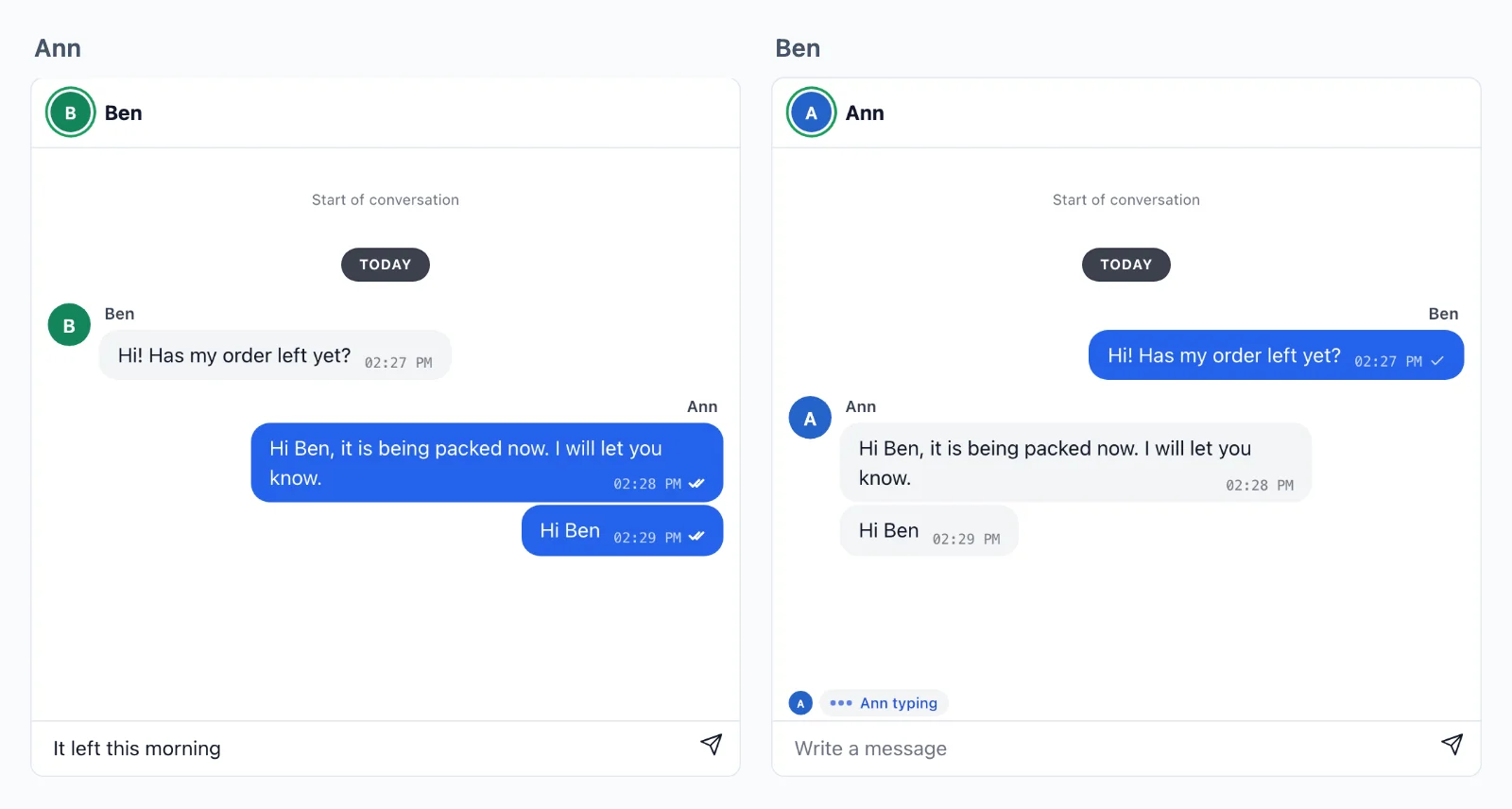
Your messages
Your messages stay in your database
We carry a conversation, and your server keeps it. A room holds its last events for about five minutes, only so a page that reconnects misses nothing, and your database holds the conversation itself.
At once, on every device
A message goes from page to page through our servers as it is sent, with no request to yours, to every tab and app of everyone in the conversation.
Kept by your server
Your webhook gets each message and reaction as it is sent, and keeps it in your own database. Your own route gives the chat its history as it opens, so the conversation is yours to search, moderate and show again.
Sealed on the way
A private conversation travels sealed with keys your server makes: its messages, its history and who is in it. The cloud carries it without being able to read it.
Your server decides
Build a chat, a task at a time
A chat is a room: chat:34:42 for Ben writing to Ann, who sells, or group:7 for a group. One rule on your server says who is in it, and the pages send each other messages, typing and read ticks through it. Here are both, from the ready-made chat to a call.
Next.js on the server, and React on the page.
Add the ready-made chat
One rule on your server for each kind of chat: a chat of two lets in the two people its name holds, and a group its members, reading your own data. Then the chat goes in the page, with typing, read ticks and reactions. isMemberOf is your own lookup.
// What every chat carries: what pages send, what your webhook
// gets to keep, and the last 50 for a page that reconnects.
const chat = {
    emit: [ 'message', 'typing', 'read', 'reaction' ],
    webhook: [ 'message', 'reaction' ],
    history: 50,
};

// Two people, such as chat:34:42: the two in its name alone.
realtime.room( 'chat:{pair}', chat );

// A group, such as group:7: its members, who see each other.
realtime.room(
    'group:{id}',
    ( user, { id } ) => isMemberOf( id, user ),
    { ...chat, presence: true },
);// What every chat carries: what pages send, what your webhook
// gets to keep, and the last 50 for a page that reconnects.
const chat = {
emit: [ 'message', 'typing', 'read', 'reaction' ],
webhook: [ 'message', 'reaction' ],
history: 50,
};
// Two people, such as chat:34:42: the two in its name alone.
realtime.room( 'chat:{pair}', chat );
// A group, such as group:7: its members, who see each other.
realtime.room(
'group:{id}',
( user, { id } ) => isMemberOf( id, user ),
{ ...chat, presence: true },
);// What every chat carries: what pages send, what your webhook
// gets to keep, and the last 50 for a page that reconnects.
const chat = {
emit: [ 'message', 'typing', 'read', 'reaction' ],
webhook: [ 'message', 'reaction' ],
history: 50,
};
// Two people, such as chat:34:42: the two in its name alone.
realtime.room( 'chat:{pair}', chat );
// A group, such as group:7: its members, who see each other.
realtime.room(
'group:{id}',
( user, { id } ) => isMemberOf( id, user ),
{ ...chat, presence: true },
);$this->callAfterResolving( Realtime::class, function ( Realtime $realtime ) {
// What every chat carries: what pages send, what your webhook
// gets to keep, and the last 50 for a page that reconnects.
$chat = [
    'emit' => [ 'message', 'typing', 'read', 'reaction' ],
    'webhook' => [ 'message', 'reaction' ],
    'history' => 50,
];

// Two people, such as chat:34:42: the two in its name alone.
$realtime->room( 'chat:{pair}', null, $chat );

// A group, such as group:7: its members, who see each other.
$realtime->room(
    'group:{id}',
    fn ( $user, array $p ) => is_member_of( $p['id'], $user ),
    [ ...$chat, 'presence' => true ],
);
} );// What every chat carries: what pages send, what your webhook
// gets to keep, and the last 50 for a page that reconnects.
$chat = [
'emit' => [ 'message', 'typing', 'read', 'reaction' ],
'webhook' => [ 'message', 'reaction' ],
'history' => 50,
];
// Two people, such as chat:34:42: the two in its name alone.
$realtime->room( 'chat:{pair}', null, $chat );
// A group, such as group:7: its members, who see each other.
$realtime->room(
'group:{id}',
fn ( $user, array $p ) => is_member_of( $p['id'], $user ),
[ ...$chat, 'presence' => true ],
);# What every chat carries: what pages send, what your webhook
# gets to keep, and the last 50 for a page that reconnects.
chat = {
"emit": ["message", "typing", "read", "reaction"],
"webhook": ["message", "reaction"],
"history": 50,
}
# Two people, such as chat:34:42: the two in its name alone.
realtime.room("chat:{pair}", **chat)
# A group, such as group:7: its members, who see each other.
realtime.room(
"group:{id}",
lambda user, p: is_member_of(p["id"], user),
presence=True,
**chat,
)# What every chat carries: what pages send, what your webhook
# gets to keep, and the last 50 for a page that reconnects.
chat = {
"emit": ["message", "typing", "read", "reaction"],
"webhook": ["message", "reaction"],
"history": 50,
}
# Two people, such as chat:34:42: the two in its name alone.
realtime.room("chat:{pair}", **chat)
# A group, such as group:7: its members, who see each other.
realtime.room(
"group:{id}",
lambda user, p: is_member_of(p["id"], user),
presence=True,
**chat,
)# What every chat carries: what pages send, what your webhook
# gets to keep, and the last 50 for a page that reconnects.
chat = {
"emit": ["message", "typing", "read", "reaction"],
"webhook": ["message", "reaction"],
"history": 50,
}
# Two people, such as chat:34:42: the two in its name alone.
realtime.room("chat:{pair}", **chat)
# A group, such as group:7: its members, who see each other.
realtime.room(
"group:{id}",
lambda user, p: is_member_of(p["id"], user),
presence=True,
**chat,
)// Your /auth route asks this for each room a page wants.
func roomRule(room, user string) (*wordplus.Room, string) {
chat := wordplus.Room{
Emit: []string{"message", "typing", "read", "reaction"},
Webhook: []string{"message", "reaction"},
History: 50,
Info: profile(user),
}
part := strings.Split(room, ":")
// Two people, such as chat:34:42: the two in its name alone.
if len(part) == 3 && part[0] == "chat" {
if user != part[1] && user != part[2] {
return nil, "forbidden"
}
return &chat, ""
}
// A group, such as group:7: its members, who see each other.
if len(part) == 2 && part[0] == "group" {
if !isMemberOf(part[1], user) {
return nil, "forbidden"
}
chat.Presence = true
return &chat, ""
}
return nil, "no_rule"
}Hooks and components for any React app, on any of the servers above.
import { connect } from '@wordplus/realtime';

const rt = await connect();

// The chat, who is online and typing, with no calls.
await rt.ui();

// And in the page of Ben, writing to Ann:
// <chat-room room="chat:34:42" to="34" name="Ann"
//            style="height: 520px"></chat-room>
//
// And in a group, beside who is in it now:
// <chat-room room="group:7"></chat-room>
// <online-list room="group:7" title="In the group"></online-list>import { connect } from '@wordplus/realtime';
const rt = await connect();
// The chat, who is online and typing, with no calls.
await rt.ui();
// And in the page of Ben, writing to Ann:
// <chat-room room="chat:34:42" to="34" name="Ann"
// style="height: 520px"></chat-room>
//
// And in a group, beside who is in it now:
// <chat-room room="group:7"></chat-room>
// <online-list room="group:7" title="In the group"></online-list>import { connect } from '@wordplus/realtime';
const rt = await connect();
// The chat, who is online and typing, with no calls.
await rt.ui();
// And in the page of Ben, writing to Ann:
// <chat-room room="chat:34:42" to="34" name="Ann"
// style="height: 520px"></chat-room>
//
// And in a group, beside who is in it now:
// <chat-room room="group:7"></chat-room>
// <online-list room="group:7" title="In the group"></online-list>import { connect } from '@wordplus/realtime';
const rt = await connect();
// The chat, who is online and typing, with no calls.
await rt.ui();
// And in the page of Ben, writing to Ann:
// <chat-room room="chat:34:42" to="34" name="Ann"
// style="height: 520px"></chat-room>
//
// And in a group, beside who is in it now:
// <chat-room room="group:7"></chat-room>
// <online-list room="group:7" title="In the group"></online-list>import { connect } from '@wordplus/realtime';
const rt = await connect();
// The chat, who is online and typing, with no calls.
await rt.ui();
// And in the page of Ben, writing to Ann:
// <chat-room room="chat:34:42" to="34" name="Ann"
// style="height: 520px"></chat-room>
//
// And in a group, beside who is in it now:
// <chat-room room="group:7"></chat-room>
// <online-list room="group:7" title="In the group"></online-list>import { connect } from '@wordplus/realtime';
const rt = await connect();
// The chat, who is online and typing, with no calls.
await rt.ui();
// And in the page of Ben, writing to Ann:
// <chat-room room="chat:34:42" to="34" name="Ann"
// style="height: 520px"></chat-room>
//
// And in a group, beside who is in it now:
// <chat-room room="group:7"></chat-room>
// <online-list room="group:7" title="In the group"></online-list>import { connect } from '@wordplus/realtime';
const rt = await connect();
// The chat, who is online and typing, with no calls.
await rt.ui();
// And in the page of Ben, writing to Ann:
// <chat-room room="chat:34:42" to="34" name="Ann"
// style="height: 520px"></chat-room>
//
// And in a group, beside who is in it now:
// <chat-room room="group:7"></chat-room>
// <online-list room="group:7" title="In the group"></online-list>import { connect } from '@wordplus/realtime';
const rt = await connect();
// The chat, who is online and typing, with no calls.
await rt.ui();
// And in the page of Ben, writing to Ann:
// <chat-room room="chat:34:42" to="34" name="Ann"
// style="height: 520px"></chat-room>
//
// And in a group, beside who is in it now:
// <chat-room room="group:7"></chat-room>
// <online-list room="group:7" title="In the group"></online-list>import { connect } from '@wordplus/realtime';
const rt = await connect();
// The chat, who is online and typing, with no calls.
await rt.ui();
// And in the page of Ben, writing to Ann:
// <chat-room room="chat:34:42" to="34" name="Ann"
// style="height: 520px"></chat-room>
//
// And in a group, beside who is in it now:
// <chat-room room="group:7"></chat-room>
// <online-list room="group:7" title="In the group"></online-list>{{-- In the page of Ben, writing to Ann. --}}
<chat-room room="chat:34:42" to="34" name="Ann"
           style="height: 520px"></chat-room>

<script type="module">
    // The chat, who is online and typing, with no calls.
    await window.Echo.connector.rt.ui();
</script>'use client'; // in Next.js
import { Chat, RealtimeUi } from '@wordplus/realtime/react';
// Inside <RealtimeProvider>, once for the whole app.
// In the page of Ben, writing to Ann.
export function Conversation() {
return (
<>
<RealtimeUi />
<div style={ { height: 520 } }>
<Chat room="chat:34:42"
to={ 34 }
name="Ann" />
</div>
</>
);
}<script setup>
import { watchEffect } from 'vue';
import { useRealtime } from '@wordplus/realtime/vue';
// provideRealtime() once, in your root component.
const rt = useRealtime();
// The chat, who is online and typing, with no calls.
watchEffect( () => rt.value?.ui() );
</script>
<!-- isCustomElement for this tag, in vite.config.js. In the page of Ben, writing to Ann. -->
<template>
<chat-room room="chat:34:42" to="34" name="Ann"
style="height: 520px"></chat-room>
</template><script>
import { useRealtime } from '@wordplus/realtime/svelte';
// provideRealtime() once, in your root component.
const rt = useRealtime();
// The chat, who is online and typing, with no calls.
$effect( () => { rt.current?.ui(); } );
</script>
<!-- In the page of Ben, writing to Ann. -->
<chat-room room="chat:34:42" to="34" name="Ann"
style="height: 520px"></chat-room>import { Component, CUSTOM_ELEMENTS_SCHEMA } from '@angular/core';
// realtime.ts, one connection for the whole app:
// export const realtime = connect();
import { realtime } from './realtime';
@Component( {
selector: 'app-conversation',
schemas: [ CUSTOM_ELEMENTS_SCHEMA ],
template: `
<!-- In the page of Ben, writing to Ann. -->
<chat-room room="chat:34:42" to="34" name="Ann"
style="height: 520px"></chat-room>
`,
} )
export class Conversation {
async ngOnInit() {
const rt = await realtime;
// The chat, who is online and typing, with no calls.
await rt.ui();
}
}Send and keep a message
The ready-made chat does this by itself. On a screen of your own, a page sends a message to the room, and everyone in it gets it at once. Your webhook keeps it by its id, and tells the other one of the two on whatever page they are. saveMessage is your own.
// Each message pages send, kept once by its id, however often the webhook brings it.
realtime.on( 'message', async ( { room, from, data, event_id, at } ) => {
    await saveMessage( { id: event_id, room, from, text: data.text, at } );

    // A notice to the other of the two, on whatever page or app they have open.
    const [ kind, a, b ] = room.split( ':' );
    if ( kind === 'chat' ) {
        const to = String( from ) === a ? b : a;
        await realtime.toUser( to ).emit( 'new_message', { room, from, text: data.text } );
    }
} );// Each message pages send, kept once by its id, however often the webhook brings it.
realtime.on( 'message', async ( { room, from, data, event_id, at } ) => {
await saveMessage( { id: event_id, room, from, text: data.text, at } );
// A notice to the other of the two, on whatever page or app they have open.
const [ kind, a, b ] = room.split( ':' );
if ( kind === 'chat' ) {
const to = String( from ) === a ? b : a;
await realtime.toUser( to ).emit( 'new_message', { room, from, text: data.text } );
}
} );// Each message pages send, kept once by its id, however often the webhook brings it.
realtime.on( 'message', async ( { room, from, data, event_id, at } ) => {
await saveMessage( { id: event_id, room, from, text: data.text, at } );
// A notice to the other of the two, on whatever page or app they have open.
const [ kind, a, b ] = room.split( ':' );
if ( kind === 'chat' ) {
const to = String( from ) === a ? b : a;
await realtime.toUser( to ).emit( 'new_message', { room, from, text: data.text } );
}
} );$this->callAfterResolving( Realtime::class, function ( Realtime $realtime ) {
// Each message pages send, kept once by its id, however often the webhook brings it.
$realtime->on( 'message', function ( array $e ) use ( $realtime ) {
Message::updateOrCreate( [ 'id' => $e['event_id'] ], [ 'room' => $e['room'], 'from' => $e['from'], 'text' => $e['data']['text'] ] );
// A notice to the other of the two, on whatever page or app they have open.
[ $kind, $a, $b ] = explode( ':', $e['room'] ) + [ '', '', '' ];
if ( 'chat' === $kind ) {
$to = (string) $e['from'] === $a ? $b : $a;
$realtime->toUser( $to )->emit( 'new_message', [ 'room' => $e['room'], 'from' => $e['from'], 'text' => $e['data']['text'] ] );
}
} );
} );// Each message pages send, kept once by its id, however often the webhook brings it.
$realtime->on( 'message', function ( array $e ) use ( $realtime ) {
save_message( $e['event_id'], $e['room'], $e['from'], $e['data']['text'], $e['at'] );
// A notice to the other of the two, on whatever page or app they have open.
[ $kind, $a, $b ] = explode( ':', $e['room'] ) + [ '', '', '' ];
if ( 'chat' === $kind ) {
$to = (string) $e['from'] === $a ? $b : $a;
$realtime->toUser( $to )->emit( 'new_message', [ 'room' => $e['room'], 'from' => $e['from'], 'text' => $e['data']['text'] ] );
}
} );# Each message pages send, kept once by its id, however often the webhook brings it.
def keep_message(e):
save_message(e["event_id"], e["room"], e["from"], e["data"]["text"], e["at"])
# A notice to the other of the two, on whatever page or app they have open.
kind, a, b = (e["room"].split(":") + ["", "", ""])[:3]
if kind == "chat":
to = b if str(e["from"]) == a else a
realtime.to_user(to).emit("new_message", {"room": e["room"], "from": e["from"], "text": e["data"]["text"]})
realtime.on("message", keep_message)# Each message pages send, kept once by its id, however often the webhook brings it.
def keep_message(e):
save_message(e["event_id"], e["room"], e["from"], e["data"]["text"], e["at"])
# A notice to the other of the two, on whatever page or app they have open.
kind, a, b = (e["room"].split(":") + ["", "", ""])[:3]
if kind == "chat":
to = b if str(e["from"]) == a else a
realtime.to_user(to).emit("new_message", {"room": e["room"], "from": e["from"], "text": e["data"]["text"]})
realtime.on("message", keep_message)# Each message pages send, kept once by its id, however often the webhook brings it.
def keep_message(e):
save_message(e["event_id"], e["room"], e["from"], e["data"]["text"], e["at"])
# A notice to the other of the two, on whatever page or app they have open.
kind, a, b = (e["room"].split(":") + ["", "", ""])[:3]
if kind == "chat":
to = b if str(e["from"]) == a else a
realtime.to_user(to).emit("new_message", {"room": e["room"], "from": e["from"], "text": e["data"]["text"]})
realtime.on("message", keep_message)// In your webhook route: app.Webhook() checks it and opens what each page sent.
for _, event := range events {
if event["type"] != "emit" || event["event"] != "message" {
continue
}
room, _ := event["room"].(string)
from := fmt.Sprint(event["from"])
data, _ := event["data"].(map[string]any)
// Kept once, by the id the pages saw, however often the webhook brings it.
saveMessage(event["event_id"], room, from, data["text"], event["at"])
// A notice to the other of the two, on whatever page or app they have open.
if part := strings.Split(room, ":"); len(part) == 3 && part[0] == "chat" {
to := part[1]
if from == part[1] {
to = part[2]
}
app.EmitToUser(to, "new_message", map[string]any{"room": room, "from": from, "text": data["text"]})
}
}Hooks and components for any React app, on any of the servers above.
import { connect } from '@wordplus/realtime';

const rt = await connect();

const chat = rt.join( 'chat:34:42' );

// Every page in the conversation gets it at once, the sender's other tabs too.
chat.on( 'message', ( data, meta ) => draw( meta.id, meta.from, data.text ) );

// Checked, kept for a reconnect and sent on. id is the one your webhook gets.
const text = 'Has my order left yet?';
const { id } = await chat.emitWithAck( 'message', { text } );
draw( id, rt.user, text );   // this tab does not get its own back

// On any page: a message in a chat that is not open there.
rt.on( 'new_message', ( m ) => showNotice( m.room, m.text ) );import { connect } from '@wordplus/realtime';
const rt = await connect();
const chat = rt.join( 'chat:34:42' );
// Every page in the conversation gets it at once, the sender's other tabs too.
chat.on( 'message', ( data, meta ) => draw( meta.id, meta.from, data.text ) );
// Checked, kept for a reconnect and sent on. id is the one your webhook gets.
const text = 'Has my order left yet?';
const { id } = await chat.emitWithAck( 'message', { text } );
draw( id, rt.user, text ); // this tab does not get its own back
// On any page: a message in a chat that is not open there.
rt.on( 'new_message', ( m ) => showNotice( m.room, m.text ) );import { connect } from '@wordplus/realtime';
const rt = await connect();
const chat = rt.join( 'chat:34:42' );
// Every page in the conversation gets it at once, the sender's other tabs too.
chat.on( 'message', ( data, meta ) => draw( meta.id, meta.from, data.text ) );
// Checked, kept for a reconnect and sent on. id is the one your webhook gets.
const text = 'Has my order left yet?';
const { id } = await chat.emitWithAck( 'message', { text } );
draw( id, rt.user, text ); // this tab does not get its own back
// On any page: a message in a chat that is not open there.
rt.on( 'new_message', ( m ) => showNotice( m.room, m.text ) );import { connect } from '@wordplus/realtime';
const rt = await connect();
const chat = rt.join( 'chat:34:42' );
// Every page in the conversation gets it at once, the sender's other tabs too.
chat.on( 'message', ( data, meta ) => draw( meta.id, meta.from, data.text ) );
// Checked, kept for a reconnect and sent on. id is the one your webhook gets.
const text = 'Has my order left yet?';
const { id } = await chat.emitWithAck( 'message', { text } );
draw( id, rt.user, text ); // this tab does not get its own back
// On any page: a message in a chat that is not open there.
rt.on( 'new_message', ( m ) => showNotice( m.room, m.text ) );import { connect } from '@wordplus/realtime';
const rt = await connect();
const chat = rt.join( 'chat:34:42' );
// Every page in the conversation gets it at once, the sender's other tabs too.
chat.on( 'message', ( data, meta ) => draw( meta.id, meta.from, data.text ) );
// Checked, kept for a reconnect and sent on. id is the one your webhook gets.
const text = 'Has my order left yet?';
const { id } = await chat.emitWithAck( 'message', { text } );
draw( id, rt.user, text ); // this tab does not get its own back
// On any page: a message in a chat that is not open there.
rt.on( 'new_message', ( m ) => showNotice( m.room, m.text ) );import { connect } from '@wordplus/realtime';
const rt = await connect();
const chat = rt.join( 'chat:34:42' );
// Every page in the conversation gets it at once, the sender's other tabs too.
chat.on( 'message', ( data, meta ) => draw( meta.id, meta.from, data.text ) );
// Checked, kept for a reconnect and sent on. id is the one your webhook gets.
const text = 'Has my order left yet?';
const { id } = await chat.emitWithAck( 'message', { text } );
draw( id, rt.user, text ); // this tab does not get its own back
// On any page: a message in a chat that is not open there.
rt.on( 'new_message', ( m ) => showNotice( m.room, m.text ) );import { connect } from '@wordplus/realtime';
const rt = await connect();
const chat = rt.join( 'chat:34:42' );
// Every page in the conversation gets it at once, the sender's other tabs too.
chat.on( 'message', ( data, meta ) => draw( meta.id, meta.from, data.text ) );
// Checked, kept for a reconnect and sent on. id is the one your webhook gets.
const text = 'Has my order left yet?';
const { id } = await chat.emitWithAck( 'message', { text } );
draw( id, rt.user, text ); // this tab does not get its own back
// On any page: a message in a chat that is not open there.
rt.on( 'new_message', ( m ) => showNotice( m.room, m.text ) );import { connect } from '@wordplus/realtime';
const rt = await connect();
const chat = rt.join( 'chat:34:42' );
// Every page in the conversation gets it at once, the sender's other tabs too.
chat.on( 'message', ( data, meta ) => draw( meta.id, meta.from, data.text ) );
// Checked, kept for a reconnect and sent on. id is the one your webhook gets.
const text = 'Has my order left yet?';
const { id } = await chat.emitWithAck( 'message', { text } );
draw( id, rt.user, text ); // this tab does not get its own back
// On any page: a message in a chat that is not open there.
rt.on( 'new_message', ( m ) => showNotice( m.room, m.text ) );import { connect } from '@wordplus/realtime';
const rt = await connect();
const chat = rt.join( 'chat:34:42' );
// Every page in the conversation gets it at once, the sender's other tabs too.
chat.on( 'message', ( data, meta ) => draw( meta.id, meta.from, data.text ) );
// Checked, kept for a reconnect and sent on. id is the one your webhook gets.
const text = 'Has my order left yet?';
const { id } = await chat.emitWithAck( 'message', { text } );
draw( id, rt.user, text ); // this tab does not get its own back
// On any page: a message in a chat that is not open there.
rt.on( 'new_message', ( m ) => showNotice( m.room, m.text ) );const rt = window.Echo.connector.rt; // the connection Echo made
const chat = rt.join( 'chat:34:42' );
// Every page in the conversation gets it at once, the sender's other tabs too.
chat.on( 'message', ( data, meta ) => draw( meta.id, meta.from, data.text ) );
// Checked, kept for a reconnect and sent on. id is the one your webhook gets.
const text = 'Has my order left yet?';
const { id } = await chat.emitWithAck( 'message', { text } );
draw( id, rt.user, text ); // this tab does not get its own back
// On any page: a message in a chat that is not open there.
rt.on( 'new_message', ( m ) => showNotice( m.room, m.text ) );'use client'; // in Next.js
import { useRoom, useUserEvent } from '@wordplus/realtime/react';
// Inside <RealtimeProvider>, once for the whole app.
export function Conversation() {
const chat = useRoom( 'chat:34:42', {
message: ( data, meta ) => draw( meta.id, meta.from, data.text ),
} );
// Checked, kept for a reconnect and sent on. id is the one your webhook gets.
const send = async ( text ) => {
const { id } = await chat.emitWithAck( 'message', { text } );
draw( id, 'me', text ); // this tab does not get its own back
};
return <SendBox onSend={ send } />;
}
// In your layout: a message in a chat that is not open there.
export function NewMessages() {
useUserEvent( 'new_message', ( m ) => showNotice( m.room, m.text ) );
return null;
}<script setup>
import { useRoom, useUserEvent } from '@wordplus/realtime/vue';
// provideRealtime() once, in your root component.
const { emitWithAck } = useRoom( 'chat:34:42', {
message: ( data, meta ) => draw( meta.id, meta.from, data.text ),
} );
// A message in a chat that is not open here.
useUserEvent( 'new_message', ( m ) => showNotice( m.room, m.text ) );
// Checked, kept for a reconnect and sent on. id is the one your webhook gets.
const send = async ( text ) => {
const { id } = await emitWithAck( 'message', { text } );
draw( id, 'me', text );
};
</script>
<template>
<SendBox @send="send" />
</template><script>
import { useRoom, useUserEvent } from '@wordplus/realtime/svelte';
import SendBox from './SendBox.svelte';
// provideRealtime() once, in your root component.
const chat = useRoom( 'chat:34:42', {
message: ( data, meta ) => draw( meta.id, meta.from, data.text ),
} );
// A message in a chat that is not open here.
useUserEvent( 'new_message', ( m ) => showNotice( m.room, m.text ) );
// Checked, kept for a reconnect and sent on. id is the one your webhook gets.
const send = async ( text ) => {
const { id } = await chat.emitWithAck( 'message', { text } );
draw( id, 'me', text );
};
</script>
<SendBox onsend={ send } />import { Component } from '@angular/core';
import { injectRoom, injectUserEvent } from '@wordplus/realtime/angular';
import { SendBox } from './send-box';
// provideRealtime() once, in your application's providers.
@Component( {
selector: 'app-conversation',
imports: [ SendBox ],
template: '<app-send-box (send)="send( $event )" />',
} )
export class Conversation {
readonly chat = injectRoom( 'chat:34:42', {
message: ( data, meta ) => draw( meta.id, meta.from, data.text ),
} );
constructor() {
// A message in a chat that is not open here.
injectUserEvent( 'new_message', ( m ) => showNotice( m.room, m.text ) );
}
// Checked, kept for a reconnect and sent on. id is the one your webhook gets.
async send( text: string ) {
const { id } = await this.chat.emitWithAck( 'message', { text } );
draw( id, 'me', text );
}
}let chat = rt.join("chat:34:42")
// Every page and app in the conversation gets it at once.
chat.on("message") { data, meta in draw(meta.id, meta.from, data["text"]?.string ?? "") }
// Checked, kept for a reconnect and sent on. ack.id is the one your webhook gets.
let ack = try await chat.emitWithAck("message", ["text": "Has my order left yet?"])
// A message in a chat that is not open here.
rt.on("new_message") { m, _ in showNotice(m["room"]?.string ?? "", m["text"]?.string ?? "") }val chat = rt.join("chat:34:42")
// Every page and app in the conversation gets it at once.
chat.on("message") { data, meta -> draw(meta.id, meta.from, data.jsonObject["text"]?.jsonPrimitive?.content ?: "") }
// Checked, kept for a reconnect and sent on. ack.id is the one your webhook gets.
val ack = chat.emitWithAck("message", buildJsonObject { put("text", "Has my order left yet?") })
// A message in a chat that is not open here.
rt.on("new_message") { m, _ -> showNotice(m.jsonObject["room"]?.jsonPrimitive?.content ?: "", m.jsonObject["text"]?.jsonPrimitive?.content ?: "") }import { useRoom, useUserEvent } from '@wordplus/realtime/react';
// Inside <RealtimeProvider>, once for the whole app.
export function Conversation() {
const chat = useRoom( 'chat:34:42', {
message: ( data, meta ) => draw( meta.id, meta.from, data.text ),
} );
// A message in a chat that is not open here.
useUserEvent( 'new_message', ( m ) => showNotice( m.room, m.text ) );
// Checked, kept for a reconnect and sent on. id is the one your webhook gets.
const send = async ( text ) => {
const { id } = await chat.emitWithAck( 'message', { text } );
draw( id, 'me', text );
};
return <SendBox onSend={ send } />;
}final chat = rt.join('chat:34:42');
// Every page and app in the conversation gets it at once.
chat.on('message', (data, meta) => draw(meta.id, meta.from, data['text']));
// Checked, kept for a reconnect and sent on. ack.id is the one your webhook gets.
final ack = await chat.emitWithAck('message', {'text': 'Has my order left yet?'});
// A message in a chat that is not open here.
rt.on('new_message', (m, _) => showNotice(m['room'], m['text']));Who is online and typing
Typing is a volatile event, never queued or kept. Who is online works anywhere in your app, and a group lists who is in it now. The ready-made chat shows both, and a ready-made list shows the people of a group.
Hooks and components for any React app, on any of the servers above.
import { connect } from '@wordplus/realtime';

const rt = await connect();

const chat = rt.join( 'chat:34:42' );

// Typing is volatile: dropped rather than queued while offline, and never kept.
input.oninput = () => chat.volatile.emit( 'typing', { on: input.value !== '' } );
chat.on( 'typing', ( data, meta ) => showTyping( meta.from, data.on ) );

// Ann online now, or when she was last, on any page or app of hers.
rt.online.watch( [ 34 ] ).on( 'change', ( { id, online, at } ) => showOnline( id, online, at ) );

// Who is in the group now, as its rule says presence: true.
const group = rt.join( 'group:7' );
group.on( 'joined', () => showMembers( [ ...group.members ] ) );   // [ id, info ]
group.on( 'join', ( { id, info } ) => addMember( id, info.name ) );
group.on( 'leave', ( { id } ) => removeMember( id ) );import { connect } from '@wordplus/realtime';
const rt = await connect();
const chat = rt.join( 'chat:34:42' );
// Typing is volatile: dropped rather than queued while offline, and never kept.
input.oninput = () => chat.volatile.emit( 'typing', { on: input.value !== '' } );
chat.on( 'typing', ( data, meta ) => showTyping( meta.from, data.on ) );
// Ann online now, or when she was last, on any page or app of hers.
rt.online.watch( [ 34 ] ).on( 'change', ( { id, online, at } ) => showOnline( id, online, at ) );
// Who is in the group now, as its rule says presence: true.
const group = rt.join( 'group:7' );
group.on( 'joined', () => showMembers( [ ...group.members ] ) ); // [ id, info ]
group.on( 'join', ( { id, info } ) => addMember( id, info.name ) );
group.on( 'leave', ( { id } ) => removeMember( id ) );import { connect } from '@wordplus/realtime';
const rt = await connect();
const chat = rt.join( 'chat:34:42' );
// Typing is volatile: dropped rather than queued while offline, and never kept.
input.oninput = () => chat.volatile.emit( 'typing', { on: input.value !== '' } );
chat.on( 'typing', ( data, meta ) => showTyping( meta.from, data.on ) );
// Ann online now, or when she was last, on any page or app of hers.
rt.online.watch( [ 34 ] ).on( 'change', ( { id, online, at } ) => showOnline( id, online, at ) );
// Who is in the group now, as its rule says presence: true.
const group = rt.join( 'group:7' );
group.on( 'joined', () => showMembers( [ ...group.members ] ) ); // [ id, info ]
group.on( 'join', ( { id, info } ) => addMember( id, info.name ) );
group.on( 'leave', ( { id } ) => removeMember( id ) );import { connect } from '@wordplus/realtime';
const rt = await connect();
const chat = rt.join( 'chat:34:42' );
// Typing is volatile: dropped rather than queued while offline, and never kept.
input.oninput = () => chat.volatile.emit( 'typing', { on: input.value !== '' } );
chat.on( 'typing', ( data, meta ) => showTyping( meta.from, data.on ) );
// Ann online now, or when she was last, on any page or app of hers.
rt.online.watch( [ 34 ] ).on( 'change', ( { id, online, at } ) => showOnline( id, online, at ) );
// Who is in the group now, as its rule says presence: true.
const group = rt.join( 'group:7' );
group.on( 'joined', () => showMembers( [ ...group.members ] ) ); // [ id, info ]
group.on( 'join', ( { id, info } ) => addMember( id, info.name ) );
group.on( 'leave', ( { id } ) => removeMember( id ) );import { connect } from '@wordplus/realtime';
const rt = await connect();
const chat = rt.join( 'chat:34:42' );
// Typing is volatile: dropped rather than queued while offline, and never kept.
input.oninput = () => chat.volatile.emit( 'typing', { on: input.value !== '' } );
chat.on( 'typing', ( data, meta ) => showTyping( meta.from, data.on ) );
// Ann online now, or when she was last, on any page or app of hers.
rt.online.watch( [ 34 ] ).on( 'change', ( { id, online, at } ) => showOnline( id, online, at ) );
// Who is in the group now, as its rule says presence: true.
const group = rt.join( 'group:7' );
group.on( 'joined', () => showMembers( [ ...group.members ] ) ); // [ id, info ]
group.on( 'join', ( { id, info } ) => addMember( id, info.name ) );
group.on( 'leave', ( { id } ) => removeMember( id ) );import { connect } from '@wordplus/realtime';
const rt = await connect();
const chat = rt.join( 'chat:34:42' );
// Typing is volatile: dropped rather than queued while offline, and never kept.
input.oninput = () => chat.volatile.emit( 'typing', { on: input.value !== '' } );
chat.on( 'typing', ( data, meta ) => showTyping( meta.from, data.on ) );
// Ann online now, or when she was last, on any page or app of hers.
rt.online.watch( [ 34 ] ).on( 'change', ( { id, online, at } ) => showOnline( id, online, at ) );
// Who is in the group now, as its rule says presence: true.
const group = rt.join( 'group:7' );
group.on( 'joined', () => showMembers( [ ...group.members ] ) ); // [ id, info ]
group.on( 'join', ( { id, info } ) => addMember( id, info.name ) );
group.on( 'leave', ( { id } ) => removeMember( id ) );import { connect } from '@wordplus/realtime';
const rt = await connect();
const chat = rt.join( 'chat:34:42' );
// Typing is volatile: dropped rather than queued while offline, and never kept.
input.oninput = () => chat.volatile.emit( 'typing', { on: input.value !== '' } );
chat.on( 'typing', ( data, meta ) => showTyping( meta.from, data.on ) );
// Ann online now, or when she was last, on any page or app of hers.
rt.online.watch( [ 34 ] ).on( 'change', ( { id, online, at } ) => showOnline( id, online, at ) );
// Who is in the group now, as its rule says presence: true.
const group = rt.join( 'group:7' );
group.on( 'joined', () => showMembers( [ ...group.members ] ) ); // [ id, info ]
group.on( 'join', ( { id, info } ) => addMember( id, info.name ) );
group.on( 'leave', ( { id } ) => removeMember( id ) );import { connect } from '@wordplus/realtime';
const rt = await connect();
const chat = rt.join( 'chat:34:42' );
// Typing is volatile: dropped rather than queued while offline, and never kept.
input.oninput = () => chat.volatile.emit( 'typing', { on: input.value !== '' } );
chat.on( 'typing', ( data, meta ) => showTyping( meta.from, data.on ) );
// Ann online now, or when she was last, on any page or app of hers.
rt.online.watch( [ 34 ] ).on( 'change', ( { id, online, at } ) => showOnline( id, online, at ) );
// Who is in the group now, as its rule says presence: true.
const group = rt.join( 'group:7' );
group.on( 'joined', () => showMembers( [ ...group.members ] ) ); // [ id, info ]
group.on( 'join', ( { id, info } ) => addMember( id, info.name ) );
group.on( 'leave', ( { id } ) => removeMember( id ) );import { connect } from '@wordplus/realtime';
const rt = await connect();
const chat = rt.join( 'chat:34:42' );
// Typing is volatile: dropped rather than queued while offline, and never kept.
input.oninput = () => chat.volatile.emit( 'typing', { on: input.value !== '' } );
chat.on( 'typing', ( data, meta ) => showTyping( meta.from, data.on ) );
// Ann online now, or when she was last, on any page or app of hers.
rt.online.watch( [ 34 ] ).on( 'change', ( { id, online, at } ) => showOnline( id, online, at ) );
// Who is in the group now, as its rule says presence: true.
const group = rt.join( 'group:7' );
group.on( 'joined', () => showMembers( [ ...group.members ] ) ); // [ id, info ]
group.on( 'join', ( { id, info } ) => addMember( id, info.name ) );
group.on( 'leave', ( { id } ) => removeMember( id ) );const rt = window.Echo.connector.rt; // the connection Echo made
const chat = rt.join( 'chat:34:42' );
// Typing is volatile: dropped rather than queued while offline, and never kept.
input.oninput = () => chat.volatile.emit( 'typing', { on: input.value !== '' } );
chat.on( 'typing', ( data, meta ) => showTyping( meta.from, data.on ) );
// Ann online now, or when she was last, on any page or app of hers.
rt.online.watch( [ 34 ] ).on( 'change', ( { id, online, at } ) => showOnline( id, online, at ) );
// Who is in the group now, as its rule says presence: true.
const group = rt.join( 'group:7' );
group.on( 'joined', () => showMembers( [ ...group.members ] ) ); // [ id, info ]
group.on( 'join', ( { id, info } ) => addMember( id, info.name ) );
group.on( 'leave', ( { id } ) => removeMember( id ) );'use client'; // in Next.js
import { OnlineList, useOnline, usePresence, useRoom, useTyping } from '@wordplus/realtime/react';
// Inside <RealtimeProvider>, once for the whole app.
export function Conversation() {
const chat = useRoom( 'chat:34:42' );
const typing = useTyping( chat ); // the ids typing now, gone as they stop
const { online, lastSeen } = useOnline( [ 34 ] ); // Ann online, or when she was last
// Volatile: dropped rather than queued while offline, and never kept.
const onKey = () => chat.room?.volatile.emit( 'typing', { on: true } );
// draw them your way
}
// Who is in the group now: [ { id, info } ], or the ready-made list.
export function GroupMembers() {
const members = usePresence( 'group:7' );
return <OnlineList room="group:7" title="In the group" />;
}<script setup>
import { useOnline, usePresence, useRoom, useTyping } from '@wordplus/realtime/vue';
// provideRealtime() once, in your root component.
const chat = useRoom( 'chat:34:42' );
const typing = useTyping( chat ); // the ids typing now, gone as they stop
const { online, lastSeen } = useOnline( [ 34 ] ); // Ann online, or when she was last
const members = usePresence( 'group:7' ); // who is in the group now: [ { id, info } ]
// Volatile: dropped rather than queued while offline, and never kept.
const onKey = () => chat.room.value?.volatile.emit( 'typing', { on: true } );
</script><script>
import { useOnline, usePresence, useRoom, useTyping } from '@wordplus/realtime/svelte';
// provideRealtime() once, in your root component.
const chat = useRoom( 'chat:34:42' );
const typing = useTyping( chat ); // typing.current: the ids typing now
const status = useOnline( [ 34 ] ); // status.online[ 34 ], status.lastSeen[ 34 ]
const members = usePresence( 'group:7' ); // members.current: who is in the group now
// Volatile: dropped rather than queued while offline, and never kept.
const onKey = () => chat.room?.volatile.emit( 'typing', { on: true } );
</script>import { Component } from '@angular/core';
import { injectOnline, injectPresence, injectRoom, injectTyping } from '@wordplus/realtime/angular';
// provideRealtime() once, in your application's providers.
@Component( {
selector: 'app-conversation',
template: `
<p>Ann is {{ status.online()[ 34 ] ? 'online' : 'away' }}</p>
@if ( typing().length > 0 ) { <p>Typing…</p> }
<input (input)="chat.room()?.volatile?.emit( 'typing', { on: true } )">
`,
} )
export class Conversation {
readonly chat = injectRoom( 'chat:34:42' );
readonly typing = injectTyping( this.chat ); // the ids typing now, gone as they stop
readonly status = injectOnline( [ 34 ] ); // Ann online, or when she was last
readonly members = injectPresence( 'group:7' ); // who is in the group now
}let chat = rt.join("chat:34:42")
// Typing is volatile: dropped rather than queued while offline, and never kept.
chat.volatile.emit("typing", ["on": true])
chat.on("typing") { data, meta in showTyping(meta.from, data["on"]?.bool ?? false) }
// Ann online now, or when she was last.
rt.online.watch(["34"]).on("change") { change in showOnline(change["id"]?.string, change["online"]?.bool ?? false) }
// Who is in the group now, as its rule says presence: true.
let group = rt.join("group:7")
group.on("join") { member, _ in addMember(member["id"]?.string ?? "") }
group.on("leave") { member, _ in removeMember(member["id"]?.string ?? "") }val chat = rt.join("chat:34:42")
// Typing is volatile: dropped rather than queued while offline, and never kept.
chat.volatile.emit("typing", buildJsonObject { put("on", true) })
chat.on("typing") { data, meta -> showTyping(meta.from, data.jsonObject["on"]) }
// Ann online now, or when she was last.
rt.online.watch(listOf("34")).on("change") { change -> showOnline(change.jsonObject["id"], change.jsonObject["online"]) }
// Who is in the group now, as its rule says presence: true.
val group = rt.join("group:7")
group.on("join") { member, _ -> addMember(member.jsonObject["id"]) }
group.on("leave") { member, _ -> removeMember(member.jsonObject["id"]) }import { useOnline, usePresence, useRoom, useTyping } from '@wordplus/realtime/react';
// Inside <RealtimeProvider>, once for the whole app.
export function Conversation() {
const chat = useRoom( 'chat:34:42' );
const typing = useTyping( chat ); // the ids typing now, gone as they stop
const { online, lastSeen } = useOnline( [ 34 ] ); // Ann online, or when she was last
const members = usePresence( 'group:7' ); // who is in the group now
// Volatile: dropped rather than queued while offline, and never kept.
const onChangeText = () => chat.room?.volatile.emit( 'typing', { on: true } );
// draw them your way
}final chat = rt.join('chat:34:42');
// Typing is volatile: dropped rather than queued while offline, and never kept.
chat.volatile.emit('typing', {'on': true});
chat.on('typing', (data, meta) => showTyping(meta.from, data['on']));
// Ann online now, or when she was last.
rt.online.watch(['34']).on('change', (change) => showOnline(change['id'], change['online']));
// Who is in the group now, as its rule says presence: true.
final group = rt.join('group:7');
group.on('join', (member, _) => addMember(member['id']));
group.on('leave', (member, _) => removeMember(member['id']));History as the chat opens
The conversation is in your database, not with us. A route of your own answers its newest 50 messages, and the 50 before as the reader scrolls up, to those your rule lets in. The room fills in what came since. messagesOf is your own query.
// GET /api/messages?room=chat:34:42, and &before=<id> as the reader scrolls up.
export async function GET( request: Request ) {
    const me = await currentUserId();
    const query = new URL( request.url ).searchParams;
    const room = query.get( 'room' ) ?? '';

    // The room's own rule: whoever may be in the conversation may read it.
    if ( ! me || ! await realtime.mayJoin( room, me ) ) {
        return new Response( null, { status: 403 } );
    }

    // Your own query: the newest 50, or the 50 before that id, oldest first,
    // as { messages: [ { id, from, text, at, files, reactions } ], more }.
    return Response.json( await messagesOf( room, query.get( 'before' ) ) );
}// GET /api/messages?room=chat:34:42, and &before=<id> as the reader scrolls up.
app.get( '/api/messages', async ( req, res ) => {
const me = userOf( req );
const { room = '', before } = req.query;
// The room's own rule: whoever may be in the conversation may read it.
if ( ! me || ! await realtime.mayJoin( room, me ) ) {
return res.sendStatus( 403 );
}
// Your own query: the newest 50, or the 50 before that id, oldest first,
// as { messages: [ { id, from, text, at, files, reactions } ], more }.
res.json( await messagesOf( room, before ) );
} );// In your createServer(): GET /api/messages?room=chat:34:42, and &before=<id>.
if ( url.pathname === '/api/messages' ) {
const me = userOf( req );
const room = url.searchParams.get( 'room' ) ?? '';
// The room's own rule: whoever may be in the conversation may read it.
if ( ! me || ! await realtime.mayJoin( room, me ) ) {
res.writeHead( 403 );
return res.end();
}
// Your own query: the newest 50, or the 50 before that id, oldest first,
// as { messages: [ { id, from, text, at, files, reactions } ], more }.
const page = await messagesOf( room, url.searchParams.get( 'before' ) );
res.writeHead( 200, { 'Content-Type': 'application/json' } );
return res.end( JSON.stringify( page ) );
}use Illuminate\Http\Request;
use WordPlus\Realtime\Laravel\Facades\Realtime;
// GET /api/messages?room=chat:34:42, and &before=<id> as the reader scrolls up.
Route::get( '/api/messages', function ( Request $request ) {
$room = (string) $request->query( 'room' );
// The room's own rule: whoever may be in the conversation may read it.
abort_unless( Realtime::mayJoin( $room, $request->user()->id ), 403 );
// Your own query: the newest 50, or the 50 before that id, oldest first,
// as [ 'messages' => [ [ 'id', 'from', 'text', 'at', 'files', 'reactions' ] ], 'more' ].
return messages_of( $room, $request->query( 'before' ) );
} )->middleware( 'auth' );require __DIR__ . '/../../src/realtime.php';
// GET /api/messages?room=chat:34:42, and &before=<id> as the reader scrolls up.
$me = current_user_id();
$room = (string) ( $_GET['room'] ?? '' );
// The room's own rule: whoever may be in the conversation may read it.
if ( ! $me || ! $realtime->mayJoin( $room, $me ) ) {
http_response_code( 403 );
exit;
}
// Your own query: the newest 50, or the 50 before that id, oldest first,
// as [ 'messages' => [ [ 'id', 'from', 'text', 'at', 'files', 'reactions' ] ], 'more' ].
header( 'Content-Type: application/json' );
echo json_encode( messages_of( $room, $_GET['before'] ?? null ) );from django.contrib.auth.decorators import login_required
from django.http import HttpResponseForbidden, JsonResponse
from .realtime import realtime
# In urls.py: path("api/messages", views.messages)
@login_required
def messages(request):
room = request.GET.get("room", "")
# The room's own rule: whoever may be in the conversation may read it.
if not realtime.may_join(room, request.user.id):
return HttpResponseForbidden()
# Your own query: the newest 50, or the 50 before that id, oldest first,
# as {"messages": [{"id", "from", "text", "at", "files", "reactions"}], "more"}.
return JsonResponse(messages_of(room, request.GET.get("before")))from fastapi import Depends, HTTPException
from realtime import realtime
# GET /api/messages?room=chat:34:42, and &before=<id> as the reader scrolls up.
@app.get("/api/messages")
def messages(room: str, before: str | None = None, me: int = Depends(current_user_id)):
# The room's own rule: whoever may be in the conversation may read it.
if not me or not realtime.may_join(room, me):
raise HTTPException(403)
# Your own query: the newest 50, or the 50 before that id, oldest first,
# as {"messages": [{"id", "from", "text", "at", "files", "reactions"}], "more"}.
return messages_of(room, before)from flask import abort, request, session
from realtime import realtime
# GET /api/messages?room=chat:34:42, and &before=<id> as the reader scrolls up.
@app.get("/api/messages")
def messages():
me = session.get("user_id")
room = request.args.get("room", "")
# The room's own rule: whoever may be in the conversation may read it.
if not me or not realtime.may_join(room, me):
abort(403)
# Your own query: the newest 50, or the 50 before that id, oldest first,
# as {"messages": [{"id", "from", "text", "at", "files", "reactions"}], "more"}.
return messages_of(room, request.args.get("before"))// http.HandleFunc("GET /api/messages", messages)
func messages(w http.ResponseWriter, r *http.Request) {
me := userOf(r)
room := r.URL.Query().Get("room")
// The room's own rule: whoever may be in the conversation may read it.
if allowed, _ := roomRule(room, me); me == "" || allowed == nil {
w.WriteHeader(403)
return
}
// Your own query: the newest 50, or the 50 before that id, oldest first.
list, more := messagesOf(room, r.URL.Query().Get("before"))
reply(w, map[string]any{"messages": list, "more": more})
}Hooks and components for any React app, on any of the servers above.
import { connect } from '@wordplus/realtime';

const rt = await connect();

// The ready-made chat asks your route as it opens, and for the page before
// as the reader scrolls up. What came since, the room fills in.
await rt.ui();
// <chat-room room="chat:34:42" to="34" name="Ann"
//            messages="/api/messages?room=chat:34:42"></chat-room>

// Or on a screen of your own.
const answer = await fetch( '/api/messages?room=chat:34:42' );
const { messages, more } = await answer.json();
drawAll( messages );

// Back after more than the room keeps: some were missed, so ask your route again.
rt.join( 'chat:34:42' ).on( 'error', ( e ) => e.code === 'gap' && reload() );import { connect } from '@wordplus/realtime';
const rt = await connect();
// The ready-made chat asks your route as it opens, and for the page before
// as the reader scrolls up. What came since, the room fills in.
await rt.ui();
// <chat-room room="chat:34:42" to="34" name="Ann"
// messages="/api/messages?room=chat:34:42"></chat-room>
// Or on a screen of your own.
const answer = await fetch( '/api/messages?room=chat:34:42' );
const { messages, more } = await answer.json();
drawAll( messages );
// Back after more than the room keeps: some were missed, so ask your route again.
rt.join( 'chat:34:42' ).on( 'error', ( e ) => e.code === 'gap' && reload() );import { connect } from '@wordplus/realtime';
const rt = await connect();
// The ready-made chat asks your route as it opens, and for the page before
// as the reader scrolls up. What came since, the room fills in.
await rt.ui();
// <chat-room room="chat:34:42" to="34" name="Ann"
// messages="/api/messages?room=chat:34:42"></chat-room>
// Or on a screen of your own.
const answer = await fetch( '/api/messages?room=chat:34:42' );
const { messages, more } = await answer.json();
drawAll( messages );
// Back after more than the room keeps: some were missed, so ask your route again.
rt.join( 'chat:34:42' ).on( 'error', ( e ) => e.code === 'gap' && reload() );import { connect } from '@wordplus/realtime';
const rt = await connect();
// The ready-made chat asks your route as it opens, and for the page before
// as the reader scrolls up. What came since, the room fills in.
await rt.ui();
// <chat-room room="chat:34:42" to="34" name="Ann"
// messages="/api/messages?room=chat:34:42"></chat-room>
// Or on a screen of your own.
const answer = await fetch( '/api/messages?room=chat:34:42' );
const { messages, more } = await answer.json();
drawAll( messages );
// Back after more than the room keeps: some were missed, so ask your route again.
rt.join( 'chat:34:42' ).on( 'error', ( e ) => e.code === 'gap' && reload() );import { connect } from '@wordplus/realtime';
const rt = await connect();
// The ready-made chat asks your route as it opens, and for the page before
// as the reader scrolls up. What came since, the room fills in.
await rt.ui();
// <chat-room room="chat:34:42" to="34" name="Ann"
// messages="/api/messages?room=chat:34:42"></chat-room>
// Or on a screen of your own.
const answer = await fetch( '/api/messages?room=chat:34:42' );
const { messages, more } = await answer.json();
drawAll( messages );
// Back after more than the room keeps: some were missed, so ask your route again.
rt.join( 'chat:34:42' ).on( 'error', ( e ) => e.code === 'gap' && reload() );import { connect } from '@wordplus/realtime';
const rt = await connect();
// The ready-made chat asks your route as it opens, and for the page before
// as the reader scrolls up. What came since, the room fills in.
await rt.ui();
// <chat-room room="chat:34:42" to="34" name="Ann"
// messages="/api/messages?room=chat:34:42"></chat-room>
// Or on a screen of your own.
const answer = await fetch( '/api/messages?room=chat:34:42' );
const { messages, more } = await answer.json();
drawAll( messages );
// Back after more than the room keeps: some were missed, so ask your route again.
rt.join( 'chat:34:42' ).on( 'error', ( e ) => e.code === 'gap' && reload() );import { connect } from '@wordplus/realtime';
const rt = await connect();
// The ready-made chat asks your route as it opens, and for the page before
// as the reader scrolls up. What came since, the room fills in.
await rt.ui();
// <chat-room room="chat:34:42" to="34" name="Ann"
// messages="/api/messages?room=chat:34:42"></chat-room>
// Or on a screen of your own.
const answer = await fetch( '/api/messages?room=chat:34:42' );
const { messages, more } = await answer.json();
drawAll( messages );
// Back after more than the room keeps: some were missed, so ask your route again.
rt.join( 'chat:34:42' ).on( 'error', ( e ) => e.code === 'gap' && reload() );import { connect } from '@wordplus/realtime';
const rt = await connect();
// The ready-made chat asks your route as it opens, and for the page before
// as the reader scrolls up. What came since, the room fills in.
await rt.ui();
// <chat-room room="chat:34:42" to="34" name="Ann"
// messages="/api/messages?room=chat:34:42"></chat-room>
// Or on a screen of your own.
const answer = await fetch( '/api/messages?room=chat:34:42' );
const { messages, more } = await answer.json();
drawAll( messages );
// Back after more than the room keeps: some were missed, so ask your route again.
rt.join( 'chat:34:42' ).on( 'error', ( e ) => e.code === 'gap' && reload() );import { connect } from '@wordplus/realtime';
const rt = await connect();
// The ready-made chat asks your route as it opens, and for the page before
// as the reader scrolls up. What came since, the room fills in.
await rt.ui();
// <chat-room room="chat:34:42" to="34" name="Ann"
// messages="/api/messages?room=chat:34:42"></chat-room>
// Or on a screen of your own.
const answer = await fetch( '/api/messages?room=chat:34:42' );
const { messages, more } = await answer.json();
drawAll( messages );
// Back after more than the room keeps: some were missed, so ask your route again.
rt.join( 'chat:34:42' ).on( 'error', ( e ) => e.code === 'gap' && reload() );{{-- The conversation from your route as it opens, and the page before as the reader scrolls up. --}}
<chat-room room="chat:34:42" to="34" name="Ann"
messages="/api/messages?room=chat:34:42"
style="height: 520px"></chat-room>
<script type="module">
// The chat, who is online and typing, with no calls.
await window.Echo.connector.rt.ui();
</script>'use client'; // in Next.js
import { Chat, RealtimeUi } from '@wordplus/realtime/react';
// Inside <RealtimeProvider>, once for the whole app.
// The conversation from your route as it opens, and the page before as the reader scrolls up.
export function Conversation() {
return (
<>
<RealtimeUi />
<div style={ { height: 520 } }>
<Chat room="chat:34:42"
to={ 34 }
name="Ann"
messages="/api/messages?room=chat:34:42" />
</div>
</>
);
}<script setup>
import { watchEffect } from 'vue';
import { useRealtime } from '@wordplus/realtime/vue';
// provideRealtime() once, in your root component.
const rt = useRealtime();
// The chat, who is online and typing, with no calls.
watchEffect( () => rt.value?.ui() );
</script>
<!-- isCustomElement for this tag, in vite.config.js. The conversation from your route as it opens, and the page before as the reader scrolls up. -->
<template>
<chat-room room="chat:34:42" to="34" name="Ann"
messages="/api/messages?room=chat:34:42"
style="height: 520px"></chat-room>
</template><script>
import { useRealtime } from '@wordplus/realtime/svelte';
// provideRealtime() once, in your root component.
const rt = useRealtime();
// The chat, who is online and typing, with no calls.
$effect( () => { rt.current?.ui(); } );
</script>
<!-- The conversation from your route as it opens, and the page before as the reader scrolls up. -->
<chat-room room="chat:34:42" to="34" name="Ann"
messages="/api/messages?room=chat:34:42"
style="height: 520px"></chat-room>import { Component, CUSTOM_ELEMENTS_SCHEMA } from '@angular/core';
// realtime.ts, one connection for the whole app:
// export const realtime = connect();
import { realtime } from './realtime';
@Component( {
selector: 'app-conversation',
schemas: [ CUSTOM_ELEMENTS_SCHEMA ],
template: `
<!-- The conversation from your route as it opens, and the page before as the reader scrolls up. -->
<chat-room room="chat:34:42" to="34" name="Ann"
messages="/api/messages?room=chat:34:42"
style="height: 520px"></chat-room>
`,
} )
export class Conversation {
async ngOnInit() {
const rt = await realtime;
// The chat, who is online and typing, with no calls.
await rt.ui();
}
}// No ready-made chat on iOS: ask your route as the screen opens,
// and with before: as the reader scrolls up.
let page = try await api.messages(room: "chat:34:42", before: oldest?.id) // your own request
drawAll(page.messages)
// Back after more than the room keeps: some were missed, so ask your route again.
chat.on("error") { error, _ in if error["code"]?.string == "gap" { reload() } }// No ready-made chat on Android: ask your route as the screen opens,
// and with before = as the reader scrolls up.
val page = api.messages(room = "chat:34:42", before = oldest?.id) // your own request
drawAll(page.messages)
// Back after more than the room keeps: some were missed, so ask your route again.
chat.on("error") { error, _ -> if (error.jsonObject["code"]?.jsonPrimitive?.content == "gap") reload() }import { useEffect } from 'react';
import { useRoom } from '@wordplus/realtime/react';
// Your server, in full, as an app has no address of its own.
const API = 'https://app.example.com/api';
export function Conversation() {
// Back after more than the room keeps: some were missed, so ask your route again.
useRoom( 'chat:34:42', { error: ( e ) => e.code === 'gap' && reload() } );
// No ready-made chat in React Native: ask your route as the screen opens,
// and with &before= as the reader scrolls up.
useEffect( () => {
fetch( API + '/messages?room=chat:34:42', { headers: { Authorization: 'Bearer ' + session.token } } )
.then( ( answer ) => answer.json() )
.then( ( { messages } ) => drawAll( messages ) );
}, [] );
// draw them your way
}// No ready-made chat in Flutter: ask your route as the screen opens,
// and with before as the reader scrolls up.
final page = await api.messages(room: 'chat:34:42', before: oldest?.id); // your own request
drawAll(page.messages);Read ticks and reactions
The ready-made chat sends both and draws them. A read tick is volatile: it reaches the pages open now, and turns the sender's ticks. A reaction comes with an ack, and your webhook keeps it.
// Each reaction, by the message and the person: an empty key takes it back.
realtime.on( 'reaction', ( { from, data } ) => saveReaction( data.id, from, data.key ) );// Each reaction, by the message and the person: an empty key takes it back.
realtime.on( 'reaction', ( { from, data } ) => saveReaction( data.id, from, data.key ) );// Each reaction, by the message and the person: an empty key takes it back.
realtime.on( 'reaction', ( { from, data } ) => saveReaction( data.id, from, data.key ) );$this->callAfterResolving( Realtime::class, function ( Realtime $realtime ) {
// Each reaction, by the message and the person: an empty key takes it back.
$realtime->on( 'reaction', fn ( array $e ) => save_reaction( $e['data']['id'], $e['from'], $e['data']['key'] ) );
} );// Each reaction, by the message and the person: an empty key takes it back.
$realtime->on( 'reaction', fn ( array $e ) => save_reaction( $e['data']['id'], $e['from'], $e['data']['key'] ) );# Each reaction, by the message and the person: an empty key takes it back.
realtime.on("reaction", lambda e: save_reaction(e["data"]["id"], e["from"], e["data"]["key"]))# Each reaction, by the message and the person: an empty key takes it back.
realtime.on("reaction", lambda e: save_reaction(e["data"]["id"], e["from"], e["data"]["key"]))# Each reaction, by the message and the person: an empty key takes it back.
realtime.on("reaction", lambda e: save_reaction(e["data"]["id"], e["from"], e["data"]["key"]))// In your webhook route, beside the messages.
// Each reaction, by the message and the person: an empty key takes it back.
if event["type"] == "emit" && event["event"] == "reaction" {
data, _ := event["data"].(map[string]any)
saveReaction(data["id"], event["from"], data["key"])
}Hooks and components for any React app, on any of the servers above.
import { connect } from '@wordplus/realtime';

const rt = await connect();

const chat = rt.join( 'chat:34:42' );

// Seen: volatile, so it reaches the pages open now and is never kept.
chat.on( 'message', ( data, meta ) => {
    draw( meta.id, meta.from, data.text );
    if ( document.visibilityState === 'visible' ) chat.volatile.emit( 'read', { id: meta.id } );
} );

// Ann has seen up to this one: tick it, and every message of Ben's before it.
chat.on( 'read', ( data, meta ) => markSeen( meta.from, data.id ) );

// One reaction each, by its code point, as the ready-made chat names them.
await chat.emitWithAck( 'reaction', { id: messageId, key: '1f44d' } );   // 👍, or '' to take it back
chat.on( 'reaction', ( data, meta ) => showReaction( data.id, meta.from, data.key ) );import { connect } from '@wordplus/realtime';
const rt = await connect();
const chat = rt.join( 'chat:34:42' );
// Seen: volatile, so it reaches the pages open now and is never kept.
chat.on( 'message', ( data, meta ) => {
draw( meta.id, meta.from, data.text );
if ( document.visibilityState === 'visible' ) chat.volatile.emit( 'read', { id: meta.id } );
} );
// Ann has seen up to this one: tick it, and every message of Ben's before it.
chat.on( 'read', ( data, meta ) => markSeen( meta.from, data.id ) );
// One reaction each, by its code point, as the ready-made chat names them.
await chat.emitWithAck( 'reaction', { id: messageId, key: '1f44d' } ); // 👍, or '' to take it back
chat.on( 'reaction', ( data, meta ) => showReaction( data.id, meta.from, data.key ) );import { connect } from '@wordplus/realtime';
const rt = await connect();
const chat = rt.join( 'chat:34:42' );
// Seen: volatile, so it reaches the pages open now and is never kept.
chat.on( 'message', ( data, meta ) => {
draw( meta.id, meta.from, data.text );
if ( document.visibilityState === 'visible' ) chat.volatile.emit( 'read', { id: meta.id } );
} );
// Ann has seen up to this one: tick it, and every message of Ben's before it.
chat.on( 'read', ( data, meta ) => markSeen( meta.from, data.id ) );
// One reaction each, by its code point, as the ready-made chat names them.
await chat.emitWithAck( 'reaction', { id: messageId, key: '1f44d' } ); // 👍, or '' to take it back
chat.on( 'reaction', ( data, meta ) => showReaction( data.id, meta.from, data.key ) );import { connect } from '@wordplus/realtime';
const rt = await connect();
const chat = rt.join( 'chat:34:42' );
// Seen: volatile, so it reaches the pages open now and is never kept.
chat.on( 'message', ( data, meta ) => {
draw( meta.id, meta.from, data.text );
if ( document.visibilityState === 'visible' ) chat.volatile.emit( 'read', { id: meta.id } );
} );
// Ann has seen up to this one: tick it, and every message of Ben's before it.
chat.on( 'read', ( data, meta ) => markSeen( meta.from, data.id ) );
// One reaction each, by its code point, as the ready-made chat names them.
await chat.emitWithAck( 'reaction', { id: messageId, key: '1f44d' } ); // 👍, or '' to take it back
chat.on( 'reaction', ( data, meta ) => showReaction( data.id, meta.from, data.key ) );import { connect } from '@wordplus/realtime';
const rt = await connect();
const chat = rt.join( 'chat:34:42' );
// Seen: volatile, so it reaches the pages open now and is never kept.
chat.on( 'message', ( data, meta ) => {
draw( meta.id, meta.from, data.text );
if ( document.visibilityState === 'visible' ) chat.volatile.emit( 'read', { id: meta.id } );
} );
// Ann has seen up to this one: tick it, and every message of Ben's before it.
chat.on( 'read', ( data, meta ) => markSeen( meta.from, data.id ) );
// One reaction each, by its code point, as the ready-made chat names them.
await chat.emitWithAck( 'reaction', { id: messageId, key: '1f44d' } ); // 👍, or '' to take it back
chat.on( 'reaction', ( data, meta ) => showReaction( data.id, meta.from, data.key ) );import { connect } from '@wordplus/realtime';
const rt = await connect();
const chat = rt.join( 'chat:34:42' );
// Seen: volatile, so it reaches the pages open now and is never kept.
chat.on( 'message', ( data, meta ) => {
draw( meta.id, meta.from, data.text );
if ( document.visibilityState === 'visible' ) chat.volatile.emit( 'read', { id: meta.id } );
} );
// Ann has seen up to this one: tick it, and every message of Ben's before it.
chat.on( 'read', ( data, meta ) => markSeen( meta.from, data.id ) );
// One reaction each, by its code point, as the ready-made chat names them.
await chat.emitWithAck( 'reaction', { id: messageId, key: '1f44d' } ); // 👍, or '' to take it back
chat.on( 'reaction', ( data, meta ) => showReaction( data.id, meta.from, data.key ) );import { connect } from '@wordplus/realtime';
const rt = await connect();
const chat = rt.join( 'chat:34:42' );
// Seen: volatile, so it reaches the pages open now and is never kept.
chat.on( 'message', ( data, meta ) => {
draw( meta.id, meta.from, data.text );
if ( document.visibilityState === 'visible' ) chat.volatile.emit( 'read', { id: meta.id } );
} );
// Ann has seen up to this one: tick it, and every message of Ben's before it.
chat.on( 'read', ( data, meta ) => markSeen( meta.from, data.id ) );
// One reaction each, by its code point, as the ready-made chat names them.
await chat.emitWithAck( 'reaction', { id: messageId, key: '1f44d' } ); // 👍, or '' to take it back
chat.on( 'reaction', ( data, meta ) => showReaction( data.id, meta.from, data.key ) );import { connect } from '@wordplus/realtime';
const rt = await connect();
const chat = rt.join( 'chat:34:42' );
// Seen: volatile, so it reaches the pages open now and is never kept.
chat.on( 'message', ( data, meta ) => {
draw( meta.id, meta.from, data.text );
if ( document.visibilityState === 'visible' ) chat.volatile.emit( 'read', { id: meta.id } );
} );
// Ann has seen up to this one: tick it, and every message of Ben's before it.
chat.on( 'read', ( data, meta ) => markSeen( meta.from, data.id ) );
// One reaction each, by its code point, as the ready-made chat names them.
await chat.emitWithAck( 'reaction', { id: messageId, key: '1f44d' } ); // 👍, or '' to take it back
chat.on( 'reaction', ( data, meta ) => showReaction( data.id, meta.from, data.key ) );import { connect } from '@wordplus/realtime';
const rt = await connect();
const chat = rt.join( 'chat:34:42' );
// Seen: volatile, so it reaches the pages open now and is never kept.
chat.on( 'message', ( data, meta ) => {
draw( meta.id, meta.from, data.text );
if ( document.visibilityState === 'visible' ) chat.volatile.emit( 'read', { id: meta.id } );
} );
// Ann has seen up to this one: tick it, and every message of Ben's before it.
chat.on( 'read', ( data, meta ) => markSeen( meta.from, data.id ) );
// One reaction each, by its code point, as the ready-made chat names them.
await chat.emitWithAck( 'reaction', { id: messageId, key: '1f44d' } ); // 👍, or '' to take it back
chat.on( 'reaction', ( data, meta ) => showReaction( data.id, meta.from, data.key ) );const rt = window.Echo.connector.rt; // the connection Echo made
const chat = rt.join( 'chat:34:42' );
// Seen: volatile, so it reaches the pages open now and is never kept.
chat.on( 'message', ( data, meta ) => {
draw( meta.id, meta.from, data.text );
if ( document.visibilityState === 'visible' ) chat.volatile.emit( 'read', { id: meta.id } );
} );
// Ann has seen up to this one: tick it, and every message of Ben's before it.
chat.on( 'read', ( data, meta ) => markSeen( meta.from, data.id ) );
// One reaction each, by its code point, as the ready-made chat names them.
await chat.emitWithAck( 'reaction', { id: messageId, key: '1f44d' } ); // 👍, or '' to take it back
chat.on( 'reaction', ( data, meta ) => showReaction( data.id, meta.from, data.key ) );'use client'; // in Next.js
import { useRoom } from '@wordplus/realtime/react';
// Inside <RealtimeProvider>, once for the whole app.
export function Conversation() {
const chat = useRoom( 'chat:34:42', {
// Seen: volatile, so it reaches the pages open now and is never kept.
message: ( data, meta ) => {
draw( meta.id, meta.from, data.text );
chat.room?.volatile.emit( 'read', { id: meta.id } );
},
// Ann has seen up to this one: tick it, and every message before it.
read: ( data, meta ) => markSeen( meta.from, data.id ),
reaction: ( data, meta ) => showReaction( data.id, meta.from, data.key ),
} );
// One reaction each, by its code point: 👍, or '' to take it back.
const react = ( id ) => chat.emitWithAck( 'reaction', { id, key: '1f44d' } );
// draw them your way
}<script setup>
import { useRoom } from '@wordplus/realtime/vue';
// provideRealtime() once, in your root component.
const chat = useRoom( 'chat:34:42', {
// Seen: volatile, so it reaches the pages open now and is never kept.
message: ( data, meta ) => {
draw( meta.id, meta.from, data.text );
chat.room.value?.volatile.emit( 'read', { id: meta.id } );
},
// Ann has seen up to this one: tick it, and every message before it.
read: ( data, meta ) => markSeen( meta.from, data.id ),
reaction: ( data, meta ) => showReaction( data.id, meta.from, data.key ),
} );
// One reaction each, by its code point: 👍, or '' to take it back.
const react = ( id ) => chat.emitWithAck( 'reaction', { id, key: '1f44d' } );
</script><script>
import { useRoom } from '@wordplus/realtime/svelte';
// provideRealtime() once, in your root component.
const chat = useRoom( 'chat:34:42', {
// Seen: volatile, so it reaches the pages open now and is never kept.
message: ( data, meta ) => {
draw( meta.id, meta.from, data.text );
chat.room?.volatile.emit( 'read', { id: meta.id } );
},
// Ann has seen up to this one: tick it, and every message before it.
read: ( data, meta ) => markSeen( meta.from, data.id ),
reaction: ( data, meta ) => showReaction( data.id, meta.from, data.key ),
} );
// One reaction each, by its code point: 👍, or '' to take it back.
const react = ( id ) => chat.emitWithAck( 'reaction', { id, key: '1f44d' } );
</script>import { Component } from '@angular/core';
import { injectRoom } from '@wordplus/realtime/angular';
// provideRealtime() once, in your application's providers.
@Component( { selector: 'app-conversation', template: '<!-- your messages -->' } )
export class Conversation {
readonly chat = injectRoom( 'chat:34:42', {
// Seen: volatile, so it reaches the pages open now and is never kept.
message: ( data, meta ) => {
draw( meta.id, meta.from, data.text );
this.chat.room()?.volatile.emit( 'read', { id: meta.id } );
},
// Ann has seen up to this one: tick it, and every message before it.
read: ( data, meta ) => markSeen( meta.from, data.id ),
reaction: ( data, meta ) => showReaction( data.id, meta.from, data.key ),
} );
// One reaction each, by its code point: 👍, or '' to take it back.
react( id: string ) {
return this.chat.emitWithAck( 'reaction', { id, key: '1f44d' } );
}
}// Seen: volatile, so it reaches the pages and apps open now and is never kept.
chat.on("message") { data, meta in
draw(meta.id, meta.from, data["text"]?.string ?? "")
chat.volatile.emit("read", ["id": .string(meta.id ?? "")])
}
// Ann has seen up to this one: tick it, and every message before it.
chat.on("read") { data, meta in markSeen(meta.from, data["id"]?.string ?? "") }
// One reaction each, by its code point: 👍, or "" to take it back.
_ = try await chat.emitWithAck("reaction", ["id": .string(messageId), "key": "1f44d"])// Seen: volatile, so it reaches the pages and apps open now and is never kept.
chat.on("message") { data, meta ->
draw(meta.id, meta.from, data.jsonObject["text"]?.jsonPrimitive?.content ?: "")
chat.volatile.emit("read", buildJsonObject { put("id", meta.id) })
}
// Ann has seen up to this one: tick it, and every message before it.
chat.on("read") { data, meta -> markSeen(meta.from, data.jsonObject["id"]?.jsonPrimitive?.content) }
// One reaction each, by its code point: 👍, or "" to take it back.
chat.emitWithAck("reaction", buildJsonObject { put("id", messageId); put("key", "1f44d") })import { useRoom } from '@wordplus/realtime/react';
// Inside <RealtimeProvider>, once for the whole app.
export function Conversation() {
const chat = useRoom( 'chat:34:42', {
// Seen: volatile, so it reaches the pages and apps open now and is never kept.
message: ( data, meta ) => {
draw( meta.id, meta.from, data.text );
chat.room?.volatile.emit( 'read', { id: meta.id } );
},
// Ann has seen up to this one: tick it, and every message before it.
read: ( data, meta ) => markSeen( meta.from, data.id ),
} );
// One reaction each, by its code point: 👍, or '' to take it back.
const react = ( id ) => chat.emitWithAck( 'reaction', { id, key: '1f44d' } );
// draw them your way
}// Seen: volatile, so it reaches the pages and apps open now and is never kept.
chat.on('message', (data, meta) {
draw(meta.id, meta.from, data['text']);
chat.volatile.emit('read', {'id': meta.id});
});
// Ann has seen up to this one: tick it, and every message before it.
chat.on('read', (data, meta) => markSeen(meta.from, data['id']));
// One reaction each, by its code point: 👍, or '' to take it back.
await chat.emitWithAck('reaction', {'id': messageId, 'key': '1f44d'});Send files
The chat sends each file to a route of yours, which keeps it in your own storage, and the message carries only where it is. We never have the file. Keep with a message only the files your route took for its room, and open a file only to those in its conversation.
// POST /api/files: a form of the file and the room, sent as the file is picked.
export async function POST( request: Request ) {
    const me = await currentUserId();
    const form = await request.formData();
    const room = String( form.get( 'room' ) ?? '' );
    const file = form.get( 'file' );

    // The room's own rule: whoever may be in the conversation may send it a file.
    if ( ! me || ! ( file instanceof File ) || ! await realtime.mayJoin( room, me ) ) {
        return Response.json( { error: 'Not for this conversation.' }, { status: 403 } );
    }
    if ( file.size > 10_000_000 ) {
        return Response.json( { error: 'Larger than 10 MB.' }, { status: 413 } );
    }

    // Your own storage: keep it, and answer { id, url, name, type, size }.
    return Response.json( await saveFile( room, me, file ), { status: 201 } );
}// The webhook keeps the files with their message: those your route took
// for this room alone, as a page may write anything into a message of its own.
realtime.on( 'message', async ( { room, from, data, event_id, at } ) => {
const files = await filesOf( room, ( data.files ?? [] ).map( ( file ) => file.id ) );
await saveMessage( { id: event_id, room, from, text: data.text, files, at } );
} );// POST /api/files: a form of the file and the room, sent as the file is picked.
// upload is multer: multer( { limits: { fileSize: 10_000_000 } } )
app.post( '/api/files', upload.single( 'file' ), async ( req, res ) => {
const me = userOf( req );
const room = req.body.room ?? '';
// The room's own rule: whoever may be in the conversation may send it a file.
if ( ! me || ! req.file || ! await realtime.mayJoin( room, me ) ) {
return res.status( 403 ).json( { error: 'Not for this conversation.' } );
}
// Your own storage: keep it, and answer { id, url, name, type, size }.
res.status( 201 ).json( await saveFile( room, me, req.file ) );
} );// The webhook keeps the files with their message: those your route took
// for this room alone, as a page may write anything into a message of its own.
realtime.on( 'message', async ( { room, from, data, event_id, at } ) => {
const files = await filesOf( room, ( data.files ?? [] ).map( ( file ) => file.id ) );
await saveMessage( { id: event_id, room, from, text: data.text, files, at } );
} );// In your createServer(): POST /api/files, a form of the file and the room.
// import { Readable } from 'node:stream';
if ( url.pathname === '/api/files' && req.method === 'POST' ) {
const me = userOf( req );
const headers = { 'Content-Type': req.headers[ 'content-type' ] ?? '' };
const form = await new Response( Readable.toWeb( req ), { headers } ).formData();
const room = String( form.get( 'room' ) ?? '' );
const file = form.get( 'file' );
// The room's own rule: whoever may be in the conversation may send it a file.
if ( ! me || ! ( file instanceof File ) || ! await realtime.mayJoin( room, me ) ) {
res.writeHead( 403, { 'Content-Type': 'application/json' } );
return res.end( JSON.stringify( { error: 'Not for this conversation.' } ) );
}
// Your own storage: keep it, and answer { id, url, name, type, size }.
res.writeHead( 201, { 'Content-Type': 'application/json' } );
return res.end( JSON.stringify( await saveFile( room, me, file ) ) );
}// The webhook keeps the files with their message: those your route took
// for this room alone, as a page may write anything into a message of its own.
realtime.on( 'message', async ( { room, from, data, event_id, at } ) => {
const files = await filesOf( room, ( data.files ?? [] ).map( ( file ) => file.id ) );
await saveMessage( { id: event_id, room, from, text: data.text, files, at } );
} );// POST /api/files: a form of the file and the room, sent as the file is picked.
Route::post( '/api/files', function ( Request $request ) {
$room = (string) $request->input( 'room' );
$file = $request->file( 'file' );
// The room's own rule: whoever may be in the conversation may send it a file.
if ( ! $file || ! Realtime::mayJoin( $room, $request->user()->id ) ) {
return response()->json( [ 'error' => 'Not for this conversation.' ], 403 );
}
if ( $file->getSize() > 10_000_000 ) {
return response()->json( [ 'error' => 'Larger than 10 MB.' ], 413 );
}
// Your own storage: keep it, and answer [ 'id', 'url', 'name', 'type', 'size' ].
return response()->json( save_file( $room, $request->user()->id, $file ), 201 );
} )->middleware( 'auth' );$this->callAfterResolving( Realtime::class, function ( Realtime $realtime ) {
// The webhook keeps the files with their message: those your route took
// for this room alone, as a page may write anything into a message of its own.
$realtime->on( 'message', function ( array $e ) {
    $files = files_of( $e['room'], array_column( $e['data']['files'] ?? [], 'id' ) );
    save_message( $e['event_id'], $e['room'], $e['from'], $e['data']['text'], $e['at'], $files );
} );
} );require __DIR__ . '/../../src/realtime.php';
// POST /api/files: a form of the file and the room, sent as the file is picked.
header( 'Content-Type: application/json' );
$me = current_user_id();
$room = (string) ( $_POST['room'] ?? '' );
$file = $_FILES['file'] ?? null;
// The room's own rule: whoever may be in the conversation may send it a file.
if ( ! $me || ! $file || ! $realtime->mayJoin( $room, $me ) ) {
http_response_code( 403 );
exit( json_encode( [ 'error' => 'Not for this conversation.' ] ) );
}
if ( $file['size'] > 10_000_000 ) {
http_response_code( 413 );
exit( json_encode( [ 'error' => 'Larger than 10 MB.' ] ) );
}
// Your own storage: keep it, and answer [ 'id', 'url', 'name', 'type', 'size' ].
http_response_code( 201 );
echo json_encode( save_file( $room, $me, $file ) );// The webhook keeps the files with their message: those your route took
// for this room alone, as a page may write anything into a message of its own.
$realtime->on( 'message', function ( array $e ) {
$files = files_of( $e['room'], array_column( $e['data']['files'] ?? [], 'id' ) );
save_message( $e['event_id'], $e['room'], $e['from'], $e['data']['text'], $e['at'], $files );
} );# In urls.py: path("api/files", views.files)
@login_required
def files(request):
room = request.POST.get("room", "")
file = request.FILES.get("file")
# The room's own rule: whoever may be in the conversation may send it a file.
if file is None or not realtime.may_join(room, request.user.id):
return JsonResponse({"error": "Not for this conversation."}, status=403)
if file.size > 10_000_000:
return JsonResponse({"error": "Larger than 10 MB."}, status=413)
# Your own storage: keep it, and answer {"id", "url", "name", "type", "size"}.
return JsonResponse(save_file(room, request.user.id, file), status=201)# The webhook keeps the files with their message: those your route took
# for this room alone, as a page may write anything into a message of its own.
def keep_message(e):
files = files_of(e["room"], [file["id"] for file in e["data"].get("files", [])])
save_message(e["event_id"], e["room"], e["from"], e["data"]["text"], e["at"], files)
realtime.on("message", keep_message)from fastapi import File, Form, UploadFile
from fastapi.responses import JSONResponse
# POST /api/files: a form of the file and the room, sent as the file is picked.
@app.post("/api/files")
def files(room: str = Form(...), file: UploadFile = File(...), me: int = Depends(current_user_id)):
# The room's own rule: whoever may be in the conversation may send it a file.
if not me or not realtime.may_join(room, me):
return JSONResponse({"error": "Not for this conversation."}, status_code=403)
if file.size and file.size > 10_000_000:
return JSONResponse({"error": "Larger than 10 MB."}, status_code=413)
# Your own storage: keep it, and answer {"id", "url", "name", "type", "size"}.
return JSONResponse(save_file(room, me, file), status_code=201)# The webhook keeps the files with their message: those your route took
# for this room alone, as a page may write anything into a message of its own.
def keep_message(e):
files = files_of(e["room"], [file["id"] for file in e["data"].get("files", [])])
save_message(e["event_id"], e["room"], e["from"], e["data"]["text"], e["at"], files)
realtime.on("message", keep_message)# POST /api/files: a form of the file and the room, sent as the file is picked.
@app.post("/api/files")
def files():
me = session.get("user_id")
room = request.form.get("room", "")
file = request.files.get("file")
# The room's own rule: whoever may be in the conversation may send it a file.
if not me or file is None or not realtime.may_join(room, me):
return {"error": "Not for this conversation."}, 403
# Your own storage: keep it, and answer {"id", "url", "name", "type", "size"}.
return save_file(room, me, file), 201# The webhook keeps the files with their message: those your route took
# for this room alone, as a page may write anything into a message of its own.
def keep_message(e):
files = files_of(e["room"], [file["id"] for file in e["data"].get("files", [])])
save_message(e["event_id"], e["room"], e["from"], e["data"]["text"], e["at"], files)
realtime.on("message", keep_message)// http.HandleFunc("POST /api/files", files)
func files(w http.ResponseWriter, r *http.Request) {
me := userOf(r)
room := r.FormValue("room")
file, header, err := r.FormFile("file")
// The room's own rule: whoever may be in the conversation may send it a file.
if allowed, _ := roomRule(room, me); me == "" || err != nil || allowed == nil {
w.WriteHeader(403)
reply(w, map[string]string{"error": "Not for this conversation."})
return
}
defer file.Close()
// Your own storage: keep it, and answer {id, url, name, type, size}.
w.WriteHeader(201)
reply(w, saveFile(room, me, file, header))
}
// In your webhook route: the files with their message, those your route took
// for this room alone, as a page may write anything into a message of its own.
if event["type"] == "emit" && event["event"] == "message" {
data, _ := event["data"].(map[string]any)
files := filesOf(event["room"], data["files"])
saveMessage(event["event_id"], event["room"], event["from"], data["text"], event["at"], files)
}Hooks and components for any React app, on any of the servers above.
import { connect } from '@wordplus/realtime';

const rt = await connect();

await rt.ui();

// The paperclip, a paste or a drop sends each file to your route as it is picked,
// and the message carries only where it is, its name, type and size.
// <chat-room room="chat:34:42" to="34" name="Ann"
//            messages="/api/messages?room=chat:34:42"
// upload="/api/files" accept="image/*,.pdf" max-file-size="10000000"></chat-room>import { connect } from '@wordplus/realtime';
const rt = await connect();
await rt.ui();
// The paperclip, a paste or a drop sends each file to your route as it is picked,
// and the message carries only where it is, its name, type and size.
// <chat-room room="chat:34:42" to="34" name="Ann"
// messages="/api/messages?room=chat:34:42"
// upload="/api/files" accept="image/*,.pdf" max-file-size="10000000"></chat-room>import { connect } from '@wordplus/realtime';
const rt = await connect();
await rt.ui();
// The paperclip, a paste or a drop sends each file to your route as it is picked,
// and the message carries only where it is, its name, type and size.
// <chat-room room="chat:34:42" to="34" name="Ann"
// messages="/api/messages?room=chat:34:42"
// upload="/api/files" accept="image/*,.pdf" max-file-size="10000000"></chat-room>import { connect } from '@wordplus/realtime';
const rt = await connect();
await rt.ui();
// The paperclip, a paste or a drop sends each file to your route as it is picked,
// and the message carries only where it is, its name, type and size.
// <chat-room room="chat:34:42" to="34" name="Ann"
// messages="/api/messages?room=chat:34:42"
// upload="/api/files" accept="image/*,.pdf" max-file-size="10000000"></chat-room>import { connect } from '@wordplus/realtime';
const rt = await connect();
await rt.ui();
// The paperclip, a paste or a drop sends each file to your route as it is picked,
// and the message carries only where it is, its name, type and size.
// <chat-room room="chat:34:42" to="34" name="Ann"
// messages="/api/messages?room=chat:34:42"
// upload="/api/files" accept="image/*,.pdf" max-file-size="10000000"></chat-room>import { connect } from '@wordplus/realtime';
const rt = await connect();
await rt.ui();
// The paperclip, a paste or a drop sends each file to your route as it is picked,
// and the message carries only where it is, its name, type and size.
// <chat-room room="chat:34:42" to="34" name="Ann"
// messages="/api/messages?room=chat:34:42"
// upload="/api/files" accept="image/*,.pdf" max-file-size="10000000"></chat-room>import { connect } from '@wordplus/realtime';
const rt = await connect();
await rt.ui();
// The paperclip, a paste or a drop sends each file to your route as it is picked,
// and the message carries only where it is, its name, type and size.
// <chat-room room="chat:34:42" to="34" name="Ann"
// messages="/api/messages?room=chat:34:42"
// upload="/api/files" accept="image/*,.pdf" max-file-size="10000000"></chat-room>import { connect } from '@wordplus/realtime';
const rt = await connect();
await rt.ui();
// The paperclip, a paste or a drop sends each file to your route as it is picked,
// and the message carries only where it is, its name, type and size.
// <chat-room room="chat:34:42" to="34" name="Ann"
// messages="/api/messages?room=chat:34:42"
// upload="/api/files" accept="image/*,.pdf" max-file-size="10000000"></chat-room>import { connect } from '@wordplus/realtime';
const rt = await connect();
await rt.ui();
// The paperclip, a paste or a drop sends each file to your route as it is picked,
// and the message carries only where it is, its name, type and size.
// <chat-room room="chat:34:42" to="34" name="Ann"
// messages="/api/messages?room=chat:34:42"
// upload="/api/files" accept="image/*,.pdf" max-file-size="10000000"></chat-room>{{-- Each file goes to your route as it is picked, and the message carries where it is. --}}
<chat-room room="chat:34:42" to="34" name="Ann"
messages="/api/messages?room=chat:34:42"
upload="/api/files" accept="image/*,.pdf" max-file-size="10000000"
style="height: 520px"></chat-room>
<script type="module">
// The chat, who is online and typing, with no calls.
await window.Echo.connector.rt.ui();
</script>'use client'; // in Next.js
import { Chat, RealtimeUi } from '@wordplus/realtime/react';
// Inside <RealtimeProvider>, once for the whole app.
// Each file goes to your route as it is picked, and the message carries where it is.
export function Conversation() {
return (
<>
<RealtimeUi />
<div style={ { height: 520 } }>
<Chat room="chat:34:42"
to={ 34 }
name="Ann"
messages="/api/messages?room=chat:34:42"
upload="/api/files"
accept="image/*,.pdf"
maxFileSize={ 10_000_000 } />
</div>
</>
);
}<script setup>
import { watchEffect } from 'vue';
import { useRealtime } from '@wordplus/realtime/vue';
// provideRealtime() once, in your root component.
const rt = useRealtime();
// The chat, who is online and typing, with no calls.
watchEffect( () => rt.value?.ui() );
</script>
<!-- isCustomElement for this tag, in vite.config.js. Each file goes to your route as it is picked, and the message carries where it is. -->
<template>
<chat-room room="chat:34:42" to="34" name="Ann"
messages="/api/messages?room=chat:34:42"
upload="/api/files" accept="image/*,.pdf" max-file-size="10000000"
style="height: 520px"></chat-room>
</template><script>
import { useRealtime } from '@wordplus/realtime/svelte';
// provideRealtime() once, in your root component.
const rt = useRealtime();
// The chat, who is online and typing, with no calls.
$effect( () => { rt.current?.ui(); } );
</script>
<!-- Each file goes to your route as it is picked, and the message carries where it is. -->
<chat-room room="chat:34:42" to="34" name="Ann"
messages="/api/messages?room=chat:34:42"
upload="/api/files" accept="image/*,.pdf" max-file-size="10000000"
style="height: 520px"></chat-room>import { Component, CUSTOM_ELEMENTS_SCHEMA } from '@angular/core';
// realtime.ts, one connection for the whole app:
// export const realtime = connect();
import { realtime } from './realtime';
@Component( {
selector: 'app-conversation',
schemas: [ CUSTOM_ELEMENTS_SCHEMA ],
template: `
<!-- Each file goes to your route as it is picked, and the message carries where it is. -->
<chat-room room="chat:34:42" to="34" name="Ann"
messages="/api/messages?room=chat:34:42"
upload="/api/files" accept="image/*,.pdf" max-file-size="10000000"
style="height: 520px"></chat-room>
`,
} )
export class Conversation {
async ngOnInit() {
const rt = await realtime;
// The chat, who is online and typing, with no calls.
await rt.ui();
}
}Mute, remove and ban
Your rule reads your own rows, so muting, banning and blocking are a change in your data. The SDK then asks your rule again at once, or takes someone out now. A message reported leaves your database and what the room keeps.
// The rules read your own rows. In a chat of two, the one blocked by the other is kept out.
realtime.room( 'chat:{pair}', async ( user, { other } ) => ! await hasBlocked( other, user ), chat );

// In a group, a ban keeps them out, and a mute lets them read alone.
realtime.room( 'group:{id}', async ( user, { id } ) => {
    const member = await memberOf( id, user );
    if ( ! member || member.banned ) return false;

    return member.muted ? { readOnly: true } : true;
}, { ...chat, presence: true } );// Mute Cara: she reads on and sends nothing. recheck() asks your rule again at once.
await setMuted( 7, 56, true );
await realtime.room( 'group:7' ).recheck( 56 );
// Out now. She is still a member, so she may come back.
await realtime.room( 'group:7' ).remove( 56 );
// Ban her: your rule says no from now on, then out now.
await setBanned( 7, 56, true );
await realtime.room( 'group:7' ).remove( 56 );
// Ann blocks Ben in their chat.
await block( 34, 42 );
await realtime.room( 'chat:34:42' ).remove( 42 );
// A message reported: out of your database, and out of what the room keeps.
await deleteMessage( eventId );
await realtime.room( 'group:7' ).forget( eventId );// The rules read your own rows. In a chat of two, the one blocked by the other is kept out.
realtime.room( 'chat:{pair}', async ( user, { other } ) => ! await hasBlocked( other, user ), chat );
// In a group, a ban keeps them out, and a mute lets them read alone.
realtime.room( 'group:{id}', async ( user, { id } ) => {
const member = await memberOf( id, user );
if ( ! member || member.banned ) return false;
return member.muted ? { readOnly: true } : true;
}, { ...chat, presence: true } );// Mute Cara: she reads on and sends nothing. recheck() asks your rule again at once.
await setMuted( 7, 56, true );
await realtime.room( 'group:7' ).recheck( 56 );
// Out now. She is still a member, so she may come back.
await realtime.room( 'group:7' ).remove( 56 );
// Ban her: your rule says no from now on, then out now.
await setBanned( 7, 56, true );
await realtime.room( 'group:7' ).remove( 56 );
// Ann blocks Ben in their chat.
await block( 34, 42 );
await realtime.room( 'chat:34:42' ).remove( 42 );
// A message reported: out of your database, and out of what the room keeps.
await deleteMessage( eventId );
await realtime.room( 'group:7' ).forget( eventId );// The rules read your own rows. In a chat of two, the one blocked by the other is kept out.
realtime.room( 'chat:{pair}', async ( user, { other } ) => ! await hasBlocked( other, user ), chat );
// In a group, a ban keeps them out, and a mute lets them read alone.
realtime.room( 'group:{id}', async ( user, { id } ) => {
const member = await memberOf( id, user );
if ( ! member || member.banned ) return false;
return member.muted ? { readOnly: true } : true;
}, { ...chat, presence: true } );// Mute Cara: she reads on and sends nothing. recheck() asks your rule again at once.
await setMuted( 7, 56, true );
await realtime.room( 'group:7' ).recheck( 56 );
// Out now. She is still a member, so she may come back.
await realtime.room( 'group:7' ).remove( 56 );
// Ban her: your rule says no from now on, then out now.
await setBanned( 7, 56, true );
await realtime.room( 'group:7' ).remove( 56 );
// Ann blocks Ben in their chat.
await block( 34, 42 );
await realtime.room( 'chat:34:42' ).remove( 42 );
// A message reported: out of your database, and out of what the room keeps.
await deleteMessage( eventId );
await realtime.room( 'group:7' ).forget( eventId );$this->callAfterResolving( Realtime::class, function ( Realtime $realtime ) {
// The rules read your own rows. In a chat of two, the one blocked by the other is kept out.
$realtime->room( 'chat:{pair}', fn ( $user, array $p ) => ! Block::where( [ 'by' => $p['other'], 'user' => $user ] )->exists(), $chat );
// In a group, a ban keeps them out, and a mute lets them read alone.
$realtime->room( 'group:{id}', function ( $user, array $p ) {
$member = GroupMember::where( [ 'group_id' => $p['id'], 'user_id' => $user ] )->first();
if ( ! $member || $member->banned ) {
return false;
}
return $member->muted ? [ 'readOnly' => true ] : true;
}, [ ...$chat, 'presence' => true ] );
} );// Mute Cara: she reads on and sends nothing. recheck() asks your rule again at once.
GroupMember::where( [ 'group_id' => 7, 'user_id' => 56 ] )->update( [ 'muted' => true ] );
Realtime::room( 'group:7' )->recheck( 56 );
// Out now. She is still a member, so she may come back.
Realtime::room( 'group:7' )->remove( 56 );
// Ban her: your rule says no from now on, then out now.
GroupMember::where( [ 'group_id' => 7, 'user_id' => 56 ] )->update( [ 'banned' => true ] );
Realtime::room( 'group:7' )->remove( 56 );
// Ann blocks Ben in their chat.
Block::create( [ 'by' => 34, 'user' => 42 ] );
Realtime::room( 'chat:34:42' )->remove( 42 );
// A message reported: out of your database, and out of what the room keeps.
Message::whereKey( $eventId )->delete();
Realtime::room( 'group:7' )->forget( $eventId );// The rules read your own rows. In a chat of two, the one blocked by the other is kept out.
$realtime->room( 'chat:{pair}', fn ( $user, array $p ) => ! has_blocked( $p['other'], $user ), $chat );
// In a group, a ban keeps them out, and a mute lets them read alone.
$realtime->room( 'group:{id}', function ( $user, array $p ) {
$member = member_of( $p['id'], $user );
if ( ! $member || $member['banned'] ) {
return false;
}
return $member['muted'] ? [ 'readOnly' => true ] : true;
}, [ ...$chat, 'presence' => true ] );// Mute Cara: she reads on and sends nothing. recheck() asks your rule again at once.
set_muted( 7, 56, true );
$realtime->room( 'group:7' )->recheck( 56 );
// Out now. She is still a member, so she may come back.
$realtime->room( 'group:7' )->remove( 56 );
// Ban her: your rule says no from now on, then out now.
set_banned( 7, 56, true );
$realtime->room( 'group:7' )->remove( 56 );
// Ann blocks Ben in their chat.
block( 34, 42 );
$realtime->room( 'chat:34:42' )->remove( 42 );
// A message reported: out of your database, and out of what the room keeps.
delete_message( $event_id );
$realtime->room( 'group:7' )->forget( $event_id );# The rules read your own rows. In a chat of two, the one blocked by the other is kept out.
realtime.room("chat:{pair}", lambda user, p: not has_blocked(p["other"], user), **chat)
# In a group, a ban keeps them out, and a mute lets them read alone.
def may_join_group(user, p):
member = member_of(p["id"], user)
if member is None or member.banned:
return False
return {"readOnly": True} if member.muted else True
realtime.room("group:{id}", may_join_group, presence=True, **chat)# Mute Cara: she reads on and sends nothing. recheck() asks your rule again at once.
set_muted(7, 56, True)
realtime.room("group:7").recheck(56)
# Out now. She is still a member, so she may come back.
realtime.room("group:7").remove(56)
# Ban her: your rule says no from now on, then out now.
set_banned(7, 56, True)
realtime.room("group:7").remove(56)
# Ann blocks Ben in their chat.
block(34, 42)
realtime.room("chat:34:42").remove(42)
# A message reported: out of your database, and out of what the room keeps.
delete_message(event_id)
realtime.room("group:7").forget(event_id)# The rules read your own rows. In a chat of two, the one blocked by the other is kept out.
realtime.room("chat:{pair}", lambda user, p: not has_blocked(p["other"], user), **chat)
# In a group, a ban keeps them out, and a mute lets them read alone.
def may_join_group(user, p):
member = member_of(p["id"], user)
if member is None or member.banned:
return False
return {"readOnly": True} if member.muted else True
realtime.room("group:{id}", may_join_group, presence=True, **chat)# In a def route, as these calls block.
# Mute Cara: she reads on and sends nothing. recheck() asks your rule again at once.
set_muted(7, 56, True)
realtime.room("group:7").recheck(56)

# Out now. She is still a member, so she may come back.
realtime.room("group:7").remove(56)

# Ban her: your rule says no from now on, then out now.
set_banned(7, 56, True)
realtime.room("group:7").remove(56)

# Ann blocks Ben in their chat.
block(34, 42)
realtime.room("chat:34:42").remove(42)

# A message reported: out of your database, and out of what the room keeps.
delete_message(event_id)
realtime.room("group:7").forget(event_id)# The rules read your own rows. In a chat of two, the one blocked by the other is kept out.
realtime.room("chat:{pair}", lambda user, p: not has_blocked(p["other"], user), **chat)
# In a group, a ban keeps them out, and a mute lets them read alone.
def may_join_group(user, p):
member = member_of(p["id"], user)
if member is None or member.banned:
return False
return {"readOnly": True} if member.muted else True
realtime.room("group:{id}", may_join_group, presence=True, **chat)# Mute Cara: she reads on and sends nothing. recheck() asks your rule again at once.
set_muted(7, 56, True)
realtime.room("group:7").recheck(56)
# Out now. She is still a member, so she may come back.
realtime.room("group:7").remove(56)
# Ban her: your rule says no from now on, then out now.
set_banned(7, 56, True)
realtime.room("group:7").remove(56)
# Ann blocks Ben in their chat.
block(34, 42)
realtime.room("chat:34:42").remove(42)
# A message reported: out of your database, and out of what the room keeps.
delete_message(event_id)
realtime.room("group:7").forget(event_id)// In roomRule, the rows of your own: the one blocked by the other is kept out,
// a ban keeps them out of a group, and a mute lets them read alone.
if len(part) == 3 && part[0] == "chat" {
other := part[1]
if user == part[1] {
other = part[2]
}
if (user != part[1] && user != part[2]) || hasBlocked(other, user) {
return nil, "forbidden"
}
return &chat, ""
}
if len(part) == 2 && part[0] == "group" {
member := memberOf(part[1], user)
if member == nil || member.Banned {
return nil, "forbidden"
}
chat.Presence = true
chat.ReadOnly = member.Muted
return &chat, ""
}# Mute Cara: she reads on and sends nothing. recheck asks your rule again at once.
# In your database: UPDATE members SET muted = 1 WHERE group_id = 7 AND user_id = 56
wordplus POST /wordplus/realtime/rooms/group%3A7/recheck '{"user":"56"}'
# Out now. She is still a member, so she may come back.
wordplus POST /wordplus/realtime/rooms/group%3A7/kick '{"user":"56"}'
# Ban her: your rule says no from now on, then out now.
# In your database: UPDATE members SET banned = 1 WHERE group_id = 7 AND user_id = 56
wordplus POST /wordplus/realtime/rooms/group%3A7/kick '{"user":"56"}'
# Ann blocks Ben in their chat.
# In your database: INSERT INTO blocks (by_user, user_id) VALUES (34, 42)
wordplus POST /wordplus/realtime/rooms/chat%3A34%3A42/kick '{"user":"42"}'
# A message reported: out of your database, and out of what the room keeps.
# In your database: DELETE FROM messages WHERE id = '<its event id>'
wordplus DELETE "/wordplus/realtime/rooms/group%3A7/history?id=$EVENT_ID"A call from the chat
With a route for its token, the chat has a video and an audio call button, and the call shows in the chat, beside the messages. Your route lets a call through when both people are in the conversation.
// GET /api/chat-call-token?to=34&type=video&name=chat:34:42, from the chat's buttons.
export async function GET( request: Request ) {
    const me = await currentUserId();
    const query = new URL( request.url ).searchParams;
    const to = query.get( 'to' ) ?? '';
    const name = query.get( 'name' ) ?? '';

    // Both in the conversation, as its room's own rule says. The name comes from the page.
    if ( ! me || ! await realtime.mayJoin( name, me ) || ! await realtime.mayJoin( name, to ) ) {
        return new Response( null, { status: 403 } );
    }

    // The call takes the chat's name, so it shows in the chat.
    const type = query.get( 'type' ) === 'audio' ? 'audio' : 'video';
    return Response.json( { token: await realtime.callToken( me, to, { type, name } ) } );
}// GET /api/chat-call-token?to=34&type=video&name=chat:34:42, from the chat's buttons.
app.get( '/api/chat-call-token', async ( req, res ) => {
const me = userOf( req );
const { to = '', name = '' } = req.query;
// Both in the conversation, as its room's own rule says. The name comes from the page.
if ( ! me || ! await realtime.mayJoin( name, me ) || ! await realtime.mayJoin( name, to ) ) {
return res.sendStatus( 403 );
}
// The call takes the chat's name, so it shows in the chat.
const type = req.query.type === 'audio' ? 'audio' : 'video';
res.json( { token: await realtime.callToken( me, to, { type, name } ) } );
} );// In your createServer(): GET /api/chat-call-token?to=34&type=video&name=chat:34:42.
if ( url.pathname === '/api/chat-call-token' ) {
const me = userOf( req );
const to = url.searchParams.get( 'to' ) ?? '';
const name = url.searchParams.get( 'name' ) ?? '';
// Both in the conversation, as its room's own rule says. The name comes from the page.
if ( ! me || ! await realtime.mayJoin( name, me ) || ! await realtime.mayJoin( name, to ) ) {
res.writeHead( 403 );
return res.end();
}
// The call takes the chat's name, so it shows in the chat.
const type = url.searchParams.get( 'type' ) === 'audio' ? 'audio' : 'video';
const token = await realtime.callToken( me, to, { type, name } );
res.writeHead( 200, { 'Content-Type': 'application/json' } );
return res.end( JSON.stringify( { token } ) );
}// GET /api/chat-call-token?to=34&type=video&name=chat:34:42, from the chat's buttons.
Route::get( '/api/chat-call-token', function ( Request $request ) {
$me = $request->user()->id;
$to = (string) $request->query( 'to' );
$name = (string) $request->query( 'name' );
// Both in the conversation, as its room's own rule says. The name comes from the page.
abort_unless( Realtime::mayJoin( $name, $me ) && Realtime::mayJoin( $name, $to ), 403 );
// The call takes the chat's name, so it shows in the chat.
return [ 'token' => Realtime::callToken( $me, $to, [
'type' => $request->query( 'type' ) === 'audio' ? 'audio' : 'video',
'name' => $name,
] ) ];
} )->middleware( 'auth' );require __DIR__ . '/../../src/realtime.php';
// GET /api/chat-call-token?to=34&type=video&name=chat:34:42, from the chat's buttons.
$me = current_user_id();
$to = (string) ( $_GET['to'] ?? '' );
$name = (string) ( $_GET['name'] ?? '' );
// Both in the conversation, as its room's own rule says. The name comes from the page.
if ( ! $me || ! $realtime->mayJoin( $name, $me ) || ! $realtime->mayJoin( $name, $to ) ) {
http_response_code( 403 );
exit;
}
// The call takes the chat's name, so it shows in the chat.
header( 'Content-Type: application/json' );
echo json_encode( [
'token' => $realtime->callToken( $me, $to, [
'type' => ( $_GET['type'] ?? '' ) === 'audio' ? 'audio' : 'video',
'name' => $name,
] ),
] );# In urls.py: path("api/chat-call-token", views.chat_call_token)
@login_required
def chat_call_token(request):
me = request.user.id
to = request.GET.get("to", "")
name = request.GET.get("name", "")
# Both in the conversation, as its room's own rule says. The name comes from the page.
if not realtime.may_join(name, me) or not realtime.may_join(name, to):
return HttpResponseForbidden()
# The call takes the chat's name, so it shows in the chat.
kind = "audio" if request.GET.get("type") == "audio" else "video"
return JsonResponse({"token": realtime.call_token(me, to, type=kind, name=name)})# GET /api/chat-call-token?to=34&type=video&name=chat:34:42, from the chat's buttons.
@app.get("/api/chat-call-token")
def chat_call_token(to: str, name: str, type: str = "video", me: int = Depends(current_user_id)):
# Both in the conversation, as its room's own rule says. The name comes from the page.
if not me or not realtime.may_join(name, me) or not realtime.may_join(name, to):
raise HTTPException(403)
# The call takes the chat's name, so it shows in the chat.
kind = "audio" if type == "audio" else "video"
return {"token": realtime.call_token(me, to, type=kind, name=name)}# GET /api/chat-call-token?to=34&type=video&name=chat:34:42, from the chat's buttons.
@app.get("/api/chat-call-token")
def chat_call_token():
me = session.get("user_id")
to = request.args.get("to", "")
name = request.args.get("name", "")
# Both in the conversation, as its room's own rule says. The name comes from the page.
if not me or not realtime.may_join(name, me) or not realtime.may_join(name, to):
abort(403)
# The call takes the chat's name, so it shows in the chat.
kind = "audio" if request.args.get("type") == "audio" else "video"
return {"token": realtime.call_token(me, to, type=kind, name=name)}// http.HandleFunc("GET /api/chat-call-token", chatCallToken)
func chatCallToken(w http.ResponseWriter, r *http.Request) {
me := userOf(r)
to := r.URL.Query().Get("to")
name := r.URL.Query().Get("name")
// Both in the conversation, as its room's rule says. The name comes from the page.
mine, _ := roomRule(name, me)
theirs, _ := roomRule(name, to)
if me == "" || mine == nil || theirs == nil {
w.WriteHeader(403)
return
}
// The example's CallToken names no call of its own, so this call
// rings and opens in the call window, over the chat.
kind := r.URL.Query().Get("type")
reply(w, map[string]string{"token": app.CallToken(me, to, kind, profile(me))})
}Hooks and components for any React app, on any of the servers above.
import { connect } from '@wordplus/realtime';
const rt = await connect();
// The chat and its calls: the ring and the call window too.
await rt.callScreen();
// With to, the chat's bar has a video and an audio call button, which ask your
// route. The call shows beside the messages, or over them in a narrow chat.
// <chat-room room="chat:34:42" to="34" name="Ann"
// messages="/api/messages?room=chat:34:42"
// token-url="/api/chat-call-token"></chat-room>import { connect } from '@wordplus/realtime';
const rt = await connect();
// The chat and its calls: the ring and the call window too.
await rt.callScreen();
// With to, the chat's bar has a video and an audio call button, which ask your
// route. The call shows beside the messages, or over them in a narrow chat.
// <chat-room room="chat:34:42" to="34" name="Ann"
// messages="/api/messages?room=chat:34:42"
// token-url="/api/chat-call-token"></chat-room>import { connect } from '@wordplus/realtime';
const rt = await connect();
// The chat and its calls: the ring and the call window too.
await rt.callScreen();
// With to, the chat's bar has a video and an audio call button, which ask your
// route. The call shows beside the messages, or over them in a narrow chat.
// <chat-room room="chat:34:42" to="34" name="Ann"
// messages="/api/messages?room=chat:34:42"
// token-url="/api/chat-call-token"></chat-room>import { connect } from '@wordplus/realtime';
const rt = await connect();
// The chat and its calls: the ring and the call window too.
await rt.callScreen();
// With to, the chat's bar has a video and an audio call button, which ask your
// route. The call shows beside the messages, or over them in a narrow chat.
// <chat-room room="chat:34:42" to="34" name="Ann"
// messages="/api/messages?room=chat:34:42"
// token-url="/api/chat-call-token"></chat-room>import { connect } from '@wordplus/realtime';
const rt = await connect();
// The chat and its calls: the ring and the call window too.
await rt.callScreen();
// With to, the chat's bar has a video and an audio call button, which ask your
// route. The call shows beside the messages, or over them in a narrow chat.
// <chat-room room="chat:34:42" to="34" name="Ann"
// messages="/api/messages?room=chat:34:42"
// token-url="/api/chat-call-token"></chat-room>import { connect } from '@wordplus/realtime';
const rt = await connect();
// The chat and its calls: the ring and the call window too.
await rt.callScreen();
// With to, the chat's bar has a video and an audio call button, which ask your
// route. The call shows beside the messages, or over them in a narrow chat.
// <chat-room room="chat:34:42" to="34" name="Ann"
// messages="/api/messages?room=chat:34:42"
// token-url="/api/chat-call-token"></chat-room>import { connect } from '@wordplus/realtime';
const rt = await connect();
// The chat and its calls: the ring and the call window too.
await rt.callScreen();
// With to, the chat's bar has a video and an audio call button, which ask your
// route. The call shows beside the messages, or over them in a narrow chat.
// <chat-room room="chat:34:42" to="34" name="Ann"
// messages="/api/messages?room=chat:34:42"
// token-url="/api/chat-call-token"></chat-room>import { connect } from '@wordplus/realtime';
const rt = await connect();
// The chat and its calls: the ring and the call window too.
await rt.callScreen();
// With to, the chat's bar has a video and an audio call button, which ask your
// route. The call shows beside the messages, or over them in a narrow chat.
// <chat-room room="chat:34:42" to="34" name="Ann"
// messages="/api/messages?room=chat:34:42"
// token-url="/api/chat-call-token"></chat-room>import { connect } from '@wordplus/realtime';
const rt = await connect();
// The chat and its calls: the ring and the call window too.
await rt.callScreen();
// With to, the chat's bar has a video and an audio call button, which ask your
// route. The call shows beside the messages, or over them in a narrow chat.
// <chat-room room="chat:34:42" to="34" name="Ann"
// messages="/api/messages?room=chat:34:42"
// token-url="/api/chat-call-token"></chat-room>{{-- The call buttons on its bar ask your route, and the call shows in the chat. --}}
<chat-room room="chat:34:42" to="34" name="Ann"
messages="/api/messages?room=chat:34:42"
token-url="/api/chat-call-token"
style="height: 520px"></chat-room>
<script type="module">
// The chat and its calls: the ring and the call window too.
await window.Echo.connector.rt.callScreen();
</script>'use client'; // in Next.js
import { Chat, CallScreen } from '@wordplus/realtime/react';
// Inside <RealtimeProvider>, once for the whole app.
// The call buttons on its bar ask your route, and the call shows in the chat.
export function Conversation() {
return (
<>
<CallScreen />
<div style={ { height: 520 } }>
<Chat room="chat:34:42"
to={ 34 }
name="Ann"
messages="/api/messages?room=chat:34:42"
tokenUrl="/api/chat-call-token" />
</div>
</>
);
}<script setup>
import { watchEffect } from 'vue';
import { useRealtime } from '@wordplus/realtime/vue';
// provideRealtime() once, in your root component.
const rt = useRealtime();
// The chat and its calls: the ring and the call window too.
watchEffect( () => rt.value?.callScreen() );
</script>
<!-- isCustomElement for this tag, in vite.config.js. The call buttons on its bar ask your route, and the call shows in the chat. -->
<template>
<chat-room room="chat:34:42" to="34" name="Ann"
messages="/api/messages?room=chat:34:42"
token-url="/api/chat-call-token"
style="height: 520px"></chat-room>
</template><script>
import { useRealtime } from '@wordplus/realtime/svelte';
// provideRealtime() once, in your root component.
const rt = useRealtime();
// The chat and its calls: the ring and the call window too.
$effect( () => { rt.current?.callScreen(); } );
</script>
<!-- The call buttons on its bar ask your route, and the call shows in the chat. -->
<chat-room room="chat:34:42" to="34" name="Ann"
messages="/api/messages?room=chat:34:42"
token-url="/api/chat-call-token"
style="height: 520px"></chat-room>import { Component, CUSTOM_ELEMENTS_SCHEMA } from '@angular/core';
// realtime.ts, one connection for the whole app:
// export const realtime = connect();
import { realtime } from './realtime';
@Component( {
selector: 'app-conversation',
schemas: [ CUSTOM_ELEMENTS_SCHEMA ],
template: `
<!-- The call buttons on its bar ask your route, and the call shows in the chat. -->
<chat-room room="chat:34:42" to="34" name="Ann"
messages="/api/messages?room=chat:34:42"
token-url="/api/chat-call-token"
style="height: 520px"></chat-room>
`,
} )
export class Conversation {
async ngOnInit() {
const rt = await realtime;
// The chat and its calls: the ring and the call window too.
await rt.callScreen();
}
}A call from the chat is a call between two people: our video call API has everything a call does.
Chat in each stack, with the whole setup:
Where it runs
The ready-made chat on the web, your own on phones
The same conversations reach the web, iOS and Android, on the same rooms. This is what each has.
On the web
The ready-made chat, who is online and who is typing, as elements for any page and as React components. Or the same events on a screen of your own, with helpers for React, Vue, Svelte and Angular.
On iOS and Android
Rooms, messages, typing, who is online and the history your route gives, in Swift and Kotlin, with ready-made call screens. There is no ready-made chat screen: your app draws its own, in its own design, on the same rooms.
In React Native and Flutter
Rooms, messages, typing and who is online on iOS and Android, on a chat screen your app draws.
On your server
Node.js, PHP and Python, with Laravel, Django, FastAPI and Flask, and the HTTP API for any other language: the rules, the webhook, messages from your server, and taking someone out of a conversation.
Use cases
What people build with chat
Each is a whole app in the docs, with its server in Node.js, PHP and Python.
Chat
Conversations between two people and in groups, with typing, read ticks and reactions, kept in your own database.
Marketplace chat
A buyer asks the seller about a listing, the seller online or last seen, and a notice or an email to whoever is away.
A support desk with agents
Each new conversation goes to an agent on duty, the others read along, and an agent calls the customer from the conversation.
AI chat, then a person
An assistant that answers in the conversation as your own model writes, and a person from support who takes over the same chat.
Who is online and who is here
A dot on every avatar, the people in a room with their roles, and how many look at a page.
Watch parties
A video that plays, pauses and jumps for everyone at once as the host does, with a chat beside it and a call of the party.
Pricing
Priced by connections, never by messages
From $11.99 a month for 1,000 concurrent connections, billed yearly, or $14.99 billed monthly.
Priced by concurrent connections, starting from 1,000, billed monthly or yearly. Messages and bandwidth are never charged, and what your server sends uses none of your connections.
The same plan and SDK bring video calls and live streaming, on the same connection.
Questions
Frequently asked
Do you store our messages?
No. A room keeps its last events for about five minutes, only so a page that reconnects misses nothing. Your server keeps the conversation in your own database, from the webhook or a route of its own, and the chat loads it from your route as it opens.
Do I need my own chat server?
No. Pages send messages to each other through our servers, with no request to yours, and everyone in the conversation gets them at once, on every tab and device. Your server says who may be in each conversation and keeps what it is sent.
Is there a ready-made chat?
Yes, on the web: a conversation with typing, read ticks, reactions, files and calls, as an element for any page and as a React component, beside lists of who is online. iOS and Android apps draw their own chat screen on the same rooms, with typing and who is online.
Which stacks can use the chat SDK?
Next.js and Express, Laravel and plain PHP, Django, FastAPI and Flask, Capacitor, iOS and Android, each with a guide. React Native and Flutter apps have rooms and presence too. A server in any other language uses the HTTP API.
Can you read our messages?
Not in a private conversation. Its messages, its history and who is in it travel sealed with keys your server makes, and the cloud carries them without being able to read them. Your server opens what its webhook brings, to keep it.
Who decides who may write to whom?
Your server, with a rule for each kind of conversation that reads your own data: who is in it, who may only read, and who is kept out. The cloud enforces every answer, and your server can take someone out of a conversation at once.
Can people send files and pictures?
Yes. The chat sends each file to a route of yours, which keeps it in your own storage, and the message carries only where it is, its name, type and size. The cloud never has the file.
Can I build my own chat screen?
Yes. The ready-made chat is optional. Change its colours and words, or draw the conversation yourself on the same events, so your screen and the ready-made chat talk with each other.
What does a chat cost?
Chat is priced by concurrent connections, starting from 1,000, billed monthly or yearly. Messages, typing, read ticks and files are never charged, and what your server sends uses none of your connections.
Questions about your integration? Write to us: we help with the SDKs, the call screen and your stack.