
 Deutsch
 Español
 Français
 Italiano
 Nederlands
 Polski
' d='M48 28h24v18a12 12 0 0 1-24 0z'/%3E%3Cpath fill='%230093DD' d='M47.5 21.5h4.6V28h-4.6zm10.2-2.5h4.6v9h-4.6zm10.2 2.5h4.6V28h-4.6z'/%3E%3Cpath fill='%23171796' d='M52.6 20h4.6v8h-4.6zm10.2 0h4.6v8h-4.6z'/%3E%3C/svg%3E) Hrvatski
 עברית
For apps
The realtime cloud for your own sites and apps
Rooms, presence, calls, group calls and live streams for any stack, under rules your server sets for every user. Use the ready-made components, or build your own interface on the same SDK.
The best pricing for WebSockets, unlimited 1-to-1 calls with TURN servers worldwide, and group calls and live streaming with an allowance included. From $11.99 a month for 1,000 concurrent connections, billed yearly, or $14.99 billed monthly.
Group calls and live streams above your plan: $0.20 per 1,000 minutes, $0.10 on audio.
Next.js on the server, and React on the page.
export async function GET( request: Request ) {
    const me = await currentUserId();
    const ask = new URL( request.url ).searchParams;
    const to = ask.get( 'to' )!;

    // Your own check, whatever your app needs.
    if ( ! me || ! await mayCall( me, to ) ) {
        return new Response( null, { status: 403 } );
    }

    const token = await realtime.callToken( me, to, {
        type: ask.get( 'type' ),
    } );

    return Response.json( { token } );
}app.get( '/api/call-token', async ( req, res ) => {
const me = userOf( req );
const { to, type } = req.query;
// Your own check, whatever your app needs.
if ( ! me || ! await mayCall( me, to ) ) {
return res.sendStatus( 403 );
}
const token = await realtime.callToken( me, to, { type } );
res.json( { token } );
} );import { createServer } from 'node:http';
createServer( async ( req, res ) => {
const url = new URL( req.url, 'http://localhost' );
if ( url.pathname === '/api/call-token' ) {
const me = userOf( req );
const to = url.searchParams.get( 'to' );
// Your own check, whatever your app needs.
if ( ! me || ! await mayCall( me, to ) ) {
res.writeHead( 403 );
return res.end();
}
const token = await realtime.callToken( me, to, {
type: url.searchParams.get( 'type' ),
} );
res.writeHead( 200, { 'Content-Type': 'application/json' } );
return res.end( JSON.stringify( { token } ) );
}
// Your pages, and realtime.node( userOf ) for the SDK's routes.
} ).listen( 3000 );use Illuminate\Http\Request;
use WordPlus\Realtime\Laravel\Facades\Realtime;
Route::get( '/api/call-token', function ( Request $request ) {
$me = $request->user()->id;
$to = $request->query( 'to' );
// Your own check, whatever your app needs.
abort_unless( may_call( $me, $to ), 403 );
return [ 'token' => Realtime::callToken( $me, $to, [
'type' => $request->query( 'type' ),
] ) ];
} )->middleware( 'auth' );require __DIR__ . '/../src/realtime.php';
$me = current_user_id();
$to = $_GET['to'] ?? '';
// Your own check, whatever your app needs.
if ( ! $me || ! may_call( $me, $to ) ) {
http_response_code( 403 );
exit;
}
header( 'Content-Type: application/json' );
echo json_encode( [
'token' => $realtime->callToken( $me, $to, [
'type' => $_GET['type'] ?? null,
] ),
] );from django.contrib.auth.decorators import login_required
from django.http import HttpResponseForbidden, JsonResponse
from .realtime import realtime
# In urls.py: path("api/call-token", views.call_token)
@login_required
def call_token(request):
me = request.user.id
to = request.GET["to"]
# Your own check, whatever your app needs.
if not may_call(me, to):
return HttpResponseForbidden()
token = realtime.call_token(me, to, type=request.GET.get("type"))
return JsonResponse({"token": token})from fastapi import Depends, HTTPException
from realtime import realtime
@app.get("/api/call-token")
def call_token(
to: str,
type: str = "video",
me: int = Depends(current_user_id),
):
# Your own check, whatever your app needs.
if not me or not may_call(me, to):
raise HTTPException(403)
return {"token": realtime.call_token(me, to, type=type)}from flask import abort, request, session
from realtime import realtime
@app.get("/api/call-token")
def call_token():
me = session.get("user_id")
to = request.args["to"]
# Your own check, whatever your app needs.
if not me or not may_call(me, to):
abort(403)
kind = request.args.get("type")
return {"token": realtime.call_token(me, to, type=kind)}// http.HandleFunc("GET /api/call-token", callToken)
func callToken(w http.ResponseWriter, r *http.Request) {
me := userOf(r)
to := r.URL.Query().Get("to")
// Your own check, whatever your app needs.
if me == "" || !mayCall(me, to) {
w.WriteHeader(403)
return
}
kind := r.URL.Query().Get("type")
reply(w, map[string]string{
"token": app.CallToken(me, to, kind, profile(me)),
})
}Hooks and components for any React app, on any of the servers above.
import { connect } from '@wordplus/realtime';

const rt = await connect();

// The ring and the call window.
await rt.callScreen();

// And in the page:
// <call-button to="34" token-url="/api/call-token"
//     type="video" name="Ann">
//     Call Ann
// </call-button>import { connect } from '@wordplus/realtime';
const rt = await connect();
// The ring and the call window.
await rt.callScreen();
// And in the page:
// <call-button to="34" token-url="/api/call-token"
// type="video" name="Ann">
// Call Ann
// </call-button>import { connect } from '@wordplus/realtime';
const rt = await connect();
// The ring and the call window.
await rt.callScreen();
// And in the page:
// <call-button to="34" token-url="/api/call-token"
// type="video" name="Ann">
// Call Ann
// </call-button>import { connect } from '@wordplus/realtime';
const rt = await connect( window.wordplusRealtimeConfig );
// The ring and the call window.
await rt.callScreen();
// And in the page:
// <call-button to="34" token-url="/api/call-token"
// type="video" name="Ann">
// Call Ann
// </call-button><call-button to="34" token-url="/api/call-token"
type="video" name="Ann">
Call Ann
</call-button>
<script type="module">
import { connect } from '@wordplus/realtime';
const rt = await connect( window.wordplusRealtimeConfig );
// The ring and the call window.
await rt.callScreen();
</script><call-button to="34" token-url="/api/call-token"
type="video" name="Ann">
Call Ann
</call-button>
<script type="module">
import { connect } from '@wordplus/realtime';
const rt = await connect( window.wordplusRealtimeConfig );
// The ring and the call window.
await rt.callScreen();
</script><call-button to="34" token-url="/api/call-token"
type="video" name="Ann">
Call Ann
</call-button>
<script type="module">
import { connect } from '@wordplus/realtime';
const rt = await connect( window.wordplusRealtimeConfig );
// The ring and the call window.
await rt.callScreen();
</script><call-button to="34" token-url="/api/call-token"
type="video" name="Ann">
Call Ann
</call-button>
<script type="module">
import { connect } from '@wordplus/realtime';
const rt = await connect( window.wordplusRealtimeConfig );
// The ring and the call window.
await rt.callScreen();
</script>import { connect } from '@wordplus/realtime';
const settings = await fetch( '/api/realtime/config' );
const rt = await connect( await settings.json() );
// The ring and the call window.
await rt.callScreen();
// And in the page:
// <call-button to="34" token-url="/api/call-token"
// type="video" name="Ann">
// Call Ann
// </call-button><call-button to="34" token-url="/api/call-token"
type="video" name="Ann">
Call Ann
</call-button>
<script type="module">
// The ring and the call window.
await window.Echo.connector.rt.callScreen();
</script>'use client'; // in Next.js
import { CallButton, CallScreen } from '@wordplus/realtime/react';
// Inside <RealtimeProvider>, once for the whole app.
export function CallAnn() {
return (
<>
<CallScreen />
<CallButton to={ 34 } tokenUrl="/api/call-token"
type="video" name="Ann">
Call Ann
</CallButton>
</>
);
}<script setup>
import { onMounted } from 'vue';
// realtime.js, one connection for the whole app:
// export const realtime = connect();
import { realtime } from './realtime';
onMounted( async () => {
// The ring and the call window.
( await realtime ).callScreen();
} );
</script>
<!-- isCustomElement for these tags, in vite.config.js -->
<template>
<call-button to="34" token-url="/api/call-token"
type="video" name="Ann">
Call Ann
</call-button>
</template><script>
import { onMount } from 'svelte';
// realtime.js, one connection for the whole app:
// export const realtime = connect();
import { realtime } from './realtime';
onMount( async () => {
// The ring and the call window.
( await realtime ).callScreen();
} );
</script>
<call-button to="34" token-url="/api/call-token"
type="video" name="Ann">
Call Ann
</call-button>import { Component, CUSTOM_ELEMENTS_SCHEMA } from '@angular/core';
// realtime.ts, one connection for the whole app:
// export const realtime = connect();
import { realtime } from './realtime';
@Component( {
selector: 'app-call-ann',
schemas: [ CUSTOM_ELEMENTS_SCHEMA ],
template: `
<call-button to="34" token-url="/api/call-token"
type="video" name="Ann">
Call Ann
</call-button>
`,
} )
export class CallAnnComponent {
async ngOnInit() {
// The ring and the call window.
( await realtime ).callScreen();
}
}import WordPlusRealtimeCalls
import WordPlusRealtimeUI
// Rings for every call coming in.
CallScreen.shared.attach(rt.calls)
// Your own request to your route.
let token = try await api.callToken(to: "34")
let call = try await rt.startCall(token)
CallScreen.shared.show(call, name: "Ann")import cloud.wordplus.realtime.calls.calls
import cloud.wordplus.realtime.calls.startCall
import cloud.wordplus.realtime.ui.CallScreen
// Rings for every call coming in.
CallScreen.attach(context, rt.calls(context))
// Your own request to your route.
val token = api.callToken(to = "34")
val call = rt.startCall(context, token)
CallScreen.show(context, call, name = "Ann")import {
CallButton, CallScreen, RealtimeProvider,
} from '@wordplus/realtime-react-native';
// Your server, in full, as an app has no address of its own.
const API = 'https://app.example.com/api';
const options = {
app: 's1500000007',
endpoint: API + '/realtime',
headers: { Authorization: 'Bearer ' + session.token },
};
export function App() {
return (
<RealtimeProvider options={ options }>
<CallScreen />
<CallButton to="34" tokenUrl={ API + '/call-token' }
type="video" name="Ann">
Call Ann
</CallButton>
</RealtimeProvider>
);
}import 'package:flutter/material.dart';
import 'package:wordplus_realtime/wordplus_realtime.dart';
// Your server, in full, as an app has no address of its own.
const api = 'https://app.example.com/api';
// Once, as your app starts.
final rt = await WordPlusRealtime.connect(
app: 's1500000007',
endpoint: '$api/realtime',
headers: {'Authorization': 'Bearer ${session.token}'},
);
// Rings for every call coming in, and shows it once answered.
await rt.callScreen();
// In your build:
CallButton(
rt: rt,
to: '34',
tokenUrl: '$api/call-token',
name: 'Ann',
child: const Text('Call Ann'),
)
Guides and live demos for your stack
Another stack? The guide for any app uses the same SDKs from Node.js, PHP or Python, and a server in any other language, such as Go, Ruby, Java or .NET, uses the HTTP API.
Questions about your integration or the SDKs? Write to our support: we help with the SDKs, the components and connecting your stack.
Ready for AI coding agents
Claude Code, Cursor and other coding agents build with our SDKs the right way: agent skills for WordPress plugins and for apps on Node.js, PHP, Python, iOS and Android, and docs they can read whole.
What your apps can do
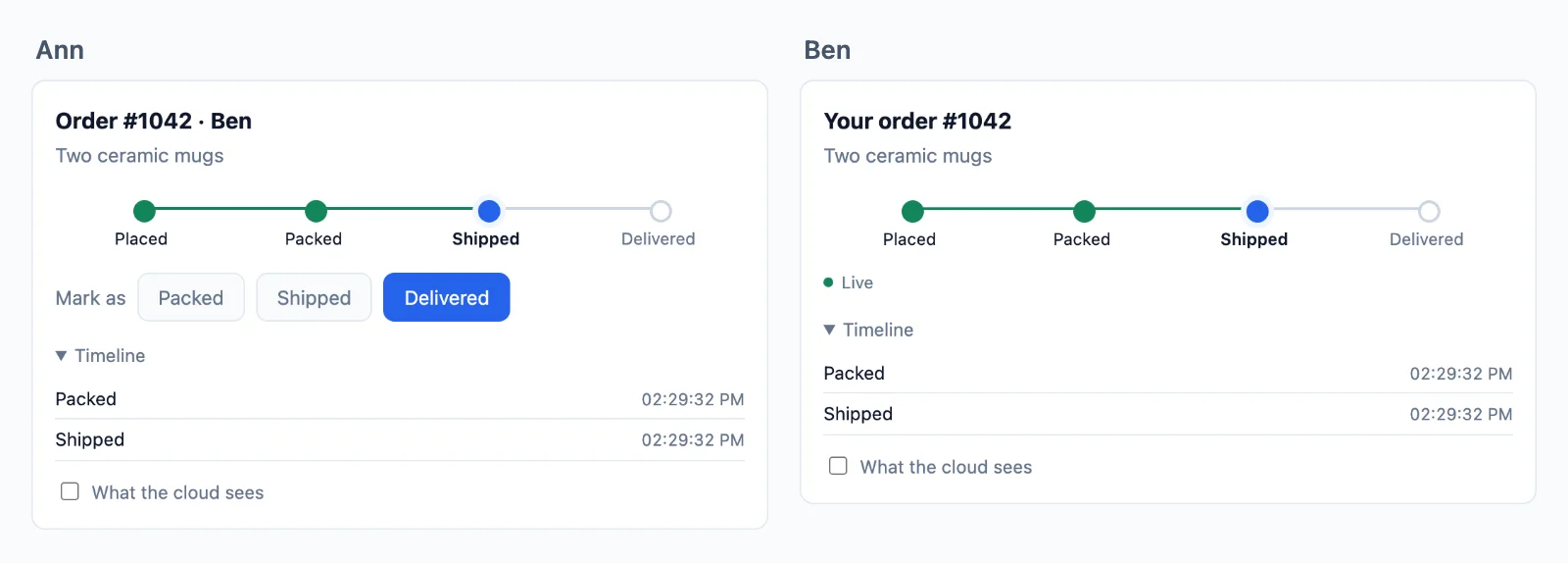
Live updates in your pages
Your server sends an event to a room, and every page in it changes at once: an order moving on, a dashboard, a game. A page that reconnects gets what it missed.
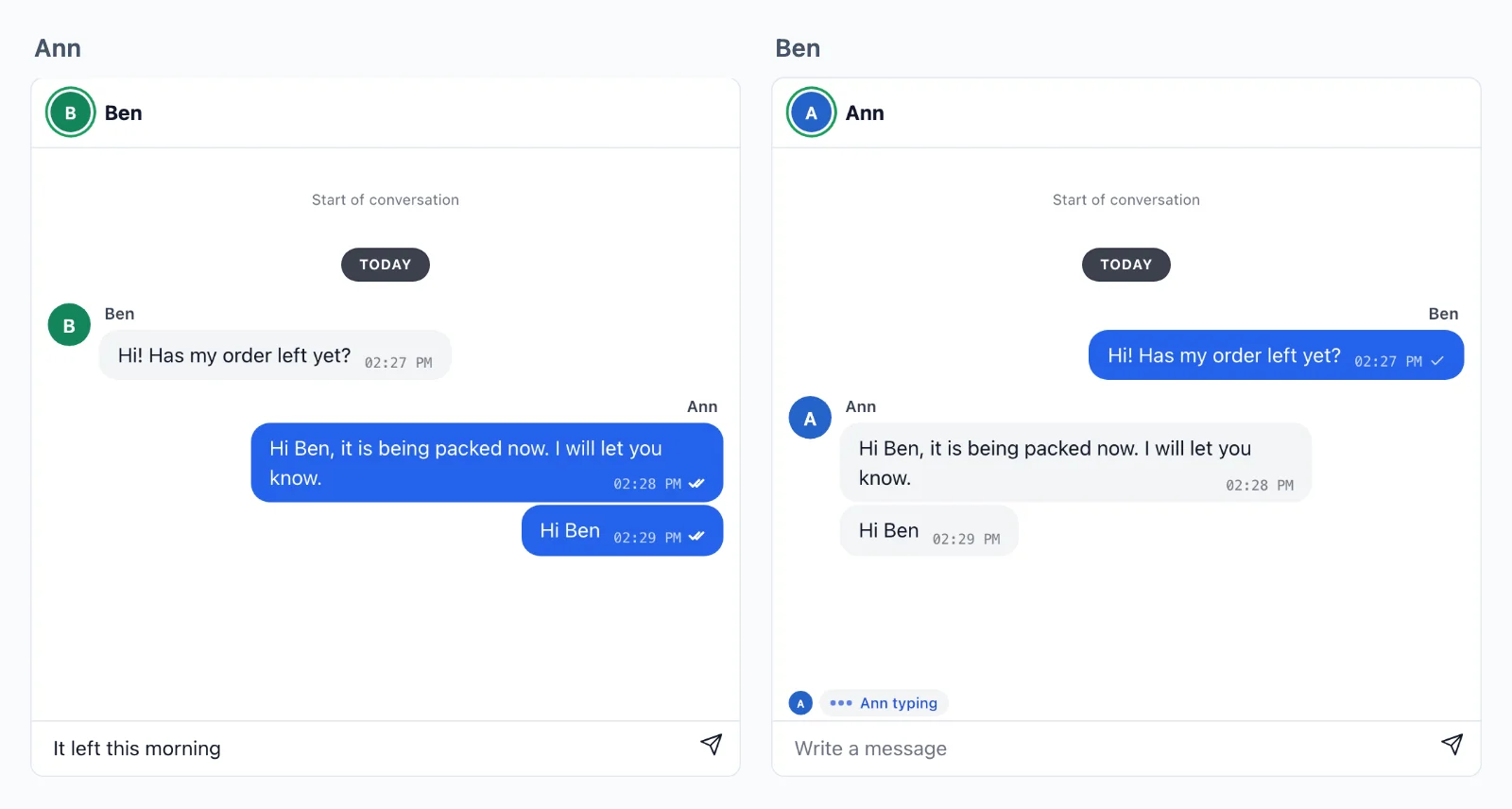
Chat, ready to use
A ready-made conversation as a component, with typing, read ticks and reactions. Your server keeps the messages, and the cloud delivers them.
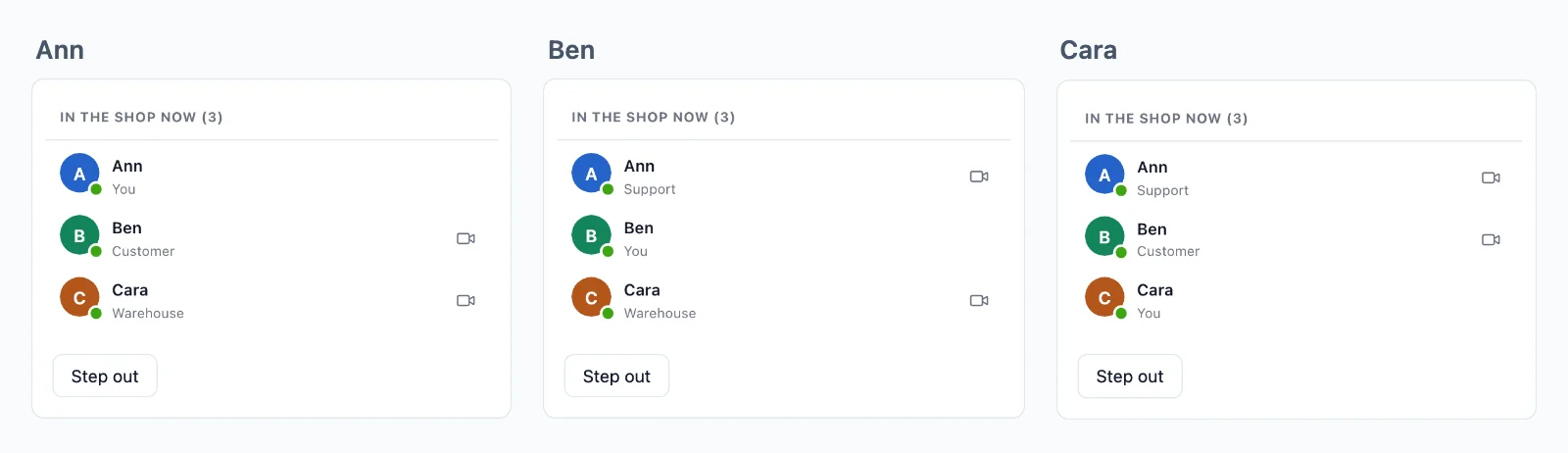
Who is online
A room can list who is in it, with what you choose to show of each person. A count says how many are looking at a page, at any size, and who is online is known across your whole app.
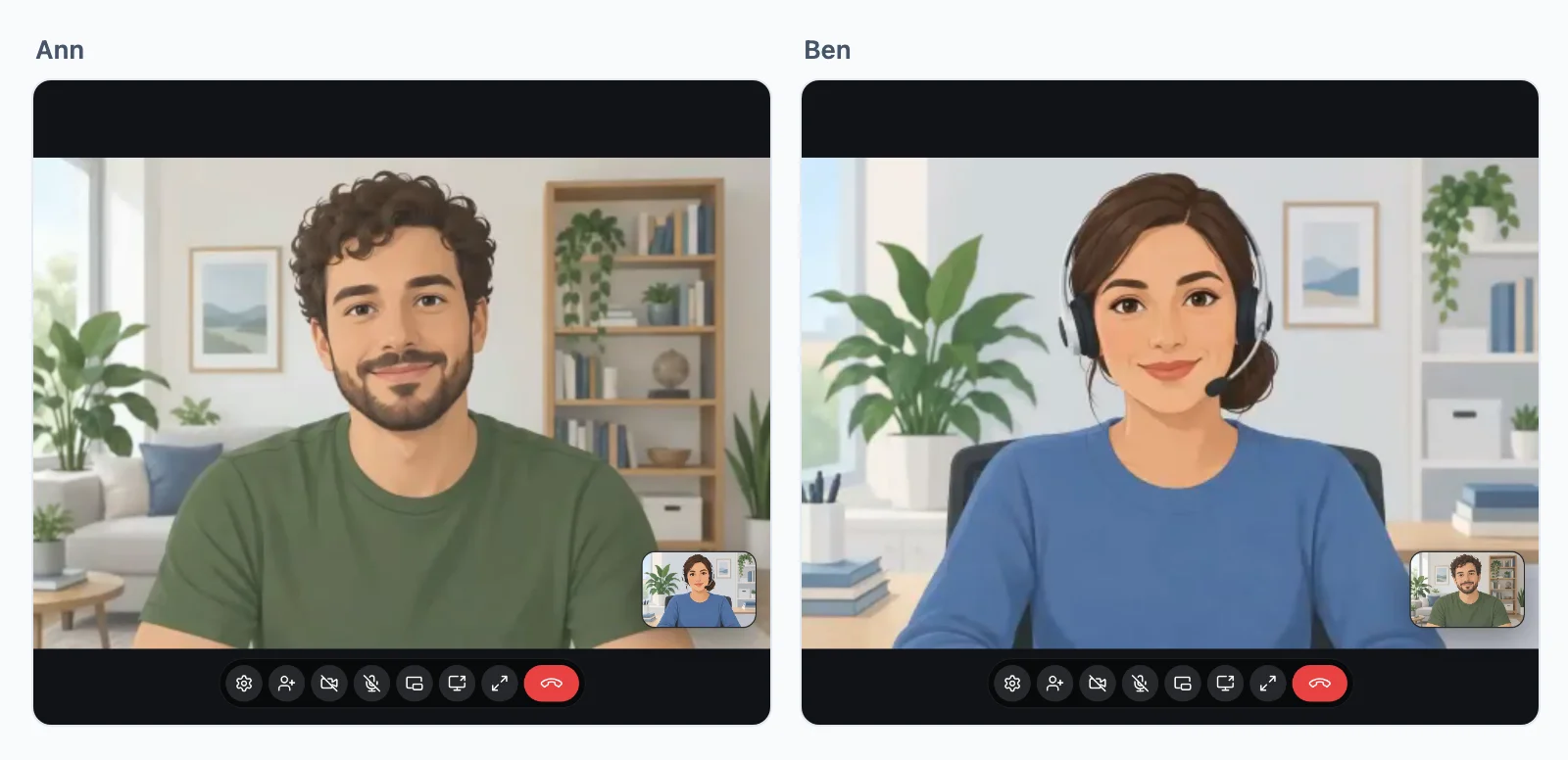
Calls and group calls
Calls between two people that ring in every tab and app of the one called, and group calls, with a ready-made call screen on the web, iOS and Android. Private calls always connect, whatever the network.
- DirectlyBetween the two devices, on most networks. The fastest path.
- Through our relaysWhen a firewall blocks the direct path. They answer on the ports of the web, so a call gets through wherever websites do.
- Through our media serversWhen even the relays cannot reach. The call moves there and goes on, without hanging up.
Encrypted end to end on every path, and included in every plan.
Live streams
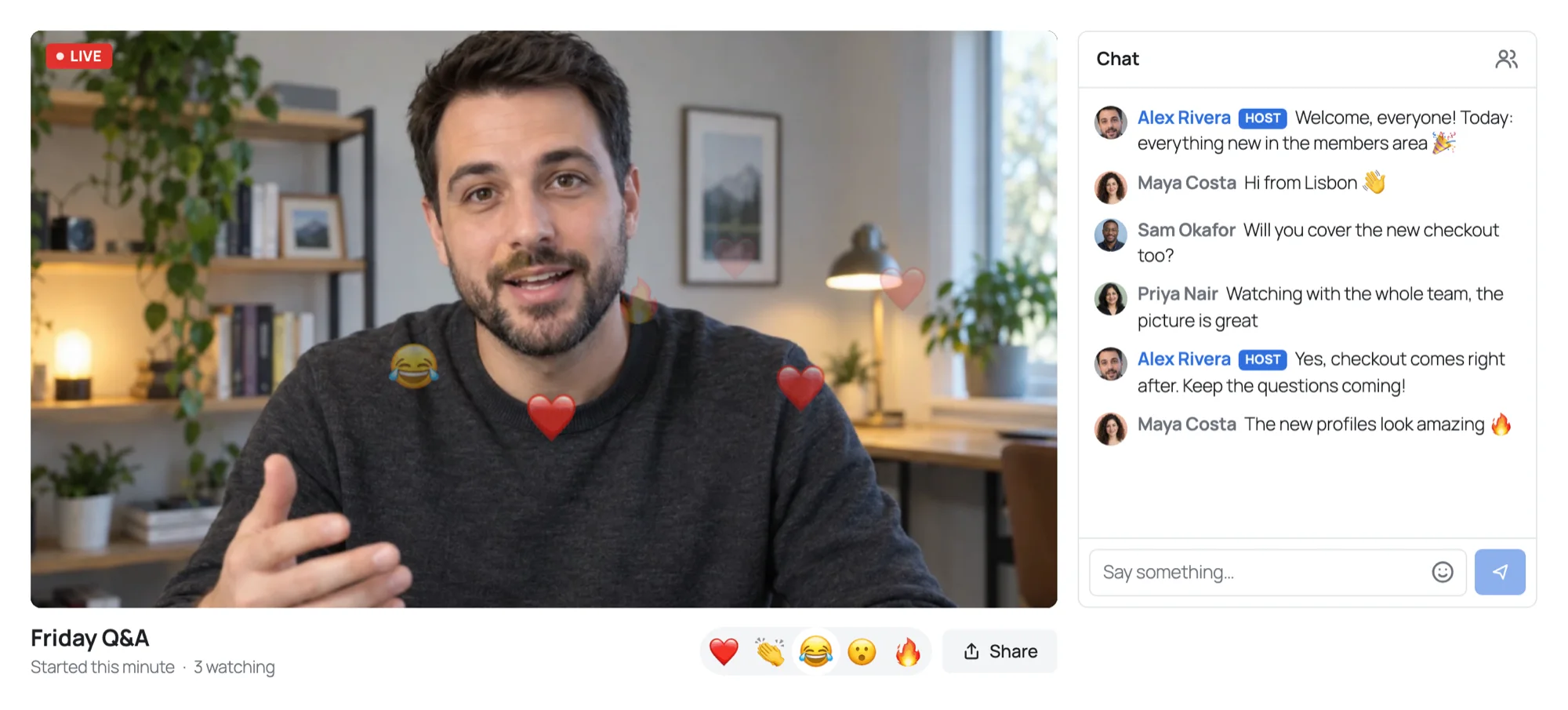
One host live to an audience from the browser, a phone or OBS, with a chat, reactions and a live count of viewers, in a ready-made stream player. Visitors can watch without signing in.
Encrypted, with keys we never hold
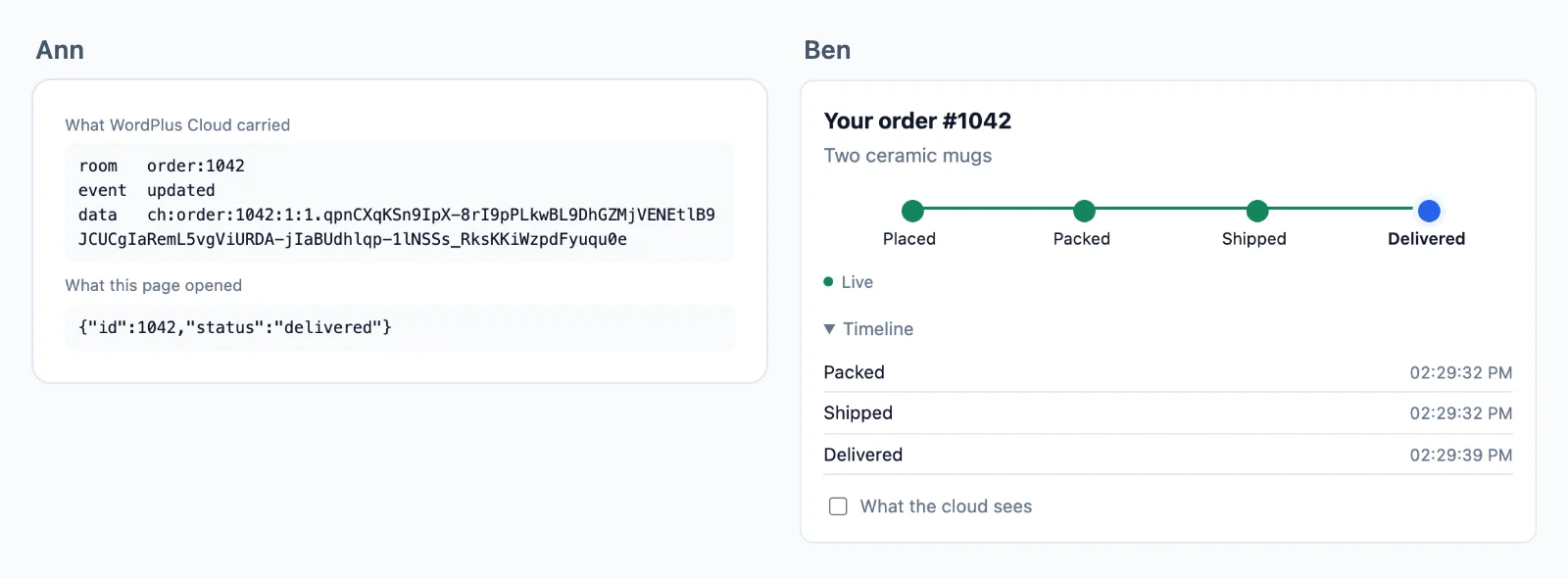
Events, presence and history travel sealed with keys your server holds, and calls between two people are encrypted end to end. The cloud carries them without being able to read them.
Yours to control
Your rules, your interface
The cloud carries your app, and you decide the rest: who may do what, and how every screen looks and works.
Your rules decide who does what
Your server decides, person by person, who joins each room and who may only read, who calls whom, who speaks in a group call and who only watches, and who hosts a live stream or keeps its chat. The cloud enforces every answer.
Access taken back at once
Take someone out of a room the moment you decide, and what it carries next can stay sealed from them. Ban someone from a live stream for good.
Ready-made, or entirely yours
Use the chat, the call screen and the stream player as they are, or change their colours and words. Swap a piece of the chat or the call screen for your own, or copy their code into your app. Or leave them all out and build your own interface on the same SDK.
How it works, in the docs: permissions and your own interface.
Why the cloud
More than a websocket
Laravel, Django and Node.js can run websockets themselves, on your servers. The cloud runs them for you, and adds what a websocket alone does not.
No websocket servers to keep
Your own websocket server has to hold every connection, grow past one machine and stay up through deploys. The cloud does that, adding servers as your traffic grows, and a page moves to another server without a drop.
Calls, not only messages
A websocket carries messages. Calls and group calls also need relays and media servers, and ours run in several regions.
Parts ready to use
Chat, who is online and the call screen come as components, the same ones Better Messages runs on WordPress sites, and agent skills show AI coding agents how to use them.
It fits your framework: in Laravel it is a broadcasting driver, so broadcast() and your channels file stay as they are.
Pricing
Priced by connections, never by messages
From $11.99 a month for 1,000 concurrent connections, billed yearly, or $14.99 billed monthly.
Group calls and live streams above your plan: $0.20 per 1,000 minutes, $0.10 on audio.
What a month costs
On the plan for 1,000 concurrent connections, billed yearly, before tax.
| In a month | Credits above your plan | Cost |
|---|---|---|
| Calls between two people, as many as you like | None | $11.99 |
| A class of 32 on video, an hour, 22 times | None | $11.99 |
| A meeting of 100 on video, an hour, 8 times | 27,640 | about $17.52 |
| A live stream to 1,000 viewers, an hour, 4 times | 223,000 | about $56.59 |
Credits come in packs from $10 and stay yours while you have a plan, so one month can come to more than this and the next to less. Work out your own month.
One price at every resolution. Bandwidth, relays and messages are never charged, and calls between two people are included. We run our own relays and media servers, which keeps these prices low.
Priced by concurrent connections, starting from 1,000, billed monthly or yearly. Calls between two people are unlimited.
With 1,000 connections, live streams in an app are unmetered up to 50 viewers at once, and group calls up to 32 people on video at once, a person on audio counting half, with no limit on people in a call. Each further 1,000 connections add 20 viewers and 12 people on video. Above that, each extra viewer or person on video takes a credit a minute, on audio half. Your plan adds 5,000 credits a month for each 1,000 connections, and packs top it up.
More is on the way: new WordPress plugins, and tools for websites and apps, on the same cloud.
Questions
Frequently asked
My framework already has websockets. Why use the cloud?
So you run none of it: the cloud keeps the connections open, adds servers as your traffic grows and stays up through restarts, and brings calls, group calls, sealed events and ready-made parts. In Laravel it is a broadcasting driver, so broadcast() and your channels file stay as they are.
Which stacks can my apps use?
Next.js and Express on Node.js, Laravel and plain PHP, Django, FastAPI and Flask on Python, and iOS and Android apps, each with a guide and a live demo. Any other server can use the Node.js, PHP or Python SDK.
What counts as a connection?
A browser or a device connected to the cloud at that moment. The tabs of one browser share a connection when your app serves the SDK worker, and what your server sends through the API counts none.
Who decides what each user can do?
Your server. For every room, call, group call and live stream it says, user by user, who gets in and what they may do there: read only or send, speak or only watch, host, keep the chat. The cloud enforces it, and your server can take access back at any moment.
Can I use my own design instead of your components?
Yes. The components are optional. Change their colours and words, replace a piece of the chat or the call screen with your own, copy their code into your app, or build your interface on the SDK alone, as the components themselves are built.
Do you keep the messages my apps send?
No. Events are delivered as they happen and kept for 5 minutes at most, so a page that reconnects gets what it missed. Your own server keeps what must last, and gets the events it asks for by webhook, such as a message sent from a page or someone coming online.
Can several apps use one subscription?
No. A subscription is for one app, on one website and its subdomains, and its connections are for that app alone. Each other app needs a subscription of its own. The addresses you develop on, such as localhost, come with every app.
What happens when my apps need more?
Up to 20% more connect for a while, and we email you at 80% and 100% of your connections. Choose more connections from your account at any time. What is left of the current period counts toward the new price.
Where do I get help with my integration?
From our support, through the contact form or the Support page of your account. We help with the SDKs, the components and connecting your stack, whatever its language.