
 Deutsch
 Español
 Français
 Italiano
 Nederlands
 Polski
' d='M48 28h24v18a12 12 0 0 1-24 0z'/%3E%3Cpath fill='%230093DD' d='M47.5 21.5h4.6V28h-4.6zm10.2-2.5h4.6v9h-4.6zm10.2 2.5h4.6V28h-4.6z'/%3E%3Cpath fill='%23171796' d='M52.6 20h4.6v8h-4.6zm10.2 0h4.6v8h-4.6z'/%3E%3C/svg%3E) Hrvatski
 עברית
For apps
Group video calls for your app
A video conferencing API and SDK for Next.js, Laravel, Django and any other stack. Meetings, classes, panels and audio rooms run on our media servers, with no limit on people in a call, and the call screen is ready to use, so there is no media server for you to run.
The best pricing for WebSockets, unlimited 1-to-1 calls with TURN servers worldwide, and group calls and live streaming with an allowance included. From $11.99 a month for 1,000 concurrent connections, billed yearly, or $14.99 billed monthly.
Group calls above your plan: $0.20 per 1,000 minutes, $0.10 on audio.
Next.js on the server, and React on the page.
export async function GET( request: Request ) {
    const me = await currentUserId();
    const id = new URL( request.url ).searchParams.get( 'id' )!;

    // Your own check: only its team, and its lead is the host.
    if ( ! me || ! await isMemberOf( id, me ) ) {
        return new Response( null, { status: 403 } );
    }

    const token = await realtime.groupCallToken( me, 'meeting:' + id, {
        admin: await isLeadOf( id, me ),
    } );

    return Response.json( { token } );
}app.get( '/api/meeting-token', async ( req, res ) => {
const me = userOf( req );
const { id } = req.query;
// Your own check: only its team, and its lead is the host.
if ( ! me || ! await isMemberOf( id, me ) ) {
return res.sendStatus( 403 );
}
const token = await realtime.groupCallToken( me, 'meeting:' + id, {
admin: await isLeadOf( id, me ),
} );
res.json( { token } );
} );import { createServer } from 'node:http';
createServer( async ( req, res ) => {
const url = new URL( req.url, 'http://localhost' );
if ( url.pathname === '/api/meeting-token' ) {
const me = userOf( req );
const id = url.searchParams.get( 'id' );
// Your own check: only its team, and its lead is the host.
if ( ! me || ! await isMemberOf( id, me ) ) {
res.writeHead( 403 );
return res.end();
}
const token = await realtime.groupCallToken( me, 'meeting:' + id, {
admin: await isLeadOf( id, me ),
} );
res.writeHead( 200, { 'Content-Type': 'application/json' } );
return res.end( JSON.stringify( { token } ) );
}
// Your pages, and realtime.node( userOf ) for the SDK's routes.
} ).listen( 3000 );use Illuminate\Http\Request;
use WordPlus\Realtime\Laravel\Facades\Realtime;
Route::get( '/api/meeting-token', function ( Request $request ) {
$me = $request->user()->id;
$id = $request->query( 'id' );
// Your own check: only its team, and its lead is the host.
abort_unless( is_member_of( $id, $me ), 403 );
return [ 'token' => Realtime::groupCallToken( $me, 'meeting:' . $id, [
'admin' => is_lead_of( $id, $me ),
] ) ];
} )->middleware( 'auth' );require __DIR__ . '/../src/realtime.php';
$me = current_user_id();
$id = $_GET['id'] ?? '';
// Your own check: only its team, and its lead is the host.
if ( ! $me || ! is_member_of( $id, $me ) ) {
http_response_code( 403 );
exit;
}
header( 'Content-Type: application/json' );
echo json_encode( [
'token' => $realtime->groupCallToken( $me, 'meeting:' . $id, [
'admin' => is_lead_of( $id, $me ),
] ),
] );from django.contrib.auth.decorators import login_required
from django.http import HttpResponseForbidden, JsonResponse
from .realtime import realtime
# In urls.py: path("api/meeting-token", views.meeting_token)
@login_required
def meeting_token(request):
me = request.user.id
id = request.GET["id"]
# Your own check: only its team, and its lead is the host.
if not is_member_of(id, me):
return HttpResponseForbidden()
token = realtime.group_call_token(
me, "meeting:" + id, admin=is_lead_of(id, me)
)
return JsonResponse({"token": token})from fastapi import Depends, HTTPException
from realtime import realtime
@app.get("/api/meeting-token")
def meeting_token(id: str, me: int = Depends(current_user_id)):
# Your own check: only its team, and its lead is the host.
if not me or not is_member_of(id, me):
raise HTTPException(403)
token = realtime.group_call_token(
me, "meeting:" + id, admin=is_lead_of(id, me)
)
return {"token": token}from flask import abort, request, session
from realtime import realtime
@app.get("/api/meeting-token")
def meeting_token():
me = session.get("user_id")
id = request.args["id"]
# Your own check: only its team, and its lead is the host.
if not me or not is_member_of(id, me):
abort(403)
token = realtime.group_call_token(
me, "meeting:" + id, admin=is_lead_of(id, me)
)
return {"token": token}// http.HandleFunc("GET /api/meeting-token", meetingToken)
func meetingToken(w http.ResponseWriter, r *http.Request) {
me := userOf(r)
id := r.URL.Query().Get("id")
// Your own check: only its team, and its lead is the host.
if me == "" || !isMemberOf(id, me) {
w.WriteHeader(403)
return
}
token := app.GroupCallToken(me, "meeting:"+id, wordplus.GroupPlace{
Admin: isLeadOf(id, me),
Info: profile(me),
})
reply(w, map[string]string{"token": token})
}Hooks and components for any React app, on any of the servers above.
import { connect } from '@wordplus/realtime';

const rt = await connect();

// The call window.
await rt.callScreen();

// And in the page:
// <group-call-button call="meeting:7"
//     token-url="/api/meeting-token?id=7"
//     type="video" title="Daily meeting">
//     Join the meeting
// </group-call-button>import { connect } from '@wordplus/realtime';
const rt = await connect();
// The call window.
await rt.callScreen();
// And in the page:
// <group-call-button call="meeting:7"
// token-url="/api/meeting-token?id=7"
// type="video" title="Daily meeting">
// Join the meeting
// </group-call-button>import { connect } from '@wordplus/realtime';
const rt = await connect();
// The call window.
await rt.callScreen();
// And in the page:
// <group-call-button call="meeting:7"
// token-url="/api/meeting-token?id=7"
// type="video" title="Daily meeting">
// Join the meeting
// </group-call-button>import { connect } from '@wordplus/realtime';
const rt = await connect();
// The call window.
await rt.callScreen();
// And in the page:
// <group-call-button call="meeting:7"
// token-url="/api/meeting-token?id=7"
// type="video" title="Daily meeting">
// Join the meeting
// </group-call-button>import { connect } from '@wordplus/realtime';
const rt = await connect();
// The call window.
await rt.callScreen();
// And in the page:
// <group-call-button call="meeting:7"
// token-url="/api/meeting-token?id=7"
// type="video" title="Daily meeting">
// Join the meeting
// </group-call-button>import { connect } from '@wordplus/realtime';
const rt = await connect();
// The call window.
await rt.callScreen();
// And in the page:
// <group-call-button call="meeting:7"
// token-url="/api/meeting-token?id=7"
// type="video" title="Daily meeting">
// Join the meeting
// </group-call-button>import { connect } from '@wordplus/realtime';
const rt = await connect();
// The call window.
await rt.callScreen();
// And in the page:
// <group-call-button call="meeting:7"
// token-url="/api/meeting-token?id=7"
// type="video" title="Daily meeting">
// Join the meeting
// </group-call-button>import { connect } from '@wordplus/realtime';
const rt = await connect();
// The call window.
await rt.callScreen();
// And in the page:
// <group-call-button call="meeting:7"
// token-url="/api/meeting-token?id=7"
// type="video" title="Daily meeting">
// Join the meeting
// </group-call-button>import { connect } from '@wordplus/realtime';
const rt = await connect();
// The call window.
await rt.callScreen();
// And in the page:
// <group-call-button call="meeting:7"
// token-url="/api/meeting-token?id=7"
// type="video" title="Daily meeting">
// Join the meeting
// </group-call-button><group-call-button call="meeting:7" token-url="/api/meeting-token?id=7" type="video" title="Daily meeting">
Join the meeting
</group-call-button>
<script type="module">
// The call window, on every page a meeting may open from.
await window.Echo.connector.rt.callScreen();
</script>'use client'; // in Next.js
import { CallScreen, GroupCallButton } from '@wordplus/realtime/react';
// Inside <RealtimeProvider>, once for the whole app.
export function JoinMeeting() {
return (
<>
<CallScreen />
<GroupCallButton call="meeting:7" tokenUrl="/api/meeting-token?id=7" type="video" title="Daily meeting">
Join the meeting
</GroupCallButton>
</>
);
}<script setup>
import { watchEffect } from 'vue';
import { useRealtime } from '@wordplus/realtime/vue';
// provideRealtime() once, in your root component.
const rt = useRealtime();
// The call window, on every page a meeting may open from.
watchEffect( () => rt.value?.callScreen() );
</script>
<!-- isCustomElement for this tag, in vite.config.js -->
<template>
<group-call-button call="meeting:7" token-url="/api/meeting-token?id=7" type="video" title="Daily meeting">
Join the meeting
</group-call-button>
</template><script>
import { useRealtime } from '@wordplus/realtime/svelte';
// provideRealtime() once, in your root component.
const rt = useRealtime();
// The call window, on every page a meeting may open from.
$effect( () => { rt.current?.callScreen(); } );
</script>
<group-call-button call="meeting:7" token-url="/api/meeting-token?id=7" type="video" title="Daily meeting">
Join the meeting
</group-call-button>import { Component, CUSTOM_ELEMENTS_SCHEMA } from '@angular/core';
// realtime.ts, one connection for the whole app:
// export const realtime = connect();
import { realtime } from './realtime';
@Component( {
selector: 'app-join-meeting',
schemas: [ CUSTOM_ELEMENTS_SCHEMA ],
template: `<group-call-button call="meeting:7" token-url="/api/meeting-token?id=7" type="video" title="Daily meeting">Join the meeting</group-call-button>`,
} )
export class JoinMeetingComponent {
async ngOnInit() {
const rt = await realtime;
// The call window, on every page a meeting may open from.
await rt.callScreen();
}
}import WordPlusRealtimeCalls
import WordPlusRealtimeUI
let token = try await api.meetingToken(id: 7) // your own request to your route
let meeting = try await rt.joinGroupCall(token)
CallScreen.shared.show(meeting, title: "Daily meeting")import cloud.wordplus.realtime.calls.joinGroupCall
import cloud.wordplus.realtime.ui.CallScreen
val token = api.meetingToken(id = 7) // your own request to your route
val meeting = rt.joinGroupCall(context, token)
CallScreen.show(context, meeting, title = "Daily meeting")import {
CallScreen, GroupCallButton, RealtimeProvider,
} from '@wordplus/realtime-react-native';
// Your server, in full, as an app has no address of its own.
const API = 'https://app.example.com/api';
const options = {
app: 's1500000007',
endpoint: API + '/realtime',
headers: { Authorization: 'Bearer ' + session.token },
};
export function App() {
return (
<RealtimeProvider options={ options }>
<CallScreen />
<GroupCallButton call="meeting:7" type="video" title="Daily meeting"
tokenUrl={ API + '/meeting-token?id=7' }>
Join the meeting
</GroupCallButton>
</RealtimeProvider>
);
}import 'package:flutter/material.dart';
import 'package:wordplus_realtime/wordplus_realtime.dart';
// Your server, in full, as an app has no address of its own.
const api = 'https://app.example.com/api';
// Once, as your app starts.
final rt = await WordPlusRealtime.connect(
app: 's1500000007',
endpoint: '$api/realtime',
headers: {'Authorization': 'Bearer ${session.token}'},
);
// The call window.
await rt.callScreen();
// In your build:
GroupCallButton(
rt: rt,
call: 'meeting:7',
tokenUrl: '$api/meeting-token?id=7',
title: 'Daily meeting',
child: const Text('Join the meeting'),
)Try a group call
Start a room here, then bring in up to three more people from their phones or other windows. No account needed.
These are the screens the SDK gives your app. Your browser asks for your camera and microphone, nothing is recorded, and the demo ends after 10 minutes.
Group calls
Group calls on our media servers
Meetings, classes, panels and audio rooms run on our media servers, not between the devices, so each device sends its camera once, however many people are in the call.
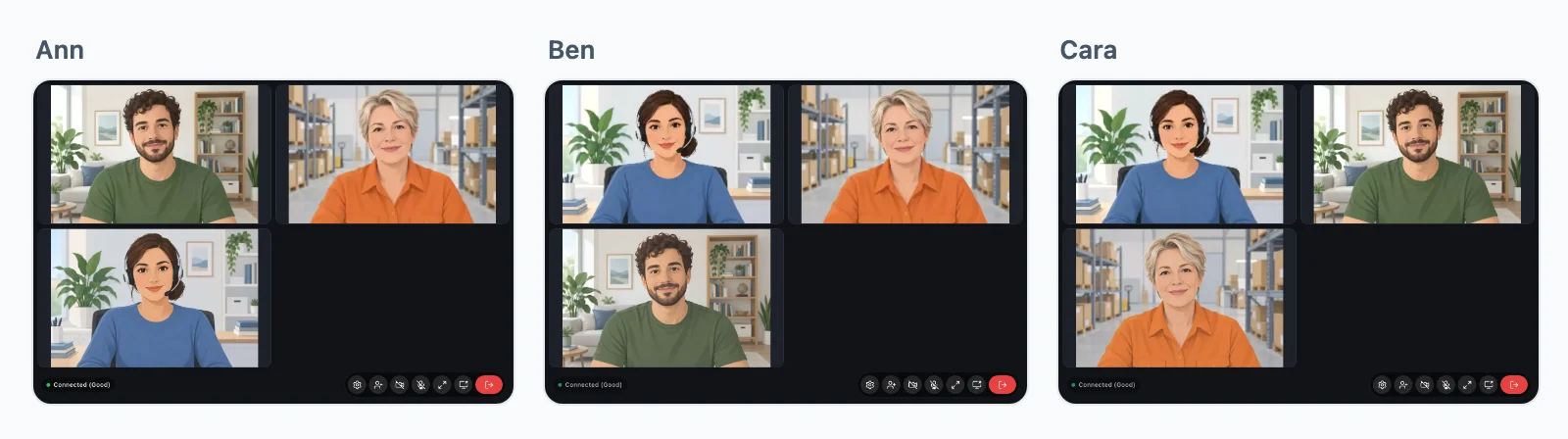
No limit on people
Everyone in a group call sends their camera, microphone and screen once, and our media servers pass them to everyone else, in several regions.
Speakers and listeners
Your server says who sends and who only watches and listens, as in a class or a panel. A host lets a listener speak, and makes them a listener again.
Hosts keep order
A host mutes a microphone, lets someone speak and removes someone from the call, from the tile of each person.
Your server decides
Run a meeting, from start to end
Your server says who joins and who hosts, and the page or your server does the rest. Here is a team meeting, then a class, a task at a time.
Next.js on the server, and React on the page.
Give the page a token
A group call is only a name, such as meeting:7, with nothing to create in the cloud. Who joins and who hosts is your app's own logic, so it lives in a route of your own, which answers a token. isMemberOf and isLeadOf are your own lookups.
export async function GET( request: Request ) {
    const me = await currentUserId();
    const id = new URL( request.url ).searchParams.get( 'id' )!;

    // Your own check: only its team, and its lead is the host.
    if ( ! me || ! await isMemberOf( id, me ) ) {
        return new Response( null, { status: 403 } );
    }

    const token = await realtime.groupCallToken( me, 'meeting:' + id, {
        admin: await isLeadOf( id, me ),
    } );

    return Response.json( { token } );
}app.get( '/api/meeting-token', async ( req, res ) => {
const me = userOf( req );
const { id } = req.query;
// Your own check: only its team, and its lead is the host.
if ( ! me || ! await isMemberOf( id, me ) ) {
return res.sendStatus( 403 );
}
const token = await realtime.groupCallToken( me, 'meeting:' + id, {
admin: await isLeadOf( id, me ),
} );
res.json( { token } );
} );import { createServer } from 'node:http';
createServer( async ( req, res ) => {
const url = new URL( req.url, 'http://localhost' );
if ( url.pathname === '/api/meeting-token' ) {
const me = userOf( req );
const id = url.searchParams.get( 'id' );
// Your own check: only its team, and its lead is the host.
if ( ! me || ! await isMemberOf( id, me ) ) {
res.writeHead( 403 );
return res.end();
}
const token = await realtime.groupCallToken( me, 'meeting:' + id, {
admin: await isLeadOf( id, me ),
} );
res.writeHead( 200, { 'Content-Type': 'application/json' } );
return res.end( JSON.stringify( { token } ) );
}
// Your pages, and realtime.node( userOf ) for the SDK's routes.
} ).listen( 3000 );use Illuminate\Http\Request;
use WordPlus\Realtime\Laravel\Facades\Realtime;
Route::get( '/api/meeting-token', function ( Request $request ) {
$me = $request->user()->id;
$id = $request->query( 'id' );
// Your own check: only its team, and its lead is the host.
abort_unless( is_member_of( $id, $me ), 403 );
return [ 'token' => Realtime::groupCallToken( $me, 'meeting:' . $id, [
'admin' => is_lead_of( $id, $me ),
] ) ];
} )->middleware( 'auth' );require __DIR__ . '/../src/realtime.php';
$me = current_user_id();
$id = $_GET['id'] ?? '';
// Your own check: only its team, and its lead is the host.
if ( ! $me || ! is_member_of( $id, $me ) ) {
http_response_code( 403 );
exit;
}
header( 'Content-Type: application/json' );
echo json_encode( [
'token' => $realtime->groupCallToken( $me, 'meeting:' . $id, [
'admin' => is_lead_of( $id, $me ),
] ),
] );from django.contrib.auth.decorators import login_required
from django.http import HttpResponseForbidden, JsonResponse
from .realtime import realtime
# In urls.py: path("api/meeting-token", views.meeting_token)
@login_required
def meeting_token(request):
me = request.user.id
id = request.GET["id"]
# Your own check: only its team, and its lead is the host.
if not is_member_of(id, me):
return HttpResponseForbidden()
token = realtime.group_call_token(
me, "meeting:" + id, admin=is_lead_of(id, me)
)
return JsonResponse({"token": token})from fastapi import Depends, HTTPException
from realtime import realtime
@app.get("/api/meeting-token")
def meeting_token(id: str, me: int = Depends(current_user_id)):
# Your own check: only its team, and its lead is the host.
if not me or not is_member_of(id, me):
raise HTTPException(403)
token = realtime.group_call_token(
me, "meeting:" + id, admin=is_lead_of(id, me)
)
return {"token": token}from flask import abort, request, session
from realtime import realtime
@app.get("/api/meeting-token")
def meeting_token():
me = session.get("user_id")
id = request.args["id"]
# Your own check: only its team, and its lead is the host.
if not me or not is_member_of(id, me):
abort(403)
token = realtime.group_call_token(
me, "meeting:" + id, admin=is_lead_of(id, me)
)
return {"token": token}// http.HandleFunc("GET /api/meeting-token", meetingToken)
func meetingToken(w http.ResponseWriter, r *http.Request) {
me := userOf(r)
id := r.URL.Query().Get("id")
// Your own check: only its team, and its lead is the host.
if me == "" || !isMemberOf(id, me) {
w.WriteHeader(403)
return
}
token := app.GroupCallToken(me, "meeting:"+id, wordplus.GroupPlace{
Admin: isLeadOf(id, me),
Info: profile(me),
})
reply(w, map[string]string{"token": token})
}Add a join button
The ready-made screen: a button, and a call window with every tile and control, with no call code. The button asks your route for its token.
Hooks and components for any React app, on any of the servers above.
import { connect } from '@wordplus/realtime';

const rt = await connect();

// The call window, on every page a meeting may open from.
await rt.callScreen();

// And in the page. The button asks your route for its token.
// <group-call-button call="meeting:7" token-url="/api/meeting-token?id=7" type="video" title="Daily meeting">
//     Join the meeting
// </group-call-button>import { connect } from '@wordplus/realtime';
const rt = await connect();
// The call window, on every page a meeting may open from.
await rt.callScreen();
// And in the page. The button asks your route for its token.
// <group-call-button call="meeting:7" token-url="/api/meeting-token?id=7" type="video" title="Daily meeting">
// Join the meeting
// </group-call-button>import { connect } from '@wordplus/realtime';
const rt = await connect();
// The call window, on every page a meeting may open from.
await rt.callScreen();
// And in the page. The button asks your route for its token.
// <group-call-button call="meeting:7" token-url="/api/meeting-token?id=7" type="video" title="Daily meeting">
// Join the meeting
// </group-call-button>import { connect } from '@wordplus/realtime';
const rt = await connect();
// The call window, on every page a meeting may open from.
await rt.callScreen();
// And in the page. The button asks your route for its token.
// <group-call-button call="meeting:7" token-url="/api/meeting-token?id=7" type="video" title="Daily meeting">
// Join the meeting
// </group-call-button>import { connect } from '@wordplus/realtime';
const rt = await connect();
// The call window, on every page a meeting may open from.
await rt.callScreen();
// And in the page. The button asks your route for its token.
// <group-call-button call="meeting:7" token-url="/api/meeting-token?id=7" type="video" title="Daily meeting">
// Join the meeting
// </group-call-button>import { connect } from '@wordplus/realtime';
const rt = await connect();
// The call window, on every page a meeting may open from.
await rt.callScreen();
// And in the page. The button asks your route for its token.
// <group-call-button call="meeting:7" token-url="/api/meeting-token?id=7" type="video" title="Daily meeting">
// Join the meeting
// </group-call-button>import { connect } from '@wordplus/realtime';
const rt = await connect();
// The call window, on every page a meeting may open from.
await rt.callScreen();
// And in the page. The button asks your route for its token.
// <group-call-button call="meeting:7" token-url="/api/meeting-token?id=7" type="video" title="Daily meeting">
// Join the meeting
// </group-call-button>import { connect } from '@wordplus/realtime';
const rt = await connect();
// The call window, on every page a meeting may open from.
await rt.callScreen();
// And in the page. The button asks your route for its token.
// <group-call-button call="meeting:7" token-url="/api/meeting-token?id=7" type="video" title="Daily meeting">
// Join the meeting
// </group-call-button>import { connect } from '@wordplus/realtime';
const rt = await connect();
// The call window, on every page a meeting may open from.
await rt.callScreen();
// And in the page. The button asks your route for its token.
// <group-call-button call="meeting:7" token-url="/api/meeting-token?id=7" type="video" title="Daily meeting">
// Join the meeting
// </group-call-button><group-call-button call="meeting:7" token-url="/api/meeting-token?id=7" type="video" title="Daily meeting">
Join the meeting
</group-call-button>
<script type="module">
// The call window, on every page a meeting may open from.
await window.Echo.connector.rt.callScreen();
</script>'use client'; // in Next.js
import { CallScreen, GroupCallButton } from '@wordplus/realtime/react';
// Inside <RealtimeProvider>, once for the whole app.
export function JoinMeeting() {
return (
<>
<CallScreen />
<GroupCallButton call="meeting:7" tokenUrl="/api/meeting-token?id=7" type="video" title="Daily meeting">
Join the meeting
</GroupCallButton>
</>
);
}<script setup>
import { watchEffect } from 'vue';
import { useRealtime } from '@wordplus/realtime/vue';
// provideRealtime() once, in your root component.
const rt = useRealtime();
// The call window, on every page a meeting may open from.
watchEffect( () => rt.value?.callScreen() );
</script>
<!-- isCustomElement for this tag, in vite.config.js -->
<template>
<group-call-button call="meeting:7" token-url="/api/meeting-token?id=7" type="video" title="Daily meeting">
Join the meeting
</group-call-button>
</template><script>
import { useRealtime } from '@wordplus/realtime/svelte';
// provideRealtime() once, in your root component.
const rt = useRealtime();
// The call window, on every page a meeting may open from.
$effect( () => { rt.current?.callScreen(); } );
</script>
<group-call-button call="meeting:7" token-url="/api/meeting-token?id=7" type="video" title="Daily meeting">
Join the meeting
</group-call-button>import { Component, CUSTOM_ELEMENTS_SCHEMA } from '@angular/core';
// realtime.ts, one connection for the whole app:
// export const realtime = connect();
import { realtime } from './realtime';
@Component( {
selector: 'app-join-meeting',
schemas: [ CUSTOM_ELEMENTS_SCHEMA ],
template: `<group-call-button call="meeting:7" token-url="/api/meeting-token?id=7" type="video" title="Daily meeting">Join the meeting</group-call-button>`,
} )
export class JoinMeetingComponent {
async ngOnInit() {
const rt = await realtime;
// The call window, on every page a meeting may open from.
await rt.callScreen();
}
}import WordPlusRealtimeCalls
import WordPlusRealtimeUI
let token = try await api.meetingToken(id: 7) // your own request to your route
let meeting = try await rt.joinGroupCall(token)
CallScreen.shared.show(meeting, title: "Daily meeting")import cloud.wordplus.realtime.calls.joinGroupCall
import cloud.wordplus.realtime.ui.CallScreen
val token = api.meetingToken(id = 7) // your own request to your route
val meeting = rt.joinGroupCall(context, token)
CallScreen.show(context, meeting, title = "Daily meeting")import {
CallScreen, GroupCallButton, RealtimeProvider,
} from '@wordplus/realtime-react-native';
// Your server, in full, as an app has no address of its own.
const API = 'https://app.example.com/api';
const options = {
app: 's1500000007',
endpoint: API + '/realtime',
headers: { Authorization: 'Bearer ' + session.token },
};
export function App() {
return (
<RealtimeProvider options={ options }>
<CallScreen />
<GroupCallButton call="meeting:7" type="video" title="Daily meeting"
tokenUrl={ API + '/meeting-token?id=7' }>
Join the meeting
</GroupCallButton>
</RealtimeProvider>
);
}import 'package:flutter/material.dart';
import 'package:wordplus_realtime/wordplus_realtime.dart';
// Your server, in full, as an app has no address of its own.
const api = 'https://app.example.com/api';
// Once, as your app starts.
final rt = await WordPlusRealtime.connect(
app: 's1500000007',
endpoint: '$api/realtime',
headers: {'Authorization': 'Bearer ${session.token}'},
);
// The call window.
await rt.callScreen();
// In your build:
GroupCallButton(
rt: rt,
call: 'meeting:7',
tokenUrl: '$api/meeting-token?id=7',
title: 'Daily meeting',
child: const Text('Join the meeting'),
)Put it in your page
The same screen in a place of your own, in place of a window over the page, joining as the page opens if you want it to.
Hooks and components for any React app, on any of the servers above.
import { connect } from '@wordplus/realtime';

const rt = await connect();

await rt.callScreen();

// And in the page. The meeting opens here, with no window over it,
// joining as the page opens, the camera and microphone on:
// <call-spot call="meeting:7" token-url="/api/meeting-token?id=7" join="video" join-with="microphone camera"></call-spot>import { connect } from '@wordplus/realtime';
const rt = await connect();
await rt.callScreen();
// And in the page. The meeting opens here, with no window over it,
// joining as the page opens, the camera and microphone on:
// <call-spot call="meeting:7" token-url="/api/meeting-token?id=7" join="video" join-with="microphone camera"></call-spot>import { connect } from '@wordplus/realtime';
const rt = await connect();
await rt.callScreen();
// And in the page. The meeting opens here, with no window over it,
// joining as the page opens, the camera and microphone on:
// <call-spot call="meeting:7" token-url="/api/meeting-token?id=7" join="video" join-with="microphone camera"></call-spot>import { connect } from '@wordplus/realtime';
const rt = await connect();
await rt.callScreen();
// And in the page. The meeting opens here, with no window over it,
// joining as the page opens, the camera and microphone on:
// <call-spot call="meeting:7" token-url="/api/meeting-token?id=7" join="video" join-with="microphone camera"></call-spot>import { connect } from '@wordplus/realtime';
const rt = await connect();
await rt.callScreen();
// And in the page. The meeting opens here, with no window over it,
// joining as the page opens, the camera and microphone on:
// <call-spot call="meeting:7" token-url="/api/meeting-token?id=7" join="video" join-with="microphone camera"></call-spot>import { connect } from '@wordplus/realtime';
const rt = await connect();
await rt.callScreen();
// And in the page. The meeting opens here, with no window over it,
// joining as the page opens, the camera and microphone on:
// <call-spot call="meeting:7" token-url="/api/meeting-token?id=7" join="video" join-with="microphone camera"></call-spot>import { connect } from '@wordplus/realtime';
const rt = await connect();
await rt.callScreen();
// And in the page. The meeting opens here, with no window over it,
// joining as the page opens, the camera and microphone on:
// <call-spot call="meeting:7" token-url="/api/meeting-token?id=7" join="video" join-with="microphone camera"></call-spot>import { connect } from '@wordplus/realtime';
const rt = await connect();
await rt.callScreen();
// And in the page. The meeting opens here, with no window over it,
// joining as the page opens, the camera and microphone on:
// <call-spot call="meeting:7" token-url="/api/meeting-token?id=7" join="video" join-with="microphone camera"></call-spot>import { connect } from '@wordplus/realtime';
const rt = await connect();
await rt.callScreen();
// And in the page. The meeting opens here, with no window over it,
// joining as the page opens, the camera and microphone on:
// <call-spot call="meeting:7" token-url="/api/meeting-token?id=7" join="video" join-with="microphone camera"></call-spot><call-spot call="meeting:7" token-url="/api/meeting-token?id=7" join="video" join-with="microphone camera"></call-spot>
<script type="module">
await window.Echo.connector.rt.callScreen();
</script>'use client'; // in Next.js
import { CallScreen, CallSpot } from '@wordplus/realtime/react';
// Inside <RealtimeProvider>, once for the whole app.
export function Meeting() {
return (
<>
<CallScreen />
<CallSpot call="meeting:7" tokenUrl="/api/meeting-token?id=7" join="video" joinWith="microphone camera" />
</>
);
}<script setup>
import { watchEffect } from 'vue';
import { useRealtime } from '@wordplus/realtime/vue';
// provideRealtime() once, in your root component.
const rt = useRealtime();
watchEffect( () => rt.value?.callScreen() );
</script>
<!-- isCustomElement for this tag, in vite.config.js -->
<template>
<call-spot call="meeting:7" token-url="/api/meeting-token?id=7" join="video" join-with="microphone camera"></call-spot>
</template><script>
import { useRealtime } from '@wordplus/realtime/svelte';
// provideRealtime() once, in your root component.
const rt = useRealtime();
$effect( () => { rt.current?.callScreen(); } );
</script>
<call-spot call="meeting:7" token-url="/api/meeting-token?id=7" join="video" join-with="microphone camera"></call-spot>import { Component, CUSTOM_ELEMENTS_SCHEMA } from '@angular/core';
// realtime.ts, one connection for the whole app:
// export const realtime = connect();
import { realtime } from './realtime';
@Component( {
selector: 'app-meeting',
schemas: [ CUSTOM_ELEMENTS_SCHEMA ],
template: `<call-spot call="meeting:7" token-url="/api/meeting-token?id=7" join="video" join-with="microphone camera"></call-spot>`,
} )
export class MeetingComponent {
async ngOnInit() {
const rt = await realtime;
await rt.callScreen();
}
}Join from your own code
For a screen you draw yourself: get a token from your route, and join with it. Each person comes with their camera and microphone, and nothing is sent until you ask.
Hooks and components for any React app, on any of the servers above.
import { connect } from '@wordplus/realtime';

const rt = await connect();

// Asks your server for a token: your route from the first step.
async function meetingToken( id ) {
    const answer = await fetch( '/api/meeting-token?id=' + id );
    if ( ! answer.ok ) throw new Error( 'Your server said no' );

    return ( await answer.json() ).token;
}

const group = await rt.joinGroupCall( await meetingToken( 7 ) );

// tileFor() and removeTile() are your own: a <video> for each person.
group.on( 'person', ( person ) => person.camera?.attach( tileFor( person.user ) ) );
group.on( 'person_left', ( person ) => removeTile( person.user ) );

await group.setMicrophone( true );
await group.setCamera( true );

leave.onclick = () => group.leave();import { connect } from '@wordplus/realtime';
const rt = await connect();
// Asks your server for a token: your route from the first step.
async function meetingToken( id ) {
const answer = await fetch( '/api/meeting-token?id=' + id );
if ( ! answer.ok ) throw new Error( 'Your server said no' );
return ( await answer.json() ).token;
}
const group = await rt.joinGroupCall( await meetingToken( 7 ) );
// tileFor() and removeTile() are your own: a <video> for each person.
group.on( 'person', ( person ) => person.camera?.attach( tileFor( person.user ) ) );
group.on( 'person_left', ( person ) => removeTile( person.user ) );
await group.setMicrophone( true );
await group.setCamera( true );
leave.onclick = () => group.leave();import { connect } from '@wordplus/realtime';
const rt = await connect();
// Asks your server for a token: your route from the first step.
async function meetingToken( id ) {
const answer = await fetch( '/api/meeting-token?id=' + id );
if ( ! answer.ok ) throw new Error( 'Your server said no' );
return ( await answer.json() ).token;
}
const group = await rt.joinGroupCall( await meetingToken( 7 ) );
// tileFor() and removeTile() are your own: a <video> for each person.
group.on( 'person', ( person ) => person.camera?.attach( tileFor( person.user ) ) );
group.on( 'person_left', ( person ) => removeTile( person.user ) );
await group.setMicrophone( true );
await group.setCamera( true );
leave.onclick = () => group.leave();import { connect } from '@wordplus/realtime';
const rt = await connect();
// Asks your server for a token: your route from the first step.
async function meetingToken( id ) {
const answer = await fetch( '/api/meeting-token?id=' + id );
if ( ! answer.ok ) throw new Error( 'Your server said no' );
return ( await answer.json() ).token;
}
const group = await rt.joinGroupCall( await meetingToken( 7 ) );
// tileFor() and removeTile() are your own: a <video> for each person.
group.on( 'person', ( person ) => person.camera?.attach( tileFor( person.user ) ) );
group.on( 'person_left', ( person ) => removeTile( person.user ) );
await group.setMicrophone( true );
await group.setCamera( true );
leave.onclick = () => group.leave();import { connect } from '@wordplus/realtime';
const rt = await connect();
// Asks your server for a token: your route from the first step.
async function meetingToken( id ) {
const answer = await fetch( '/api/meeting-token?id=' + id );
if ( ! answer.ok ) throw new Error( 'Your server said no' );
return ( await answer.json() ).token;
}
const group = await rt.joinGroupCall( await meetingToken( 7 ) );
// tileFor() and removeTile() are your own: a <video> for each person.
group.on( 'person', ( person ) => person.camera?.attach( tileFor( person.user ) ) );
group.on( 'person_left', ( person ) => removeTile( person.user ) );
await group.setMicrophone( true );
await group.setCamera( true );
leave.onclick = () => group.leave();import { connect } from '@wordplus/realtime';
const rt = await connect();
// Asks your server for a token: your route from the first step.
async function meetingToken( id ) {
const answer = await fetch( '/api/meeting-token?id=' + id );
if ( ! answer.ok ) throw new Error( 'Your server said no' );
return ( await answer.json() ).token;
}
const group = await rt.joinGroupCall( await meetingToken( 7 ) );
// tileFor() and removeTile() are your own: a <video> for each person.
group.on( 'person', ( person ) => person.camera?.attach( tileFor( person.user ) ) );
group.on( 'person_left', ( person ) => removeTile( person.user ) );
await group.setMicrophone( true );
await group.setCamera( true );
leave.onclick = () => group.leave();import { connect } from '@wordplus/realtime';
const rt = await connect();
// Asks your server for a token: your route from the first step.
async function meetingToken( id ) {
const answer = await fetch( '/api/meeting-token?id=' + id );
if ( ! answer.ok ) throw new Error( 'Your server said no' );
return ( await answer.json() ).token;
}
const group = await rt.joinGroupCall( await meetingToken( 7 ) );
// tileFor() and removeTile() are your own: a <video> for each person.
group.on( 'person', ( person ) => person.camera?.attach( tileFor( person.user ) ) );
group.on( 'person_left', ( person ) => removeTile( person.user ) );
await group.setMicrophone( true );
await group.setCamera( true );
leave.onclick = () => group.leave();import { connect } from '@wordplus/realtime';
const rt = await connect();
// Asks your server for a token: your route from the first step.
async function meetingToken( id ) {
const answer = await fetch( '/api/meeting-token?id=' + id );
if ( ! answer.ok ) throw new Error( 'Your server said no' );
return ( await answer.json() ).token;
}
const group = await rt.joinGroupCall( await meetingToken( 7 ) );
// tileFor() and removeTile() are your own: a <video> for each person.
group.on( 'person', ( person ) => person.camera?.attach( tileFor( person.user ) ) );
group.on( 'person_left', ( person ) => removeTile( person.user ) );
await group.setMicrophone( true );
await group.setCamera( true );
leave.onclick = () => group.leave();import { connect } from '@wordplus/realtime';
const rt = await connect();
// Asks your server for a token: your route from the first step.
async function meetingToken( id ) {
const answer = await fetch( '/api/meeting-token?id=' + id );
if ( ! answer.ok ) throw new Error( 'Your server said no' );
return ( await answer.json() ).token;
}
const group = await rt.joinGroupCall( await meetingToken( 7 ) );
// tileFor() and removeTile() are your own: a <video> for each person.
group.on( 'person', ( person ) => person.camera?.attach( tileFor( person.user ) ) );
group.on( 'person_left', ( person ) => removeTile( person.user ) );
await group.setMicrophone( true );
await group.setCamera( true );
leave.onclick = () => group.leave();const rt = window.Echo.connector.rt; // the connection Echo made
// Asks your server for a token: your route from the first step.
async function meetingToken( id ) {
const answer = await fetch( '/api/meeting-token?id=' + id );
if ( ! answer.ok ) throw new Error( 'Your server said no' );
return ( await answer.json() ).token;
}
const group = await rt.joinGroupCall( await meetingToken( 7 ) );
// tileFor() and removeTile() are your own: a <video> for each person.
group.on( 'person', ( person ) => person.camera?.attach( tileFor( person.user ) ) );
group.on( 'person_left', ( person ) => removeTile( person.user ) );
await group.setMicrophone( true );
await group.setCamera( true );
leave.onclick = () => group.leave();'use client'; // in Next.js
import { AudioTrack, useGroupCall, VideoTrack } from '@wordplus/realtime/react';
// Asks your server for a token: your route from the first step.
async function meetingToken( id ) {
const answer = await fetch( '/api/meeting-token?id=' + id );
if ( ! answer.ok ) throw new Error( 'Your server said no' );
return ( await answer.json() ).token;
}
// Inside <RealtimeProvider>, once for the whole app.
export function Meeting() {
const { people, camera, setCamera, setMicrophone } = useGroupCall( 'meeting:7', () => meetingToken( 7 ) );
return (
<>
{ people.map( ( person ) => (
<div key={ person.user }>
<VideoTrack track={ person.camera } />
<AudioTrack track={ person.microphone } />
</div>
) ) }
<VideoTrack track={ camera } />
<button onClick={ () => setCamera( ! camera ) }>Camera</button>
<button onClick={ () => setMicrophone( true ) }>Microphone</button>
</>
);
}<script setup>
import { AudioTrack, useGroupCall, VideoTrack } from '@wordplus/realtime/vue';
// Asks your server for a token: your route from the first step.
async function meetingToken( id ) {
const answer = await fetch( '/api/meeting-token?id=' + id );
if ( ! answer.ok ) throw new Error( 'Your server said no' );
return ( await answer.json() ).token;
}
// provideRealtime() once, in your root component.
const { people, camera, setCamera, setMicrophone } = useGroupCall( 'meeting:7', () => meetingToken( 7 ) );
</script>
<template>
<div v-for="person in people" :key="person.user">
<VideoTrack :track="person.camera" />
<AudioTrack :track="person.microphone" />
</div>
<VideoTrack :track="camera" />
<button @click="setCamera( ! camera )">Camera</button>
<button @click="setMicrophone( true )">Microphone</button>
</template><script>
import { track, useGroupCall } from '@wordplus/realtime/svelte';
// Asks your server for a token: your route from the first step.
async function meetingToken( id ) {
const answer = await fetch( '/api/meeting-token?id=' + id );
if ( ! answer.ok ) throw new Error( 'Your server said no' );
return ( await answer.json() ).token;
}
// provideRealtime() once, in your root component.
const meeting = useGroupCall( 'meeting:7', () => meetingToken( 7 ) );
</script>
{#each meeting.people as person (person.user)}
<video use:track={ person.camera } muted autoplay playsinline></video>
<audio use:track={ person.microphone } autoplay></audio>
{/each}
<video use:track={ meeting.camera } muted autoplay playsinline></video>
<button onclick={ () => meeting.setCamera( ! meeting.camera ) }>Camera</button>
<button onclick={ () => meeting.setMicrophone( true ) }>Microphone</button>import { Component, CUSTOM_ELEMENTS_SCHEMA } from '@angular/core';
// realtime.ts, one connection for the whole app:
// export const realtime = connect();
import { realtime } from './realtime';
@Component( {
selector: 'app-meeting',
schemas: [ CUSTOM_ELEMENTS_SCHEMA ],
template: `<!-- Your tiles here -->`,
} )
export class MeetingComponent {
async ngOnInit() {
const rt = await realtime;
// Asks your server for a token: your route from the first step.
async function meetingToken( id ) {
const answer = await fetch( '/api/meeting-token?id=' + id );
if ( ! answer.ok ) throw new Error( 'Your server said no' );
return ( await answer.json() ).token;
}
const group = await rt.joinGroupCall( await meetingToken( 7 ) );
// tileFor() and removeTile() are your own: a <video> for each person.
group.on( 'person', ( person ) => person.camera?.attach( tileFor( person.user ) ) );
group.on( 'person_left', ( person ) => removeTile( person.user ) );
await group.setMicrophone( true );
await group.setCamera( true );
leave.onclick = () => group.leave();
}
}let token = try await api.meetingToken(id: 7) // your own request to your route
let group = try await rt.joinGroupCall(token)
group.setMicrophone(true) // nothing is sent until asked
group.setCamera(true)
// tile(for:) is your own: a GroupVideoView for each person.
group.onPeople {
for person in group.people { tile(for: person).show(person.identity, of: group) }
}
leave.addAction(UIAction { _ in group.leave() }, for: .touchUpInside)val token = api.meetingToken(id = 7) // your own request to your route
val group = rt.joinGroupCall(context, token)
group.setMicrophone(true) // nothing is sent until asked
group.setCamera(true)
// tileFor() is your own: a GroupVideoView for each person.
group.onPeople {
for (person in group.people) tileFor(person).show(person.identity, group)
}
leave.setOnClickListener { group.leave() }import { Button, Text, View } from 'react-native';
import { GroupVideo, useGroupCall, useRealtime } from '@wordplus/realtime-react-native';
const API = 'https://app.example.com/api'; // your server, in full
// Inside <RealtimeProvider>, once for the whole app.
export function Meeting() {
const rt = useRealtime();
// Asks your route from the first step, once connected.
const { group, state, error } = useGroupCall( 'meeting:7', () => rt.tokenFrom( API + '/meeting-token', { id: 7 } ) );
if ( ! state ) return <Text>{ error ?? 'Joining…' }</Text>;
return (
<View>
{ state.people.map( ( person ) => (
<GroupVideo key={ person.identity } group={ group } person={ person.identity } style={ { aspectRatio: 16 / 9 } } />
) ) }
<GroupVideo group={ group } source="own" mirrored style={ { height: 120 } } />
<Button title="Camera" onPress={ () => group.setCamera( ! state.camera ) } />
<Button title="Microphone" onPress={ () => group.setMicrophone( ! state.microphone ) } />
</View>
);
}final token = await rt.tokenFrom('$api/meeting-token', {'id': 7});
final group = await rt.joinGroupCall(token);
await group.setMicrophone(true); // nothing is sent until asked
await group.setCamera(true);
// In your build:
ListenableBuilder(
listenable: group, // someone arrives or leaves, or what they send changes
builder: (context, _) => GridView.count(crossAxisCount: 2, children: [
for (final person in group.people)
GroupVideo(key: ValueKey(person.identity), group: group, person: person.identity),
GroupVideo(group: group, source: GroupVideoSource.own, mirrored: true),
]),
)Camera, microphone and screen
The same words in a call, a group call and a live stream, so your screen has no device to keep track of. A camera is stopped, and its light goes off, when it is turned off or the call ends.
Hooks and components for any React app, on any of the servers above.
import { connect } from '@wordplus/realtime';

const rt = await connect();

await group.setMicrophone( false );                  // muted
await group.setCamera( false );                      // stopped, and the light goes off
const shared = await group.setScreenShare( true );   // false if they picked nothing

// Move to another camera with no gap for the others.
const { cameras } = await group.devices();
await group.setCamera( true, { deviceId: cameras[ 1 ].id } );import { connect } from '@wordplus/realtime';
const rt = await connect();
await group.setMicrophone( false ); // muted
await group.setCamera( false ); // stopped, and the light goes off
const shared = await group.setScreenShare( true ); // false if they picked nothing
// Move to another camera with no gap for the others.
const { cameras } = await group.devices();
await group.setCamera( true, { deviceId: cameras[ 1 ].id } );import { connect } from '@wordplus/realtime';
const rt = await connect();
await group.setMicrophone( false ); // muted
await group.setCamera( false ); // stopped, and the light goes off
const shared = await group.setScreenShare( true ); // false if they picked nothing
// Move to another camera with no gap for the others.
const { cameras } = await group.devices();
await group.setCamera( true, { deviceId: cameras[ 1 ].id } );import { connect } from '@wordplus/realtime';
const rt = await connect();
await group.setMicrophone( false ); // muted
await group.setCamera( false ); // stopped, and the light goes off
const shared = await group.setScreenShare( true ); // false if they picked nothing
// Move to another camera with no gap for the others.
const { cameras } = await group.devices();
await group.setCamera( true, { deviceId: cameras[ 1 ].id } );import { connect } from '@wordplus/realtime';
const rt = await connect();
await group.setMicrophone( false ); // muted
await group.setCamera( false ); // stopped, and the light goes off
const shared = await group.setScreenShare( true ); // false if they picked nothing
// Move to another camera with no gap for the others.
const { cameras } = await group.devices();
await group.setCamera( true, { deviceId: cameras[ 1 ].id } );import { connect } from '@wordplus/realtime';
const rt = await connect();
await group.setMicrophone( false ); // muted
await group.setCamera( false ); // stopped, and the light goes off
const shared = await group.setScreenShare( true ); // false if they picked nothing
// Move to another camera with no gap for the others.
const { cameras } = await group.devices();
await group.setCamera( true, { deviceId: cameras[ 1 ].id } );import { connect } from '@wordplus/realtime';
const rt = await connect();
await group.setMicrophone( false ); // muted
await group.setCamera( false ); // stopped, and the light goes off
const shared = await group.setScreenShare( true ); // false if they picked nothing
// Move to another camera with no gap for the others.
const { cameras } = await group.devices();
await group.setCamera( true, { deviceId: cameras[ 1 ].id } );import { connect } from '@wordplus/realtime';
const rt = await connect();
await group.setMicrophone( false ); // muted
await group.setCamera( false ); // stopped, and the light goes off
const shared = await group.setScreenShare( true ); // false if they picked nothing
// Move to another camera with no gap for the others.
const { cameras } = await group.devices();
await group.setCamera( true, { deviceId: cameras[ 1 ].id } );import { connect } from '@wordplus/realtime';
const rt = await connect();
await group.setMicrophone( false ); // muted
await group.setCamera( false ); // stopped, and the light goes off
const shared = await group.setScreenShare( true ); // false if they picked nothing
// Move to another camera with no gap for the others.
const { cameras } = await group.devices();
await group.setCamera( true, { deviceId: cameras[ 1 ].id } );const rt = window.Echo.connector.rt; // the connection Echo made
await group.setMicrophone( false ); // muted
await group.setCamera( false ); // stopped, and the light goes off
const shared = await group.setScreenShare( true ); // false if they picked nothing
// Move to another camera with no gap for the others.
const { cameras } = await group.devices();
await group.setCamera( true, { deviceId: cameras[ 1 ].id } );// In the component that holds the meeting, on the same useGroupCall().
const { camera, microphone, screen, setCamera, setMicrophone, setScreenShare } = useGroupCall( 'meeting:7', () => meetingToken( 7 ) );
return (
<>
<button onClick={ () => setMicrophone( ! microphone ) }>Microphone</button>
<button onClick={ () => setCamera( ! camera ) }>Camera</button>
<button onClick={ () => setScreenShare( ! screen ) }>Share screen</button>
</>
);<script setup>
// In the component that holds the meeting, on the same useGroupCall().
const { camera, microphone, screen, setCamera, setMicrophone, setScreenShare } = useGroupCall( 'meeting:7', () => meetingToken( 7 ) );
</script>
<template>
<button @click="setMicrophone( ! microphone )">Microphone</button>
<button @click="setCamera( ! camera )">Camera</button>
<button @click="setScreenShare( ! screen )">Share screen</button>
</template><!-- In the component that holds the meeting, on the same useGroupCall(). -->
<button onclick={ () => meeting.setMicrophone( ! meeting.microphone ) }>Microphone</button>
<button onclick={ () => meeting.setCamera( ! meeting.camera ) }>Camera</button>
<button onclick={ () => meeting.setScreenShare( ! meeting.screen ) }>Share screen</button>import { Component, CUSTOM_ELEMENTS_SCHEMA } from '@angular/core';
// realtime.ts, one connection for the whole app:
// export const realtime = connect();
import { realtime } from './realtime';
@Component( {
selector: 'app-controls',
schemas: [ CUSTOM_ELEMENTS_SCHEMA ],
template: `<!-- Your buttons here -->`,
} )
export class ControlsComponent {
async ngOnInit() {
const rt = await realtime;
await group.setMicrophone( false ); // muted
await group.setCamera( false ); // stopped, and the light goes off
const shared = await group.setScreenShare( true ); // false if they picked nothing
// Move to another camera with no gap for the others.
const { cameras } = await group.devices();
await group.setCamera( true, { deviceId: cameras[ 1 ].id } );
}
}group.setMicrophone(false) // muted
group.setCamera(false) // stops sending the camera
group.flipCamera() // the front one to the back, and back
// Puts up the system's picker, in an app built with the broadcast extension.
await group.setScreenShare(true)group.setMicrophone(false) // muted
group.setCamera(false) // stops sending the camera
group.flipCamera() // the front one to the back, and back
// answer is what the system's dialog gave: ScreenShare.permissionIntent(activity).
group.setScreenShare(true, answer.data)// In the component that holds the meeting, on the same useGroupCall().
const { group, state } = useGroupCall( 'meeting:7', () => rt.tokenFrom( API + '/meeting-token', { id: 7 } ) );
// Sharing the phone's screen isn't in React Native yet.
return (
<>
<Button title="Microphone" onPress={ () => group?.setMicrophone( ! state.microphone ) } />
<Button title="Camera" onPress={ () => group?.setCamera( ! state.camera ) } />
<Button title="Flip camera" onPress={ () => group?.flipCamera() } />
</>
);await group.setMicrophone(false); // muted
await group.setCamera(false); // stops sending the camera
await group.flipCamera(); // the front one to the back, and back
// Android asks with the system's dialog, iOS needs the broadcast extension.
final shared = await group.setScreenShare(true); // false if they said noSpeakers and listeners
A class, a panel or an audio room: a few speak and the rest listen. Your route makes the listeners, and your server lets one speak while the call runs, keeping the choice where the route reads it for whoever joins after.
// Your route, as in the first step, for /api/class-token?id=7.
const teacher = await isTeacherOf( id, me );
if ( ! teacher && ! await isStudentOf( id, me ) ) return refuse();

const token = await realtime.groupCallToken( me, 'class:' + id, {
    type: 'audio',
    admin: teacher,
    publish: teacher || await maySpeak( id, me ),   // a student listens until let speak
} );// The teacher's Let speak button, in a route that checks it is the teacher.
await setMaySpeak( 7, 34, true ); // where your route reads it
await realtime.call( 'class:7' ).letSpeak( 34 ); // and at once in the call// Your route, as in the first step, for /api/class-token?id=7.
const teacher = await isTeacherOf( id, me );
if ( ! teacher && ! await isStudentOf( id, me ) ) return refuse();
const token = await realtime.groupCallToken( me, 'class:' + id, {
type: 'audio',
admin: teacher,
publish: teacher || await maySpeak( id, me ), // a student listens until let speak
} );
// The teacher's Let speak button, in a route that checks it is the teacher.
await setMaySpeak( 7, 34, true );                // where your route reads it
await realtime.call( 'class:7' ).letSpeak( 34 ); // and at once in the call// Your route, as in the first step, for /api/class-token?id=7.
const teacher = await isTeacherOf( id, me );
if ( ! teacher && ! await isStudentOf( id, me ) ) return refuse();
const token = await realtime.groupCallToken( me, 'class:' + id, {
type: 'audio',
admin: teacher,
publish: teacher || await maySpeak( id, me ), // a student listens until let speak
} );
// The teacher's Let speak button, in a route that checks it is the teacher.
await setMaySpeak( 7, 34, true ); // where your route reads it
await realtime.call( 'class:7' ).letSpeak( 34 ); // and at once in the call// Your route, as in the first step, for /api/class-token?id=7.
$teacher = is_teacher_of( $id, $me );
abort_unless( $teacher || is_student_of( $id, $me ), 403 );
$token = Realtime::groupCallToken( $me, 'class:' . $id, [
'type' => 'audio',
'admin' => $teacher,
'publish' => $teacher || may_speak( $id, $me ), // a student listens until let speak
] );// The teacher's Let speak button, in a route that checks it is the teacher.
set_may_speak( 7, 34, true ); // where your route reads it
Realtime::call( 'class:7' )->letSpeak( 34 ); // and at once in the call// Your route, as in the first step, for /class-token.php?id=7.
$teacher = is_teacher_of( $id, $me );
if ( ! $teacher && ! is_student_of( $id, $me ) ) {
http_response_code( 403 );
exit;
}
$token = $realtime->groupCallToken( $me, 'class:' . $id, [
'type' => 'audio',
'admin' => $teacher,
'publish' => $teacher || may_speak( $id, $me ), // a student listens until let speak
] );// The teacher's Let speak button, in a route that checks it is the teacher.
set_may_speak( 7, 34, true ); // where your route reads it
$realtime->call( 'class:7' )->letSpeak( 34 ); // and at once in the call# Your route, as in the first step, for /api/class-token?id=7.
teacher = is_teacher_of(id, me)
if not teacher and not is_student_of(id, me):
return refuse()
token = realtime.group_call_token(
me,
"class:" + id,
type="audio",
admin=teacher,
publish=teacher or may_speak(id, me), # a student listens until let speak
)
# The teacher's Let speak button, in a route that checks it is the teacher.
set_may_speak(7, 34, True) # where your route reads it
realtime.call("class:7").let_speak(34) # and at once in the call# Your route, as in the first step, for /api/class-token?id=7.
teacher = is_teacher_of(id, me)
if not teacher and not is_student_of(id, me):
return refuse()
token = realtime.group_call_token(
me,
"class:" + id,
type="audio",
admin=teacher,
publish=teacher or may_speak(id, me), # a student listens until let speak
)
# In a def route, as these calls block.
# The teacher's Let speak button, in a route that checks it is the teacher.
set_may_speak(7, 34, True) # where your route reads it
realtime.call("class:7").let_speak(34) # and at once in the call# Your route, as in the first step, for /api/class-token?id=7.
teacher = is_teacher_of(id, me)
if not teacher and not is_student_of(id, me):
return refuse()
token = realtime.group_call_token(
me,
"class:" + id,
type="audio",
admin=teacher,
publish=teacher or may_speak(id, me), # a student listens until let speak
)
# The teacher's Let speak button, in a route that checks it is the teacher.
set_may_speak(7, 34, True) # where your route reads it
realtime.call("class:7").let_speak(34) # and at once in the call// Your route, as in the first step, for /api/class-token?id=7.
teacher := isTeacherOf(id, me)
if !teacher && !isStudentOf(id, me) {
w.WriteHeader(403)
return
}
token := app.GroupCallToken(me, "class:"+id, wordplus.GroupPlace{
Kind: "audio",
Admin: teacher,
Listener: !teacher && !maySpeak(id, me), // a student listens until let speak
Info: profile(me),
})# The teacher's Let speak button, in a route that checks it is the teacher.
wordplus POST '/wordplus/realtime/calls/class%3A7/permit' '{"user":"34","publish":true}'Hooks and components for any React app, on any of the servers above.
import { connect } from '@wordplus/realtime';

const rt = await connect();

const answer = await fetch( '/api/class-token?id=7' );
const group = await rt.joinGroupCall( ( await answer.json() ).token );

// Let on, it speaks. Back to listening, the microphone closes by itself.
group.on( 'permissions', ( { publish } ) => {
    if ( publish ) group.setMicrophone( true );
} );

// Everyone sees who may speak.
group.on( 'person', ( person ) => place( person, person.publish ? speakers : listeners ) );import { connect } from '@wordplus/realtime';
const rt = await connect();
const answer = await fetch( '/api/class-token?id=7' );
const group = await rt.joinGroupCall( ( await answer.json() ).token );
// Let on, it speaks. Back to listening, the microphone closes by itself.
group.on( 'permissions', ( { publish } ) => {
if ( publish ) group.setMicrophone( true );
} );
// Everyone sees who may speak.
group.on( 'person', ( person ) => place( person, person.publish ? speakers : listeners ) );import { connect } from '@wordplus/realtime';
const rt = await connect();
const answer = await fetch( '/api/class-token?id=7' );
const group = await rt.joinGroupCall( ( await answer.json() ).token );
// Let on, it speaks. Back to listening, the microphone closes by itself.
group.on( 'permissions', ( { publish } ) => {
if ( publish ) group.setMicrophone( true );
} );
// Everyone sees who may speak.
group.on( 'person', ( person ) => place( person, person.publish ? speakers : listeners ) );import { connect } from '@wordplus/realtime';
const rt = await connect();
const answer = await fetch( '/api/class-token?id=7' );
const group = await rt.joinGroupCall( ( await answer.json() ).token );
// Let on, it speaks. Back to listening, the microphone closes by itself.
group.on( 'permissions', ( { publish } ) => {
if ( publish ) group.setMicrophone( true );
} );
// Everyone sees who may speak.
group.on( 'person', ( person ) => place( person, person.publish ? speakers : listeners ) );import { connect } from '@wordplus/realtime';
const rt = await connect();
const answer = await fetch( '/api/class-token?id=7' );
const group = await rt.joinGroupCall( ( await answer.json() ).token );
// Let on, it speaks. Back to listening, the microphone closes by itself.
group.on( 'permissions', ( { publish } ) => {
if ( publish ) group.setMicrophone( true );
} );
// Everyone sees who may speak.
group.on( 'person', ( person ) => place( person, person.publish ? speakers : listeners ) );import { connect } from '@wordplus/realtime';
const rt = await connect();
const answer = await fetch( '/api/class-token?id=7' );
const group = await rt.joinGroupCall( ( await answer.json() ).token );
// Let on, it speaks. Back to listening, the microphone closes by itself.
group.on( 'permissions', ( { publish } ) => {
if ( publish ) group.setMicrophone( true );
} );
// Everyone sees who may speak.
group.on( 'person', ( person ) => place( person, person.publish ? speakers : listeners ) );import { connect } from '@wordplus/realtime';
const rt = await connect();
const answer = await fetch( '/api/class-token?id=7' );
const group = await rt.joinGroupCall( ( await answer.json() ).token );
// Let on, it speaks. Back to listening, the microphone closes by itself.
group.on( 'permissions', ( { publish } ) => {
if ( publish ) group.setMicrophone( true );
} );
// Everyone sees who may speak.
group.on( 'person', ( person ) => place( person, person.publish ? speakers : listeners ) );import { connect } from '@wordplus/realtime';
const rt = await connect();
const answer = await fetch( '/api/class-token?id=7' );
const group = await rt.joinGroupCall( ( await answer.json() ).token );
// Let on, it speaks. Back to listening, the microphone closes by itself.
group.on( 'permissions', ( { publish } ) => {
if ( publish ) group.setMicrophone( true );
} );
// Everyone sees who may speak.
group.on( 'person', ( person ) => place( person, person.publish ? speakers : listeners ) );import { connect } from '@wordplus/realtime';
const rt = await connect();
const answer = await fetch( '/api/class-token?id=7' );
const group = await rt.joinGroupCall( ( await answer.json() ).token );
// Let on, it speaks. Back to listening, the microphone closes by itself.
group.on( 'permissions', ( { publish } ) => {
if ( publish ) group.setMicrophone( true );
} );
// Everyone sees who may speak.
group.on( 'person', ( person ) => place( person, person.publish ? speakers : listeners ) );const rt = window.Echo.connector.rt; // the connection Echo made
const answer = await fetch( '/api/class-token?id=7' );
const group = await rt.joinGroupCall( ( await answer.json() ).token );
// Let on, it speaks. Back to listening, the microphone closes by itself.
group.on( 'permissions', ( { publish } ) => {
if ( publish ) group.setMicrophone( true );
} );
// Everyone sees who may speak.
group.on( 'person', ( person ) => place( person, person.publish ? speakers : listeners ) );'use client'; // in Next.js
import { useEffect } from 'react';
import { useGroupCall } from '@wordplus/realtime/react';
// Asks your server for a token: your route for the class.
const classToken = async () => ( await ( await fetch( '/api/class-token?id=7' ) ).json() ).token;
// Inside <RealtimeProvider>, once for the whole app.
export function ClassRoom() {
const { group, people } = useGroupCall( 'class:7', classToken );
// Let on, it speaks. Back to listening, the microphone closes by itself.
useEffect( () => {
const speak = ( { publish } ) => publish && group?.setMicrophone( true );
group?.on( 'permissions', speak );
return () => { group?.off( 'permissions', speak ); };
}, [ group ] );
return <People speakers={ people.filter( ( person ) => person.publish ) } />;
}<script setup>
import { computed, watch } from 'vue';
import { useGroupCall } from '@wordplus/realtime/vue';
// Asks your server for a token: your route for the class.
const classToken = async () => ( await ( await fetch( '/api/class-token?id=7' ) ).json() ).token;
// provideRealtime() once, in your root component.
const { group, people } = useGroupCall( 'class:7', classToken );
// Let on, it speaks. Back to listening, the microphone closes by itself.
watch( group, ( now ) => {
now?.on( 'permissions', ( { publish } ) => publish && now.setMicrophone( true ) );
} );
const speakers = computed( () => people.value.filter( ( person ) => person.publish ) );
</script>
<template>
<People :speakers="speakers" />
</template><script>
import { useGroupCall } from '@wordplus/realtime/svelte';
// Asks your server for a token: your route for the class.
const classToken = async () => ( await ( await fetch( '/api/class-token?id=7' ) ).json() ).token;
// provideRealtime() once, in your root component.
const room = useGroupCall( 'class:7', classToken );
// Let on, it speaks. Back to listening, the microphone closes by itself.
$effect( () => {
room.group?.on( 'permissions', ( { publish } ) => publish && room.group.setMicrophone( true ) );
} );
</script>
<People speakers={ room.people.filter( ( person ) => person.publish ) } />import { Component, CUSTOM_ELEMENTS_SCHEMA } from '@angular/core';
// realtime.ts, one connection for the whole app:
// export const realtime = connect();
import { realtime } from './realtime';
@Component( {
selector: 'app-class-room',
schemas: [ CUSTOM_ELEMENTS_SCHEMA ],
template: `<!-- Your list here -->`,
} )
export class ClassRoomComponent {
async ngOnInit() {
const rt = await realtime;
const answer = await fetch( '/api/class-token?id=7' );
const group = await rt.joinGroupCall( ( await answer.json() ).token );
// Let on, it speaks. Back to listening, the microphone closes by itself.
group.on( 'permissions', ( { publish } ) => {
if ( publish ) group.setMicrophone( true );
} );
// Everyone sees who may speak.
group.on( 'person', ( person ) => place( person, person.publish ? speakers : listeners ) );
}
}let token = try await api.classToken(id: 7) // your own request to your route
let group = try await rt.joinGroupCall(token)
// Let on, it speaks. Back to listening, the media server took it down already.
group.onPermissions { can in
group.microphone = can.publish
}
let speakers = group.people.filter(\.publish)val token = api.classToken(id = 7) // your own request to your route
val group = rt.joinGroupCall(context, token)
// Let on, it speaks. Back to listening, the media server took it down already.
group.onPermissions { can ->
group.microphone = can.publish
}
val speakers = group.people.filter { it.publish }import { useEffect, useRef } from 'react';
import { useGroupCall, useRealtime } from '@wordplus/realtime-react-native';
const API = 'https://app.example.com/api'; // your server, in full
// Inside <RealtimeProvider>, once for the whole app.
export function ClassRoom() {
const rt = useRealtime();
const { group, state } = useGroupCall( 'class:7', () => rt.tokenFrom( API + '/class-token', { id: 7 } ) );
const letOn = state?.self?.publish;
const before = useRef( letOn );
// Let on, it speaks. Back to listening, the microphone closes by itself.
useEffect( () => {
if ( letOn && before.current === false ) group.setMicrophone( true );
before.current = letOn;
}, [ group, letOn ] );
return <People speakers={ state?.people.filter( ( person ) => person.publish ) } />;
}final token = await rt.tokenFrom('$api/class-token', {'id': 7});
final group = await rt.joinGroupCall(token);
// Let on, it speaks. Back to listening, the media server took it down already.
group.onPermissions((can) {
if (can.publish) group.setMicrophone(true);
});
final speakers = group.people.where((person) => person.publish);Mute and remove people
The host does it from the page, as their token lets them. The call screen has these on each tile.
Hooks and components for any React app, on any of the servers above.
import { connect } from '@wordplus/realtime';

const rt = await connect();

// For the one your token made the host. Anyone else is refused forbidden.
if ( group.can.admin ) {
    await group.mute( 34 );           // their microphone off, which they may turn on again
    await group.makeListener( 34 );   // sends nothing, until let speak
    await group.letSpeak( 34 );
    await group.remove( 34 );         // out of the call
}import { connect } from '@wordplus/realtime';
const rt = await connect();
// For the one your token made the host. Anyone else is refused forbidden.
if ( group.can.admin ) {
await group.mute( 34 ); // their microphone off, which they may turn on again
await group.makeListener( 34 ); // sends nothing, until let speak
await group.letSpeak( 34 );
await group.remove( 34 ); // out of the call
}import { connect } from '@wordplus/realtime';
const rt = await connect();
// For the one your token made the host. Anyone else is refused forbidden.
if ( group.can.admin ) {
await group.mute( 34 ); // their microphone off, which they may turn on again
await group.makeListener( 34 ); // sends nothing, until let speak
await group.letSpeak( 34 );
await group.remove( 34 ); // out of the call
}import { connect } from '@wordplus/realtime';
const rt = await connect();
// For the one your token made the host. Anyone else is refused forbidden.
if ( group.can.admin ) {
await group.mute( 34 ); // their microphone off, which they may turn on again
await group.makeListener( 34 ); // sends nothing, until let speak
await group.letSpeak( 34 );
await group.remove( 34 ); // out of the call
}import { connect } from '@wordplus/realtime';
const rt = await connect();
// For the one your token made the host. Anyone else is refused forbidden.
if ( group.can.admin ) {
await group.mute( 34 ); // their microphone off, which they may turn on again
await group.makeListener( 34 ); // sends nothing, until let speak
await group.letSpeak( 34 );
await group.remove( 34 ); // out of the call
}import { connect } from '@wordplus/realtime';
const rt = await connect();
// For the one your token made the host. Anyone else is refused forbidden.
if ( group.can.admin ) {
await group.mute( 34 ); // their microphone off, which they may turn on again
await group.makeListener( 34 ); // sends nothing, until let speak
await group.letSpeak( 34 );
await group.remove( 34 ); // out of the call
}import { connect } from '@wordplus/realtime';
const rt = await connect();
// For the one your token made the host. Anyone else is refused forbidden.
if ( group.can.admin ) {
await group.mute( 34 ); // their microphone off, which they may turn on again
await group.makeListener( 34 ); // sends nothing, until let speak
await group.letSpeak( 34 );
await group.remove( 34 ); // out of the call
}import { connect } from '@wordplus/realtime';
const rt = await connect();
// For the one your token made the host. Anyone else is refused forbidden.
if ( group.can.admin ) {
await group.mute( 34 ); // their microphone off, which they may turn on again
await group.makeListener( 34 ); // sends nothing, until let speak
await group.letSpeak( 34 );
await group.remove( 34 ); // out of the call
}import { connect } from '@wordplus/realtime';
const rt = await connect();
// For the one your token made the host. Anyone else is refused forbidden.
if ( group.can.admin ) {
await group.mute( 34 ); // their microphone off, which they may turn on again
await group.makeListener( 34 ); // sends nothing, until let speak
await group.letSpeak( 34 );
await group.remove( 34 ); // out of the call
}const rt = window.Echo.connector.rt; // the connection Echo made
// For the one your token made the host. Anyone else is refused forbidden.
if ( group.can.admin ) {
await group.mute( 34 ); // their microphone off, which they may turn on again
await group.makeListener( 34 ); // sends nothing, until let speak
await group.letSpeak( 34 );
await group.remove( 34 ); // out of the call
}// In the component that holds the meeting, on the same useGroupCall().
const { group } = useGroupCall( 'meeting:7', () => meetingToken( 7 ) );
// For the one your token made the host. Anyone else is refused forbidden.
if ( group?.can.admin ) {
return (
<>
<button onClick={ () => group.mute( 34 ) }>Mute</button>
<button onClick={ () => group.makeListener( 34 ) }>Make a listener</button>
<button onClick={ () => group.remove( 34 ) }>Remove</button>
</>
);
}<script setup>
// In the component that holds the meeting, on the same useGroupCall().
const { group } = useGroupCall( 'meeting:7', () => meetingToken( 7 ) );
</script>
<template>
<!-- For the one your token made the host. Anyone else is refused forbidden. -->
<template v-if="group?.can.admin">
<button @click="group.mute( 34 )">Mute</button>
<button @click="group.makeListener( 34 )">Make a listener</button>
<button @click="group.remove( 34 )">Remove</button>
</template>
</template><!-- In the component that holds the meeting, on the same useGroupCall(). -->
<!-- For the one your token made the host. Anyone else is refused forbidden. -->
{#if meeting.group?.can.admin}
<button onclick={ () => meeting.group.mute( 34 ) }>Mute</button>
<button onclick={ () => meeting.group.makeListener( 34 ) }>Make a listener</button>
<button onclick={ () => meeting.group.remove( 34 ) }>Remove</button>
{/if}import { Component, CUSTOM_ELEMENTS_SCHEMA } from '@angular/core';
// realtime.ts, one connection for the whole app:
// export const realtime = connect();
import { realtime } from './realtime';
@Component( {
selector: 'app-host',
schemas: [ CUSTOM_ELEMENTS_SCHEMA ],
template: `<!-- Your buttons here -->`,
} )
export class HostComponent {
async ngOnInit() {
const rt = await realtime;
// Asks your server for a token: your route from the first step.
async function meetingToken( id ) {
const answer = await fetch( '/api/meeting-token?id=' + id );
if ( ! answer.ok ) throw new Error( 'Your server said no' );
return ( await answer.json() ).token;
}
const group = await rt.joinGroupCall( await meetingToken( 7 ) );
// For the one your token made the host. Anyone else is refused forbidden.
if ( group.can.admin ) {
await group.mute( 34 ); // their microphone off, which they may turn on again
await group.makeListener( 34 ); // sends nothing, until let speak
await group.letSpeak( 34 );
await group.remove( 34 ); // out of the call
}
}
}// For the one your token made the host. Anyone else is refused forbidden.
if group.can.admin {
try await group.mute("34") // their microphone off, which they may turn on again
try await group.makeListener("34") // sends nothing, until let speak
try await group.letSpeak("34")
try await group.remove("34") // out of the call
}// For the one your token made the host. Anyone else is refused forbidden.
if (group.can.admin) {
group.mute("34") // their microphone off, which they may turn on again
group.makeListener("34") // sends nothing, until let speak
group.letSpeak("34")
group.remove("34") // out of the call
}// In the component that holds the meeting, on the same useGroupCall().
const { group, state } = useGroupCall( 'meeting:7', () => rt.tokenFrom( API + '/meeting-token', { id: 7 } ) );
// For the one your token made the host. Anyone else is refused forbidden.
if ( state?.can.admin ) {
return (
<>
<Button title="Mute" onPress={ () => group.mute( '34' ) } />
<Button title="Make a listener" onPress={ () => group.makeListener( '34' ) } />
<Button title="Let speak" onPress={ () => group.letSpeak( '34' ) } />
<Button title="Remove" onPress={ () => group.remove( '34' ) } />
</>
);
}// For the one your token made the host. Anyone else is refused forbidden.
if (group.can.admin) {
await group.mute('34'); // their microphone off, which they may turn on again
await group.makeListener('34'); // sends nothing, until let speak
await group.letSpeak('34');
await group.remove('34'); // out of the call
}Spotlight someone
Puts someone on the main tiles for everyone, up to four people, the host too.
Hooks and components for any React app, on any of the servers above.
import { connect } from '@wordplus/realtime';

const rt = await connect();

// On the main tiles for everyone, up to four people.
await group.spotlightOn( 34 );

group.on( 'spotlit', ( users ) => redraw( users ) );

await group.spotlightOff( 34 ); // or spotlightOff() for everyoneimport { connect } from '@wordplus/realtime';
const rt = await connect();
// On the main tiles for everyone, up to four people.
await group.spotlightOn( 34 );
group.on( 'spotlit', ( users ) => redraw( users ) );
await group.spotlightOff( 34 ); // or spotlightOff() for everyoneimport { connect } from '@wordplus/realtime';
const rt = await connect();
// On the main tiles for everyone, up to four people.
await group.spotlightOn( 34 );
group.on( 'spotlit', ( users ) => redraw( users ) );
await group.spotlightOff( 34 ); // or spotlightOff() for everyoneimport { connect } from '@wordplus/realtime';
const rt = await connect();
// On the main tiles for everyone, up to four people.
await group.spotlightOn( 34 );
group.on( 'spotlit', ( users ) => redraw( users ) );
await group.spotlightOff( 34 ); // or spotlightOff() for everyoneimport { connect } from '@wordplus/realtime';
const rt = await connect();
// On the main tiles for everyone, up to four people.
await group.spotlightOn( 34 );
group.on( 'spotlit', ( users ) => redraw( users ) );
await group.spotlightOff( 34 ); // or spotlightOff() for everyoneimport { connect } from '@wordplus/realtime';
const rt = await connect();
// On the main tiles for everyone, up to four people.
await group.spotlightOn( 34 );
group.on( 'spotlit', ( users ) => redraw( users ) );
await group.spotlightOff( 34 ); // or spotlightOff() for everyoneimport { connect } from '@wordplus/realtime';
const rt = await connect();
// On the main tiles for everyone, up to four people.
await group.spotlightOn( 34 );
group.on( 'spotlit', ( users ) => redraw( users ) );
await group.spotlightOff( 34 ); // or spotlightOff() for everyoneimport { connect } from '@wordplus/realtime';
const rt = await connect();
// On the main tiles for everyone, up to four people.
await group.spotlightOn( 34 );
group.on( 'spotlit', ( users ) => redraw( users ) );
await group.spotlightOff( 34 ); // or spotlightOff() for everyoneimport { connect } from '@wordplus/realtime';
const rt = await connect();
// On the main tiles for everyone, up to four people.
await group.spotlightOn( 34 );
group.on( 'spotlit', ( users ) => redraw( users ) );
await group.spotlightOff( 34 ); // or spotlightOff() for everyoneconst rt = window.Echo.connector.rt; // the connection Echo made
// On the main tiles for everyone, up to four people.
await group.spotlightOn( 34 );
group.on( 'spotlit', ( users ) => redraw( users ) );
await group.spotlightOff( 34 ); // or spotlightOff() for everyone// In the component that holds the meeting, on the same useGroupCall().
const { group } = useGroupCall( 'meeting:7', () => meetingToken( 7 ) );
// On the main tiles for everyone, up to four people. group.spotlit names them.
return (
<>
<button onClick={ () => group?.spotlightOn( 34 ) }>Spotlight</button>
<button onClick={ () => group?.spotlightOff( 34 ) }>Remove spotlight</button>
</>
);<script setup>
// In the component that holds the meeting, on the same useGroupCall().
const { group } = useGroupCall( 'meeting:7', () => meetingToken( 7 ) );
</script>
<template>
<!-- On the main tiles for everyone, up to four people. group.spotlit names them. -->
<button @click="group?.spotlightOn( 34 )">Spotlight</button>
<button @click="group?.spotlightOff( 34 )">Remove spotlight</button>
</template><!-- In the component that holds the meeting, on the same useGroupCall(). -->
<!-- On the main tiles for everyone, up to four people. group.spotlit names them. -->
<button onclick={ () => meeting.group?.spotlightOn( 34 ) }>Spotlight</button>
<button onclick={ () => meeting.group?.spotlightOff( 34 ) }>Remove spotlight</button>import { Component, CUSTOM_ELEMENTS_SCHEMA } from '@angular/core';
// realtime.ts, one connection for the whole app:
// export const realtime = connect();
import { realtime } from './realtime';
@Component( {
selector: 'app-spotlight',
schemas: [ CUSTOM_ELEMENTS_SCHEMA ],
template: `<!-- Your buttons here -->`,
} )
export class SpotlightComponent {
async ngOnInit() {
const rt = await realtime;
// Asks your server for a token: your route from the first step.
async function meetingToken( id ) {
const answer = await fetch( '/api/meeting-token?id=' + id );
if ( ! answer.ok ) throw new Error( 'Your server said no' );
return ( await answer.json() ).token;
}
const group = await rt.joinGroupCall( await meetingToken( 7 ) );
// On the main tiles for everyone, up to four people.
await group.spotlightOn( 34 );
group.on( 'spotlit', ( users ) => redraw( users ) );
await group.spotlightOff( 34 ); // or spotlightOff() for everyone
}
}// On the main tiles for everyone, up to four people.
try await group.spotlightOn("34")
group.onSpotlit { users in redraw(users) }
try await group.spotlightOff("34") // or spotlightOff() for everyone// On the main tiles for everyone, up to four people.
group.spotlightOn("34")
group.onSpotlit { users -> redraw(users) }
group.spotlightOff("34") // or spotlightOff() for everyone// In the component that holds the meeting, on the same useGroupCall().
const { group, state } = useGroupCall( 'meeting:7', () => rt.tokenFrom( API + '/meeting-token', { id: 7 } ) );
// On the main tiles for everyone, up to four people. state.spotlit names them.
return (
<>
<Button title="Spotlight" onPress={ () => group?.spotlightOn( '34' ) } />
<Button title="Remove spotlight" onPress={ () => group?.spotlightOff( '34' ) } />
</>
);// On the main tiles for everyone, up to four people.
await group.spotlightOn('34');
group.onSpotlit((users) => redraw(users));
await group.spotlightOff('34'); // or spotlightOff() for everyoneRun it from your server
See who is in a call and mute, make a listener or remove anyone, with no page open. Someone removed stays out until your server signs them a new token.
// No page needs to be open. Check who asks, in your own route.
const call = realtime.call( 'meeting:7' );

await call.get();              // { people, started_at, list: [ { user, camera, microphone, screen } ] }
await call.mute( 34 );         // or mute( 34, 'camera' ), mute( 34, 'screen' )
await call.makeListener( 34 ); // sends nothing, until letSpeak( 34 )
await call.remove( 34 );       // out now

await realtime.listCalls(); // every group call going on: [ { name, people, started_at } ]// No page needs to be open. Check who asks, in your own route.
const call = realtime.call( 'meeting:7' );
await call.get(); // { people, started_at, list: [ { user, camera, microphone, screen } ] }
await call.mute( 34 ); // or mute( 34, 'camera' ), mute( 34, 'screen' )
await call.makeListener( 34 ); // sends nothing, until letSpeak( 34 )
await call.remove( 34 ); // out now
await realtime.listCalls(); // every group call going on: [ { name, people, started_at } ]// No page needs to be open. Check who asks, in your own route.
const call = realtime.call( 'meeting:7' );
await call.get(); // { people, started_at, list: [ { user, camera, microphone, screen } ] }
await call.mute( 34 ); // or mute( 34, 'camera' ), mute( 34, 'screen' )
await call.makeListener( 34 ); // sends nothing, until letSpeak( 34 )
await call.remove( 34 ); // out now
await realtime.listCalls(); // every group call going on: [ { name, people, started_at } ]// No page needs to be open. Check who asks, in your own route.
$call = Realtime::call( 'meeting:7' );
$call->get(); // [ 'people', 'started_at', 'list' => [ [ 'user', 'camera', 'microphone', 'screen' ] ] ]
$call->mute( 34 ); // or mute( 34, 'camera' ), mute( 34, 'screen' )
$call->makeListener( 34 ); // sends nothing, until letSpeak( 34 )
$call->remove( 34 ); // out now
Realtime::listCalls(); // every group call going on// No page needs to be open. Check who asks, in your own route.
$call = $realtime->call( 'meeting:7' );
$call->get(); // [ 'people', 'started_at', 'list' => [ [ 'user', 'camera', 'microphone', 'screen' ] ] ]
$call->mute( 34 ); // or mute( 34, 'camera' ), mute( 34, 'screen' )
$call->makeListener( 34 ); // sends nothing, until letSpeak( 34 )
$call->remove( 34 ); // out now
$realtime->listCalls(); // every group call going on# No page needs to be open. Check who asks, in your own route.
call = realtime.call("meeting:7")
call.get() # {"people", "started_at", "list": [{"user", "camera", "microphone", "screen"}]}
call.mute(34) # or mute(34, "camera"), mute(34, "screen")
call.make_listener(34) # sends nothing, until let_speak(34)
call.remove(34) # out now
realtime.list_calls() # every group call going on# In a def route, as these calls block.
# No page needs to be open. Check who asks, in your own route.
call = realtime.call("meeting:7")

call.get()                # {"people", "started_at", "list": [{"user", "camera", "microphone", "screen"}]}
call.mute(34)             # or mute(34, "camera"), mute(34, "screen")
call.make_listener(34)    # sends nothing, until let_speak(34)
call.remove(34)           # out now

realtime.list_calls() # every group call going on# No page needs to be open. Check who asks, in your own route.
call = realtime.call("meeting:7")
call.get() # {"people", "started_at", "list": [{"user", "camera", "microphone", "screen"}]}
call.mute(34) # or mute(34, "camera"), mute(34, "screen")
call.make_listener(34) # sends nothing, until let_speak(34)
call.remove(34) # out now
realtime.list_calls() # every group call going on# No page needs to be open. Check who asks, in your own route.
wordplus GET '/wordplus/realtime/calls/meeting%3A7'
wordplus POST '/wordplus/realtime/calls/meeting%3A7/mute' '{"user":"34","track":"microphone"}'
wordplus POST '/wordplus/realtime/calls/meeting%3A7/permit' '{"user":"34","publish":false}'
wordplus POST '/wordplus/realtime/calls/meeting%3A7/remove' '{"user":"34"}'
# Every group call going on.
wordplus GET '/wordplus/realtime/calls'End it for everyone
Takes everyone out at once. Name the call again, and a new one begins.
// Everyone out, and the tokens signed before don't open it again.
await realtime.call( 'meeting:7' ).end();// Everyone out, and the tokens signed before don't open it again.
await realtime.call( 'meeting:7' ).end();// Everyone out, and the tokens signed before don't open it again.
await realtime.call( 'meeting:7' ).end();// Everyone out, and the tokens signed before don't open it again.
Realtime::call( 'meeting:7' )->end();// Everyone out, and the tokens signed before don't open it again.
$realtime->call( 'meeting:7' )->end();# Everyone out, and the tokens signed before don't open it again.
realtime.call("meeting:7").end()# In a def route, as these calls block.
# Everyone out, and the tokens signed before don't open it again.
realtime.call("meeting:7").end()# Everyone out, and the tokens signed before don't open it again.
realtime.call("meeting:7").end()# Everyone out, and the tokens signed before don't open it again.
wordplus POST '/wordplus/realtime/calls/meeting%3A7/end'Encrypt it end to end
One word in your token. Our media servers then pass on frames they cannot read, and a browser that cannot encrypt is refused rather than sending in the clear.
// In your route. Frames are encrypted in each browser, with a key your server makes.
const token = await realtime.groupCallToken( me, 'meeting:' + id, { encrypt: true } );// In your route. Frames are encrypted in each browser, with a key your server makes.
const token = await realtime.groupCallToken( me, 'meeting:' + id, { encrypt: true } );// In your route. Frames are encrypted in each browser, with a key your server makes.
const token = await realtime.groupCallToken( me, 'meeting:' + id, { encrypt: true } );// In your route. Frames are encrypted in each browser, with a key your server makes.
$token = Realtime::groupCallToken( $me, 'meeting:' . $id, [ 'encrypt' => true ] );// In your route. Frames are encrypted in each browser, with a key your server makes.
$token = $realtime->groupCallToken( $me, 'meeting:' . $id, [ 'encrypt' => true ] );# In your route. Frames are encrypted in each browser, with a key your server makes.
token = realtime.group_call_token(me, "meeting:" + id, encrypt=True)# In your route. Frames are encrypted in each browser, with a key your server makes.
token = realtime.group_call_token(me, "meeting:" + id, encrypt=True)# In your route. Frames are encrypted in each browser, with a key your server makes.
token = realtime.group_call_token(me, "meeting:" + id, encrypt=True)// In your route. Frames are encrypted in each browser, with a key your server makes.
token := app.GroupCallToken(me, "meeting:"+id, wordplus.GroupPlace{Encrypt: true, Info: profile(me)})Hooks and components for any React app, on any of the servers above.
import { connect } from '@wordplus/realtime';

const rt = await connect();

// Asks your server for a token: your route from the first step.
async function meetingToken( id ) {
    const answer = await fetch( '/api/meeting-token?id=' + id );
    if ( ! answer.ok ) throw new Error( 'Your server said no' );

    return ( await answer.json() ).token;
}

const group = await rt.joinGroupCall( await meetingToken( 7 ) );

if ( group.encrypted ) showLock();import { connect } from '@wordplus/realtime';
const rt = await connect();
// Asks your server for a token: your route from the first step.
async function meetingToken( id ) {
const answer = await fetch( '/api/meeting-token?id=' + id );
if ( ! answer.ok ) throw new Error( 'Your server said no' );
return ( await answer.json() ).token;
}
const group = await rt.joinGroupCall( await meetingToken( 7 ) );
if ( group.encrypted ) showLock();import { connect } from '@wordplus/realtime';
const rt = await connect();
// Asks your server for a token: your route from the first step.
async function meetingToken( id ) {
const answer = await fetch( '/api/meeting-token?id=' + id );
if ( ! answer.ok ) throw new Error( 'Your server said no' );
return ( await answer.json() ).token;
}
const group = await rt.joinGroupCall( await meetingToken( 7 ) );
if ( group.encrypted ) showLock();import { connect } from '@wordplus/realtime';
const rt = await connect();
// Asks your server for a token: your route from the first step.
async function meetingToken( id ) {
const answer = await fetch( '/api/meeting-token?id=' + id );
if ( ! answer.ok ) throw new Error( 'Your server said no' );
return ( await answer.json() ).token;
}
const group = await rt.joinGroupCall( await meetingToken( 7 ) );
if ( group.encrypted ) showLock();import { connect } from '@wordplus/realtime';
const rt = await connect();
// Asks your server for a token: your route from the first step.
async function meetingToken( id ) {
const answer = await fetch( '/api/meeting-token?id=' + id );
if ( ! answer.ok ) throw new Error( 'Your server said no' );
return ( await answer.json() ).token;
}
const group = await rt.joinGroupCall( await meetingToken( 7 ) );
if ( group.encrypted ) showLock();import { connect } from '@wordplus/realtime';
const rt = await connect();
// Asks your server for a token: your route from the first step.
async function meetingToken( id ) {
const answer = await fetch( '/api/meeting-token?id=' + id );
if ( ! answer.ok ) throw new Error( 'Your server said no' );
return ( await answer.json() ).token;
}
const group = await rt.joinGroupCall( await meetingToken( 7 ) );
if ( group.encrypted ) showLock();import { connect } from '@wordplus/realtime';
const rt = await connect();
// Asks your server for a token: your route from the first step.
async function meetingToken( id ) {
const answer = await fetch( '/api/meeting-token?id=' + id );
if ( ! answer.ok ) throw new Error( 'Your server said no' );
return ( await answer.json() ).token;
}
const group = await rt.joinGroupCall( await meetingToken( 7 ) );
if ( group.encrypted ) showLock();import { connect } from '@wordplus/realtime';
const rt = await connect();
// Asks your server for a token: your route from the first step.
async function meetingToken( id ) {
const answer = await fetch( '/api/meeting-token?id=' + id );
if ( ! answer.ok ) throw new Error( 'Your server said no' );
return ( await answer.json() ).token;
}
const group = await rt.joinGroupCall( await meetingToken( 7 ) );
if ( group.encrypted ) showLock();import { connect } from '@wordplus/realtime';
const rt = await connect();
// Asks your server for a token: your route from the first step.
async function meetingToken( id ) {
const answer = await fetch( '/api/meeting-token?id=' + id );
if ( ! answer.ok ) throw new Error( 'Your server said no' );
return ( await answer.json() ).token;
}
const group = await rt.joinGroupCall( await meetingToken( 7 ) );
if ( group.encrypted ) showLock();const rt = window.Echo.connector.rt; // the connection Echo made
// Asks your server for a token: your route from the first step.
async function meetingToken( id ) {
const answer = await fetch( '/api/meeting-token?id=' + id );
if ( ! answer.ok ) throw new Error( 'Your server said no' );
return ( await answer.json() ).token;
}
const group = await rt.joinGroupCall( await meetingToken( 7 ) );
if ( group.encrypted ) showLock();// In the component that holds the meeting, on the same useGroupCall().
const { group } = useGroupCall( 'meeting:7', () => meetingToken( 7 ) );
return group?.encrypted ? <Lock /> : null;<script setup>
// In the component that holds the meeting, on the same useGroupCall().
const { group } = useGroupCall( 'meeting:7', () => meetingToken( 7 ) );
</script>
<template>
<Lock v-if="group?.encrypted" />
</template><!-- In the component that holds the meeting, on the same useGroupCall(). -->
{#if meeting.group?.encrypted}
<Lock />
{/if}import { Component, CUSTOM_ELEMENTS_SCHEMA } from '@angular/core';
// realtime.ts, one connection for the whole app:
// export const realtime = connect();
import { realtime } from './realtime';
@Component( {
selector: 'app-meeting',
schemas: [ CUSTOM_ELEMENTS_SCHEMA ],
template: `<!-- Your lock here -->`,
} )
export class MeetingComponent {
async ngOnInit() {
const rt = await realtime;
// Asks your server for a token: your route from the first step.
async function meetingToken( id ) {
const answer = await fetch( '/api/meeting-token?id=' + id );
if ( ! answer.ok ) throw new Error( 'Your server said no' );
return ( await answer.json() ).token;
}
const group = await rt.joinGroupCall( await meetingToken( 7 ) );
if ( group.encrypted ) showLock();
}
}let token = try await api.meetingToken(id: 7) // your own request to your route
let group = try await rt.joinGroupCall(token)
if group.encrypted { showLock() }val token = api.meetingToken(id = 7) // your own request to your route
val group = rt.joinGroupCall(context, token)
if (group.encrypted) showLock()// In the component that holds the meeting, on the same useGroupCall().
const { state } = useGroupCall( 'meeting:7', () => rt.tokenFrom( API + '/meeting-token', { id: 7 } ) );
return state?.encrypted ? <Lock /> : null;final token = await rt.tokenFrom('$api/meeting-token', {'id': 7});
final group = await rt.joinGroupCall(token);
if (group.encrypted) showLock();Charge by the minute
Your server hears how long each person was in the call, counted on our servers, so you can bill your own users. The event may come twice, so charge once for each id. charge is your own function.
// Each person, for their own time in it, by the minute begun. Charge once for each id.
realtime.on( 'group.left', async ( { id, user, seconds } ) => {
if ( seconds ) await charge( id, user, Math.ceil( seconds / 60 ) );
} );// Each person, for their own time in it, by the minute begun. Charge once for each id.
realtime.on( 'group.left', async ( { id, user, seconds } ) => {
if ( seconds ) await charge( id, user, Math.ceil( seconds / 60 ) );
} );// Each person, for their own time in it, by the minute begun. Charge once for each id.
realtime.on( 'group.left', async ( { id, user, seconds } ) => {
if ( seconds ) await charge( id, user, Math.ceil( seconds / 60 ) );
} );$this->callAfterResolving( Realtime::class, function ( Realtime $realtime ) {
// Each person, for their own time in it, by the minute begun. Charge once for each id.
$realtime->on( 'group.left', function ( array $e ) {
if ( $e['seconds'] ) {
charge( $e['id'], $e['user'], (int) ceil( $e['seconds'] / 60 ) );
}
} );
} );// Each person, for their own time in it, by the minute begun. Charge once for each id.
$realtime->on( 'group.left', function ( array $e ) {
if ( $e['seconds'] ) {
charge( $e['id'], $e['user'], (int) ceil( $e['seconds'] / 60 ) );
}
} );# Each person, for their own time in it, by the minute begun. Charge once for each id.
def group_left(e):
if e["seconds"]:
charge(e["id"], e["user"], math.ceil(e["seconds"] / 60))
realtime.on("group.left", group_left)# Each person, for their own time in it, by the minute begun. Charge once for each id.
def group_left(e):
if e["seconds"]:
charge(e["id"], e["user"], math.ceil(e["seconds"] / 60))
realtime.on("group.left", group_left)# Each person, for their own time in it, by the minute begun. Charge once for each id.
def group_left(e):
if e["seconds"]:
charge(e["id"], e["user"], math.ceil(e["seconds"] / 60))
realtime.on("group.left", group_left)// In your webhook route, once its signature is checked as the docs say.
// Each person, for their own time in it, by the minute begun. Charge once for each id.
if event.Type == "group.left" && event.Seconds > 0 {
charge(event.ID, event.User, (event.Seconds+59)/60)
}Calls in each stack, with the whole setup:
Use cases
What people build with group calls
Each is a whole app in the docs, with its server in Node.js, PHP and Python.
Team meetings
A video meeting for each team or event, with screen sharing, which the lead ends for everyone.
Classes and audio rooms
A teacher or a panel speaks and the rest listen, raising a hand to speak.
Watch parties
A video that plays, pauses and jumps for everyone at once as the host does, with a chat beside it and a call of the party.
Consultations by booking
A video visit with a doctor, a lawyer, a tutor or a coach, open only to the two booked, at its time.
Waiting and breakout rooms
Guests wait until the host admits them, and the host sends people to smaller rooms and back.
Charging for calls
Your server learns how long each person talked, counted on our servers, to bill by the minute.
Pricing
Priced by connections, never by messages
From $11.99 a month for 1,000 concurrent connections, billed yearly, or $14.99 billed monthly.
Group calls above your plan: $0.20 per 1,000 minutes, $0.10 on audio.
One price at every resolution. Bandwidth, relays and messages are never charged, and calls between two people are included. We run our own relays and media servers, which keeps these prices low.
With 1,000 connections, group calls are unmetered up to 32 people on video at once, a person on audio counting half, with no limit on people in a call. Each further 1,000 connections add 12 people on video. Above that, each extra person on video takes a credit a minute, on audio half, and your plan adds 5,000 credits a month for each 1,000 connections.
Questions
Frequently asked
How many people can join a group call?
There is no limit on people in a call. With 1,000 connections, up to 32 people on video at once take no credits, a person on audio counting half, and each further 1,000 connections add 12. Above that, each extra person on video takes a credit a minute.
Do I need my own media servers?
No. Everyone in a group call sends their camera, microphone and screen once, and our media servers pass them to everyone else, in several regions. There is nothing for you to host.
Who decides who joins and who hosts?
Your app. Your server gives each person a token, reading your own database, which says who joins, who speaks and who only listens, and who hosts. The cloud enforces every token, and your server can take access back at any moment.
Are group calls encrypted?
When your server says so, every frame is encrypted in the browser with a key only your server gives out, so our media servers pass on what they cannot read.
Which stacks can use the group call SDK?
Next.js and Express, Laravel and plain PHP, Django, FastAPI and Flask, Capacitor, iOS and Android, each with a guide. A server in any other language uses the HTTP API. Flutter apps have calls on iOS and Android, and React Native apps on iOS for now.
Can I build my own meeting screen?
Yes. The call screen is optional. Change its colours and words, or draw the meeting yourself on the SDK, down to every person in it.
Can I charge my users for group calls?
Yes. WordPlus Cloud tells your server by webhook when each person joined and left, counted on its own servers, so your app can bill each of them by the minute.
Questions about your integration? Write to us: we help with the SDKs, the call screen and your stack.