
 Deutsch
 Español
 Français
 Italiano
 Nederlands
 Polski
' d='M48 28h24v18a12 12 0 0 1-24 0z'/%3E%3Cpath fill='%230093DD' d='M47.5 21.5h4.6V28h-4.6zm10.2-2.5h4.6v9h-4.6zm10.2 2.5h4.6V28h-4.6z'/%3E%3Cpath fill='%23171796' d='M52.6 20h4.6v8h-4.6zm10.2 0h4.6v8h-4.6z'/%3E%3C/svg%3E) Hrvatski
 עברית
For apps
A WebSocket API with no server to run
A realtime API on hosted WebSockets, for Next.js, Laravel, Django and any other stack. Your server sends an event in one short request, and every page in the room gets it at once. We keep the connections open, so there is no WebSocket server for you to run, scale or restart.
Or try the live demo: a small shop, where an order turns to shipped in another window as you click.
The best pricing for WebSockets. From $11.99 a month for 1,000 concurrent connections, billed yearly, or $14.99 billed monthly.
Next.js on the server, and React on the page.
'use server';

import { realtime } from '@/lib/realtime';

export async function markShipped( id: string ) {
    await saveStatus( id, 'shipped' );
    await realtime.to( `order:${ id }` )
        .emit( 'updated', { status: 'shipped' } );
}app.post( '/orders/:id/ship', async ( req, res ) => {
await saveStatus( req.params.id, 'shipped' );
await realtime.to( `order:${ req.params.id }` )
.emit( 'updated', { status: 'shipped' } );
res.json( { ok: true } );
} );import { createServer } from 'node:http';
const routes = realtime.node( userOf );
createServer( async ( req, res ) => {
if ( req.url.startsWith( '/api/realtime/' ) ) {
return routes( req, res );
}
await saveStatus( '1042', 'shipped' );
await realtime.to( 'order:1042' )
.emit( 'updated', { status: 'shipped' } );
res.end( 'ok' );
} ).listen( 3000 );public function ship( Order $order )
{
$order->update( [ 'status' => 'shipped' ] );
// Your event, as for any broadcaster.
broadcast( new OrderUpdated( $order ) );
}save_status( $id, 'shipped' );
$realtime->to( "order:{$id}" )
->emit( 'updated', [ 'status' => 'shipped' ] );from django.db import transaction
from wordplus_realtime.django import realtime
order.status = "shipped"
order.save()
# Once it commits, so nobody sees a change rolled back.
transaction.on_commit(lambda: realtime.to(f"order:{order.pk}")
.emit("updated", {"status": order.status}))@app.post("/orders/{pk}/ship")
async def ship(pk: int):
await save_status(pk, "shipped")
await realtime.to(f"order:{pk}").aemit(
"updated", {"status": "shipped"}
)
return {"ok": True}@app.post("/orders/<int:pk>/ship")
def ship(pk):
save_status(pk, "shipped")
realtime.to(f"order:{pk}").emit(
"updated", {"status": "shipped"}
)
return {"ok": True}# A signed JSON request, from any language.
# wordplus is a signed curl, on the signing page of the docs.
wordplus POST /wordplus/realtime/emit '{
"rooms": ["order:1042"],
"event": "updated",
"data": {"status": "shipped"}
}'Hooks and components for any React app, on any of the servers above.
import { connect } from '@wordplus/realtime';

const rt = await connect();

const order = rt.join( 'order:1042' );
order.on( 'updated', ( data ) => showStatus( data.status ) );import { connect } from '@wordplus/realtime';
const rt = await connect();
const order = rt.join( 'order:1042' );
order.on( 'updated', ( data ) => showStatus( data.status ) );import { connect } from '@wordplus/realtime';
const rt = await connect();
const order = rt.join( 'order:1042' );
order.on( 'updated', ( data ) => showStatus( data.status ) );import { connect } from '@wordplus/realtime';
const rt = await connect( window.wordplusRealtimeConfig );
const order = rt.join( 'order:1042' );
order.on( 'updated', ( data ) => showStatus( data.status ) );import { connect } from '@wordplus/realtime';
const rt = await connect( window.wordplusRealtimeConfig );
const order = rt.join( 'order:1042' );
order.on( 'updated', ( data ) => showStatus( data.status ) );import { connect } from '@wordplus/realtime';
const rt = await connect( window.wordplusRealtimeConfig );
const order = rt.join( 'order:1042' );
order.on( 'updated', ( data ) => showStatus( data.status ) );import { connect } from '@wordplus/realtime';
const rt = await connect( window.wordplusRealtimeConfig );
const order = rt.join( 'order:1042' );
order.on( 'updated', ( data ) => showStatus( data.status ) );import { connect } from '@wordplus/realtime';
const rt = await connect( window.wordplusRealtimeConfig );
const order = rt.join( 'order:1042' );
order.on( 'updated', ( data ) => showStatus( data.status ) );import { connect } from '@wordplus/realtime';
const settings = await fetch( '/api/realtime/config' );
const rt = await connect( await settings.json() );
const order = rt.join( 'order:1042' );
order.on( 'updated', ( data ) => showStatus( data.status ) );import Echo from 'laravel-echo';
import { WordplusConnector } from '@wordplus/realtime/echo';
window.Echo = new Echo( {
broadcaster: WordplusConnector,
...window.wordplusRealtimeConfig,
} );
window.Echo.private( 'order:1042' )
.listen( '.updated', ( data ) => showStatus( data.status ) );'use client'; // in Next.js
import { useState } from 'react';
import { useRoom } from '@wordplus/realtime/react';
// Inside <RealtimeProvider>, once for the whole app.
export function Status( { id, initial } ) {
const [ status, setStatus ] = useState( initial );
useRoom( `order:${ id }`, {
updated: ( data ) => setStatus( data.status ),
} );
return <p>{ status }</p>;
}<script setup>
import { ref } from 'vue';
import { useRoom } from '@wordplus/realtime/vue';
// provideRealtime() once, in your root component.
const props = defineProps( [ 'id', 'initial' ] );
const status = ref( props.initial );
useRoom( () => `order:${ props.id }`, {
updated: ( data ) => { status.value = data.status; },
} );
</script>
<template>
<p>{{ status }}</p>
</template><script>
import { useRoom } from '@wordplus/realtime/svelte';
// provideRealtime() once, in your root component.
let { id } = $props();
let status = $state( 'new' );
useRoom( () => `order:${ id }`, {
updated: ( data ) => { status = data.status; },
} );
</script>
<p>{ status }</p>import { Component, Input, signal } from '@angular/core';
// realtime.ts, one connection for the whole app:
// export const realtime = connect();
import { realtime } from './realtime';
@Component( {
selector: 'app-status',
template: '<p>{{ status() }}</p>',
} )
export class StatusComponent {
@Input( { required: true } ) id!: number;
status = signal( 'new' );
async ngOnInit() {
const rt = await realtime;
rt.join( `order:${ this.id }` ).on( 'updated', ( data ) => {
this.status.set( data.status );
} );
}
async ngOnDestroy() {
( await realtime ).leave( `order:${ this.id }` );
}
}import WordPlusRealtime
let rt = Realtime(RealtimeOptions(
app: "s1500000007",
endpoint: URL(string: "https://shop.example.com/api/realtime")!,
headers: { ["Authorization": "Bearer \(session.token)"] }
))
rt.connect()
let order = rt.join("order:1042")
order.on("updated") { data, _ in
showStatus(data["status"]?.string ?? "")
}import cloud.wordplus.realtime.*
import kotlinx.serialization.json.*
val rt = Realtime(RealtimeOptions(
app = "s1500000007",
endpoint = "https://shop.example.com/api/realtime",
headers = {
mapOf("Authorization" to "Bearer ${session.token}")
},
))
rt.connect()
val order = rt.join("order:1042")
order.on("updated") { data, _ ->
val status = data.jsonObject["status"]?.jsonPrimitive?.content
showStatus(status ?: "")
}// First in index.js, which sealing needs:
// import 'react-native-get-random-values';
import { useState } from 'react';
import { Text } from 'react-native';
import { RealtimeProvider, useRoom } from '@wordplus/realtime/react';
const options = {
app: 's1500000007',
endpoint: 'https://app.example.com/api/realtime',
headers: { Authorization: 'Bearer ' + session.token },
};
export const App = () => (
<RealtimeProvider options={ options }>
<Status id={ 1042 } initial="new" />
</RealtimeProvider>
);
function Status( { id, initial } ) {
const [ status, setStatus ] = useState( initial );
useRoom( `order:${ id }`, {
updated: ( data ) => setStatus( data.status ),
} );
return <Text>{ status }</Text>;
}import 'package:wordplus_realtime/wordplus_realtime.dart';
final rt = await WordPlusRealtime.connect(
app: 's1500000007',
endpoint: 'https://app.example.com/api/realtime',
headers: {'Authorization': 'Bearer ${session.token}'},
);
final order = rt.join('order:1042');
order.on('updated', (data, _) => showStatus(data['status']));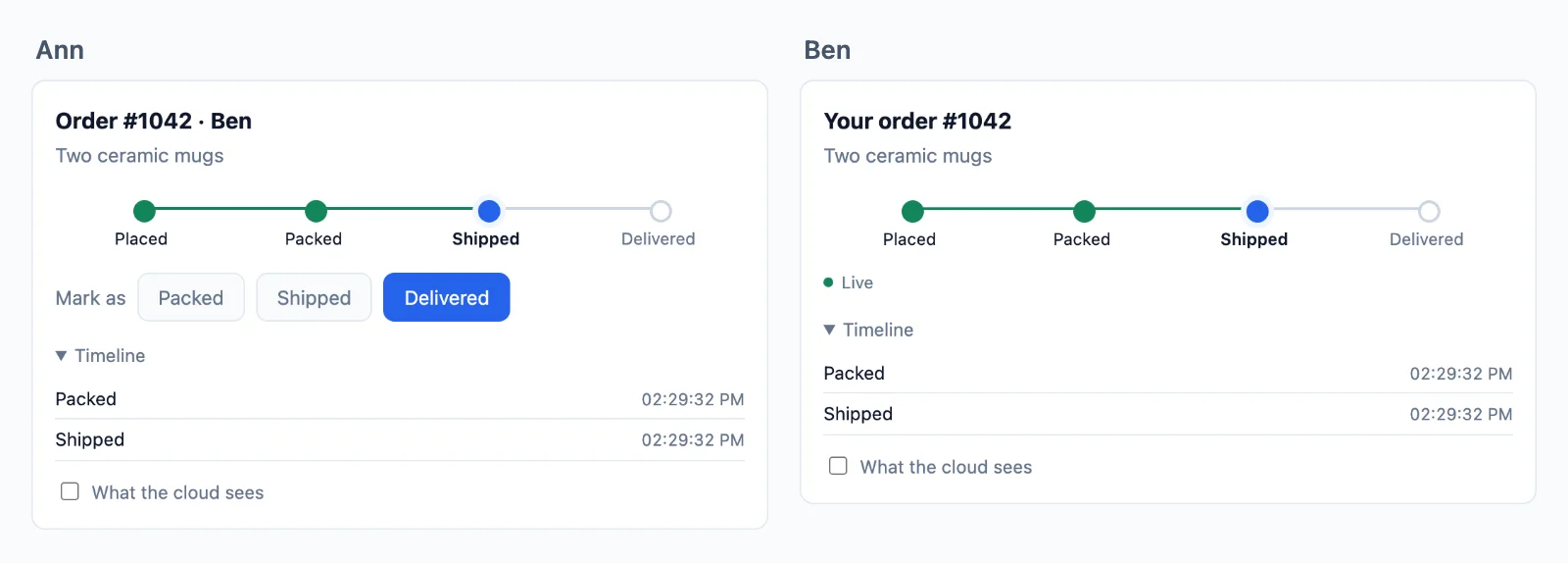
Hosted
The part you no longer run
A WebSocket server works on your laptop. In production it has to keep every connection open for hours, share each event between machines and survive your deploys, and a serverless host cannot hold a connection at all. Here the connections stay with us, and your server stays as it is.
Your server sends one request
- Next.js, Express, Node.js, Laravel, PHP, Django, FastAPI, Flask
- Serverless and edge functions
- Any other stack
Your users stay connected
- Browser tabs
- Mobile apps
- Realtime events
- Rooms
- Presence
- Reconnects
No websocket servers to keep
Your own websocket server has to hold every connection, grow past one machine and stay up through deploys. The cloud does that, adding servers as your traffic grows, and a page moves to another server without a drop.
Any host for your server
Your server only signs and sends, so it runs anywhere, serverless and edge functions included, which cannot hold a connection open themselves.
Your sign-in stays yours
A user is whatever id your app knows them by, read on your own server, so your session and cookies work as they do now.
Your server decides
Send to anyone, see who is online, and manage your rooms
A room is only a name, such as chat:7, with nothing to create in the cloud. Your database says which rooms exist and who is in them, one rule on your server reads it, and the cloud holds every page to the answer. Here is a team chat, from start to end.
Next.js on the server, and React on the page.
Create a room
Save it in your database, and write one rule that reads it. The rule runs when someone asks to join: false keeps them out, true lets them in, and readOnly lets them read and send nothing. Here db is your own database, and me is the person signed in.
// A room is a row of yours. Nothing is created in the cloud.
const room = await db.room.create( { data: { name: 'Team' } } );

await db.member.create( { data: { roomId: room.id, userId: me, role: 'member' } } );

// Its name is yours to choose: row 7 is the room chat:7.// Once, for every chat. When someone asks to join chat:7, id is '7'.
realtime.room( 'chat:{id}', async ( user, { id } ) => {
const room = await db.room.findUnique( { where: { id: Number( id ) } } );
if ( !room || room.closed ) return false; // no such room, or closed
const member = await db.member.findFirst( { where: { roomId: room.id, userId: user } } );
if ( !member || member.banned ) return false; // not a member, or banned
return member.role === 'reader' ? { readOnly: true } : true;
}, { presence: true, emit: [ 'message' ] } );// A room is a row of yours. Nothing is created in the cloud.
const room = await db.room.create( { data: { name: 'Team' } } );
await db.member.create( { data: { roomId: room.id, userId: req.session.userId, role: 'member' } } );
// Its name is yours to choose: row 7 is the room chat:7.// Once, for every chat. When someone asks to join chat:7, id is '7'.
realtime.room( 'chat:{id}', async ( user, { id } ) => {
const room = await db.room.findUnique( { where: { id: Number( id ) } } );
if ( !room || room.closed ) return false; // no such room, or closed
const member = await db.member.findFirst( { where: { roomId: room.id, userId: user } } );
if ( !member || member.banned ) return false; // not a member, or banned
return member.role === 'reader' ? { readOnly: true } : true;
}, { presence: true, emit: [ 'message' ] } );// A room is a row of yours. Nothing is created in the cloud.
const room = await db.room.create( { data: { name: 'Team' } } );
await db.member.create( { data: { roomId: room.id, userId: me, role: 'member' } } );
// Its name is yours to choose: row 7 is the room chat:7.// Once, for every chat. When someone asks to join chat:7, id is '7'.
realtime.room( 'chat:{id}', async ( user, { id } ) => {
const room = await db.room.findUnique( { where: { id: Number( id ) } } );
if ( !room || room.closed ) return false; // no such room, or closed
const member = await db.member.findFirst( { where: { roomId: room.id, userId: user } } );
if ( !member || member.banned ) return false; // not a member, or banned
return member.role === 'reader' ? { readOnly: true } : true;
}, { presence: true, emit: [ 'message' ] } );// A room is a row of yours. Nothing is created in the cloud.
$room = Room::create( [ 'name' => 'Team' ] );
$room->members()->create( [ 'user_id' => auth()->id(), 'role' => 'member' ] );
// Its name is yours to choose: row 7 is the room chat:7.// Once, for every chat. When someone asks to join chat:7, $p['id'] is '7'.
$this->callAfterResolving( Realtime::class, function ( Realtime $realtime ) {
$realtime->room( 'chat:{id}', function ( $user, array $p ) {
$room = Room::find( $p['id'] );
if ( ! $room || $room->closed ) {
return false; // no such room, or closed
}
$member = $room->members()->where( 'user_id', $user )->first();
if ( ! $member || $member->banned ) {
return false; // not a member, or banned
}
return $member->role === 'reader' ? [ 'readOnly' => true ] : true;
}, [ 'presence' => true, 'emit' => [ 'message' ] ] );
} );// A room is a row of yours. Nothing is created in the cloud.
$db->prepare( 'INSERT INTO rooms (name) VALUES (?)' )->execute( [ 'Team' ] );
$room = $db->lastInsertId();
$db->prepare( 'INSERT INTO members (room_id, user_id, role) VALUES (?, ?, ?)' )
->execute( [ $room, $_SESSION['user_id'], 'member' ] );
// Its name is yours to choose: row 7 is the room chat:7.// Once, for every chat. When someone asks to join chat:7, $p['id'] is '7'.
$realtime->room( 'chat:{id}', function ( $user, array $p ) use ( $db ) {
$query = $db->prepare( 'SELECT closed FROM rooms WHERE id = ?' );
$query->execute( [ $p['id'] ] );
$room = $query->fetch();
if ( ! $room || $room['closed'] ) {
return false; // no such room, or closed
}
$query = $db->prepare( 'SELECT role, banned FROM members WHERE room_id = ? AND user_id = ?' );
$query->execute( [ $p['id'], $user ] );
$member = $query->fetch();
if ( ! $member || $member['banned'] ) {
return false; // not a member, or banned
}
return $member['role'] === 'reader' ? [ 'readOnly' => true ] : true;
}, [ 'presence' => true, 'emit' => [ 'message' ] ] );# A room is a row of yours. Nothing is created in the cloud.
room = Room.objects.create(name="Team")
room.members.create(user=request.user, role="member")
# Its name is yours to choose: row 7 is the room chat:7.# Once, for every chat. When someone asks to join chat:7, p["id"] is "7".
def may_join_chat(user, p):
room = Room.objects.filter(pk=p["id"]).first()
if room is None or room.closed:
return False # no such room, or closed
member = room.members.filter(user_id=user).first()
if member is None or member.banned:
return False # not a member, or banned
return {"readOnly": True} if member.role == "reader" else True
realtime.room("chat:{id}", may_join_chat, presence=True, emit=["message"])# A room is a row of yours. Nothing is created in the cloud.
room = Room(name="Team", members=[Member(user_id=me, role="member")])
db.add(room)
db.commit()
# Its name is yours to choose: row 7 is the room chat:7.# Once, for every chat. When someone asks to join chat:7, p["id"] is "7".
def may_join_chat(user, p):
with SessionLocal() as db:
room = db.get(Room, int(p["id"]))
if room is None or room.closed:
return False # no such room, or closed
member = db.query(Member).filter_by(room_id=room.id, user_id=user).first()
if member is None or member.banned:
return False # not a member, or banned
return {"readOnly": True} if member.role == "reader" else True
realtime.room("chat:{id}", may_join_chat, presence=True, emit=["message"])# A room is a row of yours. Nothing is created in the cloud.
room = Room(name="Team", members=[Member(user_id=session["user_id"], role="member")])
db.session.add(room)
db.session.commit()
# Its name is yours to choose: row 7 is the room chat:7.# Once, for every chat. When someone asks to join chat:7, p["id"] is "7".
def may_join_chat(user, p):
room = db.session.get(Room, int(p["id"]))
if room is None or room.closed:
return False # no such room, or closed
member = Member.query.filter_by(room_id=room.id, user_id=user).first()
if member is None or member.banned:
return False # not a member, or banned
return {"readOnly": True} if member.role == "reader" else True
realtime.room("chat:{id}", may_join_chat, presence=True, emit=["message"])-- A room is a row of yours. Nothing is created in the cloud.
INSERT INTO rooms (name) VALUES ('Team');
INSERT INTO members (room_id, user_id, role) VALUES (7, 42, 'member');
-- Its name is yours to choose: row 7 is the room chat:7.// In Go, on the example in the docs. Any language does the same, and sealing is one step more.
// Your /auth route asks this for each room a page wants. For chat:7, id is "7".
func roomRule(room, user string) (*wordplus.Room, string) {
id, isChat := strings.CutPrefix(room, "chat:")
if !isChat {
return nil, "no_rule"
}
row := findRoom(id)
if row == nil || row.Closed {
return nil, "forbidden" // no such room, or closed
}
member := findMember(id, user)
if member == nil || member.Banned {
return nil, "forbidden" // not a member, or banned
}
return &wordplus.Room{
Presence: true,
Emit: []string{"message"},
ReadOnly: member.Role == "reader",
Info: profile(user),
}, ""
}Join and send
A page joins by the name, and your rule answers. It then hears what is sent to the room and sends to it, as the rule allows. draw and the rest are your own functions.
Hooks and components for any React app, on any of the servers above.
import { connect } from '@wordplus/realtime';

const rt = await connect();

const chat = rt.join( 'chat:7' );

chat.on( 'message', ( data, meta ) => draw( data.text, meta.from ) );
chat.on( 'error', ( e ) => showOut( e.code ) );   // forbidden: your rule said no
chat.on( 'kicked', () => showOut( 'kicked' ) );

chat.emit( 'message', { text: 'Hi' } );import { connect } from '@wordplus/realtime';
const config = document.getElementById( 'realtime' ).textContent;
const rt = await connect( JSON.parse( config ) );
const chat = rt.join( 'chat:7' );
chat.on( 'message', ( data, meta ) => draw( data.text, meta.from ) );
chat.on( 'error', ( e ) => showOut( e.code ) ); // forbidden: your rule said no
chat.on( 'kicked', () => showOut( 'kicked' ) );
chat.emit( 'message', { text: 'Hi' } );import { connect } from '@wordplus/realtime';
const config = document.getElementById( 'realtime' ).textContent;
const rt = await connect( JSON.parse( config ) );
const chat = rt.join( 'chat:7' );
chat.on( 'message', ( data, meta ) => draw( data.text, meta.from ) );
chat.on( 'error', ( e ) => showOut( e.code ) ); // forbidden: your rule said no
chat.on( 'kicked', () => showOut( 'kicked' ) );
chat.emit( 'message', { text: 'Hi' } );import { connect } from '@wordplus/realtime';
const rt = await connect( window.wordplusRealtimeConfig );
const chat = rt.join( 'chat:7' );
chat.on( 'message', ( data, meta ) => draw( data.text, meta.from ) );
chat.on( 'error', ( e ) => showOut( e.code ) ); // forbidden: your rule said no
chat.on( 'kicked', () => showOut( 'kicked' ) );
chat.emit( 'message', { text: 'Hi' } );import { connect } from '@wordplus/realtime';
const rt = await connect( window.wordplusRealtimeConfig );
const chat = rt.join( 'chat:7' );
chat.on( 'message', ( data, meta ) => draw( data.text, meta.from ) );
chat.on( 'error', ( e ) => showOut( e.code ) ); // forbidden: your rule said no
chat.on( 'kicked', () => showOut( 'kicked' ) );
chat.emit( 'message', { text: 'Hi' } );import { connect } from '@wordplus/realtime';
const rt = await connect( window.wordplusRealtimeConfig );
const chat = rt.join( 'chat:7' );
chat.on( 'message', ( data, meta ) => draw( data.text, meta.from ) );
chat.on( 'error', ( e ) => showOut( e.code ) ); // forbidden: your rule said no
chat.on( 'kicked', () => showOut( 'kicked' ) );
chat.emit( 'message', { text: 'Hi' } );import { connect } from '@wordplus/realtime';
const rt = await connect( window.wordplusRealtimeConfig );
const chat = rt.join( 'chat:7' );
chat.on( 'message', ( data, meta ) => draw( data.text, meta.from ) );
chat.on( 'error', ( e ) => showOut( e.code ) ); // forbidden: your rule said no
chat.on( 'kicked', () => showOut( 'kicked' ) );
chat.emit( 'message', { text: 'Hi' } );import { connect } from '@wordplus/realtime';
const rt = await connect( window.wordplusRealtimeConfig );
const chat = rt.join( 'chat:7' );
chat.on( 'message', ( data, meta ) => draw( data.text, meta.from ) );
chat.on( 'error', ( e ) => showOut( e.code ) ); // forbidden: your rule said no
chat.on( 'kicked', () => showOut( 'kicked' ) );
chat.emit( 'message', { text: 'Hi' } );import { connect } from '@wordplus/realtime';
const settings = await fetch( '/api/realtime/config' );
const rt = await connect( await settings.json() );
const chat = rt.join( 'chat:7' );
chat.on( 'message', ( data, meta ) => draw( data.text, meta.from ) );
chat.on( 'error', ( e ) => showOut( e.code ) ); // forbidden: your rule said no
chat.on( 'kicked', () => showOut( 'kicked' ) );
chat.emit( 'message', { text: 'Hi' } );const rt = window.Echo.connector.rt; // the connection Echo made
const chat = rt.join( 'chat:7' );
chat.on( 'message', ( data, meta ) => draw( data.text, meta.from ) );
chat.on( 'error', ( e ) => showOut( e.code ) ); // forbidden: your rule said no
chat.on( 'kicked', () => showOut( 'kicked' ) );
chat.emit( 'message', { text: 'Hi' } );'use client'; // in Next.js
import { useRoom } from '@wordplus/realtime/react';
// Inside <RealtimeProvider>, once for the whole app.
export function Chat( { id } ) {
const chat = useRoom( `chat:${ id }`, {
message: ( data, meta ) => draw( data.text, meta.from ),
} );
// forbidden when your rule says no, kicked when they are taken out.
if ( chat.error ) return <p>You are not in this room.</p>;
return <SendBox onSend={ ( text ) => chat.emit( 'message', { text } ) } />;
}<script setup>
import { useRoom } from '@wordplus/realtime/vue';
// provideRealtime() once, in your root component.
const { error, emit } = useRoom( 'chat:7', {
message: ( data, meta ) => draw( data.text, meta.from ),
} );
</script>
<template>
<!-- forbidden when your rule says no, kicked when they are taken out -->
<p v-if="error">You are not in this room.</p>
<SendBox v-else @send="( text ) => emit( 'message', { text } )" />
</template><script>
import { useRoom } from '@wordplus/realtime/svelte';
import SendBox from './SendBox.svelte';
// provideRealtime() once, in your root component.
const chat = useRoom( 'chat:7', {
message: ( data, meta ) => draw( data.text, meta.from ),
} );
</script>
<!-- forbidden when your rule says no, kicked when they are taken out -->
{#if chat.error}
<p>You are not in this room.</p>
{:else}
<SendBox onsend={ ( text ) => chat.emit( 'message', { text } ) } />
{/if}import { Component, signal } from '@angular/core';
import type { Room } from '@wordplus/realtime';
// realtime.ts, one connection for the whole app:
// export const realtime = connect();
import { realtime } from './realtime';
import { SendBox } from './send-box';
@Component( {
selector: 'app-chat',
imports: [ SendBox ],
template: `
@if ( out() ) {
<p>You are not in this room.</p>
} @else {
<app-send-box (send)="send( $event )" />
}
`,
} )
export class ChatComponent {
chat?: Room;
out = signal( false );
async ngOnInit() {
this.chat = ( await realtime ).join( 'chat:7' );
this.chat.on( 'message', ( data, meta ) => draw( data.text, meta.from ) );
this.chat.on( 'error', () => this.out.set( true ) ); // forbidden: your rule said no
this.chat.on( 'kicked', () => this.out.set( true ) );
}
send( text: string ) {
this.chat?.emit( 'message', { text } );
}
async ngOnDestroy() {
( await realtime ).leave( 'chat:7' );
}
}let chat = rt.join("chat:7")
chat.on("message") { data, meta in draw(data["text"]?.string ?? "", meta.from) }
chat.on("error") { error, _ in showOut(error["code"]?.string ?? "") } // forbidden: your rule said no
chat.on("kicked") { _, _ in showOut("kicked") }
chat.emit("message", ["text": "Hi"])val chat = rt.join("chat:7")
chat.on("message") { data, meta -> draw(data.jsonObject["text"]?.jsonPrimitive?.content ?: "", meta.from) }
chat.on("error") { error, _ -> showOut(error.jsonObject["code"]?.jsonPrimitive?.content ?: "") } // forbidden: your rule said no
chat.on("kicked") { _, _ -> showOut("kicked") }
chat.emit("message", buildJsonObject { put("text", "Hi") })import { Text } from 'react-native';
import { useRoom } from '@wordplus/realtime/react';
// Inside <RealtimeProvider>, once for the whole app.
export function Chat( { id } ) {
const chat = useRoom( `chat:${ id }`, {
message: ( data, meta ) => draw( data.text, meta.from ),
} );
// forbidden when your rule says no, kicked when they are taken out.
if ( chat.error ) return <Text>You are not in this room.</Text>;
return <SendBox onSend={ ( text ) => chat.emit( 'message', { text } ) } />;
}final chat = rt.join('chat:7');
chat.on('message', (data, meta) => draw(data['text'], meta.from));
chat.on('error', (error, _) => showOut(error['code'])); // forbidden: your rule said no
chat.on('kicked', (_, _) => showOut('kicked'));
chat.emit('message', {'text': 'Hi'});// Your server sends to the room too.
await realtime.to( 'chat:7' ).emit( 'message', { text: 'Welcome' } );// Your server sends to the room too.
await realtime.to( 'chat:7' ).emit( 'message', { text: 'Welcome' } );// Your server sends to the room too.
await realtime.to( 'chat:7' ).emit( 'message', { text: 'Welcome' } );// Your server sends to the room too.
Realtime::to( 'chat:7' )->emit( 'message', [ 'text' => 'Welcome' ] );// Your server sends to the room too.
$realtime->to( 'chat:7' )->emit( 'message', [ 'text' => 'Welcome' ] );# Your server sends to the room too.
realtime.to("chat:7").emit("message", {"text": "Welcome"})# Your server sends to the room too. In an async route, await aemit().
realtime.to("chat:7").emit("message", {"text": "Welcome"})# Your server sends to the room too.
realtime.to("chat:7").emit("message", {"text": "Welcome"})# Your server sends to the room too. wordplus is a signed curl, on the signing page of the docs.
wordplus POST /wordplus/realtime/emit '{"rooms":["chat:7"],"event":"message","data":{"text":"Welcome"}}'Confirm and keep a message
Sending with an ack tells the page when the cloud has taken a message, or why your rule refused it. The webhook then gives your server each one to keep in your database, as the cloud keeps events for reconnects alone. markSent and db are your own.
Hooks and components for any React app, on any of the servers above.
// Once the cloud has checked it, kept it and sent it on: its id and time.
// Your rule saying no rejects it, with a code.
const { id, at } = await chat.emitWithAck( 'message', { text: 'Hi' } );

markSent( id, at );// Once the cloud has checked it, kept it and sent it on: its id and time.
// Your rule saying no rejects it, with a code.
const { id, at } = await chat.emitWithAck( 'message', { text: 'Hi' } );
markSent( id, at );// Once the cloud has checked it, kept it and sent it on: its id and time.
// Your rule saying no rejects it, with a code.
const { id, at } = await chat.emitWithAck( 'message', { text: 'Hi' } );
markSent( id, at );// Once the cloud has checked it, kept it and sent it on: its id and time.
// Your rule saying no rejects it, with a code.
const { id, at } = await chat.emitWithAck( 'message', { text: 'Hi' } );
markSent( id, at );// Once the cloud has checked it, kept it and sent it on: its id and time.
// Your rule saying no rejects it, with a code.
const { id, at } = await chat.emitWithAck( 'message', { text: 'Hi' } );
markSent( id, at );// Once the cloud has checked it, kept it and sent it on: its id and time.
// Your rule saying no rejects it, with a code.
const { id, at } = await chat.emitWithAck( 'message', { text: 'Hi' } );
markSent( id, at );// Once the cloud has checked it, kept it and sent it on: its id and time.
// Your rule saying no rejects it, with a code.
const { id, at } = await chat.emitWithAck( 'message', { text: 'Hi' } );
markSent( id, at );// Once the cloud has checked it, kept it and sent it on: its id and time.
// Your rule saying no rejects it, with a code.
const { id, at } = await chat.emitWithAck( 'message', { text: 'Hi' } );
markSent( id, at );// Once the cloud has checked it, kept it and sent it on: its id and time.
// Your rule saying no rejects it, with a code.
const { id, at } = await chat.emitWithAck( 'message', { text: 'Hi' } );
markSent( id, at );const rt = window.Echo.connector.rt; // the connection Echo made
const chat = rt.join( 'chat:7' );
// Once the cloud has checked it, kept it and sent it on: its id and time.
const { id, at } = await chat.emitWithAck( 'message', { text: 'Hi' } );const chat = useRoom( 'chat:7' );
// Once the cloud has checked it, kept it and sent it on: its id and time.
const { id, at } = await chat.emitWithAck( 'message', { text: 'Hi' } );<script setup>
import { useRoom } from '@wordplus/realtime/vue';
const { emitWithAck } = useRoom( 'chat:7' );
// Once the cloud has checked it, kept it and sent it on: its id and time.
const send = async ( text ) => markSent( await emitWithAck( 'message', { text } ) );
</script><script>
import { useRoom } from '@wordplus/realtime/svelte';
const chat = useRoom( 'chat:7' );
// Once the cloud has checked it, kept it and sent it on: its id and time.
const send = async ( text ) => markSent( await chat.emitWithAck( 'message', { text } ) );
</script>// Once the cloud has checked it, kept it and sent it on: its id and time.
async send( text: string ) {
const { id, at } = await this.chat!.emitWithAck( 'message', { text } );
markSent( id, at );
}// Once the cloud has checked it, kept it and sent it on: ack.id, ack.at.
let ack = try await chat.emitWithAck("message", ["text": "Hi"])// Once the cloud has checked it, kept it and sent it on: ack.id, ack.at.
val ack = chat.emitWithAck("message", buildJsonObject { put("text", "Hi") })const chat = useRoom( 'chat:7' );
// Once the cloud has checked it, kept it and sent it on: its id and time.
const { id, at } = await chat.emitWithAck( 'message', { text: 'Hi' } );// Once the cloud has checked it, kept it and sent it on: ack.id, ack.at.
final ack = await chat.emitWithAck('message', {'text': 'Hi'});// The webhook gives your server what pages send. Keep it once, by the id the pages saw.
realtime.on( 'message', async ( { room, from, data, event_id, at } ) => {
await db.message.upsert( { id: event_id, room, from, text: data.text, at } );
} );// The webhook gives your server what pages send. Keep it once, by the id the pages saw.
realtime.on( 'message', async ( { room, from, data, event_id, at } ) => {
await db.message.upsert( { id: event_id, room, from, text: data.text, at } );
} );// The webhook gives your server what pages send. Keep it once, by the id the pages saw.
realtime.on( 'message', async ( { room, from, data, event_id, at } ) => {
await db.message.upsert( { id: event_id, room, from, text: data.text, at } );
} );$this->callAfterResolving( Realtime::class, function ( Realtime $realtime ) {
// The webhook gives your server what pages send. Keep it once, by the id the pages saw.
$realtime->on( 'message', function ( array $e ) {
Message::updateOrCreate( [ 'id' => $e['event_id'] ], [ 'room' => $e['room'], 'from' => $e['from'], 'text' => $e['data']['text'] ] );
} );
} );// The webhook gives your server what pages send. Keep it once, by the id the pages saw.
$realtime->on( 'message', function ( array $e ) {
save_message( $e['event_id'], $e['room'], $e['from'], $e['data']['text'], $e['at'] );
} );# The webhook gives your server what pages send. Keep it once, by the id the pages saw.
def keep_message(e):
save_message(e["event_id"], e["room"], e["from"], e["data"]["text"], e["at"])
realtime.on("message", keep_message)# The webhook gives your server what pages send. Keep it once, by the id the pages saw.
def keep_message(e):
save_message(e["event_id"], e["room"], e["from"], e["data"]["text"], e["at"])
realtime.on("message", keep_message)# The webhook gives your server what pages send. Keep it once, by the id the pages saw.
def keep_message(e):
save_message(e["event_id"], e["room"], e["from"], e["data"]["text"], e["at"])
realtime.on("message", keep_message)// In your webhook route, once its signature is checked as the docs say.
// Keep it once, by the id the pages saw.
if event.Type == "message" {
saveMessage(event.EventID, event.Room, event.From, event.Data["text"], event.At)
}Show who is typing
Something that matters only now goes volatile: dropped rather than queued while offline, and never kept. It reaches everyone else in the room, the sender's other tabs too. showTyping is your own function.
// Pages may send what your rule lists.
realtime.room( 'chat:{id}', mayJoin, { presence: true, emit: [ 'message', 'typing' ] } );// Pages may send what your rule lists.
realtime.room( 'chat:{id}', mayJoin, { presence: true, emit: [ 'message', 'typing' ] } );// Pages may send what your rule lists.
realtime.room( 'chat:{id}', mayJoin, { presence: true, emit: [ 'message', 'typing' ] } );$this->callAfterResolving( Realtime::class, function ( Realtime $realtime ) {
// Pages may send what your rule lists.
$realtime->room( 'chat:{id}', $mayJoin, [ 'presence' => true, 'emit' => [ 'message', 'typing' ] ] );
} );// Pages may send what your rule lists.
$realtime->room( 'chat:{id}', $may_join, [ 'presence' => true, 'emit' => [ 'message', 'typing' ] ] );# Pages may send what your rule lists.
realtime.room("chat:{id}", may_join, presence=True, emit=["message", "typing"])# Pages may send what your rule lists.
realtime.room("chat:{id}", may_join, presence=True, emit=["message", "typing"])# Pages may send what your rule lists.
realtime.room("chat:{id}", may_join, presence=True, emit=["message", "typing"])// In your /auth route, in Go on the example in the docs. Pages may send what the room lists.
room := wordplus.Room{Presence: true, Emit: []string{"message", "typing"}}Hooks and components for any React app, on any of the servers above.
// Volatile: dropped rather than queued while offline, and never kept.
chat.volatile.emit( 'typing', { on: true } );

chat.on( 'typing', ( data, meta ) => showTyping( meta.from, data.on ) );// Volatile: dropped rather than queued while offline, and never kept.
chat.volatile.emit( 'typing', { on: true } );
chat.on( 'typing', ( data, meta ) => showTyping( meta.from, data.on ) );// Volatile: dropped rather than queued while offline, and never kept.
chat.volatile.emit( 'typing', { on: true } );
chat.on( 'typing', ( data, meta ) => showTyping( meta.from, data.on ) );// Volatile: dropped rather than queued while offline, and never kept.
chat.volatile.emit( 'typing', { on: true } );
chat.on( 'typing', ( data, meta ) => showTyping( meta.from, data.on ) );// Volatile: dropped rather than queued while offline, and never kept.
chat.volatile.emit( 'typing', { on: true } );
chat.on( 'typing', ( data, meta ) => showTyping( meta.from, data.on ) );// Volatile: dropped rather than queued while offline, and never kept.
chat.volatile.emit( 'typing', { on: true } );
chat.on( 'typing', ( data, meta ) => showTyping( meta.from, data.on ) );// Volatile: dropped rather than queued while offline, and never kept.
chat.volatile.emit( 'typing', { on: true } );
chat.on( 'typing', ( data, meta ) => showTyping( meta.from, data.on ) );// Volatile: dropped rather than queued while offline, and never kept.
chat.volatile.emit( 'typing', { on: true } );
chat.on( 'typing', ( data, meta ) => showTyping( meta.from, data.on ) );// Volatile: dropped rather than queued while offline, and never kept.
chat.volatile.emit( 'typing', { on: true } );
chat.on( 'typing', ( data, meta ) => showTyping( meta.from, data.on ) );const chat = window.Echo.connector.rt.join( 'chat:7' );
// Volatile: dropped rather than queued while offline, and never kept.
chat.volatile.emit( 'typing', { on: true } );

chat.on( 'typing', ( data, meta ) => showTyping( meta.from, data.on ) );const chat = useRoom( 'chat:7' );
const typing = useTyping( chat ); // the ids of those typing, gone when they stop
// Volatile: dropped rather than queued while offline, and never kept.
const onKey = () => chat.room?.volatile.emit( 'typing', { on: true } );<script setup>
import { useRoom, useTyping } from '@wordplus/realtime/vue';
const chat = useRoom( 'chat:7' );
const typing = useTyping( chat ); // the ids of those typing, gone when they stop
// Volatile: dropped rather than queued while offline, and never kept.
const onKey = () => chat.room.value?.volatile.emit( 'typing', { on: true } );
</script><script>
import { useRoom, useTyping } from '@wordplus/realtime/svelte';
const chat = useRoom( 'chat:7' );
const typing = useTyping( chat ); // typing.current: the ids of those typing
// Volatile: dropped rather than queued while offline, and never kept.
const onKey = () => chat.room?.volatile.emit( 'typing', { on: true } );
</script>// Volatile: dropped rather than queued while offline, and never kept.
onKey() {
this.chat?.volatile.emit( 'typing', { on: true } );
}// Volatile: dropped rather than queued while offline, and never kept.
chat.volatile.emit("typing", ["on": true])
chat.on("typing") { data, meta in showTyping(meta.from, data["on"]?.bool ?? false) }// Volatile: dropped rather than queued while offline, and never kept.
chat.volatile.emit("typing", buildJsonObject { put("on", true) })
chat.on("typing") { data, meta -> showTyping(meta.from, data.jsonObject["on"]) }const chat = useRoom( 'chat:7' );
const typing = useTyping( chat ); // the ids of those typing, gone when they stop
// Volatile: dropped rather than queued while offline, and never kept.
const onChangeText = () => chat.room?.volatile.emit( 'typing', { on: true } );// Volatile: dropped rather than queued while offline, and never kept.
chat.volatile.emit('typing', {'on': true});
chat.on('typing', (data, meta) => showTyping(meta.from, data['on']));Catch up after a reconnect
A room your rule gives history keeps its last events for up to 5 minutes. A page that comes back gets what it missed, in order, before what comes next, also when it comes back on another of our servers. mayJoin and draw are your own.
// Keeps its last 50 events, for 5 minutes at most.
realtime.room( 'chat:{id}', mayJoin, { history: { last: 50, seconds: 300 }, emit: [ 'message' ] } );// Keeps its last 50 events, for 5 minutes at most.
realtime.room( 'chat:{id}', mayJoin, { history: { last: 50, seconds: 300 }, emit: [ 'message' ] } );// Keeps its last 50 events, for 5 minutes at most.
realtime.room( 'chat:{id}', mayJoin, { history: { last: 50, seconds: 300 }, emit: [ 'message' ] } );$this->callAfterResolving( Realtime::class, function ( Realtime $realtime ) {
// Keeps its last 50 events, for 5 minutes at most.
$realtime->room( 'chat:{id}', $mayJoin, [ 'history' => [ 'last' => 50, 'seconds' => 300 ], 'emit' => [ 'message' ] ] );
} );// Keeps its last 50 events, for 5 minutes at most.
$realtime->room( 'chat:{id}', $may_join, [ 'history' => [ 'last' => 50, 'seconds' => 300 ], 'emit' => [ 'message' ] ] );# Keeps its last 50 events, for 5 minutes at most.
realtime.room("chat:{id}", may_join, history={"last": 50, "seconds": 300}, emit=["message"])# Keeps its last 50 events, for 5 minutes at most.
realtime.room("chat:{id}", may_join, history={"last": 50, "seconds": 300}, emit=["message"])# Keeps its last 50 events, for 5 minutes at most.
realtime.room("chat:{id}", may_join, history={"last": 50, "seconds": 300}, emit=["message"])// In your /auth route, in Go on the example in the docs. Its last 50 events, for 5 minutes.
room := wordplus.Room{History: 50, Emit: []string{"message"}}Hooks and components for any React app, on any of the servers above.
// A page back on the line gets what it missed first, in order, with meta.replayed.
chat.on( 'message', ( data, meta ) => draw( data.text, meta.from, meta.replayed ) );

// Or read back through it yourself, the newest first by pages.
const { events, more } = await chat.history( { limit: 50 } );// A page back on the line gets what it missed first, in order, with meta.replayed.
chat.on( 'message', ( data, meta ) => draw( data.text, meta.from, meta.replayed ) );
// Or read back through it yourself, the newest first by pages.
const { events, more } = await chat.history( { limit: 50 } );// A page back on the line gets what it missed first, in order, with meta.replayed.
chat.on( 'message', ( data, meta ) => draw( data.text, meta.from, meta.replayed ) );
// Or read back through it yourself, the newest first by pages.
const { events, more } = await chat.history( { limit: 50 } );// A page back on the line gets what it missed first, in order, with meta.replayed.
chat.on( 'message', ( data, meta ) => draw( data.text, meta.from, meta.replayed ) );
// Or read back through it yourself, the newest first by pages.
const { events, more } = await chat.history( { limit: 50 } );// A page back on the line gets what it missed first, in order, with meta.replayed.
chat.on( 'message', ( data, meta ) => draw( data.text, meta.from, meta.replayed ) );
// Or read back through it yourself, the newest first by pages.
const { events, more } = await chat.history( { limit: 50 } );// A page back on the line gets what it missed first, in order, with meta.replayed.
chat.on( 'message', ( data, meta ) => draw( data.text, meta.from, meta.replayed ) );
// Or read back through it yourself, the newest first by pages.
const { events, more } = await chat.history( { limit: 50 } );// A page back on the line gets what it missed first, in order, with meta.replayed.
chat.on( 'message', ( data, meta ) => draw( data.text, meta.from, meta.replayed ) );
// Or read back through it yourself, the newest first by pages.
const { events, more } = await chat.history( { limit: 50 } );// A page back on the line gets what it missed first, in order, with meta.replayed.
chat.on( 'message', ( data, meta ) => draw( data.text, meta.from, meta.replayed ) );
// Or read back through it yourself, the newest first by pages.
const { events, more } = await chat.history( { limit: 50 } );// A page back on the line gets what it missed first, in order, with meta.replayed.
chat.on( 'message', ( data, meta ) => draw( data.text, meta.from, meta.replayed ) );
// Or read back through it yourself, the newest first by pages.
const { events, more } = await chat.history( { limit: 50 } );const chat = window.Echo.connector.rt.join( 'chat:7' );
// A page back on the line gets what it missed first, in order, with meta.replayed.
chat.on( 'message', ( data, meta ) => draw( data.text, meta.from, meta.replayed ) );// A page back on the line gets what it missed first, in order, with meta.replayed.
useRoom( 'chat:7', {
message: ( data, meta ) => draw( data.text, meta.from, meta.replayed ),
} );<script setup>
import { useRoom } from '@wordplus/realtime/vue';
// A page back on the line gets what it missed first, in order, with meta.replayed.
useRoom( 'chat:7', {
    message: ( data, meta ) => draw( data.text, meta.from, meta.replayed ),
} );
</script><script>
import { useRoom } from '@wordplus/realtime/svelte';
// A page back on the line gets what it missed first, in order, with meta.replayed.
useRoom( 'chat:7', {
message: ( data, meta ) => draw( data.text, meta.from, meta.replayed ),
} );
</script>async ngOnInit() {
this.chat = ( await realtime ).join( 'chat:7' );
// A page back on the line gets what it missed first, in order, with meta.replayed.
this.chat.on( 'message', ( data, meta ) => draw( data.text, meta.from, meta.replayed ) );
}// An app back on the line gets what it missed first, in order, with meta.replayed.
chat.on("message") { data, meta in draw(data["text"]?.string ?? "", meta.from, meta.replayed) }// An app back on the line gets what it missed first, in order, with meta.replayed.
chat.on("message") { data, meta ->
draw(data.jsonObject["text"]?.jsonPrimitive?.content ?: "", meta.from, meta.replayed)
}// An app back on the line gets what it missed first, in order, with meta.replayed.
useRoom( 'chat:7', {
message: ( data, meta ) => draw( data.text, meta.from, meta.replayed ),
} );// An app back on the line gets what it missed first, in order, with meta.replayed.
chat.on('message', (data, meta) => draw(data['text'], meta.from, meta.replayed));Send to one person
Your server sends to a user by their id, on every tab and device they have open, with no room to join. Someone with nothing open gets nothing, so keep what matters in your database. showNotice is your own function.
// To every tab and device they have open. 'notice' is a name of your own.
await realtime.toUser( 43 ).emit( 'notice', { text: 'Your order shipped' } );

// To several people at once, up to 1,000.
await realtime.toUser( [ 34, 43 ] ).emit( 'notice', { text: 'Starting soon' } );// To every tab and device they have open. 'notice' is a name of your own.
await realtime.toUser( 43 ).emit( 'notice', { text: 'Your order shipped' } );
// To several people at once, up to 1,000.
await realtime.toUser( [ 34, 43 ] ).emit( 'notice', { text: 'Starting soon' } );// To every tab and device they have open. 'notice' is a name of your own.
await realtime.toUser( 43 ).emit( 'notice', { text: 'Your order shipped' } );
// To several people at once, up to 1,000.
await realtime.toUser( [ 34, 43 ] ).emit( 'notice', { text: 'Starting soon' } );// To every tab and device they have open. 'notice' is a name of your own.
Realtime::toUser( 43 )->emit( 'notice', [ 'text' => 'Your order shipped' ] );
// To several people at once, up to 1,000.
Realtime::toUser( [ 34, 43 ] )->emit( 'notice', [ 'text' => 'Starting soon' ] );// To every tab and device they have open. 'notice' is a name of your own.
$realtime->toUser( 43 )->emit( 'notice', [ 'text' => 'Your order shipped' ] );
// To several people at once, up to 1,000.
$realtime->toUser( [ 34, 43 ] )->emit( 'notice', [ 'text' => 'Starting soon' ] );# To every tab and device they have open. "notice" is a name of your own.
realtime.to_user(43).emit("notice", {"text": "Your order shipped"})
# To several people at once, up to 1,000.
realtime.to_user([34, 43]).emit("notice", {"text": "Starting soon"})# In a def route, as these calls block.
# To every tab and device they have open. "notice" is a name of your own.
realtime.to_user(43).emit("notice", {"text": "Your order shipped"})

# To several people at once, up to 1,000.
realtime.to_user([34, 43]).emit("notice", {"text": "Starting soon"})# To every tab and device they have open. "notice" is a name of your own.
realtime.to_user(43).emit("notice", {"text": "Your order shipped"})
# To several people at once, up to 1,000.
realtime.to_user([34, 43]).emit("notice", {"text": "Starting soon"})# To every tab and device they have open. "notice" is a name of your own.
wordplus POST /wordplus/realtime/emit \
'{"users":["43"],"event":"notice","data":{"text":"Your order shipped"}}'
# To several people at once, up to 1,000.
wordplus POST /wordplus/realtime/emit \
'{"users":["34","43"],"event":"notice","data":{"text":"Starting soon"}}'Hooks and components for any React app, on any of the servers above.
// On the connection, with no room to join.
rt.on( 'notice', ( data ) => showNotice( data.text ) );// On the connection, with no room to join.
rt.on( 'notice', ( data ) => showNotice( data.text ) );// On the connection, with no room to join.
rt.on( 'notice', ( data ) => showNotice( data.text ) );// On the connection, with no room to join.
rt.on( 'notice', ( data ) => showNotice( data.text ) );// On the connection, with no room to join.
rt.on( 'notice', ( data ) => showNotice( data.text ) );// On the connection, with no room to join.
rt.on( 'notice', ( data ) => showNotice( data.text ) );// On the connection, with no room to join.
rt.on( 'notice', ( data ) => showNotice( data.text ) );// On the connection, with no room to join.
rt.on( 'notice', ( data ) => showNotice( data.text ) );// On the connection, with no room to join.
rt.on( 'notice', ( data ) => showNotice( data.text ) );window.Echo.connector.rt.on( 'notice', ( data ) => showNotice( data.text ) );useUserEvent( 'notice', ( data ) => showNotice( data.text ) );<script setup>
import { useUserEvent } from '@wordplus/realtime/vue';
useUserEvent( 'notice', ( data ) => showNotice( data.text ) );
</script><script>
import { useUserEvent } from '@wordplus/realtime/svelte';
useUserEvent( 'notice', ( data ) => showNotice( data.text ) );
</script>async ngOnInit() {
( await realtime ).on( 'notice', ( data ) => showNotice( data.text ) );
}rt.on("notice") { data, _ in showNotice(data["text"]?.string ?? "") }rt.on("notice") { data, _ -> showNotice(data.jsonObject["text"]?.jsonPrimitive?.content ?: "") }useUserEvent( 'notice', ( data ) => showNotice( data.text ) );rt.on('notice', (data, _) => showNotice(data['text']));Send to everyone
Your server sends to every page and app connected now, signed in or not, with no room to join. Anyone may be connected, so what it carries is not sealed: keep it for what anyone may read. showNotice is your own function.
// Every page and app connected now, signed in or not.
await realtime.toEveryone().emit( 'notice', { text: 'New version is out' } );// Every page and app connected now, signed in or not.
await realtime.toEveryone().emit( 'notice', { text: 'New version is out' } );// Every page and app connected now, signed in or not.
await realtime.toEveryone().emit( 'notice', { text: 'New version is out' } );// Every page and app connected now, signed in or not.
Realtime::toEveryone()->emit( 'notice', [ 'text' => 'New version is out' ] );// Every page and app connected now, signed in or not.
$realtime->toEveryone()->emit( 'notice', [ 'text' => 'New version is out' ] );# Every page and app connected now, signed in or not.
realtime.to_everyone().emit("notice", {"text": "New version is out"})# In a def route, as these calls block.
# Every page and app connected now, signed in or not.
realtime.to_everyone().emit("notice", {"text": "New version is out"})# Every page and app connected now, signed in or not.
realtime.to_everyone().emit("notice", {"text": "New version is out"})# Every page and app connected now, signed in or not.
wordplus POST /wordplus/realtime/emit \
'{"everyone":true,"event":"notice","data":{"text":"New version is out"}}'Hooks and components for any React app, on any of the servers above.
// With no room to join.
rt.on( 'notice', ( data ) => showNotice( data.text ) );// With no room to join.
rt.on( 'notice', ( data ) => showNotice( data.text ) );// With no room to join.
rt.on( 'notice', ( data ) => showNotice( data.text ) );// With no room to join.
rt.on( 'notice', ( data ) => showNotice( data.text ) );// With no room to join.
rt.on( 'notice', ( data ) => showNotice( data.text ) );// With no room to join.
rt.on( 'notice', ( data ) => showNotice( data.text ) );// With no room to join.
rt.on( 'notice', ( data ) => showNotice( data.text ) );// With no room to join.
rt.on( 'notice', ( data ) => showNotice( data.text ) );// With no room to join.
rt.on( 'notice', ( data ) => showNotice( data.text ) );// With no room to join.
window.Echo.connector.rt.on( 'notice', ( data ) => showNotice( data.text ) );// With no room to join.
useUserEvent( 'notice', ( data ) => showNotice( data.text ) );<script setup>
import { useUserEvent } from '@wordplus/realtime/vue';
// With no room to join.
useUserEvent( 'notice', ( data ) => showNotice( data.text ) );
</script><script>
import { useUserEvent } from '@wordplus/realtime/svelte';
// With no room to join.
useUserEvent( 'notice', ( data ) => showNotice( data.text ) );
</script>async ngOnInit() {
// With no room to join.
( await realtime ).on( 'notice', ( data ) => showNotice( data.text ) );
}// With no room to join.
rt.on("notice") { data, _ in showNotice(data["text"]?.string ?? "") }// With no room to join.
rt.on("notice") { data, _ ->
showNotice(data.jsonObject["text"]?.jsonPrimitive?.content ?: "")
}// With no room to join.
useUserEvent( 'notice', ( data ) => showNotice( data.text ) );// With no room to join.
rt.on('notice', (data, _) => showNotice(data['text']));See who is in a room
A room whose rule says presence lists who is in it to everyone in it, each with the name and picture your profile gives. Someone with several tabs is one member. The first 1,000 are listed, and the count keeps going at any size.
Hooks and components for any React app, on any of the servers above.
// The rule of chat:7 says presence: true, so the room lists who is in it.
const chat = rt.join( 'chat:7' );
// Who is in it now, as [ id, info ], and again after each reconnect.
chat.on( 'joined', () => showMembers( [ ...chat.members ] ) );
// Who comes and goes. info is your profile: their name and avatar.
chat.on( 'join', ( { id, info } ) => addMember( id, info.name ) );
chat.on( 'leave', ( { id } ) => removeMember( id ) );
// How many, at any size, at most once a second.
chat.on( 'count', ( n ) => showCount( n ) );// The rule of chat:7 says presence: true, so the room lists who is in it.
const chat = rt.join( 'chat:7' );
// Who is in it now, as [ id, info ], and again after each reconnect.
chat.on( 'joined', () => showMembers( [ ...chat.members ] ) );
// Who comes and goes. info is your profile: their name and avatar.
chat.on( 'join', ( { id, info } ) => addMember( id, info.name ) );
chat.on( 'leave', ( { id } ) => removeMember( id ) );
// How many, at any size, at most once a second.
chat.on( 'count', ( n ) => showCount( n ) );// The rule of chat:7 says presence: true, so the room lists who is in it.
const chat = rt.join( 'chat:7' );
// Who is in it now, as [ id, info ], and again after each reconnect.
chat.on( 'joined', () => showMembers( [ ...chat.members ] ) );
// Who comes and goes. info is your profile: their name and avatar.
chat.on( 'join', ( { id, info } ) => addMember( id, info.name ) );
chat.on( 'leave', ( { id } ) => removeMember( id ) );
// How many, at any size, at most once a second.
chat.on( 'count', ( n ) => showCount( n ) );// The rule of chat:7 says presence: true, so the room lists who is in it.
const chat = rt.join( 'chat:7' );
// Who is in it now, as [ id, info ], and again after each reconnect.
chat.on( 'joined', () => showMembers( [ ...chat.members ] ) );
// Who comes and goes. info is your profile: their name and avatar.
chat.on( 'join', ( { id, info } ) => addMember( id, info.name ) );
chat.on( 'leave', ( { id } ) => removeMember( id ) );
// How many, at any size, at most once a second.
chat.on( 'count', ( n ) => showCount( n ) );// The rule of chat:7 says presence: true, so the room lists who is in it.
const chat = rt.join( 'chat:7' );
// Who is in it now, as [ id, info ], and again after each reconnect.
chat.on( 'joined', () => showMembers( [ ...chat.members ] ) );
// Who comes and goes. info is your profile: their name and avatar.
chat.on( 'join', ( { id, info } ) => addMember( id, info.name ) );
chat.on( 'leave', ( { id } ) => removeMember( id ) );
// How many, at any size, at most once a second.
chat.on( 'count', ( n ) => showCount( n ) );// The rule of chat:7 says presence: true, so the room lists who is in it.
const chat = rt.join( 'chat:7' );
// Who is in it now, as [ id, info ], and again after each reconnect.
chat.on( 'joined', () => showMembers( [ ...chat.members ] ) );
// Who comes and goes. info is your profile: their name and avatar.
chat.on( 'join', ( { id, info } ) => addMember( id, info.name ) );
chat.on( 'leave', ( { id } ) => removeMember( id ) );
// How many, at any size, at most once a second.
chat.on( 'count', ( n ) => showCount( n ) );// The rule of chat:7 says presence: true, so the room lists who is in it.
const chat = rt.join( 'chat:7' );
// Who is in it now, as [ id, info ], and again after each reconnect.
chat.on( 'joined', () => showMembers( [ ...chat.members ] ) );
// Who comes and goes. info is your profile: their name and avatar.
chat.on( 'join', ( { id, info } ) => addMember( id, info.name ) );
chat.on( 'leave', ( { id } ) => removeMember( id ) );
// How many, at any size, at most once a second.
chat.on( 'count', ( n ) => showCount( n ) );// The rule of chat:7 says presence: true, so the room lists who is in it.
const chat = rt.join( 'chat:7' );
// Who is in it now, as [ id, info ], and again after each reconnect.
chat.on( 'joined', () => showMembers( [ ...chat.members ] ) );
// Who comes and goes. info is your profile: their name and avatar.
chat.on( 'join', ( { id, info } ) => addMember( id, info.name ) );
chat.on( 'leave', ( { id } ) => removeMember( id ) );
// How many, at any size, at most once a second.
chat.on( 'count', ( n ) => showCount( n ) );// The rule of chat:7 says presence: true, so the room lists who is in it.
const chat = rt.join( 'chat:7' );
// Who is in it now, as [ id, info ], and again after each reconnect.
chat.on( 'joined', () => showMembers( [ ...chat.members ] ) );
// Who comes and goes. info is your profile: their name and avatar.
chat.on( 'join', ( { id, info } ) => addMember( id, info.name ) );
chat.on( 'leave', ( { id } ) => removeMember( id ) );
// How many, at any size, at most once a second.
chat.on( 'count', ( n ) => showCount( n ) );// Each member as your profile gives them.
window.Echo.join( 'chat:7' )
.here( ( members ) => showMembers( members ) )
.joining( ( member ) => addMember( member ) )
.leaving( ( member ) => removeMember( member ) );'use client'; // in Next.js
import { usePresence } from '@wordplus/realtime/react';
// Inside <RealtimeProvider>, once for the whole app.
export function Members() {
const members = usePresence( 'chat:7' );
return (
<ul>
{ members.map( ( member ) => <li key={ member.id }>{ member.info.name }</li> ) }
</ul>
);
}<script setup>
import { usePresence } from '@wordplus/realtime/vue';
// provideRealtime() once, in your root component.
const members = usePresence( 'chat:7' );
</script>
<template>
<ul>
<li v-for="member in members" :key="member.id">{{ member.info.name }}</li>
</ul>
</template><script>
import { usePresence } from '@wordplus/realtime/svelte';
// provideRealtime() once, in your root component.
const members = usePresence( 'chat:7' );
</script>
<ul>
{#each members.current as member (member.id)}
<li>{ member.info.name }</li>
{/each}
</ul>import { Component, signal } from '@angular/core';
import { realtime } from './realtime';
@Component( {
selector: 'app-members',
template: `
<ul>
@for ( member of members(); track member[ 0 ] ) {
<li>{{ member[ 1 ].name }}</li>
}
</ul>
`,
} )
export class MembersComponent {
members = signal<[ string, any ][]>( [] );
async ngOnInit() {
const chat = ( await realtime ).join( 'chat:7' );
const update = () => this.members.set( [ ...chat.members ] );
chat.on( 'joined', update );
chat.on( 'join', update );
chat.on( 'leave', update );
}
}let chat = rt.join("chat:7")
for event in ["joined", "join", "leave"] {
chat.on(event) { _, _ in
showMembers(chat.members.map { id, info in info["name"]?.string ?? id })
}
}val chat = rt.join("chat:7")
for (event in listOf("joined", "join", "leave")) {
chat.on(event) { _, _ ->
showMembers(chat.members.map { (id, info) ->
info.jsonObject["name"]?.jsonPrimitive?.content ?: id
})
}
}import { Text } from 'react-native';
import { usePresence } from '@wordplus/realtime/react';
// Inside <RealtimeProvider>, once for the whole app.
export function Members() {
const members = usePresence( 'chat:7' );
return members.map( ( member ) => <Text key={ member.id }>{ member.info.name }</Text> );
}final chat = rt.join('chat:7');
for (final event in ['joined', 'join', 'leave']) {
chat.on(event, (_, _) {
showMembers([
for (final MapEntry(key: id, value: info) in chat.members.entries)
info?['name'] ?? id,
]);
});
}// Ask from your server: [ { id, info } ], with their info opened for you.
const { count, list } = await realtime.room( 'chat:7' ).members();// Ask from your server: [ { id, info } ], with their info opened for you.
const { count, list } = await realtime.room( 'chat:7' ).members();// Ask from your server: [ { id, info } ], with their info opened for you.
const { count, list } = await realtime.room( 'chat:7' ).members();// Ask from your server: [ [ 'id', 'info' ] ], with their info opened for you.
$members = Realtime::room( 'chat:7' )->members();
$members['count'];
$members['list'];// Ask from your server: [ [ 'id', 'info' ] ], with their info opened for you.
$members = $realtime->room( 'chat:7' )->members();
$members['count'];
$members['list'];# Ask from your server: [{"id", "info"}], with their info opened for you.
members = realtime.room("chat:7").members()
members["count"]
members["list"]# In a def route, as these calls block.
# Ask from your server: [{"id", "info"}], with their info opened for you.
members = realtime.room("chat:7").members()
members["count"]
members["list"]# Ask from your server: [{"id", "info"}], with their info opened for you.
members = realtime.room("chat:7").members()
members["count"]
members["list"]# Ask from your server: count, and each member's id and info.
wordplus GET '/wordplus/realtime/rooms/chat%3A7?members=1'See who is online
Someone your server signed in is online while any page or app of theirs is connected, and offline 10 seconds after the last one closes. Anyone signed in can watch up to 1,000 people. A hidden function in your setup leaves out those who chose to hide their status.
Hooks and components for any React app, on any of the servers above.
// Their status now, then each change, for up to 1,000 people.
rt.online.watch( [ 34, 43 ] ).on( 'change', ( { id, online } ) => showDot( id, online ) );
// How many are online across your app, live.
rt.online.on( 'count', ( n ) => showCount( n ) );
// Everyone online, a page at a time.
const { ids, next } = await rt.online.list();
showOnline( ids );// Their status now, then each change, for up to 1,000 people.
rt.online.watch( [ 34, 43 ] ).on( 'change', ( { id, online } ) => showDot( id, online ) );
// How many are online across your app, live.
rt.online.on( 'count', ( n ) => showCount( n ) );
// Everyone online, a page at a time.
const { ids, next } = await rt.online.list();
showOnline( ids );// Their status now, then each change, for up to 1,000 people.
rt.online.watch( [ 34, 43 ] ).on( 'change', ( { id, online } ) => showDot( id, online ) );
// How many are online across your app, live.
rt.online.on( 'count', ( n ) => showCount( n ) );
// Everyone online, a page at a time.
const { ids, next } = await rt.online.list();
showOnline( ids );// Their status now, then each change, for up to 1,000 people.
rt.online.watch( [ 34, 43 ] ).on( 'change', ( { id, online } ) => showDot( id, online ) );
// How many are online across your app, live.
rt.online.on( 'count', ( n ) => showCount( n ) );
// Everyone online, a page at a time.
const { ids, next } = await rt.online.list();
showOnline( ids );// Their status now, then each change, for up to 1,000 people.
rt.online.watch( [ 34, 43 ] ).on( 'change', ( { id, online } ) => showDot( id, online ) );
// How many are online across your app, live.
rt.online.on( 'count', ( n ) => showCount( n ) );
// Everyone online, a page at a time.
const { ids, next } = await rt.online.list();
showOnline( ids );// Their status now, then each change, for up to 1,000 people.
rt.online.watch( [ 34, 43 ] ).on( 'change', ( { id, online } ) => showDot( id, online ) );
// How many are online across your app, live.
rt.online.on( 'count', ( n ) => showCount( n ) );
// Everyone online, a page at a time.
const { ids, next } = await rt.online.list();
showOnline( ids );// Their status now, then each change, for up to 1,000 people.
rt.online.watch( [ 34, 43 ] ).on( 'change', ( { id, online } ) => showDot( id, online ) );
// How many are online across your app, live.
rt.online.on( 'count', ( n ) => showCount( n ) );
// Everyone online, a page at a time.
const { ids, next } = await rt.online.list();
showOnline( ids );// Their status now, then each change, for up to 1,000 people.
rt.online.watch( [ 34, 43 ] ).on( 'change', ( { id, online } ) => showDot( id, online ) );
// How many are online across your app, live.
rt.online.on( 'count', ( n ) => showCount( n ) );
// Everyone online, a page at a time.
const { ids, next } = await rt.online.list();
showOnline( ids );// Their status now, then each change, for up to 1,000 people.
rt.online.watch( [ 34, 43 ] ).on( 'change', ( { id, online } ) => showDot( id, online ) );
// How many are online across your app, live.
rt.online.on( 'count', ( n ) => showCount( n ) );
// Everyone online, a page at a time.
const { ids, next } = await rt.online.list();
showOnline( ids );const rt = window.Echo.connector.rt; // the connection Echo made
rt.online.watch( [ 34, 43 ] ).on( 'change', ( { id, online } ) => showDot( id, online ) );
rt.online.on( 'count', ( n ) => showCount( n ) );'use client'; // in Next.js
import { useOnline } from '@wordplus/realtime/react';
// Inside <RealtimeProvider>, once for the whole app.
export function Team() {
const { online, count } = useOnline( [ 34, 43 ], { count: true } );
return (
<>
<p>Ann is { online[ 34 ] ? 'online' : 'away' }</p>
<p>{ count } online now</p>
</>
);
}<script setup>
import { useOnline } from '@wordplus/realtime/vue';
// provideRealtime() once, in your root component.
const { online, count } = useOnline( [ 34, 43 ], { count: true } );
</script>
<template>
<p>Ann is {{ online[ 34 ] ? 'online' : 'away' }}</p>
<p>{{ count }} online now</p>
</template><script>
import { useOnline } from '@wordplus/realtime/svelte';
// provideRealtime() once, in your root component.
const team = useOnline( [ 34, 43 ], { count: true } );
</script>
<p>Ann is { team.online[ 34 ] ? 'online' : 'away' }</p>
<p>{ team.count } online now</p>import { Component, signal } from '@angular/core';
import { realtime } from './realtime';
@Component( {
selector: 'app-team',
template: `
<p>Ann is {{ annOnline() ? 'online' : 'away' }}</p>
<p>{{ count() }} online now</p>
`,
} )
export class TeamComponent {
annOnline = signal( false );
count = signal( 0 );
async ngOnInit() {
const rt = await realtime;
rt.online.watch( [ 34, 43 ] ).on( 'change', ( change ) => {
if ( change.id === '34' ) this.annOnline.set( change.online );
} );
rt.online.on( 'count', ( n ) => this.count.set( n ) );
}
}let people = ["34", "43"]
rt.online.watch(people).on("change") { _ in
showOnline(people.filter { rt.online.has($0) })
}
rt.online.on("count") { data in showCount(data["n"]?.number ?? 0) }
// Once connected: everyone online, a page at a time.
let (ids, next) = try await rt.online.list()val people = listOf("34", "43")
rt.online.watch(people).on("change") {
showOnline(people.filter { rt.online.has(it) })
}
rt.online.on("count") { data ->
showCount(data.jsonObject["n"]?.jsonPrimitive?.int ?: 0)
}
// Once connected: everyone online, a page at a time.
val (ids, next) = rt.online.list()import { Text } from 'react-native';
import { useOnline } from '@wordplus/realtime/react';
// Inside <RealtimeProvider>, once for the whole app.
export function Team() {
const { online, count } = useOnline( [ 34, 43 ], { count: true } );
return (
<>
<Text>Ann is { online[ 34 ] ? 'online' : 'away' }</Text>
<Text>{ count } online now</Text>
</>
);
}final people = ['34', '43'];
rt.online.watch(people).on('change', (_) {
showOnline(people.where(rt.online.has).toList());
});
rt.online.on('count', (data) => showCount(data['n']));
// Once connected: everyone online, a page at a time.
final page = await rt.online.list();// Ask from your server.
const isOnline = await realtime.online.has( 43 );
const states = await realtime.online.states( [ 34, 43 ] ); // [ { id, online, at? } ]
const count = await realtime.online.count();
const { ids, next } = await realtime.online.list();// Ask from your server.
const isOnline = await realtime.online.has( 43 );
const states = await realtime.online.states( [ 34, 43 ] ); // [ { id, online, at? } ]
const count = await realtime.online.count();
const { ids, next } = await realtime.online.list();// Ask from your server.
const isOnline = await realtime.online.has( 43 );
const states = await realtime.online.states( [ 34, 43 ] ); // [ { id, online, at? } ]
const count = await realtime.online.count();
const { ids, next } = await realtime.online.list();// Ask from your server.
$is_online = Realtime::online()->has( 43 );
$states = Realtime::online()->states( [ 34, 43 ] ); // [ [ 'id', 'online', 'at'? ] ]
$count = Realtime::online()->count();
$page = Realtime::online()->list(); // [ 'ids', 'next' ]// Ask from your server.
$is_online = $realtime->online()->has( 43 );
$states = $realtime->online()->states( [ 34, 43 ] ); // [ [ 'id', 'online', 'at'? ] ]
$count = $realtime->online()->count();
$page = $realtime->online()->list(); // [ 'ids', 'next' ]# Ask from your server.
is_online = realtime.online.has(43)
states = realtime.online.states([34, 43]) # [{"id", "online", "at"?}]
count = realtime.online.count()
page = realtime.online.list() # {"ids", "next"}# In a def route, as these calls block.
# Ask from your server.
is_online = realtime.online.has(43)
states = realtime.online.states([34, 43]) # [{"id", "online", "at"?}]
count = realtime.online.count()
page = realtime.online.list() # {"ids", "next"}# Ask from your server.
is_online = realtime.online.has(43)
states = realtime.online.states([34, 43]) # [{"id", "online", "at"?}]
count = realtime.online.count()
page = realtime.online.list() # {"ids", "next"}# Whether each is online, and how many are across your app.
wordplus GET '/wordplus/realtime/online?ids=34,43'
# Everyone online, a page at a time.
wordplus GET '/wordplus/realtime/online'Add a person
Add them to your table, and your rule lets them in from then on. To bring in a page they already have open, send it an event of your own.
await db.member.create( { data: { roomId: 7, userId: 43, role: 'member' } } );
// Tell their open pages. 'added' is a name of your own.
await realtime.toUser( 43 ).emit( 'added', { room: 'chat:7' } );await db.member.create( { data: { roomId: 7, userId: 43, role: 'member' } } );
// Tell their open pages. 'added' is a name of your own.
await realtime.toUser( 43 ).emit( 'added', { room: 'chat:7' } );await db.member.create( { data: { roomId: 7, userId: 43, role: 'member' } } );
// Tell their open pages. 'added' is a name of your own.
await realtime.toUser( 43 ).emit( 'added', { room: 'chat:7' } );RoomMember::create( [ 'room_id' => 7, 'user_id' => 43, 'role' => 'member' ] );
// Tell their open pages. 'added' is a name of your own.
Realtime::toUser( 43 )->emit( 'added', [ 'room' => 'chat:7' ] );$db->prepare( 'INSERT INTO members (room_id, user_id, role) VALUES (?, ?, ?)' )
->execute( [ 7, 43, 'member' ] );
// Tell their open pages. 'added' is a name of your own.
$realtime->toUser( 43 )->emit( 'added', [ 'room' => 'chat:7' ] );Member.objects.create(room_id=7, user_id=43, role="member")
# Tell their open pages. "added" is a name of your own.
realtime.to_user(43).emit("added", {"room": "chat:7"})# In a def route, as these calls block.
db.add(Member(room_id=7, user_id=43, role="member"))
db.commit()
# Tell their open pages. "added" is a name of your own.
realtime.to_user(43).emit("added", {"room": "chat:7"})db.session.add(Member(room_id=7, user_id=43, role="member"))
db.session.commit()
# Tell their open pages. "added" is a name of your own.
realtime.to_user(43).emit("added", {"room": "chat:7"})# In your database: INSERT INTO members (room_id, user_id, role) VALUES (7, 43, 'member')
# Tell their open pages. "added" is a name of your own.
wordplus POST /wordplus/realtime/emit '{"users":["43"],"event":"added","data":{"room":"chat:7"}}'Hooks and components for any React app, on any of the servers above.
rt.on( 'added', ( data ) => openChat( data.room ) );rt.on( 'added', ( data ) => openChat( data.room ) );rt.on( 'added', ( data ) => openChat( data.room ) );rt.on( 'added', ( data ) => openChat( data.room ) );rt.on( 'added', ( data ) => openChat( data.room ) );rt.on( 'added', ( data ) => openChat( data.room ) );rt.on( 'added', ( data ) => openChat( data.room ) );rt.on( 'added', ( data ) => openChat( data.room ) );rt.on( 'added', ( data ) => openChat( data.room ) );window.Echo.connector.rt.on( 'added', ( data ) => openChat( data.room ) );useUserEvent( 'added', ( data ) => openChat( data.room ) );<script setup>
import { useUserEvent } from '@wordplus/realtime/vue';
useUserEvent( 'added', ( data ) => openChat( data.room ) );
</script><script>
import { useUserEvent } from '@wordplus/realtime/svelte';
useUserEvent( 'added', ( data ) => openChat( data.room ) );
</script>async ngOnInit() {
( await realtime ).on( 'added', ( data ) => openChat( data.room ) );
}rt.on("added") { data, _ in openChat(data["room"]?.string ?? "") }rt.on("added") { data, _ -> openChat(data.jsonObject["room"]?.jsonPrimitive?.content ?: "") }useUserEvent( 'added', ( data ) => openChat( data.room ) );rt.on('added', (data, _) => openChat(data['room']));Make someone a reader
A reader joins and hears everything, and whatever they send is refused. For someone already in, change their role, then have the rule asked again: their pages come back by themselves with its new answer, in this room alone.
// A new reader.
await db.member.create( { data: { roomId: 7, userId: 44, role: 'reader' } } );
// Someone already in: change the role, then their pages ask your rule again.
await db.member.updateMany( { where: { roomId: 7, userId: 43 }, data: { role: 'reader' } } );
await realtime.room( 'chat:7' ).recheck( 43 );// A new reader.
await db.member.create( { data: { roomId: 7, userId: 44, role: 'reader' } } );
// Someone already in: change the role, then their pages ask your rule again.
await db.member.updateMany( { where: { roomId: 7, userId: 43 }, data: { role: 'reader' } } );
await realtime.room( 'chat:7' ).recheck( 43 );// A new reader.
await db.member.create( { data: { roomId: 7, userId: 44, role: 'reader' } } );
// Someone already in: change the role, then their pages ask your rule again.
await db.member.updateMany( { where: { roomId: 7, userId: 43 }, data: { role: 'reader' } } );
await realtime.room( 'chat:7' ).recheck( 43 );// A new reader.
RoomMember::create( [ 'room_id' => 7, 'user_id' => 44, 'role' => 'reader' ] );
// Someone already in: change the role, then their pages ask your rule again.
RoomMember::where( [ 'room_id' => 7, 'user_id' => 43 ] )->update( [ 'role' => 'reader' ] );
Realtime::room( 'chat:7' )->recheck( 43 );// A new reader.
$db->prepare( 'INSERT INTO members (room_id, user_id, role) VALUES (?, ?, ?)' )
->execute( [ 7, 44, 'reader' ] );
// Someone already in: change the role, then their pages ask your rule again.
$db->prepare( 'UPDATE members SET role = ? WHERE room_id = ? AND user_id = ?' )
->execute( [ 'reader', 7, 43 ] );
$realtime->room( 'chat:7' )->recheck( 43 );# A new reader.
Member.objects.create(room_id=7, user_id=44, role="reader")
# Someone already in: change the role, then their pages ask your rule again.
Member.objects.filter(room_id=7, user_id=43).update(role="reader")
realtime.room("chat:7").recheck(43)# In a def route, as these calls block.
# A new reader.
db.add(Member(room_id=7, user_id=44, role="reader"))
db.commit()
# Someone already in: change the role, then their pages ask your rule again.
db.query(Member).filter_by(room_id=7, user_id=43).update({"role": "reader"})
db.commit()
realtime.room("chat:7").recheck(43)# A new reader.
db.session.add(Member(room_id=7, user_id=44, role="reader"))
db.session.commit()
# Someone already in: change the role, then their pages ask your rule again.
Member.query.filter_by(room_id=7, user_id=43).update({"role": "reader"})
db.session.commit()
realtime.room("chat:7").recheck(43)# A new reader.
# In your database: INSERT INTO members (room_id, user_id, role) VALUES (7, 44, 'reader')
# Someone already in: change the role, then their pages ask your rule again.
# In your database: UPDATE members SET role = 'reader' WHERE room_id = 7 AND user_id = 43
wordplus POST /wordplus/realtime/rooms/chat%3A7/recheck '{"user":"43"}'Remove someone
Removing someone takes them out now, and their page hears kicked. A member can join again straight away, so to keep them out, remove them from your table first.
// Out now. They are still a member, so they may come back.
await realtime.room( 'chat:7' ).remove( 43 );
// Out for good: remove them first, and your rule says no from then on.
await db.member.deleteMany( { where: { roomId: 7, userId: 43 } } );
await realtime.room( 'chat:7' ).remove( 43 );// Out now. They are still a member, so they may come back.
await realtime.room( 'chat:7' ).remove( 43 );
// Out for good: remove them first, and your rule says no from then on.
await db.member.deleteMany( { where: { roomId: 7, userId: 43 } } );
await realtime.room( 'chat:7' ).remove( 43 );// Out now. They are still a member, so they may come back.
await realtime.room( 'chat:7' ).remove( 43 );
// Out for good: remove them first, and your rule says no from then on.
await db.member.deleteMany( { where: { roomId: 7, userId: 43 } } );
await realtime.room( 'chat:7' ).remove( 43 );// Out now. They are still a member, so they may come back.
Realtime::room( 'chat:7' )->remove( 43 );
// Out for good: remove them first, and your rule says no from then on.
RoomMember::where( [ 'room_id' => 7, 'user_id' => 43 ] )->delete();
Realtime::room( 'chat:7' )->remove( 43 );// Out now. They are still a member, so they may come back.
$realtime->room( 'chat:7' )->remove( 43 );
// Out for good: remove them first, and your rule says no from then on.
$db->prepare( 'DELETE FROM members WHERE room_id = ? AND user_id = ?' )->execute( [ 7, 43 ] );
$realtime->room( 'chat:7' )->remove( 43 );# Out now. They are still a member, so they may come back.
realtime.room("chat:7").remove(43)
# Out for good: remove them first, and your rule says no from then on.
Member.objects.filter(room_id=7, user_id=43).delete()
realtime.room("chat:7").remove(43)# In a def route, as these calls block.
# Out now. They are still a member, so they may come back.
realtime.room("chat:7").remove(43)
# Out for good: remove them first, and your rule says no from then on.
db.query(Member).filter_by(room_id=7, user_id=43).delete()
db.commit()
realtime.room("chat:7").remove(43)# Out now. They are still a member, so they may come back.
realtime.room("chat:7").remove(43)
# Out for good: remove them first, and your rule says no from then on.
Member.query.filter_by(room_id=7, user_id=43).delete()
db.session.commit()
realtime.room("chat:7").remove(43)# Out now. They are still a member, so they may come back.
wordplus POST /wordplus/realtime/rooms/chat%3A7/kick '{"user":"43"}'
# Out for good: remove them first, and your rule says no from then on.
# In your database: DELETE FROM members WHERE room_id = 7 AND user_id = 43
wordplus POST /wordplus/realtime/rooms/chat%3A7/kick '{"user":"43"}'Ban someone
A ban is a mark in your table that your rule reads, with a removal to take them out now. Clear the mark, and they can join again.
// The mark your rule reads, then out now.
await db.member.updateMany( { where: { roomId: 7, userId: 43 }, data: { banned: true } } );
await realtime.room( 'chat:7' ).remove( 43 );
// Lift it: they can join again.
await db.member.updateMany( { where: { roomId: 7, userId: 43 }, data: { banned: false } } );// The mark your rule reads, then out now.
await db.member.updateMany( { where: { roomId: 7, userId: 43 }, data: { banned: true } } );
await realtime.room( 'chat:7' ).remove( 43 );
// Lift it: they can join again.
await db.member.updateMany( { where: { roomId: 7, userId: 43 }, data: { banned: false } } );// The mark your rule reads, then out now.
await db.member.updateMany( { where: { roomId: 7, userId: 43 }, data: { banned: true } } );
await realtime.room( 'chat:7' ).remove( 43 );
// Lift it: they can join again.
await db.member.updateMany( { where: { roomId: 7, userId: 43 }, data: { banned: false } } );// The mark your rule reads, then out now.
RoomMember::where( [ 'room_id' => 7, 'user_id' => 43 ] )->update( [ 'banned' => true ] );
Realtime::room( 'chat:7' )->remove( 43 );
// Lift it: they can join again.
RoomMember::where( [ 'room_id' => 7, 'user_id' => 43 ] )->update( [ 'banned' => false ] );// The mark your rule reads, then out now.
$db->prepare( 'UPDATE members SET banned = 1 WHERE room_id = ? AND user_id = ?' )->execute( [ 7, 43 ] );
$realtime->room( 'chat:7' )->remove( 43 );
// Lift it: they can join again.
$db->prepare( 'UPDATE members SET banned = 0 WHERE room_id = ? AND user_id = ?' )->execute( [ 7, 43 ] );# The mark your rule reads, then out now.
Member.objects.filter(room_id=7, user_id=43).update(banned=True)
realtime.room("chat:7").remove(43)
# Lift it: they can join again.
Member.objects.filter(room_id=7, user_id=43).update(banned=False)# In a def route, as these calls block.
# The mark your rule reads, then out now.
db.query(Member).filter_by(room_id=7, user_id=43).update({"banned": True})
db.commit()
realtime.room("chat:7").remove(43)
# Lift it: they can join again.
db.query(Member).filter_by(room_id=7, user_id=43).update({"banned": False})
db.commit()# The mark your rule reads, then out now.
Member.query.filter_by(room_id=7, user_id=43).update({"banned": True})
db.session.commit()
realtime.room("chat:7").remove(43)
# Lift it: they can join again.
Member.query.filter_by(room_id=7, user_id=43).update({"banned": False})
db.session.commit()# The mark your rule reads, then out now.
# In your database: UPDATE members SET banned = 1 WHERE room_id = 7 AND user_id = 43
wordplus POST /wordplus/realtime/rooms/chat%3A7/kick '{"user":"43"}'
# Lift it: they can join again.
# In your database: UPDATE members SET banned = 0 WHERE room_id = 7 AND user_id = 43Close and reopen
Close the room in your table, so your rule says no to everyone, and remove everyone in it at once. Clear the mark to reopen it.
// Close: your rule now says no to everyone, and whoever is in it goes out.
await db.room.update( { where: { id: 7 }, data: { closed: true } } );
await realtime.room( 'chat:7' ).removeEveryone();
// Reopen: your rule says yes again, and people can join.
await db.room.update( { where: { id: 7 }, data: { closed: false } } );// Close: your rule now says no to everyone, and whoever is in it goes out.
await db.room.update( { where: { id: 7 }, data: { closed: true } } );
await realtime.room( 'chat:7' ).removeEveryone();
// Reopen: your rule says yes again, and people can join.
await db.room.update( { where: { id: 7 }, data: { closed: false } } );// Close: your rule now says no to everyone, and whoever is in it goes out.
await db.room.update( { where: { id: 7 }, data: { closed: true } } );
await realtime.room( 'chat:7' ).removeEveryone();
// Reopen: your rule says yes again, and people can join.
await db.room.update( { where: { id: 7 }, data: { closed: false } } );// Close: your rule now says no to everyone, and whoever is in it goes out.
Room::whereKey( 7 )->update( [ 'closed' => true ] );
Realtime::room( 'chat:7' )->removeEveryone();
// Reopen: your rule says yes again, and people can join.
Room::whereKey( 7 )->update( [ 'closed' => false ] );// Close: your rule now says no to everyone, and whoever is in it goes out.
$db->prepare( 'UPDATE rooms SET closed = 1 WHERE id = ?' )->execute( [ 7 ] );
$realtime->room( 'chat:7' )->removeEveryone();
// Reopen: your rule says yes again, and people can join.
$db->prepare( 'UPDATE rooms SET closed = 0 WHERE id = ?' )->execute( [ 7 ] );# Close: your rule now says no to everyone, and whoever is in it goes out.
Room.objects.filter(pk=7).update(closed=True)
realtime.room("chat:7").remove_everyone()
# Reopen: your rule says yes again, and people can join.
Room.objects.filter(pk=7).update(closed=False)# In a def route, as these calls block.
# Close: your rule now says no to everyone, and whoever is in it goes out.
db.query(Room).filter_by(id=7).update({"closed": True})
db.commit()
realtime.room("chat:7").remove_everyone()
# Reopen: your rule says yes again, and people can join.
db.query(Room).filter_by(id=7).update({"closed": False})
db.commit()# Close: your rule now says no to everyone, and whoever is in it goes out.
Room.query.filter_by(id=7).update({"closed": True})
db.session.commit()
realtime.room("chat:7").remove_everyone()
# Reopen: your rule says yes again, and people can join.
Room.query.filter_by(id=7).update({"closed": False})
db.session.commit()# Close: your rule now says no to everyone, and whoever is in it goes out.
# In your database: UPDATE rooms SET closed = 1 WHERE id = 7
wordplus POST /wordplus/realtime/rooms/chat%3A7/kick '{"everyone":true}'
# Reopen: your rule says yes again, and people can join.
# In your database: UPDATE rooms SET closed = 0 WHERE id = 7Delete a room
Delete your rows, remove everyone in it, and erase what the cloud kept for reconnects. Nothing of the room is left.
// Your rows first, so your rule says no from here on.
await db.member.deleteMany( { where: { roomId: 7 } } );
await db.room.delete( { where: { id: 7 } } );
// Then whoever is in it goes out, and what was kept for reconnects goes too.
await realtime.room( 'chat:7' ).removeEveryone();
await realtime.room( 'chat:7' ).forget();// Your rows first, so your rule says no from here on.
await db.member.deleteMany( { where: { roomId: 7 } } );
await db.room.delete( { where: { id: 7 } } );
// Then whoever is in it goes out, and what was kept for reconnects goes too.
await realtime.room( 'chat:7' ).removeEveryone();
await realtime.room( 'chat:7' ).forget();// Your rows first, so your rule says no from here on.
await db.member.deleteMany( { where: { roomId: 7 } } );
await db.room.delete( { where: { id: 7 } } );
// Then whoever is in it goes out, and what was kept for reconnects goes too.
await realtime.room( 'chat:7' ).removeEveryone();
await realtime.room( 'chat:7' ).forget();// Your rows first, so your rule says no from here on.
RoomMember::where( 'room_id', 7 )->delete();
Room::destroy( 7 );
// Then whoever is in it goes out, and what was kept for reconnects goes too.
Realtime::room( 'chat:7' )->removeEveryone();
Realtime::room( 'chat:7' )->forget();// Your rows first, so your rule says no from here on.
$db->prepare( 'DELETE FROM members WHERE room_id = ?' )->execute( [ 7 ] );
$db->prepare( 'DELETE FROM rooms WHERE id = ?' )->execute( [ 7 ] );
// Then whoever is in it goes out, and what was kept for reconnects goes too.
$realtime->room( 'chat:7' )->removeEveryone();
$realtime->room( 'chat:7' )->forget();# Your rows first, so your rule says no from here on.
Member.objects.filter(room_id=7).delete()
Room.objects.filter(pk=7).delete()
# Then whoever is in it goes out, and what was kept for reconnects goes too.
realtime.room("chat:7").remove_everyone()
realtime.room("chat:7").forget()# In a def route, as these calls block.
# Your rows first, so your rule says no from here on.
db.query(Member).filter_by(room_id=7).delete()
db.query(Room).filter_by(id=7).delete()
db.commit()
# Then whoever is in it goes out, and what was kept for reconnects goes too.
realtime.room("chat:7").remove_everyone()
realtime.room("chat:7").forget()# Your rows first, so your rule says no from here on.
Member.query.filter_by(room_id=7).delete()
Room.query.filter_by(id=7).delete()
db.session.commit()
# Then whoever is in it goes out, and what was kept for reconnects goes too.
realtime.room("chat:7").remove_everyone()
realtime.room("chat:7").forget()# Your rows first, so your rule says no from here on.
# In your database: DELETE FROM members WHERE room_id = 7
# In your database: DELETE FROM rooms WHERE id = 7
# Then whoever is in it goes out, and what was kept for reconnects goes too.
wordplus POST /wordplus/realtime/rooms/chat%3A7/kick '{"everyone":true}'
wordplus DELETE /wordplus/realtime/rooms/chat%3A7/historyThe team chat here is the start of one: the chat API adds the ready-made chat, the history, read ticks, files and moderation.
Rooms in each stack, with the whole setup:
WebSockets in Next.js
WebSockets in Express
WebSockets in Laravel
WebSockets in PHP
WebSockets in Django
WebSockets in FastAPI
WebSockets in Flask
WebSockets in iOS
WebSockets in Android
Why websockets get hard in your own framework: Next.js, Laravel, Django and Flask, FastAPI.
Running a WebSocket server of your own? Our WebSocket test checks it from your browser.
On every connection
More than a socket
A socket carries bytes. Everything an app builds around it, from reconnects to who is online, is already there.
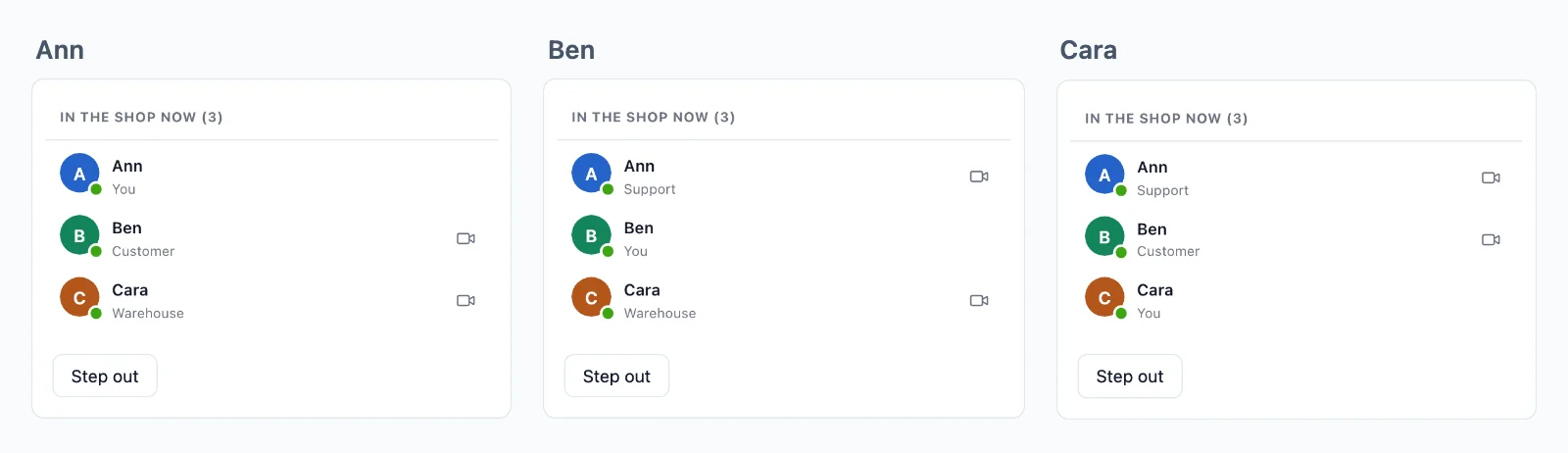
Nothing lost on a reconnect
A room can keep its last events, and a page that comes back gets what it missed, in order, before what comes next.
Who is online
A room can list who is in it, with what you choose to show of each person. A count says how many are looking at a page, at any size, and who is online is known across your whole app.
Events from the page
Pages send to the rooms they are in, with no request to your server: chat messages, typing, a cursor. The rule says which events may be sent, and a webhook gives your server those it should keep.
To one person, everywhere
Send to a user, and it reaches every tab and device they have open, with no room to set up.
Encrypted, with keys we never hold
Events, presence and history travel sealed with keys your server holds, and calls between two people are encrypted end to end. The cloud carries them without being able to read them.
One connection for every tab
The tabs of a browser share one connection, so a person with three tabs open counts once.
Use cases
What people build on WebSockets
Each is a whole app in the docs, with its server in Node.js, PHP and Python.
Live updates and notifications
An order that moves on its page, a dashboard, the progress of a job, and a notice to one user in every tab and app.
Chat
Conversations between two people and in groups, with typing, read ticks and reactions, kept in your own database.
Who is online and who is here
A dot on every avatar, the people in a room with their roles, and how many look at a page.
Editing together
Who is in a document, their cursors, and the changes, sent as binary and kept for a reconnect.
Polls, quizzes and questions
Votes and questions that reach your server alone, results sent to everyone, and a score for each player.
Live auctions
Bids your server decides one at a time, the new price to everyone, and a clock that moves on a late bid.
Pricing
Priced by connections, never by messages
From $11.99 a month for 1,000 concurrent connections, billed yearly, or $14.99 billed monthly.
Priced by concurrent connections, starting from 1,000, billed monthly or yearly. Messages and bandwidth are never charged, and what your server sends uses none of your connections.
The same plan and SDK bring video calls and live streaming, on the same connection.
Questions
Frequently asked
Do I need my own WebSocket server?
No. Browsers and apps keep their connections open to our servers, and more of them start as your app grows. Your server only says who may join what, and sends each event in one short HTTP request.
Does it work on serverless hosting?
Yes. A serverless function cannot hold a connection open, and here it does not have to: it sends each event in one short request, and the connections stay with us. Edge functions and any other host work the same way.
Which stacks can use the WebSocket API?
Next.js and Express, Laravel and plain PHP, Django, FastAPI and Flask, Capacitor, iOS and Android, each with a guide. React Native and Flutter apps have rooms and presence too. A server in any other language uses the HTTP API.
Do I write the WebSocket code myself?
No. The SDK opens the connection, reconnects by itself and joins your rooms again, and you listen for events by name. In Laravel it is a broadcasting driver, so broadcast() and your channels file stay as they are.
What counts as a connection?
A browser or a device connected to the cloud at that moment. The tabs of one browser share a connection when your app serves the SDK worker, and what your server sends through the API counts none.
What happens at my connection limit?
Up to 20% more still connect, and the account owner gets an email at 80% and at 100% of them, in time to move to a larger plan.
What happens when a page loses its connection?
It reconnects by itself. A room that keeps history gives it what it missed, in order, for up to 5 minutes, and a page away for longer is told, so it can read your server again. History is only for reconnects: your own database keeps your records.
Who decides who joins a room?
Your server, with a rule for each kind of room: who joins, what they may send, and who only reads. The cloud enforces every answer, and your server can take someone out of a room at any moment.
Can you read what my app sends?
Not in a private or presence room. Its events, its history and who is in it travel sealed with keys your server makes, and the cloud carries them without being able to read them. A public room, which anyone may join, goes plain.
Where are your servers?
The realtime servers that carry your events run in Germany. The relays and media servers for calls run in more countries.
Questions about your integration? Write to us: we help with the SDKs, the call screen and your stack.