
 English
 Deutsch
 Español
 Français
 Italiano
 Nederlands
 Polski
' d='M48 28h24v18a12 12 0 0 1-24 0z'/%3E%3Cpath fill='%230093DD' d='M47.5 21.5h4.6V28h-4.6zm10.2-2.5h4.6v9h-4.6zm10.2 2.5h4.6V28h-4.6z'/%3E%3Cpath fill='%23171796' d='M52.6 20h4.6v8h-4.6zm10.2 0h4.6v8h-4.6z'/%3E%3C/svg%3E) Hrvatski
לאפליקציות
WebSocket API בלי שרת להפעיל
API בזמן אמת על WebSockets מנוהלים, ל-Next.js, ל-Laravel, ל-Django ולכל סטאק אחר. השרת שלכם שולח אירוע בבקשה קצרה אחת, וכל דף בחדר מקבל אותו מיד. אנחנו מחזיקים את החיבורים פתוחים, ולכן אין שרת WebSocket שצריך להפעיל, להרחיב או להפעיל מחדש.
או נסו את ההדגמה החיה: חנות קטנה, שבה הזמנה הופכת לנשלחה בחלון אחר בזמן שאתם לוחצים.
התמחור הטוב ביותר ל-WebSockets. החל מ-$11.99 לחודש עבור 1,000 חיבורים בו-זמניים, בחיוב שנתי, או $14.99 בחיוב חודשי.
Next.js בשרת ו-React בדף.
'use server';

import { realtime } from '@/lib/realtime';

export async function markShipped( id: string ) {
    await saveStatus( id, 'shipped' );
    await realtime.to( `order:${ id }` )
        .emit( 'updated', { status: 'shipped' } );
}app.post( '/orders/:id/ship', async ( req, res ) => {
await saveStatus( req.params.id, 'shipped' );
await realtime.to( `order:${ req.params.id }` )
.emit( 'updated', { status: 'shipped' } );
res.json( { ok: true } );
} );import { createServer } from 'node:http';
const routes = realtime.node( userOf );
createServer( async ( req, res ) => {
if ( req.url.startsWith( '/api/realtime/' ) ) {
return routes( req, res );
}
await saveStatus( '1042', 'shipped' );
await realtime.to( 'order:1042' )
.emit( 'updated', { status: 'shipped' } );
res.end( 'ok' );
} ).listen( 3000 );public function ship( Order $order )
{
$order->update( [ 'status' => 'shipped' ] );
// Your event, as for any broadcaster.
broadcast( new OrderUpdated( $order ) );
}save_status( $id, 'shipped' );
$realtime->to( "order:{$id}" )
->emit( 'updated', [ 'status' => 'shipped' ] );from django.db import transaction
from wordplus_realtime.django import realtime
order.status = "shipped"
order.save()
# Once it commits, so nobody sees a change rolled back.
transaction.on_commit(lambda: realtime.to(f"order:{order.pk}")
.emit("updated", {"status": order.status}))@app.post("/orders/{pk}/ship")
async def ship(pk: int):
await save_status(pk, "shipped")
await realtime.to(f"order:{pk}").aemit(
"updated", {"status": "shipped"}
)
return {"ok": True}@app.post("/orders/<int:pk>/ship")
def ship(pk):
save_status(pk, "shipped")
realtime.to(f"order:{pk}").emit(
"updated", {"status": "shipped"}
)
return {"ok": True}# A signed JSON request, from any language.
# wordplus is a signed curl, on the signing page of the docs.
wordplus POST /wordplus/realtime/emit '{
"rooms": ["order:1042"],
"event": "updated",
"data": {"status": "shipped"}
}'Hooks ורכיבים לכל אפליקציית React, עם כל אחד מהשרתים למעלה.
import { connect } from '@wordplus/realtime';

const rt = await connect();

const order = rt.join( 'order:1042' );
order.on( 'updated', ( data ) => showStatus( data.status ) );import { connect } from '@wordplus/realtime';
const rt = await connect();
const order = rt.join( 'order:1042' );
order.on( 'updated', ( data ) => showStatus( data.status ) );import { connect } from '@wordplus/realtime';
const rt = await connect();
const order = rt.join( 'order:1042' );
order.on( 'updated', ( data ) => showStatus( data.status ) );import { connect } from '@wordplus/realtime';
const rt = await connect( window.wordplusRealtimeConfig );
const order = rt.join( 'order:1042' );
order.on( 'updated', ( data ) => showStatus( data.status ) );import { connect } from '@wordplus/realtime';
const rt = await connect( window.wordplusRealtimeConfig );
const order = rt.join( 'order:1042' );
order.on( 'updated', ( data ) => showStatus( data.status ) );import { connect } from '@wordplus/realtime';
const rt = await connect( window.wordplusRealtimeConfig );
const order = rt.join( 'order:1042' );
order.on( 'updated', ( data ) => showStatus( data.status ) );import { connect } from '@wordplus/realtime';
const rt = await connect( window.wordplusRealtimeConfig );
const order = rt.join( 'order:1042' );
order.on( 'updated', ( data ) => showStatus( data.status ) );import { connect } from '@wordplus/realtime';
const rt = await connect( window.wordplusRealtimeConfig );
const order = rt.join( 'order:1042' );
order.on( 'updated', ( data ) => showStatus( data.status ) );import { connect } from '@wordplus/realtime';
const settings = await fetch( '/api/realtime/config' );
const rt = await connect( await settings.json() );
const order = rt.join( 'order:1042' );
order.on( 'updated', ( data ) => showStatus( data.status ) );import Echo from 'laravel-echo';
import { WordplusConnector } from '@wordplus/realtime/echo';
window.Echo = new Echo( {
broadcaster: WordplusConnector,
...window.wordplusRealtimeConfig,
} );
window.Echo.private( 'order:1042' )
.listen( '.updated', ( data ) => showStatus( data.status ) );'use client'; // in Next.js
import { useState } from 'react';
import { useRoom } from '@wordplus/realtime/react';
// Inside <RealtimeProvider>, once for the whole app.
export function Status( { id, initial } ) {
const [ status, setStatus ] = useState( initial );
useRoom( `order:${ id }`, {
updated: ( data ) => setStatus( data.status ),
} );
return <p>{ status }</p>;
}<script setup>
import { ref } from 'vue';
import { useRoom } from '@wordplus/realtime/vue';
// provideRealtime() once, in your root component.
const props = defineProps( [ 'id', 'initial' ] );
const status = ref( props.initial );
useRoom( () => `order:${ props.id }`, {
updated: ( data ) => { status.value = data.status; },
} );
</script>
<template>
<p>{{ status }}</p>
</template><script>
import { useRoom } from '@wordplus/realtime/svelte';
// provideRealtime() once, in your root component.
let { id } = $props();
let status = $state( 'new' );
useRoom( () => `order:${ id }`, {
updated: ( data ) => { status = data.status; },
} );
</script>
<p>{ status }</p>import { Component, Input, signal } from '@angular/core';
// realtime.ts, one connection for the whole app:
// export const realtime = connect();
import { realtime } from './realtime';
@Component( {
selector: 'app-status',
template: '<p>{{ status() }}</p>',
} )
export class StatusComponent {
@Input( { required: true } ) id!: number;
status = signal( 'new' );
async ngOnInit() {
const rt = await realtime;
rt.join( `order:${ this.id }` ).on( 'updated', ( data ) => {
this.status.set( data.status );
} );
}
async ngOnDestroy() {
( await realtime ).leave( `order:${ this.id }` );
}
}import WordPlusRealtime
let rt = Realtime(RealtimeOptions(
app: "s1500000007",
endpoint: URL(string: "https://shop.example.com/api/realtime")!,
headers: { ["Authorization": "Bearer \(session.token)"] }
))
rt.connect()
let order = rt.join("order:1042")
order.on("updated") { data, _ in
showStatus(data["status"]?.string ?? "")
}import cloud.wordplus.realtime.*
import kotlinx.serialization.json.*
val rt = Realtime(RealtimeOptions(
app = "s1500000007",
endpoint = "https://shop.example.com/api/realtime",
headers = {
mapOf("Authorization" to "Bearer ${session.token}")
},
))
rt.connect()
val order = rt.join("order:1042")
order.on("updated") { data, _ ->
val status = data.jsonObject["status"]?.jsonPrimitive?.content
showStatus(status ?: "")
}// First in index.js, which sealing needs:
// import 'react-native-get-random-values';
import { useState } from 'react';
import { Text } from 'react-native';
import { RealtimeProvider, useRoom } from '@wordplus/realtime/react';
const options = {
app: 's1500000007',
endpoint: 'https://app.example.com/api/realtime',
headers: { Authorization: 'Bearer ' + session.token },
};
export const App = () => (
<RealtimeProvider options={ options }>
<Status id={ 1042 } initial="new" />
</RealtimeProvider>
);
function Status( { id, initial } ) {
const [ status, setStatus ] = useState( initial );
useRoom( `order:${ id }`, {
updated: ( data ) => setStatus( data.status ),
} );
return <Text>{ status }</Text>;
}import 'package:wordplus_realtime/wordplus_realtime.dart';
final rt = await WordPlusRealtime.connect(
app: 's1500000007',
endpoint: 'https://app.example.com/api/realtime',
headers: {'Authorization': 'Bearer ${session.token}'},
);
final order = rt.join('order:1042');
order.on('updated', (data, _) => showStatus(data['status']));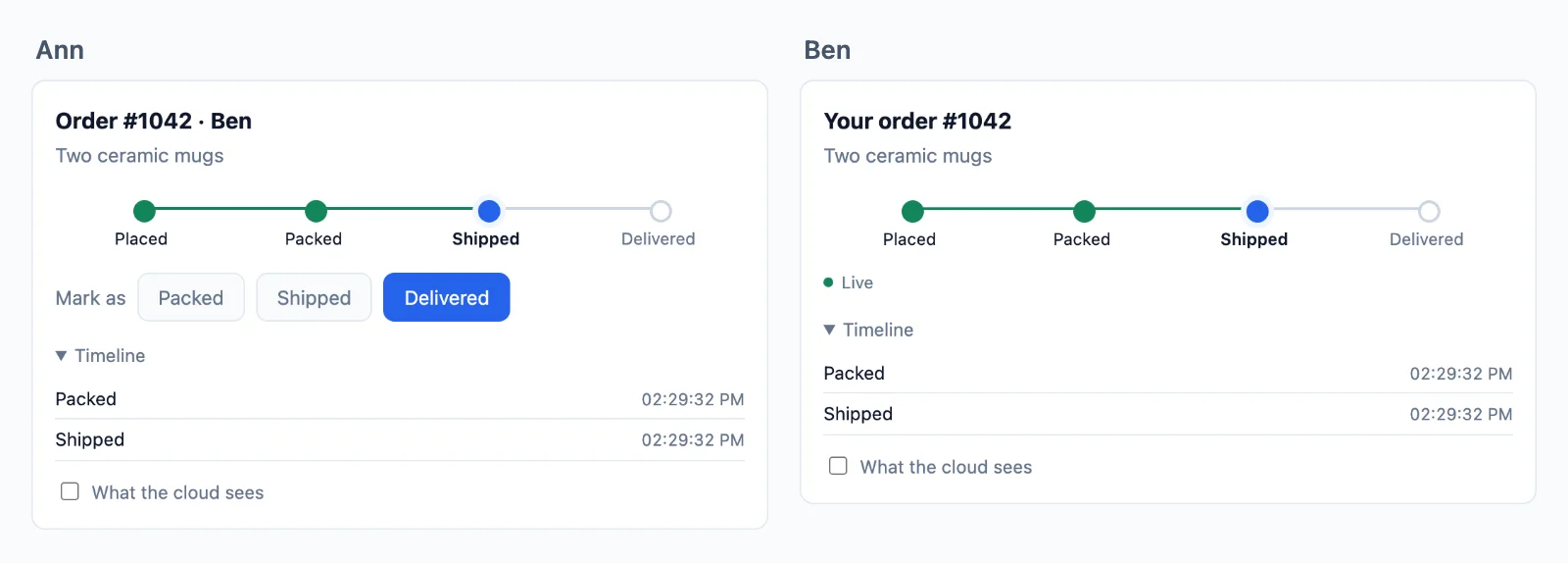
מנוהל
החלק שכבר לא צריך להפעיל
שרת WebSocket עובד על המחשב הנייד שלכם. בייצור הוא צריך להחזיק כל חיבור פתוח שעות, להעביר כל אירוע בין מכונות ולשרוד את ה-deploy שלכם, ואחסון serverless לא יכול להחזיק חיבור בכלל. כאן החיבורים נשארים אצלנו, והשרת שלכם נשאר כמו שהוא.
השרת שלכם שולח בקשה אחת
- Next.js, Express, Node.js, Laravel, PHP, Django, FastAPI, Flask
- פונקציות serverless ו-edge
- כל סטאק אחר
המשתמשים שלכם נשארים מחוברים
- לשוניות בדפדפן
- אפליקציות מובייל
- אירועים בזמן אמת
- חדרים
- נוכחות
- חיבור מחדש
בלי שרתי websocket לתחזק
שרת websocket משלכם צריך להחזיק כל חיבור, לגדול מעבר למכונה אחת ולהישאר זמין גם בזמן פריסות. הענן עושה את זה ומוסיף שרתים ככל שהתעבורה שלכם גדלה, ודף עובר לשרת אחר בלי ניתוק.
כל אחסון לשרת שלכם
השרת שלכם רק חותם ושולח, ולכן הוא רץ בכל מקום, כולל פונקציות serverless ופונקציות edge שלא יכולות להחזיק חיבור פתוח בעצמן.
ההתחברות נשארת שלכם
משתמש הוא המזהה שהאפליקציה שלכם מכירה, והוא נקרא בשרת שלכם, ולכן ה-session וה-cookies ממשיכים לעבוד כמו היום.
השרת שלכם מחליט
שליחה לכל אחד, מי מחובר וניהול החדרים שלכם
חדר הוא רק שם, כמו chat:7, ואין מה ליצור בענן. מסד הנתונים שלכם קובע אילו חדרים קיימים ומי בהם, כלל אחד בשרת שלכם קורא אותו, והענן מחייב כל דף לפי התשובה. הנה צ׳אט צוות, מההתחלה ועד הסוף.
Next.js בשרת ו-React בדף.
יצירת חדר
שמרו אותו במסד הנתונים שלכם, וכתבו כלל אחד שקורא אותו. הכלל רץ כשמישהו מבקש להצטרף: false משאיר אותו בחוץ, true מכניס אותו, ו-readOnly נותן לו לקרוא ולא לשלוח דבר. כאן db הוא מסד הנתונים שלכם, ו-me הוא האדם שמחובר.
// A room is a row of yours. Nothing is created in the cloud.
const room = await db.room.create( { data: { name: 'Team' } } );

await db.member.create( { data: { roomId: room.id, userId: me, role: 'member' } } );

// Its name is yours to choose: row 7 is the room chat:7.// Once, for every chat. When someone asks to join chat:7, id is '7'.
realtime.room( 'chat:{id}', async ( user, { id } ) => {
const room = await db.room.findUnique( { where: { id: Number( id ) } } );
if ( !room || room.closed ) return false; // no such room, or closed
const member = await db.member.findFirst( { where: { roomId: room.id, userId: user } } );
if ( !member || member.banned ) return false; // not a member, or banned
return member.role === 'reader' ? { readOnly: true } : true;
}, { presence: true, emit: [ 'message' ] } );// A room is a row of yours. Nothing is created in the cloud.
const room = await db.room.create( { data: { name: 'Team' } } );
await db.member.create( { data: { roomId: room.id, userId: req.session.userId, role: 'member' } } );
// Its name is yours to choose: row 7 is the room chat:7.// Once, for every chat. When someone asks to join chat:7, id is '7'.
realtime.room( 'chat:{id}', async ( user, { id } ) => {
const room = await db.room.findUnique( { where: { id: Number( id ) } } );
if ( !room || room.closed ) return false; // no such room, or closed
const member = await db.member.findFirst( { where: { roomId: room.id, userId: user } } );
if ( !member || member.banned ) return false; // not a member, or banned
return member.role === 'reader' ? { readOnly: true } : true;
}, { presence: true, emit: [ 'message' ] } );// A room is a row of yours. Nothing is created in the cloud.
const room = await db.room.create( { data: { name: 'Team' } } );
await db.member.create( { data: { roomId: room.id, userId: me, role: 'member' } } );
// Its name is yours to choose: row 7 is the room chat:7.// Once, for every chat. When someone asks to join chat:7, id is '7'.
realtime.room( 'chat:{id}', async ( user, { id } ) => {
const room = await db.room.findUnique( { where: { id: Number( id ) } } );
if ( !room || room.closed ) return false; // no such room, or closed
const member = await db.member.findFirst( { where: { roomId: room.id, userId: user } } );
if ( !member || member.banned ) return false; // not a member, or banned
return member.role === 'reader' ? { readOnly: true } : true;
}, { presence: true, emit: [ 'message' ] } );// A room is a row of yours. Nothing is created in the cloud.
$room = Room::create( [ 'name' => 'Team' ] );
$room->members()->create( [ 'user_id' => auth()->id(), 'role' => 'member' ] );
// Its name is yours to choose: row 7 is the room chat:7.// Once, for every chat. When someone asks to join chat:7, $p['id'] is '7'.
$this->callAfterResolving( Realtime::class, function ( Realtime $realtime ) {
$realtime->room( 'chat:{id}', function ( $user, array $p ) {
$room = Room::find( $p['id'] );
if ( ! $room || $room->closed ) {
return false; // no such room, or closed
}
$member = $room->members()->where( 'user_id', $user )->first();
if ( ! $member || $member->banned ) {
return false; // not a member, or banned
}
return $member->role === 'reader' ? [ 'readOnly' => true ] : true;
}, [ 'presence' => true, 'emit' => [ 'message' ] ] );
} );// A room is a row of yours. Nothing is created in the cloud.
$db->prepare( 'INSERT INTO rooms (name) VALUES (?)' )->execute( [ 'Team' ] );
$room = $db->lastInsertId();
$db->prepare( 'INSERT INTO members (room_id, user_id, role) VALUES (?, ?, ?)' )
->execute( [ $room, $_SESSION['user_id'], 'member' ] );
// Its name is yours to choose: row 7 is the room chat:7.// Once, for every chat. When someone asks to join chat:7, $p['id'] is '7'.
$realtime->room( 'chat:{id}', function ( $user, array $p ) use ( $db ) {
$query = $db->prepare( 'SELECT closed FROM rooms WHERE id = ?' );
$query->execute( [ $p['id'] ] );
$room = $query->fetch();
if ( ! $room || $room['closed'] ) {
return false; // no such room, or closed
}
$query = $db->prepare( 'SELECT role, banned FROM members WHERE room_id = ? AND user_id = ?' );
$query->execute( [ $p['id'], $user ] );
$member = $query->fetch();
if ( ! $member || $member['banned'] ) {
return false; // not a member, or banned
}
return $member['role'] === 'reader' ? [ 'readOnly' => true ] : true;
}, [ 'presence' => true, 'emit' => [ 'message' ] ] );# A room is a row of yours. Nothing is created in the cloud.
room = Room.objects.create(name="Team")
room.members.create(user=request.user, role="member")
# Its name is yours to choose: row 7 is the room chat:7.# Once, for every chat. When someone asks to join chat:7, p["id"] is "7".
def may_join_chat(user, p):
room = Room.objects.filter(pk=p["id"]).first()
if room is None or room.closed:
return False # no such room, or closed
member = room.members.filter(user_id=user).first()
if member is None or member.banned:
return False # not a member, or banned
return {"readOnly": True} if member.role == "reader" else True
realtime.room("chat:{id}", may_join_chat, presence=True, emit=["message"])# A room is a row of yours. Nothing is created in the cloud.
room = Room(name="Team", members=[Member(user_id=me, role="member")])
db.add(room)
db.commit()
# Its name is yours to choose: row 7 is the room chat:7.# Once, for every chat. When someone asks to join chat:7, p["id"] is "7".
def may_join_chat(user, p):
with SessionLocal() as db:
room = db.get(Room, int(p["id"]))
if room is None or room.closed:
return False # no such room, or closed
member = db.query(Member).filter_by(room_id=room.id, user_id=user).first()
if member is None or member.banned:
return False # not a member, or banned
return {"readOnly": True} if member.role == "reader" else True
realtime.room("chat:{id}", may_join_chat, presence=True, emit=["message"])# A room is a row of yours. Nothing is created in the cloud.
room = Room(name="Team", members=[Member(user_id=session["user_id"], role="member")])
db.session.add(room)
db.session.commit()
# Its name is yours to choose: row 7 is the room chat:7.# Once, for every chat. When someone asks to join chat:7, p["id"] is "7".
def may_join_chat(user, p):
room = db.session.get(Room, int(p["id"]))
if room is None or room.closed:
return False # no such room, or closed
member = Member.query.filter_by(room_id=room.id, user_id=user).first()
if member is None or member.banned:
return False # not a member, or banned
return {"readOnly": True} if member.role == "reader" else True
realtime.room("chat:{id}", may_join_chat, presence=True, emit=["message"])-- A room is a row of yours. Nothing is created in the cloud.
INSERT INTO rooms (name) VALUES ('Team');
INSERT INTO members (room_id, user_id, role) VALUES (7, 42, 'member');
-- Its name is yours to choose: row 7 is the room chat:7.// In Go, on the example in the docs. Any language does the same, and sealing is one step more.
// Your /auth route asks this for each room a page wants. For chat:7, id is "7".
func roomRule(room, user string) (*wordplus.Room, string) {
id, isChat := strings.CutPrefix(room, "chat:")
if !isChat {
return nil, "no_rule"
}
row := findRoom(id)
if row == nil || row.Closed {
return nil, "forbidden" // no such room, or closed
}
member := findMember(id, user)
if member == nil || member.Banned {
return nil, "forbidden" // not a member, or banned
}
return &wordplus.Room{
Presence: true,
Emit: []string{"message"},
ReadOnly: member.Role == "reader",
Info: profile(user),
}, ""
}הצטרפות ושליחה
דף מצטרף לפי השם, והכלל שלכם עונה. אחר כך הוא שומע מה שנשלח לחדר ושולח אליו, כפי שהכלל מתיר. draw ושאר הפונקציות הן הפונקציות שלכם.
Hooks ורכיבים לכל אפליקציית React, עם כל אחד מהשרתים למעלה.
import { connect } from '@wordplus/realtime';

const rt = await connect();

const chat = rt.join( 'chat:7' );

chat.on( 'message', ( data, meta ) => draw( data.text, meta.from ) );
chat.on( 'error', ( e ) => showOut( e.code ) );   // forbidden: your rule said no
chat.on( 'kicked', () => showOut( 'kicked' ) );

chat.emit( 'message', { text: 'Hi' } );import { connect } from '@wordplus/realtime';
const config = document.getElementById( 'realtime' ).textContent;
const rt = await connect( JSON.parse( config ) );
const chat = rt.join( 'chat:7' );
chat.on( 'message', ( data, meta ) => draw( data.text, meta.from ) );
chat.on( 'error', ( e ) => showOut( e.code ) ); // forbidden: your rule said no
chat.on( 'kicked', () => showOut( 'kicked' ) );
chat.emit( 'message', { text: 'Hi' } );import { connect } from '@wordplus/realtime';
const config = document.getElementById( 'realtime' ).textContent;
const rt = await connect( JSON.parse( config ) );
const chat = rt.join( 'chat:7' );
chat.on( 'message', ( data, meta ) => draw( data.text, meta.from ) );
chat.on( 'error', ( e ) => showOut( e.code ) ); // forbidden: your rule said no
chat.on( 'kicked', () => showOut( 'kicked' ) );
chat.emit( 'message', { text: 'Hi' } );import { connect } from '@wordplus/realtime';
const rt = await connect( window.wordplusRealtimeConfig );
const chat = rt.join( 'chat:7' );
chat.on( 'message', ( data, meta ) => draw( data.text, meta.from ) );
chat.on( 'error', ( e ) => showOut( e.code ) ); // forbidden: your rule said no
chat.on( 'kicked', () => showOut( 'kicked' ) );
chat.emit( 'message', { text: 'Hi' } );import { connect } from '@wordplus/realtime';
const rt = await connect( window.wordplusRealtimeConfig );
const chat = rt.join( 'chat:7' );
chat.on( 'message', ( data, meta ) => draw( data.text, meta.from ) );
chat.on( 'error', ( e ) => showOut( e.code ) ); // forbidden: your rule said no
chat.on( 'kicked', () => showOut( 'kicked' ) );
chat.emit( 'message', { text: 'Hi' } );import { connect } from '@wordplus/realtime';
const rt = await connect( window.wordplusRealtimeConfig );
const chat = rt.join( 'chat:7' );
chat.on( 'message', ( data, meta ) => draw( data.text, meta.from ) );
chat.on( 'error', ( e ) => showOut( e.code ) ); // forbidden: your rule said no
chat.on( 'kicked', () => showOut( 'kicked' ) );
chat.emit( 'message', { text: 'Hi' } );import { connect } from '@wordplus/realtime';
const rt = await connect( window.wordplusRealtimeConfig );
const chat = rt.join( 'chat:7' );
chat.on( 'message', ( data, meta ) => draw( data.text, meta.from ) );
chat.on( 'error', ( e ) => showOut( e.code ) ); // forbidden: your rule said no
chat.on( 'kicked', () => showOut( 'kicked' ) );
chat.emit( 'message', { text: 'Hi' } );import { connect } from '@wordplus/realtime';
const rt = await connect( window.wordplusRealtimeConfig );
const chat = rt.join( 'chat:7' );
chat.on( 'message', ( data, meta ) => draw( data.text, meta.from ) );
chat.on( 'error', ( e ) => showOut( e.code ) ); // forbidden: your rule said no
chat.on( 'kicked', () => showOut( 'kicked' ) );
chat.emit( 'message', { text: 'Hi' } );import { connect } from '@wordplus/realtime';
const settings = await fetch( '/api/realtime/config' );
const rt = await connect( await settings.json() );
const chat = rt.join( 'chat:7' );
chat.on( 'message', ( data, meta ) => draw( data.text, meta.from ) );
chat.on( 'error', ( e ) => showOut( e.code ) ); // forbidden: your rule said no
chat.on( 'kicked', () => showOut( 'kicked' ) );
chat.emit( 'message', { text: 'Hi' } );const rt = window.Echo.connector.rt; // the connection Echo made
const chat = rt.join( 'chat:7' );
chat.on( 'message', ( data, meta ) => draw( data.text, meta.from ) );
chat.on( 'error', ( e ) => showOut( e.code ) ); // forbidden: your rule said no
chat.on( 'kicked', () => showOut( 'kicked' ) );
chat.emit( 'message', { text: 'Hi' } );'use client'; // in Next.js
import { useRoom } from '@wordplus/realtime/react';
// Inside <RealtimeProvider>, once for the whole app.
export function Chat( { id } ) {
const chat = useRoom( `chat:${ id }`, {
message: ( data, meta ) => draw( data.text, meta.from ),
} );
// forbidden when your rule says no, kicked when they are taken out.
if ( chat.error ) return <p>You are not in this room.</p>;
return <SendBox onSend={ ( text ) => chat.emit( 'message', { text } ) } />;
}<script setup>
import { useRoom } from '@wordplus/realtime/vue';
// provideRealtime() once, in your root component.
const { error, emit } = useRoom( 'chat:7', {
message: ( data, meta ) => draw( data.text, meta.from ),
} );
</script>
<template>
<!-- forbidden when your rule says no, kicked when they are taken out -->
<p v-if="error">You are not in this room.</p>
<SendBox v-else @send="( text ) => emit( 'message', { text } )" />
</template><script>
import { useRoom } from '@wordplus/realtime/svelte';
import SendBox from './SendBox.svelte';
// provideRealtime() once, in your root component.
const chat = useRoom( 'chat:7', {
message: ( data, meta ) => draw( data.text, meta.from ),
} );
</script>
<!-- forbidden when your rule says no, kicked when they are taken out -->
{#if chat.error}
<p>You are not in this room.</p>
{:else}
<SendBox onsend={ ( text ) => chat.emit( 'message', { text } ) } />
{/if}import { Component, signal } from '@angular/core';
import type { Room } from '@wordplus/realtime';
// realtime.ts, one connection for the whole app:
// export const realtime = connect();
import { realtime } from './realtime';
import { SendBox } from './send-box';
@Component( {
selector: 'app-chat',
imports: [ SendBox ],
template: `
@if ( out() ) {
<p>You are not in this room.</p>
} @else {
<app-send-box (send)="send( $event )" />
}
`,
} )
export class ChatComponent {
chat?: Room;
out = signal( false );
async ngOnInit() {
this.chat = ( await realtime ).join( 'chat:7' );
this.chat.on( 'message', ( data, meta ) => draw( data.text, meta.from ) );
this.chat.on( 'error', () => this.out.set( true ) ); // forbidden: your rule said no
this.chat.on( 'kicked', () => this.out.set( true ) );
}
send( text: string ) {
this.chat?.emit( 'message', { text } );
}
async ngOnDestroy() {
( await realtime ).leave( 'chat:7' );
}
}let chat = rt.join("chat:7")
chat.on("message") { data, meta in draw(data["text"]?.string ?? "", meta.from) }
chat.on("error") { error, _ in showOut(error["code"]?.string ?? "") } // forbidden: your rule said no
chat.on("kicked") { _, _ in showOut("kicked") }
chat.emit("message", ["text": "Hi"])val chat = rt.join("chat:7")
chat.on("message") { data, meta -> draw(data.jsonObject["text"]?.jsonPrimitive?.content ?: "", meta.from) }
chat.on("error") { error, _ -> showOut(error.jsonObject["code"]?.jsonPrimitive?.content ?: "") } // forbidden: your rule said no
chat.on("kicked") { _, _ -> showOut("kicked") }
chat.emit("message", buildJsonObject { put("text", "Hi") })import { Text } from 'react-native';
import { useRoom } from '@wordplus/realtime/react';
// Inside <RealtimeProvider>, once for the whole app.
export function Chat( { id } ) {
const chat = useRoom( `chat:${ id }`, {
message: ( data, meta ) => draw( data.text, meta.from ),
} );
// forbidden when your rule says no, kicked when they are taken out.
if ( chat.error ) return <Text>You are not in this room.</Text>;
return <SendBox onSend={ ( text ) => chat.emit( 'message', { text } ) } />;
}final chat = rt.join('chat:7');
chat.on('message', (data, meta) => draw(data['text'], meta.from));
chat.on('error', (error, _) => showOut(error['code'])); // forbidden: your rule said no
chat.on('kicked', (_, _) => showOut('kicked'));
chat.emit('message', {'text': 'Hi'});// Your server sends to the room too.
await realtime.to( 'chat:7' ).emit( 'message', { text: 'Welcome' } );// Your server sends to the room too.
await realtime.to( 'chat:7' ).emit( 'message', { text: 'Welcome' } );// Your server sends to the room too.
await realtime.to( 'chat:7' ).emit( 'message', { text: 'Welcome' } );// Your server sends to the room too.
Realtime::to( 'chat:7' )->emit( 'message', [ 'text' => 'Welcome' ] );// Your server sends to the room too.
$realtime->to( 'chat:7' )->emit( 'message', [ 'text' => 'Welcome' ] );# Your server sends to the room too.
realtime.to("chat:7").emit("message", {"text": "Welcome"})# Your server sends to the room too. In an async route, await aemit().
realtime.to("chat:7").emit("message", {"text": "Welcome"})# Your server sends to the room too.
realtime.to("chat:7").emit("message", {"text": "Welcome"})# Your server sends to the room too. wordplus is a signed curl, on the signing page of the docs.
wordplus POST /wordplus/realtime/emit '{"rooms":["chat:7"],"event":"message","data":{"text":"Welcome"}}'אישור ושמירה של הודעה
שליחה עם ack אומרת לדף מתי הענן קיבל הודעה, או למה הכלל שלכם דחה אותה. אחר כך ה-webhook מעביר לשרת שלכם כל הודעה כדי לשמור אותה במסד הנתונים שלכם, כי הענן שומר אירועים רק לחיבורים מחדש. markSent ו-db הם שלכם.
Hooks ורכיבים לכל אפליקציית React, עם כל אחד מהשרתים למעלה.
// Once the cloud has checked it, kept it and sent it on: its id and time.
// Your rule saying no rejects it, with a code.
const { id, at } = await chat.emitWithAck( 'message', { text: 'Hi' } );

markSent( id, at );// Once the cloud has checked it, kept it and sent it on: its id and time.
// Your rule saying no rejects it, with a code.
const { id, at } = await chat.emitWithAck( 'message', { text: 'Hi' } );
markSent( id, at );// Once the cloud has checked it, kept it and sent it on: its id and time.
// Your rule saying no rejects it, with a code.
const { id, at } = await chat.emitWithAck( 'message', { text: 'Hi' } );
markSent( id, at );// Once the cloud has checked it, kept it and sent it on: its id and time.
// Your rule saying no rejects it, with a code.
const { id, at } = await chat.emitWithAck( 'message', { text: 'Hi' } );
markSent( id, at );// Once the cloud has checked it, kept it and sent it on: its id and time.
// Your rule saying no rejects it, with a code.
const { id, at } = await chat.emitWithAck( 'message', { text: 'Hi' } );
markSent( id, at );// Once the cloud has checked it, kept it and sent it on: its id and time.
// Your rule saying no rejects it, with a code.
const { id, at } = await chat.emitWithAck( 'message', { text: 'Hi' } );
markSent( id, at );// Once the cloud has checked it, kept it and sent it on: its id and time.
// Your rule saying no rejects it, with a code.
const { id, at } = await chat.emitWithAck( 'message', { text: 'Hi' } );
markSent( id, at );// Once the cloud has checked it, kept it and sent it on: its id and time.
// Your rule saying no rejects it, with a code.
const { id, at } = await chat.emitWithAck( 'message', { text: 'Hi' } );
markSent( id, at );// Once the cloud has checked it, kept it and sent it on: its id and time.
// Your rule saying no rejects it, with a code.
const { id, at } = await chat.emitWithAck( 'message', { text: 'Hi' } );
markSent( id, at );const rt = window.Echo.connector.rt; // the connection Echo made
const chat = rt.join( 'chat:7' );
// Once the cloud has checked it, kept it and sent it on: its id and time.
const { id, at } = await chat.emitWithAck( 'message', { text: 'Hi' } );const chat = useRoom( 'chat:7' );
// Once the cloud has checked it, kept it and sent it on: its id and time.
const { id, at } = await chat.emitWithAck( 'message', { text: 'Hi' } );<script setup>
import { useRoom } from '@wordplus/realtime/vue';
const { emitWithAck } = useRoom( 'chat:7' );
// Once the cloud has checked it, kept it and sent it on: its id and time.
const send = async ( text ) => markSent( await emitWithAck( 'message', { text } ) );
</script><script>
import { useRoom } from '@wordplus/realtime/svelte';
const chat = useRoom( 'chat:7' );
// Once the cloud has checked it, kept it and sent it on: its id and time.
const send = async ( text ) => markSent( await chat.emitWithAck( 'message', { text } ) );
</script>// Once the cloud has checked it, kept it and sent it on: its id and time.
async send( text: string ) {
const { id, at } = await this.chat!.emitWithAck( 'message', { text } );
markSent( id, at );
}// Once the cloud has checked it, kept it and sent it on: ack.id, ack.at.
let ack = try await chat.emitWithAck("message", ["text": "Hi"])// Once the cloud has checked it, kept it and sent it on: ack.id, ack.at.
val ack = chat.emitWithAck("message", buildJsonObject { put("text", "Hi") })const chat = useRoom( 'chat:7' );
// Once the cloud has checked it, kept it and sent it on: its id and time.
const { id, at } = await chat.emitWithAck( 'message', { text: 'Hi' } );// Once the cloud has checked it, kept it and sent it on: ack.id, ack.at.
final ack = await chat.emitWithAck('message', {'text': 'Hi'});// The webhook gives your server what pages send. Keep it once, by the id the pages saw.
realtime.on( 'message', async ( { room, from, data, event_id, at } ) => {
await db.message.upsert( { id: event_id, room, from, text: data.text, at } );
} );// The webhook gives your server what pages send. Keep it once, by the id the pages saw.
realtime.on( 'message', async ( { room, from, data, event_id, at } ) => {
await db.message.upsert( { id: event_id, room, from, text: data.text, at } );
} );// The webhook gives your server what pages send. Keep it once, by the id the pages saw.
realtime.on( 'message', async ( { room, from, data, event_id, at } ) => {
await db.message.upsert( { id: event_id, room, from, text: data.text, at } );
} );$this->callAfterResolving( Realtime::class, function ( Realtime $realtime ) {
// The webhook gives your server what pages send. Keep it once, by the id the pages saw.
$realtime->on( 'message', function ( array $e ) {
Message::updateOrCreate( [ 'id' => $e['event_id'] ], [ 'room' => $e['room'], 'from' => $e['from'], 'text' => $e['data']['text'] ] );
} );
} );// The webhook gives your server what pages send. Keep it once, by the id the pages saw.
$realtime->on( 'message', function ( array $e ) {
save_message( $e['event_id'], $e['room'], $e['from'], $e['data']['text'], $e['at'] );
} );# The webhook gives your server what pages send. Keep it once, by the id the pages saw.
def keep_message(e):
save_message(e["event_id"], e["room"], e["from"], e["data"]["text"], e["at"])
realtime.on("message", keep_message)# The webhook gives your server what pages send. Keep it once, by the id the pages saw.
def keep_message(e):
save_message(e["event_id"], e["room"], e["from"], e["data"]["text"], e["at"])
realtime.on("message", keep_message)# The webhook gives your server what pages send. Keep it once, by the id the pages saw.
def keep_message(e):
save_message(e["event_id"], e["room"], e["from"], e["data"]["text"], e["at"])
realtime.on("message", keep_message)// In your webhook route, once its signature is checked as the docs say.
// Keep it once, by the id the pages saw.
if event.Type == "message" {
saveMessage(event.EventID, event.Room, event.From, event.Data["text"], event.At)
}הצגה של מי מקליד
מה שחשוב רק עכשיו נשלח כ-volatile: הוא נזרק במקום להמתין בתור כשאין חיבור, ולעולם לא נשמר. הוא מגיע לכל השאר בחדר, גם ללשוניות האחרות של השולח. showTyping היא פונקציה שלכם.
// Pages may send what your rule lists.
realtime.room( 'chat:{id}', mayJoin, { presence: true, emit: [ 'message', 'typing' ] } );// Pages may send what your rule lists.
realtime.room( 'chat:{id}', mayJoin, { presence: true, emit: [ 'message', 'typing' ] } );// Pages may send what your rule lists.
realtime.room( 'chat:{id}', mayJoin, { presence: true, emit: [ 'message', 'typing' ] } );$this->callAfterResolving( Realtime::class, function ( Realtime $realtime ) {
// Pages may send what your rule lists.
$realtime->room( 'chat:{id}', $mayJoin, [ 'presence' => true, 'emit' => [ 'message', 'typing' ] ] );
} );// Pages may send what your rule lists.
$realtime->room( 'chat:{id}', $may_join, [ 'presence' => true, 'emit' => [ 'message', 'typing' ] ] );# Pages may send what your rule lists.
realtime.room("chat:{id}", may_join, presence=True, emit=["message", "typing"])# Pages may send what your rule lists.
realtime.room("chat:{id}", may_join, presence=True, emit=["message", "typing"])# Pages may send what your rule lists.
realtime.room("chat:{id}", may_join, presence=True, emit=["message", "typing"])// In your /auth route, in Go on the example in the docs. Pages may send what the room lists.
room := wordplus.Room{Presence: true, Emit: []string{"message", "typing"}}Hooks ורכיבים לכל אפליקציית React, עם כל אחד מהשרתים למעלה.
// Volatile: dropped rather than queued while offline, and never kept.
chat.volatile.emit( 'typing', { on: true } );

chat.on( 'typing', ( data, meta ) => showTyping( meta.from, data.on ) );// Volatile: dropped rather than queued while offline, and never kept.
chat.volatile.emit( 'typing', { on: true } );
chat.on( 'typing', ( data, meta ) => showTyping( meta.from, data.on ) );// Volatile: dropped rather than queued while offline, and never kept.
chat.volatile.emit( 'typing', { on: true } );
chat.on( 'typing', ( data, meta ) => showTyping( meta.from, data.on ) );// Volatile: dropped rather than queued while offline, and never kept.
chat.volatile.emit( 'typing', { on: true } );
chat.on( 'typing', ( data, meta ) => showTyping( meta.from, data.on ) );// Volatile: dropped rather than queued while offline, and never kept.
chat.volatile.emit( 'typing', { on: true } );
chat.on( 'typing', ( data, meta ) => showTyping( meta.from, data.on ) );// Volatile: dropped rather than queued while offline, and never kept.
chat.volatile.emit( 'typing', { on: true } );
chat.on( 'typing', ( data, meta ) => showTyping( meta.from, data.on ) );// Volatile: dropped rather than queued while offline, and never kept.
chat.volatile.emit( 'typing', { on: true } );
chat.on( 'typing', ( data, meta ) => showTyping( meta.from, data.on ) );// Volatile: dropped rather than queued while offline, and never kept.
chat.volatile.emit( 'typing', { on: true } );
chat.on( 'typing', ( data, meta ) => showTyping( meta.from, data.on ) );// Volatile: dropped rather than queued while offline, and never kept.
chat.volatile.emit( 'typing', { on: true } );
chat.on( 'typing', ( data, meta ) => showTyping( meta.from, data.on ) );const chat = window.Echo.connector.rt.join( 'chat:7' );
// Volatile: dropped rather than queued while offline, and never kept.
chat.volatile.emit( 'typing', { on: true } );

chat.on( 'typing', ( data, meta ) => showTyping( meta.from, data.on ) );const chat = useRoom( 'chat:7' );
const typing = useTyping( chat ); // the ids of those typing, gone when they stop
// Volatile: dropped rather than queued while offline, and never kept.
const onKey = () => chat.room?.volatile.emit( 'typing', { on: true } );<script setup>
import { useRoom, useTyping } from '@wordplus/realtime/vue';
const chat = useRoom( 'chat:7' );
const typing = useTyping( chat ); // the ids of those typing, gone when they stop
// Volatile: dropped rather than queued while offline, and never kept.
const onKey = () => chat.room.value?.volatile.emit( 'typing', { on: true } );
</script><script>
import { useRoom, useTyping } from '@wordplus/realtime/svelte';
const chat = useRoom( 'chat:7' );
const typing = useTyping( chat ); // typing.current: the ids of those typing
// Volatile: dropped rather than queued while offline, and never kept.
const onKey = () => chat.room?.volatile.emit( 'typing', { on: true } );
</script>// Volatile: dropped rather than queued while offline, and never kept.
onKey() {
this.chat?.volatile.emit( 'typing', { on: true } );
}// Volatile: dropped rather than queued while offline, and never kept.
chat.volatile.emit("typing", ["on": true])
chat.on("typing") { data, meta in showTyping(meta.from, data["on"]?.bool ?? false) }// Volatile: dropped rather than queued while offline, and never kept.
chat.volatile.emit("typing", buildJsonObject { put("on", true) })
chat.on("typing") { data, meta -> showTyping(meta.from, data.jsonObject["on"]) }const chat = useRoom( 'chat:7' );
const typing = useTyping( chat ); // the ids of those typing, gone when they stop
// Volatile: dropped rather than queued while offline, and never kept.
const onChangeText = () => chat.room?.volatile.emit( 'typing', { on: true } );// Volatile: dropped rather than queued while offline, and never kept.
chat.volatile.emit('typing', {'on': true});
chat.on('typing', (data, meta) => showTyping(meta.from, data['on']));השלמת הפער אחרי חיבור מחדש
חדר שהכלל שלכם נותן לו היסטוריה שומר את האירועים האחרונים שלו עד 5 דקות. דף שחוזר מקבל את מה שהחמיץ, לפי הסדר, לפני מה שבא אחר כך, גם כשהוא חוזר דרך שרת אחר שלנו. mayJoin ו-draw הן שלכם.
// Keeps its last 50 events, for 5 minutes at most.
realtime.room( 'chat:{id}', mayJoin, { history: { last: 50, seconds: 300 }, emit: [ 'message' ] } );// Keeps its last 50 events, for 5 minutes at most.
realtime.room( 'chat:{id}', mayJoin, { history: { last: 50, seconds: 300 }, emit: [ 'message' ] } );// Keeps its last 50 events, for 5 minutes at most.
realtime.room( 'chat:{id}', mayJoin, { history: { last: 50, seconds: 300 }, emit: [ 'message' ] } );$this->callAfterResolving( Realtime::class, function ( Realtime $realtime ) {
// Keeps its last 50 events, for 5 minutes at most.
$realtime->room( 'chat:{id}', $mayJoin, [ 'history' => [ 'last' => 50, 'seconds' => 300 ], 'emit' => [ 'message' ] ] );
} );// Keeps its last 50 events, for 5 minutes at most.
$realtime->room( 'chat:{id}', $may_join, [ 'history' => [ 'last' => 50, 'seconds' => 300 ], 'emit' => [ 'message' ] ] );# Keeps its last 50 events, for 5 minutes at most.
realtime.room("chat:{id}", may_join, history={"last": 50, "seconds": 300}, emit=["message"])# Keeps its last 50 events, for 5 minutes at most.
realtime.room("chat:{id}", may_join, history={"last": 50, "seconds": 300}, emit=["message"])# Keeps its last 50 events, for 5 minutes at most.
realtime.room("chat:{id}", may_join, history={"last": 50, "seconds": 300}, emit=["message"])// In your /auth route, in Go on the example in the docs. Its last 50 events, for 5 minutes.
room := wordplus.Room{History: 50, Emit: []string{"message"}}Hooks ורכיבים לכל אפליקציית React, עם כל אחד מהשרתים למעלה.
// A page back on the line gets what it missed first, in order, with meta.replayed.
chat.on( 'message', ( data, meta ) => draw( data.text, meta.from, meta.replayed ) );

// Or read back through it yourself, the newest first by pages.
const { events, more } = await chat.history( { limit: 50 } );// A page back on the line gets what it missed first, in order, with meta.replayed.
chat.on( 'message', ( data, meta ) => draw( data.text, meta.from, meta.replayed ) );
// Or read back through it yourself, the newest first by pages.
const { events, more } = await chat.history( { limit: 50 } );// A page back on the line gets what it missed first, in order, with meta.replayed.
chat.on( 'message', ( data, meta ) => draw( data.text, meta.from, meta.replayed ) );
// Or read back through it yourself, the newest first by pages.
const { events, more } = await chat.history( { limit: 50 } );// A page back on the line gets what it missed first, in order, with meta.replayed.
chat.on( 'message', ( data, meta ) => draw( data.text, meta.from, meta.replayed ) );
// Or read back through it yourself, the newest first by pages.
const { events, more } = await chat.history( { limit: 50 } );// A page back on the line gets what it missed first, in order, with meta.replayed.
chat.on( 'message', ( data, meta ) => draw( data.text, meta.from, meta.replayed ) );
// Or read back through it yourself, the newest first by pages.
const { events, more } = await chat.history( { limit: 50 } );// A page back on the line gets what it missed first, in order, with meta.replayed.
chat.on( 'message', ( data, meta ) => draw( data.text, meta.from, meta.replayed ) );
// Or read back through it yourself, the newest first by pages.
const { events, more } = await chat.history( { limit: 50 } );// A page back on the line gets what it missed first, in order, with meta.replayed.
chat.on( 'message', ( data, meta ) => draw( data.text, meta.from, meta.replayed ) );
// Or read back through it yourself, the newest first by pages.
const { events, more } = await chat.history( { limit: 50 } );// A page back on the line gets what it missed first, in order, with meta.replayed.
chat.on( 'message', ( data, meta ) => draw( data.text, meta.from, meta.replayed ) );
// Or read back through it yourself, the newest first by pages.
const { events, more } = await chat.history( { limit: 50 } );// A page back on the line gets what it missed first, in order, with meta.replayed.
chat.on( 'message', ( data, meta ) => draw( data.text, meta.from, meta.replayed ) );
// Or read back through it yourself, the newest first by pages.
const { events, more } = await chat.history( { limit: 50 } );const chat = window.Echo.connector.rt.join( 'chat:7' );
// A page back on the line gets what it missed first, in order, with meta.replayed.
chat.on( 'message', ( data, meta ) => draw( data.text, meta.from, meta.replayed ) );// A page back on the line gets what it missed first, in order, with meta.replayed.
useRoom( 'chat:7', {
message: ( data, meta ) => draw( data.text, meta.from, meta.replayed ),
} );<script setup>
import { useRoom } from '@wordplus/realtime/vue';
// A page back on the line gets what it missed first, in order, with meta.replayed.
useRoom( 'chat:7', {
    message: ( data, meta ) => draw( data.text, meta.from, meta.replayed ),
} );
</script><script>
import { useRoom } from '@wordplus/realtime/svelte';
// A page back on the line gets what it missed first, in order, with meta.replayed.
useRoom( 'chat:7', {
message: ( data, meta ) => draw( data.text, meta.from, meta.replayed ),
} );
</script>async ngOnInit() {
this.chat = ( await realtime ).join( 'chat:7' );
// A page back on the line gets what it missed first, in order, with meta.replayed.
this.chat.on( 'message', ( data, meta ) => draw( data.text, meta.from, meta.replayed ) );
}// An app back on the line gets what it missed first, in order, with meta.replayed.
chat.on("message") { data, meta in draw(data["text"]?.string ?? "", meta.from, meta.replayed) }// An app back on the line gets what it missed first, in order, with meta.replayed.
chat.on("message") { data, meta ->
draw(data.jsonObject["text"]?.jsonPrimitive?.content ?: "", meta.from, meta.replayed)
}// An app back on the line gets what it missed first, in order, with meta.replayed.
useRoom( 'chat:7', {
message: ( data, meta ) => draw( data.text, meta.from, meta.replayed ),
} );// An app back on the line gets what it missed first, in order, with meta.replayed.
chat.on('message', (data, meta) => draw(data['text'], meta.from, meta.replayed));שליחה לאדם אחד
השרת שלכם שולח למשתמש לפי המזהה שלו, לכל לשונית ומכשיר שפתוחים אצלו, בלי חדר להצטרף אליו. מי שאין לו דבר פתוח לא מקבל דבר, לכן שמרו את מה שחשוב במסד הנתונים שלכם. showNotice היא פונקציה משלכם.
// To every tab and device they have open. 'notice' is a name of your own.
await realtime.toUser( 43 ).emit( 'notice', { text: 'Your order shipped' } );

// To several people at once, up to 1,000.
await realtime.toUser( [ 34, 43 ] ).emit( 'notice', { text: 'Starting soon' } );// To every tab and device they have open. 'notice' is a name of your own.
await realtime.toUser( 43 ).emit( 'notice', { text: 'Your order shipped' } );
// To several people at once, up to 1,000.
await realtime.toUser( [ 34, 43 ] ).emit( 'notice', { text: 'Starting soon' } );// To every tab and device they have open. 'notice' is a name of your own.
await realtime.toUser( 43 ).emit( 'notice', { text: 'Your order shipped' } );
// To several people at once, up to 1,000.
await realtime.toUser( [ 34, 43 ] ).emit( 'notice', { text: 'Starting soon' } );// To every tab and device they have open. 'notice' is a name of your own.
Realtime::toUser( 43 )->emit( 'notice', [ 'text' => 'Your order shipped' ] );
// To several people at once, up to 1,000.
Realtime::toUser( [ 34, 43 ] )->emit( 'notice', [ 'text' => 'Starting soon' ] );// To every tab and device they have open. 'notice' is a name of your own.
$realtime->toUser( 43 )->emit( 'notice', [ 'text' => 'Your order shipped' ] );
// To several people at once, up to 1,000.
$realtime->toUser( [ 34, 43 ] )->emit( 'notice', [ 'text' => 'Starting soon' ] );# To every tab and device they have open. "notice" is a name of your own.
realtime.to_user(43).emit("notice", {"text": "Your order shipped"})
# To several people at once, up to 1,000.
realtime.to_user([34, 43]).emit("notice", {"text": "Starting soon"})# In a def route, as these calls block.
# To every tab and device they have open. "notice" is a name of your own.
realtime.to_user(43).emit("notice", {"text": "Your order shipped"})

# To several people at once, up to 1,000.
realtime.to_user([34, 43]).emit("notice", {"text": "Starting soon"})# To every tab and device they have open. "notice" is a name of your own.
realtime.to_user(43).emit("notice", {"text": "Your order shipped"})
# To several people at once, up to 1,000.
realtime.to_user([34, 43]).emit("notice", {"text": "Starting soon"})# To every tab and device they have open. "notice" is a name of your own.
wordplus POST /wordplus/realtime/emit \
'{"users":["43"],"event":"notice","data":{"text":"Your order shipped"}}'
# To several people at once, up to 1,000.
wordplus POST /wordplus/realtime/emit \
'{"users":["34","43"],"event":"notice","data":{"text":"Starting soon"}}'Hooks ורכיבים לכל אפליקציית React, עם כל אחד מהשרתים למעלה.
// On the connection, with no room to join.
rt.on( 'notice', ( data ) => showNotice( data.text ) );// On the connection, with no room to join.
rt.on( 'notice', ( data ) => showNotice( data.text ) );// On the connection, with no room to join.
rt.on( 'notice', ( data ) => showNotice( data.text ) );// On the connection, with no room to join.
rt.on( 'notice', ( data ) => showNotice( data.text ) );// On the connection, with no room to join.
rt.on( 'notice', ( data ) => showNotice( data.text ) );// On the connection, with no room to join.
rt.on( 'notice', ( data ) => showNotice( data.text ) );// On the connection, with no room to join.
rt.on( 'notice', ( data ) => showNotice( data.text ) );// On the connection, with no room to join.
rt.on( 'notice', ( data ) => showNotice( data.text ) );// On the connection, with no room to join.
rt.on( 'notice', ( data ) => showNotice( data.text ) );window.Echo.connector.rt.on( 'notice', ( data ) => showNotice( data.text ) );useUserEvent( 'notice', ( data ) => showNotice( data.text ) );<script setup>
import { useUserEvent } from '@wordplus/realtime/vue';
useUserEvent( 'notice', ( data ) => showNotice( data.text ) );
</script><script>
import { useUserEvent } from '@wordplus/realtime/svelte';
useUserEvent( 'notice', ( data ) => showNotice( data.text ) );
</script>async ngOnInit() {
( await realtime ).on( 'notice', ( data ) => showNotice( data.text ) );
}rt.on("notice") { data, _ in showNotice(data["text"]?.string ?? "") }rt.on("notice") { data, _ -> showNotice(data.jsonObject["text"]?.jsonPrimitive?.content ?: "") }useUserEvent( 'notice', ( data ) => showNotice( data.text ) );rt.on('notice', (data, _) => showNotice(data['text']));שליחה לכולם
השרת שלכם שולח לכל דף ואפליקציה שפתוחים עכשיו, עם התחברות לחשבון או בלי, בלי חדר להצטרף אליו. כל אחד יכול להיות מחובר, ולכן מה שעובר בזה אינו חתום: השתמשו בזה למה שכל אחד רשאי לקרוא. showNotice היא פונקציה שלכם.
// Every page and app connected now, signed in or not.
await realtime.toEveryone().emit( 'notice', { text: 'New version is out' } );// Every page and app connected now, signed in or not.
await realtime.toEveryone().emit( 'notice', { text: 'New version is out' } );// Every page and app connected now, signed in or not.
await realtime.toEveryone().emit( 'notice', { text: 'New version is out' } );// Every page and app connected now, signed in or not.
Realtime::toEveryone()->emit( 'notice', [ 'text' => 'New version is out' ] );// Every page and app connected now, signed in or not.
$realtime->toEveryone()->emit( 'notice', [ 'text' => 'New version is out' ] );# Every page and app connected now, signed in or not.
realtime.to_everyone().emit("notice", {"text": "New version is out"})# In a def route, as these calls block.
# Every page and app connected now, signed in or not.
realtime.to_everyone().emit("notice", {"text": "New version is out"})# Every page and app connected now, signed in or not.
realtime.to_everyone().emit("notice", {"text": "New version is out"})# Every page and app connected now, signed in or not.
wordplus POST /wordplus/realtime/emit \
'{"everyone":true,"event":"notice","data":{"text":"New version is out"}}'Hooks ורכיבים לכל אפליקציית React, עם כל אחד מהשרתים למעלה.
// With no room to join.
rt.on( 'notice', ( data ) => showNotice( data.text ) );// With no room to join.
rt.on( 'notice', ( data ) => showNotice( data.text ) );// With no room to join.
rt.on( 'notice', ( data ) => showNotice( data.text ) );// With no room to join.
rt.on( 'notice', ( data ) => showNotice( data.text ) );// With no room to join.
rt.on( 'notice', ( data ) => showNotice( data.text ) );// With no room to join.
rt.on( 'notice', ( data ) => showNotice( data.text ) );// With no room to join.
rt.on( 'notice', ( data ) => showNotice( data.text ) );// With no room to join.
rt.on( 'notice', ( data ) => showNotice( data.text ) );// With no room to join.
rt.on( 'notice', ( data ) => showNotice( data.text ) );// With no room to join.
window.Echo.connector.rt.on( 'notice', ( data ) => showNotice( data.text ) );// With no room to join.
useUserEvent( 'notice', ( data ) => showNotice( data.text ) );<script setup>
import { useUserEvent } from '@wordplus/realtime/vue';
// With no room to join.
useUserEvent( 'notice', ( data ) => showNotice( data.text ) );
</script><script>
import { useUserEvent } from '@wordplus/realtime/svelte';
// With no room to join.
useUserEvent( 'notice', ( data ) => showNotice( data.text ) );
</script>async ngOnInit() {
// With no room to join.
( await realtime ).on( 'notice', ( data ) => showNotice( data.text ) );
}// With no room to join.
rt.on("notice") { data, _ in showNotice(data["text"]?.string ?? "") }// With no room to join.
rt.on("notice") { data, _ ->
showNotice(data.jsonObject["text"]?.jsonPrimitive?.content ?: "")
}// With no room to join.
useUserEvent( 'notice', ( data ) => showNotice( data.text ) );// With no room to join.
rt.on('notice', (data, _) => showNotice(data['text']));מי נמצא בחדר
חדר שהכלל שלו אומר presence מציג לכל מי שנמצא בו מי נמצא בו, כל אחד עם השם והתמונה מהפרופיל שלכם. מי שפתוחות אצלו כמה לשוניות הוא חבר אחד. 1,000 הראשונים מוצגים ברשימה, והספירה ממשיכה בכל גודל.
Hooks ורכיבים לכל אפליקציית React, עם כל אחד מהשרתים למעלה.
// The rule of chat:7 says presence: true, so the room lists who is in it.
const chat = rt.join( 'chat:7' );
// Who is in it now, as [ id, info ], and again after each reconnect.
chat.on( 'joined', () => showMembers( [ ...chat.members ] ) );
// Who comes and goes. info is your profile: their name and avatar.
chat.on( 'join', ( { id, info } ) => addMember( id, info.name ) );
chat.on( 'leave', ( { id } ) => removeMember( id ) );
// How many, at any size, at most once a second.
chat.on( 'count', ( n ) => showCount( n ) );// The rule of chat:7 says presence: true, so the room lists who is in it.
const chat = rt.join( 'chat:7' );
// Who is in it now, as [ id, info ], and again after each reconnect.
chat.on( 'joined', () => showMembers( [ ...chat.members ] ) );
// Who comes and goes. info is your profile: their name and avatar.
chat.on( 'join', ( { id, info } ) => addMember( id, info.name ) );
chat.on( 'leave', ( { id } ) => removeMember( id ) );
// How many, at any size, at most once a second.
chat.on( 'count', ( n ) => showCount( n ) );// The rule of chat:7 says presence: true, so the room lists who is in it.
const chat = rt.join( 'chat:7' );
// Who is in it now, as [ id, info ], and again after each reconnect.
chat.on( 'joined', () => showMembers( [ ...chat.members ] ) );
// Who comes and goes. info is your profile: their name and avatar.
chat.on( 'join', ( { id, info } ) => addMember( id, info.name ) );
chat.on( 'leave', ( { id } ) => removeMember( id ) );
// How many, at any size, at most once a second.
chat.on( 'count', ( n ) => showCount( n ) );// The rule of chat:7 says presence: true, so the room lists who is in it.
const chat = rt.join( 'chat:7' );
// Who is in it now, as [ id, info ], and again after each reconnect.
chat.on( 'joined', () => showMembers( [ ...chat.members ] ) );
// Who comes and goes. info is your profile: their name and avatar.
chat.on( 'join', ( { id, info } ) => addMember( id, info.name ) );
chat.on( 'leave', ( { id } ) => removeMember( id ) );
// How many, at any size, at most once a second.
chat.on( 'count', ( n ) => showCount( n ) );// The rule of chat:7 says presence: true, so the room lists who is in it.
const chat = rt.join( 'chat:7' );
// Who is in it now, as [ id, info ], and again after each reconnect.
chat.on( 'joined', () => showMembers( [ ...chat.members ] ) );
// Who comes and goes. info is your profile: their name and avatar.
chat.on( 'join', ( { id, info } ) => addMember( id, info.name ) );
chat.on( 'leave', ( { id } ) => removeMember( id ) );
// How many, at any size, at most once a second.
chat.on( 'count', ( n ) => showCount( n ) );// The rule of chat:7 says presence: true, so the room lists who is in it.
const chat = rt.join( 'chat:7' );
// Who is in it now, as [ id, info ], and again after each reconnect.
chat.on( 'joined', () => showMembers( [ ...chat.members ] ) );
// Who comes and goes. info is your profile: their name and avatar.
chat.on( 'join', ( { id, info } ) => addMember( id, info.name ) );
chat.on( 'leave', ( { id } ) => removeMember( id ) );
// How many, at any size, at most once a second.
chat.on( 'count', ( n ) => showCount( n ) );// The rule of chat:7 says presence: true, so the room lists who is in it.
const chat = rt.join( 'chat:7' );
// Who is in it now, as [ id, info ], and again after each reconnect.
chat.on( 'joined', () => showMembers( [ ...chat.members ] ) );
// Who comes and goes. info is your profile: their name and avatar.
chat.on( 'join', ( { id, info } ) => addMember( id, info.name ) );
chat.on( 'leave', ( { id } ) => removeMember( id ) );
// How many, at any size, at most once a second.
chat.on( 'count', ( n ) => showCount( n ) );// The rule of chat:7 says presence: true, so the room lists who is in it.
const chat = rt.join( 'chat:7' );
// Who is in it now, as [ id, info ], and again after each reconnect.
chat.on( 'joined', () => showMembers( [ ...chat.members ] ) );
// Who comes and goes. info is your profile: their name and avatar.
chat.on( 'join', ( { id, info } ) => addMember( id, info.name ) );
chat.on( 'leave', ( { id } ) => removeMember( id ) );
// How many, at any size, at most once a second.
chat.on( 'count', ( n ) => showCount( n ) );// The rule of chat:7 says presence: true, so the room lists who is in it.
const chat = rt.join( 'chat:7' );
// Who is in it now, as [ id, info ], and again after each reconnect.
chat.on( 'joined', () => showMembers( [ ...chat.members ] ) );
// Who comes and goes. info is your profile: their name and avatar.
chat.on( 'join', ( { id, info } ) => addMember( id, info.name ) );
chat.on( 'leave', ( { id } ) => removeMember( id ) );
// How many, at any size, at most once a second.
chat.on( 'count', ( n ) => showCount( n ) );// Each member as your profile gives them.
window.Echo.join( 'chat:7' )
.here( ( members ) => showMembers( members ) )
.joining( ( member ) => addMember( member ) )
.leaving( ( member ) => removeMember( member ) );'use client'; // in Next.js
import { usePresence } from '@wordplus/realtime/react';
// Inside <RealtimeProvider>, once for the whole app.
export function Members() {
const members = usePresence( 'chat:7' );
return (
<ul>
{ members.map( ( member ) => <li key={ member.id }>{ member.info.name }</li> ) }
</ul>
);
}<script setup>
import { usePresence } from '@wordplus/realtime/vue';
// provideRealtime() once, in your root component.
const members = usePresence( 'chat:7' );
</script>
<template>
<ul>
<li v-for="member in members" :key="member.id">{{ member.info.name }}</li>
</ul>
</template><script>
import { usePresence } from '@wordplus/realtime/svelte';
// provideRealtime() once, in your root component.
const members = usePresence( 'chat:7' );
</script>
<ul>
{#each members.current as member (member.id)}
<li>{ member.info.name }</li>
{/each}
</ul>import { Component, signal } from '@angular/core';
import { realtime } from './realtime';
@Component( {
selector: 'app-members',
template: `
<ul>
@for ( member of members(); track member[ 0 ] ) {
<li>{{ member[ 1 ].name }}</li>
}
</ul>
`,
} )
export class MembersComponent {
members = signal<[ string, any ][]>( [] );
async ngOnInit() {
const chat = ( await realtime ).join( 'chat:7' );
const update = () => this.members.set( [ ...chat.members ] );
chat.on( 'joined', update );
chat.on( 'join', update );
chat.on( 'leave', update );
}
}let chat = rt.join("chat:7")
for event in ["joined", "join", "leave"] {
chat.on(event) { _, _ in
showMembers(chat.members.map { id, info in info["name"]?.string ?? id })
}
}val chat = rt.join("chat:7")
for (event in listOf("joined", "join", "leave")) {
chat.on(event) { _, _ ->
showMembers(chat.members.map { (id, info) ->
info.jsonObject["name"]?.jsonPrimitive?.content ?: id
})
}
}import { Text } from 'react-native';
import { usePresence } from '@wordplus/realtime/react';
// Inside <RealtimeProvider>, once for the whole app.
export function Members() {
const members = usePresence( 'chat:7' );
return members.map( ( member ) => <Text key={ member.id }>{ member.info.name }</Text> );
}final chat = rt.join('chat:7');
for (final event in ['joined', 'join', 'leave']) {
chat.on(event, (_, _) {
showMembers([
for (final MapEntry(key: id, value: info) in chat.members.entries)
info?['name'] ?? id,
]);
});
}// Ask from your server: [ { id, info } ], with their info opened for you.
const { count, list } = await realtime.room( 'chat:7' ).members();// Ask from your server: [ { id, info } ], with their info opened for you.
const { count, list } = await realtime.room( 'chat:7' ).members();// Ask from your server: [ { id, info } ], with their info opened for you.
const { count, list } = await realtime.room( 'chat:7' ).members();// Ask from your server: [ [ 'id', 'info' ] ], with their info opened for you.
$members = Realtime::room( 'chat:7' )->members();
$members['count'];
$members['list'];// Ask from your server: [ [ 'id', 'info' ] ], with their info opened for you.
$members = $realtime->room( 'chat:7' )->members();
$members['count'];
$members['list'];# Ask from your server: [{"id", "info"}], with their info opened for you.
members = realtime.room("chat:7").members()
members["count"]
members["list"]# In a def route, as these calls block.
# Ask from your server: [{"id", "info"}], with their info opened for you.
members = realtime.room("chat:7").members()
members["count"]
members["list"]# Ask from your server: [{"id", "info"}], with their info opened for you.
members = realtime.room("chat:7").members()
members["count"]
members["list"]# Ask from your server: count, and each member's id and info.
wordplus GET '/wordplus/realtime/rooms/chat%3A7?members=1'מי מחובר
מי שהשרת שלכם חיבר נחשב מחובר כל עוד דף או אפליקציה שלו מחוברים, ולא מחובר 10 שניות אחרי שהאחרון נסגר. כל מי שמחובר יכול לעקוב אחרי עד 1,000 אנשים. פונקציית hidden בהגדרות שלכם משמיטה את מי שבחרו להסתיר את הסטטוס שלהם.
Hooks ורכיבים לכל אפליקציית React, עם כל אחד מהשרתים למעלה.
// Their status now, then each change, for up to 1,000 people.
rt.online.watch( [ 34, 43 ] ).on( 'change', ( { id, online } ) => showDot( id, online ) );
// How many are online across your app, live.
rt.online.on( 'count', ( n ) => showCount( n ) );
// Everyone online, a page at a time.
const { ids, next } = await rt.online.list();
showOnline( ids );// Their status now, then each change, for up to 1,000 people.
rt.online.watch( [ 34, 43 ] ).on( 'change', ( { id, online } ) => showDot( id, online ) );
// How many are online across your app, live.
rt.online.on( 'count', ( n ) => showCount( n ) );
// Everyone online, a page at a time.
const { ids, next } = await rt.online.list();
showOnline( ids );// Their status now, then each change, for up to 1,000 people.
rt.online.watch( [ 34, 43 ] ).on( 'change', ( { id, online } ) => showDot( id, online ) );
// How many are online across your app, live.
rt.online.on( 'count', ( n ) => showCount( n ) );
// Everyone online, a page at a time.
const { ids, next } = await rt.online.list();
showOnline( ids );// Their status now, then each change, for up to 1,000 people.
rt.online.watch( [ 34, 43 ] ).on( 'change', ( { id, online } ) => showDot( id, online ) );
// How many are online across your app, live.
rt.online.on( 'count', ( n ) => showCount( n ) );
// Everyone online, a page at a time.
const { ids, next } = await rt.online.list();
showOnline( ids );// Their status now, then each change, for up to 1,000 people.
rt.online.watch( [ 34, 43 ] ).on( 'change', ( { id, online } ) => showDot( id, online ) );
// How many are online across your app, live.
rt.online.on( 'count', ( n ) => showCount( n ) );
// Everyone online, a page at a time.
const { ids, next } = await rt.online.list();
showOnline( ids );// Their status now, then each change, for up to 1,000 people.
rt.online.watch( [ 34, 43 ] ).on( 'change', ( { id, online } ) => showDot( id, online ) );
// How many are online across your app, live.
rt.online.on( 'count', ( n ) => showCount( n ) );
// Everyone online, a page at a time.
const { ids, next } = await rt.online.list();
showOnline( ids );// Their status now, then each change, for up to 1,000 people.
rt.online.watch( [ 34, 43 ] ).on( 'change', ( { id, online } ) => showDot( id, online ) );
// How many are online across your app, live.
rt.online.on( 'count', ( n ) => showCount( n ) );
// Everyone online, a page at a time.
const { ids, next } = await rt.online.list();
showOnline( ids );// Their status now, then each change, for up to 1,000 people.
rt.online.watch( [ 34, 43 ] ).on( 'change', ( { id, online } ) => showDot( id, online ) );
// How many are online across your app, live.
rt.online.on( 'count', ( n ) => showCount( n ) );
// Everyone online, a page at a time.
const { ids, next } = await rt.online.list();
showOnline( ids );// Their status now, then each change, for up to 1,000 people.
rt.online.watch( [ 34, 43 ] ).on( 'change', ( { id, online } ) => showDot( id, online ) );
// How many are online across your app, live.
rt.online.on( 'count', ( n ) => showCount( n ) );
// Everyone online, a page at a time.
const { ids, next } = await rt.online.list();
showOnline( ids );const rt = window.Echo.connector.rt; // the connection Echo made
rt.online.watch( [ 34, 43 ] ).on( 'change', ( { id, online } ) => showDot( id, online ) );
rt.online.on( 'count', ( n ) => showCount( n ) );'use client'; // in Next.js
import { useOnline } from '@wordplus/realtime/react';
// Inside <RealtimeProvider>, once for the whole app.
export function Team() {
const { online, count } = useOnline( [ 34, 43 ], { count: true } );
return (
<>
<p>Ann is { online[ 34 ] ? 'online' : 'away' }</p>
<p>{ count } online now</p>
</>
);
}<script setup>
import { useOnline } from '@wordplus/realtime/vue';
// provideRealtime() once, in your root component.
const { online, count } = useOnline( [ 34, 43 ], { count: true } );
</script>
<template>
<p>Ann is {{ online[ 34 ] ? 'online' : 'away' }}</p>
<p>{{ count }} online now</p>
</template><script>
import { useOnline } from '@wordplus/realtime/svelte';
// provideRealtime() once, in your root component.
const team = useOnline( [ 34, 43 ], { count: true } );
</script>
<p>Ann is { team.online[ 34 ] ? 'online' : 'away' }</p>
<p>{ team.count } online now</p>import { Component, signal } from '@angular/core';
import { realtime } from './realtime';
@Component( {
selector: 'app-team',
template: `
<p>Ann is {{ annOnline() ? 'online' : 'away' }}</p>
<p>{{ count() }} online now</p>
`,
} )
export class TeamComponent {
annOnline = signal( false );
count = signal( 0 );
async ngOnInit() {
const rt = await realtime;
rt.online.watch( [ 34, 43 ] ).on( 'change', ( change ) => {
if ( change.id === '34' ) this.annOnline.set( change.online );
} );
rt.online.on( 'count', ( n ) => this.count.set( n ) );
}
}let people = ["34", "43"]
rt.online.watch(people).on("change") { _ in
showOnline(people.filter { rt.online.has($0) })
}
rt.online.on("count") { data in showCount(data["n"]?.number ?? 0) }
// Once connected: everyone online, a page at a time.
let (ids, next) = try await rt.online.list()val people = listOf("34", "43")
rt.online.watch(people).on("change") {
showOnline(people.filter { rt.online.has(it) })
}
rt.online.on("count") { data ->
showCount(data.jsonObject["n"]?.jsonPrimitive?.int ?: 0)
}
// Once connected: everyone online, a page at a time.
val (ids, next) = rt.online.list()import { Text } from 'react-native';
import { useOnline } from '@wordplus/realtime/react';
// Inside <RealtimeProvider>, once for the whole app.
export function Team() {
const { online, count } = useOnline( [ 34, 43 ], { count: true } );
return (
<>
<Text>Ann is { online[ 34 ] ? 'online' : 'away' }</Text>
<Text>{ count } online now</Text>
</>
);
}final people = ['34', '43'];
rt.online.watch(people).on('change', (_) {
showOnline(people.where(rt.online.has).toList());
});
rt.online.on('count', (data) => showCount(data['n']));
// Once connected: everyone online, a page at a time.
final page = await rt.online.list();// Ask from your server.
const isOnline = await realtime.online.has( 43 );
const states = await realtime.online.states( [ 34, 43 ] ); // [ { id, online, at? } ]
const count = await realtime.online.count();
const { ids, next } = await realtime.online.list();// Ask from your server.
const isOnline = await realtime.online.has( 43 );
const states = await realtime.online.states( [ 34, 43 ] ); // [ { id, online, at? } ]
const count = await realtime.online.count();
const { ids, next } = await realtime.online.list();// Ask from your server.
const isOnline = await realtime.online.has( 43 );
const states = await realtime.online.states( [ 34, 43 ] ); // [ { id, online, at? } ]
const count = await realtime.online.count();
const { ids, next } = await realtime.online.list();// Ask from your server.
$is_online = Realtime::online()->has( 43 );
$states = Realtime::online()->states( [ 34, 43 ] ); // [ [ 'id', 'online', 'at'? ] ]
$count = Realtime::online()->count();
$page = Realtime::online()->list(); // [ 'ids', 'next' ]// Ask from your server.
$is_online = $realtime->online()->has( 43 );
$states = $realtime->online()->states( [ 34, 43 ] ); // [ [ 'id', 'online', 'at'? ] ]
$count = $realtime->online()->count();
$page = $realtime->online()->list(); // [ 'ids', 'next' ]# Ask from your server.
is_online = realtime.online.has(43)
states = realtime.online.states([34, 43]) # [{"id", "online", "at"?}]
count = realtime.online.count()
page = realtime.online.list() # {"ids", "next"}# In a def route, as these calls block.
# Ask from your server.
is_online = realtime.online.has(43)
states = realtime.online.states([34, 43]) # [{"id", "online", "at"?}]
count = realtime.online.count()
page = realtime.online.list() # {"ids", "next"}# Ask from your server.
is_online = realtime.online.has(43)
states = realtime.online.states([34, 43]) # [{"id", "online", "at"?}]
count = realtime.online.count()
page = realtime.online.list() # {"ids", "next"}# Whether each is online, and how many are across your app.
wordplus GET '/wordplus/realtime/online?ids=34,43'
# Everyone online, a page at a time.
wordplus GET '/wordplus/realtime/online'הוספת אדם
הוסיפו אותו לטבלה שלכם, והכלל יכניס אותו מעכשיו. כדי להכניס דף שכבר פתוח אצלו, שלחו לו אירוע משלכם.
await db.member.create( { data: { roomId: 7, userId: 43, role: 'member' } } );
// Tell their open pages. 'added' is a name of your own.
await realtime.toUser( 43 ).emit( 'added', { room: 'chat:7' } );await db.member.create( { data: { roomId: 7, userId: 43, role: 'member' } } );
// Tell their open pages. 'added' is a name of your own.
await realtime.toUser( 43 ).emit( 'added', { room: 'chat:7' } );await db.member.create( { data: { roomId: 7, userId: 43, role: 'member' } } );
// Tell their open pages. 'added' is a name of your own.
await realtime.toUser( 43 ).emit( 'added', { room: 'chat:7' } );RoomMember::create( [ 'room_id' => 7, 'user_id' => 43, 'role' => 'member' ] );
// Tell their open pages. 'added' is a name of your own.
Realtime::toUser( 43 )->emit( 'added', [ 'room' => 'chat:7' ] );$db->prepare( 'INSERT INTO members (room_id, user_id, role) VALUES (?, ?, ?)' )
->execute( [ 7, 43, 'member' ] );
// Tell their open pages. 'added' is a name of your own.
$realtime->toUser( 43 )->emit( 'added', [ 'room' => 'chat:7' ] );Member.objects.create(room_id=7, user_id=43, role="member")
# Tell their open pages. "added" is a name of your own.
realtime.to_user(43).emit("added", {"room": "chat:7"})# In a def route, as these calls block.
db.add(Member(room_id=7, user_id=43, role="member"))
db.commit()
# Tell their open pages. "added" is a name of your own.
realtime.to_user(43).emit("added", {"room": "chat:7"})db.session.add(Member(room_id=7, user_id=43, role="member"))
db.session.commit()
# Tell their open pages. "added" is a name of your own.
realtime.to_user(43).emit("added", {"room": "chat:7"})# In your database: INSERT INTO members (room_id, user_id, role) VALUES (7, 43, 'member')
# Tell their open pages. "added" is a name of your own.
wordplus POST /wordplus/realtime/emit '{"users":["43"],"event":"added","data":{"room":"chat:7"}}'Hooks ורכיבים לכל אפליקציית React, עם כל אחד מהשרתים למעלה.
rt.on( 'added', ( data ) => openChat( data.room ) );rt.on( 'added', ( data ) => openChat( data.room ) );rt.on( 'added', ( data ) => openChat( data.room ) );rt.on( 'added', ( data ) => openChat( data.room ) );rt.on( 'added', ( data ) => openChat( data.room ) );rt.on( 'added', ( data ) => openChat( data.room ) );rt.on( 'added', ( data ) => openChat( data.room ) );rt.on( 'added', ( data ) => openChat( data.room ) );rt.on( 'added', ( data ) => openChat( data.room ) );window.Echo.connector.rt.on( 'added', ( data ) => openChat( data.room ) );useUserEvent( 'added', ( data ) => openChat( data.room ) );<script setup>
import { useUserEvent } from '@wordplus/realtime/vue';
useUserEvent( 'added', ( data ) => openChat( data.room ) );
</script><script>
import { useUserEvent } from '@wordplus/realtime/svelte';
useUserEvent( 'added', ( data ) => openChat( data.room ) );
</script>async ngOnInit() {
( await realtime ).on( 'added', ( data ) => openChat( data.room ) );
}rt.on("added") { data, _ in openChat(data["room"]?.string ?? "") }rt.on("added") { data, _ -> openChat(data.jsonObject["room"]?.jsonPrimitive?.content ?: "") }useUserEvent( 'added', ( data ) => openChat( data.room ) );rt.on('added', (data, _) => openChat(data['room']));הפיכת מישהו לקורא
קורא מצטרף ושומע הכול, ומה שהוא שולח נדחה. למי שכבר בפנים, שנו את התפקיד ואז גרמו לכלל להישאל שוב: הדפים שלו חוזרים מעצמם עם התשובה החדשה, בחדר הזה בלבד.
// A new reader.
await db.member.create( { data: { roomId: 7, userId: 44, role: 'reader' } } );
// Someone already in: change the role, then their pages ask your rule again.
await db.member.updateMany( { where: { roomId: 7, userId: 43 }, data: { role: 'reader' } } );
await realtime.room( 'chat:7' ).recheck( 43 );// A new reader.
await db.member.create( { data: { roomId: 7, userId: 44, role: 'reader' } } );
// Someone already in: change the role, then their pages ask your rule again.
await db.member.updateMany( { where: { roomId: 7, userId: 43 }, data: { role: 'reader' } } );
await realtime.room( 'chat:7' ).recheck( 43 );// A new reader.
await db.member.create( { data: { roomId: 7, userId: 44, role: 'reader' } } );
// Someone already in: change the role, then their pages ask your rule again.
await db.member.updateMany( { where: { roomId: 7, userId: 43 }, data: { role: 'reader' } } );
await realtime.room( 'chat:7' ).recheck( 43 );// A new reader.
RoomMember::create( [ 'room_id' => 7, 'user_id' => 44, 'role' => 'reader' ] );
// Someone already in: change the role, then their pages ask your rule again.
RoomMember::where( [ 'room_id' => 7, 'user_id' => 43 ] )->update( [ 'role' => 'reader' ] );
Realtime::room( 'chat:7' )->recheck( 43 );// A new reader.
$db->prepare( 'INSERT INTO members (room_id, user_id, role) VALUES (?, ?, ?)' )
->execute( [ 7, 44, 'reader' ] );
// Someone already in: change the role, then their pages ask your rule again.
$db->prepare( 'UPDATE members SET role = ? WHERE room_id = ? AND user_id = ?' )
->execute( [ 'reader', 7, 43 ] );
$realtime->room( 'chat:7' )->recheck( 43 );# A new reader.
Member.objects.create(room_id=7, user_id=44, role="reader")
# Someone already in: change the role, then their pages ask your rule again.
Member.objects.filter(room_id=7, user_id=43).update(role="reader")
realtime.room("chat:7").recheck(43)# In a def route, as these calls block.
# A new reader.
db.add(Member(room_id=7, user_id=44, role="reader"))
db.commit()
# Someone already in: change the role, then their pages ask your rule again.
db.query(Member).filter_by(room_id=7, user_id=43).update({"role": "reader"})
db.commit()
realtime.room("chat:7").recheck(43)# A new reader.
db.session.add(Member(room_id=7, user_id=44, role="reader"))
db.session.commit()
# Someone already in: change the role, then their pages ask your rule again.
Member.query.filter_by(room_id=7, user_id=43).update({"role": "reader"})
db.session.commit()
realtime.room("chat:7").recheck(43)# A new reader.
# In your database: INSERT INTO members (room_id, user_id, role) VALUES (7, 44, 'reader')
# Someone already in: change the role, then their pages ask your rule again.
# In your database: UPDATE members SET role = 'reader' WHERE room_id = 7 AND user_id = 43
wordplus POST /wordplus/realtime/rooms/chat%3A7/recheck '{"user":"43"}'הוצאת מישהו
הוצאת מישהו מרחיקה אותו מיד, והדף שלו שומע kicked. חבר יכול להצטרף שוב מיד, ולכן כדי להשאיר אותו בחוץ, הסירו אותו קודם מהטבלה שלכם.
// Out now. They are still a member, so they may come back.
await realtime.room( 'chat:7' ).remove( 43 );
// Out for good: remove them first, and your rule says no from then on.
await db.member.deleteMany( { where: { roomId: 7, userId: 43 } } );
await realtime.room( 'chat:7' ).remove( 43 );// Out now. They are still a member, so they may come back.
await realtime.room( 'chat:7' ).remove( 43 );
// Out for good: remove them first, and your rule says no from then on.
await db.member.deleteMany( { where: { roomId: 7, userId: 43 } } );
await realtime.room( 'chat:7' ).remove( 43 );// Out now. They are still a member, so they may come back.
await realtime.room( 'chat:7' ).remove( 43 );
// Out for good: remove them first, and your rule says no from then on.
await db.member.deleteMany( { where: { roomId: 7, userId: 43 } } );
await realtime.room( 'chat:7' ).remove( 43 );// Out now. They are still a member, so they may come back.
Realtime::room( 'chat:7' )->remove( 43 );
// Out for good: remove them first, and your rule says no from then on.
RoomMember::where( [ 'room_id' => 7, 'user_id' => 43 ] )->delete();
Realtime::room( 'chat:7' )->remove( 43 );// Out now. They are still a member, so they may come back.
$realtime->room( 'chat:7' )->remove( 43 );
// Out for good: remove them first, and your rule says no from then on.
$db->prepare( 'DELETE FROM members WHERE room_id = ? AND user_id = ?' )->execute( [ 7, 43 ] );
$realtime->room( 'chat:7' )->remove( 43 );# Out now. They are still a member, so they may come back.
realtime.room("chat:7").remove(43)
# Out for good: remove them first, and your rule says no from then on.
Member.objects.filter(room_id=7, user_id=43).delete()
realtime.room("chat:7").remove(43)# In a def route, as these calls block.
# Out now. They are still a member, so they may come back.
realtime.room("chat:7").remove(43)
# Out for good: remove them first, and your rule says no from then on.
db.query(Member).filter_by(room_id=7, user_id=43).delete()
db.commit()
realtime.room("chat:7").remove(43)# Out now. They are still a member, so they may come back.
realtime.room("chat:7").remove(43)
# Out for good: remove them first, and your rule says no from then on.
Member.query.filter_by(room_id=7, user_id=43).delete()
db.session.commit()
realtime.room("chat:7").remove(43)# Out now. They are still a member, so they may come back.
wordplus POST /wordplus/realtime/rooms/chat%3A7/kick '{"user":"43"}'
# Out for good: remove them first, and your rule says no from then on.
# In your database: DELETE FROM members WHERE room_id = 7 AND user_id = 43
wordplus POST /wordplus/realtime/rooms/chat%3A7/kick '{"user":"43"}'חסימת מישהו
חסימה היא סימון בטבלה שלכם שהכלל קורא, יחד עם הוצאה כדי להרחיק אותו עכשיו. מחקו את הסימון, והוא יוכל להצטרף שוב.
// The mark your rule reads, then out now.
await db.member.updateMany( { where: { roomId: 7, userId: 43 }, data: { banned: true } } );
await realtime.room( 'chat:7' ).remove( 43 );
// Lift it: they can join again.
await db.member.updateMany( { where: { roomId: 7, userId: 43 }, data: { banned: false } } );// The mark your rule reads, then out now.
await db.member.updateMany( { where: { roomId: 7, userId: 43 }, data: { banned: true } } );
await realtime.room( 'chat:7' ).remove( 43 );
// Lift it: they can join again.
await db.member.updateMany( { where: { roomId: 7, userId: 43 }, data: { banned: false } } );// The mark your rule reads, then out now.
await db.member.updateMany( { where: { roomId: 7, userId: 43 }, data: { banned: true } } );
await realtime.room( 'chat:7' ).remove( 43 );
// Lift it: they can join again.
await db.member.updateMany( { where: { roomId: 7, userId: 43 }, data: { banned: false } } );// The mark your rule reads, then out now.
RoomMember::where( [ 'room_id' => 7, 'user_id' => 43 ] )->update( [ 'banned' => true ] );
Realtime::room( 'chat:7' )->remove( 43 );
// Lift it: they can join again.
RoomMember::where( [ 'room_id' => 7, 'user_id' => 43 ] )->update( [ 'banned' => false ] );// The mark your rule reads, then out now.
$db->prepare( 'UPDATE members SET banned = 1 WHERE room_id = ? AND user_id = ?' )->execute( [ 7, 43 ] );
$realtime->room( 'chat:7' )->remove( 43 );
// Lift it: they can join again.
$db->prepare( 'UPDATE members SET banned = 0 WHERE room_id = ? AND user_id = ?' )->execute( [ 7, 43 ] );# The mark your rule reads, then out now.
Member.objects.filter(room_id=7, user_id=43).update(banned=True)
realtime.room("chat:7").remove(43)
# Lift it: they can join again.
Member.objects.filter(room_id=7, user_id=43).update(banned=False)# In a def route, as these calls block.
# The mark your rule reads, then out now.
db.query(Member).filter_by(room_id=7, user_id=43).update({"banned": True})
db.commit()
realtime.room("chat:7").remove(43)
# Lift it: they can join again.
db.query(Member).filter_by(room_id=7, user_id=43).update({"banned": False})
db.commit()# The mark your rule reads, then out now.
Member.query.filter_by(room_id=7, user_id=43).update({"banned": True})
db.session.commit()
realtime.room("chat:7").remove(43)
# Lift it: they can join again.
Member.query.filter_by(room_id=7, user_id=43).update({"banned": False})
db.session.commit()# The mark your rule reads, then out now.
# In your database: UPDATE members SET banned = 1 WHERE room_id = 7 AND user_id = 43
wordplus POST /wordplus/realtime/rooms/chat%3A7/kick '{"user":"43"}'
# Lift it: they can join again.
# In your database: UPDATE members SET banned = 0 WHERE room_id = 7 AND user_id = 43סגירה ופתיחה מחדש
סגרו את החדר בטבלה שלכם, כך שהכלל יסרב לכולם, והוציאו בבת אחת את כל מי שנמצא בו. מחקו את הסימון כדי לפתוח אותו שוב.
// Close: your rule now says no to everyone, and whoever is in it goes out.
await db.room.update( { where: { id: 7 }, data: { closed: true } } );
await realtime.room( 'chat:7' ).removeEveryone();
// Reopen: your rule says yes again, and people can join.
await db.room.update( { where: { id: 7 }, data: { closed: false } } );// Close: your rule now says no to everyone, and whoever is in it goes out.
await db.room.update( { where: { id: 7 }, data: { closed: true } } );
await realtime.room( 'chat:7' ).removeEveryone();
// Reopen: your rule says yes again, and people can join.
await db.room.update( { where: { id: 7 }, data: { closed: false } } );// Close: your rule now says no to everyone, and whoever is in it goes out.
await db.room.update( { where: { id: 7 }, data: { closed: true } } );
await realtime.room( 'chat:7' ).removeEveryone();
// Reopen: your rule says yes again, and people can join.
await db.room.update( { where: { id: 7 }, data: { closed: false } } );// Close: your rule now says no to everyone, and whoever is in it goes out.
Room::whereKey( 7 )->update( [ 'closed' => true ] );
Realtime::room( 'chat:7' )->removeEveryone();
// Reopen: your rule says yes again, and people can join.
Room::whereKey( 7 )->update( [ 'closed' => false ] );// Close: your rule now says no to everyone, and whoever is in it goes out.
$db->prepare( 'UPDATE rooms SET closed = 1 WHERE id = ?' )->execute( [ 7 ] );
$realtime->room( 'chat:7' )->removeEveryone();
// Reopen: your rule says yes again, and people can join.
$db->prepare( 'UPDATE rooms SET closed = 0 WHERE id = ?' )->execute( [ 7 ] );# Close: your rule now says no to everyone, and whoever is in it goes out.
Room.objects.filter(pk=7).update(closed=True)
realtime.room("chat:7").remove_everyone()
# Reopen: your rule says yes again, and people can join.
Room.objects.filter(pk=7).update(closed=False)# In a def route, as these calls block.
# Close: your rule now says no to everyone, and whoever is in it goes out.
db.query(Room).filter_by(id=7).update({"closed": True})
db.commit()
realtime.room("chat:7").remove_everyone()
# Reopen: your rule says yes again, and people can join.
db.query(Room).filter_by(id=7).update({"closed": False})
db.commit()# Close: your rule now says no to everyone, and whoever is in it goes out.
Room.query.filter_by(id=7).update({"closed": True})
db.session.commit()
realtime.room("chat:7").remove_everyone()
# Reopen: your rule says yes again, and people can join.
Room.query.filter_by(id=7).update({"closed": False})
db.session.commit()# Close: your rule now says no to everyone, and whoever is in it goes out.
# In your database: UPDATE rooms SET closed = 1 WHERE id = 7
wordplus POST /wordplus/realtime/rooms/chat%3A7/kick '{"everyone":true}'
# Reopen: your rule says yes again, and people can join.
# In your database: UPDATE rooms SET closed = 0 WHERE id = 7מחיקת חדר
מחקו את השורות שלכם, הוציאו את כל מי שנמצא בו, ומחקו את מה שהענן שמר לחיבורים מחדש. לא נשאר דבר מהחדר.
// Your rows first, so your rule says no from here on.
await db.member.deleteMany( { where: { roomId: 7 } } );
await db.room.delete( { where: { id: 7 } } );
// Then whoever is in it goes out, and what was kept for reconnects goes too.
await realtime.room( 'chat:7' ).removeEveryone();
await realtime.room( 'chat:7' ).forget();// Your rows first, so your rule says no from here on.
await db.member.deleteMany( { where: { roomId: 7 } } );
await db.room.delete( { where: { id: 7 } } );
// Then whoever is in it goes out, and what was kept for reconnects goes too.
await realtime.room( 'chat:7' ).removeEveryone();
await realtime.room( 'chat:7' ).forget();// Your rows first, so your rule says no from here on.
await db.member.deleteMany( { where: { roomId: 7 } } );
await db.room.delete( { where: { id: 7 } } );
// Then whoever is in it goes out, and what was kept for reconnects goes too.
await realtime.room( 'chat:7' ).removeEveryone();
await realtime.room( 'chat:7' ).forget();// Your rows first, so your rule says no from here on.
RoomMember::where( 'room_id', 7 )->delete();
Room::destroy( 7 );
// Then whoever is in it goes out, and what was kept for reconnects goes too.
Realtime::room( 'chat:7' )->removeEveryone();
Realtime::room( 'chat:7' )->forget();// Your rows first, so your rule says no from here on.
$db->prepare( 'DELETE FROM members WHERE room_id = ?' )->execute( [ 7 ] );
$db->prepare( 'DELETE FROM rooms WHERE id = ?' )->execute( [ 7 ] );
// Then whoever is in it goes out, and what was kept for reconnects goes too.
$realtime->room( 'chat:7' )->removeEveryone();
$realtime->room( 'chat:7' )->forget();# Your rows first, so your rule says no from here on.
Member.objects.filter(room_id=7).delete()
Room.objects.filter(pk=7).delete()
# Then whoever is in it goes out, and what was kept for reconnects goes too.
realtime.room("chat:7").remove_everyone()
realtime.room("chat:7").forget()# In a def route, as these calls block.
# Your rows first, so your rule says no from here on.
db.query(Member).filter_by(room_id=7).delete()
db.query(Room).filter_by(id=7).delete()
db.commit()
# Then whoever is in it goes out, and what was kept for reconnects goes too.
realtime.room("chat:7").remove_everyone()
realtime.room("chat:7").forget()# Your rows first, so your rule says no from here on.
Member.query.filter_by(room_id=7).delete()
Room.query.filter_by(id=7).delete()
db.session.commit()
# Then whoever is in it goes out, and what was kept for reconnects goes too.
realtime.room("chat:7").remove_everyone()
realtime.room("chat:7").forget()# Your rows first, so your rule says no from here on.
# In your database: DELETE FROM members WHERE room_id = 7
# In your database: DELETE FROM rooms WHERE id = 7
# Then whoever is in it goes out, and what was kept for reconnects goes too.
wordplus POST /wordplus/realtime/rooms/chat%3A7/kick '{"everyone":true}'
wordplus DELETE /wordplus/realtime/rooms/chat%3A7/historyהצ׳אט הצוותי כאן הוא רק ההתחלה: ה-API של הצ׳אט מוסיף את הצ׳אט המוכן, את ההיסטוריה, סימוני קריאה, קבצים וניהול.
חדרים בכל סטאק, עם ההגדרה המלאה:
WebSockets ב-Next.js
WebSockets ב-Express
WebSockets ב-Laravel
WebSockets ב-PHP
WebSockets ב-Django
WebSockets ב-FastAPI
WebSockets ב-Flask
WebSockets ב-iOS
WebSockets ב-Android
למה WebSockets הופכים קשים ב-framework שלכם: Next.js, Laravel, Django ו-Flask, FastAPI.
מפעילים שרת WebSocket משלכם? בדיקת ה-WebSocket שלנו בודקת אותו מהדפדפן שלכם.
בכל חיבור
יותר מסוקט
סוקט מעביר בתים. כל מה שאפליקציה בונה סביבו, מחיבור מחדש ועד מי מחובר, כבר קיים.
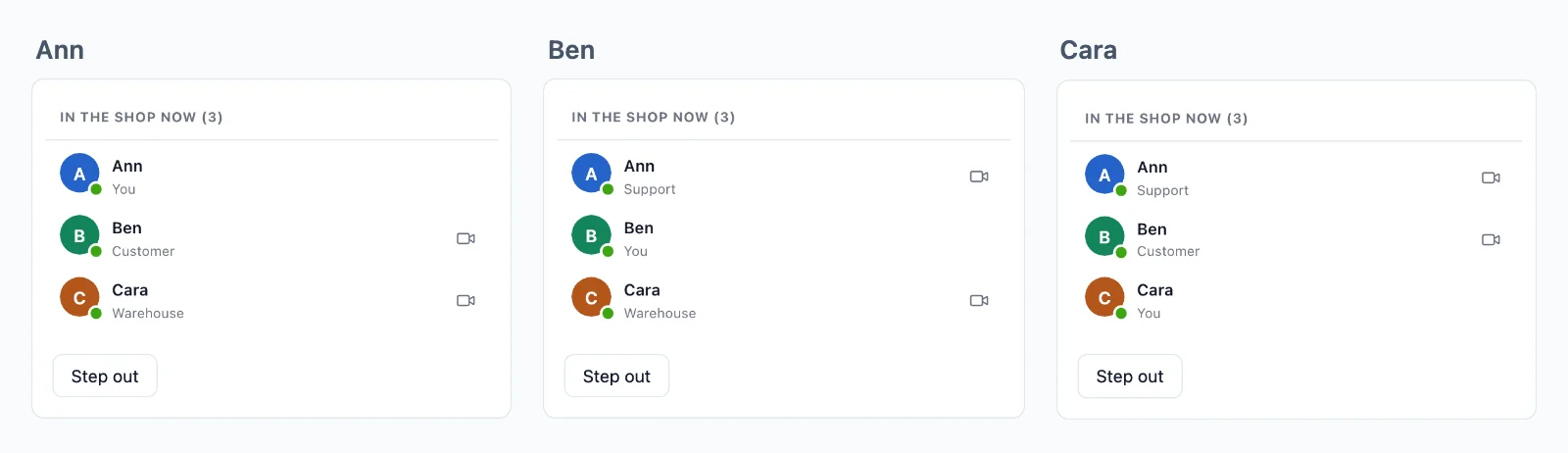
שום דבר לא הולך לאיבוד בחיבור מחדש
חדר יכול לשמור את האירועים האחרונים שלו, ודף שחוזר מקבל את מה שהחמיץ, לפי הסדר, לפני מה שבא אחר כך.
מי מחובר
חדר יכול להציג מי נמצא בו, עם מה שתבחרו להציג על כל אחד. מונה אומר כמה צופים בדף, בכל היקף, ומי מחובר ידוע בכל האפליקציה שלכם.
אירועים מהדף
דפים שולחים לחדרים שהם נמצאים בהם, בלי בקשה לשרת שלכם: הודעות צ׳אט, הקלדה, סמן. הכלל קובע אילו אירועים מותר לשלוח, ווובהוק מעביר לשרת שלכם את אלה שהוא צריך לשמור.
לאדם אחד, בכל מקום
שלחו למשתמש, וזה מגיע לכל לשונית ולכל מכשיר שפתוחים אצלו, בלי להקים חדר.
מוצפן, במפתחות שאף פעם אינם אצלנו
אירועים, נוכחות והיסטוריה עוברים מוצפנים במפתחות שהשרת שלכם מחזיק, ושיחות בין שני אנשים מוצפנות מקצה לקצה. הענן מעביר אותם בלי יכולת לקרוא אותם.
חיבור אחד לכל הלשוניות
הלשוניות של דפדפן חולקות חיבור אחד, ולכן אדם עם שלוש לשוניות פתוחות נספר פעם אחת.
שימושים
מה בונים על WebSockets
כל אחד מהם הוא אפליקציה שלמה בתיעוד, עם השרת שלה ב-Node.js, PHP ו-Python.
עדכונים חיים והתראות
הזמנה שמתקדמת בדף שלה, לוח בקרה, התקדמות של משימה, והתראה למשתמש אחד בכל לשונית ואפליקציה.
צ׳אט
שיחות בין שני אנשים ובקבוצות, עם הקלדה, סימוני קריאה ותגובות, שנשמרות במסד הנתונים שלכם.
מי מחובר ומי כאן
נקודה על כל אווטאר, האנשים בחדר עם התפקידים שלהם, וכמה אנשים צופים בדף.
עריכה משותפת
מי נמצא במסמך, הסמנים שלהם והשינויים, שנשלחים כבינארי ונשמרים לחיבור מחדש.
סקרים, חידונים ושאלות
הצבעות ושאלות שמגיעות רק לשרת שלכם, תוצאות שנשלחות לכולם, וניקוד לכל שחקן.
מכירות פומביות חיות
הצעות שהשרת שלכם מכריע בהן אחת אחרי השנייה, המחיר החדש לכולם, ושעון שמתארך כשמגיעה הצעה מאוחרת.
מחירים
מחיר לפי חיבורים, אף פעם לא לפי הודעות
החל מ-$11.99 לחודש עבור 1,000 חיבורים בו-זמניים, בחיוב שנתי, או $14.99 בחיוב חודשי.
התמחור לפי חיבורים בו-זמניים, החל מ-1,000, בחיוב חודשי או שנתי. הודעות ורוחב פס אף פעם לא מחויבים, ומה שהשרת שלכם שולח לא משתמש באף אחד מהחיבורים שלכם.
אותה תוכנית ואותו SDK מביאים גם שיחות וידאו וגם שידור חי, על אותו חיבור.
שאלות
שאלות נפוצות
האם אני צריך שרת WebSocket משלי?
לא. דפדפנים ואפליקציות מחזיקים את החיבורים שלהם פתוחים לשרתים שלנו, ועוד נפתחים כשהאפליקציה גדלה. השרת שלכם רק קובע מי רשאי להצטרף לאן, ושולח כל אירוע בבקשת HTTP קצרה אחת.
האם זה עובד באחסון serverless?
כן. פונקציית serverless לא יכולה להחזיק חיבור פתוח, וכאן היא לא צריכה: היא שולחת כל אירוע בבקשה קצרה אחת, והחיבורים נשארים אצלנו. פונקציות edge וכל אחסון אחר עובדים באותו אופן.
אילו סטאקים יכולים להשתמש ב-WebSocket API?
Next.js ו-Express, Laravel ו-PHP רגיל, Django, FastAPI ו-Flask, Capacitor, iOS ו-Android, לכל אחד מדריך. גם באפליקציות React Native ו-Flutter יש חדרים ונוכחות. שרת בכל שפה אחרת משתמש ב-HTTP API.
האם אני כותב בעצמי את קוד ה-WebSocket?
לא. ה-SDK פותח את החיבור, מתחבר מחדש מעצמו ומצטרף שוב לחדרים שלכם, ואתם מאזינים לאירועים לפי שם. ב-Laravel הוא broadcasting driver, ולכן broadcast() וקובץ הערוצים שלכם נשארים כמו שהם.
מה נחשב לחיבור?
דפדפן או מכשיר שמחובר לענן באותו רגע. הלשוניות של דפדפן אחד חולקות חיבור אחד כשהאפליקציה מגישה את ה-worker של ה-SDK, ומה שהשרת שולח דרך ה-API לא נספר.
מה קורה כשמגיעים למגבלת החיבורים?
עד 20% נוספים עדיין מתחברים, ובעל החשבון מקבל אימייל ב-80% וב-100% מהם, בזמן כדי לעבור לתוכנית גדולה יותר.
מה קורה כשדף מאבד את החיבור?
הוא מתחבר מחדש מעצמו. חדר ששומר היסטוריה נותן לו מה שהחמיץ, לפי הסדר, עד 5 דקות, ודף שנעדר זמן רב יותר מקבל הודעה על כך, כדי שיוכל לקרוא מחדש מהשרת שלכם. ההיסטוריה נועדה רק לחיבור מחדש: מסד הנתונים שלכם שומר את הרשומות שלכם.
מי מחליט מי מצטרף לחדר?
השרת שלכם, עם כלל לכל סוג חדר: מי מצטרף, מה מותר לו לשלוח, ומי רק קורא. הענן אוכף כל תשובה, והשרת שלכם יכול להוציא מישהו מחדר בכל רגע.
האם אתם יכולים לקרוא מה שהאפליקציה שלי שולחת?
לא בחדר פרטי או בחדר נוכחות. האירועים שלו, ההיסטוריה שלו ומי נמצא בו עוברים מוצפנים במפתחות שהשרת שלכם יוצר, והענן מעביר אותם בלי יכולת לקרוא אותם. חדר ציבורי, שכל אחד רשאי להצטרף אליו, עובר בלי הצפנה.
איפה השרתים שלכם?
שרתי הזמן אמת שמעבירים את האירועים שלכם פועלים בגרמניה. שרתי ההעברה ושרתי המדיה לשיחות פועלים בכמה מדינות נוספות.
שאלות על האינטגרציה שלכם? כתבו לנו: אנחנו עוזרים עם ה-SDK, מסך השיחה וה-stack שלכם.