' d='M48 28h24v18a12 12 0 0 1-24 0z'/%3E%3Cpath fill='%230093DD' d='M47.5 21.5h4.6V28h-4.6zm10.2-2.5h4.6v9h-4.6zm10.2 2.5h4.6V28h-4.6z'/%3E%3Cpath fill='%23171796' d='M52.6 20h4.6v8h-4.6zm10.2 0h4.6v8h-4.6z'/%3E%3C/svg%3E)
 English
 Deutsch
 Español
 Français
 Italiano
 Nederlands
 Polski
 עברית
Za aplikacije
WebSocket API bez poslužitelja kojim morate upravljati
API za stvarno vrijeme na hostiranim WebSockets, za Next.js, Laravel, Django i svaki drugi stack. Vaš poslužitelj šalje događaj jednim kratkim zahtjevom, a svaka stranica u sobi ga dobiva odmah. Mi držimo veze otvorenima, pa nema WebSocket poslužitelja koji biste morali pokretati, skalirati ili ponovno pokretati.
Ili isprobajte demo uživo: malu trgovinu u kojoj se narudžba u drugom prozoru mijenja u poslanu dok vi klikate.
Najbolje cijene za WebSockets. Od $11.99 mjesečno za 1.000 istodobnih veza uz godišnju naplatu, ili $14.99 uz mjesečnu naplatu.
Next.js na poslužitelju i React na stranici.
'use server';

import { realtime } from '@/lib/realtime';

export async function markShipped( id: string ) {
    await saveStatus( id, 'shipped' );
    await realtime.to( `order:${ id }` )
        .emit( 'updated', { status: 'shipped' } );
}app.post( '/orders/:id/ship', async ( req, res ) => {
await saveStatus( req.params.id, 'shipped' );
await realtime.to( `order:${ req.params.id }` )
.emit( 'updated', { status: 'shipped' } );
res.json( { ok: true } );
} );import { createServer } from 'node:http';
const routes = realtime.node( userOf );
createServer( async ( req, res ) => {
if ( req.url.startsWith( '/api/realtime/' ) ) {
return routes( req, res );
}
await saveStatus( '1042', 'shipped' );
await realtime.to( 'order:1042' )
.emit( 'updated', { status: 'shipped' } );
res.end( 'ok' );
} ).listen( 3000 );public function ship( Order $order )
{
$order->update( [ 'status' => 'shipped' ] );
// Your event, as for any broadcaster.
broadcast( new OrderUpdated( $order ) );
}save_status( $id, 'shipped' );
$realtime->to( "order:{$id}" )
->emit( 'updated', [ 'status' => 'shipped' ] );from django.db import transaction
from wordplus_realtime.django import realtime
order.status = "shipped"
order.save()
# Once it commits, so nobody sees a change rolled back.
transaction.on_commit(lambda: realtime.to(f"order:{order.pk}")
.emit("updated", {"status": order.status}))@app.post("/orders/{pk}/ship")
async def ship(pk: int):
await save_status(pk, "shipped")
await realtime.to(f"order:{pk}").aemit(
"updated", {"status": "shipped"}
)
return {"ok": True}@app.post("/orders/<int:pk>/ship")
def ship(pk):
save_status(pk, "shipped")
realtime.to(f"order:{pk}").emit(
"updated", {"status": "shipped"}
)
return {"ok": True}# A signed JSON request, from any language.
# wordplus is a signed curl, on the signing page of the docs.
wordplus POST /wordplus/realtime/emit '{
"rooms": ["order:1042"],
"event": "updated",
"data": {"status": "shipped"}
}'Hookovi i komponente za svaku React aplikaciju, uz bilo koji poslužitelj gore.
import { connect } from '@wordplus/realtime';

const rt = await connect();

const order = rt.join( 'order:1042' );
order.on( 'updated', ( data ) => showStatus( data.status ) );import { connect } from '@wordplus/realtime';
const rt = await connect();
const order = rt.join( 'order:1042' );
order.on( 'updated', ( data ) => showStatus( data.status ) );import { connect } from '@wordplus/realtime';
const rt = await connect();
const order = rt.join( 'order:1042' );
order.on( 'updated', ( data ) => showStatus( data.status ) );import { connect } from '@wordplus/realtime';
const rt = await connect( window.wordplusRealtimeConfig );
const order = rt.join( 'order:1042' );
order.on( 'updated', ( data ) => showStatus( data.status ) );import { connect } from '@wordplus/realtime';
const rt = await connect( window.wordplusRealtimeConfig );
const order = rt.join( 'order:1042' );
order.on( 'updated', ( data ) => showStatus( data.status ) );import { connect } from '@wordplus/realtime';
const rt = await connect( window.wordplusRealtimeConfig );
const order = rt.join( 'order:1042' );
order.on( 'updated', ( data ) => showStatus( data.status ) );import { connect } from '@wordplus/realtime';
const rt = await connect( window.wordplusRealtimeConfig );
const order = rt.join( 'order:1042' );
order.on( 'updated', ( data ) => showStatus( data.status ) );import { connect } from '@wordplus/realtime';
const rt = await connect( window.wordplusRealtimeConfig );
const order = rt.join( 'order:1042' );
order.on( 'updated', ( data ) => showStatus( data.status ) );import { connect } from '@wordplus/realtime';
const settings = await fetch( '/api/realtime/config' );
const rt = await connect( await settings.json() );
const order = rt.join( 'order:1042' );
order.on( 'updated', ( data ) => showStatus( data.status ) );import Echo from 'laravel-echo';
import { WordplusConnector } from '@wordplus/realtime/echo';
window.Echo = new Echo( {
broadcaster: WordplusConnector,
...window.wordplusRealtimeConfig,
} );
window.Echo.private( 'order:1042' )
.listen( '.updated', ( data ) => showStatus( data.status ) );'use client'; // in Next.js
import { useState } from 'react';
import { useRoom } from '@wordplus/realtime/react';
// Inside <RealtimeProvider>, once for the whole app.
export function Status( { id, initial } ) {
const [ status, setStatus ] = useState( initial );
useRoom( `order:${ id }`, {
updated: ( data ) => setStatus( data.status ),
} );
return <p>{ status }</p>;
}<script setup>
import { ref } from 'vue';
import { useRoom } from '@wordplus/realtime/vue';
// provideRealtime() once, in your root component.
const props = defineProps( [ 'id', 'initial' ] );
const status = ref( props.initial );
useRoom( () => `order:${ props.id }`, {
updated: ( data ) => { status.value = data.status; },
} );
</script>
<template>
<p>{{ status }}</p>
</template><script>
import { useRoom } from '@wordplus/realtime/svelte';
// provideRealtime() once, in your root component.
let { id } = $props();
let status = $state( 'new' );
useRoom( () => `order:${ id }`, {
updated: ( data ) => { status = data.status; },
} );
</script>
<p>{ status }</p>import { Component, Input, signal } from '@angular/core';
// realtime.ts, one connection for the whole app:
// export const realtime = connect();
import { realtime } from './realtime';
@Component( {
selector: 'app-status',
template: '<p>{{ status() }}</p>',
} )
export class StatusComponent {
@Input( { required: true } ) id!: number;
status = signal( 'new' );
async ngOnInit() {
const rt = await realtime;
rt.join( `order:${ this.id }` ).on( 'updated', ( data ) => {
this.status.set( data.status );
} );
}
async ngOnDestroy() {
( await realtime ).leave( `order:${ this.id }` );
}
}import WordPlusRealtime
let rt = Realtime(RealtimeOptions(
app: "s1500000007",
endpoint: URL(string: "https://shop.example.com/api/realtime")!,
headers: { ["Authorization": "Bearer \(session.token)"] }
))
rt.connect()
let order = rt.join("order:1042")
order.on("updated") { data, _ in
showStatus(data["status"]?.string ?? "")
}import cloud.wordplus.realtime.*
import kotlinx.serialization.json.*
val rt = Realtime(RealtimeOptions(
app = "s1500000007",
endpoint = "https://shop.example.com/api/realtime",
headers = {
mapOf("Authorization" to "Bearer ${session.token}")
},
))
rt.connect()
val order = rt.join("order:1042")
order.on("updated") { data, _ ->
val status = data.jsonObject["status"]?.jsonPrimitive?.content
showStatus(status ?: "")
}// First in index.js, which sealing needs:
// import 'react-native-get-random-values';
import { useState } from 'react';
import { Text } from 'react-native';
import { RealtimeProvider, useRoom } from '@wordplus/realtime/react';
const options = {
app: 's1500000007',
endpoint: 'https://app.example.com/api/realtime',
headers: { Authorization: 'Bearer ' + session.token },
};
export const App = () => (
<RealtimeProvider options={ options }>
<Status id={ 1042 } initial="new" />
</RealtimeProvider>
);
function Status( { id, initial } ) {
const [ status, setStatus ] = useState( initial );
useRoom( `order:${ id }`, {
updated: ( data ) => setStatus( data.status ),
} );
return <Text>{ status }</Text>;
}import 'package:wordplus_realtime/wordplus_realtime.dart';
final rt = await WordPlusRealtime.connect(
app: 's1500000007',
endpoint: 'https://app.example.com/api/realtime',
headers: {'Authorization': 'Bearer ${session.token}'},
);
final order = rt.join('order:1042');
order.on('updated', (data, _) => showStatus(data['status']));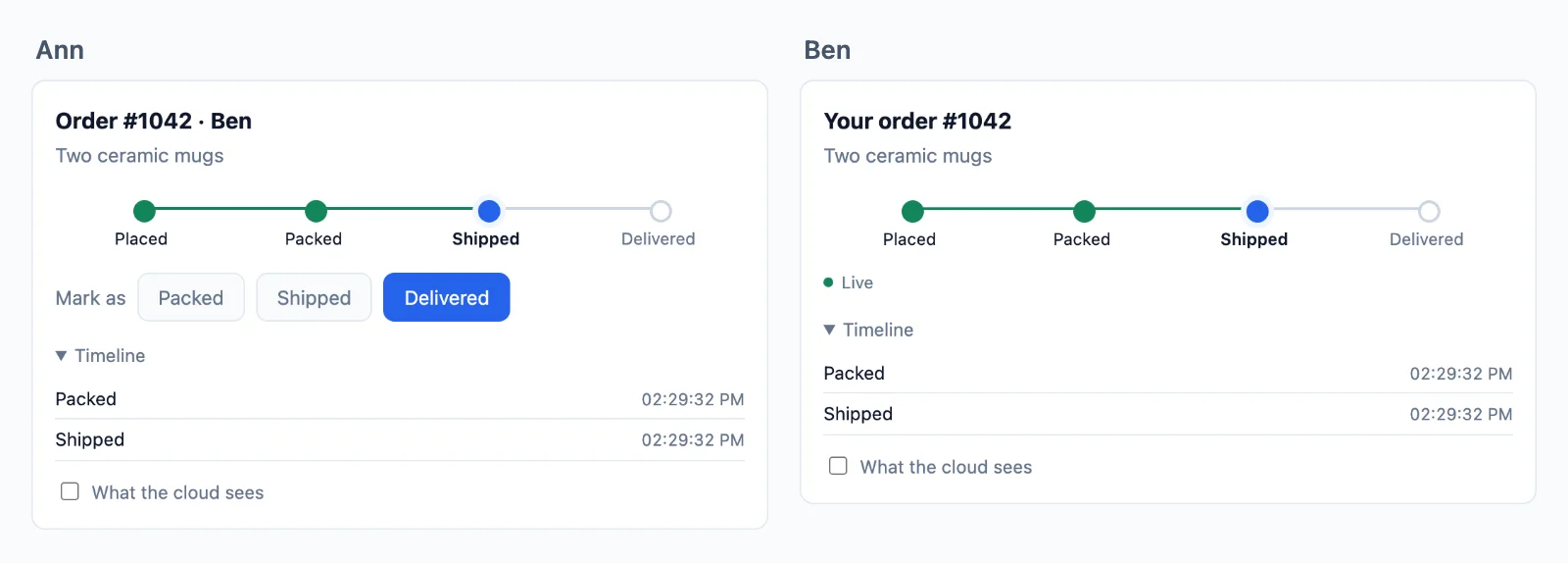
Hostirano
Dio kojim više ne upravljate
WebSocket poslužitelj radi na vašem laptopu. U produkciji mora satima držati svaku vezu otvorenom, dijeliti svaki događaj među strojevima i preživjeti vaše deploye, a serverless hosting uopće ne može držati vezu. Ovdje veze ostaju kod nas, a vaš poslužitelj ostaje kakav jest.
Vaš poslužitelj šalje jedan zahtjev
- Next.js, Express, Node.js, Laravel, PHP, Django, FastAPI, Flask
- Serverless i edge funkcije
- Bilo koji drugi stack
Vaši korisnici ostaju povezani
- Kartice preglednika
- Mobilne aplikacije
- Događaji u stvarnom vremenu
- Sobe
- Prisutnost
- Ponovna povezivanja
Nema websocket poslužitelja za održavanje
Vaš vlastiti websocket poslužitelj mora držati svaku vezu, rasti preko jednog stroja i raditi tijekom isporuka. Oblak to radi umjesto vas, dodajući poslužitelje kako promet raste, a stranica prelazi na drugi poslužitelj bez prekida.
Bilo koji hosting za vaš poslužitelj
Vaš poslužitelj samo potpisuje i šalje, pa radi bilo gdje, uključujući serverless i edge funkcije, koje same ne mogu držati vezu otvorenom.
Vaša prijava ostaje vaša
Korisnik je ono što vaša aplikacija koristi kao njegov id, a čita se na vašem poslužitelju, pa vaša sesija i kolačići rade kao i sada.
Odlučuje vaš poslužitelj
Šaljite kome želite, pogledajte tko je na mreži i upravljajte sobama
Soba je samo naziv, poput chat:7, a u oblaku nema ništa što biste morali stvarati. Vaša baza podataka određuje koje sobe postoje i tko je u njima, jedno pravilo na vašem poslužitelju to čita, a oblak svaku stranicu drži onoga što pravilo odgovori. Evo timskog chata, od početka do kraja.
Next.js na poslužitelju i React na stranici.
Stvorite sobu
Spremite je u svoju bazu podataka i napišite jedno pravilo koje je čita. Pravilo se pokreće kad se netko želi pridružiti: false ga ne pušta, true ga pušta, a readOnly mu dopušta samo čitanje, bez slanja. Ovdje je db vaša baza podataka, a me je prijavljena osoba.
// A room is a row of yours. Nothing is created in the cloud.
const room = await db.room.create( { data: { name: 'Team' } } );

await db.member.create( { data: { roomId: room.id, userId: me, role: 'member' } } );

// Its name is yours to choose: row 7 is the room chat:7.// Once, for every chat. When someone asks to join chat:7, id is '7'.
realtime.room( 'chat:{id}', async ( user, { id } ) => {
const room = await db.room.findUnique( { where: { id: Number( id ) } } );
if ( !room || room.closed ) return false; // no such room, or closed
const member = await db.member.findFirst( { where: { roomId: room.id, userId: user } } );
if ( !member || member.banned ) return false; // not a member, or banned
return member.role === 'reader' ? { readOnly: true } : true;
}, { presence: true, emit: [ 'message' ] } );// A room is a row of yours. Nothing is created in the cloud.
const room = await db.room.create( { data: { name: 'Team' } } );
await db.member.create( { data: { roomId: room.id, userId: req.session.userId, role: 'member' } } );
// Its name is yours to choose: row 7 is the room chat:7.// Once, for every chat. When someone asks to join chat:7, id is '7'.
realtime.room( 'chat:{id}', async ( user, { id } ) => {
const room = await db.room.findUnique( { where: { id: Number( id ) } } );
if ( !room || room.closed ) return false; // no such room, or closed
const member = await db.member.findFirst( { where: { roomId: room.id, userId: user } } );
if ( !member || member.banned ) return false; // not a member, or banned
return member.role === 'reader' ? { readOnly: true } : true;
}, { presence: true, emit: [ 'message' ] } );// A room is a row of yours. Nothing is created in the cloud.
const room = await db.room.create( { data: { name: 'Team' } } );
await db.member.create( { data: { roomId: room.id, userId: me, role: 'member' } } );
// Its name is yours to choose: row 7 is the room chat:7.// Once, for every chat. When someone asks to join chat:7, id is '7'.
realtime.room( 'chat:{id}', async ( user, { id } ) => {
const room = await db.room.findUnique( { where: { id: Number( id ) } } );
if ( !room || room.closed ) return false; // no such room, or closed
const member = await db.member.findFirst( { where: { roomId: room.id, userId: user } } );
if ( !member || member.banned ) return false; // not a member, or banned
return member.role === 'reader' ? { readOnly: true } : true;
}, { presence: true, emit: [ 'message' ] } );// A room is a row of yours. Nothing is created in the cloud.
$room = Room::create( [ 'name' => 'Team' ] );
$room->members()->create( [ 'user_id' => auth()->id(), 'role' => 'member' ] );
// Its name is yours to choose: row 7 is the room chat:7.// Once, for every chat. When someone asks to join chat:7, $p['id'] is '7'.
$this->callAfterResolving( Realtime::class, function ( Realtime $realtime ) {
$realtime->room( 'chat:{id}', function ( $user, array $p ) {
$room = Room::find( $p['id'] );
if ( ! $room || $room->closed ) {
return false; // no such room, or closed
}
$member = $room->members()->where( 'user_id', $user )->first();
if ( ! $member || $member->banned ) {
return false; // not a member, or banned
}
return $member->role === 'reader' ? [ 'readOnly' => true ] : true;
}, [ 'presence' => true, 'emit' => [ 'message' ] ] );
} );// A room is a row of yours. Nothing is created in the cloud.
$db->prepare( 'INSERT INTO rooms (name) VALUES (?)' )->execute( [ 'Team' ] );
$room = $db->lastInsertId();
$db->prepare( 'INSERT INTO members (room_id, user_id, role) VALUES (?, ?, ?)' )
->execute( [ $room, $_SESSION['user_id'], 'member' ] );
// Its name is yours to choose: row 7 is the room chat:7.// Once, for every chat. When someone asks to join chat:7, $p['id'] is '7'.
$realtime->room( 'chat:{id}', function ( $user, array $p ) use ( $db ) {
$query = $db->prepare( 'SELECT closed FROM rooms WHERE id = ?' );
$query->execute( [ $p['id'] ] );
$room = $query->fetch();
if ( ! $room || $room['closed'] ) {
return false; // no such room, or closed
}
$query = $db->prepare( 'SELECT role, banned FROM members WHERE room_id = ? AND user_id = ?' );
$query->execute( [ $p['id'], $user ] );
$member = $query->fetch();
if ( ! $member || $member['banned'] ) {
return false; // not a member, or banned
}
return $member['role'] === 'reader' ? [ 'readOnly' => true ] : true;
}, [ 'presence' => true, 'emit' => [ 'message' ] ] );# A room is a row of yours. Nothing is created in the cloud.
room = Room.objects.create(name="Team")
room.members.create(user=request.user, role="member")
# Its name is yours to choose: row 7 is the room chat:7.# Once, for every chat. When someone asks to join chat:7, p["id"] is "7".
def may_join_chat(user, p):
room = Room.objects.filter(pk=p["id"]).first()
if room is None or room.closed:
return False # no such room, or closed
member = room.members.filter(user_id=user).first()
if member is None or member.banned:
return False # not a member, or banned
return {"readOnly": True} if member.role == "reader" else True
realtime.room("chat:{id}", may_join_chat, presence=True, emit=["message"])# A room is a row of yours. Nothing is created in the cloud.
room = Room(name="Team", members=[Member(user_id=me, role="member")])
db.add(room)
db.commit()
# Its name is yours to choose: row 7 is the room chat:7.# Once, for every chat. When someone asks to join chat:7, p["id"] is "7".
def may_join_chat(user, p):
with SessionLocal() as db:
room = db.get(Room, int(p["id"]))
if room is None or room.closed:
return False # no such room, or closed
member = db.query(Member).filter_by(room_id=room.id, user_id=user).first()
if member is None or member.banned:
return False # not a member, or banned
return {"readOnly": True} if member.role == "reader" else True
realtime.room("chat:{id}", may_join_chat, presence=True, emit=["message"])# A room is a row of yours. Nothing is created in the cloud.
room = Room(name="Team", members=[Member(user_id=session["user_id"], role="member")])
db.session.add(room)
db.session.commit()
# Its name is yours to choose: row 7 is the room chat:7.# Once, for every chat. When someone asks to join chat:7, p["id"] is "7".
def may_join_chat(user, p):
room = db.session.get(Room, int(p["id"]))
if room is None or room.closed:
return False # no such room, or closed
member = Member.query.filter_by(room_id=room.id, user_id=user).first()
if member is None or member.banned:
return False # not a member, or banned
return {"readOnly": True} if member.role == "reader" else True
realtime.room("chat:{id}", may_join_chat, presence=True, emit=["message"])-- A room is a row of yours. Nothing is created in the cloud.
INSERT INTO rooms (name) VALUES ('Team');
INSERT INTO members (room_id, user_id, role) VALUES (7, 42, 'member');
-- Its name is yours to choose: row 7 is the room chat:7.// In Go, on the example in the docs. Any language does the same, and sealing is one step more.
// Your /auth route asks this for each room a page wants. For chat:7, id is "7".
func roomRule(room, user string) (*wordplus.Room, string) {
id, isChat := strings.CutPrefix(room, "chat:")
if !isChat {
return nil, "no_rule"
}
row := findRoom(id)
if row == nil || row.Closed {
return nil, "forbidden" // no such room, or closed
}
member := findMember(id, user)
if member == nil || member.Banned {
return nil, "forbidden" // not a member, or banned
}
return &wordplus.Room{
Presence: true,
Emit: []string{"message"},
ReadOnly: member.Role == "reader",
Info: profile(user),
}, ""
}Pridružite se i šaljite
Stranica se pridružuje po nazivu, a vaše pravilo odgovara. Zatim čuje što se šalje u sobu i šalje u nju, onako kako pravilo dopušta. draw i ostalo su vaše vlastite funkcije.
Hookovi i komponente za svaku React aplikaciju, uz bilo koji poslužitelj gore.
import { connect } from '@wordplus/realtime';

const rt = await connect();

const chat = rt.join( 'chat:7' );

chat.on( 'message', ( data, meta ) => draw( data.text, meta.from ) );
chat.on( 'error', ( e ) => showOut( e.code ) );   // forbidden: your rule said no
chat.on( 'kicked', () => showOut( 'kicked' ) );

chat.emit( 'message', { text: 'Hi' } );import { connect } from '@wordplus/realtime';
const config = document.getElementById( 'realtime' ).textContent;
const rt = await connect( JSON.parse( config ) );
const chat = rt.join( 'chat:7' );
chat.on( 'message', ( data, meta ) => draw( data.text, meta.from ) );
chat.on( 'error', ( e ) => showOut( e.code ) ); // forbidden: your rule said no
chat.on( 'kicked', () => showOut( 'kicked' ) );
chat.emit( 'message', { text: 'Hi' } );import { connect } from '@wordplus/realtime';
const config = document.getElementById( 'realtime' ).textContent;
const rt = await connect( JSON.parse( config ) );
const chat = rt.join( 'chat:7' );
chat.on( 'message', ( data, meta ) => draw( data.text, meta.from ) );
chat.on( 'error', ( e ) => showOut( e.code ) ); // forbidden: your rule said no
chat.on( 'kicked', () => showOut( 'kicked' ) );
chat.emit( 'message', { text: 'Hi' } );import { connect } from '@wordplus/realtime';
const rt = await connect( window.wordplusRealtimeConfig );
const chat = rt.join( 'chat:7' );
chat.on( 'message', ( data, meta ) => draw( data.text, meta.from ) );
chat.on( 'error', ( e ) => showOut( e.code ) ); // forbidden: your rule said no
chat.on( 'kicked', () => showOut( 'kicked' ) );
chat.emit( 'message', { text: 'Hi' } );import { connect } from '@wordplus/realtime';
const rt = await connect( window.wordplusRealtimeConfig );
const chat = rt.join( 'chat:7' );
chat.on( 'message', ( data, meta ) => draw( data.text, meta.from ) );
chat.on( 'error', ( e ) => showOut( e.code ) ); // forbidden: your rule said no
chat.on( 'kicked', () => showOut( 'kicked' ) );
chat.emit( 'message', { text: 'Hi' } );import { connect } from '@wordplus/realtime';
const rt = await connect( window.wordplusRealtimeConfig );
const chat = rt.join( 'chat:7' );
chat.on( 'message', ( data, meta ) => draw( data.text, meta.from ) );
chat.on( 'error', ( e ) => showOut( e.code ) ); // forbidden: your rule said no
chat.on( 'kicked', () => showOut( 'kicked' ) );
chat.emit( 'message', { text: 'Hi' } );import { connect } from '@wordplus/realtime';
const rt = await connect( window.wordplusRealtimeConfig );
const chat = rt.join( 'chat:7' );
chat.on( 'message', ( data, meta ) => draw( data.text, meta.from ) );
chat.on( 'error', ( e ) => showOut( e.code ) ); // forbidden: your rule said no
chat.on( 'kicked', () => showOut( 'kicked' ) );
chat.emit( 'message', { text: 'Hi' } );import { connect } from '@wordplus/realtime';
const rt = await connect( window.wordplusRealtimeConfig );
const chat = rt.join( 'chat:7' );
chat.on( 'message', ( data, meta ) => draw( data.text, meta.from ) );
chat.on( 'error', ( e ) => showOut( e.code ) ); // forbidden: your rule said no
chat.on( 'kicked', () => showOut( 'kicked' ) );
chat.emit( 'message', { text: 'Hi' } );import { connect } from '@wordplus/realtime';
const settings = await fetch( '/api/realtime/config' );
const rt = await connect( await settings.json() );
const chat = rt.join( 'chat:7' );
chat.on( 'message', ( data, meta ) => draw( data.text, meta.from ) );
chat.on( 'error', ( e ) => showOut( e.code ) ); // forbidden: your rule said no
chat.on( 'kicked', () => showOut( 'kicked' ) );
chat.emit( 'message', { text: 'Hi' } );const rt = window.Echo.connector.rt; // the connection Echo made
const chat = rt.join( 'chat:7' );
chat.on( 'message', ( data, meta ) => draw( data.text, meta.from ) );
chat.on( 'error', ( e ) => showOut( e.code ) ); // forbidden: your rule said no
chat.on( 'kicked', () => showOut( 'kicked' ) );
chat.emit( 'message', { text: 'Hi' } );'use client'; // in Next.js
import { useRoom } from '@wordplus/realtime/react';
// Inside <RealtimeProvider>, once for the whole app.
export function Chat( { id } ) {
const chat = useRoom( `chat:${ id }`, {
message: ( data, meta ) => draw( data.text, meta.from ),
} );
// forbidden when your rule says no, kicked when they are taken out.
if ( chat.error ) return <p>You are not in this room.</p>;
return <SendBox onSend={ ( text ) => chat.emit( 'message', { text } ) } />;
}<script setup>
import { useRoom } from '@wordplus/realtime/vue';
// provideRealtime() once, in your root component.
const { error, emit } = useRoom( 'chat:7', {
message: ( data, meta ) => draw( data.text, meta.from ),
} );
</script>
<template>
<!-- forbidden when your rule says no, kicked when they are taken out -->
<p v-if="error">You are not in this room.</p>
<SendBox v-else @send="( text ) => emit( 'message', { text } )" />
</template><script>
import { useRoom } from '@wordplus/realtime/svelte';
import SendBox from './SendBox.svelte';
// provideRealtime() once, in your root component.
const chat = useRoom( 'chat:7', {
message: ( data, meta ) => draw( data.text, meta.from ),
} );
</script>
<!-- forbidden when your rule says no, kicked when they are taken out -->
{#if chat.error}
<p>You are not in this room.</p>
{:else}
<SendBox onsend={ ( text ) => chat.emit( 'message', { text } ) } />
{/if}import { Component, signal } from '@angular/core';
import type { Room } from '@wordplus/realtime';
// realtime.ts, one connection for the whole app:
// export const realtime = connect();
import { realtime } from './realtime';
import { SendBox } from './send-box';
@Component( {
selector: 'app-chat',
imports: [ SendBox ],
template: `
@if ( out() ) {
<p>You are not in this room.</p>
} @else {
<app-send-box (send)="send( $event )" />
}
`,
} )
export class ChatComponent {
chat?: Room;
out = signal( false );
async ngOnInit() {
this.chat = ( await realtime ).join( 'chat:7' );
this.chat.on( 'message', ( data, meta ) => draw( data.text, meta.from ) );
this.chat.on( 'error', () => this.out.set( true ) ); // forbidden: your rule said no
this.chat.on( 'kicked', () => this.out.set( true ) );
}
send( text: string ) {
this.chat?.emit( 'message', { text } );
}
async ngOnDestroy() {
( await realtime ).leave( 'chat:7' );
}
}let chat = rt.join("chat:7")
chat.on("message") { data, meta in draw(data["text"]?.string ?? "", meta.from) }
chat.on("error") { error, _ in showOut(error["code"]?.string ?? "") } // forbidden: your rule said no
chat.on("kicked") { _, _ in showOut("kicked") }
chat.emit("message", ["text": "Hi"])val chat = rt.join("chat:7")
chat.on("message") { data, meta -> draw(data.jsonObject["text"]?.jsonPrimitive?.content ?: "", meta.from) }
chat.on("error") { error, _ -> showOut(error.jsonObject["code"]?.jsonPrimitive?.content ?: "") } // forbidden: your rule said no
chat.on("kicked") { _, _ -> showOut("kicked") }
chat.emit("message", buildJsonObject { put("text", "Hi") })import { Text } from 'react-native';
import { useRoom } from '@wordplus/realtime/react';
// Inside <RealtimeProvider>, once for the whole app.
export function Chat( { id } ) {
const chat = useRoom( `chat:${ id }`, {
message: ( data, meta ) => draw( data.text, meta.from ),
} );
// forbidden when your rule says no, kicked when they are taken out.
if ( chat.error ) return <Text>You are not in this room.</Text>;
return <SendBox onSend={ ( text ) => chat.emit( 'message', { text } ) } />;
}final chat = rt.join('chat:7');
chat.on('message', (data, meta) => draw(data['text'], meta.from));
chat.on('error', (error, _) => showOut(error['code'])); // forbidden: your rule said no
chat.on('kicked', (_, _) => showOut('kicked'));
chat.emit('message', {'text': 'Hi'});// Your server sends to the room too.
await realtime.to( 'chat:7' ).emit( 'message', { text: 'Welcome' } );// Your server sends to the room too.
await realtime.to( 'chat:7' ).emit( 'message', { text: 'Welcome' } );// Your server sends to the room too.
await realtime.to( 'chat:7' ).emit( 'message', { text: 'Welcome' } );// Your server sends to the room too.
Realtime::to( 'chat:7' )->emit( 'message', [ 'text' => 'Welcome' ] );// Your server sends to the room too.
$realtime->to( 'chat:7' )->emit( 'message', [ 'text' => 'Welcome' ] );# Your server sends to the room too.
realtime.to("chat:7").emit("message", {"text": "Welcome"})# Your server sends to the room too. In an async route, await aemit().
realtime.to("chat:7").emit("message", {"text": "Welcome"})# Your server sends to the room too.
realtime.to("chat:7").emit("message", {"text": "Welcome"})# Your server sends to the room too. wordplus is a signed curl, on the signing page of the docs.
wordplus POST /wordplus/realtime/emit '{"rooms":["chat:7"],"event":"message","data":{"text":"Welcome"}}'Potvrdite i sačuvajte poruku
Slanje s ackom kaže stranici kad je oblak preuzeo poruku ili zašto ju je vaše pravilo odbilo. Webhook zatim svaku predaje vašem poslužitelju da je spremi u vašu bazu podataka, jer oblak događaje čuva samo za ponovna povezivanja. markSent i db su vaši.
Hookovi i komponente za svaku React aplikaciju, uz bilo koji poslužitelj gore.
// Once the cloud has checked it, kept it and sent it on: its id and time.
// Your rule saying no rejects it, with a code.
const { id, at } = await chat.emitWithAck( 'message', { text: 'Hi' } );

markSent( id, at );// Once the cloud has checked it, kept it and sent it on: its id and time.
// Your rule saying no rejects it, with a code.
const { id, at } = await chat.emitWithAck( 'message', { text: 'Hi' } );
markSent( id, at );// Once the cloud has checked it, kept it and sent it on: its id and time.
// Your rule saying no rejects it, with a code.
const { id, at } = await chat.emitWithAck( 'message', { text: 'Hi' } );
markSent( id, at );// Once the cloud has checked it, kept it and sent it on: its id and time.
// Your rule saying no rejects it, with a code.
const { id, at } = await chat.emitWithAck( 'message', { text: 'Hi' } );
markSent( id, at );// Once the cloud has checked it, kept it and sent it on: its id and time.
// Your rule saying no rejects it, with a code.
const { id, at } = await chat.emitWithAck( 'message', { text: 'Hi' } );
markSent( id, at );// Once the cloud has checked it, kept it and sent it on: its id and time.
// Your rule saying no rejects it, with a code.
const { id, at } = await chat.emitWithAck( 'message', { text: 'Hi' } );
markSent( id, at );// Once the cloud has checked it, kept it and sent it on: its id and time.
// Your rule saying no rejects it, with a code.
const { id, at } = await chat.emitWithAck( 'message', { text: 'Hi' } );
markSent( id, at );// Once the cloud has checked it, kept it and sent it on: its id and time.
// Your rule saying no rejects it, with a code.
const { id, at } = await chat.emitWithAck( 'message', { text: 'Hi' } );
markSent( id, at );// Once the cloud has checked it, kept it and sent it on: its id and time.
// Your rule saying no rejects it, with a code.
const { id, at } = await chat.emitWithAck( 'message', { text: 'Hi' } );
markSent( id, at );const rt = window.Echo.connector.rt; // the connection Echo made
const chat = rt.join( 'chat:7' );
// Once the cloud has checked it, kept it and sent it on: its id and time.
const { id, at } = await chat.emitWithAck( 'message', { text: 'Hi' } );const chat = useRoom( 'chat:7' );
// Once the cloud has checked it, kept it and sent it on: its id and time.
const { id, at } = await chat.emitWithAck( 'message', { text: 'Hi' } );<script setup>
import { useRoom } from '@wordplus/realtime/vue';
const { emitWithAck } = useRoom( 'chat:7' );
// Once the cloud has checked it, kept it and sent it on: its id and time.
const send = async ( text ) => markSent( await emitWithAck( 'message', { text } ) );
</script><script>
import { useRoom } from '@wordplus/realtime/svelte';
const chat = useRoom( 'chat:7' );
// Once the cloud has checked it, kept it and sent it on: its id and time.
const send = async ( text ) => markSent( await chat.emitWithAck( 'message', { text } ) );
</script>// Once the cloud has checked it, kept it and sent it on: its id and time.
async send( text: string ) {
const { id, at } = await this.chat!.emitWithAck( 'message', { text } );
markSent( id, at );
}// Once the cloud has checked it, kept it and sent it on: ack.id, ack.at.
let ack = try await chat.emitWithAck("message", ["text": "Hi"])// Once the cloud has checked it, kept it and sent it on: ack.id, ack.at.
val ack = chat.emitWithAck("message", buildJsonObject { put("text", "Hi") })const chat = useRoom( 'chat:7' );
// Once the cloud has checked it, kept it and sent it on: its id and time.
const { id, at } = await chat.emitWithAck( 'message', { text: 'Hi' } );// Once the cloud has checked it, kept it and sent it on: ack.id, ack.at.
final ack = await chat.emitWithAck('message', {'text': 'Hi'});// The webhook gives your server what pages send. Keep it once, by the id the pages saw.
realtime.on( 'message', async ( { room, from, data, event_id, at } ) => {
await db.message.upsert( { id: event_id, room, from, text: data.text, at } );
} );// The webhook gives your server what pages send. Keep it once, by the id the pages saw.
realtime.on( 'message', async ( { room, from, data, event_id, at } ) => {
await db.message.upsert( { id: event_id, room, from, text: data.text, at } );
} );// The webhook gives your server what pages send. Keep it once, by the id the pages saw.
realtime.on( 'message', async ( { room, from, data, event_id, at } ) => {
await db.message.upsert( { id: event_id, room, from, text: data.text, at } );
} );$this->callAfterResolving( Realtime::class, function ( Realtime $realtime ) {
// The webhook gives your server what pages send. Keep it once, by the id the pages saw.
$realtime->on( 'message', function ( array $e ) {
Message::updateOrCreate( [ 'id' => $e['event_id'] ], [ 'room' => $e['room'], 'from' => $e['from'], 'text' => $e['data']['text'] ] );
} );
} );// The webhook gives your server what pages send. Keep it once, by the id the pages saw.
$realtime->on( 'message', function ( array $e ) {
save_message( $e['event_id'], $e['room'], $e['from'], $e['data']['text'], $e['at'] );
} );# The webhook gives your server what pages send. Keep it once, by the id the pages saw.
def keep_message(e):
save_message(e["event_id"], e["room"], e["from"], e["data"]["text"], e["at"])
realtime.on("message", keep_message)# The webhook gives your server what pages send. Keep it once, by the id the pages saw.
def keep_message(e):
save_message(e["event_id"], e["room"], e["from"], e["data"]["text"], e["at"])
realtime.on("message", keep_message)# The webhook gives your server what pages send. Keep it once, by the id the pages saw.
def keep_message(e):
save_message(e["event_id"], e["room"], e["from"], e["data"]["text"], e["at"])
realtime.on("message", keep_message)// In your webhook route, once its signature is checked as the docs say.
// Keep it once, by the id the pages saw.
if event.Type == "message" {
saveMessage(event.EventID, event.Room, event.From, event.Data["text"], event.At)
}Prikažite tko tipka
Ono što je važno samo sada šalje se kao volatile: odbacuje se umjesto da čeka u redu dok je netko izvan mreže, i nikad se ne čuva. Stiže do svih ostalih u sobi, i do ostalih kartica pošiljatelja. showTyping je vaša vlastita funkcija.
// Pages may send what your rule lists.
realtime.room( 'chat:{id}', mayJoin, { presence: true, emit: [ 'message', 'typing' ] } );// Pages may send what your rule lists.
realtime.room( 'chat:{id}', mayJoin, { presence: true, emit: [ 'message', 'typing' ] } );// Pages may send what your rule lists.
realtime.room( 'chat:{id}', mayJoin, { presence: true, emit: [ 'message', 'typing' ] } );$this->callAfterResolving( Realtime::class, function ( Realtime $realtime ) {
// Pages may send what your rule lists.
$realtime->room( 'chat:{id}', $mayJoin, [ 'presence' => true, 'emit' => [ 'message', 'typing' ] ] );
} );// Pages may send what your rule lists.
$realtime->room( 'chat:{id}', $may_join, [ 'presence' => true, 'emit' => [ 'message', 'typing' ] ] );# Pages may send what your rule lists.
realtime.room("chat:{id}", may_join, presence=True, emit=["message", "typing"])# Pages may send what your rule lists.
realtime.room("chat:{id}", may_join, presence=True, emit=["message", "typing"])# Pages may send what your rule lists.
realtime.room("chat:{id}", may_join, presence=True, emit=["message", "typing"])// In your /auth route, in Go on the example in the docs. Pages may send what the room lists.
room := wordplus.Room{Presence: true, Emit: []string{"message", "typing"}}Hookovi i komponente za svaku React aplikaciju, uz bilo koji poslužitelj gore.
// Volatile: dropped rather than queued while offline, and never kept.
chat.volatile.emit( 'typing', { on: true } );

chat.on( 'typing', ( data, meta ) => showTyping( meta.from, data.on ) );// Volatile: dropped rather than queued while offline, and never kept.
chat.volatile.emit( 'typing', { on: true } );
chat.on( 'typing', ( data, meta ) => showTyping( meta.from, data.on ) );// Volatile: dropped rather than queued while offline, and never kept.
chat.volatile.emit( 'typing', { on: true } );
chat.on( 'typing', ( data, meta ) => showTyping( meta.from, data.on ) );// Volatile: dropped rather than queued while offline, and never kept.
chat.volatile.emit( 'typing', { on: true } );
chat.on( 'typing', ( data, meta ) => showTyping( meta.from, data.on ) );// Volatile: dropped rather than queued while offline, and never kept.
chat.volatile.emit( 'typing', { on: true } );
chat.on( 'typing', ( data, meta ) => showTyping( meta.from, data.on ) );// Volatile: dropped rather than queued while offline, and never kept.
chat.volatile.emit( 'typing', { on: true } );
chat.on( 'typing', ( data, meta ) => showTyping( meta.from, data.on ) );// Volatile: dropped rather than queued while offline, and never kept.
chat.volatile.emit( 'typing', { on: true } );
chat.on( 'typing', ( data, meta ) => showTyping( meta.from, data.on ) );// Volatile: dropped rather than queued while offline, and never kept.
chat.volatile.emit( 'typing', { on: true } );
chat.on( 'typing', ( data, meta ) => showTyping( meta.from, data.on ) );// Volatile: dropped rather than queued while offline, and never kept.
chat.volatile.emit( 'typing', { on: true } );
chat.on( 'typing', ( data, meta ) => showTyping( meta.from, data.on ) );const chat = window.Echo.connector.rt.join( 'chat:7' );
// Volatile: dropped rather than queued while offline, and never kept.
chat.volatile.emit( 'typing', { on: true } );

chat.on( 'typing', ( data, meta ) => showTyping( meta.from, data.on ) );const chat = useRoom( 'chat:7' );
const typing = useTyping( chat ); // the ids of those typing, gone when they stop
// Volatile: dropped rather than queued while offline, and never kept.
const onKey = () => chat.room?.volatile.emit( 'typing', { on: true } );<script setup>
import { useRoom, useTyping } from '@wordplus/realtime/vue';
const chat = useRoom( 'chat:7' );
const typing = useTyping( chat ); // the ids of those typing, gone when they stop
// Volatile: dropped rather than queued while offline, and never kept.
const onKey = () => chat.room.value?.volatile.emit( 'typing', { on: true } );
</script><script>
import { useRoom, useTyping } from '@wordplus/realtime/svelte';
const chat = useRoom( 'chat:7' );
const typing = useTyping( chat ); // typing.current: the ids of those typing
// Volatile: dropped rather than queued while offline, and never kept.
const onKey = () => chat.room?.volatile.emit( 'typing', { on: true } );
</script>// Volatile: dropped rather than queued while offline, and never kept.
onKey() {
this.chat?.volatile.emit( 'typing', { on: true } );
}// Volatile: dropped rather than queued while offline, and never kept.
chat.volatile.emit("typing", ["on": true])
chat.on("typing") { data, meta in showTyping(meta.from, data["on"]?.bool ?? false) }// Volatile: dropped rather than queued while offline, and never kept.
chat.volatile.emit("typing", buildJsonObject { put("on", true) })
chat.on("typing") { data, meta -> showTyping(meta.from, data.jsonObject["on"]) }const chat = useRoom( 'chat:7' );
const typing = useTyping( chat ); // the ids of those typing, gone when they stop
// Volatile: dropped rather than queued while offline, and never kept.
const onChangeText = () => chat.room?.volatile.emit( 'typing', { on: true } );// Volatile: dropped rather than queued while offline, and never kept.
chat.volatile.emit('typing', {'on': true});
chat.on('typing', (data, meta) => showTyping(meta.from, data['on']));Nadoknadite propušteno nakon ponovnog povezivanja
Soba kojoj vaše pravilo daje povijest čuva svoje zadnje događaje do 5 minuta. Stranica koja se vrati dobiva što je propustila, redom, prije onoga što slijedi, i kad se vrati na drugom našem poslužitelju. mayJoin i draw su vaši.
// Keeps its last 50 events, for 5 minutes at most.
realtime.room( 'chat:{id}', mayJoin, { history: { last: 50, seconds: 300 }, emit: [ 'message' ] } );// Keeps its last 50 events, for 5 minutes at most.
realtime.room( 'chat:{id}', mayJoin, { history: { last: 50, seconds: 300 }, emit: [ 'message' ] } );// Keeps its last 50 events, for 5 minutes at most.
realtime.room( 'chat:{id}', mayJoin, { history: { last: 50, seconds: 300 }, emit: [ 'message' ] } );$this->callAfterResolving( Realtime::class, function ( Realtime $realtime ) {
// Keeps its last 50 events, for 5 minutes at most.
$realtime->room( 'chat:{id}', $mayJoin, [ 'history' => [ 'last' => 50, 'seconds' => 300 ], 'emit' => [ 'message' ] ] );
} );// Keeps its last 50 events, for 5 minutes at most.
$realtime->room( 'chat:{id}', $may_join, [ 'history' => [ 'last' => 50, 'seconds' => 300 ], 'emit' => [ 'message' ] ] );# Keeps its last 50 events, for 5 minutes at most.
realtime.room("chat:{id}", may_join, history={"last": 50, "seconds": 300}, emit=["message"])# Keeps its last 50 events, for 5 minutes at most.
realtime.room("chat:{id}", may_join, history={"last": 50, "seconds": 300}, emit=["message"])# Keeps its last 50 events, for 5 minutes at most.
realtime.room("chat:{id}", may_join, history={"last": 50, "seconds": 300}, emit=["message"])// In your /auth route, in Go on the example in the docs. Its last 50 events, for 5 minutes.
room := wordplus.Room{History: 50, Emit: []string{"message"}}Hookovi i komponente za svaku React aplikaciju, uz bilo koji poslužitelj gore.
// A page back on the line gets what it missed first, in order, with meta.replayed.
chat.on( 'message', ( data, meta ) => draw( data.text, meta.from, meta.replayed ) );

// Or read back through it yourself, the newest first by pages.
const { events, more } = await chat.history( { limit: 50 } );// A page back on the line gets what it missed first, in order, with meta.replayed.
chat.on( 'message', ( data, meta ) => draw( data.text, meta.from, meta.replayed ) );
// Or read back through it yourself, the newest first by pages.
const { events, more } = await chat.history( { limit: 50 } );// A page back on the line gets what it missed first, in order, with meta.replayed.
chat.on( 'message', ( data, meta ) => draw( data.text, meta.from, meta.replayed ) );
// Or read back through it yourself, the newest first by pages.
const { events, more } = await chat.history( { limit: 50 } );// A page back on the line gets what it missed first, in order, with meta.replayed.
chat.on( 'message', ( data, meta ) => draw( data.text, meta.from, meta.replayed ) );
// Or read back through it yourself, the newest first by pages.
const { events, more } = await chat.history( { limit: 50 } );// A page back on the line gets what it missed first, in order, with meta.replayed.
chat.on( 'message', ( data, meta ) => draw( data.text, meta.from, meta.replayed ) );
// Or read back through it yourself, the newest first by pages.
const { events, more } = await chat.history( { limit: 50 } );// A page back on the line gets what it missed first, in order, with meta.replayed.
chat.on( 'message', ( data, meta ) => draw( data.text, meta.from, meta.replayed ) );
// Or read back through it yourself, the newest first by pages.
const { events, more } = await chat.history( { limit: 50 } );// A page back on the line gets what it missed first, in order, with meta.replayed.
chat.on( 'message', ( data, meta ) => draw( data.text, meta.from, meta.replayed ) );
// Or read back through it yourself, the newest first by pages.
const { events, more } = await chat.history( { limit: 50 } );// A page back on the line gets what it missed first, in order, with meta.replayed.
chat.on( 'message', ( data, meta ) => draw( data.text, meta.from, meta.replayed ) );
// Or read back through it yourself, the newest first by pages.
const { events, more } = await chat.history( { limit: 50 } );// A page back on the line gets what it missed first, in order, with meta.replayed.
chat.on( 'message', ( data, meta ) => draw( data.text, meta.from, meta.replayed ) );
// Or read back through it yourself, the newest first by pages.
const { events, more } = await chat.history( { limit: 50 } );const chat = window.Echo.connector.rt.join( 'chat:7' );
// A page back on the line gets what it missed first, in order, with meta.replayed.
chat.on( 'message', ( data, meta ) => draw( data.text, meta.from, meta.replayed ) );// A page back on the line gets what it missed first, in order, with meta.replayed.
useRoom( 'chat:7', {
message: ( data, meta ) => draw( data.text, meta.from, meta.replayed ),
} );<script setup>
import { useRoom } from '@wordplus/realtime/vue';
// A page back on the line gets what it missed first, in order, with meta.replayed.
useRoom( 'chat:7', {
    message: ( data, meta ) => draw( data.text, meta.from, meta.replayed ),
} );
</script><script>
import { useRoom } from '@wordplus/realtime/svelte';
// A page back on the line gets what it missed first, in order, with meta.replayed.
useRoom( 'chat:7', {
message: ( data, meta ) => draw( data.text, meta.from, meta.replayed ),
} );
</script>async ngOnInit() {
this.chat = ( await realtime ).join( 'chat:7' );
// A page back on the line gets what it missed first, in order, with meta.replayed.
this.chat.on( 'message', ( data, meta ) => draw( data.text, meta.from, meta.replayed ) );
}// An app back on the line gets what it missed first, in order, with meta.replayed.
chat.on("message") { data, meta in draw(data["text"]?.string ?? "", meta.from, meta.replayed) }// An app back on the line gets what it missed first, in order, with meta.replayed.
chat.on("message") { data, meta ->
draw(data.jsonObject["text"]?.jsonPrimitive?.content ?: "", meta.from, meta.replayed)
}// An app back on the line gets what it missed first, in order, with meta.replayed.
useRoom( 'chat:7', {
message: ( data, meta ) => draw( data.text, meta.from, meta.replayed ),
} );// An app back on the line gets what it missed first, in order, with meta.replayed.
chat.on('message', (data, meta) => draw(data['text'], meta.from, meta.replayed));Pošaljite jednoj osobi
Vaš poslužitelj šalje korisniku prema njegovu id-u, na svaku karticu i uređaj koje ima otvorene, bez sobe kojoj bi se trebao pridružiti. Tko nema ništa otvoreno, ne dobiva ništa, pa ono što je važno čuvajte u svojoj bazi podataka. showNotice je vaša vlastita funkcija.
// To every tab and device they have open. 'notice' is a name of your own.
await realtime.toUser( 43 ).emit( 'notice', { text: 'Your order shipped' } );

// To several people at once, up to 1,000.
await realtime.toUser( [ 34, 43 ] ).emit( 'notice', { text: 'Starting soon' } );// To every tab and device they have open. 'notice' is a name of your own.
await realtime.toUser( 43 ).emit( 'notice', { text: 'Your order shipped' } );
// To several people at once, up to 1,000.
await realtime.toUser( [ 34, 43 ] ).emit( 'notice', { text: 'Starting soon' } );// To every tab and device they have open. 'notice' is a name of your own.
await realtime.toUser( 43 ).emit( 'notice', { text: 'Your order shipped' } );
// To several people at once, up to 1,000.
await realtime.toUser( [ 34, 43 ] ).emit( 'notice', { text: 'Starting soon' } );// To every tab and device they have open. 'notice' is a name of your own.
Realtime::toUser( 43 )->emit( 'notice', [ 'text' => 'Your order shipped' ] );
// To several people at once, up to 1,000.
Realtime::toUser( [ 34, 43 ] )->emit( 'notice', [ 'text' => 'Starting soon' ] );// To every tab and device they have open. 'notice' is a name of your own.
$realtime->toUser( 43 )->emit( 'notice', [ 'text' => 'Your order shipped' ] );
// To several people at once, up to 1,000.
$realtime->toUser( [ 34, 43 ] )->emit( 'notice', [ 'text' => 'Starting soon' ] );# To every tab and device they have open. "notice" is a name of your own.
realtime.to_user(43).emit("notice", {"text": "Your order shipped"})
# To several people at once, up to 1,000.
realtime.to_user([34, 43]).emit("notice", {"text": "Starting soon"})# In a def route, as these calls block.
# To every tab and device they have open. "notice" is a name of your own.
realtime.to_user(43).emit("notice", {"text": "Your order shipped"})

# To several people at once, up to 1,000.
realtime.to_user([34, 43]).emit("notice", {"text": "Starting soon"})# To every tab and device they have open. "notice" is a name of your own.
realtime.to_user(43).emit("notice", {"text": "Your order shipped"})
# To several people at once, up to 1,000.
realtime.to_user([34, 43]).emit("notice", {"text": "Starting soon"})# To every tab and device they have open. "notice" is a name of your own.
wordplus POST /wordplus/realtime/emit \
'{"users":["43"],"event":"notice","data":{"text":"Your order shipped"}}'
# To several people at once, up to 1,000.
wordplus POST /wordplus/realtime/emit \
'{"users":["34","43"],"event":"notice","data":{"text":"Starting soon"}}'Hookovi i komponente za svaku React aplikaciju, uz bilo koji poslužitelj gore.
// On the connection, with no room to join.
rt.on( 'notice', ( data ) => showNotice( data.text ) );// On the connection, with no room to join.
rt.on( 'notice', ( data ) => showNotice( data.text ) );// On the connection, with no room to join.
rt.on( 'notice', ( data ) => showNotice( data.text ) );// On the connection, with no room to join.
rt.on( 'notice', ( data ) => showNotice( data.text ) );// On the connection, with no room to join.
rt.on( 'notice', ( data ) => showNotice( data.text ) );// On the connection, with no room to join.
rt.on( 'notice', ( data ) => showNotice( data.text ) );// On the connection, with no room to join.
rt.on( 'notice', ( data ) => showNotice( data.text ) );// On the connection, with no room to join.
rt.on( 'notice', ( data ) => showNotice( data.text ) );// On the connection, with no room to join.
rt.on( 'notice', ( data ) => showNotice( data.text ) );window.Echo.connector.rt.on( 'notice', ( data ) => showNotice( data.text ) );useUserEvent( 'notice', ( data ) => showNotice( data.text ) );<script setup>
import { useUserEvent } from '@wordplus/realtime/vue';
useUserEvent( 'notice', ( data ) => showNotice( data.text ) );
</script><script>
import { useUserEvent } from '@wordplus/realtime/svelte';
useUserEvent( 'notice', ( data ) => showNotice( data.text ) );
</script>async ngOnInit() {
( await realtime ).on( 'notice', ( data ) => showNotice( data.text ) );
}rt.on("notice") { data, _ in showNotice(data["text"]?.string ?? "") }rt.on("notice") { data, _ -> showNotice(data.jsonObject["text"]?.jsonPrimitive?.content ?: "") }useUserEvent( 'notice', ( data ) => showNotice( data.text ) );rt.on('notice', (data, _) => showNotice(data['text']));Pošaljite svima
Vaš poslužitelj šalje svakoj stranici i aplikaciji koja je sada spojena, prijavljenoj ili ne, bez sobe kojoj se treba pridružiti. Spojen može biti bilo tko, pa ono što se prenosi nije zapečaćeno: koristite to za ono što svatko smije čitati. showNotice je vaša vlastita funkcija.
// Every page and app connected now, signed in or not.
await realtime.toEveryone().emit( 'notice', { text: 'New version is out' } );// Every page and app connected now, signed in or not.
await realtime.toEveryone().emit( 'notice', { text: 'New version is out' } );// Every page and app connected now, signed in or not.
await realtime.toEveryone().emit( 'notice', { text: 'New version is out' } );// Every page and app connected now, signed in or not.
Realtime::toEveryone()->emit( 'notice', [ 'text' => 'New version is out' ] );// Every page and app connected now, signed in or not.
$realtime->toEveryone()->emit( 'notice', [ 'text' => 'New version is out' ] );# Every page and app connected now, signed in or not.
realtime.to_everyone().emit("notice", {"text": "New version is out"})# In a def route, as these calls block.
# Every page and app connected now, signed in or not.
realtime.to_everyone().emit("notice", {"text": "New version is out"})# Every page and app connected now, signed in or not.
realtime.to_everyone().emit("notice", {"text": "New version is out"})# Every page and app connected now, signed in or not.
wordplus POST /wordplus/realtime/emit \
'{"everyone":true,"event":"notice","data":{"text":"New version is out"}}'Hookovi i komponente za svaku React aplikaciju, uz bilo koji poslužitelj gore.
// With no room to join.
rt.on( 'notice', ( data ) => showNotice( data.text ) );// With no room to join.
rt.on( 'notice', ( data ) => showNotice( data.text ) );// With no room to join.
rt.on( 'notice', ( data ) => showNotice( data.text ) );// With no room to join.
rt.on( 'notice', ( data ) => showNotice( data.text ) );// With no room to join.
rt.on( 'notice', ( data ) => showNotice( data.text ) );// With no room to join.
rt.on( 'notice', ( data ) => showNotice( data.text ) );// With no room to join.
rt.on( 'notice', ( data ) => showNotice( data.text ) );// With no room to join.
rt.on( 'notice', ( data ) => showNotice( data.text ) );// With no room to join.
rt.on( 'notice', ( data ) => showNotice( data.text ) );// With no room to join.
window.Echo.connector.rt.on( 'notice', ( data ) => showNotice( data.text ) );// With no room to join.
useUserEvent( 'notice', ( data ) => showNotice( data.text ) );<script setup>
import { useUserEvent } from '@wordplus/realtime/vue';
// With no room to join.
useUserEvent( 'notice', ( data ) => showNotice( data.text ) );
</script><script>
import { useUserEvent } from '@wordplus/realtime/svelte';
// With no room to join.
useUserEvent( 'notice', ( data ) => showNotice( data.text ) );
</script>async ngOnInit() {
// With no room to join.
( await realtime ).on( 'notice', ( data ) => showNotice( data.text ) );
}// With no room to join.
rt.on("notice") { data, _ in showNotice(data["text"]?.string ?? "") }// With no room to join.
rt.on("notice") { data, _ ->
showNotice(data.jsonObject["text"]?.jsonPrimitive?.content ?: "")
}// With no room to join.
useUserEvent( 'notice', ( data ) => showNotice( data.text ) );// With no room to join.
rt.on('notice', (data, _) => showNotice(data['text']));Pogledajte tko je u sobi
Soba čije pravilo kaže presence svima u njoj prikazuje tko je u njoj, svakoga s imenom i slikom iz vašeg profila. Osoba s više kartica jedan je član. Navedeno je prvih 1.000, a broj se nastavlja pri svakoj veličini.
Hookovi i komponente za svaku React aplikaciju, uz bilo koji poslužitelj gore.
// The rule of chat:7 says presence: true, so the room lists who is in it.
const chat = rt.join( 'chat:7' );
// Who is in it now, as [ id, info ], and again after each reconnect.
chat.on( 'joined', () => showMembers( [ ...chat.members ] ) );
// Who comes and goes. info is your profile: their name and avatar.
chat.on( 'join', ( { id, info } ) => addMember( id, info.name ) );
chat.on( 'leave', ( { id } ) => removeMember( id ) );
// How many, at any size, at most once a second.
chat.on( 'count', ( n ) => showCount( n ) );// The rule of chat:7 says presence: true, so the room lists who is in it.
const chat = rt.join( 'chat:7' );
// Who is in it now, as [ id, info ], and again after each reconnect.
chat.on( 'joined', () => showMembers( [ ...chat.members ] ) );
// Who comes and goes. info is your profile: their name and avatar.
chat.on( 'join', ( { id, info } ) => addMember( id, info.name ) );
chat.on( 'leave', ( { id } ) => removeMember( id ) );
// How many, at any size, at most once a second.
chat.on( 'count', ( n ) => showCount( n ) );// The rule of chat:7 says presence: true, so the room lists who is in it.
const chat = rt.join( 'chat:7' );
// Who is in it now, as [ id, info ], and again after each reconnect.
chat.on( 'joined', () => showMembers( [ ...chat.members ] ) );
// Who comes and goes. info is your profile: their name and avatar.
chat.on( 'join', ( { id, info } ) => addMember( id, info.name ) );
chat.on( 'leave', ( { id } ) => removeMember( id ) );
// How many, at any size, at most once a second.
chat.on( 'count', ( n ) => showCount( n ) );// The rule of chat:7 says presence: true, so the room lists who is in it.
const chat = rt.join( 'chat:7' );
// Who is in it now, as [ id, info ], and again after each reconnect.
chat.on( 'joined', () => showMembers( [ ...chat.members ] ) );
// Who comes and goes. info is your profile: their name and avatar.
chat.on( 'join', ( { id, info } ) => addMember( id, info.name ) );
chat.on( 'leave', ( { id } ) => removeMember( id ) );
// How many, at any size, at most once a second.
chat.on( 'count', ( n ) => showCount( n ) );// The rule of chat:7 says presence: true, so the room lists who is in it.
const chat = rt.join( 'chat:7' );
// Who is in it now, as [ id, info ], and again after each reconnect.
chat.on( 'joined', () => showMembers( [ ...chat.members ] ) );
// Who comes and goes. info is your profile: their name and avatar.
chat.on( 'join', ( { id, info } ) => addMember( id, info.name ) );
chat.on( 'leave', ( { id } ) => removeMember( id ) );
// How many, at any size, at most once a second.
chat.on( 'count', ( n ) => showCount( n ) );// The rule of chat:7 says presence: true, so the room lists who is in it.
const chat = rt.join( 'chat:7' );
// Who is in it now, as [ id, info ], and again after each reconnect.
chat.on( 'joined', () => showMembers( [ ...chat.members ] ) );
// Who comes and goes. info is your profile: their name and avatar.
chat.on( 'join', ( { id, info } ) => addMember( id, info.name ) );
chat.on( 'leave', ( { id } ) => removeMember( id ) );
// How many, at any size, at most once a second.
chat.on( 'count', ( n ) => showCount( n ) );// The rule of chat:7 says presence: true, so the room lists who is in it.
const chat = rt.join( 'chat:7' );
// Who is in it now, as [ id, info ], and again after each reconnect.
chat.on( 'joined', () => showMembers( [ ...chat.members ] ) );
// Who comes and goes. info is your profile: their name and avatar.
chat.on( 'join', ( { id, info } ) => addMember( id, info.name ) );
chat.on( 'leave', ( { id } ) => removeMember( id ) );
// How many, at any size, at most once a second.
chat.on( 'count', ( n ) => showCount( n ) );// The rule of chat:7 says presence: true, so the room lists who is in it.
const chat = rt.join( 'chat:7' );
// Who is in it now, as [ id, info ], and again after each reconnect.
chat.on( 'joined', () => showMembers( [ ...chat.members ] ) );
// Who comes and goes. info is your profile: their name and avatar.
chat.on( 'join', ( { id, info } ) => addMember( id, info.name ) );
chat.on( 'leave', ( { id } ) => removeMember( id ) );
// How many, at any size, at most once a second.
chat.on( 'count', ( n ) => showCount( n ) );// The rule of chat:7 says presence: true, so the room lists who is in it.
const chat = rt.join( 'chat:7' );
// Who is in it now, as [ id, info ], and again after each reconnect.
chat.on( 'joined', () => showMembers( [ ...chat.members ] ) );
// Who comes and goes. info is your profile: their name and avatar.
chat.on( 'join', ( { id, info } ) => addMember( id, info.name ) );
chat.on( 'leave', ( { id } ) => removeMember( id ) );
// How many, at any size, at most once a second.
chat.on( 'count', ( n ) => showCount( n ) );// Each member as your profile gives them.
window.Echo.join( 'chat:7' )
.here( ( members ) => showMembers( members ) )
.joining( ( member ) => addMember( member ) )
.leaving( ( member ) => removeMember( member ) );'use client'; // in Next.js
import { usePresence } from '@wordplus/realtime/react';
// Inside <RealtimeProvider>, once for the whole app.
export function Members() {
const members = usePresence( 'chat:7' );
return (
<ul>
{ members.map( ( member ) => <li key={ member.id }>{ member.info.name }</li> ) }
</ul>
);
}<script setup>
import { usePresence } from '@wordplus/realtime/vue';
// provideRealtime() once, in your root component.
const members = usePresence( 'chat:7' );
</script>
<template>
<ul>
<li v-for="member in members" :key="member.id">{{ member.info.name }}</li>
</ul>
</template><script>
import { usePresence } from '@wordplus/realtime/svelte';
// provideRealtime() once, in your root component.
const members = usePresence( 'chat:7' );
</script>
<ul>
{#each members.current as member (member.id)}
<li>{ member.info.name }</li>
{/each}
</ul>import { Component, signal } from '@angular/core';
import { realtime } from './realtime';
@Component( {
selector: 'app-members',
template: `
<ul>
@for ( member of members(); track member[ 0 ] ) {
<li>{{ member[ 1 ].name }}</li>
}
</ul>
`,
} )
export class MembersComponent {
members = signal<[ string, any ][]>( [] );
async ngOnInit() {
const chat = ( await realtime ).join( 'chat:7' );
const update = () => this.members.set( [ ...chat.members ] );
chat.on( 'joined', update );
chat.on( 'join', update );
chat.on( 'leave', update );
}
}let chat = rt.join("chat:7")
for event in ["joined", "join", "leave"] {
chat.on(event) { _, _ in
showMembers(chat.members.map { id, info in info["name"]?.string ?? id })
}
}val chat = rt.join("chat:7")
for (event in listOf("joined", "join", "leave")) {
chat.on(event) { _, _ ->
showMembers(chat.members.map { (id, info) ->
info.jsonObject["name"]?.jsonPrimitive?.content ?: id
})
}
}import { Text } from 'react-native';
import { usePresence } from '@wordplus/realtime/react';
// Inside <RealtimeProvider>, once for the whole app.
export function Members() {
const members = usePresence( 'chat:7' );
return members.map( ( member ) => <Text key={ member.id }>{ member.info.name }</Text> );
}final chat = rt.join('chat:7');
for (final event in ['joined', 'join', 'leave']) {
chat.on(event, (_, _) {
showMembers([
for (final MapEntry(key: id, value: info) in chat.members.entries)
info?['name'] ?? id,
]);
});
}// Ask from your server: [ { id, info } ], with their info opened for you.
const { count, list } = await realtime.room( 'chat:7' ).members();// Ask from your server: [ { id, info } ], with their info opened for you.
const { count, list } = await realtime.room( 'chat:7' ).members();// Ask from your server: [ { id, info } ], with their info opened for you.
const { count, list } = await realtime.room( 'chat:7' ).members();// Ask from your server: [ [ 'id', 'info' ] ], with their info opened for you.
$members = Realtime::room( 'chat:7' )->members();
$members['count'];
$members['list'];// Ask from your server: [ [ 'id', 'info' ] ], with their info opened for you.
$members = $realtime->room( 'chat:7' )->members();
$members['count'];
$members['list'];# Ask from your server: [{"id", "info"}], with their info opened for you.
members = realtime.room("chat:7").members()
members["count"]
members["list"]# In a def route, as these calls block.
# Ask from your server: [{"id", "info"}], with their info opened for you.
members = realtime.room("chat:7").members()
members["count"]
members["list"]# Ask from your server: [{"id", "info"}], with their info opened for you.
members = realtime.room("chat:7").members()
members["count"]
members["list"]# Ask from your server: count, and each member's id and info.
wordplus GET '/wordplus/realtime/rooms/chat%3A7?members=1'Pogledajte tko je na mreži
Osoba koju je vaš poslužitelj prijavio na mreži je dok je povezana neka njezina stranica ili aplikacija, a izvan mreže 10 sekundi nakon zatvaranja posljednje. Svatko prijavljen može pratiti do 1.000 osoba. Funkcija hidden u vašem postavljanju izostavlja one koji su odlučili sakriti svoj status.
Hookovi i komponente za svaku React aplikaciju, uz bilo koji poslužitelj gore.
// Their status now, then each change, for up to 1,000 people.
rt.online.watch( [ 34, 43 ] ).on( 'change', ( { id, online } ) => showDot( id, online ) );
// How many are online across your app, live.
rt.online.on( 'count', ( n ) => showCount( n ) );
// Everyone online, a page at a time.
const { ids, next } = await rt.online.list();
showOnline( ids );// Their status now, then each change, for up to 1,000 people.
rt.online.watch( [ 34, 43 ] ).on( 'change', ( { id, online } ) => showDot( id, online ) );
// How many are online across your app, live.
rt.online.on( 'count', ( n ) => showCount( n ) );
// Everyone online, a page at a time.
const { ids, next } = await rt.online.list();
showOnline( ids );// Their status now, then each change, for up to 1,000 people.
rt.online.watch( [ 34, 43 ] ).on( 'change', ( { id, online } ) => showDot( id, online ) );
// How many are online across your app, live.
rt.online.on( 'count', ( n ) => showCount( n ) );
// Everyone online, a page at a time.
const { ids, next } = await rt.online.list();
showOnline( ids );// Their status now, then each change, for up to 1,000 people.
rt.online.watch( [ 34, 43 ] ).on( 'change', ( { id, online } ) => showDot( id, online ) );
// How many are online across your app, live.
rt.online.on( 'count', ( n ) => showCount( n ) );
// Everyone online, a page at a time.
const { ids, next } = await rt.online.list();
showOnline( ids );// Their status now, then each change, for up to 1,000 people.
rt.online.watch( [ 34, 43 ] ).on( 'change', ( { id, online } ) => showDot( id, online ) );
// How many are online across your app, live.
rt.online.on( 'count', ( n ) => showCount( n ) );
// Everyone online, a page at a time.
const { ids, next } = await rt.online.list();
showOnline( ids );// Their status now, then each change, for up to 1,000 people.
rt.online.watch( [ 34, 43 ] ).on( 'change', ( { id, online } ) => showDot( id, online ) );
// How many are online across your app, live.
rt.online.on( 'count', ( n ) => showCount( n ) );
// Everyone online, a page at a time.
const { ids, next } = await rt.online.list();
showOnline( ids );// Their status now, then each change, for up to 1,000 people.
rt.online.watch( [ 34, 43 ] ).on( 'change', ( { id, online } ) => showDot( id, online ) );
// How many are online across your app, live.
rt.online.on( 'count', ( n ) => showCount( n ) );
// Everyone online, a page at a time.
const { ids, next } = await rt.online.list();
showOnline( ids );// Their status now, then each change, for up to 1,000 people.
rt.online.watch( [ 34, 43 ] ).on( 'change', ( { id, online } ) => showDot( id, online ) );
// How many are online across your app, live.
rt.online.on( 'count', ( n ) => showCount( n ) );
// Everyone online, a page at a time.
const { ids, next } = await rt.online.list();
showOnline( ids );// Their status now, then each change, for up to 1,000 people.
rt.online.watch( [ 34, 43 ] ).on( 'change', ( { id, online } ) => showDot( id, online ) );
// How many are online across your app, live.
rt.online.on( 'count', ( n ) => showCount( n ) );
// Everyone online, a page at a time.
const { ids, next } = await rt.online.list();
showOnline( ids );const rt = window.Echo.connector.rt; // the connection Echo made
rt.online.watch( [ 34, 43 ] ).on( 'change', ( { id, online } ) => showDot( id, online ) );
rt.online.on( 'count', ( n ) => showCount( n ) );'use client'; // in Next.js
import { useOnline } from '@wordplus/realtime/react';
// Inside <RealtimeProvider>, once for the whole app.
export function Team() {
const { online, count } = useOnline( [ 34, 43 ], { count: true } );
return (
<>
<p>Ann is { online[ 34 ] ? 'online' : 'away' }</p>
<p>{ count } online now</p>
</>
);
}<script setup>
import { useOnline } from '@wordplus/realtime/vue';
// provideRealtime() once, in your root component.
const { online, count } = useOnline( [ 34, 43 ], { count: true } );
</script>
<template>
<p>Ann is {{ online[ 34 ] ? 'online' : 'away' }}</p>
<p>{{ count }} online now</p>
</template><script>
import { useOnline } from '@wordplus/realtime/svelte';
// provideRealtime() once, in your root component.
const team = useOnline( [ 34, 43 ], { count: true } );
</script>
<p>Ann is { team.online[ 34 ] ? 'online' : 'away' }</p>
<p>{ team.count } online now</p>import { Component, signal } from '@angular/core';
import { realtime } from './realtime';
@Component( {
selector: 'app-team',
template: `
<p>Ann is {{ annOnline() ? 'online' : 'away' }}</p>
<p>{{ count() }} online now</p>
`,
} )
export class TeamComponent {
annOnline = signal( false );
count = signal( 0 );
async ngOnInit() {
const rt = await realtime;
rt.online.watch( [ 34, 43 ] ).on( 'change', ( change ) => {
if ( change.id === '34' ) this.annOnline.set( change.online );
} );
rt.online.on( 'count', ( n ) => this.count.set( n ) );
}
}let people = ["34", "43"]
rt.online.watch(people).on("change") { _ in
showOnline(people.filter { rt.online.has($0) })
}
rt.online.on("count") { data in showCount(data["n"]?.number ?? 0) }
// Once connected: everyone online, a page at a time.
let (ids, next) = try await rt.online.list()val people = listOf("34", "43")
rt.online.watch(people).on("change") {
showOnline(people.filter { rt.online.has(it) })
}
rt.online.on("count") { data ->
showCount(data.jsonObject["n"]?.jsonPrimitive?.int ?: 0)
}
// Once connected: everyone online, a page at a time.
val (ids, next) = rt.online.list()import { Text } from 'react-native';
import { useOnline } from '@wordplus/realtime/react';
// Inside <RealtimeProvider>, once for the whole app.
export function Team() {
const { online, count } = useOnline( [ 34, 43 ], { count: true } );
return (
<>
<Text>Ann is { online[ 34 ] ? 'online' : 'away' }</Text>
<Text>{ count } online now</Text>
</>
);
}final people = ['34', '43'];
rt.online.watch(people).on('change', (_) {
showOnline(people.where(rt.online.has).toList());
});
rt.online.on('count', (data) => showCount(data['n']));
// Once connected: everyone online, a page at a time.
final page = await rt.online.list();// Ask from your server.
const isOnline = await realtime.online.has( 43 );
const states = await realtime.online.states( [ 34, 43 ] ); // [ { id, online, at? } ]
const count = await realtime.online.count();
const { ids, next } = await realtime.online.list();// Ask from your server.
const isOnline = await realtime.online.has( 43 );
const states = await realtime.online.states( [ 34, 43 ] ); // [ { id, online, at? } ]
const count = await realtime.online.count();
const { ids, next } = await realtime.online.list();// Ask from your server.
const isOnline = await realtime.online.has( 43 );
const states = await realtime.online.states( [ 34, 43 ] ); // [ { id, online, at? } ]
const count = await realtime.online.count();
const { ids, next } = await realtime.online.list();// Ask from your server.
$is_online = Realtime::online()->has( 43 );
$states = Realtime::online()->states( [ 34, 43 ] ); // [ [ 'id', 'online', 'at'? ] ]
$count = Realtime::online()->count();
$page = Realtime::online()->list(); // [ 'ids', 'next' ]// Ask from your server.
$is_online = $realtime->online()->has( 43 );
$states = $realtime->online()->states( [ 34, 43 ] ); // [ [ 'id', 'online', 'at'? ] ]
$count = $realtime->online()->count();
$page = $realtime->online()->list(); // [ 'ids', 'next' ]# Ask from your server.
is_online = realtime.online.has(43)
states = realtime.online.states([34, 43]) # [{"id", "online", "at"?}]
count = realtime.online.count()
page = realtime.online.list() # {"ids", "next"}# In a def route, as these calls block.
# Ask from your server.
is_online = realtime.online.has(43)
states = realtime.online.states([34, 43]) # [{"id", "online", "at"?}]
count = realtime.online.count()
page = realtime.online.list() # {"ids", "next"}# Ask from your server.
is_online = realtime.online.has(43)
states = realtime.online.states([34, 43]) # [{"id", "online", "at"?}]
count = realtime.online.count()
page = realtime.online.list() # {"ids", "next"}# Whether each is online, and how many are across your app.
wordplus GET '/wordplus/realtime/online?ids=34,43'
# Everyone online, a page at a time.
wordplus GET '/wordplus/realtime/online'Dodajte osobu
Dodajte je u svoju tablicu i vaše je pravilo od tada pušta unutra. Da uvedete stranicu koju ta osoba već ima otvorenu, pošaljite joj vlastiti događaj.
await db.member.create( { data: { roomId: 7, userId: 43, role: 'member' } } );
// Tell their open pages. 'added' is a name of your own.
await realtime.toUser( 43 ).emit( 'added', { room: 'chat:7' } );await db.member.create( { data: { roomId: 7, userId: 43, role: 'member' } } );
// Tell their open pages. 'added' is a name of your own.
await realtime.toUser( 43 ).emit( 'added', { room: 'chat:7' } );await db.member.create( { data: { roomId: 7, userId: 43, role: 'member' } } );
// Tell their open pages. 'added' is a name of your own.
await realtime.toUser( 43 ).emit( 'added', { room: 'chat:7' } );RoomMember::create( [ 'room_id' => 7, 'user_id' => 43, 'role' => 'member' ] );
// Tell their open pages. 'added' is a name of your own.
Realtime::toUser( 43 )->emit( 'added', [ 'room' => 'chat:7' ] );$db->prepare( 'INSERT INTO members (room_id, user_id, role) VALUES (?, ?, ?)' )
->execute( [ 7, 43, 'member' ] );
// Tell their open pages. 'added' is a name of your own.
$realtime->toUser( 43 )->emit( 'added', [ 'room' => 'chat:7' ] );Member.objects.create(room_id=7, user_id=43, role="member")
# Tell their open pages. "added" is a name of your own.
realtime.to_user(43).emit("added", {"room": "chat:7"})# In a def route, as these calls block.
db.add(Member(room_id=7, user_id=43, role="member"))
db.commit()
# Tell their open pages. "added" is a name of your own.
realtime.to_user(43).emit("added", {"room": "chat:7"})db.session.add(Member(room_id=7, user_id=43, role="member"))
db.session.commit()
# Tell their open pages. "added" is a name of your own.
realtime.to_user(43).emit("added", {"room": "chat:7"})# In your database: INSERT INTO members (room_id, user_id, role) VALUES (7, 43, 'member')
# Tell their open pages. "added" is a name of your own.
wordplus POST /wordplus/realtime/emit '{"users":["43"],"event":"added","data":{"room":"chat:7"}}'Hookovi i komponente za svaku React aplikaciju, uz bilo koji poslužitelj gore.
rt.on( 'added', ( data ) => openChat( data.room ) );rt.on( 'added', ( data ) => openChat( data.room ) );rt.on( 'added', ( data ) => openChat( data.room ) );rt.on( 'added', ( data ) => openChat( data.room ) );rt.on( 'added', ( data ) => openChat( data.room ) );rt.on( 'added', ( data ) => openChat( data.room ) );rt.on( 'added', ( data ) => openChat( data.room ) );rt.on( 'added', ( data ) => openChat( data.room ) );rt.on( 'added', ( data ) => openChat( data.room ) );window.Echo.connector.rt.on( 'added', ( data ) => openChat( data.room ) );useUserEvent( 'added', ( data ) => openChat( data.room ) );<script setup>
import { useUserEvent } from '@wordplus/realtime/vue';
useUserEvent( 'added', ( data ) => openChat( data.room ) );
</script><script>
import { useUserEvent } from '@wordplus/realtime/svelte';
useUserEvent( 'added', ( data ) => openChat( data.room ) );
</script>async ngOnInit() {
( await realtime ).on( 'added', ( data ) => openChat( data.room ) );
}rt.on("added") { data, _ in openChat(data["room"]?.string ?? "") }rt.on("added") { data, _ -> openChat(data.jsonObject["room"]?.jsonPrimitive?.content ?: "") }useUserEvent( 'added', ( data ) => openChat( data.room ) );rt.on('added', (data, _) => openChat(data['room']));Postavite nekoga kao čitatelja
Čitatelj se pridružuje i čuje sve, a sve što pošalje bit će odbijeno. Za nekoga tko je već unutra promijenite mu ulogu pa neka se pravilo ponovno pita: njegove se stranice same vraćaju s novim odgovorom, samo u ovoj sobi.
// A new reader.
await db.member.create( { data: { roomId: 7, userId: 44, role: 'reader' } } );
// Someone already in: change the role, then their pages ask your rule again.
await db.member.updateMany( { where: { roomId: 7, userId: 43 }, data: { role: 'reader' } } );
await realtime.room( 'chat:7' ).recheck( 43 );// A new reader.
await db.member.create( { data: { roomId: 7, userId: 44, role: 'reader' } } );
// Someone already in: change the role, then their pages ask your rule again.
await db.member.updateMany( { where: { roomId: 7, userId: 43 }, data: { role: 'reader' } } );
await realtime.room( 'chat:7' ).recheck( 43 );// A new reader.
await db.member.create( { data: { roomId: 7, userId: 44, role: 'reader' } } );
// Someone already in: change the role, then their pages ask your rule again.
await db.member.updateMany( { where: { roomId: 7, userId: 43 }, data: { role: 'reader' } } );
await realtime.room( 'chat:7' ).recheck( 43 );// A new reader.
RoomMember::create( [ 'room_id' => 7, 'user_id' => 44, 'role' => 'reader' ] );
// Someone already in: change the role, then their pages ask your rule again.
RoomMember::where( [ 'room_id' => 7, 'user_id' => 43 ] )->update( [ 'role' => 'reader' ] );
Realtime::room( 'chat:7' )->recheck( 43 );// A new reader.
$db->prepare( 'INSERT INTO members (room_id, user_id, role) VALUES (?, ?, ?)' )
->execute( [ 7, 44, 'reader' ] );
// Someone already in: change the role, then their pages ask your rule again.
$db->prepare( 'UPDATE members SET role = ? WHERE room_id = ? AND user_id = ?' )
->execute( [ 'reader', 7, 43 ] );
$realtime->room( 'chat:7' )->recheck( 43 );# A new reader.
Member.objects.create(room_id=7, user_id=44, role="reader")
# Someone already in: change the role, then their pages ask your rule again.
Member.objects.filter(room_id=7, user_id=43).update(role="reader")
realtime.room("chat:7").recheck(43)# In a def route, as these calls block.
# A new reader.
db.add(Member(room_id=7, user_id=44, role="reader"))
db.commit()
# Someone already in: change the role, then their pages ask your rule again.
db.query(Member).filter_by(room_id=7, user_id=43).update({"role": "reader"})
db.commit()
realtime.room("chat:7").recheck(43)# A new reader.
db.session.add(Member(room_id=7, user_id=44, role="reader"))
db.session.commit()
# Someone already in: change the role, then their pages ask your rule again.
Member.query.filter_by(room_id=7, user_id=43).update({"role": "reader"})
db.session.commit()
realtime.room("chat:7").recheck(43)# A new reader.
# In your database: INSERT INTO members (room_id, user_id, role) VALUES (7, 44, 'reader')
# Someone already in: change the role, then their pages ask your rule again.
# In your database: UPDATE members SET role = 'reader' WHERE room_id = 7 AND user_id = 43
wordplus POST /wordplus/realtime/rooms/chat%3A7/recheck '{"user":"43"}'Uklonite nekoga
Uklanjanje ga izbacuje odmah, a njegova stranica čuje kicked. Član se može odmah ponovno pridružiti, pa ga prvo uklonite iz svoje tablice ako ga želite držati vani.
// Out now. They are still a member, so they may come back.
await realtime.room( 'chat:7' ).remove( 43 );
// Out for good: remove them first, and your rule says no from then on.
await db.member.deleteMany( { where: { roomId: 7, userId: 43 } } );
await realtime.room( 'chat:7' ).remove( 43 );// Out now. They are still a member, so they may come back.
await realtime.room( 'chat:7' ).remove( 43 );
// Out for good: remove them first, and your rule says no from then on.
await db.member.deleteMany( { where: { roomId: 7, userId: 43 } } );
await realtime.room( 'chat:7' ).remove( 43 );// Out now. They are still a member, so they may come back.
await realtime.room( 'chat:7' ).remove( 43 );
// Out for good: remove them first, and your rule says no from then on.
await db.member.deleteMany( { where: { roomId: 7, userId: 43 } } );
await realtime.room( 'chat:7' ).remove( 43 );// Out now. They are still a member, so they may come back.
Realtime::room( 'chat:7' )->remove( 43 );
// Out for good: remove them first, and your rule says no from then on.
RoomMember::where( [ 'room_id' => 7, 'user_id' => 43 ] )->delete();
Realtime::room( 'chat:7' )->remove( 43 );// Out now. They are still a member, so they may come back.
$realtime->room( 'chat:7' )->remove( 43 );
// Out for good: remove them first, and your rule says no from then on.
$db->prepare( 'DELETE FROM members WHERE room_id = ? AND user_id = ?' )->execute( [ 7, 43 ] );
$realtime->room( 'chat:7' )->remove( 43 );# Out now. They are still a member, so they may come back.
realtime.room("chat:7").remove(43)
# Out for good: remove them first, and your rule says no from then on.
Member.objects.filter(room_id=7, user_id=43).delete()
realtime.room("chat:7").remove(43)# In a def route, as these calls block.
# Out now. They are still a member, so they may come back.
realtime.room("chat:7").remove(43)
# Out for good: remove them first, and your rule says no from then on.
db.query(Member).filter_by(room_id=7, user_id=43).delete()
db.commit()
realtime.room("chat:7").remove(43)# Out now. They are still a member, so they may come back.
realtime.room("chat:7").remove(43)
# Out for good: remove them first, and your rule says no from then on.
Member.query.filter_by(room_id=7, user_id=43).delete()
db.session.commit()
realtime.room("chat:7").remove(43)# Out now. They are still a member, so they may come back.
wordplus POST /wordplus/realtime/rooms/chat%3A7/kick '{"user":"43"}'
# Out for good: remove them first, and your rule says no from then on.
# In your database: DELETE FROM members WHERE room_id = 7 AND user_id = 43
wordplus POST /wordplus/realtime/rooms/chat%3A7/kick '{"user":"43"}'Blokirajte nekoga
Blokada je oznaka u vašoj tablici koju čita vaše pravilo, uz uklanjanje da ga izbacite odmah. Obrišite oznaku i može se ponovno pridružiti.
// The mark your rule reads, then out now.
await db.member.updateMany( { where: { roomId: 7, userId: 43 }, data: { banned: true } } );
await realtime.room( 'chat:7' ).remove( 43 );
// Lift it: they can join again.
await db.member.updateMany( { where: { roomId: 7, userId: 43 }, data: { banned: false } } );// The mark your rule reads, then out now.
await db.member.updateMany( { where: { roomId: 7, userId: 43 }, data: { banned: true } } );
await realtime.room( 'chat:7' ).remove( 43 );
// Lift it: they can join again.
await db.member.updateMany( { where: { roomId: 7, userId: 43 }, data: { banned: false } } );// The mark your rule reads, then out now.
await db.member.updateMany( { where: { roomId: 7, userId: 43 }, data: { banned: true } } );
await realtime.room( 'chat:7' ).remove( 43 );
// Lift it: they can join again.
await db.member.updateMany( { where: { roomId: 7, userId: 43 }, data: { banned: false } } );// The mark your rule reads, then out now.
RoomMember::where( [ 'room_id' => 7, 'user_id' => 43 ] )->update( [ 'banned' => true ] );
Realtime::room( 'chat:7' )->remove( 43 );
// Lift it: they can join again.
RoomMember::where( [ 'room_id' => 7, 'user_id' => 43 ] )->update( [ 'banned' => false ] );// The mark your rule reads, then out now.
$db->prepare( 'UPDATE members SET banned = 1 WHERE room_id = ? AND user_id = ?' )->execute( [ 7, 43 ] );
$realtime->room( 'chat:7' )->remove( 43 );
// Lift it: they can join again.
$db->prepare( 'UPDATE members SET banned = 0 WHERE room_id = ? AND user_id = ?' )->execute( [ 7, 43 ] );# The mark your rule reads, then out now.
Member.objects.filter(room_id=7, user_id=43).update(banned=True)
realtime.room("chat:7").remove(43)
# Lift it: they can join again.
Member.objects.filter(room_id=7, user_id=43).update(banned=False)# In a def route, as these calls block.
# The mark your rule reads, then out now.
db.query(Member).filter_by(room_id=7, user_id=43).update({"banned": True})
db.commit()
realtime.room("chat:7").remove(43)
# Lift it: they can join again.
db.query(Member).filter_by(room_id=7, user_id=43).update({"banned": False})
db.commit()# The mark your rule reads, then out now.
Member.query.filter_by(room_id=7, user_id=43).update({"banned": True})
db.session.commit()
realtime.room("chat:7").remove(43)
# Lift it: they can join again.
Member.query.filter_by(room_id=7, user_id=43).update({"banned": False})
db.session.commit()# The mark your rule reads, then out now.
# In your database: UPDATE members SET banned = 1 WHERE room_id = 7 AND user_id = 43
wordplus POST /wordplus/realtime/rooms/chat%3A7/kick '{"user":"43"}'
# Lift it: they can join again.
# In your database: UPDATE members SET banned = 0 WHERE room_id = 7 AND user_id = 43Zatvorite i ponovno otvorite
Zatvorite sobu u svojoj tablici da vaše pravilo svima odgovara ne, pa uklonite sve u njoj odjednom. Obrišite oznaku da je ponovno otvorite.
// Close: your rule now says no to everyone, and whoever is in it goes out.
await db.room.update( { where: { id: 7 }, data: { closed: true } } );
await realtime.room( 'chat:7' ).removeEveryone();
// Reopen: your rule says yes again, and people can join.
await db.room.update( { where: { id: 7 }, data: { closed: false } } );// Close: your rule now says no to everyone, and whoever is in it goes out.
await db.room.update( { where: { id: 7 }, data: { closed: true } } );
await realtime.room( 'chat:7' ).removeEveryone();
// Reopen: your rule says yes again, and people can join.
await db.room.update( { where: { id: 7 }, data: { closed: false } } );// Close: your rule now says no to everyone, and whoever is in it goes out.
await db.room.update( { where: { id: 7 }, data: { closed: true } } );
await realtime.room( 'chat:7' ).removeEveryone();
// Reopen: your rule says yes again, and people can join.
await db.room.update( { where: { id: 7 }, data: { closed: false } } );// Close: your rule now says no to everyone, and whoever is in it goes out.
Room::whereKey( 7 )->update( [ 'closed' => true ] );
Realtime::room( 'chat:7' )->removeEveryone();
// Reopen: your rule says yes again, and people can join.
Room::whereKey( 7 )->update( [ 'closed' => false ] );// Close: your rule now says no to everyone, and whoever is in it goes out.
$db->prepare( 'UPDATE rooms SET closed = 1 WHERE id = ?' )->execute( [ 7 ] );
$realtime->room( 'chat:7' )->removeEveryone();
// Reopen: your rule says yes again, and people can join.
$db->prepare( 'UPDATE rooms SET closed = 0 WHERE id = ?' )->execute( [ 7 ] );# Close: your rule now says no to everyone, and whoever is in it goes out.
Room.objects.filter(pk=7).update(closed=True)
realtime.room("chat:7").remove_everyone()
# Reopen: your rule says yes again, and people can join.
Room.objects.filter(pk=7).update(closed=False)# In a def route, as these calls block.
# Close: your rule now says no to everyone, and whoever is in it goes out.
db.query(Room).filter_by(id=7).update({"closed": True})
db.commit()
realtime.room("chat:7").remove_everyone()
# Reopen: your rule says yes again, and people can join.
db.query(Room).filter_by(id=7).update({"closed": False})
db.commit()# Close: your rule now says no to everyone, and whoever is in it goes out.
Room.query.filter_by(id=7).update({"closed": True})
db.session.commit()
realtime.room("chat:7").remove_everyone()
# Reopen: your rule says yes again, and people can join.
Room.query.filter_by(id=7).update({"closed": False})
db.session.commit()# Close: your rule now says no to everyone, and whoever is in it goes out.
# In your database: UPDATE rooms SET closed = 1 WHERE id = 7
wordplus POST /wordplus/realtime/rooms/chat%3A7/kick '{"everyone":true}'
# Reopen: your rule says yes again, and people can join.
# In your database: UPDATE rooms SET closed = 0 WHERE id = 7Obrišite sobu
Obrišite svoje retke, uklonite sve u njoj i izbrišite ono što je oblak čuvao za ponovna povezivanja. Od sobe ne ostaje ništa.
// Your rows first, so your rule says no from here on.
await db.member.deleteMany( { where: { roomId: 7 } } );
await db.room.delete( { where: { id: 7 } } );
// Then whoever is in it goes out, and what was kept for reconnects goes too.
await realtime.room( 'chat:7' ).removeEveryone();
await realtime.room( 'chat:7' ).forget();// Your rows first, so your rule says no from here on.
await db.member.deleteMany( { where: { roomId: 7 } } );
await db.room.delete( { where: { id: 7 } } );
// Then whoever is in it goes out, and what was kept for reconnects goes too.
await realtime.room( 'chat:7' ).removeEveryone();
await realtime.room( 'chat:7' ).forget();// Your rows first, so your rule says no from here on.
await db.member.deleteMany( { where: { roomId: 7 } } );
await db.room.delete( { where: { id: 7 } } );
// Then whoever is in it goes out, and what was kept for reconnects goes too.
await realtime.room( 'chat:7' ).removeEveryone();
await realtime.room( 'chat:7' ).forget();// Your rows first, so your rule says no from here on.
RoomMember::where( 'room_id', 7 )->delete();
Room::destroy( 7 );
// Then whoever is in it goes out, and what was kept for reconnects goes too.
Realtime::room( 'chat:7' )->removeEveryone();
Realtime::room( 'chat:7' )->forget();// Your rows first, so your rule says no from here on.
$db->prepare( 'DELETE FROM members WHERE room_id = ?' )->execute( [ 7 ] );
$db->prepare( 'DELETE FROM rooms WHERE id = ?' )->execute( [ 7 ] );
// Then whoever is in it goes out, and what was kept for reconnects goes too.
$realtime->room( 'chat:7' )->removeEveryone();
$realtime->room( 'chat:7' )->forget();# Your rows first, so your rule says no from here on.
Member.objects.filter(room_id=7).delete()
Room.objects.filter(pk=7).delete()
# Then whoever is in it goes out, and what was kept for reconnects goes too.
realtime.room("chat:7").remove_everyone()
realtime.room("chat:7").forget()# In a def route, as these calls block.
# Your rows first, so your rule says no from here on.
db.query(Member).filter_by(room_id=7).delete()
db.query(Room).filter_by(id=7).delete()
db.commit()
# Then whoever is in it goes out, and what was kept for reconnects goes too.
realtime.room("chat:7").remove_everyone()
realtime.room("chat:7").forget()# Your rows first, so your rule says no from here on.
Member.query.filter_by(room_id=7).delete()
Room.query.filter_by(id=7).delete()
db.session.commit()
# Then whoever is in it goes out, and what was kept for reconnects goes too.
realtime.room("chat:7").remove_everyone()
realtime.room("chat:7").forget()# Your rows first, so your rule says no from here on.
# In your database: DELETE FROM members WHERE room_id = 7
# In your database: DELETE FROM rooms WHERE id = 7
# Then whoever is in it goes out, and what was kept for reconnects goes too.
wordplus POST /wordplus/realtime/rooms/chat%3A7/kick '{"everyone":true}'
wordplus DELETE /wordplus/realtime/rooms/chat%3A7/historyTimski chat ovdje tek je početak: chat API dodaje gotov chat, povijest, oznake čitanja, datoteke i moderiranje.
Sobe u svakom stacku, s cijelim postavljanjem:
WebSockets u Next.js
WebSockets u Express
WebSockets u Laravel
WebSockets u PHP
WebSockets u Django
WebSockets u FastAPI
WebSockets u Flask
WebSockets u iOS
WebSockets u Android
Zašto WebSockets postaju teški u vašem frameworku: Next.js, Laravel, Django i Flask, FastAPI.
Imate vlastiti WebSocket poslužitelj? Naš WebSocket test provjerava ga iz vašeg preglednika.
Na svakoj vezi
Više od socketa
Socket prenosi bajtove. Sve što aplikacija gradi oko njega, od ponovnih povezivanja do toga tko je na mreži, već postoji.
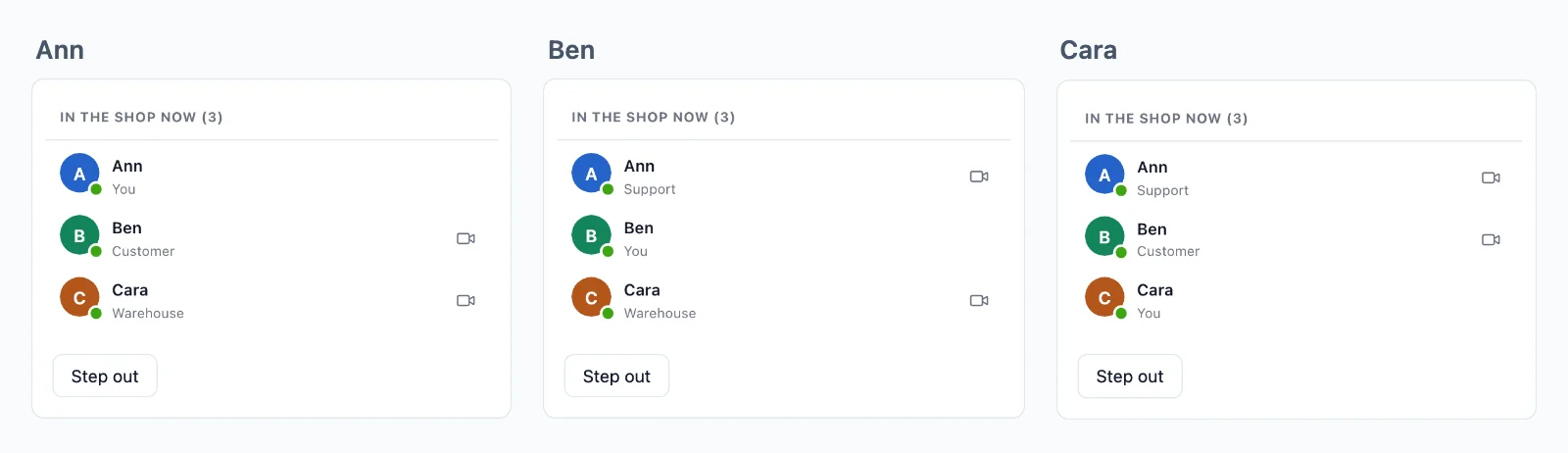
Ništa se ne gubi pri ponovnom povezivanju
Soba može čuvati svoje zadnje događaje, a stranica koja se vrati dobiva što je propustila, redom, prije onoga što slijedi.
Tko je online
Soba može prikazati tko je u njoj, s onim što odaberete prikazati o svakoj osobi. Brojač govori koliko ljudi gleda stranicu, u bilo kojem opsegu, a tko je online poznato je u cijeloj vašoj aplikaciji.
Događaji sa stranice
Stranice šalju u sobe u kojima jesu, bez zahtjeva prema vašem poslužitelju: poruke chata, tipkanje, kursor. Pravilo određuje koji se događaji smiju slati, a webhook vašem poslužitelju predaje one koje treba zadržati.
Jednoj osobi, posvuda
Pošaljite korisniku i poruka stiže na svaku karticu i uređaj koje ima otvorene, bez postavljanja sobe.
Šifrirano, ključevima koje nikad nemamo
Događaji, prisutnost i povijest putuju zapečaćeni ključevima koje drži vaš poslužitelj, a pozivi između dvoje ljudi šifrirani su s kraja na kraj. Oblak ih prenosi bez mogućnosti da ih pročita.
Jedna veza za sve kartice
Kartice jednog preglednika dijele jednu vezu, pa se osoba s tri otvorene kartice računa jednom.
Primjeri upotrebe
Što ljudi grade na WebSockets
Svaki je cijela aplikacija u dokumentaciji, s poslužiteljem u Node.js-u, PHP-u i Pythonu.
Ažuriranja i obavijesti uživo
Narudžba koja se mijenja na svojoj stranici, nadzorna ploča, napredak nekog posla i obavijest jednom korisniku u svakoj kartici i aplikaciji.
Chat
Razgovori između dviju osoba i u grupama, s tipkanjem, oznakama pročitanosti i reakcijama, spremljeni u vašu bazu podataka.
Tko je na mreži i tko je ovdje
Točka na svakom avataru, osobe u sobi s njihovim ulogama i broj onih koji gledaju stranicu.
Zajedničko uređivanje
Tko je u dokumentu, njihovi kursori i izmjene, poslani binarno i sačuvani za ponovno povezivanje.
Ankete, kvizovi i pitanja
Glasovi i pitanja koji stižu samo do vašeg poslužitelja, rezultati poslani svima i rezultat za svakog igrača.
Aukcije uživo
Ponude o kojima vaš poslužitelj odlučuje jednu po jednu, nova cijena svima i sat koji se pomiče kad ponuda stigne u zadnji čas.
Cijene
Cijena prema vezama, nikad prema porukama
Od $11.99 mjesečno za 1.000 istodobnih veza uz godišnju naplatu, ili $14.99 uz mjesečnu naplatu.
Cijena ovisi o broju istodobnih veza, počevši od 1.000, uz mjesečnu ili godišnju naplatu. Poruke i promet nikad se ne naplaćuju, a ono što šalje vaš poslužitelj ne troši nijednu vašu vezu.
Isti plan i SDK donose video pozive i prijenos uživo, na istoj vezi.
Pitanja
Česta pitanja
Trebam li vlastiti WebSocket poslužitelj?
Ne. Preglednici i aplikacije drže svoje veze otvorenima prema našim poslužiteljima, a kako vaša aplikacija raste, pokreće se još njih. Vaš poslužitelj samo određuje tko se čemu smije pridružiti i šalje svaki događaj jednim kratkim HTTP zahtjevom.
Radi li na serverless hostingu?
Da. Serverless funkcija ne može držati vezu otvorenom i ovdje ne mora: svaki događaj šalje jednim kratkim zahtjevom, a veze ostaju kod nas. Edge funkcije i svaki drugi hosting rade na isti način.
Koji stackovi mogu koristiti WebSocket API?
Next.js i Express, Laravel i obični PHP, Django, FastAPI i Flask, Capacitor, iOS i Android, svaki s vlastitim vodičem. Aplikacije u React Nativeu i Flutteru također imaju sobe i prisutnost. Poslužitelj u bilo kojem drugom jeziku koristi HTTP API.
Moram li sam pisati WebSocket kôd?
Ne. SDK otvara vezu, sam se ponovno povezuje i ponovno vas pridružuje vašim sobama, a vi slušate događaje po nazivu. U Laravelu je to broadcasting driver, pa broadcast() i vaša datoteka s kanalima ostaju kakvi jesu.
Što se broji kao veza?
Preglednik ili uređaj koji je u tom trenutku povezan s oblakom. Kartice jednog preglednika dijele jednu vezu kada vaša aplikacija poslužuje SDK worker, a ono što vaš poslužitelj šalje preko API-ja ne broji se.
Što se događa kad dosegnem ograničenje veza?
Do 20% više veza i dalje se uspješno spaja, a vlasnik računa dobiva e-poštu na 80% i na 100% veza, na vrijeme da prijeđe na veći plan.
Što se događa kad stranica izgubi vezu?
Sama se ponovno povezuje. Soba koja čuva povijest daje joj što je propustila, redom, do 5 minuta, a stranica koja je bila odsutna dulje dobiva obavijest o tome, pa ponovno može čitati vaš poslužitelj. Povijest služi samo za ponovna povezivanja: vaše zapise čuva vaša baza podataka.
Tko odlučuje tko se pridružuje sobi?
Vaš poslužitelj, pravilom za svaku vrstu sobe: tko se pridružuje, što smije slati i tko samo čita. Oblak provodi svaki odgovor, a vaš poslužitelj može u svakom trenutku nekoga izbaciti iz sobe.
Možete li čitati što moja aplikacija šalje?
Ne u privatnoj ili presence sobi. Njezini događaji, povijest i popis tko je u njoj putuju zapečaćeni ključevima koje izrađuje vaš poslužitelj, a oblak ih prenosi bez mogućnosti čitanja. Javna soba, kojoj se svatko može pridružiti, ide nešifrirano.
Gdje su vaši poslužitelji?
Poslužitelji za stvarno vrijeme koji prenose vaše događaje nalaze se u Njemačkoj. Releji i medijski poslužitelji za pozive nalaze se u više zemalja.
Pitanja o vašoj integraciji? Pišite nam: pomažemo sa SDK-ovima, zaslonom poziva i vašim stackom.