' d='M48 28h24v18a12 12 0 0 1-24 0z'/%3E%3Cpath fill='%230093DD' d='M47.5 21.5h4.6V28h-4.6zm10.2-2.5h4.6v9h-4.6zm10.2 2.5h4.6V28h-4.6z'/%3E%3Cpath fill='%23171796' d='M52.6 20h4.6v8h-4.6zm10.2 0h4.6v8h-4.6z'/%3E%3C/svg%3E)
 English
 Deutsch
 Español
 Français
 Italiano
 Nederlands
 Polski
 עברית
Za aplikacije
Prijenos uživo za vašu aplikaciju
API i SDK za prijenos uživo za Next.js, Laravel, Django i svaki drugi stack. Voditelj emitira uživo iz preglednika, s mobitela ili iz OBS-a, naši medijski poslužitelji prenose sliku svima koji gledaju, a player s chatom spreman je za upotrebu, pa ne morate održavati nikakav medijski poslužitelj.
Najbolje cijene za WebSockets, neograničeni pozivi 1 na 1 s TURN poslužiteljima diljem svijeta te grupni pozivi i prijenos uživo s uključenom kvotom. Od $11.99 mjesečno za 1.000 istodobnih veza uz godišnju naplatu, ili $14.99 uz mjesečnu naplatu.
Gledatelji iznad vašeg plana: $0.20 za 1.000 minuta.
Next.js na poslužitelju i React na stranici.
export async function GET( request: Request ) {
    const me = await currentUserId();   // null for a visitor
    const id = new URL( request.url ).searchParams.get( 'id' )!;

    // Your own check: its host goes live, the rest watch.
    const token = await realtime.streamToken( me, 'live:' + id, {
        role: me && await isHostOf( id, me ) ? 'host' : 'viewer',
    } );

    return Response.json( { token } );
}app.get( '/api/stream-token', async ( req, res ) => {
const me = userOf( req ); // null for a visitor
const { id } = req.query;
// Your own check: its host goes live, the rest watch.
const token = await realtime.streamToken( me, 'live:' + id, {
role: me && await isHostOf( id, me ) ? 'host' : 'viewer',
} );
res.json( { token } );
} );import { createServer } from 'node:http';
createServer( async ( req, res ) => {
const url = new URL( req.url, 'http://localhost' );
if ( url.pathname === '/api/stream-token' ) {
const me = userOf( req ); // null for a visitor
const id = url.searchParams.get( 'id' );
// Your own check: its host goes live, the rest watch.
const token = await realtime.streamToken( me, 'live:' + id, {
role: me && await isHostOf( id, me ) ? 'host' : 'viewer',
} );
res.writeHead( 200, { 'Content-Type': 'application/json' } );
return res.end( JSON.stringify( { token } ) );
}
// Your pages, and realtime.node( userOf ) for the SDK's routes.
} ).listen( 3000 );use Illuminate\Http\Request;
use WordPlus\Realtime\Laravel\Facades\Realtime;
Route::get( '/api/stream-token', function ( Request $request ) {
$me = $request->user()?->id; // null for a visitor
$id = $request->query( 'id' );
// Your own check: its host goes live, the rest watch.
return [ 'token' => Realtime::streamToken( $me, 'live:' . $id, [
'role' => $me && is_host_of( $id, $me ) ? 'host' : 'viewer',
] ) ];
} );require __DIR__ . '/../src/realtime.php';
$me = current_user_id(); // null for a visitor
$id = $_GET['id'] ?? '';
header( 'Content-Type: application/json' );
// Your own check: its host goes live, the rest watch.
echo json_encode( [
'token' => $realtime->streamToken( $me, 'live:' . $id, [
'role' => $me && is_host_of( $id, $me ) ? 'host' : 'viewer',
] ),
] );from django.http import JsonResponse
from .realtime import realtime
# In urls.py: path("api/stream-token", views.stream_token)
def stream_token(request):
me = request.user.id if request.user.is_authenticated else None
id = request.GET["id"]
# Your own check: its host goes live, the rest watch.
token = realtime.stream_token(
me,
"live:" + id,
role="host" if me and is_host_of(id, me) else "viewer",
)
return JsonResponse({"token": token})from fastapi import Depends
from realtime import realtime
# current_user_id answers None for a visitor.
@app.get("/api/stream-token")
def stream_token(id: str, me: int | None = Depends(current_user_id)):
# Your own check: its host goes live, the rest watch.
token = realtime.stream_token(
me,
"live:" + id,
role="host" if me and is_host_of(id, me) else "viewer",
)
return {"token": token}from flask import request, session
from realtime import realtime
@app.get("/api/stream-token")
def stream_token():
me = session.get("user_id") # None for a visitor
id = request.args["id"]
# Your own check: its host goes live, the rest watch.
token = realtime.stream_token(
me,
"live:" + id,
role="host" if me and is_host_of(id, me) else "viewer",
)
return {"token": token}// http.HandleFunc("GET /api/stream-token", streamToken)
func streamToken(w http.ResponseWriter, r *http.Request) {
me := userOf(r) // empty for a visitor
id := r.URL.Query().Get("id")
// Your own check: its host goes live, the rest watch.
role := "viewer"
if me != "" && isHostOf(id, me) {
role = "host"
}
token := app.StreamToken(wordplus.Stream{
Name: "live:" + id,
Role: role,
User: me,
})
reply(w, map[string]string{"token": token})
}Hookovi i komponente za svaku React aplikaciju, uz bilo koji poslužitelj gore.
import { connect } from '@wordplus/realtime';

const rt = await connect();

// The player and the studio.
await rt.streamScreen();

// And in the page:
// <live-stream name="live:12"
//     token-url="/api/stream-token?id=12"
// title="Opening night"></live-stream>import { connect } from '@wordplus/realtime';
const rt = await connect();
// The player and the studio.
await rt.streamScreen();
// And in the page:
// <live-stream name="live:12"
// token-url="/api/stream-token?id=12"
// title="Opening night"></live-stream>import { connect } from '@wordplus/realtime';
const rt = await connect();
// The player and the studio.
await rt.streamScreen();
// And in the page:
// <live-stream name="live:12"
// token-url="/api/stream-token?id=12"
// title="Opening night"></live-stream>import { connect } from '@wordplus/realtime';
const rt = await connect( window.wordplusRealtimeConfig );
// The player and the studio.
await rt.streamScreen();
// And in the page:
// <live-stream name="live:12"
// token-url="/api/stream-token?id=12"
// title="Opening night"></live-stream><live-stream name="live:12"
token-url="/api/stream-token?id=12"
title="Opening night"></live-stream>
<script type="module">
import { connect } from '@wordplus/realtime';
const rt = await connect( window.wordplusRealtimeConfig );
// The player and the studio.
await rt.streamScreen();
</script><live-stream name="live:12"
token-url="/api/stream-token?id=12"
title="Opening night"></live-stream>
<script type="module">
import { connect } from '@wordplus/realtime';
const rt = await connect( window.wordplusRealtimeConfig );
// The player and the studio.
await rt.streamScreen();
</script><live-stream name="live:12"
token-url="/api/stream-token?id=12"
title="Opening night"></live-stream>
<script type="module">
import { connect } from '@wordplus/realtime';
const rt = await connect( window.wordplusRealtimeConfig );
// The player and the studio.
await rt.streamScreen();
</script><live-stream name="live:12"
token-url="/api/stream-token?id=12"
title="Opening night"></live-stream>
<script type="module">
import { connect } from '@wordplus/realtime';
const rt = await connect( window.wordplusRealtimeConfig );
// The player and the studio.
await rt.streamScreen();
</script>import { connect } from '@wordplus/realtime';
const settings = await fetch( '/api/realtime/config' );
const rt = await connect( await settings.json() );
// The player and the studio.
await rt.streamScreen();
// And in the page:
// <live-stream name="live:12"
// token-url="/api/stream-token?id=12"
// title="Opening night"></live-stream><live-stream name="live:{{ $event->id }}"
token-url="/api/stream-token?id={{ $event->id }}"
title="{{ $event->title }}"></live-stream>
<script type="module">
// The player and the studio.
await window.Echo.connector.rt.streamScreen();
</script>'use client'; // in Next.js
import { LiveStream } from '@wordplus/realtime/react';
// Inside <RealtimeProvider>, once for the whole app.
export function Stream( { id, title } ) {
return (
<LiveStream name={ `live:${ id }` } title={ title }
tokenUrl={ `/api/stream-token?id=${ id }` } />
);
}<script setup>
import { onMounted } from 'vue';
// realtime.js, one connection for the whole app:
// export const realtime = connect();
import { realtime } from './realtime';
defineProps( [ 'id', 'title' ] );
onMounted( async () => {
// The player and the studio.
( await realtime ).streamScreen();
} );
</script>
<!-- isCustomElement for this tag, in vite.config.js -->
<template>
<live-stream :name="`live:${ id }`" :title="title"
:token-url="`/api/stream-token?id=${ id }`"></live-stream>
</template><script>
import { onMount } from 'svelte';
// realtime.js, one connection for the whole app:
// export const realtime = connect();
import { realtime } from './realtime';
let { id, title } = $props();
onMount( async () => {
// The player and the studio.
( await realtime ).streamScreen();
} );
</script>
<live-stream name="live:{ id }" { title }
token-url="/api/stream-token?id={ id }"></live-stream>import {
Component, CUSTOM_ELEMENTS_SCHEMA, Input,
} from '@angular/core';
// realtime.ts, one connection for the whole app:
// export const realtime = connect();
import { realtime } from './realtime';
@Component( {
selector: 'app-stream',
schemas: [ CUSTOM_ELEMENTS_SCHEMA ],
template: `
<live-stream [attr.name]="'live:' + id"
[attr.token-url]="'/api/stream-token?id=' + id"
[attr.title]="title"></live-stream>
`,
} )
export class StreamComponent {
@Input( { required: true } ) id!: number;
@Input( { required: true } ) title!: string;
async ngOnInit() {
// The player and the studio.
( await realtime ).streamScreen();
}
}import WordPlusRealtimeCalls
import WordPlusRealtimeUI
// Your own request to your route, asked again as tokens run out.
let stream = try await rt.joinStream {
try await api.streamToken(id: 12)
}
present(LiveStreamScreen(stream: stream, title: "Opening night"),
animated: true)import cloud.wordplus.realtime.calls.joinStream
import cloud.wordplus.realtime.ui.LiveStreamScreen
// Your own request to your route, asked again as tokens run out.
val stream = rt.joinStream(context) {
api.streamToken(id = 12)
}
LiveStreamScreen.open(activity, stream, title = "Opening night")import { LiveStreamButton } from '@wordplus/realtime-react-native';
// Your server, in full, as an app has no address of its own.
const API = 'https://app.example.com/api';
// Inside <RealtimeProvider>, once for the whole app.
export function Stream( { id, title } ) {
return (
<LiveStreamButton name={ `live:${ id }` } title={ title }
tokenUrl={ `${ API }/stream-token?id=${ id }` }>
Watch
</LiveStreamButton>
);
}import 'package:flutter/material.dart';
import 'package:wordplus_realtime/wordplus_realtime.dart';
// Your server, in full, as an app has no address of its own.
const api = 'https://app.example.com/api';
// In your build. It asks your route again as tokens run out.
LiveStreamButton(
rt: rt,
stream: 'live:12',
tokenUrl: '$api/stream-token?id=12',
title: 'Opening night',
child: const Text('Watch'),
)
Isprobajte prijenos uživo
Krenite uživo s ove stranice, a gledajte s mobitela ili iz drugog prozora. Račun nije potreban.
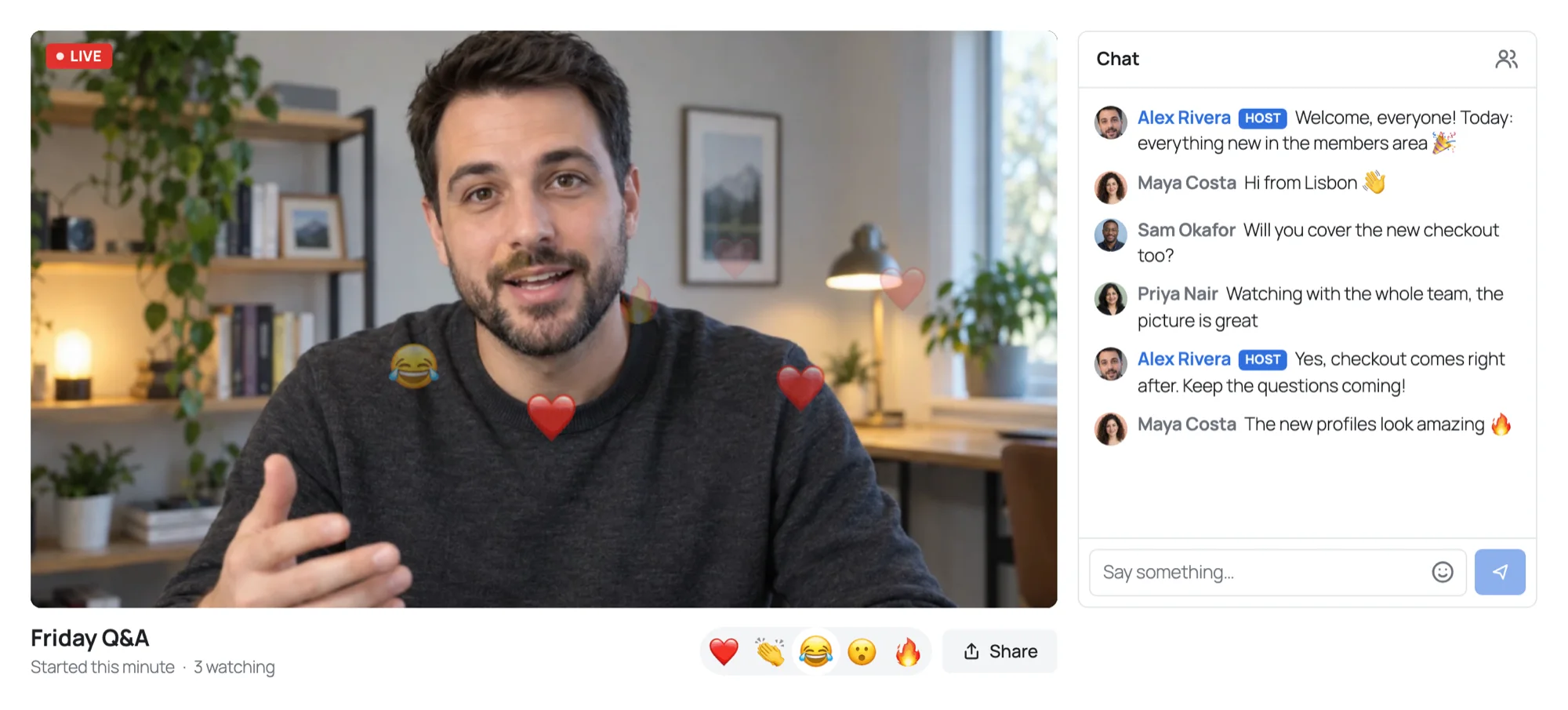
Ovo su zasloni koje SDK daje vašoj aplikaciji. Preglednik traži kameru i mikrofon, ništa se ne snima, a demo završava nakon 10 minuta.
Voditelji i moderatori
Emitirajte uživo iz preglednika, s mobitela ili iz OBS-a
Studio i chat dolaze s playerom, za voditelja i moderatore koje određuje vaš poslužitelj.
Kamera, zaslon ili OBS
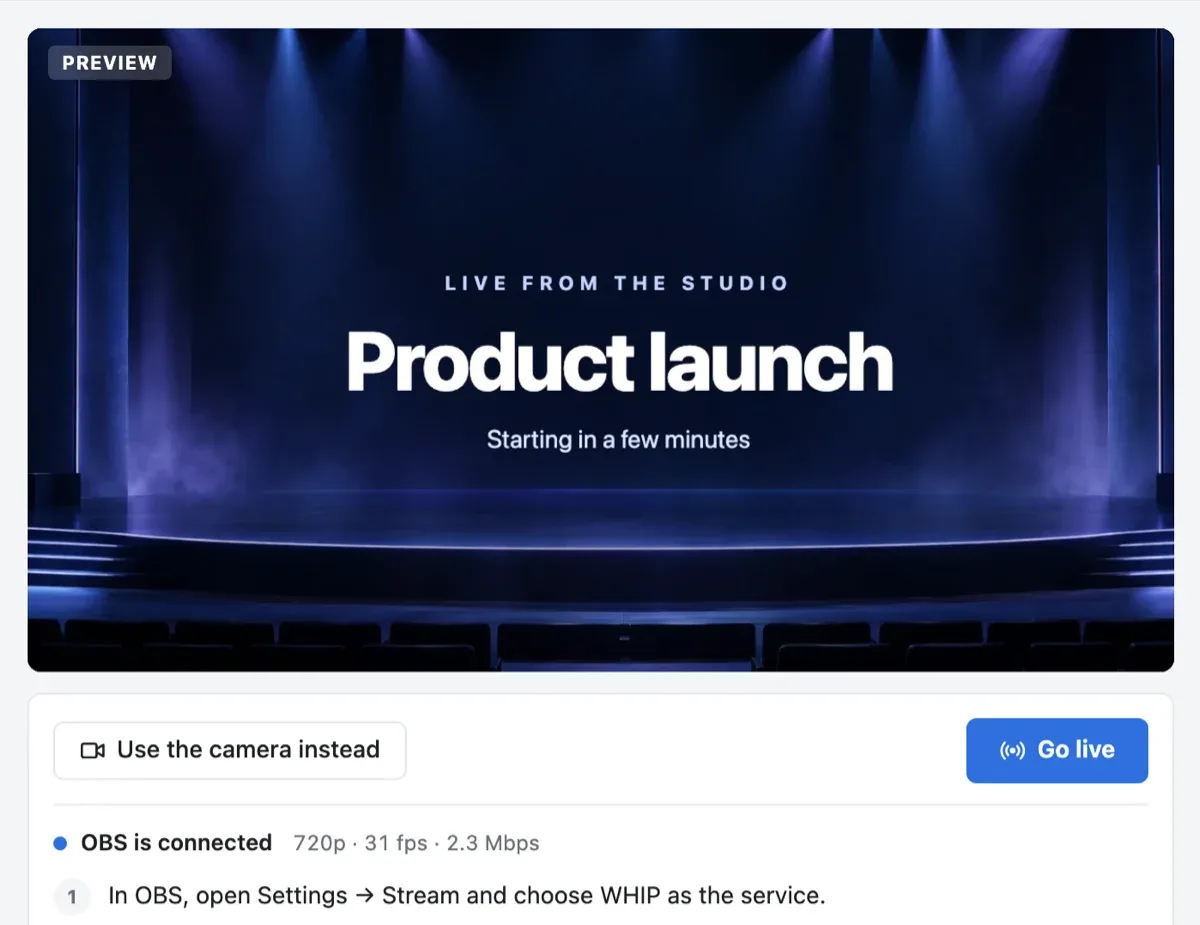
Voditelj vidi sliku prije nego što krene uživo, zatim jednim klikom pokreće prijenos i završava ga za sve. Emitira s kamere i mikrofona preglednika ili mobitela, dijeli zaslon ili šalje sliku iz OBS-a ili bilo kojeg drugog enkodera preko WHIP-a.
Chat u kojem vlada red
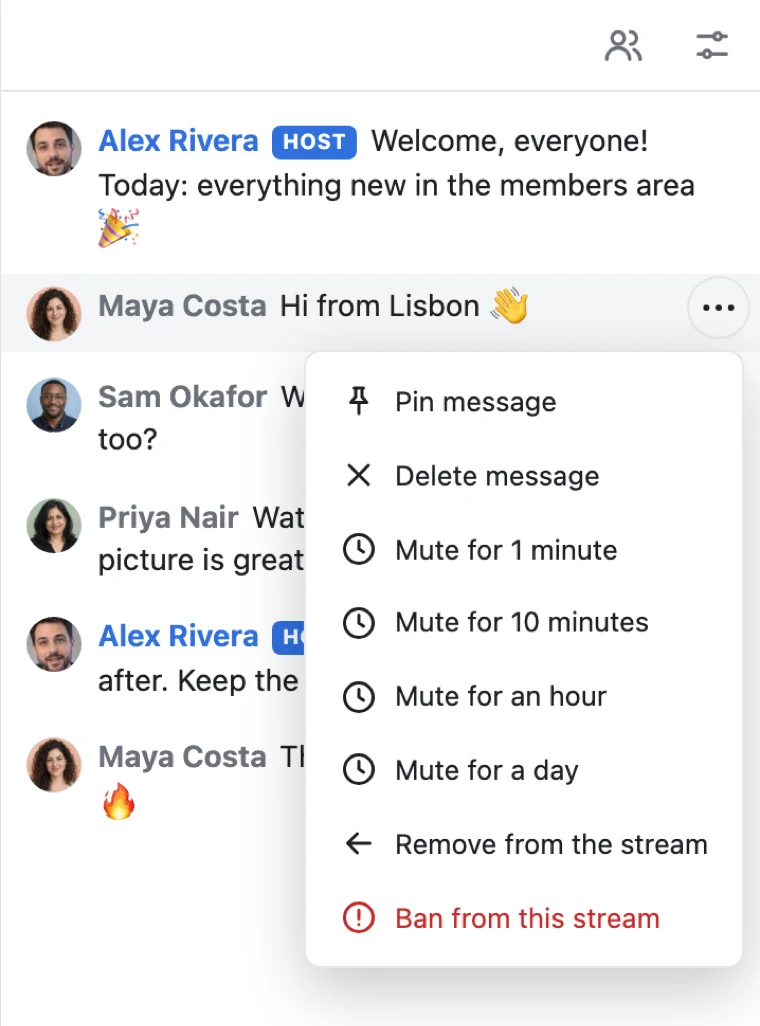
Gledatelji pišu u chatu pokraj slike i šalju reakcije preko nje. Voditelj i moderatori koje određuje vaš poslužitelj prikvačuju i brišu poruke, usporavaju chat, privremeno utišavaju nekoga te ga uklanjaju ili mu zabranjuju pristup. Vaš poslužitelj može učiniti isto i pisati u chatu pod vlastitim imenom.
Gledatelji
Svi koji gledaju, prijavljeni ili ne
Gledatelju treba samo poveznica na stranicu. Gleda, piše u chatu i reagira, a svi vide koliko ljudi gleda.
Za gledanje ne treba račun
Vaš poslužitelj čini posjetitelja gledateljem, pa svatko s poveznicom gleda, a prijavljuje se kad želi pisati u chatu. Ili prijenos ostavite samo za članove.
Slika za svaki zaslon
Svaki gledatelj dobiva sliku u veličini koju podnose njegov zaslon i veza, na webu, iOS-u i Androidu, uz brojač gledatelja uživo.
Gosti na pozornici
Gledatelj diže ruku, a voditelj ga dovodi na pozornicu s njegovom kamerom i mikrofonom, za pitanje, intervju ili panel.
Odlučuje vaš poslužitelj
Nekoliko redaka u vašem stacku
Vaš poslužitelj kaže tko vodi koji prijenos, tko gleda, a tko moderira chat. Stranica prikazuje prijenos jednim elementom ili vašim vlastitim kodom.
Next.js na poslužitelju i React na stranici.
export async function GET( request: Request ) {
const me = await currentUserId(); // null for a visitor
const id = new URL( request.url ).searchParams.get( 'id' )!;
// Your own check: its host goes live, the rest watch.
const token = await realtime.streamToken( me, 'live:' + id, {
role: me && await isHostOf( id, me ) ? 'host' : 'viewer',
mod: me && await isModerator( me ),
settings: { reactions: true },
} );
return Response.json( { token } );
}app.get( '/api/stream-token', async ( req, res ) => {
const me = userOf( req ); // null for a visitor
const { id } = req.query;
// Your own check: its host goes live, the rest watch.
const token = await realtime.streamToken( me, 'live:' + id, {
role: me && await isHostOf( id, me ) ? 'host' : 'viewer',
mod: me && await isModerator( me ),
settings: { reactions: true },
} );
res.json( { token } );
} );import { createServer } from 'node:http';
createServer( async ( req, res ) => {
const url = new URL( req.url, 'http://localhost' );
if ( url.pathname === '/api/stream-token' ) {
const me = userOf( req ); // null for a visitor
const id = url.searchParams.get( 'id' );
// Your own check: its host goes live, the rest watch.
const token = await realtime.streamToken( me, 'live:' + id, {
role: me && await isHostOf( id, me ) ? 'host' : 'viewer',
mod: me && await isModerator( me ),
settings: { reactions: true },
} );
res.writeHead( 200, { 'Content-Type': 'application/json' } );
return res.end( JSON.stringify( { token } ) );
}
// Your pages, and realtime.node( userOf ) for the SDK's routes.
} ).listen( 3000 );use Illuminate\Http\Request;
use WordPlus\Realtime\Laravel\Facades\Realtime;
Route::get( '/api/stream-token', function ( Request $request ) {
$me = $request->user()?->id; // null for a visitor
$id = $request->query( 'id' );
// Your own check: its host goes live, the rest watch.
return [ 'token' => Realtime::streamToken( $me, 'live:' . $id, [
'role' => $me && is_host_of( $id, $me ) ? 'host' : 'viewer',
'mod' => $me && is_moderator( $me ),
'settings' => [ 'reactions' => true ],
] ) ];
} );require __DIR__ . '/../src/realtime.php';
$me = current_user_id(); // null for a visitor
$id = $_GET['id'] ?? '';
header( 'Content-Type: application/json' );
// Your own check: its host goes live, the rest watch.
echo json_encode( [
'token' => $realtime->streamToken( $me, 'live:' . $id, [
'role' => $me && is_host_of( $id, $me ) ? 'host' : 'viewer',
'mod' => $me && is_moderator( $me ),
'settings' => [ 'reactions' => true ],
] ),
] );from django.http import JsonResponse
from .realtime import realtime
# In urls.py: path("api/stream-token", views.stream_token)
def stream_token(request):
me = request.user.id if request.user.is_authenticated else None
id = request.GET["id"]
# Your own check: its host goes live, the rest watch.
token = realtime.stream_token(
me,
"live:" + id,
role="host" if me and is_host_of(id, me) else "viewer",
mod=bool(me and is_moderator(me)),
settings={"reactions": True},
)
return JsonResponse({"token": token})from fastapi import Depends
from realtime import realtime
# current_user_id answers None for a visitor.
@app.get("/api/stream-token")
def stream_token(id: str, me: int | None = Depends(current_user_id)):
# Your own check: its host goes live, the rest watch.
token = realtime.stream_token(
me,
"live:" + id,
role="host" if me and is_host_of(id, me) else "viewer",
mod=bool(me and is_moderator(me)),
settings={"reactions": True},
)
return {"token": token}from flask import request, session
from realtime import realtime
@app.get("/api/stream-token")
def stream_token():
me = session.get("user_id") # None for a visitor
id = request.args["id"]
# Your own check: its host goes live, the rest watch.
token = realtime.stream_token(
me,
"live:" + id,
role="host" if me and is_host_of(id, me) else "viewer",
mod=bool(me and is_moderator(me)),
settings={"reactions": True},
)
return {"token": token}// http.HandleFunc("GET /api/stream-token", streamToken)
func streamToken(w http.ResponseWriter, r *http.Request) {
me := userOf(r) // empty for a visitor
id := r.URL.Query().Get("id")
// Your own check: its host goes live, the rest watch.
role := "viewer"
if me != "" && isHostOf(id, me) {
role = "host"
}
token := app.StreamToken(wordplus.Stream{
Name: "live:" + id,
Role: role,
User: me,
Mod: me != "" && isModerator(me),
React: wordplus.Yes,
})
reply(w, map[string]string{"token": token})
}Hookovi i komponente za svaku React aplikaciju, uz bilo koji poslužitelj gore.
import { connect } from '@wordplus/realtime';

const rt = await connect();

// The player and the studio.
await rt.streamScreen();

// And in the page:
// <live-stream name="live:12"
//     token-url="/api/stream-token?id=12"
// title="Opening night"></live-stream>import { connect } from '@wordplus/realtime';
const rt = await connect();
// The player and the studio.
await rt.streamScreen();
// And in the page:
// <live-stream name="live:12"
// token-url="/api/stream-token?id=12"
// title="Opening night"></live-stream>import { connect } from '@wordplus/realtime';
const rt = await connect();
// The player and the studio.
await rt.streamScreen();
// And in the page:
// <live-stream name="live:12"
// token-url="/api/stream-token?id=12"
// title="Opening night"></live-stream>import { connect } from '@wordplus/realtime';
const rt = await connect( window.wordplusRealtimeConfig );
// The player and the studio.
await rt.streamScreen();
// And in the page:
// <live-stream name="live:12"
// token-url="/api/stream-token?id=12"
// title="Opening night"></live-stream><live-stream name="live:12"
token-url="/api/stream-token?id=12"
title="Opening night"></live-stream>
<script type="module">
import { connect } from '@wordplus/realtime';
const rt = await connect( window.wordplusRealtimeConfig );
// The player and the studio.
await rt.streamScreen();
</script><live-stream name="live:12"
token-url="/api/stream-token?id=12"
title="Opening night"></live-stream>
<script type="module">
import { connect } from '@wordplus/realtime';
const rt = await connect( window.wordplusRealtimeConfig );
// The player and the studio.
await rt.streamScreen();
</script><live-stream name="live:12"
token-url="/api/stream-token?id=12"
title="Opening night"></live-stream>
<script type="module">
import { connect } from '@wordplus/realtime';
const rt = await connect( window.wordplusRealtimeConfig );
// The player and the studio.
await rt.streamScreen();
</script><live-stream name="live:12"
token-url="/api/stream-token?id=12"
title="Opening night"></live-stream>
<script type="module">
import { connect } from '@wordplus/realtime';
const rt = await connect( window.wordplusRealtimeConfig );
// The player and the studio.
await rt.streamScreen();
</script>import { connect } from '@wordplus/realtime';
const settings = await fetch( '/api/realtime/config' );
const rt = await connect( await settings.json() );
// The player and the studio.
await rt.streamScreen();
// And in the page:
// <live-stream name="live:12"
// token-url="/api/stream-token?id=12"
// title="Opening night"></live-stream><live-stream name="live:{{ $event->id }}"
token-url="/api/stream-token?id={{ $event->id }}"
title="{{ $event->title }}"></live-stream>
<script type="module">
// The player and the studio.
await window.Echo.connector.rt.streamScreen();
</script>'use client'; // in Next.js
import { LiveStream } from '@wordplus/realtime/react';
// Inside <RealtimeProvider>, once for the whole app.
export function Stream( { id, title } ) {
return (
<LiveStream name={ `live:${ id }` } title={ title }
tokenUrl={ `/api/stream-token?id=${ id }` } />
);
}<script setup>
import { onMounted } from 'vue';
// realtime.js, one connection for the whole app:
// export const realtime = connect();
import { realtime } from './realtime';
defineProps( [ 'id', 'title' ] );
onMounted( async () => {
// The player and the studio.
( await realtime ).streamScreen();
} );
</script>
<!-- isCustomElement for this tag, in vite.config.js -->
<template>
<live-stream :name="`live:${ id }`" :title="title"
:token-url="`/api/stream-token?id=${ id }`"></live-stream>
</template><script>
import { onMount } from 'svelte';
// realtime.js, one connection for the whole app:
// export const realtime = connect();
import { realtime } from './realtime';
let { id, title } = $props();
onMount( async () => {
// The player and the studio.
( await realtime ).streamScreen();
} );
</script>
<live-stream name="live:{ id }" { title }
token-url="/api/stream-token?id={ id }"></live-stream>import {
Component, CUSTOM_ELEMENTS_SCHEMA, Input,
} from '@angular/core';
// realtime.ts, one connection for the whole app:
// export const realtime = connect();
import { realtime } from './realtime';
@Component( {
selector: 'app-stream',
schemas: [ CUSTOM_ELEMENTS_SCHEMA ],
template: `
<live-stream [attr.name]="'live:' + id"
[attr.token-url]="'/api/stream-token?id=' + id"
[attr.title]="title"></live-stream>
`,
} )
export class StreamComponent {
@Input( { required: true } ) id!: number;
@Input( { required: true } ) title!: string;
async ngOnInit() {
// The player and the studio.
( await realtime ).streamScreen();
}
}import WordPlusRealtimeCalls
import WordPlusRealtimeUI
// Your own request to your route, asked again as tokens run out.
let stream = try await rt.joinStream {
try await api.streamToken(id: 12)
}
present(LiveStreamScreen(stream: stream, title: "Opening night"),
animated: true)import cloud.wordplus.realtime.calls.joinStream
import cloud.wordplus.realtime.ui.LiveStreamScreen
// Your own request to your route, asked again as tokens run out.
val stream = rt.joinStream(context) {
api.streamToken(id = 12)
}
LiveStreamScreen.open(activity, stream, title = "Opening night")import { LiveStreamButton } from '@wordplus/realtime-react-native';
// Your server, in full, as an app has no address of its own.
const API = 'https://app.example.com/api';
// Inside <RealtimeProvider>, once for the whole app.
export function Stream( { id, title } ) {
return (
<LiveStreamButton name={ `live:${ id }` } title={ title }
tokenUrl={ `${ API }/stream-token?id=${ id }` }>
Watch
</LiveStreamButton>
);
}import 'package:flutter/material.dart';
import 'package:wordplus_realtime/wordplus_realtime.dart';
// Your server, in full, as an app has no address of its own.
const api = 'https://app.example.com/api';
// In your build. It asks your route again as tokens run out.
LiveStreamButton(
rt: rt,
stream: 'live:12',
tokenUrl: '$api/stream-token?id=12',
title: 'Opening night',
child: const Text('Watch'),
)Prijenosi uživo u svakom stacku, s cijelim postavljanjem:
Primjeri upotrebe
Što se gradi s prijenosima uživo
Svaki je cijela aplikacija u dokumentaciji, s poslužiteljem u Node.js-u, PHP-u i Pythonu.
Događaji uživo
Predstavljanje, sat, predavanje ili koncert, uživo za svakoga tko otvori stranicu.
Prijenosi samo za članove
Prijenos koji smiju gledati samo članovi kluba, vlasnici ulaznice ili polaznici tečaja.
Intervjui i pitanja na pozornici
Gledatelji dižu ruku, a voditelj ih dovodi na pozornicu pokraj sebe, u rasporedu koji sam odabere.
Cijene
Cijena prema vezama, nikad prema porukama
Od $11.99 mjesečno za 1.000 istodobnih veza uz godišnju naplatu, ili $14.99 uz mjesečnu naplatu.
Gledatelji iznad vašeg plana: $0.20 za 1.000 minuta.
Jedna cijena pri svakoj razlučivosti. Propusnost, releji i poruke nikad se ne naplaćuju, a pozivi između dvije osobe su uključeni. Sami vodimo svoje releje i medijske poslužitelje, pa su ove cijene niske.
Cijena prema istodobnim vezama, od 1.000 naviše, mjesečna ili godišnja naplata.
S 1.000 veza prijenosi uživo nisu obračunati do 50 gledatelja istodobno, a svakih daljnjih 1.000 veza dodaje 20 gledatelja. Iznad toga svaki dodatni gledatelj troši kredit po minuti, samo dok je prijenos u eteru, a vaš plan dodaje 5.000 kredita mjesečno na svakih 1.000 veza.
Pitanja
Česta pitanja
Trebam li vlastiti medijski poslužitelj?
Ne. Voditelj šalje sliku našim medijskim poslužiteljima, koji je prenose svima koji gledaju. OBS i drugi enkoderi šalju je preko WHIP-a. Ništa ne morate sami hostati.
Koji stackovi mogu koristiti SDK za prijenos uživo?
Next.js i Express, Laravel i čisti PHP, Django, FastAPI i Flask, Capacitor, iOS i Android, svaki s vodičem. Poslužitelj u bilo kojem drugom jeziku koristi HTTP API. Aplikacije u Flutteru imaju prijenose uživo na iOS-u i Androidu, a aplikacije u React Nativeu zasad na iOS-u.
Mogu li ljudi gledati bez računa?
Da. Vaš poslužitelj čini neprijavljenog posjetitelja gledateljem, pa svatko s poveznicom gleda, a prijavljuje se kad želi pisati u chatu. Ili prijenos ostavite samo za članove, pa proslijeđena poveznica ništa ne otvara.
Mogu li emitirati iz OBS-a?
Da. Studio voditelju daje adresu i ključ za OBS ili bilo koji drugi enkoder koji šalje preko WHIP-a, a slika iz enkodera zamjenjuje kameru. Novi ključ isključuje stari.
Koliko ljudi može gledati?
S 1.000 veza do 50 gledatelja istodobno ne troši kredite, a svakih daljnjih 1.000 veza dodaje 20. Iznad toga svaki dodatni gledatelj troši kredit po minuti, samo dok je prijenos u eteru.
Tko moderira chat?
Voditelj i svatko koga vaš poslužitelj učini moderatorom. Oni prikvačuju i brišu poruke, usporavaju chat, utišavaju nekoga na razdoblje od minute do jednog dana te nekoga uklanjaju ili mu zabranjuju pristup prijenosu. Sve to može i vaš poslužitelj, bez ijedne otvorene stranice.
Mogu li izgraditi vlastiti player?
Da. Player, chat i studio nisu obavezni. Postavite svaki dio gdje ga vaša stranica treba ili sami prikažite prijenos na SDK-u: sliku, gledatelje, chat i reakcije.
Mogu li naplaćivati gledanje?
Da. Vaš poslužitelj odlučuje tko smije gledati, pa ulaznica ili članstvo otvara prijenos. WordPlus Cloud putem webhooka javlja vašem poslužitelju kad svaki prijavljeni gledatelj počne i prestane gledati, izbrojeno na vlastitim poslužiteljima, kako bi vaša aplikacija mogla naplaćivati po gledanju ili po minuti.
Pitanja o vašoj integraciji? Pišite nam: pomažemo sa SDK-ovima, playerom i vašim stackom.