
 English
 Deutsch
 Français
 Italiano
 Nederlands
 Polski
' d='M48 28h24v18a12 12 0 0 1-24 0z'/%3E%3Cpath fill='%230093DD' d='M47.5 21.5h4.6V28h-4.6zm10.2-2.5h4.6v9h-4.6zm10.2 2.5h4.6V28h-4.6z'/%3E%3Cpath fill='%23171796' d='M52.6 20h4.6v8h-4.6zm10.2 0h4.6v8h-4.6z'/%3E%3C/svg%3E) Hrvatski
 עברית
Para apps
Transmisión en directo para tu app
Una API y un SDK de transmisión en directo para Next.js, Laravel, Django y cualquier otro stack. Un anfitrión sale en directo desde el navegador, un móvil u OBS, nuestros servidores multimedia llevan la imagen a todos los que miran, y el reproductor con su chat está listo para usar, así que no tienes que mantener ningún servidor multimedia.
Los mejores precios para WebSockets, llamadas 1 a 1 ilimitadas con servidores TURN en todo el mundo, y llamadas en grupo y transmisión en directo con una cuota incluida. Desde $11.99 al mes por 1000 conexiones simultáneas, con facturación anual, o $14.99 con facturación mensual.
Espectadores por encima de tu plan: $0.20 por cada 1.000 minutos.
Next.js en el servidor y React en la página.
export async function GET( request: Request ) {
    const me = await currentUserId();   // null for a visitor
    const id = new URL( request.url ).searchParams.get( 'id' )!;

    // Your own check: its host goes live, the rest watch.
    const token = await realtime.streamToken( me, 'live:' + id, {
        role: me && await isHostOf( id, me ) ? 'host' : 'viewer',
    } );

    return Response.json( { token } );
}app.get( '/api/stream-token', async ( req, res ) => {
const me = userOf( req ); // null for a visitor
const { id } = req.query;
// Your own check: its host goes live, the rest watch.
const token = await realtime.streamToken( me, 'live:' + id, {
role: me && await isHostOf( id, me ) ? 'host' : 'viewer',
} );
res.json( { token } );
} );import { createServer } from 'node:http';
createServer( async ( req, res ) => {
const url = new URL( req.url, 'http://localhost' );
if ( url.pathname === '/api/stream-token' ) {
const me = userOf( req ); // null for a visitor
const id = url.searchParams.get( 'id' );
// Your own check: its host goes live, the rest watch.
const token = await realtime.streamToken( me, 'live:' + id, {
role: me && await isHostOf( id, me ) ? 'host' : 'viewer',
} );
res.writeHead( 200, { 'Content-Type': 'application/json' } );
return res.end( JSON.stringify( { token } ) );
}
// Your pages, and realtime.node( userOf ) for the SDK's routes.
} ).listen( 3000 );use Illuminate\Http\Request;
use WordPlus\Realtime\Laravel\Facades\Realtime;
Route::get( '/api/stream-token', function ( Request $request ) {
$me = $request->user()?->id; // null for a visitor
$id = $request->query( 'id' );
// Your own check: its host goes live, the rest watch.
return [ 'token' => Realtime::streamToken( $me, 'live:' . $id, [
'role' => $me && is_host_of( $id, $me ) ? 'host' : 'viewer',
] ) ];
} );require __DIR__ . '/../src/realtime.php';
$me = current_user_id(); // null for a visitor
$id = $_GET['id'] ?? '';
header( 'Content-Type: application/json' );
// Your own check: its host goes live, the rest watch.
echo json_encode( [
'token' => $realtime->streamToken( $me, 'live:' . $id, [
'role' => $me && is_host_of( $id, $me ) ? 'host' : 'viewer',
] ),
] );from django.http import JsonResponse
from .realtime import realtime
# In urls.py: path("api/stream-token", views.stream_token)
def stream_token(request):
me = request.user.id if request.user.is_authenticated else None
id = request.GET["id"]
# Your own check: its host goes live, the rest watch.
token = realtime.stream_token(
me,
"live:" + id,
role="host" if me and is_host_of(id, me) else "viewer",
)
return JsonResponse({"token": token})from fastapi import Depends
from realtime import realtime
# current_user_id answers None for a visitor.
@app.get("/api/stream-token")
def stream_token(id: str, me: int | None = Depends(current_user_id)):
# Your own check: its host goes live, the rest watch.
token = realtime.stream_token(
me,
"live:" + id,
role="host" if me and is_host_of(id, me) else "viewer",
)
return {"token": token}from flask import request, session
from realtime import realtime
@app.get("/api/stream-token")
def stream_token():
me = session.get("user_id") # None for a visitor
id = request.args["id"]
# Your own check: its host goes live, the rest watch.
token = realtime.stream_token(
me,
"live:" + id,
role="host" if me and is_host_of(id, me) else "viewer",
)
return {"token": token}// http.HandleFunc("GET /api/stream-token", streamToken)
func streamToken(w http.ResponseWriter, r *http.Request) {
me := userOf(r) // empty for a visitor
id := r.URL.Query().Get("id")
// Your own check: its host goes live, the rest watch.
role := "viewer"
if me != "" && isHostOf(id, me) {
role = "host"
}
token := app.StreamToken(wordplus.Stream{
Name: "live:" + id,
Role: role,
User: me,
})
reply(w, map[string]string{"token": token})
}Hooks y componentes para cualquier app de React, con cualquiera de los servidores de arriba.
import { connect } from '@wordplus/realtime';

const rt = await connect();

// The player and the studio.
await rt.streamScreen();

// And in the page:
// <live-stream name="live:12"
//     token-url="/api/stream-token?id=12"
// title="Opening night"></live-stream>import { connect } from '@wordplus/realtime';
const rt = await connect();
// The player and the studio.
await rt.streamScreen();
// And in the page:
// <live-stream name="live:12"
// token-url="/api/stream-token?id=12"
// title="Opening night"></live-stream>import { connect } from '@wordplus/realtime';
const rt = await connect();
// The player and the studio.
await rt.streamScreen();
// And in the page:
// <live-stream name="live:12"
// token-url="/api/stream-token?id=12"
// title="Opening night"></live-stream>import { connect } from '@wordplus/realtime';
const rt = await connect( window.wordplusRealtimeConfig );
// The player and the studio.
await rt.streamScreen();
// And in the page:
// <live-stream name="live:12"
// token-url="/api/stream-token?id=12"
// title="Opening night"></live-stream><live-stream name="live:12"
token-url="/api/stream-token?id=12"
title="Opening night"></live-stream>
<script type="module">
import { connect } from '@wordplus/realtime';
const rt = await connect( window.wordplusRealtimeConfig );
// The player and the studio.
await rt.streamScreen();
</script><live-stream name="live:12"
token-url="/api/stream-token?id=12"
title="Opening night"></live-stream>
<script type="module">
import { connect } from '@wordplus/realtime';
const rt = await connect( window.wordplusRealtimeConfig );
// The player and the studio.
await rt.streamScreen();
</script><live-stream name="live:12"
token-url="/api/stream-token?id=12"
title="Opening night"></live-stream>
<script type="module">
import { connect } from '@wordplus/realtime';
const rt = await connect( window.wordplusRealtimeConfig );
// The player and the studio.
await rt.streamScreen();
</script><live-stream name="live:12"
token-url="/api/stream-token?id=12"
title="Opening night"></live-stream>
<script type="module">
import { connect } from '@wordplus/realtime';
const rt = await connect( window.wordplusRealtimeConfig );
// The player and the studio.
await rt.streamScreen();
</script>import { connect } from '@wordplus/realtime';
const settings = await fetch( '/api/realtime/config' );
const rt = await connect( await settings.json() );
// The player and the studio.
await rt.streamScreen();
// And in the page:
// <live-stream name="live:12"
// token-url="/api/stream-token?id=12"
// title="Opening night"></live-stream><live-stream name="live:{{ $event->id }}"
token-url="/api/stream-token?id={{ $event->id }}"
title="{{ $event->title }}"></live-stream>
<script type="module">
// The player and the studio.
await window.Echo.connector.rt.streamScreen();
</script>'use client'; // in Next.js
import { LiveStream } from '@wordplus/realtime/react';
// Inside <RealtimeProvider>, once for the whole app.
export function Stream( { id, title } ) {
return (
<LiveStream name={ `live:${ id }` } title={ title }
tokenUrl={ `/api/stream-token?id=${ id }` } />
);
}<script setup>
import { onMounted } from 'vue';
// realtime.js, one connection for the whole app:
// export const realtime = connect();
import { realtime } from './realtime';
defineProps( [ 'id', 'title' ] );
onMounted( async () => {
// The player and the studio.
( await realtime ).streamScreen();
} );
</script>
<!-- isCustomElement for this tag, in vite.config.js -->
<template>
<live-stream :name="`live:${ id }`" :title="title"
:token-url="`/api/stream-token?id=${ id }`"></live-stream>
</template><script>
import { onMount } from 'svelte';
// realtime.js, one connection for the whole app:
// export const realtime = connect();
import { realtime } from './realtime';
let { id, title } = $props();
onMount( async () => {
// The player and the studio.
( await realtime ).streamScreen();
} );
</script>
<live-stream name="live:{ id }" { title }
token-url="/api/stream-token?id={ id }"></live-stream>import {
Component, CUSTOM_ELEMENTS_SCHEMA, Input,
} from '@angular/core';
// realtime.ts, one connection for the whole app:
// export const realtime = connect();
import { realtime } from './realtime';
@Component( {
selector: 'app-stream',
schemas: [ CUSTOM_ELEMENTS_SCHEMA ],
template: `
<live-stream [attr.name]="'live:' + id"
[attr.token-url]="'/api/stream-token?id=' + id"
[attr.title]="title"></live-stream>
`,
} )
export class StreamComponent {
@Input( { required: true } ) id!: number;
@Input( { required: true } ) title!: string;
async ngOnInit() {
// The player and the studio.
( await realtime ).streamScreen();
}
}import WordPlusRealtimeCalls
import WordPlusRealtimeUI
// Your own request to your route, asked again as tokens run out.
let stream = try await rt.joinStream {
try await api.streamToken(id: 12)
}
present(LiveStreamScreen(stream: stream, title: "Opening night"),
animated: true)import cloud.wordplus.realtime.calls.joinStream
import cloud.wordplus.realtime.ui.LiveStreamScreen
// Your own request to your route, asked again as tokens run out.
val stream = rt.joinStream(context) {
api.streamToken(id = 12)
}
LiveStreamScreen.open(activity, stream, title = "Opening night")import { LiveStreamButton } from '@wordplus/realtime-react-native';
// Your server, in full, as an app has no address of its own.
const API = 'https://app.example.com/api';
// Inside <RealtimeProvider>, once for the whole app.
export function Stream( { id, title } ) {
return (
<LiveStreamButton name={ `live:${ id }` } title={ title }
tokenUrl={ `${ API }/stream-token?id=${ id }` }>
Watch
</LiveStreamButton>
);
}import 'package:flutter/material.dart';
import 'package:wordplus_realtime/wordplus_realtime.dart';
// Your server, in full, as an app has no address of its own.
const api = 'https://app.example.com/api';
// In your build. It asks your route again as tokens run out.
LiveStreamButton(
rt: rt,
stream: 'live:12',
tokenUrl: '$api/stream-token?id=12',
title: 'Opening night',
child: const Text('Watch'),
)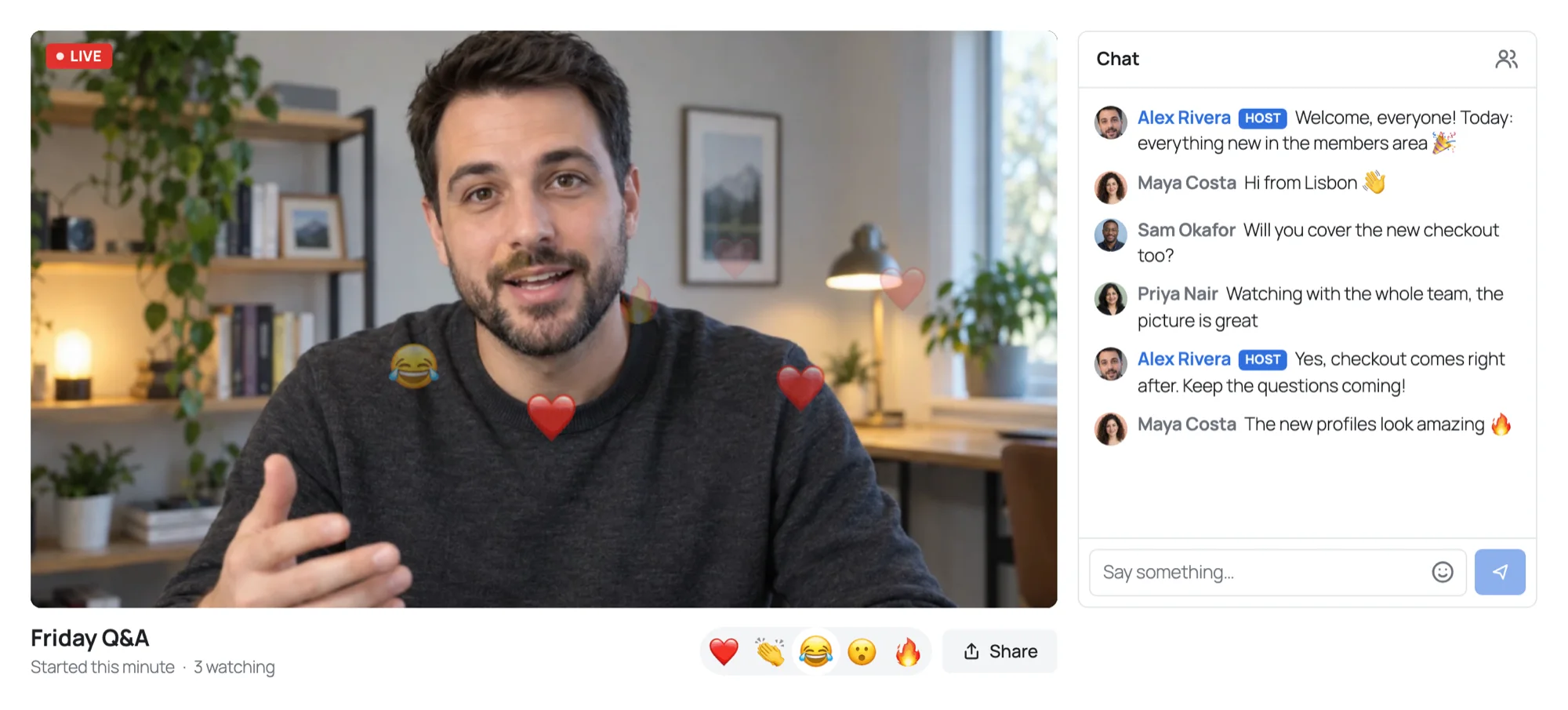
Prueba una transmisión en directo
Emite en directo desde esta página y mírala desde tu teléfono o una segunda ventana. No necesitas cuenta.
Estas son las pantallas que el SDK da a tu app. Tu navegador pide la cámara y el micrófono, no se graba nada y la demo termina tras 10 minutos.
Anfitriones y moderadores
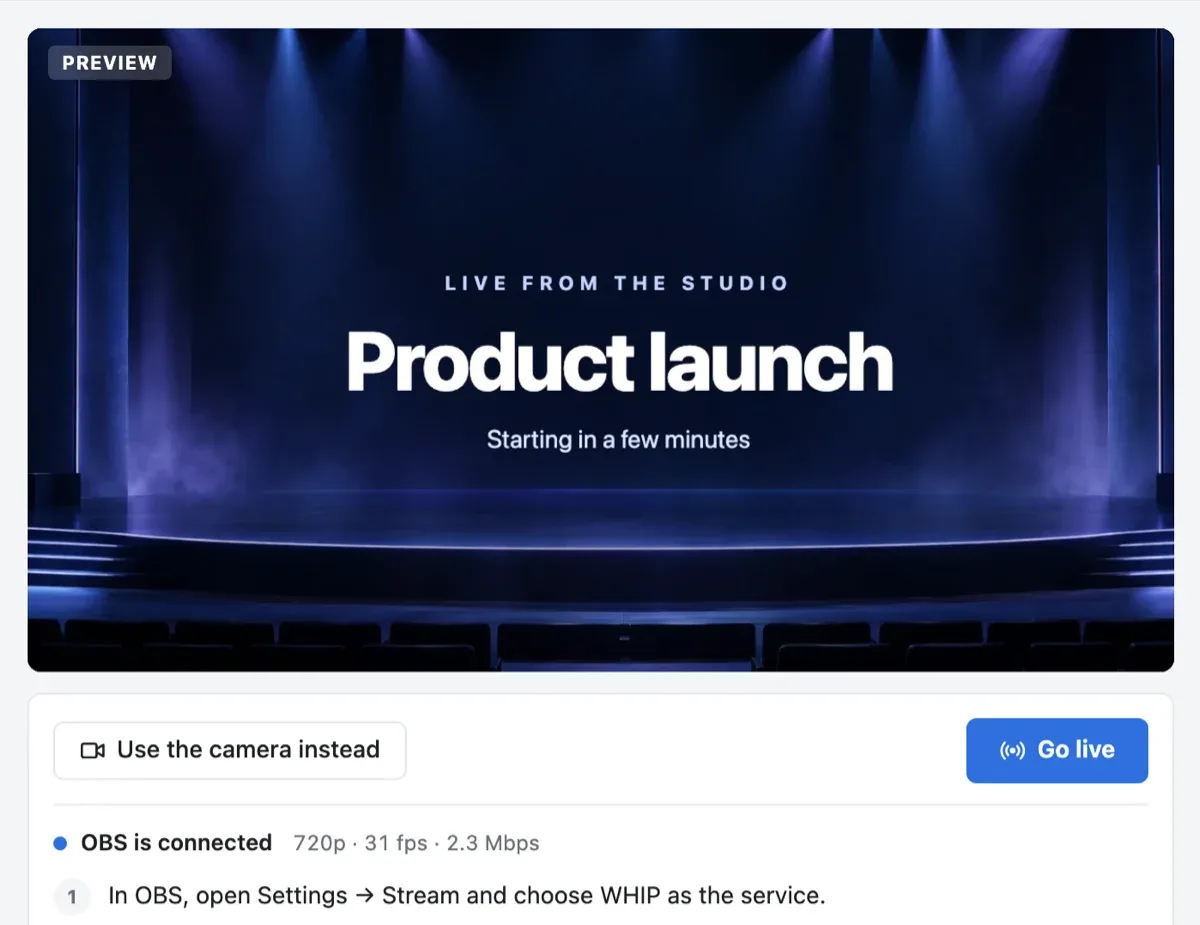
Emite en directo desde el navegador, un móvil u OBS
El estudio y el chat vienen con el reproductor, para el anfitrión y los moderadores que nombra tu servidor.
La cámara, una pantalla u OBS
El anfitrión ve la imagen antes de salir en directo, luego sale en directo con un clic y termina la transmisión para todos. Transmite con la cámara y el micrófono del navegador o de un móvil, comparte una pantalla o envía la imagen desde OBS o cualquier otro codificador por WHIP.
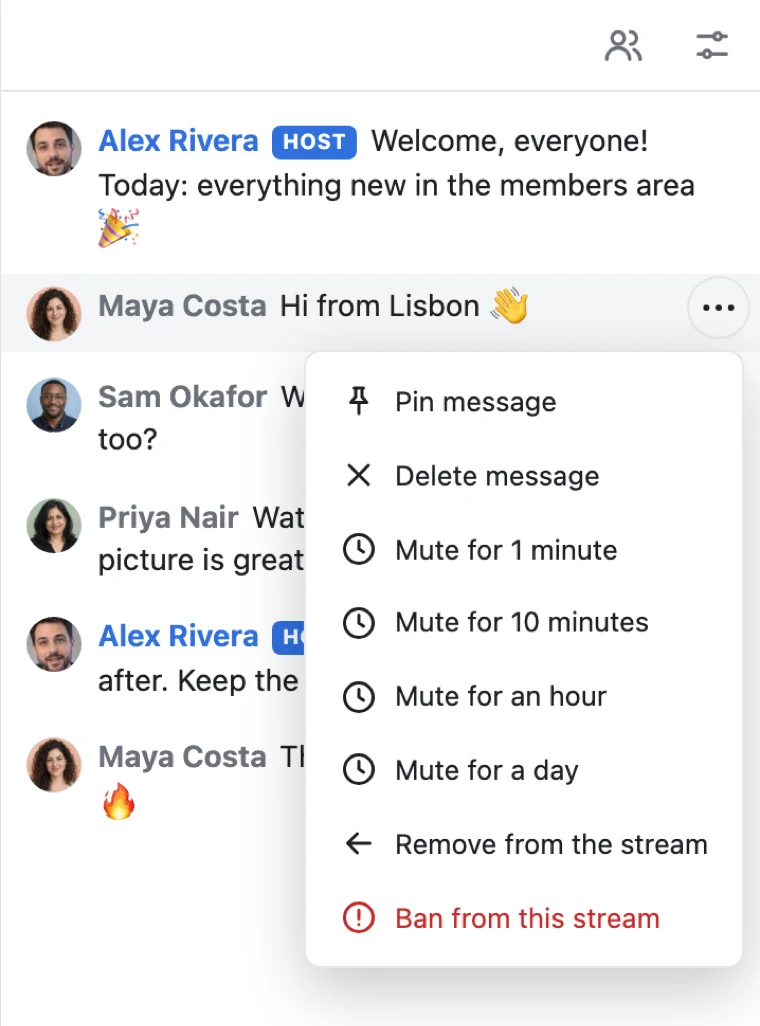
Un chat que se mantiene en orden
Los espectadores escriben en el chat junto a la imagen y envían reacciones que aparecen sobre ella. El anfitrión y los moderadores que nombra tu servidor fijan y eliminan mensajes, ralentizan el chat, silencian a alguien por un tiempo, y lo sacan o lo vetan. Tu servidor puede hacer lo mismo y escribir en el chat con un nombre propio.
Espectadores
Todos los espectadores, con sesión iniciada o no
Un enlace a la página es todo lo que necesita un espectador. Mira, escribe en el chat y reacciona, y todos ven cuántos están mirando.
Ver sin cuenta
Tu servidor convierte a un visitante en espectador, así que cualquiera con el enlace puede ver la transmisión, e inicia sesión para escribir en el chat. O reserva una transmisión solo para miembros.
Una imagen para cada pantalla
Cada espectador recibe la imagen en el tamaño que admiten su pantalla y su conexión, en la web, iOS y Android, con un contador de espectadores en directo.
Invitados en el escenario
Un espectador levanta la mano, y el anfitrión lo sube al escenario con su cámara y su micrófono, para una pregunta, una entrevista o un panel.
Tu servidor decide
Unas pocas líneas en tu stack
Tu servidor dice quién presenta cada transmisión, quién la ve y quién modera el chat. La página muestra la transmisión con un elemento o con tu propio código.
Next.js en el servidor y React en la página.
export async function GET( request: Request ) {
const me = await currentUserId(); // null for a visitor
const id = new URL( request.url ).searchParams.get( 'id' )!;
// Your own check: its host goes live, the rest watch.
const token = await realtime.streamToken( me, 'live:' + id, {
role: me && await isHostOf( id, me ) ? 'host' : 'viewer',
mod: me && await isModerator( me ),
settings: { reactions: true },
} );
return Response.json( { token } );
}app.get( '/api/stream-token', async ( req, res ) => {
const me = userOf( req ); // null for a visitor
const { id } = req.query;
// Your own check: its host goes live, the rest watch.
const token = await realtime.streamToken( me, 'live:' + id, {
role: me && await isHostOf( id, me ) ? 'host' : 'viewer',
mod: me && await isModerator( me ),
settings: { reactions: true },
} );
res.json( { token } );
} );import { createServer } from 'node:http';
createServer( async ( req, res ) => {
const url = new URL( req.url, 'http://localhost' );
if ( url.pathname === '/api/stream-token' ) {
const me = userOf( req ); // null for a visitor
const id = url.searchParams.get( 'id' );
// Your own check: its host goes live, the rest watch.
const token = await realtime.streamToken( me, 'live:' + id, {
role: me && await isHostOf( id, me ) ? 'host' : 'viewer',
mod: me && await isModerator( me ),
settings: { reactions: true },
} );
res.writeHead( 200, { 'Content-Type': 'application/json' } );
return res.end( JSON.stringify( { token } ) );
}
// Your pages, and realtime.node( userOf ) for the SDK's routes.
} ).listen( 3000 );use Illuminate\Http\Request;
use WordPlus\Realtime\Laravel\Facades\Realtime;
Route::get( '/api/stream-token', function ( Request $request ) {
$me = $request->user()?->id; // null for a visitor
$id = $request->query( 'id' );
// Your own check: its host goes live, the rest watch.
return [ 'token' => Realtime::streamToken( $me, 'live:' . $id, [
'role' => $me && is_host_of( $id, $me ) ? 'host' : 'viewer',
'mod' => $me && is_moderator( $me ),
'settings' => [ 'reactions' => true ],
] ) ];
} );require __DIR__ . '/../src/realtime.php';
$me = current_user_id(); // null for a visitor
$id = $_GET['id'] ?? '';
header( 'Content-Type: application/json' );
// Your own check: its host goes live, the rest watch.
echo json_encode( [
'token' => $realtime->streamToken( $me, 'live:' . $id, [
'role' => $me && is_host_of( $id, $me ) ? 'host' : 'viewer',
'mod' => $me && is_moderator( $me ),
'settings' => [ 'reactions' => true ],
] ),
] );from django.http import JsonResponse
from .realtime import realtime
# In urls.py: path("api/stream-token", views.stream_token)
def stream_token(request):
me = request.user.id if request.user.is_authenticated else None
id = request.GET["id"]
# Your own check: its host goes live, the rest watch.
token = realtime.stream_token(
me,
"live:" + id,
role="host" if me and is_host_of(id, me) else "viewer",
mod=bool(me and is_moderator(me)),
settings={"reactions": True},
)
return JsonResponse({"token": token})from fastapi import Depends
from realtime import realtime
# current_user_id answers None for a visitor.
@app.get("/api/stream-token")
def stream_token(id: str, me: int | None = Depends(current_user_id)):
# Your own check: its host goes live, the rest watch.
token = realtime.stream_token(
me,
"live:" + id,
role="host" if me and is_host_of(id, me) else "viewer",
mod=bool(me and is_moderator(me)),
settings={"reactions": True},
)
return {"token": token}from flask import request, session
from realtime import realtime
@app.get("/api/stream-token")
def stream_token():
me = session.get("user_id") # None for a visitor
id = request.args["id"]
# Your own check: its host goes live, the rest watch.
token = realtime.stream_token(
me,
"live:" + id,
role="host" if me and is_host_of(id, me) else "viewer",
mod=bool(me and is_moderator(me)),
settings={"reactions": True},
)
return {"token": token}// http.HandleFunc("GET /api/stream-token", streamToken)
func streamToken(w http.ResponseWriter, r *http.Request) {
me := userOf(r) // empty for a visitor
id := r.URL.Query().Get("id")
// Your own check: its host goes live, the rest watch.
role := "viewer"
if me != "" && isHostOf(id, me) {
role = "host"
}
token := app.StreamToken(wordplus.Stream{
Name: "live:" + id,
Role: role,
User: me,
Mod: me != "" && isModerator(me),
React: wordplus.Yes,
})
reply(w, map[string]string{"token": token})
}Hooks y componentes para cualquier app de React, con cualquiera de los servidores de arriba.
import { connect } from '@wordplus/realtime';

const rt = await connect();

// The player and the studio.
await rt.streamScreen();

// And in the page:
// <live-stream name="live:12"
//     token-url="/api/stream-token?id=12"
// title="Opening night"></live-stream>import { connect } from '@wordplus/realtime';
const rt = await connect();
// The player and the studio.
await rt.streamScreen();
// And in the page:
// <live-stream name="live:12"
// token-url="/api/stream-token?id=12"
// title="Opening night"></live-stream>import { connect } from '@wordplus/realtime';
const rt = await connect();
// The player and the studio.
await rt.streamScreen();
// And in the page:
// <live-stream name="live:12"
// token-url="/api/stream-token?id=12"
// title="Opening night"></live-stream>import { connect } from '@wordplus/realtime';
const rt = await connect( window.wordplusRealtimeConfig );
// The player and the studio.
await rt.streamScreen();
// And in the page:
// <live-stream name="live:12"
// token-url="/api/stream-token?id=12"
// title="Opening night"></live-stream><live-stream name="live:12"
token-url="/api/stream-token?id=12"
title="Opening night"></live-stream>
<script type="module">
import { connect } from '@wordplus/realtime';
const rt = await connect( window.wordplusRealtimeConfig );
// The player and the studio.
await rt.streamScreen();
</script><live-stream name="live:12"
token-url="/api/stream-token?id=12"
title="Opening night"></live-stream>
<script type="module">
import { connect } from '@wordplus/realtime';
const rt = await connect( window.wordplusRealtimeConfig );
// The player and the studio.
await rt.streamScreen();
</script><live-stream name="live:12"
token-url="/api/stream-token?id=12"
title="Opening night"></live-stream>
<script type="module">
import { connect } from '@wordplus/realtime';
const rt = await connect( window.wordplusRealtimeConfig );
// The player and the studio.
await rt.streamScreen();
</script><live-stream name="live:12"
token-url="/api/stream-token?id=12"
title="Opening night"></live-stream>
<script type="module">
import { connect } from '@wordplus/realtime';
const rt = await connect( window.wordplusRealtimeConfig );
// The player and the studio.
await rt.streamScreen();
</script>import { connect } from '@wordplus/realtime';
const settings = await fetch( '/api/realtime/config' );
const rt = await connect( await settings.json() );
// The player and the studio.
await rt.streamScreen();
// And in the page:
// <live-stream name="live:12"
// token-url="/api/stream-token?id=12"
// title="Opening night"></live-stream><live-stream name="live:{{ $event->id }}"
token-url="/api/stream-token?id={{ $event->id }}"
title="{{ $event->title }}"></live-stream>
<script type="module">
// The player and the studio.
await window.Echo.connector.rt.streamScreen();
</script>'use client'; // in Next.js
import { LiveStream } from '@wordplus/realtime/react';
// Inside <RealtimeProvider>, once for the whole app.
export function Stream( { id, title } ) {
return (
<LiveStream name={ `live:${ id }` } title={ title }
tokenUrl={ `/api/stream-token?id=${ id }` } />
);
}<script setup>
import { onMounted } from 'vue';
// realtime.js, one connection for the whole app:
// export const realtime = connect();
import { realtime } from './realtime';
defineProps( [ 'id', 'title' ] );
onMounted( async () => {
// The player and the studio.
( await realtime ).streamScreen();
} );
</script>
<!-- isCustomElement for this tag, in vite.config.js -->
<template>
<live-stream :name="`live:${ id }`" :title="title"
:token-url="`/api/stream-token?id=${ id }`"></live-stream>
</template><script>
import { onMount } from 'svelte';
// realtime.js, one connection for the whole app:
// export const realtime = connect();
import { realtime } from './realtime';
let { id, title } = $props();
onMount( async () => {
// The player and the studio.
( await realtime ).streamScreen();
} );
</script>
<live-stream name="live:{ id }" { title }
token-url="/api/stream-token?id={ id }"></live-stream>import {
Component, CUSTOM_ELEMENTS_SCHEMA, Input,
} from '@angular/core';
// realtime.ts, one connection for the whole app:
// export const realtime = connect();
import { realtime } from './realtime';
@Component( {
selector: 'app-stream',
schemas: [ CUSTOM_ELEMENTS_SCHEMA ],
template: `
<live-stream [attr.name]="'live:' + id"
[attr.token-url]="'/api/stream-token?id=' + id"
[attr.title]="title"></live-stream>
`,
} )
export class StreamComponent {
@Input( { required: true } ) id!: number;
@Input( { required: true } ) title!: string;
async ngOnInit() {
// The player and the studio.
( await realtime ).streamScreen();
}
}import WordPlusRealtimeCalls
import WordPlusRealtimeUI
// Your own request to your route, asked again as tokens run out.
let stream = try await rt.joinStream {
try await api.streamToken(id: 12)
}
present(LiveStreamScreen(stream: stream, title: "Opening night"),
animated: true)import cloud.wordplus.realtime.calls.joinStream
import cloud.wordplus.realtime.ui.LiveStreamScreen
// Your own request to your route, asked again as tokens run out.
val stream = rt.joinStream(context) {
api.streamToken(id = 12)
}
LiveStreamScreen.open(activity, stream, title = "Opening night")import { LiveStreamButton } from '@wordplus/realtime-react-native';
// Your server, in full, as an app has no address of its own.
const API = 'https://app.example.com/api';
// Inside <RealtimeProvider>, once for the whole app.
export function Stream( { id, title } ) {
return (
<LiveStreamButton name={ `live:${ id }` } title={ title }
tokenUrl={ `${ API }/stream-token?id=${ id }` }>
Watch
</LiveStreamButton>
);
}import 'package:flutter/material.dart';
import 'package:wordplus_realtime/wordplus_realtime.dart';
// Your server, in full, as an app has no address of its own.
const api = 'https://app.example.com/api';
// In your build. It asks your route again as tokens run out.
LiveStreamButton(
rt: rt,
stream: 'live:12',
tokenUrl: '$api/stream-token?id=12',
title: 'Opening night',
child: const Text('Watch'),
)Las transmisiones en directo en cada stack, con toda la configuración:
Casos de uso
Lo que se construye con transmisiones en directo
Cada uno es una app completa en la documentación, con su servidor en Node.js, PHP y Python.
Eventos en directo
Un lanzamiento, una clase, una charla o un concierto, en directo para todos los que abren la página.
Transmisiones solo para miembros
Una transmisión que solo pueden ver los miembros de un club, quienes tienen una entrada o los alumnos de un curso.
Entrevistas y preguntas en el escenario
Los espectadores levantan la mano, y el anfitrión los sube al escenario a su lado, con la disposición que elige el anfitrión.
Precios
Precio por conexiones, nunca por mensajes
Desde $11.99 al mes por 1000 conexiones simultáneas, con facturación anual, o $14.99 con facturación mensual.
Espectadores por encima de tu plan: $0.20 por cada 1.000 minutos.
Un solo precio en cualquier resolución. El ancho de banda, los relés y los mensajes nunca se cobran, y las llamadas entre dos personas están incluidas. Gestionamos nuestros propios relés y servidores multimedia, y por eso estos precios son bajos.
Precio según las conexiones simultáneas, a partir de 1.000, con facturación mensual o anual.
Con 1.000 conexiones, las transmisiones en directo no se miden hasta 50 espectadores a la vez, y cada 1.000 conexiones más añaden 20 espectadores. Por encima, cada espectador adicional gasta un crédito por minuto, contado solo mientras la transmisión está en directo, y tu plan añade 5000 créditos al mes por cada 1.000 conexiones.
Dudas
Preguntas frecuentes
¿Necesito mi propio servidor multimedia?
No. El anfitrión envía la imagen a nuestros servidores multimedia, que la llevan a todos los que miran. OBS y otros codificadores la envían por WHIP. No tienes nada que alojar.
¿Qué stacks pueden usar el SDK de transmisión en directo?
Next.js y Express, Laravel y PHP sin framework, Django, FastAPI y Flask, Capacitor, iOS y Android, cada uno con una guía. Un servidor en cualquier otro lenguaje usa la API HTTP. Las apps de Flutter tienen transmisiones en directo en iOS y Android, y las de React Native por ahora en iOS.
¿Se puede ver sin una cuenta?
Sí. Tu servidor convierte a un visitante sin sesión iniciada en espectador, así que cualquiera con el enlace puede ver la transmisión, e inicia sesión para escribir en el chat. O reserva una transmisión solo para miembros, y un enlace que se comparta no abre nada.
¿Puedo transmitir desde OBS?
Sí. El estudio da al anfitrión una dirección y una clave para OBS o cualquier otro codificador que envíe por WHIP, y la imagen del codificador ocupa el lugar de la cámara. Una clave nueva desconecta la anterior.
¿Cuántas personas pueden ver una transmisión?
Con 1.000 conexiones, hasta 50 espectadores a la vez no gastan créditos, y cada 1.000 conexiones más añaden 20. Por encima, cada espectador adicional gasta un crédito por minuto, contado solo mientras la transmisión está en directo.
¿Quién modera el chat?
El anfitrión y cualquiera a quien tu servidor haga moderador. Fijan y eliminan mensajes, ralentizan el chat, silencian a alguien desde un minuto hasta un día, y sacan a alguien de la transmisión o lo vetan. Tu servidor también puede hacerlo todo, sin ninguna página abierta.
¿Puedo crear mi propio reproductor?
Sí. El reproductor, el chat y el estudio son opcionales. Coloca cada parte donde la quiera tu página, o dibuja tú mismo la transmisión con el SDK: la imagen, los espectadores, el chat y las reacciones.
¿Puedo cobrar por ver las transmisiones?
Sí. Tu servidor decide quién puede ver, así que una entrada o una membresía abre la transmisión. WordPlus Cloud le dice a tu servidor por webhook cuándo empieza y deja de mirar cada espectador con sesión iniciada, contado en sus propios servidores, para que tu app cobre por visualización o por minuto.
¿Preguntas sobre tu integración? Escríbenos: te ayudamos con los SDK, el reproductor y tu stack.