
 English
 Deutsch
 Français
 Italiano
 Nederlands
 Polski
' d='M48 28h24v18a12 12 0 0 1-24 0z'/%3E%3Cpath fill='%230093DD' d='M47.5 21.5h4.6V28h-4.6zm10.2-2.5h4.6v9h-4.6zm10.2 2.5h4.6V28h-4.6z'/%3E%3Cpath fill='%23171796' d='M52.6 20h4.6v8h-4.6zm10.2 0h4.6v8h-4.6z'/%3E%3C/svg%3E) Hrvatski
 עברית
Para apps
Videollamadas para tu app
Una API y un SDK de videollamadas para Next.js, Laravel, Django y cualquier otro stack. Las llamadas entre dos personas suenan en cada pestaña y app de la persona llamada, siempre conectan y están cifradas de extremo a extremo, y la pantalla de llamada está lista para usar, así que no tienes nada que mantener.
O prueba la demo en directo: ábrela en dos navegadores y llama de uno al otro.
Los mejores precios para WebSockets, llamadas 1 a 1 ilimitadas con servidores TURN en todo el mundo, y llamadas en grupo y transmisión en directo con una cuota incluida. Desde $11.99 al mes por 1000 conexiones simultáneas, con facturación anual, o $14.99 con facturación mensual.
Llamadas en grupo por encima de tu plan: $0.20 por cada 1.000 minutos, $0.10 con audio.
Next.js en el servidor y React en la página.
export async function GET( request: Request ) {
    const me = await currentUserId();
    const ask = new URL( request.url ).searchParams;
    const to = ask.get( 'to' )!;

    // Your own check, whatever your app needs.
    if ( ! me || ! await mayCall( me, to ) ) {
        return new Response( null, { status: 403 } );
    }

    const token = await realtime.callToken( me, to, {
        type: ask.get( 'type' ),
    } );

    return Response.json( { token } );
}app.get( '/api/call-token', async ( req, res ) => {
const me = userOf( req );
const { to, type } = req.query;
// Your own check, whatever your app needs.
if ( ! me || ! await mayCall( me, to ) ) {
return res.sendStatus( 403 );
}
const token = await realtime.callToken( me, to, { type } );
res.json( { token } );
} );import { createServer } from 'node:http';
createServer( async ( req, res ) => {
const url = new URL( req.url, 'http://localhost' );
if ( url.pathname === '/api/call-token' ) {
const me = userOf( req );
const to = url.searchParams.get( 'to' );
// Your own check, whatever your app needs.
if ( ! me || ! await mayCall( me, to ) ) {
res.writeHead( 403 );
return res.end();
}
const token = await realtime.callToken( me, to, {
type: url.searchParams.get( 'type' ),
} );
res.writeHead( 200, { 'Content-Type': 'application/json' } );
return res.end( JSON.stringify( { token } ) );
}
// Your pages, and realtime.node( userOf ) for the SDK's routes.
} ).listen( 3000 );use Illuminate\Http\Request;
use WordPlus\Realtime\Laravel\Facades\Realtime;
Route::get( '/api/call-token', function ( Request $request ) {
$me = $request->user()->id;
$to = $request->query( 'to' );
// Your own check, whatever your app needs.
abort_unless( may_call( $me, $to ), 403 );
return [ 'token' => Realtime::callToken( $me, $to, [
'type' => $request->query( 'type' ),
] ) ];
} )->middleware( 'auth' );require __DIR__ . '/../src/realtime.php';
$me = current_user_id();
$to = $_GET['to'] ?? '';
// Your own check, whatever your app needs.
if ( ! $me || ! may_call( $me, $to ) ) {
http_response_code( 403 );
exit;
}
header( 'Content-Type: application/json' );
echo json_encode( [
'token' => $realtime->callToken( $me, $to, [
'type' => $_GET['type'] ?? null,
] ),
] );from django.contrib.auth.decorators import login_required
from django.http import HttpResponseForbidden, JsonResponse
from .realtime import realtime
# In urls.py: path("api/call-token", views.call_token)
@login_required
def call_token(request):
me = request.user.id
to = request.GET["to"]
# Your own check, whatever your app needs.
if not may_call(me, to):
return HttpResponseForbidden()
token = realtime.call_token(me, to, type=request.GET.get("type"))
return JsonResponse({"token": token})from fastapi import Depends, HTTPException
from realtime import realtime
@app.get("/api/call-token")
def call_token(
to: str,
type: str = "video",
me: int = Depends(current_user_id),
):
# Your own check, whatever your app needs.
if not me or not may_call(me, to):
raise HTTPException(403)
return {"token": realtime.call_token(me, to, type=type)}from flask import abort, request, session
from realtime import realtime
@app.get("/api/call-token")
def call_token():
me = session.get("user_id")
to = request.args["to"]
# Your own check, whatever your app needs.
if not me or not may_call(me, to):
abort(403)
kind = request.args.get("type")
return {"token": realtime.call_token(me, to, type=kind)}// http.HandleFunc("GET /api/call-token", callToken)
func callToken(w http.ResponseWriter, r *http.Request) {
me := userOf(r)
to := r.URL.Query().Get("to")
// Your own check, whatever your app needs.
if me == "" || !mayCall(me, to) {
w.WriteHeader(403)
return
}
kind := r.URL.Query().Get("type")
reply(w, map[string]string{
"token": app.CallToken(me, to, kind, profile(me)),
})
}Hooks y componentes para cualquier app de React, con cualquiera de los servidores de arriba.
import { connect } from '@wordplus/realtime';

const rt = await connect();

// The ring and the call window.
await rt.callScreen();

// And in the page:
// <call-button to="34" token-url="/api/call-token"
//     type="video" name="Ann">
//     Call Ann
// </call-button>import { connect } from '@wordplus/realtime';
const rt = await connect();
// The ring and the call window.
await rt.callScreen();
// And in the page:
// <call-button to="34" token-url="/api/call-token"
// type="video" name="Ann">
// Call Ann
// </call-button>import { connect } from '@wordplus/realtime';
const rt = await connect();
// The ring and the call window.
await rt.callScreen();
// And in the page:
// <call-button to="34" token-url="/api/call-token"
// type="video" name="Ann">
// Call Ann
// </call-button>import { connect } from '@wordplus/realtime';
const rt = await connect( window.wordplusRealtimeConfig );
// The ring and the call window.
await rt.callScreen();
// And in the page:
// <call-button to="34" token-url="/api/call-token"
// type="video" name="Ann">
// Call Ann
// </call-button><call-button to="34" token-url="/api/call-token"
type="video" name="Ann">
Call Ann
</call-button>
<script type="module">
import { connect } from '@wordplus/realtime';
const rt = await connect( window.wordplusRealtimeConfig );
// The ring and the call window.
await rt.callScreen();
</script><call-button to="34" token-url="/api/call-token"
type="video" name="Ann">
Call Ann
</call-button>
<script type="module">
import { connect } from '@wordplus/realtime';
const rt = await connect( window.wordplusRealtimeConfig );
// The ring and the call window.
await rt.callScreen();
</script><call-button to="34" token-url="/api/call-token"
type="video" name="Ann">
Call Ann
</call-button>
<script type="module">
import { connect } from '@wordplus/realtime';
const rt = await connect( window.wordplusRealtimeConfig );
// The ring and the call window.
await rt.callScreen();
</script><call-button to="34" token-url="/api/call-token"
type="video" name="Ann">
Call Ann
</call-button>
<script type="module">
import { connect } from '@wordplus/realtime';
const rt = await connect( window.wordplusRealtimeConfig );
// The ring and the call window.
await rt.callScreen();
</script>import { connect } from '@wordplus/realtime';
const settings = await fetch( '/api/realtime/config' );
const rt = await connect( await settings.json() );
// The ring and the call window.
await rt.callScreen();
// And in the page:
// <call-button to="34" token-url="/api/call-token"
// type="video" name="Ann">
// Call Ann
// </call-button><call-button to="34" token-url="/api/call-token"
type="video" name="Ann">
Call Ann
</call-button>
<script type="module">
// The ring and the call window.
await window.Echo.connector.rt.callScreen();
</script>'use client'; // in Next.js
import { CallButton, CallScreen } from '@wordplus/realtime/react';
// Inside <RealtimeProvider>, once for the whole app.
export function CallAnn() {
return (
<>
<CallScreen />
<CallButton to={ 34 } tokenUrl="/api/call-token"
type="video" name="Ann">
Call Ann
</CallButton>
</>
);
}<script setup>
import { onMounted } from 'vue';
// realtime.js, one connection for the whole app:
// export const realtime = connect();
import { realtime } from './realtime';
onMounted( async () => {
// The ring and the call window.
( await realtime ).callScreen();
} );
</script>
<!-- isCustomElement for these tags, in vite.config.js -->
<template>
<call-button to="34" token-url="/api/call-token"
type="video" name="Ann">
Call Ann
</call-button>
</template><script>
import { onMount } from 'svelte';
// realtime.js, one connection for the whole app:
// export const realtime = connect();
import { realtime } from './realtime';
onMount( async () => {
// The ring and the call window.
( await realtime ).callScreen();
} );
</script>
<call-button to="34" token-url="/api/call-token"
type="video" name="Ann">
Call Ann
</call-button>import { Component, CUSTOM_ELEMENTS_SCHEMA } from '@angular/core';
// realtime.ts, one connection for the whole app:
// export const realtime = connect();
import { realtime } from './realtime';
@Component( {
selector: 'app-call-ann',
schemas: [ CUSTOM_ELEMENTS_SCHEMA ],
template: `
<call-button to="34" token-url="/api/call-token"
type="video" name="Ann">
Call Ann
</call-button>
`,
} )
export class CallAnnComponent {
async ngOnInit() {
// The ring and the call window.
( await realtime ).callScreen();
}
}import WordPlusRealtimeCalls
import WordPlusRealtimeUI
// Rings for every call coming in.
CallScreen.shared.attach(rt.calls)
// Your own request to your route.
let token = try await api.callToken(to: "34")
let call = try await rt.startCall(token)
CallScreen.shared.show(call, name: "Ann")import cloud.wordplus.realtime.calls.calls
import cloud.wordplus.realtime.calls.startCall
import cloud.wordplus.realtime.ui.CallScreen
// Rings for every call coming in.
CallScreen.attach(context, rt.calls(context))
// Your own request to your route.
val token = api.callToken(to = "34")
val call = rt.startCall(context, token)
CallScreen.show(context, call, name = "Ann")import {
CallButton, CallScreen, RealtimeProvider,
} from '@wordplus/realtime-react-native';
// Your server, in full, as an app has no address of its own.
const API = 'https://app.example.com/api';
const options = {
app: 's1500000007',
endpoint: API + '/realtime',
headers: { Authorization: 'Bearer ' + session.token },
};
export function App() {
return (
<RealtimeProvider options={ options }>
<CallScreen />
<CallButton to="34" tokenUrl={ API + '/call-token' }
type="video" name="Ann">
Call Ann
</CallButton>
</RealtimeProvider>
);
}import 'package:flutter/material.dart';
import 'package:wordplus_realtime/wordplus_realtime.dart';
// Your server, in full, as an app has no address of its own.
const api = 'https://app.example.com/api';
// Once, as your app starts.
final rt = await WordPlusRealtime.connect(
app: 's1500000007',
endpoint: '$api/realtime',
headers: {'Authorization': 'Bearer ${session.token}'},
);
// Rings for every call coming in, and shows it once answered.
await rt.callScreen();
// In your build:
CallButton(
rt: rt,
to: '34',
tokenUrl: '$api/call-token',
name: 'Ann',
child: const Text('Call Ann'),
)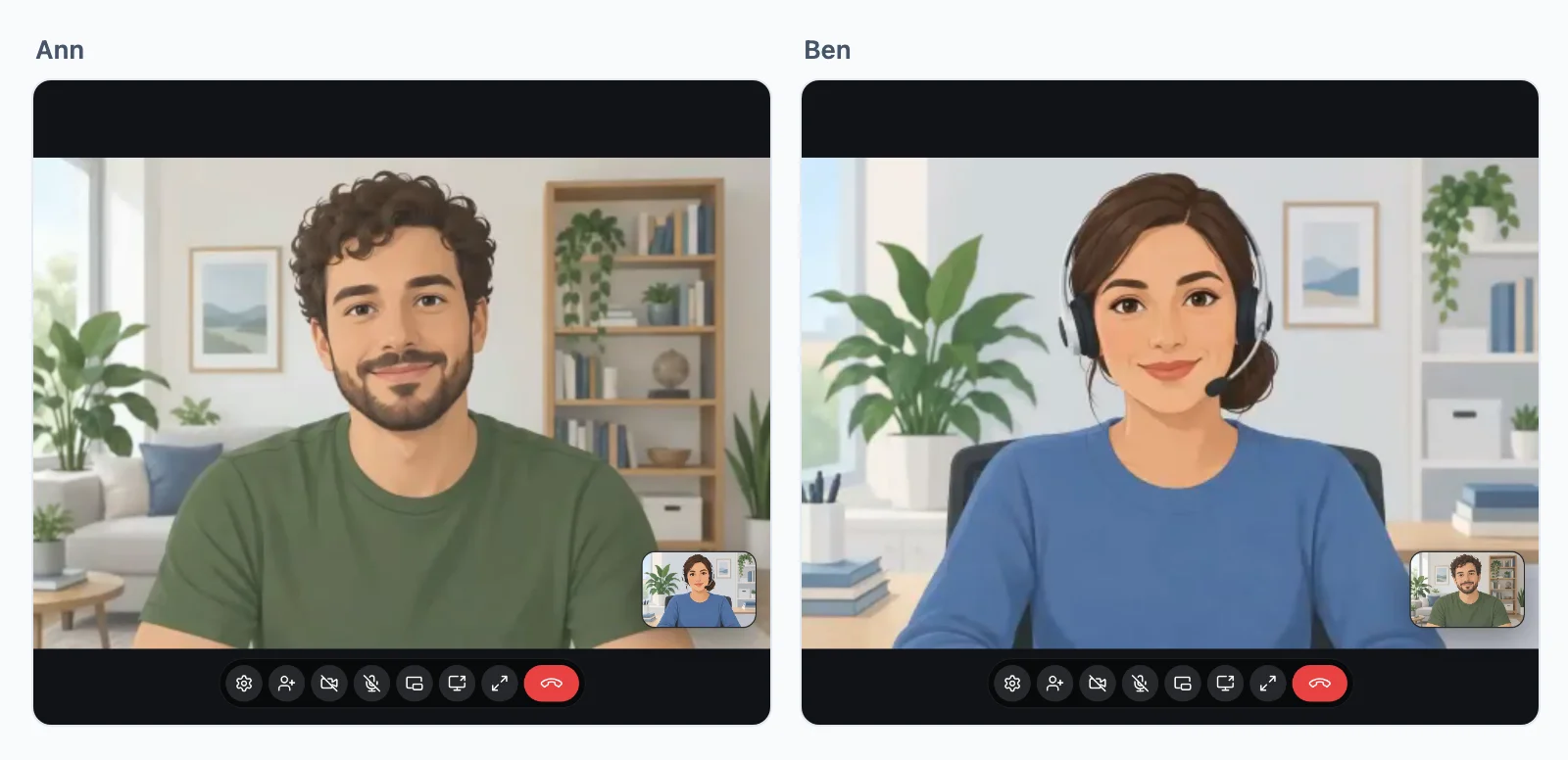
Prueba una videollamada
Inicia una llamada aquí y contesta desde tu teléfono o una segunda ventana. No necesitas cuenta.
Estas son las pantallas que el SDK da a tu app. Tu navegador pide la cámara y el micrófono, no se graba nada y la demo termina tras 10 minutos.
Llamadas entre dos personas
Cada llamada conecta
Una llamada suena en cada pestaña y app que la persona llamada tiene abierta, y deja de sonar en todas en cuanto responde en una. Después toma el mejor camino que permiten las dos redes, sin ningún servidor TURN tuyo que mantener.
- DirectamenteEntre los dos dispositivos, en la mayoría de las redes. El camino más rápido.
- A través de nuestros relésCuando un cortafuegos bloquea el camino directo. Responden en los puertos de la web, así que una llamada pasa allí donde pasan los sitios web.
- A través de nuestros servidores multimediaCuando ni siquiera los relés llegan. La llamada pasa a ellos y sigue, sin colgar.
Cifradas de extremo a extremo en todos los caminos, e incluidas en todos los planes.
Dónde se conectan las llamadas
Nuestros relés y servidores multimedia funcionan cerca de tus usuarios, y cada llamada pasa por el más cercano a quienes participan en ella.
Tu servidor decide
Hacer, responder y gestionar una llamada
Quién puede llamar a quién lo decide tu app. Tu servidor da a la página un token por cada llamada que permite, y la página inicia la llamada con él, desde un botón o con tu propio código. Aquí tienes una llamada a Ann, tarea por tarea.
Next.js en el servidor y React en la página.
Dar un token a la página
Quién puede llamar a quién es lógica de tu propia app, así que va en una ruta tuya. Comprueba lo que tu app necesite y responde con un token. Un token inicia una llamada, y sin él nada suena. mayCall es tu propia comprobación.
export async function GET( request: Request ) {
    const me = await currentUserId();
    const ask = new URL( request.url ).searchParams;
    const to = ask.get( 'to' )!;

    // Your own check, whatever your app needs.
    if ( ! me || ! await mayCall( me, to ) ) {
        return new Response( null, { status: 403 } );
    }

    const token = await realtime.callToken( me, to, {
        type: ask.get( 'type' ),
    } );

    return Response.json( { token } );
}app.get( '/api/call-token', async ( req, res ) => {
const me = userOf( req );
const { to, type } = req.query;
// Your own check, whatever your app needs.
if ( ! me || ! await mayCall( me, to ) ) {
return res.sendStatus( 403 );
}
const token = await realtime.callToken( me, to, { type } );
res.json( { token } );
} );import { createServer } from 'node:http';
createServer( async ( req, res ) => {
const url = new URL( req.url, 'http://localhost' );
if ( url.pathname === '/api/call-token' ) {
const me = userOf( req );
const to = url.searchParams.get( 'to' );
// Your own check, whatever your app needs.
if ( ! me || ! await mayCall( me, to ) ) {
res.writeHead( 403 );
return res.end();
}
const token = await realtime.callToken( me, to, {
type: url.searchParams.get( 'type' ),
} );
res.writeHead( 200, { 'Content-Type': 'application/json' } );
return res.end( JSON.stringify( { token } ) );
}
// Your pages, and realtime.node( userOf ) for the SDK's routes.
} ).listen( 3000 );use Illuminate\Http\Request;
use WordPlus\Realtime\Laravel\Facades\Realtime;
Route::get( '/api/call-token', function ( Request $request ) {
$me = $request->user()->id;
$to = $request->query( 'to' );
// Your own check, whatever your app needs.
abort_unless( may_call( $me, $to ), 403 );
return [ 'token' => Realtime::callToken( $me, $to, [
'type' => $request->query( 'type' ),
] ) ];
} )->middleware( 'auth' );require __DIR__ . '/../src/realtime.php';
$me = current_user_id();
$to = $_GET['to'] ?? '';
// Your own check, whatever your app needs.
if ( ! $me || ! may_call( $me, $to ) ) {
http_response_code( 403 );
exit;
}
header( 'Content-Type: application/json' );
echo json_encode( [
'token' => $realtime->callToken( $me, $to, [
'type' => $_GET['type'] ?? null,
] ),
] );from django.contrib.auth.decorators import login_required
from django.http import HttpResponseForbidden, JsonResponse
from .realtime import realtime
# In urls.py: path("api/call-token", views.call_token)
@login_required
def call_token(request):
me = request.user.id
to = request.GET["to"]
# Your own check, whatever your app needs.
if not may_call(me, to):
return HttpResponseForbidden()
token = realtime.call_token(me, to, type=request.GET.get("type"))
return JsonResponse({"token": token})from fastapi import Depends, HTTPException
from realtime import realtime
@app.get("/api/call-token")
def call_token(
to: str,
type: str = "video",
me: int = Depends(current_user_id),
):
# Your own check, whatever your app needs.
if not me or not may_call(me, to):
raise HTTPException(403)
return {"token": realtime.call_token(me, to, type=type)}from flask import abort, request, session
from realtime import realtime
@app.get("/api/call-token")
def call_token():
me = session.get("user_id")
to = request.args["to"]
# Your own check, whatever your app needs.
if not me or not may_call(me, to):
abort(403)
kind = request.args.get("type")
return {"token": realtime.call_token(me, to, type=kind)}// http.HandleFunc("GET /api/call-token", callToken)
func callToken(w http.ResponseWriter, r *http.Request) {
me := userOf(r)
to := r.URL.Query().Get("to")
// Your own check, whatever your app needs.
if me == "" || !mayCall(me, to) {
w.WriteHeader(403)
return
}
kind := r.URL.Query().Get("type")
reply(w, map[string]string{
"token": app.CallToken(me, to, kind, profile(me)),
})
}Añadir un botón de llamada
La pantalla lista para usar: un botón, el tono con Responder y Rechazar, y la ventana de llamada, sin código de llamada. El botón le pide su token a tu ruta. Inicia la pantalla en cada página en la que alguien pueda recibir llamadas, ya que una llamada solo suena donde se ejecuta.
Hooks y componentes para cualquier app de React, con cualquiera de los servidores de arriba.
import { connect } from '@wordplus/realtime';

const rt = await connect();

// The ring and the call window, on every page someone may be called on.
await rt.callScreen();

// And in the page. The button asks your route for its token.
// <call-button to="34" token-url="/api/call-token" type="video" name="Ann">
//     Call Ann
// </call-button>import { connect } from '@wordplus/realtime';
const rt = await connect();
// The ring and the call window, on every page someone may be called on.
await rt.callScreen();
// And in the page. The button asks your route for its token.
// <call-button to="34" token-url="/api/call-token" type="video" name="Ann">
// Call Ann
// </call-button><call-button to="34" token-url="/api/call-token" type="video" name="Ann">
Call Ann
</call-button>
<script type="module">
// The ring and the call window, on every page someone may be called on.
await window.Echo.connector.rt.callScreen();
</script>'use client'; // in Next.js
import { CallButton, CallScreen } from '@wordplus/realtime/react';
// Inside <RealtimeProvider>, once for the whole app.
export function CallAnn() {
return (
<>
<CallScreen />
<CallButton to={ 34 } tokenUrl="/api/call-token" type="video" name="Ann">
Call Ann
</CallButton>
</>
);
}<script setup>
import { watchEffect } from 'vue';
import { useRealtime } from '@wordplus/realtime/vue';
// provideRealtime() once, in your root component.
const rt = useRealtime();
// The ring and the call window, on every page someone may be called on.
watchEffect( () => rt.value?.callScreen() );
</script>
<!-- isCustomElement for this tag, in vite.config.js -->
<template>
<call-button to="34" token-url="/api/call-token" type="video" name="Ann">
Call Ann
</call-button>
</template><script>
import { useRealtime } from '@wordplus/realtime/svelte';
// provideRealtime() once, in your root component.
const rt = useRealtime();
// The ring and the call window, on every page someone may be called on.
$effect( () => { rt.current?.callScreen(); } );
</script>
<call-button to="34" token-url="/api/call-token" type="video" name="Ann">
Call Ann
</call-button>import { Component, CUSTOM_ELEMENTS_SCHEMA } from '@angular/core';
// realtime.ts, one connection for the whole app:
// export const realtime = connect();
import { realtime } from './realtime';
@Component( {
selector: 'app-call-ann',
schemas: [ CUSTOM_ELEMENTS_SCHEMA ],
template: `<call-button to="34" token-url="/api/call-token" type="video" name="Ann">Call Ann</call-button>`,
} )
export class CallAnnComponent {
async ngOnInit() {
const rt = await realtime;
// The ring and the call window, on every page someone may be called on.
await rt.callScreen();
}
}import WordPlusRealtimeCalls
import WordPlusRealtimeUI
// Rings for every call coming in, and shows it once answered.
CallScreen.shared.attach(rt.calls)
let token = try await api.callToken(to: "34") // your own request to your route
let call = try await rt.startCall(token)
CallScreen.shared.show(call, name: "Ann")import cloud.wordplus.realtime.calls.calls
import cloud.wordplus.realtime.calls.startCall
import cloud.wordplus.realtime.ui.CallScreen
// Rings for every call coming in, and shows it once answered.
CallScreen.attach(context, rt.calls(context))
val token = api.callToken(to = "34") // your own request to your route
val call = rt.startCall(context, token)
CallScreen.show(context, call, name = "Ann")import {
CallButton, CallScreen, RealtimeProvider,
} from '@wordplus/realtime-react-native';
// Your server, in full, as an app has no address of its own.
const API = 'https://app.example.com/api';
const options = {
app: 's1500000007',
endpoint: API + '/realtime',
headers: { Authorization: 'Bearer ' + session.token },
};
export function App() {
return (
<RealtimeProvider options={ options }>
<CallScreen />
<CallButton to="34" tokenUrl={ API + '/call-token' }
type="video" name="Ann">
Call Ann
</CallButton>
</RealtimeProvider>
);
}import 'package:flutter/material.dart';
import 'package:wordplus_realtime/wordplus_realtime.dart';
// Your server, in full, as an app has no address of its own.
const api = 'https://app.example.com/api';
// Once, as your app starts.
final rt = await WordPlusRealtime.connect(
app: 's1500000007',
endpoint: '$api/realtime',
headers: {'Authorization': 'Bearer ${session.token}'},
);
// Rings for every call coming in, and shows it once answered.
await rt.callScreen();
// In your build:
CallButton(
rt: rt,
to: '34',
tokenUrl: '$api/call-token',
name: 'Ann',
child: const Text('Call Ann'),
)Llamar desde tu propio código
Para una pantalla que dibujas tú: obtén un token de tu ruta e inicia la llamada con él. La llamada suena en cada pestaña y app que la otra persona tiene abierta, y deja de sonar en todas en cuanto responde en una.
Hooks y componentes para cualquier app de React, con cualquiera de los servidores de arriba.
import { connect } from '@wordplus/realtime';

const rt = await connect();

// Asks your server for a token: your route from the first step.
async function callToken( to ) {
    const answer = await fetch( '/api/call-token?to=' + to );
    if ( ! answer.ok ) throw new Error( 'Your server said no' );

    return ( await answer.json() ).token;
}

const call = await rt.startCall( await callToken( 34 ) );

call.on( 'state', ( state ) => showState( state ) );   // ringing, connecting, connected, ended
call.on( 'remote', () => {
    call.remote.camera?.attach( video );               // a <video> of yours
    call.remote.microphone?.attach( audio );           // an <audio> of yours
} );

await call.setMicrophone( true );
await call.setCamera( true );

hangUp.onclick = () => call.end();import { connect } from '@wordplus/realtime';
const rt = await connect();
// Asks your server for a token: your route from the first step.
async function callToken( to ) {
const answer = await fetch( '/api/call-token?to=' + to );
if ( ! answer.ok ) throw new Error( 'Your server said no' );
return ( await answer.json() ).token;
}
const call = await rt.startCall( await callToken( 34 ) );
call.on( 'state', ( state ) => showState( state ) ); // ringing, connecting, connected, ended
call.on( 'remote', () => {
call.remote.camera?.attach( video ); // a <video> of yours
call.remote.microphone?.attach( audio ); // an <audio> of yours
} );
await call.setMicrophone( true );
await call.setCamera( true );
hangUp.onclick = () => call.end();const rt = window.Echo.connector.rt; // the connection Echo made
// Asks your server for a token: your route from the first step.
async function callToken( to ) {
const answer = await fetch( '/api/call-token?to=' + to );
if ( ! answer.ok ) throw new Error( 'Your server said no' );
return ( await answer.json() ).token;
}
const call = await rt.startCall( await callToken( 34 ) );
call.on( 'state', ( state ) => showState( state ) ); // ringing, connecting, connected, ended
call.on( 'remote', () => {
call.remote.camera?.attach( video ); // a <video> of yours
call.remote.microphone?.attach( audio ); // an <audio> of yours
} );
await call.setMicrophone( true );
await call.setCamera( true );
hangUp.onclick = () => call.end();'use client'; // in Next.js
import { AudioTrack, useCall, VideoTrack } from '@wordplus/realtime/react';
// Asks your server for a token: your route from the first step.
async function callToken( to ) {
const answer = await fetch( '/api/call-token?to=' + to );
if ( ! answer.ok ) throw new Error( 'Your server said no' );
return ( await answer.json() ).token;
}
// Inside <RealtimeProvider>, once for the whole app.
export function Call() {
const { call, state, remote, camera, start, end } = useCall();
if ( ! call ) {
return <button onClick={ async () => start( await callToken( 34 ) ) }>Call Ann</button>;
}
return (
<>
<p>{ state }</p>
<VideoTrack track={ remote?.camera } />
<AudioTrack track={ remote?.microphone } />
<VideoTrack track={ camera } />
<button onClick={ end }>Hang up</button>
</>
);
}<script setup>
import { AudioTrack, useCall, VideoTrack } from '@wordplus/realtime/vue';
// Asks your server for a token: your route from the first step.
async function callToken( to ) {
const answer = await fetch( '/api/call-token?to=' + to );
if ( ! answer.ok ) throw new Error( 'Your server said no' );
return ( await answer.json() ).token;
}
// provideRealtime() once, in your root component.
const { call, state, remote, camera, start, end } = useCall();
</script>
<template>
<button v-if="! call" @click="async () => start( await callToken( 34 ) )">Call Ann</button>
<template v-else>
<p>{{ state }}</p>
<VideoTrack :track="remote?.camera" />
<AudioTrack :track="remote?.microphone" />
<VideoTrack :track="camera" />
<button @click="end">Hang up</button>
</template>
</template><script>
import { track, useCall } from '@wordplus/realtime/svelte';
// Asks your server for a token: your route from the first step.
async function callToken( to ) {
const answer = await fetch( '/api/call-token?to=' + to );
if ( ! answer.ok ) throw new Error( 'Your server said no' );
return ( await answer.json() ).token;
}
// provideRealtime() once, in your root component.
const current = useCall();
</script>
{#if ! current.call}
<button onclick={ async () => current.start( await callToken( 34 ) ) }>Call Ann</button>
{:else}
<p>{ current.state }</p>
<video use:track={ current.remote?.camera } muted autoplay playsinline></video>
<audio use:track={ current.remote?.microphone } autoplay></audio>
<video use:track={ current.camera } muted autoplay playsinline></video>
<button onclick={ current.end }>Hang up</button>
{/if}import { Component, CUSTOM_ELEMENTS_SCHEMA } from '@angular/core';
// realtime.ts, one connection for the whole app:
// export const realtime = connect();
import { realtime } from './realtime';
@Component( {
selector: 'app-call',
schemas: [ CUSTOM_ELEMENTS_SCHEMA ],
template: `<video #video autoplay playsinline></video>`,
} )
export class CallComponent {
async ngOnInit() {
const rt = await realtime;
// Asks your server for a token: your route from the first step.
async function callToken( to ) {
const answer = await fetch( '/api/call-token?to=' + to );
if ( ! answer.ok ) throw new Error( 'Your server said no' );
return ( await answer.json() ).token;
}
const call = await rt.startCall( await callToken( 34 ) );
call.on( 'state', ( state ) => showState( state ) ); // ringing, connecting, connected, ended
call.on( 'remote', () => {
call.remote.camera?.attach( video ); // a <video> of yours
call.remote.microphone?.attach( audio ); // an <audio> of yours
} );
await call.setMicrophone( true );
await call.setCamera( true );
hangUp.onclick = () => call.end();
}
}let token = try await api.callToken(to: "34") // your own request to your route
let call = try await rt.startCall(token)
call.onState { state in label.text = state.rawValue } // ringing, connecting, connected, ended
call.onRemote { remoteView.show(call.remoteCamera) } // a CallVideoView of yours
ownView.show(call.localCamera)
hangUp.addAction(UIAction { _ in call.end() }, for: .touchUpInside)val token = api.callToken(to = "34") // your own request to your route
val call = rt.startCall(context, token)
call.onState { state -> label.text = state.wire } // ringing, connecting, connected, ended
call.onRemote { remoteView.show(call.remoteCamera) } // a CallVideoView of yours
ownView.show(call.localCamera)
hangUp.setOnClickListener { call.end() }import { Button, Text, View } from 'react-native';
import { CallVideo, useCall, useRealtime } from '@wordplus/realtime-react-native';
const API = 'https://app.example.com/api'; // your server, in full
// Inside <RealtimeProvider>, once for the whole app.
export function Call() {
const rt = useRealtime();
const { call, state, start, end } = useCall();
// Asks your route from the first step, then starts with its token.
const callAnn = async () => {
start( await rt.tokenFrom( API + '/call-token', { to: 34, type: 'video' } ) );
};
if ( ! call ) return <Button title="Call Ann" disabled={ ! rt } onPress={ callAnn } />;
return (
<View style={ { flex: 1 } }>
<Text>{ state?.state }</Text>
<CallVideo call={ call } style={ { flex: 1 } } />
<CallVideo call={ call } source="own" mirrored style={ { height: 120 } } />
<Button title="Hang up" onPress={ end } />
</View>
);
}// Asks your route from the first step, then starts with its token.
final token = await rt.tokenFrom('$api/call-token', {'to': 34, 'type': 'video'});
final call = await rt.startCall(token);
// ringing, connecting, connected, reconnecting, ended
call.onState((state) => showState(state));
// In your build, where you lay them out:
CallVideo(call: call) // the other side
CallVideo(call: call, source: CallVideoSource.own, mirrored: true) // your own
FilledButton(onPressed: call.end, child: const Text('Hang up'))Responder a una llamada
Una página que espera llamadas ocupa la línea de su usuario, donde sus llamadas suenan durante 45 segundos. Responder no requiere token, ya que el de quien llama ya muestra que tu servidor dijo que sí. Responde o rechaza, y sus otras pestañas dejan de sonar.
Hooks y componentes para cualquier app de React, con cualquiera de los servidores de arriba.
import { connect } from '@wordplus/realtime';

const rt = await connect();

// From now on their calls ring on this page.
rt.onIncomingCall( ( incoming ) => {
    showRing( incoming.info?.name, incoming.type );

    answer.onclick = () => incoming.accept();    // gives the call, as rt.startCall() does
    decline.onclick = () => incoming.decline();  // or decline( 'busy' )

    incoming.on( 'over', hideRing );             // answered elsewhere, or the caller gave up
} );import { connect } from '@wordplus/realtime';
const rt = await connect();
// From now on their calls ring on this page.
rt.onIncomingCall( ( incoming ) => {
showRing( incoming.info?.name, incoming.type );
answer.onclick = () => incoming.accept(); // gives the call, as rt.startCall() does
decline.onclick = () => incoming.decline(); // or decline( 'busy' )
incoming.on( 'over', hideRing ); // answered elsewhere, or the caller gave up
} );const rt = window.Echo.connector.rt; // the connection Echo made
// From now on their calls ring on this page.
rt.onIncomingCall( ( incoming ) => {
showRing( incoming.info?.name, incoming.type );
answer.onclick = () => incoming.accept(); // gives the call, as rt.startCall() does
decline.onclick = () => incoming.decline(); // or decline( 'busy' )
incoming.on( 'over', hideRing ); // answered elsewhere, or the caller gave up
} );// In the component that holds the call, on the same useCall().
const { incoming } = useCalls(); // those ringing now
const ring = incoming[ 0 ];
if ( ! call && ring ) {
return (
<>
<p>{ ring.info?.name } is calling</p>
<button onClick={ () => answer( ring ) }>Answer</button>
<button onClick={ () => ring.decline() }>Decline</button>
</>
);
}<script setup>
// In the component that holds the call, on the same useCall().
const { incoming } = useCalls(); // those ringing now
</script>
<template>
<template v-if="! call && incoming[ 0 ]">
<p>{{ incoming[ 0 ].info?.name }} is calling</p>
<button @click="answer( incoming[ 0 ] )">Answer</button>
<button @click="incoming[ 0 ].decline()">Decline</button>
</template>
</template><script>
// In the component that holds the call, on the same useCall().
const calls = useCalls(); // those ringing now
</script>
{#if ! current.call && calls.incoming[ 0 ]}
<p>{ calls.incoming[ 0 ].info?.name } is calling</p>
<button onclick={ () => current.answer( calls.incoming[ 0 ] ) }>Answer</button>
<button onclick={ () => calls.incoming[ 0 ].decline() }>Decline</button>
{/if}import { Component, CUSTOM_ELEMENTS_SCHEMA } from '@angular/core';
// realtime.ts, one connection for the whole app:
// export const realtime = connect();
import { realtime } from './realtime';
@Component( {
selector: 'app-ring',
schemas: [ CUSTOM_ELEMENTS_SCHEMA ],
template: `<!-- Your ring here -->`,
} )
export class RingComponent {
async ngOnInit() {
const rt = await realtime;
// From now on their calls ring on this page.
rt.onIncomingCall( ( incoming ) => {
showRing( incoming.info?.name, incoming.type );
answer.onclick = () => incoming.accept(); // gives the call, as rt.startCall() does
decline.onclick = () => incoming.decline(); // or decline( 'busy' )
incoming.on( 'over', hideRing ); // answered elsewhere, or the caller gave up
} );
}
}rt.calls.onIncoming { incoming in
showRing(incoming.info["name"], incoming.type)
incoming.onOver { _ in hideRing() } // answered elsewhere, or the caller gave up
Task { @MainActor in
switch try await incoming.accept() { // or try await incoming.decline(busy: true)
case let .call(call): show(call)
case let .group(group): show(group)
}
}
}calls.onIncoming { incoming ->
showRing(incoming.info["name"], incoming.type)
incoming.onOver { hideRing() } // answered elsewhere, or the caller gave up
viewModelScope.launch {
when (val answered = incoming.accept()) { // or incoming.decline(busy = true)
is IncomingCall.Answered.ToCall -> show(answered.call)
is IncomingCall.Answered.ToGroup -> show(answered.group)
}
}
}// In the component that holds the call, on the same useCall().
const { incoming } = useCalls(); // those ringing now
const ring = incoming[ 0 ];
if ( ! call && ring ) {
return (
<View>
<Text>{ ring.info?.name } is calling</Text>
<Button title="Answer" onPress={ () => answer( ring ) } />
<Button title="Decline" onPress={ () => ring.decline() } />
</View>
);
}rt.onIncomingCall((incoming) async {
showRing(incoming.info?['name'], incoming.type);
incoming.onOver((reason) => hideRing()); // answered elsewhere, or the caller gave up
// On your Answer button, or incoming.decline(), decline(busy: true) if busy.
switch (await incoming.accept()) {
case ToCall(:final call):
showCall(call);
case ToGroup(:final group):
showGroup(group);
}
});Cámara, micrófono y pantalla
Los mismos comandos en una llamada, una llamada en grupo y una transmisión en directo, así que tu pantalla no tiene ningún dispositivo que controlar. Una cámara se detiene, y su luz se apaga, cuando se desactiva o termina la llamada.
Hooks y componentes para cualquier app de React, con cualquiera de los servidores de arriba.
import { connect } from '@wordplus/realtime';

const rt = await connect();

await call.setMicrophone( false );                  // muted
await call.setCamera( false );                      // stopped, and the light goes off
const shared = await call.setScreenShare( true );   // false if they picked nothing

// Move to another camera with no gap on the other side.
const { cameras } = await ( await rt.calls() ).devices();
await call.setCamera( true, { deviceId: cameras[ 1 ].id } );import { connect } from '@wordplus/realtime';
const rt = await connect();
await call.setMicrophone( false ); // muted
await call.setCamera( false ); // stopped, and the light goes off
const shared = await call.setScreenShare( true ); // false if they picked nothing
// Move to another camera with no gap on the other side.
const { cameras } = await ( await rt.calls() ).devices();
await call.setCamera( true, { deviceId: cameras[ 1 ].id } );const rt = window.Echo.connector.rt; // the connection Echo made
await call.setMicrophone( false ); // muted
await call.setCamera( false ); // stopped, and the light goes off
const shared = await call.setScreenShare( true ); // false if they picked nothing
// Move to another camera with no gap on the other side.
const { cameras } = await ( await rt.calls() ).devices();
await call.setCamera( true, { deviceId: cameras[ 1 ].id } );// In the component that holds the call, on the same useCall().
const { camera, microphone, screen, setCamera, setMicrophone, setScreenShare } = useCall();
return (
<>
<button onClick={ () => setMicrophone( ! microphone ) }>Microphone</button>
<button onClick={ () => setCamera( ! camera ) }>Camera</button>
<button onClick={ () => setScreenShare( ! screen ) }>Share screen</button>
</>
);<script setup>
// In the component that holds the call, on the same useCall().
const { camera, microphone, screen, setCamera, setMicrophone, setScreenShare } = useCall();
</script>
<template>
<button @click="setMicrophone( ! microphone )">Microphone</button>
<button @click="setCamera( ! camera )">Camera</button>
<button @click="setScreenShare( ! screen )">Share screen</button>
</template><!-- In the component that holds the call, on the same useCall(). -->
<button onclick={ () => current.setMicrophone( ! current.microphone ) }>Microphone</button>
<button onclick={ () => current.setCamera( ! current.camera ) }>Camera</button>
<button onclick={ () => current.setScreenShare( ! current.screen ) }>Share screen</button>import { Component, CUSTOM_ELEMENTS_SCHEMA } from '@angular/core';
// realtime.ts, one connection for the whole app:
// export const realtime = connect();
import { realtime } from './realtime';
@Component( {
selector: 'app-controls',
schemas: [ CUSTOM_ELEMENTS_SCHEMA ],
template: `<!-- Your buttons here -->`,
} )
export class ControlsComponent {
async ngOnInit() {
const rt = await realtime;
await call.setMicrophone( false ); // muted
await call.setCamera( false ); // stopped, and the light goes off
const shared = await call.setScreenShare( true ); // false if they picked nothing
// Move to another camera with no gap on the other side.
const { cameras } = await ( await rt.calls() ).devices();
await call.setCamera( true, { deviceId: cameras[ 1 ].id } );
}
}call.microphone = false // muted
call.camera = false // stops sending the camera
call.flipCamera() // the front one to the back, and back
// Puts up the system's picker, in an app built with the broadcast extension.
await call.setScreenShare(true)call.microphone = false // muted
call.camera = false // stops sending the camera
call.flipCamera() // the front one to the back, and back
// answer is what the system's dialog gave: ScreenShare.permissionIntent(activity).
call.setScreenShare(true, answer.data)// In the component that holds the call, on the same useCall().
const { call, state } = useCall();
// Sharing the phone's screen isn't in React Native yet.
return (
<>
<Button title="Microphone" onPress={ () => call.setMicrophone( ! state.microphone ) } />
<Button title="Camera" onPress={ () => call.setCamera( ! state.camera ) } />
<Button title="Flip camera" onPress={ () => call.flipCamera() } />
</>
);await call.setMicrophone(false); // muted
await call.setCamera(false); // stopped, and the light goes off
await call.flipCamera(); // the front one to the back, and back
// Android asks with the system's dialog, iOS needs the broadcast extension.
final shared = await call.setScreenShare(true); // false if they said noAñadir a una tercera persona
Una vez en marcha la llamada, cualquiera de los dos puede llamar a alguien más, y sigue como llamada en grupo, sin que nadie cuelgue. Tu ruta decide a quién, como en cualquier llamada, y la página le indica de qué llamada se trata. mayAdd es tu propia comprobación.
// Your route from the first step. call is the page's call.ref.
if ( ! await mayAdd( me, to ) ) return refuse();

const token = await realtime.callToken( me, to, { into: call } );// Your route from the first step. call is the page's call.ref.
if ( ! await mayAdd( me, to ) ) return refuse();
const token = await realtime.callToken( me, to, { into: call } );// Your route from the first step. call is the page's call.ref.
if ( ! await mayAdd( me, to ) ) return refuse();
const token = await realtime.callToken( me, to, { into: call } );// Your route from the first step. The page's call.ref comes as call.
abort_unless( may_add( $me, $to ), 403 );
$token = Realtime::callToken( $me, $to, [ 'into' => $request->query( 'call' ) ] );// Your route from the first step. The page's call.ref comes as call.
if ( ! may_add( $me, $to ) ) {
http_response_code( 403 );
exit;
}
$token = $realtime->callToken( $me, $to, [ 'into' => $_GET['call'] ] );# Your route from the first step. call is the page's call.ref.
if not may_add(me, to):
return refuse()
token = realtime.call_token(me, to, into=call)# Your route from the first step. call is the page's call.ref.
if not may_add(me, to):
return refuse()
token = realtime.call_token(me, to, into=call)# Your route from the first step. call is the page's call.ref.
if not may_add(me, to):
return refuse()
token = realtime.call_token(me, to, into=call)// Your route from the first step. The page's call.ref comes as call.
if !mayAdd(me, to) {
w.WriteHeader(403)
return
}
token, err := app.AddToCallToken(me, to, r.URL.Query().Get("call"), profile(me))Hooks y componentes para cualquier app de React, con cualquiera de los servidores de arriba.
import { connect } from '@wordplus/realtime';

const rt = await connect();

// Asks your route with the call, so it rings them into this one.
const answer = await fetch( '/api/call-token?to=56&call=' + call.ref );
const invite = await call.add( ( await answer.json() ).token );   // rings them everywhere they are

// Both sides go on in a group call, with no one hanging up.
call.on( 'group', ( group ) => showGroup( group ) );

invite.on( 'state', ( state ) => showState( state ) ); // answered, rejected, busy, no_answerimport { connect } from '@wordplus/realtime';
const rt = await connect();
// Asks your route with the call, so it rings them into this one.
const answer = await fetch( '/api/call-token?to=56&call=' + call.ref );
const invite = await call.add( ( await answer.json() ).token ); // rings them everywhere they are
// Both sides go on in a group call, with no one hanging up.
call.on( 'group', ( group ) => showGroup( group ) );
invite.on( 'state', ( state ) => showState( state ) ); // answered, rejected, busy, no_answerconst rt = window.Echo.connector.rt; // the connection Echo made
// Asks your route with the call, so it rings them into this one.
const answer = await fetch( '/api/call-token?to=56&call=' + call.ref );
const invite = await call.add( ( await answer.json() ).token ); // rings them everywhere they are
// Both sides go on in a group call, with no one hanging up.
call.on( 'group', ( group ) => showGroup( group ) );
invite.on( 'state', ( state ) => showState( state ) ); // answered, rejected, busy, no_answer// In the component that holds the call, on the same useCall().
const { call, group } = useCall(); // group: the call goes on as this group call
async function addCara() {
// Asks your route with the call, so it rings them into this one.
const answer = await fetch( '/api/call-token?to=56&call=' + call.ref );
await call.add( ( await answer.json() ).token );
}
return <button onClick={ addCara }>Add Cara</button>;<script setup>
// In the component that holds the call, on the same useCall().
const { call, group } = useCall(); // group: the call goes on as this group call
async function addCara() {
// Asks your route with the call, so it rings them into this one.
const answer = await fetch( '/api/call-token?to=56&call=' + call.value.ref );
await call.value.add( ( await answer.json() ).token );
}
</script>
<template>
<button @click="addCara">Add Cara</button>
</template><script>
// In the component that holds the call, on the same useCall(). current.group: the call goes on as this group call.
async function addCara() {
// Asks your route with the call, so it rings them into this one.
const answer = await fetch( '/api/call-token?to=56&call=' + current.call.ref );
await current.call.add( ( await answer.json() ).token );
}
</script>
<button onclick={ addCara }>Add Cara</button>import { Component, CUSTOM_ELEMENTS_SCHEMA } from '@angular/core';
// realtime.ts, one connection for the whole app:
// export const realtime = connect();
import { realtime } from './realtime';
@Component( {
selector: 'app-add-person',
schemas: [ CUSTOM_ELEMENTS_SCHEMA ],
template: `<!-- Your button here -->`,
} )
export class AddPersonComponent {
async ngOnInit() {
const rt = await realtime;
// Asks your route with the call, so it rings them into this one.
const answer = await fetch( '/api/call-token?to=56&call=' + call.ref );
const invite = await call.add( ( await answer.json() ).token ); // rings them everywhere they are
// Both sides go on in a group call, with no one hanging up.
call.on( 'group', ( group ) => showGroup( group ) );
invite.on( 'state', ( state ) => showState( state ) ); // answered, rejected, busy, no_answer
}
}// Both sides go on in a group call, with no one hanging up.
call.onGroup { group in follow(group) }
// Your own request to your route, with the call.
let token = try await api.callToken(to: "56", call: call.ref)
let invite = try await call.add(token) // rings them everywhere they are
invite.onState { state in label.text = state } // answered, rejected, busy, no_answer// Both sides go on in a group call, with no one hanging up.
call.onGroup { group -> follow(group) }
// Your own request to your route, with the call.
val token = api.callToken(to = "56", call = call.ref)
val invite = call.add(token) // rings them everywhere they are
invite.onState { state -> label.text = state } // answered, rejected, busy, no_answer// In the component that holds the call, on the same useCall().
const rt = useRealtime();
const { call, group } = useCall(); // group: the call goes on as this group call
async function addCara() {
// Asks your route with the call, so it rings them into this one.
await call.add( await rt.tokenFrom( API + '/call-token', { to: 56, call: call.ref } ) );
}
return <Button title="Add Cara" onPress={ addCara } />;// Both sides go on in a group call, with no one hanging up.
call.onGroup((group) => showGroup(group));
// Asks your route with the call, so it rings them into this one.
final token = await rt.tokenFrom('$api/call-token', {'to': 56, 'call': call.ref});
final invite = await call.add(token); // rings them everywhere they are
invite.onState((state) => showInvite(state)); // answered, rejected, busy, no_answerVer por qué terminó una llamada
Cada llamada dice por qué terminó, para que tu pantalla ofrezca lo adecuado a continuación, como dejar un mensaje cuando nadie respondió.
Hooks y componentes para cualquier app de React, con cualquiera de los servidores de arriba.
import { connect } from '@wordplus/realtime';

const rt = await connect();

call.on( 'state', ( state ) => {
    if ( state !== 'ended' ) return;

    // hangup, cancelled, rejected, busy, no_answer, page_closed, peer_lost, group
    if ( call.endReason === 'no_answer' ) offerMessage();
} );import { connect } from '@wordplus/realtime';
const rt = await connect();
call.on( 'state', ( state ) => {
if ( state !== 'ended' ) return;
// hangup, cancelled, rejected, busy, no_answer, page_closed, peer_lost, group
if ( call.endReason === 'no_answer' ) offerMessage();
} );import { connect } from '@wordplus/realtime';
const rt = await connect();
call.on( 'state', ( state ) => {
if ( state !== 'ended' ) return;
// hangup, cancelled, rejected, busy, no_answer, page_closed, peer_lost, group
if ( call.endReason === 'no_answer' ) offerMessage();
} );import { connect } from '@wordplus/realtime';
const rt = await connect();
call.on( 'state', ( state ) => {
if ( state !== 'ended' ) return;
// hangup, cancelled, rejected, busy, no_answer, page_closed, peer_lost, group
if ( call.endReason === 'no_answer' ) offerMessage();
} );import { connect } from '@wordplus/realtime';
const rt = await connect();
call.on( 'state', ( state ) => {
if ( state !== 'ended' ) return;
// hangup, cancelled, rejected, busy, no_answer, page_closed, peer_lost, group
if ( call.endReason === 'no_answer' ) offerMessage();
} );import { connect } from '@wordplus/realtime';
const rt = await connect();
call.on( 'state', ( state ) => {
if ( state !== 'ended' ) return;
// hangup, cancelled, rejected, busy, no_answer, page_closed, peer_lost, group
if ( call.endReason === 'no_answer' ) offerMessage();
} );import { connect } from '@wordplus/realtime';
const rt = await connect();
call.on( 'state', ( state ) => {
if ( state !== 'ended' ) return;
// hangup, cancelled, rejected, busy, no_answer, page_closed, peer_lost, group
if ( call.endReason === 'no_answer' ) offerMessage();
} );import { connect } from '@wordplus/realtime';
const rt = await connect();
call.on( 'state', ( state ) => {
if ( state !== 'ended' ) return;
// hangup, cancelled, rejected, busy, no_answer, page_closed, peer_lost, group
if ( call.endReason === 'no_answer' ) offerMessage();
} );import { connect } from '@wordplus/realtime';
const rt = await connect();
call.on( 'state', ( state ) => {
if ( state !== 'ended' ) return;
// hangup, cancelled, rejected, busy, no_answer, page_closed, peer_lost, group
if ( call.endReason === 'no_answer' ) offerMessage();
} );const rt = window.Echo.connector.rt; // the connection Echo made
call.on( 'state', ( state ) => {
if ( state !== 'ended' ) return;
// hangup, cancelled, rejected, busy, no_answer, page_closed, peer_lost, group
if ( call.endReason === 'no_answer' ) offerMessage();
} );// In the component that holds the call, on the same useCall().
const { endReason } = useCall();
// hangup, cancelled, rejected, busy, no_answer, page_closed, peer_lost, group
return endReason === 'no_answer' ? <OfferMessage /> : null;<script setup>
// In the component that holds the call, on the same useCall().
const { endReason } = useCall();
</script>
<template>
<!-- hangup, cancelled, rejected, busy, no_answer, page_closed, peer_lost, group -->
<OfferMessage v-if="endReason === 'no_answer'" />
</template><!-- In the component that holds the call, on the same useCall(). -->
<!-- hangup, cancelled, rejected, busy, no_answer, page_closed, peer_lost, group -->
{#if current.endReason === 'no_answer'}
<OfferMessage />
{/if}import { Component, CUSTOM_ELEMENTS_SCHEMA } from '@angular/core';
// realtime.ts, one connection for the whole app:
// export const realtime = connect();
import { realtime } from './realtime';
@Component( {
selector: 'app-call-end',
schemas: [ CUSTOM_ELEMENTS_SCHEMA ],
template: `<!-- Your message here -->`,
} )
export class CallEndComponent {
async ngOnInit() {
const rt = await realtime;
call.on( 'state', ( state ) => {
if ( state !== 'ended' ) return;
// hangup, cancelled, rejected, busy, no_answer, page_closed, peer_lost, group
if ( call.endReason === 'no_answer' ) offerMessage();
} );
}
}// hangup, cancelled, rejected, busy, no_answer, page_closed, peer_lost, group
call.onEnded { reason in
if reason == "no_answer" { offerMessage() }
}// hangup, cancelled, rejected, busy, no_answer, page_closed, peer_lost, group
call.onEnded { reason ->
if (reason == "no_answer") offerMessage()
}// In the component that holds the call, on the same useCall().
const { endReason } = useCall();
// hangup, cancelled, rejected, busy, no_answer, page_closed, peer_lost, group
return endReason === 'no_answer' ? <OfferMessage /> : null;// hangup, cancelled, rejected, busy, no_answer, page_closed, peer_lost, group
call.onEnded((reason) {
if (reason == 'no_answer') offerMessage();
});Cobrar por minuto
Tu servidor sabe cuánto duró cada llamada, contado en nuestros servidores, para que puedas cobrar a tus propios usuarios. El evento puede llegar dos veces, así que cobra una sola vez por cada id. charge es tu propia función.
// The caller, for the time talked, by the minute begun. Charge once for each id.
realtime.on( 'call.ended', async ( { id, from, seconds } ) => {
    if ( seconds > 0 ) await charge( id, from, Math.ceil( seconds / 60 ) );
} );// The caller, for the time talked, by the minute begun. Charge once for each id.
realtime.on( 'call.ended', async ( { id, from, seconds } ) => {
if ( seconds > 0 ) await charge( id, from, Math.ceil( seconds / 60 ) );
} );// The caller, for the time talked, by the minute begun. Charge once for each id.
realtime.on( 'call.ended', async ( { id, from, seconds } ) => {
if ( seconds > 0 ) await charge( id, from, Math.ceil( seconds / 60 ) );
} );$this->callAfterResolving( Realtime::class, function ( Realtime $realtime ) {
// The caller, for the time talked, by the minute begun. Charge once for each id.
$realtime->on( 'call.ended', function ( array $e ) {
    if ( $e['seconds'] > 0 ) {
        charge( $e['id'], $e['from'], (int) ceil( $e['seconds'] / 60 ) );
    }
} );
} );// The caller, for the time talked, by the minute begun. Charge once for each id.
$realtime->on( 'call.ended', function ( array $e ) {
if ( $e['seconds'] > 0 ) {
charge( $e['id'], $e['from'], (int) ceil( $e['seconds'] / 60 ) );
}
} );# The caller, for the time talked, by the minute begun. Charge once for each id.
def call_ended(e):
if e["seconds"] > 0:
charge(e["id"], e["from"], math.ceil(e["seconds"] / 60))
realtime.on("call.ended", call_ended)# The caller, for the time talked, by the minute begun. Charge once for each id.
def call_ended(e):
if e["seconds"] > 0:
charge(e["id"], e["from"], math.ceil(e["seconds"] / 60))
realtime.on("call.ended", call_ended)# The caller, for the time talked, by the minute begun. Charge once for each id.
def call_ended(e):
if e["seconds"] > 0:
charge(e["id"], e["from"], math.ceil(e["seconds"] / 60))
realtime.on("call.ended", call_ended)// In your webhook route, once its signature is checked as the docs say.
// The caller, for the time talked, by the minute begun. Charge once for each id.
if event.Type == "call.ended" && event.Seconds > 0 {
charge(event.ID, event.From, (event.Seconds+59)/60)
}Las llamadas en cada stack, con toda la configuración:
Videollamadas en Next.js
Videollamadas en Express
Videollamadas en Laravel
Videollamadas en PHP
Videollamadas en Django
Videollamadas en FastAPI
Videollamadas en Flask
Videollamadas en iOS
Videollamadas en Android
O paso a paso, en una app real: Cómo implementar videollamadas en Next.js
Listo para usar o tuyo
Una pantalla de llamada lista para usar, o la tuya
La pantalla de llamada está lista para usar: botones de llamada, el tono y la ventana de llamada, en la web, iOS y Android. Cambia sus colores y textos, sustituye una parte por la tuya o crea tu propia interfaz con el mismo SDK.
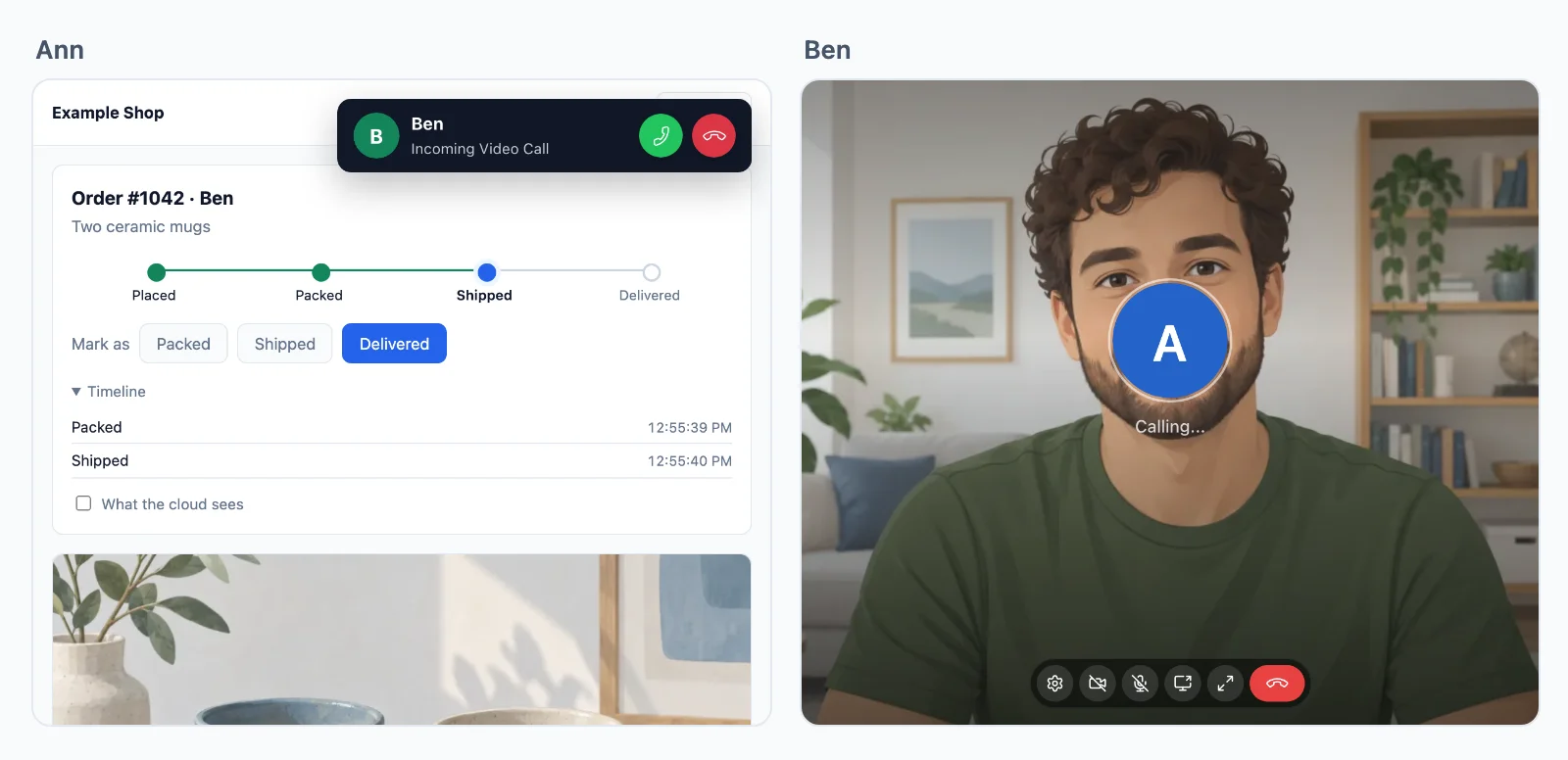
Las llamadas entre dos personas están cifradas de extremo a extremo en todos los caminos, y una llamada en grupo lo está cuando tu servidor lo indica.
¿Más de dos personas? Las llamadas en grupo funcionan en nuestros servidores multimedia, con anfitriones, ponentes y oyentes.
Casos de uso
Lo que se construye con llamadas
Cada uno es una app completa en la documentación, con su servidor en Node.js, PHP y Python.
Llamadas desde un botón
Un botón Llamar a soporte que suena para el agente en cada pestaña que tenga abierta.
Consultas con cita
Una visita por vídeo con una médica, un abogado, una tutora o un coach, abierta solo a los dos con cita, a su hora.
Reuniones de equipo
Una reunión por vídeo para cada equipo o evento, con pantalla compartida, que quien la dirige termina para todos.
Clases y salas de audio
Un profesor o un panel habla y el resto escucha, levantando la mano para hablar.
Salas de espera y salas de grupos
Los invitados esperan hasta que el anfitrión los admite, y el anfitrión envía a las personas a salas más pequeñas y las trae de vuelta.
Cobrar por las llamadas
Tu servidor sabe cuánto habló cada persona, contado en nuestros servidores, para cobrar por minuto.
Precios
Precio por conexiones, nunca por mensajes
Desde $11.99 al mes por 1000 conexiones simultáneas, con facturación anual, o $14.99 con facturación mensual.
Llamadas en grupo por encima de tu plan: $0.20 por cada 1.000 minutos, $0.10 con audio.
Un solo precio en cualquier resolución. El ancho de banda, los relés y los mensajes nunca se cobran, y las llamadas entre dos personas están incluidas. Gestionamos nuestros propios relés y servidores multimedia, y por eso estos precios son bajos.
Precio según las conexiones simultáneas, a partir de 1000, con facturación mensual o anual. Las llamadas entre dos personas son ilimitadas.
Con 1.000 conexiones, las llamadas en grupo no se miden hasta 32 personas con vídeo a la vez, y una persona con audio cuenta la mitad, sin límite de personas por llamada. Cada 1.000 conexiones más añaden 12 personas con vídeo. Por encima, cada persona con vídeo adicional gasta un crédito por minuto, con audio la mitad, y tu plan añade 5000 créditos al mes por cada 1.000 conexiones.
Dudas
Preguntas frecuentes
¿Necesito mis propios servidores TURN o multimedia?
No. Una llamada entre dos personas va directamente entre los dos dispositivos cuando puede, a través de nuestros relés cuando un cortafuegos bloquea el camino directo, y a través de nuestros servidores multimedia cuando ni los relés la alcanzan. Las llamadas en grupo funcionan en nuestros servidores multimedia en varias regiones. No tienes nada que alojar.
¿Qué stacks pueden usar el SDK de videollamadas?
Next.js y Express, Laravel y PHP sin framework, Django, FastAPI y Flask, Capacitor, iOS y Android, cada uno con una guía. Un servidor en cualquier otro lenguaje usa la API HTTP. Las apps de Flutter tienen llamadas en iOS y Android, y las de React Native por ahora en iOS.
¿Cuántas personas pueden unirse a una llamada en grupo?
No hay límite de personas por llamada. Con 1.000 conexiones, hasta 32 personas con vídeo a la vez no gastan créditos, y una persona con audio cuenta la mitad, y cada 1.000 conexiones más añaden 12. Por encima, cada persona con vídeo adicional gasta un crédito por minuto.
¿Están cifradas las llamadas?
Sí. Los medios de una llamada entre dos personas están cifrados de extremo a extremo en todos los caminos, también cuando los llevan nuestros relés o servidores multimedia. Una llamada en grupo está cifrada de extremo a extremo cuando tu servidor lo indica, con una clave que solo entrega tu servidor.
¿Dónde están vuestros servidores?
Nuestros relés y servidores multimedia funcionan en estos países: Alemania, Francia, Reino Unido, Polonia, Canadá y Singapur. Cada llamada pasa por el más cercano a quienes participan en ella. Próximamente: Estados Unidos, Australia, India y Italia. Los servidores de tiempo real que transportan tus eventos funcionan en Alemania.
¿Quién decide quién puede llamar a quién?
Tu app. Tu servidor da a la página un token por cada llamada que permite, y por cada persona que entra en una llamada en grupo, diciendo quién habla y quién solo escucha, y quién es el anfitrión. Así que quién puede hacer qué es tu propia lógica, y nada empieza sin un token. La nube aplica cada token, y tu servidor puede retirar el acceso en cualquier momento.
¿Puedo crear mi propia interfaz de llamada?
Sí. La pantalla de llamada es opcional. Cambia sus colores y textos, o haz, responde y dibuja las llamadas tú mismo con el SDK, hasta cada persona de una llamada en grupo.
¿Puedo cobrar a mis usuarios por las llamadas?
Sí. WordPlus Cloud le dice a tu servidor por webhook cuánto duró cada llamada y cuándo entró y salió cada persona de una llamada en grupo, contado en sus propios servidores, para que tu app cobre por minuto.
¿Preguntas sobre tu integración? Escríbenos: te ayudamos con los SDK, la pantalla de llamada y tu stack.