
 English
 Español
 Français
 Italiano
 Nederlands
 Polski
' d='M48 28h24v18a12 12 0 0 1-24 0z'/%3E%3Cpath fill='%230093DD' d='M47.5 21.5h4.6V28h-4.6zm10.2-2.5h4.6v9h-4.6zm10.2 2.5h4.6V28h-4.6z'/%3E%3Cpath fill='%23171796' d='M52.6 20h4.6v8h-4.6zm10.2 0h4.6v8h-4.6z'/%3E%3C/svg%3E) Hrvatski
 עברית
Für Apps
Videoanrufe für Ihre App
Eine Videoanruf-API und ein SDK für Next.js, Laravel, Django und jeden anderen Stack. Anrufe zwischen zwei Personen klingeln in jedem Tab und jeder App der angerufenen Person, kommen immer zustande und sind Ende-zu-Ende-verschlüsselt, und der Anrufbildschirm ist sofort nutzbar, sodass Sie nichts betreiben müssen.
Oder probieren Sie die Live-Demo: Öffnen Sie sie in zwei Browsern und rufen Sie von einem zum anderen an.
Die besten Preise für WebSockets, unbegrenzte 1:1-Anrufe mit TURN-Servern weltweit sowie Gruppenanrufe und Live-Streaming mit inklusivem Kontingent. Ab $11.99 im Monat für 1.000 gleichzeitige Verbindungen, jährlich abgerechnet, oder $14.99 bei monatlicher Abrechnung.
Gruppenanrufe über Ihren Plan hinaus: $0.20 pro 1.000 Minuten, $0.10 per Audio.
Next.js auf dem Server und React auf der Seite.
export async function GET( request: Request ) {
    const me = await currentUserId();
    const ask = new URL( request.url ).searchParams;
    const to = ask.get( 'to' )!;

    // Your own check, whatever your app needs.
    if ( ! me || ! await mayCall( me, to ) ) {
        return new Response( null, { status: 403 } );
    }

    const token = await realtime.callToken( me, to, {
        type: ask.get( 'type' ),
    } );

    return Response.json( { token } );
}app.get( '/api/call-token', async ( req, res ) => {
const me = userOf( req );
const { to, type } = req.query;
// Your own check, whatever your app needs.
if ( ! me || ! await mayCall( me, to ) ) {
return res.sendStatus( 403 );
}
const token = await realtime.callToken( me, to, { type } );
res.json( { token } );
} );import { createServer } from 'node:http';
createServer( async ( req, res ) => {
const url = new URL( req.url, 'http://localhost' );
if ( url.pathname === '/api/call-token' ) {
const me = userOf( req );
const to = url.searchParams.get( 'to' );
// Your own check, whatever your app needs.
if ( ! me || ! await mayCall( me, to ) ) {
res.writeHead( 403 );
return res.end();
}
const token = await realtime.callToken( me, to, {
type: url.searchParams.get( 'type' ),
} );
res.writeHead( 200, { 'Content-Type': 'application/json' } );
return res.end( JSON.stringify( { token } ) );
}
// Your pages, and realtime.node( userOf ) for the SDK's routes.
} ).listen( 3000 );use Illuminate\Http\Request;
use WordPlus\Realtime\Laravel\Facades\Realtime;
Route::get( '/api/call-token', function ( Request $request ) {
$me = $request->user()->id;
$to = $request->query( 'to' );
// Your own check, whatever your app needs.
abort_unless( may_call( $me, $to ), 403 );
return [ 'token' => Realtime::callToken( $me, $to, [
'type' => $request->query( 'type' ),
] ) ];
} )->middleware( 'auth' );require __DIR__ . '/../src/realtime.php';
$me = current_user_id();
$to = $_GET['to'] ?? '';
// Your own check, whatever your app needs.
if ( ! $me || ! may_call( $me, $to ) ) {
http_response_code( 403 );
exit;
}
header( 'Content-Type: application/json' );
echo json_encode( [
'token' => $realtime->callToken( $me, $to, [
'type' => $_GET['type'] ?? null,
] ),
] );from django.contrib.auth.decorators import login_required
from django.http import HttpResponseForbidden, JsonResponse
from .realtime import realtime
# In urls.py: path("api/call-token", views.call_token)
@login_required
def call_token(request):
me = request.user.id
to = request.GET["to"]
# Your own check, whatever your app needs.
if not may_call(me, to):
return HttpResponseForbidden()
token = realtime.call_token(me, to, type=request.GET.get("type"))
return JsonResponse({"token": token})from fastapi import Depends, HTTPException
from realtime import realtime
@app.get("/api/call-token")
def call_token(
to: str,
type: str = "video",
me: int = Depends(current_user_id),
):
# Your own check, whatever your app needs.
if not me or not may_call(me, to):
raise HTTPException(403)
return {"token": realtime.call_token(me, to, type=type)}from flask import abort, request, session
from realtime import realtime
@app.get("/api/call-token")
def call_token():
me = session.get("user_id")
to = request.args["to"]
# Your own check, whatever your app needs.
if not me or not may_call(me, to):
abort(403)
kind = request.args.get("type")
return {"token": realtime.call_token(me, to, type=kind)}// http.HandleFunc("GET /api/call-token", callToken)
func callToken(w http.ResponseWriter, r *http.Request) {
me := userOf(r)
to := r.URL.Query().Get("to")
// Your own check, whatever your app needs.
if me == "" || !mayCall(me, to) {
w.WriteHeader(403)
return
}
kind := r.URL.Query().Get("type")
reply(w, map[string]string{
"token": app.CallToken(me, to, kind, profile(me)),
})
}Hooks und Komponenten für jede React-App, auf jedem der Server oben.
import { connect } from '@wordplus/realtime';

const rt = await connect();

// The ring and the call window.
await rt.callScreen();

// And in the page:
// <call-button to="34" token-url="/api/call-token"
//     type="video" name="Ann">
//     Call Ann
// </call-button>import { connect } from '@wordplus/realtime';
const rt = await connect();
// The ring and the call window.
await rt.callScreen();
// And in the page:
// <call-button to="34" token-url="/api/call-token"
// type="video" name="Ann">
// Call Ann
// </call-button>import { connect } from '@wordplus/realtime';
const rt = await connect();
// The ring and the call window.
await rt.callScreen();
// And in the page:
// <call-button to="34" token-url="/api/call-token"
// type="video" name="Ann">
// Call Ann
// </call-button>import { connect } from '@wordplus/realtime';
const rt = await connect( window.wordplusRealtimeConfig );
// The ring and the call window.
await rt.callScreen();
// And in the page:
// <call-button to="34" token-url="/api/call-token"
// type="video" name="Ann">
// Call Ann
// </call-button><call-button to="34" token-url="/api/call-token"
type="video" name="Ann">
Call Ann
</call-button>
<script type="module">
import { connect } from '@wordplus/realtime';
const rt = await connect( window.wordplusRealtimeConfig );
// The ring and the call window.
await rt.callScreen();
</script><call-button to="34" token-url="/api/call-token"
type="video" name="Ann">
Call Ann
</call-button>
<script type="module">
import { connect } from '@wordplus/realtime';
const rt = await connect( window.wordplusRealtimeConfig );
// The ring and the call window.
await rt.callScreen();
</script><call-button to="34" token-url="/api/call-token"
type="video" name="Ann">
Call Ann
</call-button>
<script type="module">
import { connect } from '@wordplus/realtime';
const rt = await connect( window.wordplusRealtimeConfig );
// The ring and the call window.
await rt.callScreen();
</script><call-button to="34" token-url="/api/call-token"
type="video" name="Ann">
Call Ann
</call-button>
<script type="module">
import { connect } from '@wordplus/realtime';
const rt = await connect( window.wordplusRealtimeConfig );
// The ring and the call window.
await rt.callScreen();
</script>import { connect } from '@wordplus/realtime';
const settings = await fetch( '/api/realtime/config' );
const rt = await connect( await settings.json() );
// The ring and the call window.
await rt.callScreen();
// And in the page:
// <call-button to="34" token-url="/api/call-token"
// type="video" name="Ann">
// Call Ann
// </call-button><call-button to="34" token-url="/api/call-token"
type="video" name="Ann">
Call Ann
</call-button>
<script type="module">
// The ring and the call window.
await window.Echo.connector.rt.callScreen();
</script>'use client'; // in Next.js
import { CallButton, CallScreen } from '@wordplus/realtime/react';
// Inside <RealtimeProvider>, once for the whole app.
export function CallAnn() {
return (
<>
<CallScreen />
<CallButton to={ 34 } tokenUrl="/api/call-token"
type="video" name="Ann">
Call Ann
</CallButton>
</>
);
}<script setup>
import { onMounted } from 'vue';
// realtime.js, one connection for the whole app:
// export const realtime = connect();
import { realtime } from './realtime';
onMounted( async () => {
// The ring and the call window.
( await realtime ).callScreen();
} );
</script>
<!-- isCustomElement for these tags, in vite.config.js -->
<template>
<call-button to="34" token-url="/api/call-token"
type="video" name="Ann">
Call Ann
</call-button>
</template><script>
import { onMount } from 'svelte';
// realtime.js, one connection for the whole app:
// export const realtime = connect();
import { realtime } from './realtime';
onMount( async () => {
// The ring and the call window.
( await realtime ).callScreen();
} );
</script>
<call-button to="34" token-url="/api/call-token"
type="video" name="Ann">
Call Ann
</call-button>import { Component, CUSTOM_ELEMENTS_SCHEMA } from '@angular/core';
// realtime.ts, one connection for the whole app:
// export const realtime = connect();
import { realtime } from './realtime';
@Component( {
selector: 'app-call-ann',
schemas: [ CUSTOM_ELEMENTS_SCHEMA ],
template: `
<call-button to="34" token-url="/api/call-token"
type="video" name="Ann">
Call Ann
</call-button>
`,
} )
export class CallAnnComponent {
async ngOnInit() {
// The ring and the call window.
( await realtime ).callScreen();
}
}import WordPlusRealtimeCalls
import WordPlusRealtimeUI
// Rings for every call coming in.
CallScreen.shared.attach(rt.calls)
// Your own request to your route.
let token = try await api.callToken(to: "34")
let call = try await rt.startCall(token)
CallScreen.shared.show(call, name: "Ann")import cloud.wordplus.realtime.calls.calls
import cloud.wordplus.realtime.calls.startCall
import cloud.wordplus.realtime.ui.CallScreen
// Rings for every call coming in.
CallScreen.attach(context, rt.calls(context))
// Your own request to your route.
val token = api.callToken(to = "34")
val call = rt.startCall(context, token)
CallScreen.show(context, call, name = "Ann")import {
CallButton, CallScreen, RealtimeProvider,
} from '@wordplus/realtime-react-native';
// Your server, in full, as an app has no address of its own.
const API = 'https://app.example.com/api';
const options = {
app: 's1500000007',
endpoint: API + '/realtime',
headers: { Authorization: 'Bearer ' + session.token },
};
export function App() {
return (
<RealtimeProvider options={ options }>
<CallScreen />
<CallButton to="34" tokenUrl={ API + '/call-token' }
type="video" name="Ann">
Call Ann
</CallButton>
</RealtimeProvider>
);
}import 'package:flutter/material.dart';
import 'package:wordplus_realtime/wordplus_realtime.dart';
// Your server, in full, as an app has no address of its own.
const api = 'https://app.example.com/api';
// Once, as your app starts.
final rt = await WordPlusRealtime.connect(
app: 's1500000007',
endpoint: '$api/realtime',
headers: {'Authorization': 'Bearer ${session.token}'},
);
// Rings for every call coming in, and shows it once answered.
await rt.callScreen();
// In your build:
CallButton(
rt: rt,
to: '34',
tokenUrl: '$api/call-token',
name: 'Ann',
child: const Text('Call Ann'),
)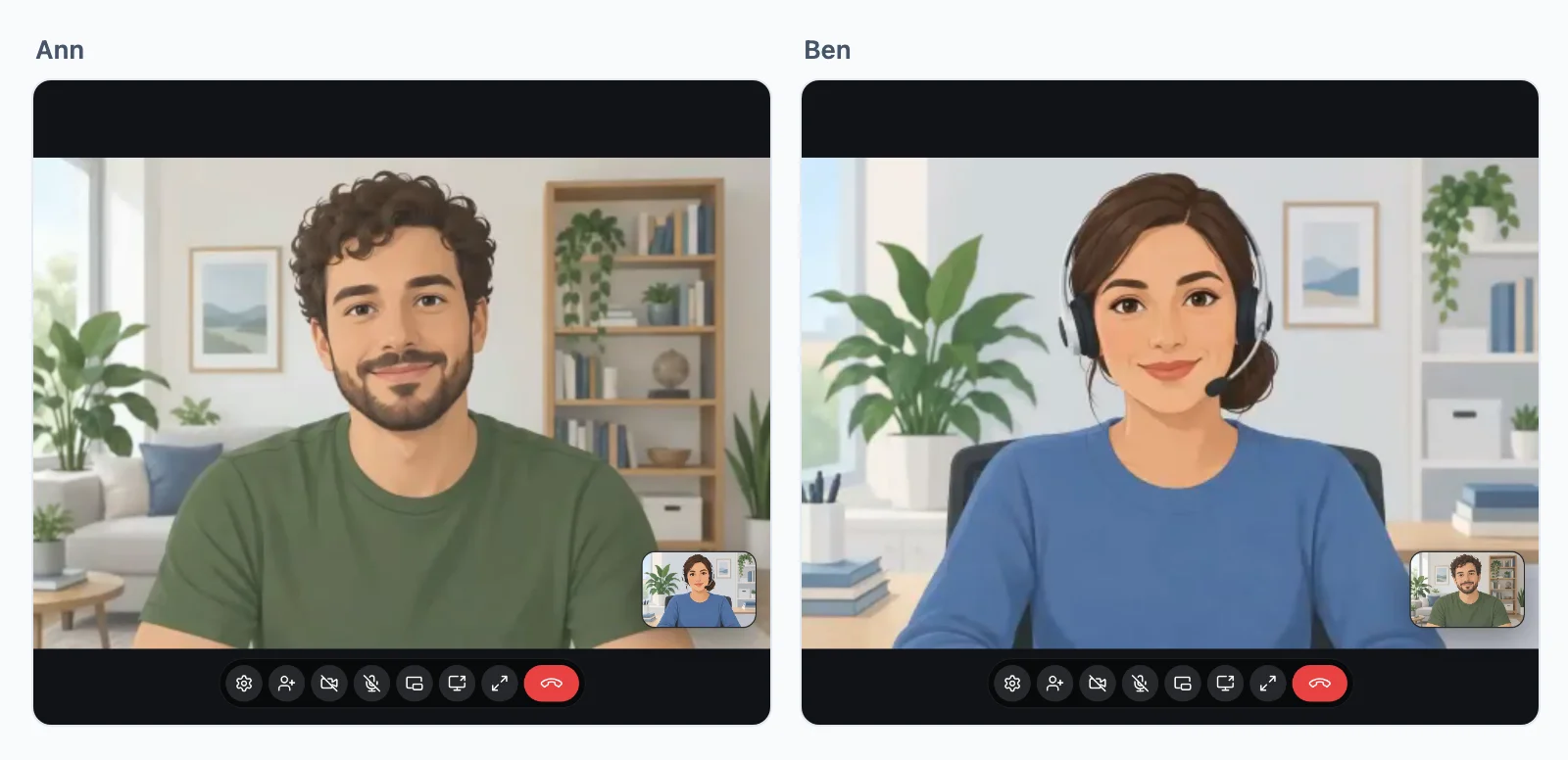
Videoanruf ausprobieren
Starten Sie hier einen Anruf und nehmen Sie ihn auf Ihrem Smartphone oder in einem zweiten Fenster an. Kein Konto nötig.
Das sind die Bildschirme, die das SDK Ihrer App gibt. Ihr Browser fragt nach Kamera und Mikrofon, nichts wird aufgezeichnet, und die Demo endet nach 10 Minuten.
Anrufe zwischen zwei Personen
Jeder Anruf kommt durch
Ein Anruf klingelt in jedem Tab und jeder App, die die angerufene Person geöffnet hat, und hört überall auf zu klingeln, sobald sie auf einem davon annimmt. Dann nimmt er den besten Weg, den die beiden Netzwerke erlauben, ohne dass Sie einen TURN-Server betreiben müssen.
- DirektZwischen den beiden Geräten, in den meisten Netzwerken. Der schnellste Weg.
- Über unsere RelaysWenn eine Firewall den direkten Weg blockiert. Sie antworten auf den Ports des Webs, sodass ein Anruf überall durchkommt, wo auch Websites durchkommen.
- Über unsere MedienserverWenn selbst die Relays nicht durchkommen. Der Anruf wechselt dorthin und geht weiter, ohne aufzulegen.
Auf jedem Weg Ende-zu-Ende-verschlüsselt und in jedem Tarif enthalten.
Wo Anrufe verbunden werden
Unsere Relays und Medienserver laufen nah an Ihren Nutzern, und jeder Anruf läuft über den, der seinen Teilnehmern am nächsten ist.
Ihr Server entscheidet
Einen Anruf starten, annehmen und steuern
Wer wen anrufen darf, entscheidet Ihre App. Ihr Server gibt der Seite ein Token für jeden Anruf, den er erlaubt, und die Seite startet den Anruf damit, per Knopf oder mit Ihrem eigenen Code. Hier sehen Sie einen Anruf an Ann, Aufgabe für Aufgabe.
Next.js auf dem Server und React auf der Seite.
Der Seite ein Token geben
Wer wen anrufen darf, gehört zur eigenen Logik Ihrer App und liegt daher in einer eigenen Route. Prüfen Sie, was Ihre App braucht, und antworten Sie dann mit einem Token. Ein Token startet einen Anruf, und ohne Token klingelt nichts. mayCall ist Ihre eigene Prüfung.
export async function GET( request: Request ) {
    const me = await currentUserId();
    const ask = new URL( request.url ).searchParams;
    const to = ask.get( 'to' )!;

    // Your own check, whatever your app needs.
    if ( ! me || ! await mayCall( me, to ) ) {
        return new Response( null, { status: 403 } );
    }

    const token = await realtime.callToken( me, to, {
        type: ask.get( 'type' ),
    } );

    return Response.json( { token } );
}app.get( '/api/call-token', async ( req, res ) => {
const me = userOf( req );
const { to, type } = req.query;
// Your own check, whatever your app needs.
if ( ! me || ! await mayCall( me, to ) ) {
return res.sendStatus( 403 );
}
const token = await realtime.callToken( me, to, { type } );
res.json( { token } );
} );import { createServer } from 'node:http';
createServer( async ( req, res ) => {
const url = new URL( req.url, 'http://localhost' );
if ( url.pathname === '/api/call-token' ) {
const me = userOf( req );
const to = url.searchParams.get( 'to' );
// Your own check, whatever your app needs.
if ( ! me || ! await mayCall( me, to ) ) {
res.writeHead( 403 );
return res.end();
}
const token = await realtime.callToken( me, to, {
type: url.searchParams.get( 'type' ),
} );
res.writeHead( 200, { 'Content-Type': 'application/json' } );
return res.end( JSON.stringify( { token } ) );
}
// Your pages, and realtime.node( userOf ) for the SDK's routes.
} ).listen( 3000 );use Illuminate\Http\Request;
use WordPlus\Realtime\Laravel\Facades\Realtime;
Route::get( '/api/call-token', function ( Request $request ) {
$me = $request->user()->id;
$to = $request->query( 'to' );
// Your own check, whatever your app needs.
abort_unless( may_call( $me, $to ), 403 );
return [ 'token' => Realtime::callToken( $me, $to, [
'type' => $request->query( 'type' ),
] ) ];
} )->middleware( 'auth' );require __DIR__ . '/../src/realtime.php';
$me = current_user_id();
$to = $_GET['to'] ?? '';
// Your own check, whatever your app needs.
if ( ! $me || ! may_call( $me, $to ) ) {
http_response_code( 403 );
exit;
}
header( 'Content-Type: application/json' );
echo json_encode( [
'token' => $realtime->callToken( $me, $to, [
'type' => $_GET['type'] ?? null,
] ),
] );from django.contrib.auth.decorators import login_required
from django.http import HttpResponseForbidden, JsonResponse
from .realtime import realtime
# In urls.py: path("api/call-token", views.call_token)
@login_required
def call_token(request):
me = request.user.id
to = request.GET["to"]
# Your own check, whatever your app needs.
if not may_call(me, to):
return HttpResponseForbidden()
token = realtime.call_token(me, to, type=request.GET.get("type"))
return JsonResponse({"token": token})from fastapi import Depends, HTTPException
from realtime import realtime
@app.get("/api/call-token")
def call_token(
to: str,
type: str = "video",
me: int = Depends(current_user_id),
):
# Your own check, whatever your app needs.
if not me or not may_call(me, to):
raise HTTPException(403)
return {"token": realtime.call_token(me, to, type=type)}from flask import abort, request, session
from realtime import realtime
@app.get("/api/call-token")
def call_token():
me = session.get("user_id")
to = request.args["to"]
# Your own check, whatever your app needs.
if not me or not may_call(me, to):
abort(403)
kind = request.args.get("type")
return {"token": realtime.call_token(me, to, type=kind)}// http.HandleFunc("GET /api/call-token", callToken)
func callToken(w http.ResponseWriter, r *http.Request) {
me := userOf(r)
to := r.URL.Query().Get("to")
// Your own check, whatever your app needs.
if me == "" || !mayCall(me, to) {
w.WriteHeader(403)
return
}
kind := r.URL.Query().Get("type")
reply(w, map[string]string{
"token": app.CallToken(me, to, kind, profile(me)),
})
}Einen Anrufknopf hinzufügen
Der fertige Bildschirm: ein Knopf, das Klingeln mit Annehmen und Ablehnen und das Anruffenster, ganz ohne Anrufcode. Der Knopf fragt Ihre Route nach seinem Token. Starten Sie den Bildschirm auf jeder Seite, auf der jemand angerufen werden kann, denn ein Anruf klingelt nur dort, wo er läuft.
Hooks und Komponenten für jede React-App, auf jedem der Server oben.
import { connect } from '@wordplus/realtime';

const rt = await connect();

// The ring and the call window, on every page someone may be called on.
await rt.callScreen();

// And in the page. The button asks your route for its token.
// <call-button to="34" token-url="/api/call-token" type="video" name="Ann">
//     Call Ann
// </call-button>import { connect } from '@wordplus/realtime';
const rt = await connect();
// The ring and the call window, on every page someone may be called on.
await rt.callScreen();
// And in the page. The button asks your route for its token.
// <call-button to="34" token-url="/api/call-token" type="video" name="Ann">
// Call Ann
// </call-button><call-button to="34" token-url="/api/call-token" type="video" name="Ann">
Call Ann
</call-button>
<script type="module">
// The ring and the call window, on every page someone may be called on.
await window.Echo.connector.rt.callScreen();
</script>'use client'; // in Next.js
import { CallButton, CallScreen } from '@wordplus/realtime/react';
// Inside <RealtimeProvider>, once for the whole app.
export function CallAnn() {
return (
<>
<CallScreen />
<CallButton to={ 34 } tokenUrl="/api/call-token" type="video" name="Ann">
Call Ann
</CallButton>
</>
);
}<script setup>
import { watchEffect } from 'vue';
import { useRealtime } from '@wordplus/realtime/vue';
// provideRealtime() once, in your root component.
const rt = useRealtime();
// The ring and the call window, on every page someone may be called on.
watchEffect( () => rt.value?.callScreen() );
</script>
<!-- isCustomElement for this tag, in vite.config.js -->
<template>
<call-button to="34" token-url="/api/call-token" type="video" name="Ann">
Call Ann
</call-button>
</template><script>
import { useRealtime } from '@wordplus/realtime/svelte';
// provideRealtime() once, in your root component.
const rt = useRealtime();
// The ring and the call window, on every page someone may be called on.
$effect( () => { rt.current?.callScreen(); } );
</script>
<call-button to="34" token-url="/api/call-token" type="video" name="Ann">
Call Ann
</call-button>import { Component, CUSTOM_ELEMENTS_SCHEMA } from '@angular/core';
// realtime.ts, one connection for the whole app:
// export const realtime = connect();
import { realtime } from './realtime';
@Component( {
selector: 'app-call-ann',
schemas: [ CUSTOM_ELEMENTS_SCHEMA ],
template: `<call-button to="34" token-url="/api/call-token" type="video" name="Ann">Call Ann</call-button>`,
} )
export class CallAnnComponent {
async ngOnInit() {
const rt = await realtime;
// The ring and the call window, on every page someone may be called on.
await rt.callScreen();
}
}import WordPlusRealtimeCalls
import WordPlusRealtimeUI
// Rings for every call coming in, and shows it once answered.
CallScreen.shared.attach(rt.calls)
let token = try await api.callToken(to: "34") // your own request to your route
let call = try await rt.startCall(token)
CallScreen.shared.show(call, name: "Ann")import cloud.wordplus.realtime.calls.calls
import cloud.wordplus.realtime.calls.startCall
import cloud.wordplus.realtime.ui.CallScreen
// Rings for every call coming in, and shows it once answered.
CallScreen.attach(context, rt.calls(context))
val token = api.callToken(to = "34") // your own request to your route
val call = rt.startCall(context, token)
CallScreen.show(context, call, name = "Ann")import {
CallButton, CallScreen, RealtimeProvider,
} from '@wordplus/realtime-react-native';
// Your server, in full, as an app has no address of its own.
const API = 'https://app.example.com/api';
const options = {
app: 's1500000007',
endpoint: API + '/realtime',
headers: { Authorization: 'Bearer ' + session.token },
};
export function App() {
return (
<RealtimeProvider options={ options }>
<CallScreen />
<CallButton to="34" tokenUrl={ API + '/call-token' }
type="video" name="Ann">
Call Ann
</CallButton>
</RealtimeProvider>
);
}import 'package:flutter/material.dart';
import 'package:wordplus_realtime/wordplus_realtime.dart';
// Your server, in full, as an app has no address of its own.
const api = 'https://app.example.com/api';
// Once, as your app starts.
final rt = await WordPlusRealtime.connect(
app: 's1500000007',
endpoint: '$api/realtime',
headers: {'Authorization': 'Bearer ${session.token}'},
);
// Rings for every call coming in, and shows it once answered.
await rt.callScreen();
// In your build:
CallButton(
rt: rt,
to: '34',
tokenUrl: '$api/call-token',
name: 'Ann',
child: const Text('Call Ann'),
)Mit Ihrem eigenen Code anrufen
Für einen Bildschirm, den Sie selbst zeichnen: Holen Sie ein Token von Ihrer Route und starten Sie damit den Anruf. Der Anruf klingelt in jedem Tab und jeder App, die die andere Person geöffnet hat, und hört überall auf zu klingeln, sobald sie auf einem davon annimmt.
Hooks und Komponenten für jede React-App, auf jedem der Server oben.
import { connect } from '@wordplus/realtime';

const rt = await connect();

// Asks your server for a token: your route from the first step.
async function callToken( to ) {
    const answer = await fetch( '/api/call-token?to=' + to );
    if ( ! answer.ok ) throw new Error( 'Your server said no' );

    return ( await answer.json() ).token;
}

const call = await rt.startCall( await callToken( 34 ) );

call.on( 'state', ( state ) => showState( state ) );   // ringing, connecting, connected, ended
call.on( 'remote', () => {
    call.remote.camera?.attach( video );               // a <video> of yours
    call.remote.microphone?.attach( audio );           // an <audio> of yours
} );

await call.setMicrophone( true );
await call.setCamera( true );

hangUp.onclick = () => call.end();import { connect } from '@wordplus/realtime';
const rt = await connect();
// Asks your server for a token: your route from the first step.
async function callToken( to ) {
const answer = await fetch( '/api/call-token?to=' + to );
if ( ! answer.ok ) throw new Error( 'Your server said no' );
return ( await answer.json() ).token;
}
const call = await rt.startCall( await callToken( 34 ) );
call.on( 'state', ( state ) => showState( state ) ); // ringing, connecting, connected, ended
call.on( 'remote', () => {
call.remote.camera?.attach( video ); // a <video> of yours
call.remote.microphone?.attach( audio ); // an <audio> of yours
} );
await call.setMicrophone( true );
await call.setCamera( true );
hangUp.onclick = () => call.end();const rt = window.Echo.connector.rt; // the connection Echo made
// Asks your server for a token: your route from the first step.
async function callToken( to ) {
const answer = await fetch( '/api/call-token?to=' + to );
if ( ! answer.ok ) throw new Error( 'Your server said no' );
return ( await answer.json() ).token;
}
const call = await rt.startCall( await callToken( 34 ) );
call.on( 'state', ( state ) => showState( state ) ); // ringing, connecting, connected, ended
call.on( 'remote', () => {
call.remote.camera?.attach( video ); // a <video> of yours
call.remote.microphone?.attach( audio ); // an <audio> of yours
} );
await call.setMicrophone( true );
await call.setCamera( true );
hangUp.onclick = () => call.end();'use client'; // in Next.js
import { AudioTrack, useCall, VideoTrack } from '@wordplus/realtime/react';
// Asks your server for a token: your route from the first step.
async function callToken( to ) {
const answer = await fetch( '/api/call-token?to=' + to );
if ( ! answer.ok ) throw new Error( 'Your server said no' );
return ( await answer.json() ).token;
}
// Inside <RealtimeProvider>, once for the whole app.
export function Call() {
const { call, state, remote, camera, start, end } = useCall();
if ( ! call ) {
return <button onClick={ async () => start( await callToken( 34 ) ) }>Call Ann</button>;
}
return (
<>
<p>{ state }</p>
<VideoTrack track={ remote?.camera } />
<AudioTrack track={ remote?.microphone } />
<VideoTrack track={ camera } />
<button onClick={ end }>Hang up</button>
</>
);
}<script setup>
import { AudioTrack, useCall, VideoTrack } from '@wordplus/realtime/vue';
// Asks your server for a token: your route from the first step.
async function callToken( to ) {
const answer = await fetch( '/api/call-token?to=' + to );
if ( ! answer.ok ) throw new Error( 'Your server said no' );
return ( await answer.json() ).token;
}
// provideRealtime() once, in your root component.
const { call, state, remote, camera, start, end } = useCall();
</script>
<template>
<button v-if="! call" @click="async () => start( await callToken( 34 ) )">Call Ann</button>
<template v-else>
<p>{{ state }}</p>
<VideoTrack :track="remote?.camera" />
<AudioTrack :track="remote?.microphone" />
<VideoTrack :track="camera" />
<button @click="end">Hang up</button>
</template>
</template><script>
import { track, useCall } from '@wordplus/realtime/svelte';
// Asks your server for a token: your route from the first step.
async function callToken( to ) {
const answer = await fetch( '/api/call-token?to=' + to );
if ( ! answer.ok ) throw new Error( 'Your server said no' );
return ( await answer.json() ).token;
}
// provideRealtime() once, in your root component.
const current = useCall();
</script>
{#if ! current.call}
<button onclick={ async () => current.start( await callToken( 34 ) ) }>Call Ann</button>
{:else}
<p>{ current.state }</p>
<video use:track={ current.remote?.camera } muted autoplay playsinline></video>
<audio use:track={ current.remote?.microphone } autoplay></audio>
<video use:track={ current.camera } muted autoplay playsinline></video>
<button onclick={ current.end }>Hang up</button>
{/if}import { Component, CUSTOM_ELEMENTS_SCHEMA } from '@angular/core';
// realtime.ts, one connection for the whole app:
// export const realtime = connect();
import { realtime } from './realtime';
@Component( {
selector: 'app-call',
schemas: [ CUSTOM_ELEMENTS_SCHEMA ],
template: `<video #video autoplay playsinline></video>`,
} )
export class CallComponent {
async ngOnInit() {
const rt = await realtime;
// Asks your server for a token: your route from the first step.
async function callToken( to ) {
const answer = await fetch( '/api/call-token?to=' + to );
if ( ! answer.ok ) throw new Error( 'Your server said no' );
return ( await answer.json() ).token;
}
const call = await rt.startCall( await callToken( 34 ) );
call.on( 'state', ( state ) => showState( state ) ); // ringing, connecting, connected, ended
call.on( 'remote', () => {
call.remote.camera?.attach( video ); // a <video> of yours
call.remote.microphone?.attach( audio ); // an <audio> of yours
} );
await call.setMicrophone( true );
await call.setCamera( true );
hangUp.onclick = () => call.end();
}
}let token = try await api.callToken(to: "34") // your own request to your route
let call = try await rt.startCall(token)
call.onState { state in label.text = state.rawValue } // ringing, connecting, connected, ended
call.onRemote { remoteView.show(call.remoteCamera) } // a CallVideoView of yours
ownView.show(call.localCamera)
hangUp.addAction(UIAction { _ in call.end() }, for: .touchUpInside)val token = api.callToken(to = "34") // your own request to your route
val call = rt.startCall(context, token)
call.onState { state -> label.text = state.wire } // ringing, connecting, connected, ended
call.onRemote { remoteView.show(call.remoteCamera) } // a CallVideoView of yours
ownView.show(call.localCamera)
hangUp.setOnClickListener { call.end() }import { Button, Text, View } from 'react-native';
import { CallVideo, useCall, useRealtime } from '@wordplus/realtime-react-native';
const API = 'https://app.example.com/api'; // your server, in full
// Inside <RealtimeProvider>, once for the whole app.
export function Call() {
const rt = useRealtime();
const { call, state, start, end } = useCall();
// Asks your route from the first step, then starts with its token.
const callAnn = async () => {
start( await rt.tokenFrom( API + '/call-token', { to: 34, type: 'video' } ) );
};
if ( ! call ) return <Button title="Call Ann" disabled={ ! rt } onPress={ callAnn } />;
return (
<View style={ { flex: 1 } }>
<Text>{ state?.state }</Text>
<CallVideo call={ call } style={ { flex: 1 } } />
<CallVideo call={ call } source="own" mirrored style={ { height: 120 } } />
<Button title="Hang up" onPress={ end } />
</View>
);
}// Asks your route from the first step, then starts with its token.
final token = await rt.tokenFrom('$api/call-token', {'to': 34, 'type': 'video'});
final call = await rt.startCall(token);
// ringing, connecting, connected, reconnecting, ended
call.onState((state) => showState(state));
// In your build, where you lay them out:
CallVideo(call: call) // the other side
CallVideo(call: call, source: CallVideoSource.own, mirrored: true) // your own
FilledButton(onPressed: call.end, child: const Text('Hang up'))Einen Anruf annehmen
Eine Seite, die auf Anrufe wartet, hält die Leitung ihres Nutzers, auf der seine Anrufe 45 Sekunden lang klingeln. Zum Annehmen braucht es kein Token, denn das des Anrufers zeigt bereits, dass Ihr Server zugestimmt hat. Nehmen Sie an oder lehnen Sie ab, und seine anderen Tabs hören auf zu klingeln.
Hooks und Komponenten für jede React-App, auf jedem der Server oben.
import { connect } from '@wordplus/realtime';

const rt = await connect();

// From now on their calls ring on this page.
rt.onIncomingCall( ( incoming ) => {
    showRing( incoming.info?.name, incoming.type );

    answer.onclick = () => incoming.accept();    // gives the call, as rt.startCall() does
    decline.onclick = () => incoming.decline();  // or decline( 'busy' )

    incoming.on( 'over', hideRing );             // answered elsewhere, or the caller gave up
} );import { connect } from '@wordplus/realtime';
const rt = await connect();
// From now on their calls ring on this page.
rt.onIncomingCall( ( incoming ) => {
showRing( incoming.info?.name, incoming.type );
answer.onclick = () => incoming.accept(); // gives the call, as rt.startCall() does
decline.onclick = () => incoming.decline(); // or decline( 'busy' )
incoming.on( 'over', hideRing ); // answered elsewhere, or the caller gave up
} );const rt = window.Echo.connector.rt; // the connection Echo made
// From now on their calls ring on this page.
rt.onIncomingCall( ( incoming ) => {
showRing( incoming.info?.name, incoming.type );
answer.onclick = () => incoming.accept(); // gives the call, as rt.startCall() does
decline.onclick = () => incoming.decline(); // or decline( 'busy' )
incoming.on( 'over', hideRing ); // answered elsewhere, or the caller gave up
} );// In the component that holds the call, on the same useCall().
const { incoming } = useCalls(); // those ringing now
const ring = incoming[ 0 ];
if ( ! call && ring ) {
return (
<>
<p>{ ring.info?.name } is calling</p>
<button onClick={ () => answer( ring ) }>Answer</button>
<button onClick={ () => ring.decline() }>Decline</button>
</>
);
}<script setup>
// In the component that holds the call, on the same useCall().
const { incoming } = useCalls(); // those ringing now
</script>
<template>
<template v-if="! call && incoming[ 0 ]">
<p>{{ incoming[ 0 ].info?.name }} is calling</p>
<button @click="answer( incoming[ 0 ] )">Answer</button>
<button @click="incoming[ 0 ].decline()">Decline</button>
</template>
</template><script>
// In the component that holds the call, on the same useCall().
const calls = useCalls(); // those ringing now
</script>
{#if ! current.call && calls.incoming[ 0 ]}
<p>{ calls.incoming[ 0 ].info?.name } is calling</p>
<button onclick={ () => current.answer( calls.incoming[ 0 ] ) }>Answer</button>
<button onclick={ () => calls.incoming[ 0 ].decline() }>Decline</button>
{/if}import { Component, CUSTOM_ELEMENTS_SCHEMA } from '@angular/core';
// realtime.ts, one connection for the whole app:
// export const realtime = connect();
import { realtime } from './realtime';
@Component( {
selector: 'app-ring',
schemas: [ CUSTOM_ELEMENTS_SCHEMA ],
template: `<!-- Your ring here -->`,
} )
export class RingComponent {
async ngOnInit() {
const rt = await realtime;
// From now on their calls ring on this page.
rt.onIncomingCall( ( incoming ) => {
showRing( incoming.info?.name, incoming.type );
answer.onclick = () => incoming.accept(); // gives the call, as rt.startCall() does
decline.onclick = () => incoming.decline(); // or decline( 'busy' )
incoming.on( 'over', hideRing ); // answered elsewhere, or the caller gave up
} );
}
}rt.calls.onIncoming { incoming in
showRing(incoming.info["name"], incoming.type)
incoming.onOver { _ in hideRing() } // answered elsewhere, or the caller gave up
Task { @MainActor in
switch try await incoming.accept() { // or try await incoming.decline(busy: true)
case let .call(call): show(call)
case let .group(group): show(group)
}
}
}calls.onIncoming { incoming ->
showRing(incoming.info["name"], incoming.type)
incoming.onOver { hideRing() } // answered elsewhere, or the caller gave up
viewModelScope.launch {
when (val answered = incoming.accept()) { // or incoming.decline(busy = true)
is IncomingCall.Answered.ToCall -> show(answered.call)
is IncomingCall.Answered.ToGroup -> show(answered.group)
}
}
}// In the component that holds the call, on the same useCall().
const { incoming } = useCalls(); // those ringing now
const ring = incoming[ 0 ];
if ( ! call && ring ) {
return (
<View>
<Text>{ ring.info?.name } is calling</Text>
<Button title="Answer" onPress={ () => answer( ring ) } />
<Button title="Decline" onPress={ () => ring.decline() } />
</View>
);
}rt.onIncomingCall((incoming) async {
showRing(incoming.info?['name'], incoming.type);
incoming.onOver((reason) => hideRing()); // answered elsewhere, or the caller gave up
// On your Answer button, or incoming.decline(), decline(busy: true) if busy.
switch (await incoming.accept()) {
case ToCall(:final call):
showCall(call);
case ToGroup(:final group):
showGroup(group);
}
});Kamera, Mikrofon und Bildschirm
Dieselben Befehle in einem Anruf, einem Gruppenanruf und einem Livestream, sodass Ihr Bildschirm kein Gerät im Blick behalten muss. Eine Kamera wird gestoppt und ihre Leuchte erlischt, wenn sie ausgeschaltet wird oder der Anruf endet.
Hooks und Komponenten für jede React-App, auf jedem der Server oben.
import { connect } from '@wordplus/realtime';

const rt = await connect();

await call.setMicrophone( false );                  // muted
await call.setCamera( false );                      // stopped, and the light goes off
const shared = await call.setScreenShare( true );   // false if they picked nothing

// Move to another camera with no gap on the other side.
const { cameras } = await ( await rt.calls() ).devices();
await call.setCamera( true, { deviceId: cameras[ 1 ].id } );import { connect } from '@wordplus/realtime';
const rt = await connect();
await call.setMicrophone( false ); // muted
await call.setCamera( false ); // stopped, and the light goes off
const shared = await call.setScreenShare( true ); // false if they picked nothing
// Move to another camera with no gap on the other side.
const { cameras } = await ( await rt.calls() ).devices();
await call.setCamera( true, { deviceId: cameras[ 1 ].id } );const rt = window.Echo.connector.rt; // the connection Echo made
await call.setMicrophone( false ); // muted
await call.setCamera( false ); // stopped, and the light goes off
const shared = await call.setScreenShare( true ); // false if they picked nothing
// Move to another camera with no gap on the other side.
const { cameras } = await ( await rt.calls() ).devices();
await call.setCamera( true, { deviceId: cameras[ 1 ].id } );// In the component that holds the call, on the same useCall().
const { camera, microphone, screen, setCamera, setMicrophone, setScreenShare } = useCall();
return (
<>
<button onClick={ () => setMicrophone( ! microphone ) }>Microphone</button>
<button onClick={ () => setCamera( ! camera ) }>Camera</button>
<button onClick={ () => setScreenShare( ! screen ) }>Share screen</button>
</>
);<script setup>
// In the component that holds the call, on the same useCall().
const { camera, microphone, screen, setCamera, setMicrophone, setScreenShare } = useCall();
</script>
<template>
<button @click="setMicrophone( ! microphone )">Microphone</button>
<button @click="setCamera( ! camera )">Camera</button>
<button @click="setScreenShare( ! screen )">Share screen</button>
</template><!-- In the component that holds the call, on the same useCall(). -->
<button onclick={ () => current.setMicrophone( ! current.microphone ) }>Microphone</button>
<button onclick={ () => current.setCamera( ! current.camera ) }>Camera</button>
<button onclick={ () => current.setScreenShare( ! current.screen ) }>Share screen</button>import { Component, CUSTOM_ELEMENTS_SCHEMA } from '@angular/core';
// realtime.ts, one connection for the whole app:
// export const realtime = connect();
import { realtime } from './realtime';
@Component( {
selector: 'app-controls',
schemas: [ CUSTOM_ELEMENTS_SCHEMA ],
template: `<!-- Your buttons here -->`,
} )
export class ControlsComponent {
async ngOnInit() {
const rt = await realtime;
await call.setMicrophone( false ); // muted
await call.setCamera( false ); // stopped, and the light goes off
const shared = await call.setScreenShare( true ); // false if they picked nothing
// Move to another camera with no gap on the other side.
const { cameras } = await ( await rt.calls() ).devices();
await call.setCamera( true, { deviceId: cameras[ 1 ].id } );
}
}call.microphone = false // muted
call.camera = false // stops sending the camera
call.flipCamera() // the front one to the back, and back
// Puts up the system's picker, in an app built with the broadcast extension.
await call.setScreenShare(true)call.microphone = false // muted
call.camera = false // stops sending the camera
call.flipCamera() // the front one to the back, and back
// answer is what the system's dialog gave: ScreenShare.permissionIntent(activity).
call.setScreenShare(true, answer.data)// In the component that holds the call, on the same useCall().
const { call, state } = useCall();
// Sharing the phone's screen isn't in React Native yet.
return (
<>
<Button title="Microphone" onPress={ () => call.setMicrophone( ! state.microphone ) } />
<Button title="Camera" onPress={ () => call.setCamera( ! state.camera ) } />
<Button title="Flip camera" onPress={ () => call.flipCamera() } />
</>
);await call.setMicrophone(false); // muted
await call.setCamera(false); // stopped, and the light goes off
await call.flipCamera(); // the front one to the back, and back
// Android asks with the system's dialog, iOS needs the broadcast extension.
final shared = await call.setScreenShare(true); // false if they said noEine dritte Person hinzufügen
Sobald ein Anruf läuft, kann jede Seite jemand anderen dazuholen, und er geht als Gruppenanruf weiter, ohne dass jemand auflegt. Ihre Route entscheidet, wen, wie bei jedem Anruf, und die Seite sagt ihr, um welchen Anruf es geht. mayAdd ist Ihre eigene Prüfung.
// Your route from the first step. call is the page's call.ref.
if ( ! await mayAdd( me, to ) ) return refuse();

const token = await realtime.callToken( me, to, { into: call } );// Your route from the first step. call is the page's call.ref.
if ( ! await mayAdd( me, to ) ) return refuse();
const token = await realtime.callToken( me, to, { into: call } );// Your route from the first step. call is the page's call.ref.
if ( ! await mayAdd( me, to ) ) return refuse();
const token = await realtime.callToken( me, to, { into: call } );// Your route from the first step. The page's call.ref comes as call.
abort_unless( may_add( $me, $to ), 403 );
$token = Realtime::callToken( $me, $to, [ 'into' => $request->query( 'call' ) ] );// Your route from the first step. The page's call.ref comes as call.
if ( ! may_add( $me, $to ) ) {
http_response_code( 403 );
exit;
}
$token = $realtime->callToken( $me, $to, [ 'into' => $_GET['call'] ] );# Your route from the first step. call is the page's call.ref.
if not may_add(me, to):
return refuse()
token = realtime.call_token(me, to, into=call)# Your route from the first step. call is the page's call.ref.
if not may_add(me, to):
return refuse()
token = realtime.call_token(me, to, into=call)# Your route from the first step. call is the page's call.ref.
if not may_add(me, to):
return refuse()
token = realtime.call_token(me, to, into=call)// Your route from the first step. The page's call.ref comes as call.
if !mayAdd(me, to) {
w.WriteHeader(403)
return
}
token, err := app.AddToCallToken(me, to, r.URL.Query().Get("call"), profile(me))Hooks und Komponenten für jede React-App, auf jedem der Server oben.
import { connect } from '@wordplus/realtime';

const rt = await connect();

// Asks your route with the call, so it rings them into this one.
const answer = await fetch( '/api/call-token?to=56&call=' + call.ref );
const invite = await call.add( ( await answer.json() ).token );   // rings them everywhere they are

// Both sides go on in a group call, with no one hanging up.
call.on( 'group', ( group ) => showGroup( group ) );

invite.on( 'state', ( state ) => showState( state ) ); // answered, rejected, busy, no_answerimport { connect } from '@wordplus/realtime';
const rt = await connect();
// Asks your route with the call, so it rings them into this one.
const answer = await fetch( '/api/call-token?to=56&call=' + call.ref );
const invite = await call.add( ( await answer.json() ).token ); // rings them everywhere they are
// Both sides go on in a group call, with no one hanging up.
call.on( 'group', ( group ) => showGroup( group ) );
invite.on( 'state', ( state ) => showState( state ) ); // answered, rejected, busy, no_answerconst rt = window.Echo.connector.rt; // the connection Echo made
// Asks your route with the call, so it rings them into this one.
const answer = await fetch( '/api/call-token?to=56&call=' + call.ref );
const invite = await call.add( ( await answer.json() ).token ); // rings them everywhere they are
// Both sides go on in a group call, with no one hanging up.
call.on( 'group', ( group ) => showGroup( group ) );
invite.on( 'state', ( state ) => showState( state ) ); // answered, rejected, busy, no_answer// In the component that holds the call, on the same useCall().
const { call, group } = useCall(); // group: the call goes on as this group call
async function addCara() {
// Asks your route with the call, so it rings them into this one.
const answer = await fetch( '/api/call-token?to=56&call=' + call.ref );
await call.add( ( await answer.json() ).token );
}
return <button onClick={ addCara }>Add Cara</button>;<script setup>
// In the component that holds the call, on the same useCall().
const { call, group } = useCall(); // group: the call goes on as this group call
async function addCara() {
// Asks your route with the call, so it rings them into this one.
const answer = await fetch( '/api/call-token?to=56&call=' + call.value.ref );
await call.value.add( ( await answer.json() ).token );
}
</script>
<template>
<button @click="addCara">Add Cara</button>
</template><script>
// In the component that holds the call, on the same useCall(). current.group: the call goes on as this group call.
async function addCara() {
// Asks your route with the call, so it rings them into this one.
const answer = await fetch( '/api/call-token?to=56&call=' + current.call.ref );
await current.call.add( ( await answer.json() ).token );
}
</script>
<button onclick={ addCara }>Add Cara</button>import { Component, CUSTOM_ELEMENTS_SCHEMA } from '@angular/core';
// realtime.ts, one connection for the whole app:
// export const realtime = connect();
import { realtime } from './realtime';
@Component( {
selector: 'app-add-person',
schemas: [ CUSTOM_ELEMENTS_SCHEMA ],
template: `<!-- Your button here -->`,
} )
export class AddPersonComponent {
async ngOnInit() {
const rt = await realtime;
// Asks your route with the call, so it rings them into this one.
const answer = await fetch( '/api/call-token?to=56&call=' + call.ref );
const invite = await call.add( ( await answer.json() ).token ); // rings them everywhere they are
// Both sides go on in a group call, with no one hanging up.
call.on( 'group', ( group ) => showGroup( group ) );
invite.on( 'state', ( state ) => showState( state ) ); // answered, rejected, busy, no_answer
}
}// Both sides go on in a group call, with no one hanging up.
call.onGroup { group in follow(group) }
// Your own request to your route, with the call.
let token = try await api.callToken(to: "56", call: call.ref)
let invite = try await call.add(token) // rings them everywhere they are
invite.onState { state in label.text = state } // answered, rejected, busy, no_answer// Both sides go on in a group call, with no one hanging up.
call.onGroup { group -> follow(group) }
// Your own request to your route, with the call.
val token = api.callToken(to = "56", call = call.ref)
val invite = call.add(token) // rings them everywhere they are
invite.onState { state -> label.text = state } // answered, rejected, busy, no_answer// In the component that holds the call, on the same useCall().
const rt = useRealtime();
const { call, group } = useCall(); // group: the call goes on as this group call
async function addCara() {
// Asks your route with the call, so it rings them into this one.
await call.add( await rt.tokenFrom( API + '/call-token', { to: 56, call: call.ref } ) );
}
return <Button title="Add Cara" onPress={ addCara } />;// Both sides go on in a group call, with no one hanging up.
call.onGroup((group) => showGroup(group));
// Asks your route with the call, so it rings them into this one.
final token = await rt.tokenFrom('$api/call-token', {'to': 56, 'call': call.ref});
final invite = await call.add(token); // rings them everywhere they are
invite.onState((state) => showInvite(state)); // answered, rejected, busy, no_answerSehen, warum ein Anruf endete
Jeder Anruf sagt, warum er endete, sodass Ihr Bildschirm das Passende anbieten kann, etwa eine Nachricht zu hinterlassen, wenn niemand angenommen hat.
Hooks und Komponenten für jede React-App, auf jedem der Server oben.
import { connect } from '@wordplus/realtime';

const rt = await connect();

call.on( 'state', ( state ) => {
    if ( state !== 'ended' ) return;

    // hangup, cancelled, rejected, busy, no_answer, page_closed, peer_lost, group
    if ( call.endReason === 'no_answer' ) offerMessage();
} );import { connect } from '@wordplus/realtime';
const rt = await connect();
call.on( 'state', ( state ) => {
if ( state !== 'ended' ) return;
// hangup, cancelled, rejected, busy, no_answer, page_closed, peer_lost, group
if ( call.endReason === 'no_answer' ) offerMessage();
} );import { connect } from '@wordplus/realtime';
const rt = await connect();
call.on( 'state', ( state ) => {
if ( state !== 'ended' ) return;
// hangup, cancelled, rejected, busy, no_answer, page_closed, peer_lost, group
if ( call.endReason === 'no_answer' ) offerMessage();
} );import { connect } from '@wordplus/realtime';
const rt = await connect();
call.on( 'state', ( state ) => {
if ( state !== 'ended' ) return;
// hangup, cancelled, rejected, busy, no_answer, page_closed, peer_lost, group
if ( call.endReason === 'no_answer' ) offerMessage();
} );import { connect } from '@wordplus/realtime';
const rt = await connect();
call.on( 'state', ( state ) => {
if ( state !== 'ended' ) return;
// hangup, cancelled, rejected, busy, no_answer, page_closed, peer_lost, group
if ( call.endReason === 'no_answer' ) offerMessage();
} );import { connect } from '@wordplus/realtime';
const rt = await connect();
call.on( 'state', ( state ) => {
if ( state !== 'ended' ) return;
// hangup, cancelled, rejected, busy, no_answer, page_closed, peer_lost, group
if ( call.endReason === 'no_answer' ) offerMessage();
} );import { connect } from '@wordplus/realtime';
const rt = await connect();
call.on( 'state', ( state ) => {
if ( state !== 'ended' ) return;
// hangup, cancelled, rejected, busy, no_answer, page_closed, peer_lost, group
if ( call.endReason === 'no_answer' ) offerMessage();
} );import { connect } from '@wordplus/realtime';
const rt = await connect();
call.on( 'state', ( state ) => {
if ( state !== 'ended' ) return;
// hangup, cancelled, rejected, busy, no_answer, page_closed, peer_lost, group
if ( call.endReason === 'no_answer' ) offerMessage();
} );import { connect } from '@wordplus/realtime';
const rt = await connect();
call.on( 'state', ( state ) => {
if ( state !== 'ended' ) return;
// hangup, cancelled, rejected, busy, no_answer, page_closed, peer_lost, group
if ( call.endReason === 'no_answer' ) offerMessage();
} );const rt = window.Echo.connector.rt; // the connection Echo made
call.on( 'state', ( state ) => {
if ( state !== 'ended' ) return;
// hangup, cancelled, rejected, busy, no_answer, page_closed, peer_lost, group
if ( call.endReason === 'no_answer' ) offerMessage();
} );// In the component that holds the call, on the same useCall().
const { endReason } = useCall();
// hangup, cancelled, rejected, busy, no_answer, page_closed, peer_lost, group
return endReason === 'no_answer' ? <OfferMessage /> : null;<script setup>
// In the component that holds the call, on the same useCall().
const { endReason } = useCall();
</script>
<template>
<!-- hangup, cancelled, rejected, busy, no_answer, page_closed, peer_lost, group -->
<OfferMessage v-if="endReason === 'no_answer'" />
</template><!-- In the component that holds the call, on the same useCall(). -->
<!-- hangup, cancelled, rejected, busy, no_answer, page_closed, peer_lost, group -->
{#if current.endReason === 'no_answer'}
<OfferMessage />
{/if}import { Component, CUSTOM_ELEMENTS_SCHEMA } from '@angular/core';
// realtime.ts, one connection for the whole app:
// export const realtime = connect();
import { realtime } from './realtime';
@Component( {
selector: 'app-call-end',
schemas: [ CUSTOM_ELEMENTS_SCHEMA ],
template: `<!-- Your message here -->`,
} )
export class CallEndComponent {
async ngOnInit() {
const rt = await realtime;
call.on( 'state', ( state ) => {
if ( state !== 'ended' ) return;
// hangup, cancelled, rejected, busy, no_answer, page_closed, peer_lost, group
if ( call.endReason === 'no_answer' ) offerMessage();
} );
}
}// hangup, cancelled, rejected, busy, no_answer, page_closed, peer_lost, group
call.onEnded { reason in
if reason == "no_answer" { offerMessage() }
}// hangup, cancelled, rejected, busy, no_answer, page_closed, peer_lost, group
call.onEnded { reason ->
if (reason == "no_answer") offerMessage()
}// In the component that holds the call, on the same useCall().
const { endReason } = useCall();
// hangup, cancelled, rejected, busy, no_answer, page_closed, peer_lost, group
return endReason === 'no_answer' ? <OfferMessage /> : null;// hangup, cancelled, rejected, busy, no_answer, page_closed, peer_lost, group
call.onEnded((reason) {
if (reason == 'no_answer') offerMessage();
});Minutengenau abrechnen
Ihr Server erfährt, wie lange jeder Anruf gedauert hat, gezählt auf unseren Servern, sodass Sie Ihren eigenen Nutzern die Zeit berechnen können. Das Ereignis kann zweimal kommen, berechnen Sie daher nur einmal pro id. charge ist Ihre eigene Funktion.
// The caller, for the time talked, by the minute begun. Charge once for each id.
realtime.on( 'call.ended', async ( { id, from, seconds } ) => {
    if ( seconds > 0 ) await charge( id, from, Math.ceil( seconds / 60 ) );
} );// The caller, for the time talked, by the minute begun. Charge once for each id.
realtime.on( 'call.ended', async ( { id, from, seconds } ) => {
if ( seconds > 0 ) await charge( id, from, Math.ceil( seconds / 60 ) );
} );// The caller, for the time talked, by the minute begun. Charge once for each id.
realtime.on( 'call.ended', async ( { id, from, seconds } ) => {
if ( seconds > 0 ) await charge( id, from, Math.ceil( seconds / 60 ) );
} );$this->callAfterResolving( Realtime::class, function ( Realtime $realtime ) {
// The caller, for the time talked, by the minute begun. Charge once for each id.
$realtime->on( 'call.ended', function ( array $e ) {
    if ( $e['seconds'] > 0 ) {
        charge( $e['id'], $e['from'], (int) ceil( $e['seconds'] / 60 ) );
    }
} );
} );// The caller, for the time talked, by the minute begun. Charge once for each id.
$realtime->on( 'call.ended', function ( array $e ) {
if ( $e['seconds'] > 0 ) {
charge( $e['id'], $e['from'], (int) ceil( $e['seconds'] / 60 ) );
}
} );# The caller, for the time talked, by the minute begun. Charge once for each id.
def call_ended(e):
if e["seconds"] > 0:
charge(e["id"], e["from"], math.ceil(e["seconds"] / 60))
realtime.on("call.ended", call_ended)# The caller, for the time talked, by the minute begun. Charge once for each id.
def call_ended(e):
if e["seconds"] > 0:
charge(e["id"], e["from"], math.ceil(e["seconds"] / 60))
realtime.on("call.ended", call_ended)# The caller, for the time talked, by the minute begun. Charge once for each id.
def call_ended(e):
if e["seconds"] > 0:
charge(e["id"], e["from"], math.ceil(e["seconds"] / 60))
realtime.on("call.ended", call_ended)// In your webhook route, once its signature is checked as the docs say.
// The caller, for the time talked, by the minute begun. Charge once for each id.
if event.Type == "call.ended" && event.Seconds > 0 {
charge(event.ID, event.From, (event.Seconds+59)/60)
}Anrufe in jedem Stack, mit der ganzen Einrichtung:
Videoanrufe in Next.js
Videoanrufe in Express
Videoanrufe in Laravel
Videoanrufe in PHP
Videoanrufe in Django
Videoanrufe in FastAPI
Videoanrufe in Flask
Videoanrufe in iOS
Videoanrufe in Android
Oder Schritt für Schritt in einer echten App: So implementieren Sie Videoanrufe in Next.js
Fertig oder Ihr eigenes
Ein Anrufbildschirm, sofort nutzbar, oder Ihr eigener
Der Anrufbildschirm ist sofort nutzbar: Anrufknöpfe, das Klingeln und das Anruffenster, im Web, unter iOS und Android. Ändern Sie seine Farben und Texte, ersetzen Sie einen Teil durch Ihren eigenen, oder bauen Sie Ihre eigene Oberfläche auf demselben SDK.
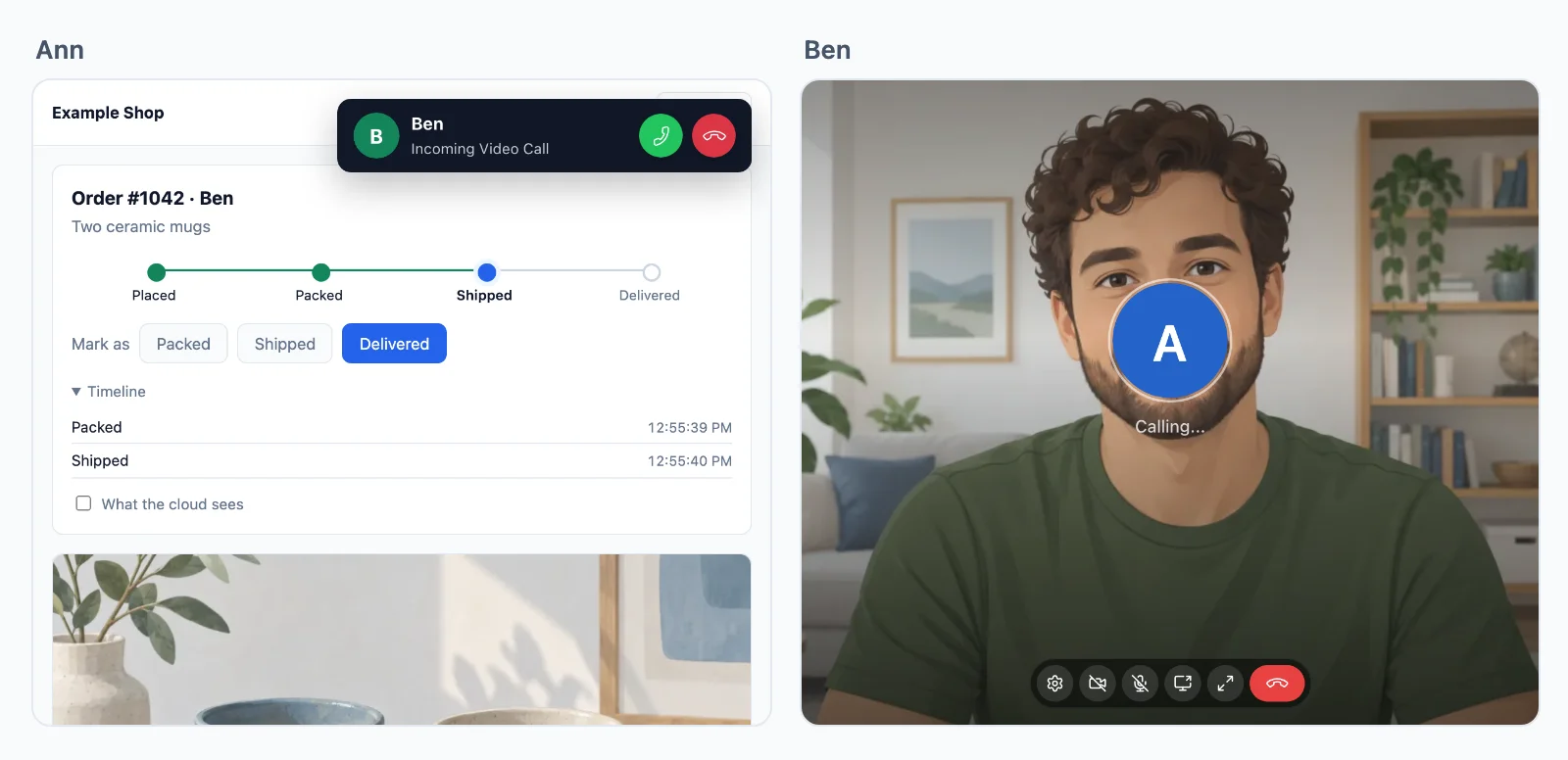
Anrufe zwischen zwei Personen sind auf jedem Weg Ende-zu-Ende-verschlüsselt, und ein Gruppenanruf ist es, wenn Ihr Server das sagt.
Mehr als zwei Personen? Gruppenanrufe laufen auf unseren Medienservern, mit Hosts, Sprechern und Zuhörern.
Anwendungsfälle
Was mit Anrufen gebaut wird
Jeder ist eine ganze App in der Dokumentation, mit ihrem Server in Node.js, PHP und Python.
Anrufe per Knopfdruck
Ein Knopf „Support anrufen“, der beim Mitarbeiter in jedem geöffneten Tab klingelt.
Beratungen nach Termin
Ein Videotermin bei einer Ärztin, einem Anwalt, einer Nachhilfe oder einem Coach, nur für die beiden Gebuchten offen, zu seiner Zeit.
Team-Meetings
Ein Video-Meeting für jedes Team oder Event, mit Bildschirmfreigabe, das die Leitung für alle beendet.
Kurse und Audioräume
Eine Lehrkraft oder ein Podium spricht, die anderen hören zu und melden sich per Handzeichen.
Warte- und Breakout-Räume
Gäste warten, bis der Host sie hereinlässt, und der Host schickt Personen in kleinere Räume und wieder zurück.
Abrechnung von Anrufen
Ihr Server erfährt, wie lange jede Person gesprochen hat, gezählt auf unseren Servern, um minutengenau abzurechnen.
Preise
Preise nach Verbindungen, nie nach Nachrichten
Ab $11.99 im Monat für 1.000 gleichzeitige Verbindungen, jährlich abgerechnet, oder $14.99 bei monatlicher Abrechnung.
Gruppenanrufe über Ihren Plan hinaus: $0.20 pro 1.000 Minuten, $0.10 per Audio.
Ein Preis für jede Auflösung. Bandbreite, Relays und Nachrichten werden nie berechnet, und Anrufe zwischen zwei Personen sind inklusive. Wir betreiben unsere Relays und Medienserver selbst, deshalb bleiben diese Preise niedrig.
Preise nach gleichzeitigen Verbindungen, ab 1.000, monatlich oder jährlich abgerechnet. Anrufe zwischen zwei Personen sind unbegrenzt.
Mit 1.000 Verbindungen sind Gruppenanrufe bis zu 32 Personen per Video gleichzeitig ohne Abrechnung, eine Person per Audio zählt halb, ohne Personenlimit pro Anruf. Mit jeden weiteren 1.000 Verbindungen kommen 12 Personen per Video hinzu. Darüber verbraucht jede weitere Person per Video ein Credit pro Minute, per Audio die Hälfte, und Ihr Plan fügt je 1.000 Verbindungen 5.000 Credits pro Monat hinzu.
Fragen
Häufige Fragen
Brauche ich eigene TURN- oder Medienserver?
Nein. Ein Anruf zwischen zwei Personen geht direkt zwischen den beiden Geräten, wenn das möglich ist, über unsere Relays, wenn eine Firewall den direkten Weg blockiert, und über unsere Medienserver, wenn selbst die Relays ihn nicht erreichen. Gruppenanrufe laufen auf unseren Medienservern in mehreren Regionen. Sie müssen nichts selbst hosten.
Welche Stacks können das Videoanruf-SDK nutzen?
Next.js und Express, Laravel und reines PHP, Django, FastAPI und Flask, Capacitor, iOS und Android, jeweils mit Anleitung. Ein Server in einer anderen Sprache nutzt die HTTP-API. Flutter-Apps haben Anrufe auf iOS und Android, React-Native-Apps vorerst auf iOS.
Wie viele Personen können einem Gruppenanruf beitreten?
Es gibt kein Personenlimit pro Anruf. Mit 1.000 Verbindungen verbrauchen bis zu 32 Personen per Video gleichzeitig keine Credits, eine Person per Audio zählt halb, und mit jeden weiteren 1.000 Verbindungen kommen 12 hinzu. Darüber verbraucht jede weitere Person per Video ein Credit pro Minute.
Sind die Anrufe verschlüsselt?
Ja. Die Medien eines Anrufs zwischen zwei Personen sind auf jedem Weg Ende-zu-Ende-verschlüsselt, auch wenn unsere Relays oder Medienserver sie übertragen. Ein Gruppenanruf ist Ende-zu-Ende-verschlüsselt, wenn Ihr Server das sagt, mit einem Schlüssel, den nur Ihr Server vergibt.
Wo stehen Ihre Server?
Unsere Relays und Medienserver laufen in diesen Ländern: Deutschland, Frankreich, Vereinigtes Königreich, Polen, Kanada und Singapur. Jeder Anruf läuft über den, der seinen Teilnehmern am nächsten ist. Als Nächstes kommen: Vereinigte Staaten, Australien, Indien und Italien. Die Echtzeit-Server, die Ihre Events übertragen, laufen in Deutschland.
Wer entscheidet, wer wen anrufen darf?
Ihre App. Ihr Server gibt der Seite ein Token für jeden Anruf, den er erlaubt, und für jede Person, die einem Gruppenanruf beitritt, und legt darin fest, wer spricht und wer nur zuhört, und wer Host ist. Wer was darf, ist also Ihre eigene Logik, und ohne Token startet nichts. Die Cloud setzt jedes Token durch, und Ihr Server kann den Zugang jederzeit wieder entziehen.
Kann ich meine eigene Anrufoberfläche bauen?
Ja. Der Anrufbildschirm ist optional. Ändern Sie seine Farben und Texte, oder starten, beantworten und zeichnen Sie Anrufe selbst mit dem SDK, bis hin zu jeder Person in einem Gruppenanruf.
Kann ich meinen Nutzern Anrufe berechnen?
Ja. WordPlus Cloud teilt Ihrem Server per Webhook mit, wie lange jeder Anruf gedauert hat und wann jede Person einem Gruppenanruf beigetreten ist und ihn verlassen hat, gezählt auf den eigenen Servern, sodass Ihre App minutengenau abrechnen kann.
Fragen zu Ihrer Integration? Schreiben Sie uns: Wir helfen mit den SDKs, dem Anrufbildschirm und Ihrem Stack.