
 English
 Deutsch
 Español
 Français
 Nederlands
 Polski
' d='M48 28h24v18a12 12 0 0 1-24 0z'/%3E%3Cpath fill='%230093DD' d='M47.5 21.5h4.6V28h-4.6zm10.2-2.5h4.6v9h-4.6zm10.2 2.5h4.6V28h-4.6z'/%3E%3Cpath fill='%23171796' d='M52.6 20h4.6v8h-4.6zm10.2 0h4.6v8h-4.6z'/%3E%3C/svg%3E) Hrvatski
 עברית
Per le app
Videochiamate per la tua app
Un’API e un SDK per videochiamate per Next.js, Laravel, Django e qualsiasi altro stack. Le chiamate tra due persone squillano in ogni scheda e app della persona chiamata, si connettono sempre e sono cifrate end-to-end, e la schermata di chiamata è pronta da usare, così non hai nulla da gestire.
Oppure prova la demo dal vivo: aprila in due browser e chiama dall’uno all’altro.
I prezzi migliori per WebSocket, chiamate 1 a 1 illimitate con server TURN in tutto il mondo, e chiamate di gruppo e live streaming con una quota inclusa. Da $11.99 al mese per 1000 connessioni simultanee, con fatturazione annuale, o $14.99 con fatturazione mensile.
Chiamate di gruppo oltre il tuo piano: $0.20 ogni 1.000 minuti, $0.10 in audio.
Next.js sul server e React nella pagina.
export async function GET( request: Request ) {
    const me = await currentUserId();
    const ask = new URL( request.url ).searchParams;
    const to = ask.get( 'to' )!;

    // Your own check, whatever your app needs.
    if ( ! me || ! await mayCall( me, to ) ) {
        return new Response( null, { status: 403 } );
    }

    const token = await realtime.callToken( me, to, {
        type: ask.get( 'type' ),
    } );

    return Response.json( { token } );
}app.get( '/api/call-token', async ( req, res ) => {
const me = userOf( req );
const { to, type } = req.query;
// Your own check, whatever your app needs.
if ( ! me || ! await mayCall( me, to ) ) {
return res.sendStatus( 403 );
}
const token = await realtime.callToken( me, to, { type } );
res.json( { token } );
} );import { createServer } from 'node:http';
createServer( async ( req, res ) => {
const url = new URL( req.url, 'http://localhost' );
if ( url.pathname === '/api/call-token' ) {
const me = userOf( req );
const to = url.searchParams.get( 'to' );
// Your own check, whatever your app needs.
if ( ! me || ! await mayCall( me, to ) ) {
res.writeHead( 403 );
return res.end();
}
const token = await realtime.callToken( me, to, {
type: url.searchParams.get( 'type' ),
} );
res.writeHead( 200, { 'Content-Type': 'application/json' } );
return res.end( JSON.stringify( { token } ) );
}
// Your pages, and realtime.node( userOf ) for the SDK's routes.
} ).listen( 3000 );use Illuminate\Http\Request;
use WordPlus\Realtime\Laravel\Facades\Realtime;
Route::get( '/api/call-token', function ( Request $request ) {
$me = $request->user()->id;
$to = $request->query( 'to' );
// Your own check, whatever your app needs.
abort_unless( may_call( $me, $to ), 403 );
return [ 'token' => Realtime::callToken( $me, $to, [
'type' => $request->query( 'type' ),
] ) ];
} )->middleware( 'auth' );require __DIR__ . '/../src/realtime.php';
$me = current_user_id();
$to = $_GET['to'] ?? '';
// Your own check, whatever your app needs.
if ( ! $me || ! may_call( $me, $to ) ) {
http_response_code( 403 );
exit;
}
header( 'Content-Type: application/json' );
echo json_encode( [
'token' => $realtime->callToken( $me, $to, [
'type' => $_GET['type'] ?? null,
] ),
] );from django.contrib.auth.decorators import login_required
from django.http import HttpResponseForbidden, JsonResponse
from .realtime import realtime
# In urls.py: path("api/call-token", views.call_token)
@login_required
def call_token(request):
me = request.user.id
to = request.GET["to"]
# Your own check, whatever your app needs.
if not may_call(me, to):
return HttpResponseForbidden()
token = realtime.call_token(me, to, type=request.GET.get("type"))
return JsonResponse({"token": token})from fastapi import Depends, HTTPException
from realtime import realtime
@app.get("/api/call-token")
def call_token(
to: str,
type: str = "video",
me: int = Depends(current_user_id),
):
# Your own check, whatever your app needs.
if not me or not may_call(me, to):
raise HTTPException(403)
return {"token": realtime.call_token(me, to, type=type)}from flask import abort, request, session
from realtime import realtime
@app.get("/api/call-token")
def call_token():
me = session.get("user_id")
to = request.args["to"]
# Your own check, whatever your app needs.
if not me or not may_call(me, to):
abort(403)
kind = request.args.get("type")
return {"token": realtime.call_token(me, to, type=kind)}// http.HandleFunc("GET /api/call-token", callToken)
func callToken(w http.ResponseWriter, r *http.Request) {
me := userOf(r)
to := r.URL.Query().Get("to")
// Your own check, whatever your app needs.
if me == "" || !mayCall(me, to) {
w.WriteHeader(403)
return
}
kind := r.URL.Query().Get("type")
reply(w, map[string]string{
"token": app.CallToken(me, to, kind, profile(me)),
})
}Hook e componenti per qualsiasi app React, con uno qualsiasi dei server sopra.
import { connect } from '@wordplus/realtime';

const rt = await connect();

// The ring and the call window.
await rt.callScreen();

// And in the page:
// <call-button to="34" token-url="/api/call-token"
//     type="video" name="Ann">
//     Call Ann
// </call-button>import { connect } from '@wordplus/realtime';
const rt = await connect();
// The ring and the call window.
await rt.callScreen();
// And in the page:
// <call-button to="34" token-url="/api/call-token"
// type="video" name="Ann">
// Call Ann
// </call-button>import { connect } from '@wordplus/realtime';
const rt = await connect();
// The ring and the call window.
await rt.callScreen();
// And in the page:
// <call-button to="34" token-url="/api/call-token"
// type="video" name="Ann">
// Call Ann
// </call-button>import { connect } from '@wordplus/realtime';
const rt = await connect( window.wordplusRealtimeConfig );
// The ring and the call window.
await rt.callScreen();
// And in the page:
// <call-button to="34" token-url="/api/call-token"
// type="video" name="Ann">
// Call Ann
// </call-button><call-button to="34" token-url="/api/call-token"
type="video" name="Ann">
Call Ann
</call-button>
<script type="module">
import { connect } from '@wordplus/realtime';
const rt = await connect( window.wordplusRealtimeConfig );
// The ring and the call window.
await rt.callScreen();
</script><call-button to="34" token-url="/api/call-token"
type="video" name="Ann">
Call Ann
</call-button>
<script type="module">
import { connect } from '@wordplus/realtime';
const rt = await connect( window.wordplusRealtimeConfig );
// The ring and the call window.
await rt.callScreen();
</script><call-button to="34" token-url="/api/call-token"
type="video" name="Ann">
Call Ann
</call-button>
<script type="module">
import { connect } from '@wordplus/realtime';
const rt = await connect( window.wordplusRealtimeConfig );
// The ring and the call window.
await rt.callScreen();
</script><call-button to="34" token-url="/api/call-token"
type="video" name="Ann">
Call Ann
</call-button>
<script type="module">
import { connect } from '@wordplus/realtime';
const rt = await connect( window.wordplusRealtimeConfig );
// The ring and the call window.
await rt.callScreen();
</script>import { connect } from '@wordplus/realtime';
const settings = await fetch( '/api/realtime/config' );
const rt = await connect( await settings.json() );
// The ring and the call window.
await rt.callScreen();
// And in the page:
// <call-button to="34" token-url="/api/call-token"
// type="video" name="Ann">
// Call Ann
// </call-button><call-button to="34" token-url="/api/call-token"
type="video" name="Ann">
Call Ann
</call-button>
<script type="module">
// The ring and the call window.
await window.Echo.connector.rt.callScreen();
</script>'use client'; // in Next.js
import { CallButton, CallScreen } from '@wordplus/realtime/react';
// Inside <RealtimeProvider>, once for the whole app.
export function CallAnn() {
return (
<>
<CallScreen />
<CallButton to={ 34 } tokenUrl="/api/call-token"
type="video" name="Ann">
Call Ann
</CallButton>
</>
);
}<script setup>
import { onMounted } from 'vue';
// realtime.js, one connection for the whole app:
// export const realtime = connect();
import { realtime } from './realtime';
onMounted( async () => {
// The ring and the call window.
( await realtime ).callScreen();
} );
</script>
<!-- isCustomElement for these tags, in vite.config.js -->
<template>
<call-button to="34" token-url="/api/call-token"
type="video" name="Ann">
Call Ann
</call-button>
</template><script>
import { onMount } from 'svelte';
// realtime.js, one connection for the whole app:
// export const realtime = connect();
import { realtime } from './realtime';
onMount( async () => {
// The ring and the call window.
( await realtime ).callScreen();
} );
</script>
<call-button to="34" token-url="/api/call-token"
type="video" name="Ann">
Call Ann
</call-button>import { Component, CUSTOM_ELEMENTS_SCHEMA } from '@angular/core';
// realtime.ts, one connection for the whole app:
// export const realtime = connect();
import { realtime } from './realtime';
@Component( {
selector: 'app-call-ann',
schemas: [ CUSTOM_ELEMENTS_SCHEMA ],
template: `
<call-button to="34" token-url="/api/call-token"
type="video" name="Ann">
Call Ann
</call-button>
`,
} )
export class CallAnnComponent {
async ngOnInit() {
// The ring and the call window.
( await realtime ).callScreen();
}
}import WordPlusRealtimeCalls
import WordPlusRealtimeUI
// Rings for every call coming in.
CallScreen.shared.attach(rt.calls)
// Your own request to your route.
let token = try await api.callToken(to: "34")
let call = try await rt.startCall(token)
CallScreen.shared.show(call, name: "Ann")import cloud.wordplus.realtime.calls.calls
import cloud.wordplus.realtime.calls.startCall
import cloud.wordplus.realtime.ui.CallScreen
// Rings for every call coming in.
CallScreen.attach(context, rt.calls(context))
// Your own request to your route.
val token = api.callToken(to = "34")
val call = rt.startCall(context, token)
CallScreen.show(context, call, name = "Ann")import {
CallButton, CallScreen, RealtimeProvider,
} from '@wordplus/realtime-react-native';
// Your server, in full, as an app has no address of its own.
const API = 'https://app.example.com/api';
const options = {
app: 's1500000007',
endpoint: API + '/realtime',
headers: { Authorization: 'Bearer ' + session.token },
};
export function App() {
return (
<RealtimeProvider options={ options }>
<CallScreen />
<CallButton to="34" tokenUrl={ API + '/call-token' }
type="video" name="Ann">
Call Ann
</CallButton>
</RealtimeProvider>
);
}import 'package:flutter/material.dart';
import 'package:wordplus_realtime/wordplus_realtime.dart';
// Your server, in full, as an app has no address of its own.
const api = 'https://app.example.com/api';
// Once, as your app starts.
final rt = await WordPlusRealtime.connect(
app: 's1500000007',
endpoint: '$api/realtime',
headers: {'Authorization': 'Bearer ${session.token}'},
);
// Rings for every call coming in, and shows it once answered.
await rt.callScreen();
// In your build:
CallButton(
rt: rt,
to: '34',
tokenUrl: '$api/call-token',
name: 'Ann',
child: const Text('Call Ann'),
)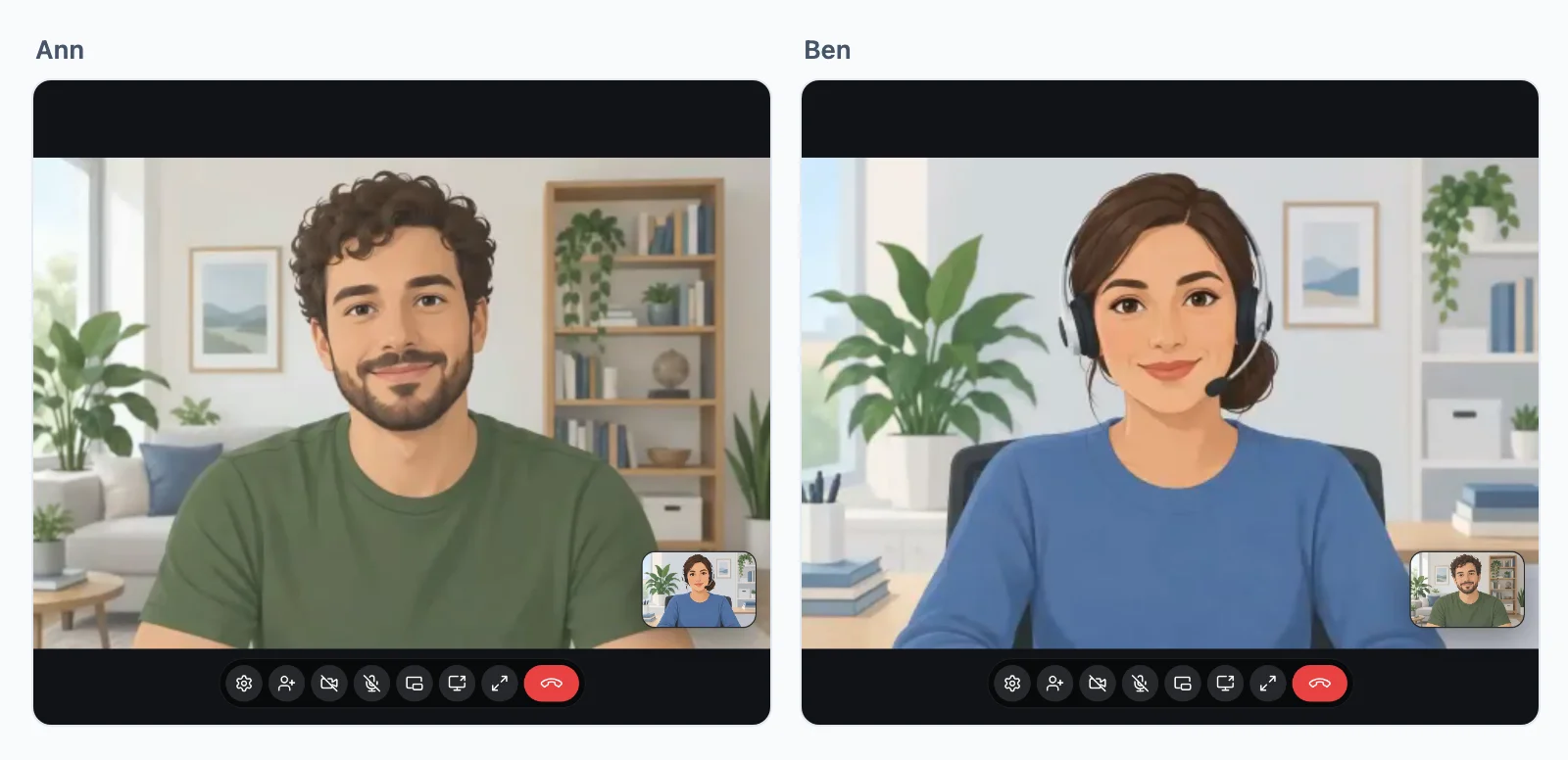
Prova una videochiamata
Avvia una chiamata qui, poi rispondi dal telefono o da una seconda finestra. Nessun account necessario.
Queste sono le schermate che l’SDK dà alla tua app. Il browser chiede fotocamera e microfono, non viene registrato nulla e la demo termina dopo 10 minuti.
Chiamate tra due persone
Ogni chiamata si collega
Una chiamata squilla in ogni scheda e app che la persona chiamata ha aperto, e smette di squillare ovunque appena risponde su una. Poi prende la strada migliore che le due reti permettono, senza nessun server TURN tuo da gestire.
- DirettamenteTra i due dispositivi, sulla maggior parte delle reti. Il percorso più veloce.
- Tramite i nostri relayQuando un firewall blocca il percorso diretto. Rispondono sulle porte del web, così una chiamata passa ovunque passino i siti web.
- Tramite i nostri media serverQuando nemmeno i relay arrivano. La chiamata si sposta lì e continua, senza riagganciare.
Crittografate end-to-end su ogni percorso, e incluse in ogni piano.
Dove si collegano le chiamate
I nostri relay e media server sono vicini ai tuoi utenti, e ogni chiamata passa da quello più vicino a chi vi partecipa.
Decide il tuo server
Avvia, rispondi e gestisci una chiamata
Chi può chiamare chi dipende dalla tua app. Il tuo server dà alla pagina un token per ogni chiamata che consente, e la pagina avvia la chiamata con quello, da un pulsante o con il tuo codice. Ecco una chiamata ad Ann, un’attività alla volta.
Next.js sul server e React nella pagina.
Dai un token alla pagina
Chi può chiamare chi è logica della tua app, quindi sta in una tua route. Verifica ciò che serve alla tua app, poi rispondi con un token. Un token avvia una chiamata, e senza token non squilla nulla. mayCall è una verifica tua.
export async function GET( request: Request ) {
    const me = await currentUserId();
    const ask = new URL( request.url ).searchParams;
    const to = ask.get( 'to' )!;

    // Your own check, whatever your app needs.
    if ( ! me || ! await mayCall( me, to ) ) {
        return new Response( null, { status: 403 } );
    }

    const token = await realtime.callToken( me, to, {
        type: ask.get( 'type' ),
    } );

    return Response.json( { token } );
}app.get( '/api/call-token', async ( req, res ) => {
const me = userOf( req );
const { to, type } = req.query;
// Your own check, whatever your app needs.
if ( ! me || ! await mayCall( me, to ) ) {
return res.sendStatus( 403 );
}
const token = await realtime.callToken( me, to, { type } );
res.json( { token } );
} );import { createServer } from 'node:http';
createServer( async ( req, res ) => {
const url = new URL( req.url, 'http://localhost' );
if ( url.pathname === '/api/call-token' ) {
const me = userOf( req );
const to = url.searchParams.get( 'to' );
// Your own check, whatever your app needs.
if ( ! me || ! await mayCall( me, to ) ) {
res.writeHead( 403 );
return res.end();
}
const token = await realtime.callToken( me, to, {
type: url.searchParams.get( 'type' ),
} );
res.writeHead( 200, { 'Content-Type': 'application/json' } );
return res.end( JSON.stringify( { token } ) );
}
// Your pages, and realtime.node( userOf ) for the SDK's routes.
} ).listen( 3000 );use Illuminate\Http\Request;
use WordPlus\Realtime\Laravel\Facades\Realtime;
Route::get( '/api/call-token', function ( Request $request ) {
$me = $request->user()->id;
$to = $request->query( 'to' );
// Your own check, whatever your app needs.
abort_unless( may_call( $me, $to ), 403 );
return [ 'token' => Realtime::callToken( $me, $to, [
'type' => $request->query( 'type' ),
] ) ];
} )->middleware( 'auth' );require __DIR__ . '/../src/realtime.php';
$me = current_user_id();
$to = $_GET['to'] ?? '';
// Your own check, whatever your app needs.
if ( ! $me || ! may_call( $me, $to ) ) {
http_response_code( 403 );
exit;
}
header( 'Content-Type: application/json' );
echo json_encode( [
'token' => $realtime->callToken( $me, $to, [
'type' => $_GET['type'] ?? null,
] ),
] );from django.contrib.auth.decorators import login_required
from django.http import HttpResponseForbidden, JsonResponse
from .realtime import realtime
# In urls.py: path("api/call-token", views.call_token)
@login_required
def call_token(request):
me = request.user.id
to = request.GET["to"]
# Your own check, whatever your app needs.
if not may_call(me, to):
return HttpResponseForbidden()
token = realtime.call_token(me, to, type=request.GET.get("type"))
return JsonResponse({"token": token})from fastapi import Depends, HTTPException
from realtime import realtime
@app.get("/api/call-token")
def call_token(
to: str,
type: str = "video",
me: int = Depends(current_user_id),
):
# Your own check, whatever your app needs.
if not me or not may_call(me, to):
raise HTTPException(403)
return {"token": realtime.call_token(me, to, type=type)}from flask import abort, request, session
from realtime import realtime
@app.get("/api/call-token")
def call_token():
me = session.get("user_id")
to = request.args["to"]
# Your own check, whatever your app needs.
if not me or not may_call(me, to):
abort(403)
kind = request.args.get("type")
return {"token": realtime.call_token(me, to, type=kind)}// http.HandleFunc("GET /api/call-token", callToken)
func callToken(w http.ResponseWriter, r *http.Request) {
me := userOf(r)
to := r.URL.Query().Get("to")
// Your own check, whatever your app needs.
if me == "" || !mayCall(me, to) {
w.WriteHeader(403)
return
}
kind := r.URL.Query().Get("type")
reply(w, map[string]string{
"token": app.CallToken(me, to, kind, profile(me)),
})
}Aggiungi un pulsante di chiamata
La schermata pronta: un pulsante, lo squillo con Rispondi e Rifiuta, e la finestra di chiamata, senza codice di chiamata. Il pulsante chiede il suo token alla tua route. Avvia la schermata su ogni pagina in cui qualcuno può essere chiamato, perché una chiamata squilla solo dove gira.
Hook e componenti per qualsiasi app React, con uno qualsiasi dei server sopra.
import { connect } from '@wordplus/realtime';

const rt = await connect();

// The ring and the call window, on every page someone may be called on.
await rt.callScreen();

// And in the page. The button asks your route for its token.
// <call-button to="34" token-url="/api/call-token" type="video" name="Ann">
//     Call Ann
// </call-button>import { connect } from '@wordplus/realtime';
const rt = await connect();
// The ring and the call window, on every page someone may be called on.
await rt.callScreen();
// And in the page. The button asks your route for its token.
// <call-button to="34" token-url="/api/call-token" type="video" name="Ann">
// Call Ann
// </call-button><call-button to="34" token-url="/api/call-token" type="video" name="Ann">
Call Ann
</call-button>
<script type="module">
// The ring and the call window, on every page someone may be called on.
await window.Echo.connector.rt.callScreen();
</script>'use client'; // in Next.js
import { CallButton, CallScreen } from '@wordplus/realtime/react';
// Inside <RealtimeProvider>, once for the whole app.
export function CallAnn() {
return (
<>
<CallScreen />
<CallButton to={ 34 } tokenUrl="/api/call-token" type="video" name="Ann">
Call Ann
</CallButton>
</>
);
}<script setup>
import { watchEffect } from 'vue';
import { useRealtime } from '@wordplus/realtime/vue';
// provideRealtime() once, in your root component.
const rt = useRealtime();
// The ring and the call window, on every page someone may be called on.
watchEffect( () => rt.value?.callScreen() );
</script>
<!-- isCustomElement for this tag, in vite.config.js -->
<template>
<call-button to="34" token-url="/api/call-token" type="video" name="Ann">
Call Ann
</call-button>
</template><script>
import { useRealtime } from '@wordplus/realtime/svelte';
// provideRealtime() once, in your root component.
const rt = useRealtime();
// The ring and the call window, on every page someone may be called on.
$effect( () => { rt.current?.callScreen(); } );
</script>
<call-button to="34" token-url="/api/call-token" type="video" name="Ann">
Call Ann
</call-button>import { Component, CUSTOM_ELEMENTS_SCHEMA } from '@angular/core';
// realtime.ts, one connection for the whole app:
// export const realtime = connect();
import { realtime } from './realtime';
@Component( {
selector: 'app-call-ann',
schemas: [ CUSTOM_ELEMENTS_SCHEMA ],
template: `<call-button to="34" token-url="/api/call-token" type="video" name="Ann">Call Ann</call-button>`,
} )
export class CallAnnComponent {
async ngOnInit() {
const rt = await realtime;
// The ring and the call window, on every page someone may be called on.
await rt.callScreen();
}
}import WordPlusRealtimeCalls
import WordPlusRealtimeUI
// Rings for every call coming in, and shows it once answered.
CallScreen.shared.attach(rt.calls)
let token = try await api.callToken(to: "34") // your own request to your route
let call = try await rt.startCall(token)
CallScreen.shared.show(call, name: "Ann")import cloud.wordplus.realtime.calls.calls
import cloud.wordplus.realtime.calls.startCall
import cloud.wordplus.realtime.ui.CallScreen
// Rings for every call coming in, and shows it once answered.
CallScreen.attach(context, rt.calls(context))
val token = api.callToken(to = "34") // your own request to your route
val call = rt.startCall(context, token)
CallScreen.show(context, call, name = "Ann")import {
CallButton, CallScreen, RealtimeProvider,
} from '@wordplus/realtime-react-native';
// Your server, in full, as an app has no address of its own.
const API = 'https://app.example.com/api';
const options = {
app: 's1500000007',
endpoint: API + '/realtime',
headers: { Authorization: 'Bearer ' + session.token },
};
export function App() {
return (
<RealtimeProvider options={ options }>
<CallScreen />
<CallButton to="34" tokenUrl={ API + '/call-token' }
type="video" name="Ann">
Call Ann
</CallButton>
</RealtimeProvider>
);
}import 'package:flutter/material.dart';
import 'package:wordplus_realtime/wordplus_realtime.dart';
// Your server, in full, as an app has no address of its own.
const api = 'https://app.example.com/api';
// Once, as your app starts.
final rt = await WordPlusRealtime.connect(
app: 's1500000007',
endpoint: '$api/realtime',
headers: {'Authorization': 'Bearer ${session.token}'},
);
// Rings for every call coming in, and shows it once answered.
await rt.callScreen();
// In your build:
CallButton(
rt: rt,
to: '34',
tokenUrl: '$api/call-token',
name: 'Ann',
child: const Text('Call Ann'),
)Chiama dal tuo codice
Per una schermata che disegni tu: ottieni un token dalla tua route e avvia la chiamata con quello. La chiamata squilla in ogni scheda e app che l’altra persona ha aperto, e smette di squillare ovunque appena risponde su una.
Hook e componenti per qualsiasi app React, con uno qualsiasi dei server sopra.
import { connect } from '@wordplus/realtime';

const rt = await connect();

// Asks your server for a token: your route from the first step.
async function callToken( to ) {
    const answer = await fetch( '/api/call-token?to=' + to );
    if ( ! answer.ok ) throw new Error( 'Your server said no' );

    return ( await answer.json() ).token;
}

const call = await rt.startCall( await callToken( 34 ) );

call.on( 'state', ( state ) => showState( state ) );   // ringing, connecting, connected, ended
call.on( 'remote', () => {
    call.remote.camera?.attach( video );               // a <video> of yours
    call.remote.microphone?.attach( audio );           // an <audio> of yours
} );

await call.setMicrophone( true );
await call.setCamera( true );

hangUp.onclick = () => call.end();import { connect } from '@wordplus/realtime';
const rt = await connect();
// Asks your server for a token: your route from the first step.
async function callToken( to ) {
const answer = await fetch( '/api/call-token?to=' + to );
if ( ! answer.ok ) throw new Error( 'Your server said no' );
return ( await answer.json() ).token;
}
const call = await rt.startCall( await callToken( 34 ) );
call.on( 'state', ( state ) => showState( state ) ); // ringing, connecting, connected, ended
call.on( 'remote', () => {
call.remote.camera?.attach( video ); // a <video> of yours
call.remote.microphone?.attach( audio ); // an <audio> of yours
} );
await call.setMicrophone( true );
await call.setCamera( true );
hangUp.onclick = () => call.end();const rt = window.Echo.connector.rt; // the connection Echo made
// Asks your server for a token: your route from the first step.
async function callToken( to ) {
const answer = await fetch( '/api/call-token?to=' + to );
if ( ! answer.ok ) throw new Error( 'Your server said no' );
return ( await answer.json() ).token;
}
const call = await rt.startCall( await callToken( 34 ) );
call.on( 'state', ( state ) => showState( state ) ); // ringing, connecting, connected, ended
call.on( 'remote', () => {
call.remote.camera?.attach( video ); // a <video> of yours
call.remote.microphone?.attach( audio ); // an <audio> of yours
} );
await call.setMicrophone( true );
await call.setCamera( true );
hangUp.onclick = () => call.end();'use client'; // in Next.js
import { AudioTrack, useCall, VideoTrack } from '@wordplus/realtime/react';
// Asks your server for a token: your route from the first step.
async function callToken( to ) {
const answer = await fetch( '/api/call-token?to=' + to );
if ( ! answer.ok ) throw new Error( 'Your server said no' );
return ( await answer.json() ).token;
}
// Inside <RealtimeProvider>, once for the whole app.
export function Call() {
const { call, state, remote, camera, start, end } = useCall();
if ( ! call ) {
return <button onClick={ async () => start( await callToken( 34 ) ) }>Call Ann</button>;
}
return (
<>
<p>{ state }</p>
<VideoTrack track={ remote?.camera } />
<AudioTrack track={ remote?.microphone } />
<VideoTrack track={ camera } />
<button onClick={ end }>Hang up</button>
</>
);
}<script setup>
import { AudioTrack, useCall, VideoTrack } from '@wordplus/realtime/vue';
// Asks your server for a token: your route from the first step.
async function callToken( to ) {
const answer = await fetch( '/api/call-token?to=' + to );
if ( ! answer.ok ) throw new Error( 'Your server said no' );
return ( await answer.json() ).token;
}
// provideRealtime() once, in your root component.
const { call, state, remote, camera, start, end } = useCall();
</script>
<template>
<button v-if="! call" @click="async () => start( await callToken( 34 ) )">Call Ann</button>
<template v-else>
<p>{{ state }}</p>
<VideoTrack :track="remote?.camera" />
<AudioTrack :track="remote?.microphone" />
<VideoTrack :track="camera" />
<button @click="end">Hang up</button>
</template>
</template><script>
import { track, useCall } from '@wordplus/realtime/svelte';
// Asks your server for a token: your route from the first step.
async function callToken( to ) {
const answer = await fetch( '/api/call-token?to=' + to );
if ( ! answer.ok ) throw new Error( 'Your server said no' );
return ( await answer.json() ).token;
}
// provideRealtime() once, in your root component.
const current = useCall();
</script>
{#if ! current.call}
<button onclick={ async () => current.start( await callToken( 34 ) ) }>Call Ann</button>
{:else}
<p>{ current.state }</p>
<video use:track={ current.remote?.camera } muted autoplay playsinline></video>
<audio use:track={ current.remote?.microphone } autoplay></audio>
<video use:track={ current.camera } muted autoplay playsinline></video>
<button onclick={ current.end }>Hang up</button>
{/if}import { Component, CUSTOM_ELEMENTS_SCHEMA } from '@angular/core';
// realtime.ts, one connection for the whole app:
// export const realtime = connect();
import { realtime } from './realtime';
@Component( {
selector: 'app-call',
schemas: [ CUSTOM_ELEMENTS_SCHEMA ],
template: `<video #video autoplay playsinline></video>`,
} )
export class CallComponent {
async ngOnInit() {
const rt = await realtime;
// Asks your server for a token: your route from the first step.
async function callToken( to ) {
const answer = await fetch( '/api/call-token?to=' + to );
if ( ! answer.ok ) throw new Error( 'Your server said no' );
return ( await answer.json() ).token;
}
const call = await rt.startCall( await callToken( 34 ) );
call.on( 'state', ( state ) => showState( state ) ); // ringing, connecting, connected, ended
call.on( 'remote', () => {
call.remote.camera?.attach( video ); // a <video> of yours
call.remote.microphone?.attach( audio ); // an <audio> of yours
} );
await call.setMicrophone( true );
await call.setCamera( true );
hangUp.onclick = () => call.end();
}
}let token = try await api.callToken(to: "34") // your own request to your route
let call = try await rt.startCall(token)
call.onState { state in label.text = state.rawValue } // ringing, connecting, connected, ended
call.onRemote { remoteView.show(call.remoteCamera) } // a CallVideoView of yours
ownView.show(call.localCamera)
hangUp.addAction(UIAction { _ in call.end() }, for: .touchUpInside)val token = api.callToken(to = "34") // your own request to your route
val call = rt.startCall(context, token)
call.onState { state -> label.text = state.wire } // ringing, connecting, connected, ended
call.onRemote { remoteView.show(call.remoteCamera) } // a CallVideoView of yours
ownView.show(call.localCamera)
hangUp.setOnClickListener { call.end() }import { Button, Text, View } from 'react-native';
import { CallVideo, useCall, useRealtime } from '@wordplus/realtime-react-native';
const API = 'https://app.example.com/api'; // your server, in full
// Inside <RealtimeProvider>, once for the whole app.
export function Call() {
const rt = useRealtime();
const { call, state, start, end } = useCall();
// Asks your route from the first step, then starts with its token.
const callAnn = async () => {
start( await rt.tokenFrom( API + '/call-token', { to: 34, type: 'video' } ) );
};
if ( ! call ) return <Button title="Call Ann" disabled={ ! rt } onPress={ callAnn } />;
return (
<View style={ { flex: 1 } }>
<Text>{ state?.state }</Text>
<CallVideo call={ call } style={ { flex: 1 } } />
<CallVideo call={ call } source="own" mirrored style={ { height: 120 } } />
<Button title="Hang up" onPress={ end } />
</View>
);
}// Asks your route from the first step, then starts with its token.
final token = await rt.tokenFrom('$api/call-token', {'to': 34, 'type': 'video'});
final call = await rt.startCall(token);
// ringing, connecting, connected, reconnecting, ended
call.onState((state) => showState(state));
// In your build, where you lay them out:
CallVideo(call: call) // the other side
CallVideo(call: call, source: CallVideoSource.own, mirrored: true) // your own
FilledButton(onPressed: call.end, child: const Text('Hang up'))Rispondi a una chiamata
Una pagina in attesa delle chiamate tiene la linea del suo utente, dove le sue chiamate squillano per 45 secondi. Per rispondere non serve un token, perché quello di chi chiama mostra già che il tuo server ha detto sì. Rispondi o rifiuta, e le sue altre schede smettono di squillare.
Hook e componenti per qualsiasi app React, con uno qualsiasi dei server sopra.
import { connect } from '@wordplus/realtime';

const rt = await connect();

// From now on their calls ring on this page.
rt.onIncomingCall( ( incoming ) => {
    showRing( incoming.info?.name, incoming.type );

    answer.onclick = () => incoming.accept();    // gives the call, as rt.startCall() does
    decline.onclick = () => incoming.decline();  // or decline( 'busy' )

    incoming.on( 'over', hideRing );             // answered elsewhere, or the caller gave up
} );import { connect } from '@wordplus/realtime';
const rt = await connect();
// From now on their calls ring on this page.
rt.onIncomingCall( ( incoming ) => {
showRing( incoming.info?.name, incoming.type );
answer.onclick = () => incoming.accept(); // gives the call, as rt.startCall() does
decline.onclick = () => incoming.decline(); // or decline( 'busy' )
incoming.on( 'over', hideRing ); // answered elsewhere, or the caller gave up
} );const rt = window.Echo.connector.rt; // the connection Echo made
// From now on their calls ring on this page.
rt.onIncomingCall( ( incoming ) => {
showRing( incoming.info?.name, incoming.type );
answer.onclick = () => incoming.accept(); // gives the call, as rt.startCall() does
decline.onclick = () => incoming.decline(); // or decline( 'busy' )
incoming.on( 'over', hideRing ); // answered elsewhere, or the caller gave up
} );// In the component that holds the call, on the same useCall().
const { incoming } = useCalls(); // those ringing now
const ring = incoming[ 0 ];
if ( ! call && ring ) {
return (
<>
<p>{ ring.info?.name } is calling</p>
<button onClick={ () => answer( ring ) }>Answer</button>
<button onClick={ () => ring.decline() }>Decline</button>
</>
);
}<script setup>
// In the component that holds the call, on the same useCall().
const { incoming } = useCalls(); // those ringing now
</script>
<template>
<template v-if="! call && incoming[ 0 ]">
<p>{{ incoming[ 0 ].info?.name }} is calling</p>
<button @click="answer( incoming[ 0 ] )">Answer</button>
<button @click="incoming[ 0 ].decline()">Decline</button>
</template>
</template><script>
// In the component that holds the call, on the same useCall().
const calls = useCalls(); // those ringing now
</script>
{#if ! current.call && calls.incoming[ 0 ]}
<p>{ calls.incoming[ 0 ].info?.name } is calling</p>
<button onclick={ () => current.answer( calls.incoming[ 0 ] ) }>Answer</button>
<button onclick={ () => calls.incoming[ 0 ].decline() }>Decline</button>
{/if}import { Component, CUSTOM_ELEMENTS_SCHEMA } from '@angular/core';
// realtime.ts, one connection for the whole app:
// export const realtime = connect();
import { realtime } from './realtime';
@Component( {
selector: 'app-ring',
schemas: [ CUSTOM_ELEMENTS_SCHEMA ],
template: `<!-- Your ring here -->`,
} )
export class RingComponent {
async ngOnInit() {
const rt = await realtime;
// From now on their calls ring on this page.
rt.onIncomingCall( ( incoming ) => {
showRing( incoming.info?.name, incoming.type );
answer.onclick = () => incoming.accept(); // gives the call, as rt.startCall() does
decline.onclick = () => incoming.decline(); // or decline( 'busy' )
incoming.on( 'over', hideRing ); // answered elsewhere, or the caller gave up
} );
}
}rt.calls.onIncoming { incoming in
showRing(incoming.info["name"], incoming.type)
incoming.onOver { _ in hideRing() } // answered elsewhere, or the caller gave up
Task { @MainActor in
switch try await incoming.accept() { // or try await incoming.decline(busy: true)
case let .call(call): show(call)
case let .group(group): show(group)
}
}
}calls.onIncoming { incoming ->
showRing(incoming.info["name"], incoming.type)
incoming.onOver { hideRing() } // answered elsewhere, or the caller gave up
viewModelScope.launch {
when (val answered = incoming.accept()) { // or incoming.decline(busy = true)
is IncomingCall.Answered.ToCall -> show(answered.call)
is IncomingCall.Answered.ToGroup -> show(answered.group)
}
}
}// In the component that holds the call, on the same useCall().
const { incoming } = useCalls(); // those ringing now
const ring = incoming[ 0 ];
if ( ! call && ring ) {
return (
<View>
<Text>{ ring.info?.name } is calling</Text>
<Button title="Answer" onPress={ () => answer( ring ) } />
<Button title="Decline" onPress={ () => ring.decline() } />
</View>
);
}rt.onIncomingCall((incoming) async {
showRing(incoming.info?['name'], incoming.type);
incoming.onOver((reason) => hideRing()); // answered elsewhere, or the caller gave up
// On your Answer button, or incoming.decline(), decline(busy: true) if busy.
switch (await incoming.accept()) {
case ToCall(:final call):
showCall(call);
case ToGroup(:final group):
showGroup(group);
}
});Fotocamera, microfono e schermo
Gli stessi comandi in una chiamata, in una chiamata di gruppo e in una diretta, così la tua schermata non ha dispositivi da seguire. Una fotocamera si ferma, e la sua spia si spegne, quando viene disattivata o quando la chiamata finisce.
Hook e componenti per qualsiasi app React, con uno qualsiasi dei server sopra.
import { connect } from '@wordplus/realtime';

const rt = await connect();

await call.setMicrophone( false );                  // muted
await call.setCamera( false );                      // stopped, and the light goes off
const shared = await call.setScreenShare( true );   // false if they picked nothing

// Move to another camera with no gap on the other side.
const { cameras } = await ( await rt.calls() ).devices();
await call.setCamera( true, { deviceId: cameras[ 1 ].id } );import { connect } from '@wordplus/realtime';
const rt = await connect();
await call.setMicrophone( false ); // muted
await call.setCamera( false ); // stopped, and the light goes off
const shared = await call.setScreenShare( true ); // false if they picked nothing
// Move to another camera with no gap on the other side.
const { cameras } = await ( await rt.calls() ).devices();
await call.setCamera( true, { deviceId: cameras[ 1 ].id } );const rt = window.Echo.connector.rt; // the connection Echo made
await call.setMicrophone( false ); // muted
await call.setCamera( false ); // stopped, and the light goes off
const shared = await call.setScreenShare( true ); // false if they picked nothing
// Move to another camera with no gap on the other side.
const { cameras } = await ( await rt.calls() ).devices();
await call.setCamera( true, { deviceId: cameras[ 1 ].id } );// In the component that holds the call, on the same useCall().
const { camera, microphone, screen, setCamera, setMicrophone, setScreenShare } = useCall();
return (
<>
<button onClick={ () => setMicrophone( ! microphone ) }>Microphone</button>
<button onClick={ () => setCamera( ! camera ) }>Camera</button>
<button onClick={ () => setScreenShare( ! screen ) }>Share screen</button>
</>
);<script setup>
// In the component that holds the call, on the same useCall().
const { camera, microphone, screen, setCamera, setMicrophone, setScreenShare } = useCall();
</script>
<template>
<button @click="setMicrophone( ! microphone )">Microphone</button>
<button @click="setCamera( ! camera )">Camera</button>
<button @click="setScreenShare( ! screen )">Share screen</button>
</template><!-- In the component that holds the call, on the same useCall(). -->
<button onclick={ () => current.setMicrophone( ! current.microphone ) }>Microphone</button>
<button onclick={ () => current.setCamera( ! current.camera ) }>Camera</button>
<button onclick={ () => current.setScreenShare( ! current.screen ) }>Share screen</button>import { Component, CUSTOM_ELEMENTS_SCHEMA } from '@angular/core';
// realtime.ts, one connection for the whole app:
// export const realtime = connect();
import { realtime } from './realtime';
@Component( {
selector: 'app-controls',
schemas: [ CUSTOM_ELEMENTS_SCHEMA ],
template: `<!-- Your buttons here -->`,
} )
export class ControlsComponent {
async ngOnInit() {
const rt = await realtime;
await call.setMicrophone( false ); // muted
await call.setCamera( false ); // stopped, and the light goes off
const shared = await call.setScreenShare( true ); // false if they picked nothing
// Move to another camera with no gap on the other side.
const { cameras } = await ( await rt.calls() ).devices();
await call.setCamera( true, { deviceId: cameras[ 1 ].id } );
}
}call.microphone = false // muted
call.camera = false // stops sending the camera
call.flipCamera() // the front one to the back, and back
// Puts up the system's picker, in an app built with the broadcast extension.
await call.setScreenShare(true)call.microphone = false // muted
call.camera = false // stops sending the camera
call.flipCamera() // the front one to the back, and back
// answer is what the system's dialog gave: ScreenShare.permissionIntent(activity).
call.setScreenShare(true, answer.data)// In the component that holds the call, on the same useCall().
const { call, state } = useCall();
// Sharing the phone's screen isn't in React Native yet.
return (
<>
<Button title="Microphone" onPress={ () => call.setMicrophone( ! state.microphone ) } />
<Button title="Camera" onPress={ () => call.setCamera( ! state.camera ) } />
<Button title="Flip camera" onPress={ () => call.flipCamera() } />
</>
);await call.setMicrophone(false); // muted
await call.setCamera(false); // stopped, and the light goes off
await call.flipCamera(); // the front one to the back, and back
// Android asks with the system's dialog, iOS needs the broadcast extension.
final shared = await call.setScreenShare(true); // false if they said noAggiungi una terza persona
Una volta avviata la chiamata, ciascuna delle due parti può far squillare un’altra persona, e la chiamata continua come chiamata di gruppo, senza che nessuno riagganci. La tua route decide chi, come per qualsiasi chiamata, e la pagina le indica di quale chiamata si tratta. mayAdd è una verifica tua.
// Your route from the first step. call is the page's call.ref.
if ( ! await mayAdd( me, to ) ) return refuse();

const token = await realtime.callToken( me, to, { into: call } );// Your route from the first step. call is the page's call.ref.
if ( ! await mayAdd( me, to ) ) return refuse();
const token = await realtime.callToken( me, to, { into: call } );// Your route from the first step. call is the page's call.ref.
if ( ! await mayAdd( me, to ) ) return refuse();
const token = await realtime.callToken( me, to, { into: call } );// Your route from the first step. The page's call.ref comes as call.
abort_unless( may_add( $me, $to ), 403 );
$token = Realtime::callToken( $me, $to, [ 'into' => $request->query( 'call' ) ] );// Your route from the first step. The page's call.ref comes as call.
if ( ! may_add( $me, $to ) ) {
http_response_code( 403 );
exit;
}
$token = $realtime->callToken( $me, $to, [ 'into' => $_GET['call'] ] );# Your route from the first step. call is the page's call.ref.
if not may_add(me, to):
return refuse()
token = realtime.call_token(me, to, into=call)# Your route from the first step. call is the page's call.ref.
if not may_add(me, to):
return refuse()
token = realtime.call_token(me, to, into=call)# Your route from the first step. call is the page's call.ref.
if not may_add(me, to):
return refuse()
token = realtime.call_token(me, to, into=call)// Your route from the first step. The page's call.ref comes as call.
if !mayAdd(me, to) {
w.WriteHeader(403)
return
}
token, err := app.AddToCallToken(me, to, r.URL.Query().Get("call"), profile(me))Hook e componenti per qualsiasi app React, con uno qualsiasi dei server sopra.
import { connect } from '@wordplus/realtime';

const rt = await connect();

// Asks your route with the call, so it rings them into this one.
const answer = await fetch( '/api/call-token?to=56&call=' + call.ref );
const invite = await call.add( ( await answer.json() ).token );   // rings them everywhere they are

// Both sides go on in a group call, with no one hanging up.
call.on( 'group', ( group ) => showGroup( group ) );

invite.on( 'state', ( state ) => showState( state ) ); // answered, rejected, busy, no_answerimport { connect } from '@wordplus/realtime';
const rt = await connect();
// Asks your route with the call, so it rings them into this one.
const answer = await fetch( '/api/call-token?to=56&call=' + call.ref );
const invite = await call.add( ( await answer.json() ).token ); // rings them everywhere they are
// Both sides go on in a group call, with no one hanging up.
call.on( 'group', ( group ) => showGroup( group ) );
invite.on( 'state', ( state ) => showState( state ) ); // answered, rejected, busy, no_answerconst rt = window.Echo.connector.rt; // the connection Echo made
// Asks your route with the call, so it rings them into this one.
const answer = await fetch( '/api/call-token?to=56&call=' + call.ref );
const invite = await call.add( ( await answer.json() ).token ); // rings them everywhere they are
// Both sides go on in a group call, with no one hanging up.
call.on( 'group', ( group ) => showGroup( group ) );
invite.on( 'state', ( state ) => showState( state ) ); // answered, rejected, busy, no_answer// In the component that holds the call, on the same useCall().
const { call, group } = useCall(); // group: the call goes on as this group call
async function addCara() {
// Asks your route with the call, so it rings them into this one.
const answer = await fetch( '/api/call-token?to=56&call=' + call.ref );
await call.add( ( await answer.json() ).token );
}
return <button onClick={ addCara }>Add Cara</button>;<script setup>
// In the component that holds the call, on the same useCall().
const { call, group } = useCall(); // group: the call goes on as this group call
async function addCara() {
// Asks your route with the call, so it rings them into this one.
const answer = await fetch( '/api/call-token?to=56&call=' + call.value.ref );
await call.value.add( ( await answer.json() ).token );
}
</script>
<template>
<button @click="addCara">Add Cara</button>
</template><script>
// In the component that holds the call, on the same useCall(). current.group: the call goes on as this group call.
async function addCara() {
// Asks your route with the call, so it rings them into this one.
const answer = await fetch( '/api/call-token?to=56&call=' + current.call.ref );
await current.call.add( ( await answer.json() ).token );
}
</script>
<button onclick={ addCara }>Add Cara</button>import { Component, CUSTOM_ELEMENTS_SCHEMA } from '@angular/core';
// realtime.ts, one connection for the whole app:
// export const realtime = connect();
import { realtime } from './realtime';
@Component( {
selector: 'app-add-person',
schemas: [ CUSTOM_ELEMENTS_SCHEMA ],
template: `<!-- Your button here -->`,
} )
export class AddPersonComponent {
async ngOnInit() {
const rt = await realtime;
// Asks your route with the call, so it rings them into this one.
const answer = await fetch( '/api/call-token?to=56&call=' + call.ref );
const invite = await call.add( ( await answer.json() ).token ); // rings them everywhere they are
// Both sides go on in a group call, with no one hanging up.
call.on( 'group', ( group ) => showGroup( group ) );
invite.on( 'state', ( state ) => showState( state ) ); // answered, rejected, busy, no_answer
}
}// Both sides go on in a group call, with no one hanging up.
call.onGroup { group in follow(group) }
// Your own request to your route, with the call.
let token = try await api.callToken(to: "56", call: call.ref)
let invite = try await call.add(token) // rings them everywhere they are
invite.onState { state in label.text = state } // answered, rejected, busy, no_answer// Both sides go on in a group call, with no one hanging up.
call.onGroup { group -> follow(group) }
// Your own request to your route, with the call.
val token = api.callToken(to = "56", call = call.ref)
val invite = call.add(token) // rings them everywhere they are
invite.onState { state -> label.text = state } // answered, rejected, busy, no_answer// In the component that holds the call, on the same useCall().
const rt = useRealtime();
const { call, group } = useCall(); // group: the call goes on as this group call
async function addCara() {
// Asks your route with the call, so it rings them into this one.
await call.add( await rt.tokenFrom( API + '/call-token', { to: 56, call: call.ref } ) );
}
return <Button title="Add Cara" onPress={ addCara } />;// Both sides go on in a group call, with no one hanging up.
call.onGroup((group) => showGroup(group));
// Asks your route with the call, so it rings them into this one.
final token = await rt.tokenFrom('$api/call-token', {'to': 56, 'call': call.ref});
final invite = await call.add(token); // rings them everywhere they are
invite.onState((state) => showInvite(state)); // answered, rejected, busy, no_answerVedi perché una chiamata è finita
Ogni chiamata dice perché è finita, così la tua schermata può offrire la cosa giusta da fare dopo, come lasciare un messaggio quando nessuno ha risposto.
Hook e componenti per qualsiasi app React, con uno qualsiasi dei server sopra.
import { connect } from '@wordplus/realtime';

const rt = await connect();

call.on( 'state', ( state ) => {
    if ( state !== 'ended' ) return;

    // hangup, cancelled, rejected, busy, no_answer, page_closed, peer_lost, group
    if ( call.endReason === 'no_answer' ) offerMessage();
} );import { connect } from '@wordplus/realtime';
const rt = await connect();
call.on( 'state', ( state ) => {
if ( state !== 'ended' ) return;
// hangup, cancelled, rejected, busy, no_answer, page_closed, peer_lost, group
if ( call.endReason === 'no_answer' ) offerMessage();
} );import { connect } from '@wordplus/realtime';
const rt = await connect();
call.on( 'state', ( state ) => {
if ( state !== 'ended' ) return;
// hangup, cancelled, rejected, busy, no_answer, page_closed, peer_lost, group
if ( call.endReason === 'no_answer' ) offerMessage();
} );import { connect } from '@wordplus/realtime';
const rt = await connect();
call.on( 'state', ( state ) => {
if ( state !== 'ended' ) return;
// hangup, cancelled, rejected, busy, no_answer, page_closed, peer_lost, group
if ( call.endReason === 'no_answer' ) offerMessage();
} );import { connect } from '@wordplus/realtime';
const rt = await connect();
call.on( 'state', ( state ) => {
if ( state !== 'ended' ) return;
// hangup, cancelled, rejected, busy, no_answer, page_closed, peer_lost, group
if ( call.endReason === 'no_answer' ) offerMessage();
} );import { connect } from '@wordplus/realtime';
const rt = await connect();
call.on( 'state', ( state ) => {
if ( state !== 'ended' ) return;
// hangup, cancelled, rejected, busy, no_answer, page_closed, peer_lost, group
if ( call.endReason === 'no_answer' ) offerMessage();
} );import { connect } from '@wordplus/realtime';
const rt = await connect();
call.on( 'state', ( state ) => {
if ( state !== 'ended' ) return;
// hangup, cancelled, rejected, busy, no_answer, page_closed, peer_lost, group
if ( call.endReason === 'no_answer' ) offerMessage();
} );import { connect } from '@wordplus/realtime';
const rt = await connect();
call.on( 'state', ( state ) => {
if ( state !== 'ended' ) return;
// hangup, cancelled, rejected, busy, no_answer, page_closed, peer_lost, group
if ( call.endReason === 'no_answer' ) offerMessage();
} );import { connect } from '@wordplus/realtime';
const rt = await connect();
call.on( 'state', ( state ) => {
if ( state !== 'ended' ) return;
// hangup, cancelled, rejected, busy, no_answer, page_closed, peer_lost, group
if ( call.endReason === 'no_answer' ) offerMessage();
} );const rt = window.Echo.connector.rt; // the connection Echo made
call.on( 'state', ( state ) => {
if ( state !== 'ended' ) return;
// hangup, cancelled, rejected, busy, no_answer, page_closed, peer_lost, group
if ( call.endReason === 'no_answer' ) offerMessage();
} );// In the component that holds the call, on the same useCall().
const { endReason } = useCall();
// hangup, cancelled, rejected, busy, no_answer, page_closed, peer_lost, group
return endReason === 'no_answer' ? <OfferMessage /> : null;<script setup>
// In the component that holds the call, on the same useCall().
const { endReason } = useCall();
</script>
<template>
<!-- hangup, cancelled, rejected, busy, no_answer, page_closed, peer_lost, group -->
<OfferMessage v-if="endReason === 'no_answer'" />
</template><!-- In the component that holds the call, on the same useCall(). -->
<!-- hangup, cancelled, rejected, busy, no_answer, page_closed, peer_lost, group -->
{#if current.endReason === 'no_answer'}
<OfferMessage />
{/if}import { Component, CUSTOM_ELEMENTS_SCHEMA } from '@angular/core';
// realtime.ts, one connection for the whole app:
// export const realtime = connect();
import { realtime } from './realtime';
@Component( {
selector: 'app-call-end',
schemas: [ CUSTOM_ELEMENTS_SCHEMA ],
template: `<!-- Your message here -->`,
} )
export class CallEndComponent {
async ngOnInit() {
const rt = await realtime;
call.on( 'state', ( state ) => {
if ( state !== 'ended' ) return;
// hangup, cancelled, rejected, busy, no_answer, page_closed, peer_lost, group
if ( call.endReason === 'no_answer' ) offerMessage();
} );
}
}// hangup, cancelled, rejected, busy, no_answer, page_closed, peer_lost, group
call.onEnded { reason in
if reason == "no_answer" { offerMessage() }
}// hangup, cancelled, rejected, busy, no_answer, page_closed, peer_lost, group
call.onEnded { reason ->
if (reason == "no_answer") offerMessage()
}// In the component that holds the call, on the same useCall().
const { endReason } = useCall();
// hangup, cancelled, rejected, busy, no_answer, page_closed, peer_lost, group
return endReason === 'no_answer' ? <OfferMessage /> : null;// hangup, cancelled, rejected, busy, no_answer, page_closed, peer_lost, group
call.onEnded((reason) {
if (reason == 'no_answer') offerMessage();
});Fattura al minuto
Il tuo server sa quanto è durata ogni chiamata, conteggiato sui nostri server, così puoi fatturare ai tuoi utenti. L’evento può arrivare due volte, quindi addebita una sola volta per ogni id. charge è una funzione tua.
// The caller, for the time talked, by the minute begun. Charge once for each id.
realtime.on( 'call.ended', async ( { id, from, seconds } ) => {
    if ( seconds > 0 ) await charge( id, from, Math.ceil( seconds / 60 ) );
} );// The caller, for the time talked, by the minute begun. Charge once for each id.
realtime.on( 'call.ended', async ( { id, from, seconds } ) => {
if ( seconds > 0 ) await charge( id, from, Math.ceil( seconds / 60 ) );
} );// The caller, for the time talked, by the minute begun. Charge once for each id.
realtime.on( 'call.ended', async ( { id, from, seconds } ) => {
if ( seconds > 0 ) await charge( id, from, Math.ceil( seconds / 60 ) );
} );$this->callAfterResolving( Realtime::class, function ( Realtime $realtime ) {
// The caller, for the time talked, by the minute begun. Charge once for each id.
$realtime->on( 'call.ended', function ( array $e ) {
    if ( $e['seconds'] > 0 ) {
        charge( $e['id'], $e['from'], (int) ceil( $e['seconds'] / 60 ) );
    }
} );
} );// The caller, for the time talked, by the minute begun. Charge once for each id.
$realtime->on( 'call.ended', function ( array $e ) {
if ( $e['seconds'] > 0 ) {
charge( $e['id'], $e['from'], (int) ceil( $e['seconds'] / 60 ) );
}
} );# The caller, for the time talked, by the minute begun. Charge once for each id.
def call_ended(e):
if e["seconds"] > 0:
charge(e["id"], e["from"], math.ceil(e["seconds"] / 60))
realtime.on("call.ended", call_ended)# The caller, for the time talked, by the minute begun. Charge once for each id.
def call_ended(e):
if e["seconds"] > 0:
charge(e["id"], e["from"], math.ceil(e["seconds"] / 60))
realtime.on("call.ended", call_ended)# The caller, for the time talked, by the minute begun. Charge once for each id.
def call_ended(e):
if e["seconds"] > 0:
charge(e["id"], e["from"], math.ceil(e["seconds"] / 60))
realtime.on("call.ended", call_ended)// In your webhook route, once its signature is checked as the docs say.
// The caller, for the time talked, by the minute begun. Charge once for each id.
if event.Type == "call.ended" && event.Seconds > 0 {
charge(event.ID, event.From, (event.Seconds+59)/60)
}Le chiamate in ogni stack, con tutta la configurazione:
Videochiamate con Next.js
Videochiamate con Express
Videochiamate con Laravel
Videochiamate con PHP
Videochiamate con Django
Videochiamate con FastAPI
Videochiamate con Flask
Videochiamate con iOS
Videochiamate con Android
Oppure passo dopo passo, in un’app vera: Come implementare le videochiamate in Next.js
Pronto da usare o tuo
Una schermata di chiamata pronta da usare, o la tua
La schermata di chiamata è pronta da usare: pulsanti di chiamata, lo squillo e la finestra di chiamata, sul web, su iOS e su Android. Cambia i suoi colori e testi, sostituiscine una parte con la tua, o costruisci la tua interfaccia sullo stesso SDK.
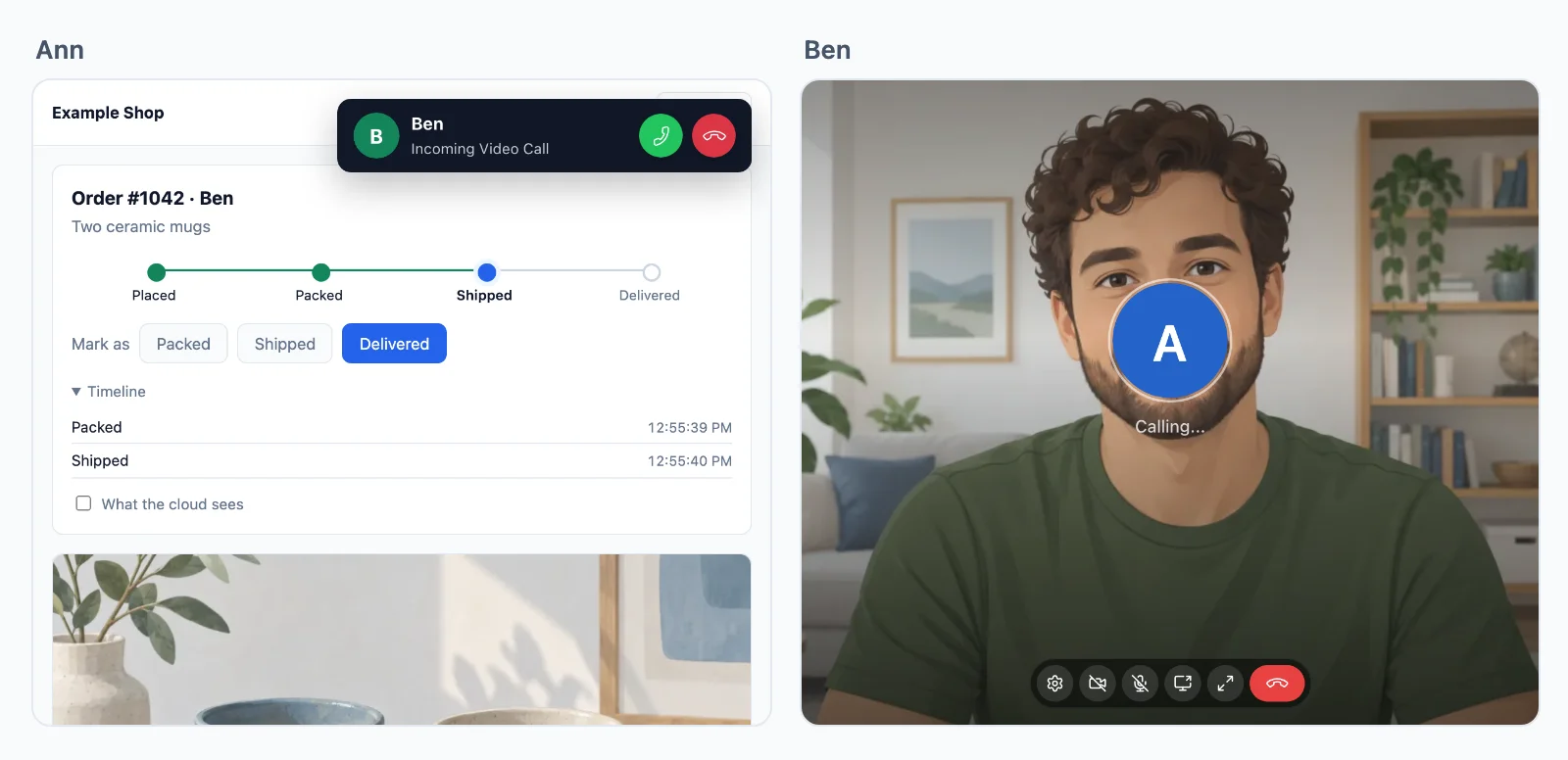
Le chiamate tra due persone sono cifrate end-to-end su ogni percorso, e una chiamata di gruppo lo è quando il tuo server lo dice.
Più di due persone? Le chiamate di gruppo girano sui nostri media server, con host, relatori e ascoltatori.
Casi d’uso
Cosa si costruisce con le chiamate
Ognuno è un’app completa nella documentazione, con il suo server in Node.js, PHP e Python.
Chiamate da un pulsante
Un pulsante Chiama l’assistenza che squilla per l’operatore in ogni scheda che ha aperta.
Consulenze su appuntamento
Una visita in video con una medica, un avvocato, una tutor o un coach, aperta solo ai due prenotati, alla sua ora.
Riunioni di team
Una riunione video per ogni team o evento, con condivisione dello schermo, che chi la conduce chiude per tutti.
Lezioni e stanze audio
Un docente o un panel parla e gli altri ascoltano, alzando la mano per parlare.
Sale d’attesa e stanze separate
Gli ospiti aspettano finché l’host non li fa entrare, e l’host manda le persone in stanze più piccole e poi le riporta indietro.
Addebitare le chiamate
Il tuo server sa quanto ha parlato ogni persona, conteggiato sui nostri server, per fatturare al minuto.
Prezzi
Prezzo per connessioni, mai per messaggi
Da $11.99 al mese per 1000 connessioni simultanee, con fatturazione annuale, o $14.99 con fatturazione mensile.
Chiamate di gruppo oltre il tuo piano: $0.20 ogni 1.000 minuti, $0.10 in audio.
Un solo prezzo a qualsiasi risoluzione. Banda, relay e messaggi non vengono mai addebitati, e le chiamate tra due persone sono incluse. Gestiamo in proprio relay e media server, ed è per questo che questi prezzi restano bassi.
Prezzo in base alle connessioni simultanee, a partire da 1.000, con fatturazione mensile o annuale. Le chiamate tra due persone sono illimitate.
Con 1.000 connessioni, le chiamate di gruppo sono senza conteggio fino a 32 persone in video contemporaneamente, e una persona in audio conta la metà, senza limite di persone per chiamata. Ogni 1.000 connessioni in più aggiungono 12 persone in video. Oltre, ogni persona in video in più consuma un credito al minuto, in audio la metà, e il tuo piano aggiunge 5000 crediti al mese ogni 1.000 connessioni.
Domande
Domande frequenti
Mi servono server TURN o media server miei?
No. Una chiamata tra due persone va direttamente tra i due dispositivi quando può, tramite i nostri relay quando un firewall blocca la strada diretta, e tramite i nostri media server quando nemmeno i relay la raggiungono. Le chiamate di gruppo girano sui nostri media server in più regioni. Non hai niente da ospitare.
Quali stack possono usare l’SDK per videochiamate?
Next.js ed Express, Laravel e PHP puro, Django, FastAPI e Flask, Capacitor, iOS e Android, ciascuno con una guida. Un server in qualsiasi altro linguaggio usa l’API HTTP. Le app Flutter hanno le chiamate su iOS e Android, e le app React Native per ora su iOS.
Quante persone possono partecipare a una chiamata di gruppo?
Non c’è limite di persone per chiamata. Con 1.000 connessioni, fino a 32 persone in video contemporaneamente non consumano crediti, e una persona in audio conta la metà, e ogni 1.000 connessioni in più ne aggiungono 12. Oltre, ogni persona in video in più consuma un credito al minuto.
Le chiamate sono cifrate?
Sì. Il flusso di una chiamata tra due persone è cifrato end-to-end su ogni percorso, anche quando lo trasportano i nostri relay o media server. Una chiamata di gruppo è cifrata end-to-end quando il tuo server lo dice, con una chiave che solo il tuo server consegna.
Dove sono i vostri server?
I nostri relay e media server sono attivi in questi paesi: Germania, Francia, Regno Unito, Polonia, Canada e Singapore. Ogni chiamata passa da quello più vicino a chi vi partecipa. In arrivo: Stati Uniti, Australia, India e Italia. I server in tempo reale che trasportano i tuoi eventi sono in Germania.
Chi decide chi può chiamare chi?
La tua app. Il tuo server dà alla pagina un token per ogni chiamata che consente, e per ogni persona che entra in una chiamata di gruppo, dicendo chi parla e chi ascolta soltanto, e chi fa da host. Quindi chi può fare cosa è logica tua, e nulla parte senza un token. Il cloud applica ogni token, e il tuo server può revocare l’accesso in qualsiasi momento.
Posso costruire la mia interfaccia di chiamata?
Sì. La schermata di chiamata è facoltativa. Cambia i suoi colori e testi, oppure avvia, rispondi e disegna le chiamate tu stesso con l’SDK, fino a ogni persona di una chiamata di gruppo.
Posso addebitare le chiamate ai miei utenti?
Sì. WordPlus Cloud comunica al tuo server via webhook quanto è durata ogni chiamata e quando ogni persona è entrata e uscita da una chiamata di gruppo, conteggiato sui suoi server, così la tua app può fatturare al minuto.
Domande sulla tua integrazione? Scrivici: ti aiutiamo con gli SDK, la schermata di chiamata e il tuo stack.