
 English
 Deutsch
 Español
 Français
 Nederlands
 Polski
' d='M48 28h24v18a12 12 0 0 1-24 0z'/%3E%3Cpath fill='%230093DD' d='M47.5 21.5h4.6V28h-4.6zm10.2-2.5h4.6v9h-4.6zm10.2 2.5h4.6V28h-4.6z'/%3E%3Cpath fill='%23171796' d='M52.6 20h4.6v8h-4.6zm10.2 0h4.6v8h-4.6z'/%3E%3C/svg%3E) Hrvatski
 עברית
Per le app
Un’API WebSocket senza server da gestire
Un’API in tempo reale su WebSocket ospitati, per Next.js, Laravel, Django e qualsiasi altro stack. Il tuo server invia un evento con una breve richiesta e ogni pagina nella stanza lo riceve subito. Le connessioni le teniamo aperte noi, quindi non c’è alcun server WebSocket da gestire, scalare o riavviare.
Oppure prova la demo dal vivo: un piccolo negozio, dove un ordine passa a spedito in un’altra finestra mentre clicchi.
I prezzi migliori per WebSocket. Da $11.99 al mese per 1000 connessioni simultanee, con fatturazione annuale, o $14.99 con fatturazione mensile.
Next.js sul server e React nella pagina.
'use server';

import { realtime } from '@/lib/realtime';

export async function markShipped( id: string ) {
    await saveStatus( id, 'shipped' );
    await realtime.to( `order:${ id }` )
        .emit( 'updated', { status: 'shipped' } );
}app.post( '/orders/:id/ship', async ( req, res ) => {
await saveStatus( req.params.id, 'shipped' );
await realtime.to( `order:${ req.params.id }` )
.emit( 'updated', { status: 'shipped' } );
res.json( { ok: true } );
} );import { createServer } from 'node:http';
const routes = realtime.node( userOf );
createServer( async ( req, res ) => {
if ( req.url.startsWith( '/api/realtime/' ) ) {
return routes( req, res );
}
await saveStatus( '1042', 'shipped' );
await realtime.to( 'order:1042' )
.emit( 'updated', { status: 'shipped' } );
res.end( 'ok' );
} ).listen( 3000 );public function ship( Order $order )
{
$order->update( [ 'status' => 'shipped' ] );
// Your event, as for any broadcaster.
broadcast( new OrderUpdated( $order ) );
}save_status( $id, 'shipped' );
$realtime->to( "order:{$id}" )
->emit( 'updated', [ 'status' => 'shipped' ] );from django.db import transaction
from wordplus_realtime.django import realtime
order.status = "shipped"
order.save()
# Once it commits, so nobody sees a change rolled back.
transaction.on_commit(lambda: realtime.to(f"order:{order.pk}")
.emit("updated", {"status": order.status}))@app.post("/orders/{pk}/ship")
async def ship(pk: int):
await save_status(pk, "shipped")
await realtime.to(f"order:{pk}").aemit(
"updated", {"status": "shipped"}
)
return {"ok": True}@app.post("/orders/<int:pk>/ship")
def ship(pk):
save_status(pk, "shipped")
realtime.to(f"order:{pk}").emit(
"updated", {"status": "shipped"}
)
return {"ok": True}# A signed JSON request, from any language.
# wordplus is a signed curl, on the signing page of the docs.
wordplus POST /wordplus/realtime/emit '{
"rooms": ["order:1042"],
"event": "updated",
"data": {"status": "shipped"}
}'Hook e componenti per qualsiasi app React, con uno qualsiasi dei server sopra.
import { connect } from '@wordplus/realtime';

const rt = await connect();

const order = rt.join( 'order:1042' );
order.on( 'updated', ( data ) => showStatus( data.status ) );import { connect } from '@wordplus/realtime';
const rt = await connect();
const order = rt.join( 'order:1042' );
order.on( 'updated', ( data ) => showStatus( data.status ) );import { connect } from '@wordplus/realtime';
const rt = await connect();
const order = rt.join( 'order:1042' );
order.on( 'updated', ( data ) => showStatus( data.status ) );import { connect } from '@wordplus/realtime';
const rt = await connect( window.wordplusRealtimeConfig );
const order = rt.join( 'order:1042' );
order.on( 'updated', ( data ) => showStatus( data.status ) );import { connect } from '@wordplus/realtime';
const rt = await connect( window.wordplusRealtimeConfig );
const order = rt.join( 'order:1042' );
order.on( 'updated', ( data ) => showStatus( data.status ) );import { connect } from '@wordplus/realtime';
const rt = await connect( window.wordplusRealtimeConfig );
const order = rt.join( 'order:1042' );
order.on( 'updated', ( data ) => showStatus( data.status ) );import { connect } from '@wordplus/realtime';
const rt = await connect( window.wordplusRealtimeConfig );
const order = rt.join( 'order:1042' );
order.on( 'updated', ( data ) => showStatus( data.status ) );import { connect } from '@wordplus/realtime';
const rt = await connect( window.wordplusRealtimeConfig );
const order = rt.join( 'order:1042' );
order.on( 'updated', ( data ) => showStatus( data.status ) );import { connect } from '@wordplus/realtime';
const settings = await fetch( '/api/realtime/config' );
const rt = await connect( await settings.json() );
const order = rt.join( 'order:1042' );
order.on( 'updated', ( data ) => showStatus( data.status ) );import Echo from 'laravel-echo';
import { WordplusConnector } from '@wordplus/realtime/echo';
window.Echo = new Echo( {
broadcaster: WordplusConnector,
...window.wordplusRealtimeConfig,
} );
window.Echo.private( 'order:1042' )
.listen( '.updated', ( data ) => showStatus( data.status ) );'use client'; // in Next.js
import { useState } from 'react';
import { useRoom } from '@wordplus/realtime/react';
// Inside <RealtimeProvider>, once for the whole app.
export function Status( { id, initial } ) {
const [ status, setStatus ] = useState( initial );
useRoom( `order:${ id }`, {
updated: ( data ) => setStatus( data.status ),
} );
return <p>{ status }</p>;
}<script setup>
import { ref } from 'vue';
import { useRoom } from '@wordplus/realtime/vue';
// provideRealtime() once, in your root component.
const props = defineProps( [ 'id', 'initial' ] );
const status = ref( props.initial );
useRoom( () => `order:${ props.id }`, {
updated: ( data ) => { status.value = data.status; },
} );
</script>
<template>
<p>{{ status }}</p>
</template><script>
import { useRoom } from '@wordplus/realtime/svelte';
// provideRealtime() once, in your root component.
let { id } = $props();
let status = $state( 'new' );
useRoom( () => `order:${ id }`, {
updated: ( data ) => { status = data.status; },
} );
</script>
<p>{ status }</p>import { Component, Input, signal } from '@angular/core';
// realtime.ts, one connection for the whole app:
// export const realtime = connect();
import { realtime } from './realtime';
@Component( {
selector: 'app-status',
template: '<p>{{ status() }}</p>',
} )
export class StatusComponent {
@Input( { required: true } ) id!: number;
status = signal( 'new' );
async ngOnInit() {
const rt = await realtime;
rt.join( `order:${ this.id }` ).on( 'updated', ( data ) => {
this.status.set( data.status );
} );
}
async ngOnDestroy() {
( await realtime ).leave( `order:${ this.id }` );
}
}import WordPlusRealtime
let rt = Realtime(RealtimeOptions(
app: "s1500000007",
endpoint: URL(string: "https://shop.example.com/api/realtime")!,
headers: { ["Authorization": "Bearer \(session.token)"] }
))
rt.connect()
let order = rt.join("order:1042")
order.on("updated") { data, _ in
showStatus(data["status"]?.string ?? "")
}import cloud.wordplus.realtime.*
import kotlinx.serialization.json.*
val rt = Realtime(RealtimeOptions(
app = "s1500000007",
endpoint = "https://shop.example.com/api/realtime",
headers = {
mapOf("Authorization" to "Bearer ${session.token}")
},
))
rt.connect()
val order = rt.join("order:1042")
order.on("updated") { data, _ ->
val status = data.jsonObject["status"]?.jsonPrimitive?.content
showStatus(status ?: "")
}// First in index.js, which sealing needs:
// import 'react-native-get-random-values';
import { useState } from 'react';
import { Text } from 'react-native';
import { RealtimeProvider, useRoom } from '@wordplus/realtime/react';
const options = {
app: 's1500000007',
endpoint: 'https://app.example.com/api/realtime',
headers: { Authorization: 'Bearer ' + session.token },
};
export const App = () => (
<RealtimeProvider options={ options }>
<Status id={ 1042 } initial="new" />
</RealtimeProvider>
);
function Status( { id, initial } ) {
const [ status, setStatus ] = useState( initial );
useRoom( `order:${ id }`, {
updated: ( data ) => setStatus( data.status ),
} );
return <Text>{ status }</Text>;
}import 'package:wordplus_realtime/wordplus_realtime.dart';
final rt = await WordPlusRealtime.connect(
app: 's1500000007',
endpoint: 'https://app.example.com/api/realtime',
headers: {'Authorization': 'Bearer ${session.token}'},
);
final order = rt.join('order:1042');
order.on('updated', (data, _) => showStatus(data['status']));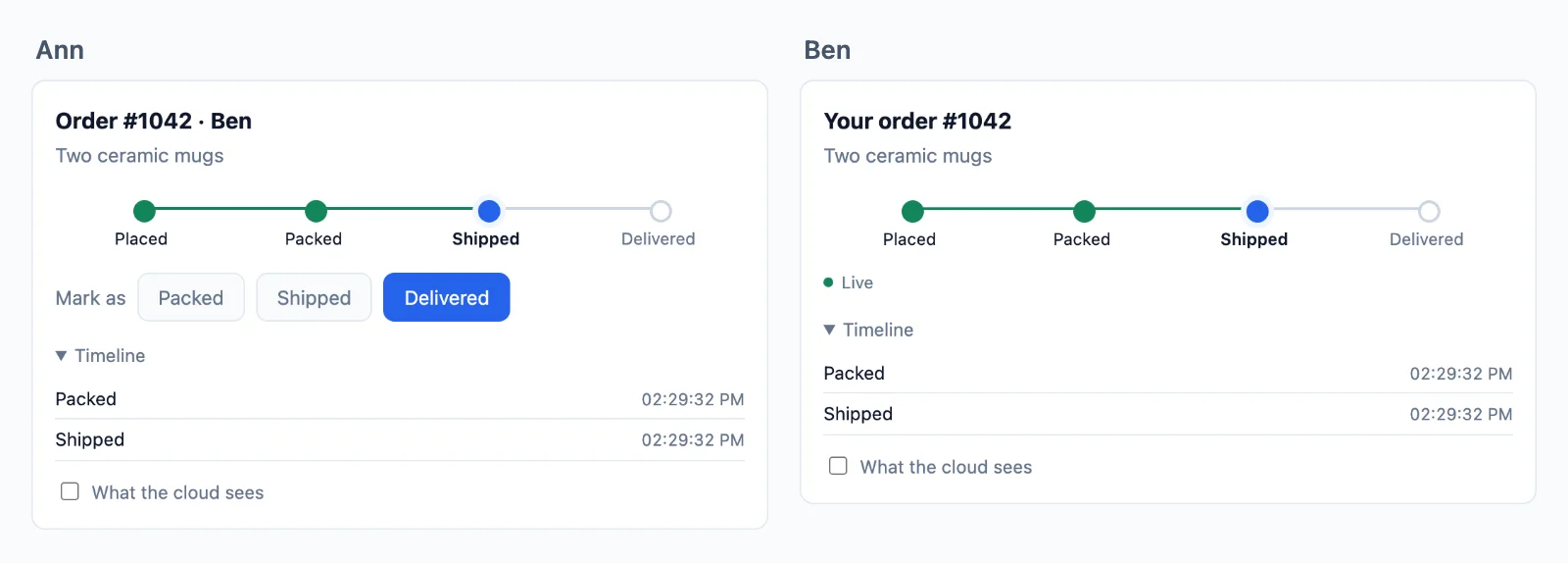
Ospitato
La parte che non gestisci più
Un server WebSocket funziona sul tuo portatile. In produzione deve tenere aperta ogni connessione per ore, condividere ogni evento tra più macchine e sopravvivere ai tuoi deploy, e un host serverless non può tenere una connessione affatto. Qui le connessioni restano da noi e il tuo server resta com’è.
Il tuo server invia una richiesta
- Next.js, Express, Node.js, Laravel, PHP, Django, FastAPI, Flask
- Funzioni serverless ed edge
- Qualsiasi altro stack
I tuoi utenti restano connessi
- Schede del browser
- App mobili
- Eventi in tempo reale
- Stanze
- Presenza
- Riconnessioni
Nessun server websocket da gestire
Il tuo server websocket deve tenere ogni connessione, crescere oltre una macchina e restare attivo durante i deploy. Il cloud lo fa per te, aggiungendo server quando il traffico cresce, e una pagina passa a un altro server senza interruzioni.
Qualsiasi host per il tuo server
Il tuo server si limita a firmare e inviare, quindi gira ovunque, comprese le funzioni serverless ed edge, che da sole non possono tenere aperta una connessione.
Il tuo accesso resta tuo
Un utente è l’id con cui la tua app lo conosce, letto sul tuo server, quindi la tua sessione e i tuoi cookie funzionano come ora.
Decide il tuo server
Invia a chiunque, vedi chi è online e gestisci le tue stanze
Una stanza è solo un nome, come chat:7, senza nulla da creare nel cloud. Il tuo database dice quali stanze esistono e chi c’è dentro, una regola sul tuo server lo legge e il cloud fa rispettare a ogni pagina la risposta. Ecco una chat di team, dall’inizio alla fine.
Next.js sul server e React nella pagina.
Crea una stanza
Salvala nel tuo database e scrivi una regola che la legge. La regola viene eseguita quando qualcuno chiede di entrare: false lo tiene fuori, true lo fa entrare, e readOnly gli permette di leggere ma non di inviare nulla. Qui db è il tuo database e me è la persona che ha effettuato l’accesso.
// A room is a row of yours. Nothing is created in the cloud.
const room = await db.room.create( { data: { name: 'Team' } } );

await db.member.create( { data: { roomId: room.id, userId: me, role: 'member' } } );

// Its name is yours to choose: row 7 is the room chat:7.// Once, for every chat. When someone asks to join chat:7, id is '7'.
realtime.room( 'chat:{id}', async ( user, { id } ) => {
const room = await db.room.findUnique( { where: { id: Number( id ) } } );
if ( !room || room.closed ) return false; // no such room, or closed
const member = await db.member.findFirst( { where: { roomId: room.id, userId: user } } );
if ( !member || member.banned ) return false; // not a member, or banned
return member.role === 'reader' ? { readOnly: true } : true;
}, { presence: true, emit: [ 'message' ] } );// A room is a row of yours. Nothing is created in the cloud.
const room = await db.room.create( { data: { name: 'Team' } } );
await db.member.create( { data: { roomId: room.id, userId: req.session.userId, role: 'member' } } );
// Its name is yours to choose: row 7 is the room chat:7.// Once, for every chat. When someone asks to join chat:7, id is '7'.
realtime.room( 'chat:{id}', async ( user, { id } ) => {
const room = await db.room.findUnique( { where: { id: Number( id ) } } );
if ( !room || room.closed ) return false; // no such room, or closed
const member = await db.member.findFirst( { where: { roomId: room.id, userId: user } } );
if ( !member || member.banned ) return false; // not a member, or banned
return member.role === 'reader' ? { readOnly: true } : true;
}, { presence: true, emit: [ 'message' ] } );// A room is a row of yours. Nothing is created in the cloud.
const room = await db.room.create( { data: { name: 'Team' } } );
await db.member.create( { data: { roomId: room.id, userId: me, role: 'member' } } );
// Its name is yours to choose: row 7 is the room chat:7.// Once, for every chat. When someone asks to join chat:7, id is '7'.
realtime.room( 'chat:{id}', async ( user, { id } ) => {
const room = await db.room.findUnique( { where: { id: Number( id ) } } );
if ( !room || room.closed ) return false; // no such room, or closed
const member = await db.member.findFirst( { where: { roomId: room.id, userId: user } } );
if ( !member || member.banned ) return false; // not a member, or banned
return member.role === 'reader' ? { readOnly: true } : true;
}, { presence: true, emit: [ 'message' ] } );// A room is a row of yours. Nothing is created in the cloud.
$room = Room::create( [ 'name' => 'Team' ] );
$room->members()->create( [ 'user_id' => auth()->id(), 'role' => 'member' ] );
// Its name is yours to choose: row 7 is the room chat:7.// Once, for every chat. When someone asks to join chat:7, $p['id'] is '7'.
$this->callAfterResolving( Realtime::class, function ( Realtime $realtime ) {
$realtime->room( 'chat:{id}', function ( $user, array $p ) {
$room = Room::find( $p['id'] );
if ( ! $room || $room->closed ) {
return false; // no such room, or closed
}
$member = $room->members()->where( 'user_id', $user )->first();
if ( ! $member || $member->banned ) {
return false; // not a member, or banned
}
return $member->role === 'reader' ? [ 'readOnly' => true ] : true;
}, [ 'presence' => true, 'emit' => [ 'message' ] ] );
} );// A room is a row of yours. Nothing is created in the cloud.
$db->prepare( 'INSERT INTO rooms (name) VALUES (?)' )->execute( [ 'Team' ] );
$room = $db->lastInsertId();
$db->prepare( 'INSERT INTO members (room_id, user_id, role) VALUES (?, ?, ?)' )
->execute( [ $room, $_SESSION['user_id'], 'member' ] );
// Its name is yours to choose: row 7 is the room chat:7.// Once, for every chat. When someone asks to join chat:7, $p['id'] is '7'.
$realtime->room( 'chat:{id}', function ( $user, array $p ) use ( $db ) {
$query = $db->prepare( 'SELECT closed FROM rooms WHERE id = ?' );
$query->execute( [ $p['id'] ] );
$room = $query->fetch();
if ( ! $room || $room['closed'] ) {
return false; // no such room, or closed
}
$query = $db->prepare( 'SELECT role, banned FROM members WHERE room_id = ? AND user_id = ?' );
$query->execute( [ $p['id'], $user ] );
$member = $query->fetch();
if ( ! $member || $member['banned'] ) {
return false; // not a member, or banned
}
return $member['role'] === 'reader' ? [ 'readOnly' => true ] : true;
}, [ 'presence' => true, 'emit' => [ 'message' ] ] );# A room is a row of yours. Nothing is created in the cloud.
room = Room.objects.create(name="Team")
room.members.create(user=request.user, role="member")
# Its name is yours to choose: row 7 is the room chat:7.# Once, for every chat. When someone asks to join chat:7, p["id"] is "7".
def may_join_chat(user, p):
room = Room.objects.filter(pk=p["id"]).first()
if room is None or room.closed:
return False # no such room, or closed
member = room.members.filter(user_id=user).first()
if member is None or member.banned:
return False # not a member, or banned
return {"readOnly": True} if member.role == "reader" else True
realtime.room("chat:{id}", may_join_chat, presence=True, emit=["message"])# A room is a row of yours. Nothing is created in the cloud.
room = Room(name="Team", members=[Member(user_id=me, role="member")])
db.add(room)
db.commit()
# Its name is yours to choose: row 7 is the room chat:7.# Once, for every chat. When someone asks to join chat:7, p["id"] is "7".
def may_join_chat(user, p):
with SessionLocal() as db:
room = db.get(Room, int(p["id"]))
if room is None or room.closed:
return False # no such room, or closed
member = db.query(Member).filter_by(room_id=room.id, user_id=user).first()
if member is None or member.banned:
return False # not a member, or banned
return {"readOnly": True} if member.role == "reader" else True
realtime.room("chat:{id}", may_join_chat, presence=True, emit=["message"])# A room is a row of yours. Nothing is created in the cloud.
room = Room(name="Team", members=[Member(user_id=session["user_id"], role="member")])
db.session.add(room)
db.session.commit()
# Its name is yours to choose: row 7 is the room chat:7.# Once, for every chat. When someone asks to join chat:7, p["id"] is "7".
def may_join_chat(user, p):
room = db.session.get(Room, int(p["id"]))
if room is None or room.closed:
return False # no such room, or closed
member = Member.query.filter_by(room_id=room.id, user_id=user).first()
if member is None or member.banned:
return False # not a member, or banned
return {"readOnly": True} if member.role == "reader" else True
realtime.room("chat:{id}", may_join_chat, presence=True, emit=["message"])-- A room is a row of yours. Nothing is created in the cloud.
INSERT INTO rooms (name) VALUES ('Team');
INSERT INTO members (room_id, user_id, role) VALUES (7, 42, 'member');
-- Its name is yours to choose: row 7 is the room chat:7.// In Go, on the example in the docs. Any language does the same, and sealing is one step more.
// Your /auth route asks this for each room a page wants. For chat:7, id is "7".
func roomRule(room, user string) (*wordplus.Room, string) {
id, isChat := strings.CutPrefix(room, "chat:")
if !isChat {
return nil, "no_rule"
}
row := findRoom(id)
if row == nil || row.Closed {
return nil, "forbidden" // no such room, or closed
}
member := findMember(id, user)
if member == nil || member.Banned {
return nil, "forbidden" // not a member, or banned
}
return &wordplus.Room{
Presence: true,
Emit: []string{"message"},
ReadOnly: member.Role == "reader",
Info: profile(user),
}, ""
}Entra e invia
Una pagina entra con il nome e la tua regola risponde. Poi riceve ciò che viene inviato alla stanza e invia a sua volta, come la regola consente. draw e il resto sono funzioni tue.
Hook e componenti per qualsiasi app React, con uno qualsiasi dei server sopra.
import { connect } from '@wordplus/realtime';

const rt = await connect();

const chat = rt.join( 'chat:7' );

chat.on( 'message', ( data, meta ) => draw( data.text, meta.from ) );
chat.on( 'error', ( e ) => showOut( e.code ) );   // forbidden: your rule said no
chat.on( 'kicked', () => showOut( 'kicked' ) );

chat.emit( 'message', { text: 'Hi' } );import { connect } from '@wordplus/realtime';
const config = document.getElementById( 'realtime' ).textContent;
const rt = await connect( JSON.parse( config ) );
const chat = rt.join( 'chat:7' );
chat.on( 'message', ( data, meta ) => draw( data.text, meta.from ) );
chat.on( 'error', ( e ) => showOut( e.code ) ); // forbidden: your rule said no
chat.on( 'kicked', () => showOut( 'kicked' ) );
chat.emit( 'message', { text: 'Hi' } );import { connect } from '@wordplus/realtime';
const config = document.getElementById( 'realtime' ).textContent;
const rt = await connect( JSON.parse( config ) );
const chat = rt.join( 'chat:7' );
chat.on( 'message', ( data, meta ) => draw( data.text, meta.from ) );
chat.on( 'error', ( e ) => showOut( e.code ) ); // forbidden: your rule said no
chat.on( 'kicked', () => showOut( 'kicked' ) );
chat.emit( 'message', { text: 'Hi' } );import { connect } from '@wordplus/realtime';
const rt = await connect( window.wordplusRealtimeConfig );
const chat = rt.join( 'chat:7' );
chat.on( 'message', ( data, meta ) => draw( data.text, meta.from ) );
chat.on( 'error', ( e ) => showOut( e.code ) ); // forbidden: your rule said no
chat.on( 'kicked', () => showOut( 'kicked' ) );
chat.emit( 'message', { text: 'Hi' } );import { connect } from '@wordplus/realtime';
const rt = await connect( window.wordplusRealtimeConfig );
const chat = rt.join( 'chat:7' );
chat.on( 'message', ( data, meta ) => draw( data.text, meta.from ) );
chat.on( 'error', ( e ) => showOut( e.code ) ); // forbidden: your rule said no
chat.on( 'kicked', () => showOut( 'kicked' ) );
chat.emit( 'message', { text: 'Hi' } );import { connect } from '@wordplus/realtime';
const rt = await connect( window.wordplusRealtimeConfig );
const chat = rt.join( 'chat:7' );
chat.on( 'message', ( data, meta ) => draw( data.text, meta.from ) );
chat.on( 'error', ( e ) => showOut( e.code ) ); // forbidden: your rule said no
chat.on( 'kicked', () => showOut( 'kicked' ) );
chat.emit( 'message', { text: 'Hi' } );import { connect } from '@wordplus/realtime';
const rt = await connect( window.wordplusRealtimeConfig );
const chat = rt.join( 'chat:7' );
chat.on( 'message', ( data, meta ) => draw( data.text, meta.from ) );
chat.on( 'error', ( e ) => showOut( e.code ) ); // forbidden: your rule said no
chat.on( 'kicked', () => showOut( 'kicked' ) );
chat.emit( 'message', { text: 'Hi' } );import { connect } from '@wordplus/realtime';
const rt = await connect( window.wordplusRealtimeConfig );
const chat = rt.join( 'chat:7' );
chat.on( 'message', ( data, meta ) => draw( data.text, meta.from ) );
chat.on( 'error', ( e ) => showOut( e.code ) ); // forbidden: your rule said no
chat.on( 'kicked', () => showOut( 'kicked' ) );
chat.emit( 'message', { text: 'Hi' } );import { connect } from '@wordplus/realtime';
const settings = await fetch( '/api/realtime/config' );
const rt = await connect( await settings.json() );
const chat = rt.join( 'chat:7' );
chat.on( 'message', ( data, meta ) => draw( data.text, meta.from ) );
chat.on( 'error', ( e ) => showOut( e.code ) ); // forbidden: your rule said no
chat.on( 'kicked', () => showOut( 'kicked' ) );
chat.emit( 'message', { text: 'Hi' } );const rt = window.Echo.connector.rt; // the connection Echo made
const chat = rt.join( 'chat:7' );
chat.on( 'message', ( data, meta ) => draw( data.text, meta.from ) );
chat.on( 'error', ( e ) => showOut( e.code ) ); // forbidden: your rule said no
chat.on( 'kicked', () => showOut( 'kicked' ) );
chat.emit( 'message', { text: 'Hi' } );'use client'; // in Next.js
import { useRoom } from '@wordplus/realtime/react';
// Inside <RealtimeProvider>, once for the whole app.
export function Chat( { id } ) {
const chat = useRoom( `chat:${ id }`, {
message: ( data, meta ) => draw( data.text, meta.from ),
} );
// forbidden when your rule says no, kicked when they are taken out.
if ( chat.error ) return <p>You are not in this room.</p>;
return <SendBox onSend={ ( text ) => chat.emit( 'message', { text } ) } />;
}<script setup>
import { useRoom } from '@wordplus/realtime/vue';
// provideRealtime() once, in your root component.
const { error, emit } = useRoom( 'chat:7', {
message: ( data, meta ) => draw( data.text, meta.from ),
} );
</script>
<template>
<!-- forbidden when your rule says no, kicked when they are taken out -->
<p v-if="error">You are not in this room.</p>
<SendBox v-else @send="( text ) => emit( 'message', { text } )" />
</template><script>
import { useRoom } from '@wordplus/realtime/svelte';
import SendBox from './SendBox.svelte';
// provideRealtime() once, in your root component.
const chat = useRoom( 'chat:7', {
message: ( data, meta ) => draw( data.text, meta.from ),
} );
</script>
<!-- forbidden when your rule says no, kicked when they are taken out -->
{#if chat.error}
<p>You are not in this room.</p>
{:else}
<SendBox onsend={ ( text ) => chat.emit( 'message', { text } ) } />
{/if}import { Component, signal } from '@angular/core';
import type { Room } from '@wordplus/realtime';
// realtime.ts, one connection for the whole app:
// export const realtime = connect();
import { realtime } from './realtime';
import { SendBox } from './send-box';
@Component( {
selector: 'app-chat',
imports: [ SendBox ],
template: `
@if ( out() ) {
<p>You are not in this room.</p>
} @else {
<app-send-box (send)="send( $event )" />
}
`,
} )
export class ChatComponent {
chat?: Room;
out = signal( false );
async ngOnInit() {
this.chat = ( await realtime ).join( 'chat:7' );
this.chat.on( 'message', ( data, meta ) => draw( data.text, meta.from ) );
this.chat.on( 'error', () => this.out.set( true ) ); // forbidden: your rule said no
this.chat.on( 'kicked', () => this.out.set( true ) );
}
send( text: string ) {
this.chat?.emit( 'message', { text } );
}
async ngOnDestroy() {
( await realtime ).leave( 'chat:7' );
}
}let chat = rt.join("chat:7")
chat.on("message") { data, meta in draw(data["text"]?.string ?? "", meta.from) }
chat.on("error") { error, _ in showOut(error["code"]?.string ?? "") } // forbidden: your rule said no
chat.on("kicked") { _, _ in showOut("kicked") }
chat.emit("message", ["text": "Hi"])val chat = rt.join("chat:7")
chat.on("message") { data, meta -> draw(data.jsonObject["text"]?.jsonPrimitive?.content ?: "", meta.from) }
chat.on("error") { error, _ -> showOut(error.jsonObject["code"]?.jsonPrimitive?.content ?: "") } // forbidden: your rule said no
chat.on("kicked") { _, _ -> showOut("kicked") }
chat.emit("message", buildJsonObject { put("text", "Hi") })import { Text } from 'react-native';
import { useRoom } from '@wordplus/realtime/react';
// Inside <RealtimeProvider>, once for the whole app.
export function Chat( { id } ) {
const chat = useRoom( `chat:${ id }`, {
message: ( data, meta ) => draw( data.text, meta.from ),
} );
// forbidden when your rule says no, kicked when they are taken out.
if ( chat.error ) return <Text>You are not in this room.</Text>;
return <SendBox onSend={ ( text ) => chat.emit( 'message', { text } ) } />;
}final chat = rt.join('chat:7');
chat.on('message', (data, meta) => draw(data['text'], meta.from));
chat.on('error', (error, _) => showOut(error['code'])); // forbidden: your rule said no
chat.on('kicked', (_, _) => showOut('kicked'));
chat.emit('message', {'text': 'Hi'});// Your server sends to the room too.
await realtime.to( 'chat:7' ).emit( 'message', { text: 'Welcome' } );// Your server sends to the room too.
await realtime.to( 'chat:7' ).emit( 'message', { text: 'Welcome' } );// Your server sends to the room too.
await realtime.to( 'chat:7' ).emit( 'message', { text: 'Welcome' } );// Your server sends to the room too.
Realtime::to( 'chat:7' )->emit( 'message', [ 'text' => 'Welcome' ] );// Your server sends to the room too.
$realtime->to( 'chat:7' )->emit( 'message', [ 'text' => 'Welcome' ] );# Your server sends to the room too.
realtime.to("chat:7").emit("message", {"text": "Welcome"})# Your server sends to the room too. In an async route, await aemit().
realtime.to("chat:7").emit("message", {"text": "Welcome"})# Your server sends to the room too.
realtime.to("chat:7").emit("message", {"text": "Welcome"})# Your server sends to the room too. wordplus is a signed curl, on the signing page of the docs.
wordplus POST /wordplus/realtime/emit '{"rooms":["chat:7"],"event":"message","data":{"text":"Welcome"}}'Conferma e conserva un messaggio
Inviare con un ack dice alla pagina quando il cloud ha preso un messaggio, o perché la tua regola l’ha rifiutato. Il webhook poi consegna ogni messaggio al tuo server perché lo conservi nel tuo database, dato che il cloud conserva gli eventi solo per le riconnessioni. markSent e db sono tuoi.
Hook e componenti per qualsiasi app React, con uno qualsiasi dei server sopra.
// Once the cloud has checked it, kept it and sent it on: its id and time.
// Your rule saying no rejects it, with a code.
const { id, at } = await chat.emitWithAck( 'message', { text: 'Hi' } );

markSent( id, at );// Once the cloud has checked it, kept it and sent it on: its id and time.
// Your rule saying no rejects it, with a code.
const { id, at } = await chat.emitWithAck( 'message', { text: 'Hi' } );
markSent( id, at );// Once the cloud has checked it, kept it and sent it on: its id and time.
// Your rule saying no rejects it, with a code.
const { id, at } = await chat.emitWithAck( 'message', { text: 'Hi' } );
markSent( id, at );// Once the cloud has checked it, kept it and sent it on: its id and time.
// Your rule saying no rejects it, with a code.
const { id, at } = await chat.emitWithAck( 'message', { text: 'Hi' } );
markSent( id, at );// Once the cloud has checked it, kept it and sent it on: its id and time.
// Your rule saying no rejects it, with a code.
const { id, at } = await chat.emitWithAck( 'message', { text: 'Hi' } );
markSent( id, at );// Once the cloud has checked it, kept it and sent it on: its id and time.
// Your rule saying no rejects it, with a code.
const { id, at } = await chat.emitWithAck( 'message', { text: 'Hi' } );
markSent( id, at );// Once the cloud has checked it, kept it and sent it on: its id and time.
// Your rule saying no rejects it, with a code.
const { id, at } = await chat.emitWithAck( 'message', { text: 'Hi' } );
markSent( id, at );// Once the cloud has checked it, kept it and sent it on: its id and time.
// Your rule saying no rejects it, with a code.
const { id, at } = await chat.emitWithAck( 'message', { text: 'Hi' } );
markSent( id, at );// Once the cloud has checked it, kept it and sent it on: its id and time.
// Your rule saying no rejects it, with a code.
const { id, at } = await chat.emitWithAck( 'message', { text: 'Hi' } );
markSent( id, at );const rt = window.Echo.connector.rt; // the connection Echo made
const chat = rt.join( 'chat:7' );
// Once the cloud has checked it, kept it and sent it on: its id and time.
const { id, at } = await chat.emitWithAck( 'message', { text: 'Hi' } );const chat = useRoom( 'chat:7' );
// Once the cloud has checked it, kept it and sent it on: its id and time.
const { id, at } = await chat.emitWithAck( 'message', { text: 'Hi' } );<script setup>
import { useRoom } from '@wordplus/realtime/vue';
const { emitWithAck } = useRoom( 'chat:7' );
// Once the cloud has checked it, kept it and sent it on: its id and time.
const send = async ( text ) => markSent( await emitWithAck( 'message', { text } ) );
</script><script>
import { useRoom } from '@wordplus/realtime/svelte';
const chat = useRoom( 'chat:7' );
// Once the cloud has checked it, kept it and sent it on: its id and time.
const send = async ( text ) => markSent( await chat.emitWithAck( 'message', { text } ) );
</script>// Once the cloud has checked it, kept it and sent it on: its id and time.
async send( text: string ) {
const { id, at } = await this.chat!.emitWithAck( 'message', { text } );
markSent( id, at );
}// Once the cloud has checked it, kept it and sent it on: ack.id, ack.at.
let ack = try await chat.emitWithAck("message", ["text": "Hi"])// Once the cloud has checked it, kept it and sent it on: ack.id, ack.at.
val ack = chat.emitWithAck("message", buildJsonObject { put("text", "Hi") })const chat = useRoom( 'chat:7' );
// Once the cloud has checked it, kept it and sent it on: its id and time.
const { id, at } = await chat.emitWithAck( 'message', { text: 'Hi' } );// Once the cloud has checked it, kept it and sent it on: ack.id, ack.at.
final ack = await chat.emitWithAck('message', {'text': 'Hi'});// The webhook gives your server what pages send. Keep it once, by the id the pages saw.
realtime.on( 'message', async ( { room, from, data, event_id, at } ) => {
await db.message.upsert( { id: event_id, room, from, text: data.text, at } );
} );// The webhook gives your server what pages send. Keep it once, by the id the pages saw.
realtime.on( 'message', async ( { room, from, data, event_id, at } ) => {
await db.message.upsert( { id: event_id, room, from, text: data.text, at } );
} );// The webhook gives your server what pages send. Keep it once, by the id the pages saw.
realtime.on( 'message', async ( { room, from, data, event_id, at } ) => {
await db.message.upsert( { id: event_id, room, from, text: data.text, at } );
} );$this->callAfterResolving( Realtime::class, function ( Realtime $realtime ) {
// The webhook gives your server what pages send. Keep it once, by the id the pages saw.
$realtime->on( 'message', function ( array $e ) {
Message::updateOrCreate( [ 'id' => $e['event_id'] ], [ 'room' => $e['room'], 'from' => $e['from'], 'text' => $e['data']['text'] ] );
} );
} );// The webhook gives your server what pages send. Keep it once, by the id the pages saw.
$realtime->on( 'message', function ( array $e ) {
save_message( $e['event_id'], $e['room'], $e['from'], $e['data']['text'], $e['at'] );
} );# The webhook gives your server what pages send. Keep it once, by the id the pages saw.
def keep_message(e):
save_message(e["event_id"], e["room"], e["from"], e["data"]["text"], e["at"])
realtime.on("message", keep_message)# The webhook gives your server what pages send. Keep it once, by the id the pages saw.
def keep_message(e):
save_message(e["event_id"], e["room"], e["from"], e["data"]["text"], e["at"])
realtime.on("message", keep_message)# The webhook gives your server what pages send. Keep it once, by the id the pages saw.
def keep_message(e):
save_message(e["event_id"], e["room"], e["from"], e["data"]["text"], e["at"])
realtime.on("message", keep_message)// In your webhook route, once its signature is checked as the docs say.
// Keep it once, by the id the pages saw.
if event.Type == "message" {
saveMessage(event.EventID, event.Room, event.From, event.Data["text"], event.At)
}Mostra chi sta scrivendo
Ciò che conta solo ora va come volatile: viene scartato anziché messo in coda quando si è offline, e non viene mai conservato. Raggiunge tutti gli altri nella stanza, anche le altre schede di chi invia. showTyping è una funzione tua.
// Pages may send what your rule lists.
realtime.room( 'chat:{id}', mayJoin, { presence: true, emit: [ 'message', 'typing' ] } );// Pages may send what your rule lists.
realtime.room( 'chat:{id}', mayJoin, { presence: true, emit: [ 'message', 'typing' ] } );// Pages may send what your rule lists.
realtime.room( 'chat:{id}', mayJoin, { presence: true, emit: [ 'message', 'typing' ] } );$this->callAfterResolving( Realtime::class, function ( Realtime $realtime ) {
// Pages may send what your rule lists.
$realtime->room( 'chat:{id}', $mayJoin, [ 'presence' => true, 'emit' => [ 'message', 'typing' ] ] );
} );// Pages may send what your rule lists.
$realtime->room( 'chat:{id}', $may_join, [ 'presence' => true, 'emit' => [ 'message', 'typing' ] ] );# Pages may send what your rule lists.
realtime.room("chat:{id}", may_join, presence=True, emit=["message", "typing"])# Pages may send what your rule lists.
realtime.room("chat:{id}", may_join, presence=True, emit=["message", "typing"])# Pages may send what your rule lists.
realtime.room("chat:{id}", may_join, presence=True, emit=["message", "typing"])// In your /auth route, in Go on the example in the docs. Pages may send what the room lists.
room := wordplus.Room{Presence: true, Emit: []string{"message", "typing"}}Hook e componenti per qualsiasi app React, con uno qualsiasi dei server sopra.
// Volatile: dropped rather than queued while offline, and never kept.
chat.volatile.emit( 'typing', { on: true } );

chat.on( 'typing', ( data, meta ) => showTyping( meta.from, data.on ) );// Volatile: dropped rather than queued while offline, and never kept.
chat.volatile.emit( 'typing', { on: true } );
chat.on( 'typing', ( data, meta ) => showTyping( meta.from, data.on ) );// Volatile: dropped rather than queued while offline, and never kept.
chat.volatile.emit( 'typing', { on: true } );
chat.on( 'typing', ( data, meta ) => showTyping( meta.from, data.on ) );// Volatile: dropped rather than queued while offline, and never kept.
chat.volatile.emit( 'typing', { on: true } );
chat.on( 'typing', ( data, meta ) => showTyping( meta.from, data.on ) );// Volatile: dropped rather than queued while offline, and never kept.
chat.volatile.emit( 'typing', { on: true } );
chat.on( 'typing', ( data, meta ) => showTyping( meta.from, data.on ) );// Volatile: dropped rather than queued while offline, and never kept.
chat.volatile.emit( 'typing', { on: true } );
chat.on( 'typing', ( data, meta ) => showTyping( meta.from, data.on ) );// Volatile: dropped rather than queued while offline, and never kept.
chat.volatile.emit( 'typing', { on: true } );
chat.on( 'typing', ( data, meta ) => showTyping( meta.from, data.on ) );// Volatile: dropped rather than queued while offline, and never kept.
chat.volatile.emit( 'typing', { on: true } );
chat.on( 'typing', ( data, meta ) => showTyping( meta.from, data.on ) );// Volatile: dropped rather than queued while offline, and never kept.
chat.volatile.emit( 'typing', { on: true } );
chat.on( 'typing', ( data, meta ) => showTyping( meta.from, data.on ) );const chat = window.Echo.connector.rt.join( 'chat:7' );
// Volatile: dropped rather than queued while offline, and never kept.
chat.volatile.emit( 'typing', { on: true } );

chat.on( 'typing', ( data, meta ) => showTyping( meta.from, data.on ) );const chat = useRoom( 'chat:7' );
const typing = useTyping( chat ); // the ids of those typing, gone when they stop
// Volatile: dropped rather than queued while offline, and never kept.
const onKey = () => chat.room?.volatile.emit( 'typing', { on: true } );<script setup>
import { useRoom, useTyping } from '@wordplus/realtime/vue';
const chat = useRoom( 'chat:7' );
const typing = useTyping( chat ); // the ids of those typing, gone when they stop
// Volatile: dropped rather than queued while offline, and never kept.
const onKey = () => chat.room.value?.volatile.emit( 'typing', { on: true } );
</script><script>
import { useRoom, useTyping } from '@wordplus/realtime/svelte';
const chat = useRoom( 'chat:7' );
const typing = useTyping( chat ); // typing.current: the ids of those typing
// Volatile: dropped rather than queued while offline, and never kept.
const onKey = () => chat.room?.volatile.emit( 'typing', { on: true } );
</script>// Volatile: dropped rather than queued while offline, and never kept.
onKey() {
this.chat?.volatile.emit( 'typing', { on: true } );
}// Volatile: dropped rather than queued while offline, and never kept.
chat.volatile.emit("typing", ["on": true])
chat.on("typing") { data, meta in showTyping(meta.from, data["on"]?.bool ?? false) }// Volatile: dropped rather than queued while offline, and never kept.
chat.volatile.emit("typing", buildJsonObject { put("on", true) })
chat.on("typing") { data, meta -> showTyping(meta.from, data.jsonObject["on"]) }const chat = useRoom( 'chat:7' );
const typing = useTyping( chat ); // the ids of those typing, gone when they stop
// Volatile: dropped rather than queued while offline, and never kept.
const onChangeText = () => chat.room?.volatile.emit( 'typing', { on: true } );// Volatile: dropped rather than queued while offline, and never kept.
chat.volatile.emit('typing', {'on': true});
chat.on('typing', (data, meta) => showTyping(meta.from, data['on']));Recupera dopo una riconnessione
Una stanza a cui la tua regola dà una cronologia conserva i suoi ultimi eventi fino a 5 minuti. Una pagina che torna riceve ciò che ha perso, in ordine, prima di ciò che viene dopo, anche quando torna su un altro dei nostri server. mayJoin e draw sono tuoi.
// Keeps its last 50 events, for 5 minutes at most.
realtime.room( 'chat:{id}', mayJoin, { history: { last: 50, seconds: 300 }, emit: [ 'message' ] } );// Keeps its last 50 events, for 5 minutes at most.
realtime.room( 'chat:{id}', mayJoin, { history: { last: 50, seconds: 300 }, emit: [ 'message' ] } );// Keeps its last 50 events, for 5 minutes at most.
realtime.room( 'chat:{id}', mayJoin, { history: { last: 50, seconds: 300 }, emit: [ 'message' ] } );$this->callAfterResolving( Realtime::class, function ( Realtime $realtime ) {
// Keeps its last 50 events, for 5 minutes at most.
$realtime->room( 'chat:{id}', $mayJoin, [ 'history' => [ 'last' => 50, 'seconds' => 300 ], 'emit' => [ 'message' ] ] );
} );// Keeps its last 50 events, for 5 minutes at most.
$realtime->room( 'chat:{id}', $may_join, [ 'history' => [ 'last' => 50, 'seconds' => 300 ], 'emit' => [ 'message' ] ] );# Keeps its last 50 events, for 5 minutes at most.
realtime.room("chat:{id}", may_join, history={"last": 50, "seconds": 300}, emit=["message"])# Keeps its last 50 events, for 5 minutes at most.
realtime.room("chat:{id}", may_join, history={"last": 50, "seconds": 300}, emit=["message"])# Keeps its last 50 events, for 5 minutes at most.
realtime.room("chat:{id}", may_join, history={"last": 50, "seconds": 300}, emit=["message"])// In your /auth route, in Go on the example in the docs. Its last 50 events, for 5 minutes.
room := wordplus.Room{History: 50, Emit: []string{"message"}}Hook e componenti per qualsiasi app React, con uno qualsiasi dei server sopra.
// A page back on the line gets what it missed first, in order, with meta.replayed.
chat.on( 'message', ( data, meta ) => draw( data.text, meta.from, meta.replayed ) );

// Or read back through it yourself, the newest first by pages.
const { events, more } = await chat.history( { limit: 50 } );// A page back on the line gets what it missed first, in order, with meta.replayed.
chat.on( 'message', ( data, meta ) => draw( data.text, meta.from, meta.replayed ) );
// Or read back through it yourself, the newest first by pages.
const { events, more } = await chat.history( { limit: 50 } );// A page back on the line gets what it missed first, in order, with meta.replayed.
chat.on( 'message', ( data, meta ) => draw( data.text, meta.from, meta.replayed ) );
// Or read back through it yourself, the newest first by pages.
const { events, more } = await chat.history( { limit: 50 } );// A page back on the line gets what it missed first, in order, with meta.replayed.
chat.on( 'message', ( data, meta ) => draw( data.text, meta.from, meta.replayed ) );
// Or read back through it yourself, the newest first by pages.
const { events, more } = await chat.history( { limit: 50 } );// A page back on the line gets what it missed first, in order, with meta.replayed.
chat.on( 'message', ( data, meta ) => draw( data.text, meta.from, meta.replayed ) );
// Or read back through it yourself, the newest first by pages.
const { events, more } = await chat.history( { limit: 50 } );// A page back on the line gets what it missed first, in order, with meta.replayed.
chat.on( 'message', ( data, meta ) => draw( data.text, meta.from, meta.replayed ) );
// Or read back through it yourself, the newest first by pages.
const { events, more } = await chat.history( { limit: 50 } );// A page back on the line gets what it missed first, in order, with meta.replayed.
chat.on( 'message', ( data, meta ) => draw( data.text, meta.from, meta.replayed ) );
// Or read back through it yourself, the newest first by pages.
const { events, more } = await chat.history( { limit: 50 } );// A page back on the line gets what it missed first, in order, with meta.replayed.
chat.on( 'message', ( data, meta ) => draw( data.text, meta.from, meta.replayed ) );
// Or read back through it yourself, the newest first by pages.
const { events, more } = await chat.history( { limit: 50 } );// A page back on the line gets what it missed first, in order, with meta.replayed.
chat.on( 'message', ( data, meta ) => draw( data.text, meta.from, meta.replayed ) );
// Or read back through it yourself, the newest first by pages.
const { events, more } = await chat.history( { limit: 50 } );const chat = window.Echo.connector.rt.join( 'chat:7' );
// A page back on the line gets what it missed first, in order, with meta.replayed.
chat.on( 'message', ( data, meta ) => draw( data.text, meta.from, meta.replayed ) );// A page back on the line gets what it missed first, in order, with meta.replayed.
useRoom( 'chat:7', {
message: ( data, meta ) => draw( data.text, meta.from, meta.replayed ),
} );<script setup>
import { useRoom } from '@wordplus/realtime/vue';
// A page back on the line gets what it missed first, in order, with meta.replayed.
useRoom( 'chat:7', {
    message: ( data, meta ) => draw( data.text, meta.from, meta.replayed ),
} );
</script><script>
import { useRoom } from '@wordplus/realtime/svelte';
// A page back on the line gets what it missed first, in order, with meta.replayed.
useRoom( 'chat:7', {
message: ( data, meta ) => draw( data.text, meta.from, meta.replayed ),
} );
</script>async ngOnInit() {
this.chat = ( await realtime ).join( 'chat:7' );
// A page back on the line gets what it missed first, in order, with meta.replayed.
this.chat.on( 'message', ( data, meta ) => draw( data.text, meta.from, meta.replayed ) );
}// An app back on the line gets what it missed first, in order, with meta.replayed.
chat.on("message") { data, meta in draw(data["text"]?.string ?? "", meta.from, meta.replayed) }// An app back on the line gets what it missed first, in order, with meta.replayed.
chat.on("message") { data, meta ->
draw(data.jsonObject["text"]?.jsonPrimitive?.content ?: "", meta.from, meta.replayed)
}// An app back on the line gets what it missed first, in order, with meta.replayed.
useRoom( 'chat:7', {
message: ( data, meta ) => draw( data.text, meta.from, meta.replayed ),
} );// An app back on the line gets what it missed first, in order, with meta.replayed.
chat.on('message', (data, meta) => draw(data['text'], meta.from, meta.replayed));Invia a una persona
Il tuo server invia a un utente tramite il suo id, su ogni scheda e dispositivo che ha aperti, senza stanze a cui unirsi. Chi non ha nulla di aperto non riceve nulla, quindi conserva ciò che conta nel tuo database. showNotice è una tua funzione.
// To every tab and device they have open. 'notice' is a name of your own.
await realtime.toUser( 43 ).emit( 'notice', { text: 'Your order shipped' } );

// To several people at once, up to 1,000.
await realtime.toUser( [ 34, 43 ] ).emit( 'notice', { text: 'Starting soon' } );// To every tab and device they have open. 'notice' is a name of your own.
await realtime.toUser( 43 ).emit( 'notice', { text: 'Your order shipped' } );
// To several people at once, up to 1,000.
await realtime.toUser( [ 34, 43 ] ).emit( 'notice', { text: 'Starting soon' } );// To every tab and device they have open. 'notice' is a name of your own.
await realtime.toUser( 43 ).emit( 'notice', { text: 'Your order shipped' } );
// To several people at once, up to 1,000.
await realtime.toUser( [ 34, 43 ] ).emit( 'notice', { text: 'Starting soon' } );// To every tab and device they have open. 'notice' is a name of your own.
Realtime::toUser( 43 )->emit( 'notice', [ 'text' => 'Your order shipped' ] );
// To several people at once, up to 1,000.
Realtime::toUser( [ 34, 43 ] )->emit( 'notice', [ 'text' => 'Starting soon' ] );// To every tab and device they have open. 'notice' is a name of your own.
$realtime->toUser( 43 )->emit( 'notice', [ 'text' => 'Your order shipped' ] );
// To several people at once, up to 1,000.
$realtime->toUser( [ 34, 43 ] )->emit( 'notice', [ 'text' => 'Starting soon' ] );# To every tab and device they have open. "notice" is a name of your own.
realtime.to_user(43).emit("notice", {"text": "Your order shipped"})
# To several people at once, up to 1,000.
realtime.to_user([34, 43]).emit("notice", {"text": "Starting soon"})# In a def route, as these calls block.
# To every tab and device they have open. "notice" is a name of your own.
realtime.to_user(43).emit("notice", {"text": "Your order shipped"})

# To several people at once, up to 1,000.
realtime.to_user([34, 43]).emit("notice", {"text": "Starting soon"})# To every tab and device they have open. "notice" is a name of your own.
realtime.to_user(43).emit("notice", {"text": "Your order shipped"})
# To several people at once, up to 1,000.
realtime.to_user([34, 43]).emit("notice", {"text": "Starting soon"})# To every tab and device they have open. "notice" is a name of your own.
wordplus POST /wordplus/realtime/emit \
'{"users":["43"],"event":"notice","data":{"text":"Your order shipped"}}'
# To several people at once, up to 1,000.
wordplus POST /wordplus/realtime/emit \
'{"users":["34","43"],"event":"notice","data":{"text":"Starting soon"}}'Hook e componenti per qualsiasi app React, con uno qualsiasi dei server sopra.
// On the connection, with no room to join.
rt.on( 'notice', ( data ) => showNotice( data.text ) );// On the connection, with no room to join.
rt.on( 'notice', ( data ) => showNotice( data.text ) );// On the connection, with no room to join.
rt.on( 'notice', ( data ) => showNotice( data.text ) );// On the connection, with no room to join.
rt.on( 'notice', ( data ) => showNotice( data.text ) );// On the connection, with no room to join.
rt.on( 'notice', ( data ) => showNotice( data.text ) );// On the connection, with no room to join.
rt.on( 'notice', ( data ) => showNotice( data.text ) );// On the connection, with no room to join.
rt.on( 'notice', ( data ) => showNotice( data.text ) );// On the connection, with no room to join.
rt.on( 'notice', ( data ) => showNotice( data.text ) );// On the connection, with no room to join.
rt.on( 'notice', ( data ) => showNotice( data.text ) );window.Echo.connector.rt.on( 'notice', ( data ) => showNotice( data.text ) );useUserEvent( 'notice', ( data ) => showNotice( data.text ) );<script setup>
import { useUserEvent } from '@wordplus/realtime/vue';
useUserEvent( 'notice', ( data ) => showNotice( data.text ) );
</script><script>
import { useUserEvent } from '@wordplus/realtime/svelte';
useUserEvent( 'notice', ( data ) => showNotice( data.text ) );
</script>async ngOnInit() {
( await realtime ).on( 'notice', ( data ) => showNotice( data.text ) );
}rt.on("notice") { data, _ in showNotice(data["text"]?.string ?? "") }rt.on("notice") { data, _ -> showNotice(data.jsonObject["text"]?.jsonPrimitive?.content ?: "") }useUserEvent( 'notice', ( data ) => showNotice( data.text ) );rt.on('notice', (data, _) => showNotice(data['text']));Invia a tutti
Il tuo server invia a ogni pagina e app connessa in questo momento, con accesso o senza, senza stanze in cui entrare. Chiunque può essere connesso, quindi ciò che trasporta non è sigillato: usalo per ciò che chiunque può leggere. showNotice è una funzione tua.
// Every page and app connected now, signed in or not.
await realtime.toEveryone().emit( 'notice', { text: 'New version is out' } );// Every page and app connected now, signed in or not.
await realtime.toEveryone().emit( 'notice', { text: 'New version is out' } );// Every page and app connected now, signed in or not.
await realtime.toEveryone().emit( 'notice', { text: 'New version is out' } );// Every page and app connected now, signed in or not.
Realtime::toEveryone()->emit( 'notice', [ 'text' => 'New version is out' ] );// Every page and app connected now, signed in or not.
$realtime->toEveryone()->emit( 'notice', [ 'text' => 'New version is out' ] );# Every page and app connected now, signed in or not.
realtime.to_everyone().emit("notice", {"text": "New version is out"})# In a def route, as these calls block.
# Every page and app connected now, signed in or not.
realtime.to_everyone().emit("notice", {"text": "New version is out"})# Every page and app connected now, signed in or not.
realtime.to_everyone().emit("notice", {"text": "New version is out"})# Every page and app connected now, signed in or not.
wordplus POST /wordplus/realtime/emit \
'{"everyone":true,"event":"notice","data":{"text":"New version is out"}}'Hook e componenti per qualsiasi app React, con uno qualsiasi dei server sopra.
// With no room to join.
rt.on( 'notice', ( data ) => showNotice( data.text ) );// With no room to join.
rt.on( 'notice', ( data ) => showNotice( data.text ) );// With no room to join.
rt.on( 'notice', ( data ) => showNotice( data.text ) );// With no room to join.
rt.on( 'notice', ( data ) => showNotice( data.text ) );// With no room to join.
rt.on( 'notice', ( data ) => showNotice( data.text ) );// With no room to join.
rt.on( 'notice', ( data ) => showNotice( data.text ) );// With no room to join.
rt.on( 'notice', ( data ) => showNotice( data.text ) );// With no room to join.
rt.on( 'notice', ( data ) => showNotice( data.text ) );// With no room to join.
rt.on( 'notice', ( data ) => showNotice( data.text ) );// With no room to join.
window.Echo.connector.rt.on( 'notice', ( data ) => showNotice( data.text ) );// With no room to join.
useUserEvent( 'notice', ( data ) => showNotice( data.text ) );<script setup>
import { useUserEvent } from '@wordplus/realtime/vue';
// With no room to join.
useUserEvent( 'notice', ( data ) => showNotice( data.text ) );
</script><script>
import { useUserEvent } from '@wordplus/realtime/svelte';
// With no room to join.
useUserEvent( 'notice', ( data ) => showNotice( data.text ) );
</script>async ngOnInit() {
// With no room to join.
( await realtime ).on( 'notice', ( data ) => showNotice( data.text ) );
}// With no room to join.
rt.on("notice") { data, _ in showNotice(data["text"]?.string ?? "") }// With no room to join.
rt.on("notice") { data, _ ->
showNotice(data.jsonObject["text"]?.jsonPrimitive?.content ?: "")
}// With no room to join.
useUserEvent( 'notice', ( data ) => showNotice( data.text ) );// With no room to join.
rt.on('notice', (data, _) => showNotice(data['text']));Vedi chi c’è in una stanza
Una stanza la cui regola dice presence mostra a tutti quelli che ci sono chi c’è dentro, ciascuno con il nome e l’immagine del tuo profilo. Chi ha più schede è un solo membro. Sono elencati i primi 1.000, e il conteggio prosegue a qualsiasi dimensione.
Hook e componenti per qualsiasi app React, con uno qualsiasi dei server sopra.
// The rule of chat:7 says presence: true, so the room lists who is in it.
const chat = rt.join( 'chat:7' );
// Who is in it now, as [ id, info ], and again after each reconnect.
chat.on( 'joined', () => showMembers( [ ...chat.members ] ) );
// Who comes and goes. info is your profile: their name and avatar.
chat.on( 'join', ( { id, info } ) => addMember( id, info.name ) );
chat.on( 'leave', ( { id } ) => removeMember( id ) );
// How many, at any size, at most once a second.
chat.on( 'count', ( n ) => showCount( n ) );// The rule of chat:7 says presence: true, so the room lists who is in it.
const chat = rt.join( 'chat:7' );
// Who is in it now, as [ id, info ], and again after each reconnect.
chat.on( 'joined', () => showMembers( [ ...chat.members ] ) );
// Who comes and goes. info is your profile: their name and avatar.
chat.on( 'join', ( { id, info } ) => addMember( id, info.name ) );
chat.on( 'leave', ( { id } ) => removeMember( id ) );
// How many, at any size, at most once a second.
chat.on( 'count', ( n ) => showCount( n ) );// The rule of chat:7 says presence: true, so the room lists who is in it.
const chat = rt.join( 'chat:7' );
// Who is in it now, as [ id, info ], and again after each reconnect.
chat.on( 'joined', () => showMembers( [ ...chat.members ] ) );
// Who comes and goes. info is your profile: their name and avatar.
chat.on( 'join', ( { id, info } ) => addMember( id, info.name ) );
chat.on( 'leave', ( { id } ) => removeMember( id ) );
// How many, at any size, at most once a second.
chat.on( 'count', ( n ) => showCount( n ) );// The rule of chat:7 says presence: true, so the room lists who is in it.
const chat = rt.join( 'chat:7' );
// Who is in it now, as [ id, info ], and again after each reconnect.
chat.on( 'joined', () => showMembers( [ ...chat.members ] ) );
// Who comes and goes. info is your profile: their name and avatar.
chat.on( 'join', ( { id, info } ) => addMember( id, info.name ) );
chat.on( 'leave', ( { id } ) => removeMember( id ) );
// How many, at any size, at most once a second.
chat.on( 'count', ( n ) => showCount( n ) );// The rule of chat:7 says presence: true, so the room lists who is in it.
const chat = rt.join( 'chat:7' );
// Who is in it now, as [ id, info ], and again after each reconnect.
chat.on( 'joined', () => showMembers( [ ...chat.members ] ) );
// Who comes and goes. info is your profile: their name and avatar.
chat.on( 'join', ( { id, info } ) => addMember( id, info.name ) );
chat.on( 'leave', ( { id } ) => removeMember( id ) );
// How many, at any size, at most once a second.
chat.on( 'count', ( n ) => showCount( n ) );// The rule of chat:7 says presence: true, so the room lists who is in it.
const chat = rt.join( 'chat:7' );
// Who is in it now, as [ id, info ], and again after each reconnect.
chat.on( 'joined', () => showMembers( [ ...chat.members ] ) );
// Who comes and goes. info is your profile: their name and avatar.
chat.on( 'join', ( { id, info } ) => addMember( id, info.name ) );
chat.on( 'leave', ( { id } ) => removeMember( id ) );
// How many, at any size, at most once a second.
chat.on( 'count', ( n ) => showCount( n ) );// The rule of chat:7 says presence: true, so the room lists who is in it.
const chat = rt.join( 'chat:7' );
// Who is in it now, as [ id, info ], and again after each reconnect.
chat.on( 'joined', () => showMembers( [ ...chat.members ] ) );
// Who comes and goes. info is your profile: their name and avatar.
chat.on( 'join', ( { id, info } ) => addMember( id, info.name ) );
chat.on( 'leave', ( { id } ) => removeMember( id ) );
// How many, at any size, at most once a second.
chat.on( 'count', ( n ) => showCount( n ) );// The rule of chat:7 says presence: true, so the room lists who is in it.
const chat = rt.join( 'chat:7' );
// Who is in it now, as [ id, info ], and again after each reconnect.
chat.on( 'joined', () => showMembers( [ ...chat.members ] ) );
// Who comes and goes. info is your profile: their name and avatar.
chat.on( 'join', ( { id, info } ) => addMember( id, info.name ) );
chat.on( 'leave', ( { id } ) => removeMember( id ) );
// How many, at any size, at most once a second.
chat.on( 'count', ( n ) => showCount( n ) );// The rule of chat:7 says presence: true, so the room lists who is in it.
const chat = rt.join( 'chat:7' );
// Who is in it now, as [ id, info ], and again after each reconnect.
chat.on( 'joined', () => showMembers( [ ...chat.members ] ) );
// Who comes and goes. info is your profile: their name and avatar.
chat.on( 'join', ( { id, info } ) => addMember( id, info.name ) );
chat.on( 'leave', ( { id } ) => removeMember( id ) );
// How many, at any size, at most once a second.
chat.on( 'count', ( n ) => showCount( n ) );// Each member as your profile gives them.
window.Echo.join( 'chat:7' )
.here( ( members ) => showMembers( members ) )
.joining( ( member ) => addMember( member ) )
.leaving( ( member ) => removeMember( member ) );'use client'; // in Next.js
import { usePresence } from '@wordplus/realtime/react';
// Inside <RealtimeProvider>, once for the whole app.
export function Members() {
const members = usePresence( 'chat:7' );
return (
<ul>
{ members.map( ( member ) => <li key={ member.id }>{ member.info.name }</li> ) }
</ul>
);
}<script setup>
import { usePresence } from '@wordplus/realtime/vue';
// provideRealtime() once, in your root component.
const members = usePresence( 'chat:7' );
</script>
<template>
<ul>
<li v-for="member in members" :key="member.id">{{ member.info.name }}</li>
</ul>
</template><script>
import { usePresence } from '@wordplus/realtime/svelte';
// provideRealtime() once, in your root component.
const members = usePresence( 'chat:7' );
</script>
<ul>
{#each members.current as member (member.id)}
<li>{ member.info.name }</li>
{/each}
</ul>import { Component, signal } from '@angular/core';
import { realtime } from './realtime';
@Component( {
selector: 'app-members',
template: `
<ul>
@for ( member of members(); track member[ 0 ] ) {
<li>{{ member[ 1 ].name }}</li>
}
</ul>
`,
} )
export class MembersComponent {
members = signal<[ string, any ][]>( [] );
async ngOnInit() {
const chat = ( await realtime ).join( 'chat:7' );
const update = () => this.members.set( [ ...chat.members ] );
chat.on( 'joined', update );
chat.on( 'join', update );
chat.on( 'leave', update );
}
}let chat = rt.join("chat:7")
for event in ["joined", "join", "leave"] {
chat.on(event) { _, _ in
showMembers(chat.members.map { id, info in info["name"]?.string ?? id })
}
}val chat = rt.join("chat:7")
for (event in listOf("joined", "join", "leave")) {
chat.on(event) { _, _ ->
showMembers(chat.members.map { (id, info) ->
info.jsonObject["name"]?.jsonPrimitive?.content ?: id
})
}
}import { Text } from 'react-native';
import { usePresence } from '@wordplus/realtime/react';
// Inside <RealtimeProvider>, once for the whole app.
export function Members() {
const members = usePresence( 'chat:7' );
return members.map( ( member ) => <Text key={ member.id }>{ member.info.name }</Text> );
}final chat = rt.join('chat:7');
for (final event in ['joined', 'join', 'leave']) {
chat.on(event, (_, _) {
showMembers([
for (final MapEntry(key: id, value: info) in chat.members.entries)
info?['name'] ?? id,
]);
});
}// Ask from your server: [ { id, info } ], with their info opened for you.
const { count, list } = await realtime.room( 'chat:7' ).members();// Ask from your server: [ { id, info } ], with their info opened for you.
const { count, list } = await realtime.room( 'chat:7' ).members();// Ask from your server: [ { id, info } ], with their info opened for you.
const { count, list } = await realtime.room( 'chat:7' ).members();// Ask from your server: [ [ 'id', 'info' ] ], with their info opened for you.
$members = Realtime::room( 'chat:7' )->members();
$members['count'];
$members['list'];// Ask from your server: [ [ 'id', 'info' ] ], with their info opened for you.
$members = $realtime->room( 'chat:7' )->members();
$members['count'];
$members['list'];# Ask from your server: [{"id", "info"}], with their info opened for you.
members = realtime.room("chat:7").members()
members["count"]
members["list"]# In a def route, as these calls block.
# Ask from your server: [{"id", "info"}], with their info opened for you.
members = realtime.room("chat:7").members()
members["count"]
members["list"]# Ask from your server: [{"id", "info"}], with their info opened for you.
members = realtime.room("chat:7").members()
members["count"]
members["list"]# Ask from your server: count, and each member's id and info.
wordplus GET '/wordplus/realtime/rooms/chat%3A7?members=1'Vedi chi è online
Chi il tuo server ha autenticato è online finché una sua pagina o app è connessa, e offline 10 secondi dopo la chiusura dell’ultima. Chi ha effettuato l’accesso può osservare fino a 1.000 persone. Una funzione hidden nella tua configurazione esclude chi ha scelto di nascondere il proprio stato.
Hook e componenti per qualsiasi app React, con uno qualsiasi dei server sopra.
// Their status now, then each change, for up to 1,000 people.
rt.online.watch( [ 34, 43 ] ).on( 'change', ( { id, online } ) => showDot( id, online ) );
// How many are online across your app, live.
rt.online.on( 'count', ( n ) => showCount( n ) );
// Everyone online, a page at a time.
const { ids, next } = await rt.online.list();
showOnline( ids );// Their status now, then each change, for up to 1,000 people.
rt.online.watch( [ 34, 43 ] ).on( 'change', ( { id, online } ) => showDot( id, online ) );
// How many are online across your app, live.
rt.online.on( 'count', ( n ) => showCount( n ) );
// Everyone online, a page at a time.
const { ids, next } = await rt.online.list();
showOnline( ids );// Their status now, then each change, for up to 1,000 people.
rt.online.watch( [ 34, 43 ] ).on( 'change', ( { id, online } ) => showDot( id, online ) );
// How many are online across your app, live.
rt.online.on( 'count', ( n ) => showCount( n ) );
// Everyone online, a page at a time.
const { ids, next } = await rt.online.list();
showOnline( ids );// Their status now, then each change, for up to 1,000 people.
rt.online.watch( [ 34, 43 ] ).on( 'change', ( { id, online } ) => showDot( id, online ) );
// How many are online across your app, live.
rt.online.on( 'count', ( n ) => showCount( n ) );
// Everyone online, a page at a time.
const { ids, next } = await rt.online.list();
showOnline( ids );// Their status now, then each change, for up to 1,000 people.
rt.online.watch( [ 34, 43 ] ).on( 'change', ( { id, online } ) => showDot( id, online ) );
// How many are online across your app, live.
rt.online.on( 'count', ( n ) => showCount( n ) );
// Everyone online, a page at a time.
const { ids, next } = await rt.online.list();
showOnline( ids );// Their status now, then each change, for up to 1,000 people.
rt.online.watch( [ 34, 43 ] ).on( 'change', ( { id, online } ) => showDot( id, online ) );
// How many are online across your app, live.
rt.online.on( 'count', ( n ) => showCount( n ) );
// Everyone online, a page at a time.
const { ids, next } = await rt.online.list();
showOnline( ids );// Their status now, then each change, for up to 1,000 people.
rt.online.watch( [ 34, 43 ] ).on( 'change', ( { id, online } ) => showDot( id, online ) );
// How many are online across your app, live.
rt.online.on( 'count', ( n ) => showCount( n ) );
// Everyone online, a page at a time.
const { ids, next } = await rt.online.list();
showOnline( ids );// Their status now, then each change, for up to 1,000 people.
rt.online.watch( [ 34, 43 ] ).on( 'change', ( { id, online } ) => showDot( id, online ) );
// How many are online across your app, live.
rt.online.on( 'count', ( n ) => showCount( n ) );
// Everyone online, a page at a time.
const { ids, next } = await rt.online.list();
showOnline( ids );// Their status now, then each change, for up to 1,000 people.
rt.online.watch( [ 34, 43 ] ).on( 'change', ( { id, online } ) => showDot( id, online ) );
// How many are online across your app, live.
rt.online.on( 'count', ( n ) => showCount( n ) );
// Everyone online, a page at a time.
const { ids, next } = await rt.online.list();
showOnline( ids );const rt = window.Echo.connector.rt; // the connection Echo made
rt.online.watch( [ 34, 43 ] ).on( 'change', ( { id, online } ) => showDot( id, online ) );
rt.online.on( 'count', ( n ) => showCount( n ) );'use client'; // in Next.js
import { useOnline } from '@wordplus/realtime/react';
// Inside <RealtimeProvider>, once for the whole app.
export function Team() {
const { online, count } = useOnline( [ 34, 43 ], { count: true } );
return (
<>
<p>Ann is { online[ 34 ] ? 'online' : 'away' }</p>
<p>{ count } online now</p>
</>
);
}<script setup>
import { useOnline } from '@wordplus/realtime/vue';
// provideRealtime() once, in your root component.
const { online, count } = useOnline( [ 34, 43 ], { count: true } );
</script>
<template>
<p>Ann is {{ online[ 34 ] ? 'online' : 'away' }}</p>
<p>{{ count }} online now</p>
</template><script>
import { useOnline } from '@wordplus/realtime/svelte';
// provideRealtime() once, in your root component.
const team = useOnline( [ 34, 43 ], { count: true } );
</script>
<p>Ann is { team.online[ 34 ] ? 'online' : 'away' }</p>
<p>{ team.count } online now</p>import { Component, signal } from '@angular/core';
import { realtime } from './realtime';
@Component( {
selector: 'app-team',
template: `
<p>Ann is {{ annOnline() ? 'online' : 'away' }}</p>
<p>{{ count() }} online now</p>
`,
} )
export class TeamComponent {
annOnline = signal( false );
count = signal( 0 );
async ngOnInit() {
const rt = await realtime;
rt.online.watch( [ 34, 43 ] ).on( 'change', ( change ) => {
if ( change.id === '34' ) this.annOnline.set( change.online );
} );
rt.online.on( 'count', ( n ) => this.count.set( n ) );
}
}let people = ["34", "43"]
rt.online.watch(people).on("change") { _ in
showOnline(people.filter { rt.online.has($0) })
}
rt.online.on("count") { data in showCount(data["n"]?.number ?? 0) }
// Once connected: everyone online, a page at a time.
let (ids, next) = try await rt.online.list()val people = listOf("34", "43")
rt.online.watch(people).on("change") {
showOnline(people.filter { rt.online.has(it) })
}
rt.online.on("count") { data ->
showCount(data.jsonObject["n"]?.jsonPrimitive?.int ?: 0)
}
// Once connected: everyone online, a page at a time.
val (ids, next) = rt.online.list()import { Text } from 'react-native';
import { useOnline } from '@wordplus/realtime/react';
// Inside <RealtimeProvider>, once for the whole app.
export function Team() {
const { online, count } = useOnline( [ 34, 43 ], { count: true } );
return (
<>
<Text>Ann is { online[ 34 ] ? 'online' : 'away' }</Text>
<Text>{ count } online now</Text>
</>
);
}final people = ['34', '43'];
rt.online.watch(people).on('change', (_) {
showOnline(people.where(rt.online.has).toList());
});
rt.online.on('count', (data) => showCount(data['n']));
// Once connected: everyone online, a page at a time.
final page = await rt.online.list();// Ask from your server.
const isOnline = await realtime.online.has( 43 );
const states = await realtime.online.states( [ 34, 43 ] ); // [ { id, online, at? } ]
const count = await realtime.online.count();
const { ids, next } = await realtime.online.list();// Ask from your server.
const isOnline = await realtime.online.has( 43 );
const states = await realtime.online.states( [ 34, 43 ] ); // [ { id, online, at? } ]
const count = await realtime.online.count();
const { ids, next } = await realtime.online.list();// Ask from your server.
const isOnline = await realtime.online.has( 43 );
const states = await realtime.online.states( [ 34, 43 ] ); // [ { id, online, at? } ]
const count = await realtime.online.count();
const { ids, next } = await realtime.online.list();// Ask from your server.
$is_online = Realtime::online()->has( 43 );
$states = Realtime::online()->states( [ 34, 43 ] ); // [ [ 'id', 'online', 'at'? ] ]
$count = Realtime::online()->count();
$page = Realtime::online()->list(); // [ 'ids', 'next' ]// Ask from your server.
$is_online = $realtime->online()->has( 43 );
$states = $realtime->online()->states( [ 34, 43 ] ); // [ [ 'id', 'online', 'at'? ] ]
$count = $realtime->online()->count();
$page = $realtime->online()->list(); // [ 'ids', 'next' ]# Ask from your server.
is_online = realtime.online.has(43)
states = realtime.online.states([34, 43]) # [{"id", "online", "at"?}]
count = realtime.online.count()
page = realtime.online.list() # {"ids", "next"}# In a def route, as these calls block.
# Ask from your server.
is_online = realtime.online.has(43)
states = realtime.online.states([34, 43]) # [{"id", "online", "at"?}]
count = realtime.online.count()
page = realtime.online.list() # {"ids", "next"}# Ask from your server.
is_online = realtime.online.has(43)
states = realtime.online.states([34, 43]) # [{"id", "online", "at"?}]
count = realtime.online.count()
page = realtime.online.list() # {"ids", "next"}# Whether each is online, and how many are across your app.
wordplus GET '/wordplus/realtime/online?ids=34,43'
# Everyone online, a page at a time.
wordplus GET '/wordplus/realtime/online'Aggiungi una persona
Aggiungila alla tua tabella e la tua regola la lascia entrare da quel momento. Per far entrare una pagina che ha già aperta, inviale un evento tuo.
await db.member.create( { data: { roomId: 7, userId: 43, role: 'member' } } );
// Tell their open pages. 'added' is a name of your own.
await realtime.toUser( 43 ).emit( 'added', { room: 'chat:7' } );await db.member.create( { data: { roomId: 7, userId: 43, role: 'member' } } );
// Tell their open pages. 'added' is a name of your own.
await realtime.toUser( 43 ).emit( 'added', { room: 'chat:7' } );await db.member.create( { data: { roomId: 7, userId: 43, role: 'member' } } );
// Tell their open pages. 'added' is a name of your own.
await realtime.toUser( 43 ).emit( 'added', { room: 'chat:7' } );RoomMember::create( [ 'room_id' => 7, 'user_id' => 43, 'role' => 'member' ] );
// Tell their open pages. 'added' is a name of your own.
Realtime::toUser( 43 )->emit( 'added', [ 'room' => 'chat:7' ] );$db->prepare( 'INSERT INTO members (room_id, user_id, role) VALUES (?, ?, ?)' )
->execute( [ 7, 43, 'member' ] );
// Tell their open pages. 'added' is a name of your own.
$realtime->toUser( 43 )->emit( 'added', [ 'room' => 'chat:7' ] );Member.objects.create(room_id=7, user_id=43, role="member")
# Tell their open pages. "added" is a name of your own.
realtime.to_user(43).emit("added", {"room": "chat:7"})# In a def route, as these calls block.
db.add(Member(room_id=7, user_id=43, role="member"))
db.commit()
# Tell their open pages. "added" is a name of your own.
realtime.to_user(43).emit("added", {"room": "chat:7"})db.session.add(Member(room_id=7, user_id=43, role="member"))
db.session.commit()
# Tell their open pages. "added" is a name of your own.
realtime.to_user(43).emit("added", {"room": "chat:7"})# In your database: INSERT INTO members (room_id, user_id, role) VALUES (7, 43, 'member')
# Tell their open pages. "added" is a name of your own.
wordplus POST /wordplus/realtime/emit '{"users":["43"],"event":"added","data":{"room":"chat:7"}}'Hook e componenti per qualsiasi app React, con uno qualsiasi dei server sopra.
rt.on( 'added', ( data ) => openChat( data.room ) );rt.on( 'added', ( data ) => openChat( data.room ) );rt.on( 'added', ( data ) => openChat( data.room ) );rt.on( 'added', ( data ) => openChat( data.room ) );rt.on( 'added', ( data ) => openChat( data.room ) );rt.on( 'added', ( data ) => openChat( data.room ) );rt.on( 'added', ( data ) => openChat( data.room ) );rt.on( 'added', ( data ) => openChat( data.room ) );rt.on( 'added', ( data ) => openChat( data.room ) );window.Echo.connector.rt.on( 'added', ( data ) => openChat( data.room ) );useUserEvent( 'added', ( data ) => openChat( data.room ) );<script setup>
import { useUserEvent } from '@wordplus/realtime/vue';
useUserEvent( 'added', ( data ) => openChat( data.room ) );
</script><script>
import { useUserEvent } from '@wordplus/realtime/svelte';
useUserEvent( 'added', ( data ) => openChat( data.room ) );
</script>async ngOnInit() {
( await realtime ).on( 'added', ( data ) => openChat( data.room ) );
}rt.on("added") { data, _ in openChat(data["room"]?.string ?? "") }rt.on("added") { data, _ -> openChat(data.jsonObject["room"]?.jsonPrimitive?.content ?: "") }useUserEvent( 'added', ( data ) => openChat( data.room ) );rt.on('added', (data, _) => openChat(data['room']));Rendi qualcuno un lettore
Un lettore entra e riceve tutto, e ciò che invia viene rifiutato. Per chi è già dentro, cambia il suo ruolo e poi fai interrogare di nuovo la regola: le sue pagine tornano da sole con la nuova risposta, solo in questa stanza.
// A new reader.
await db.member.create( { data: { roomId: 7, userId: 44, role: 'reader' } } );
// Someone already in: change the role, then their pages ask your rule again.
await db.member.updateMany( { where: { roomId: 7, userId: 43 }, data: { role: 'reader' } } );
await realtime.room( 'chat:7' ).recheck( 43 );// A new reader.
await db.member.create( { data: { roomId: 7, userId: 44, role: 'reader' } } );
// Someone already in: change the role, then their pages ask your rule again.
await db.member.updateMany( { where: { roomId: 7, userId: 43 }, data: { role: 'reader' } } );
await realtime.room( 'chat:7' ).recheck( 43 );// A new reader.
await db.member.create( { data: { roomId: 7, userId: 44, role: 'reader' } } );
// Someone already in: change the role, then their pages ask your rule again.
await db.member.updateMany( { where: { roomId: 7, userId: 43 }, data: { role: 'reader' } } );
await realtime.room( 'chat:7' ).recheck( 43 );// A new reader.
RoomMember::create( [ 'room_id' => 7, 'user_id' => 44, 'role' => 'reader' ] );
// Someone already in: change the role, then their pages ask your rule again.
RoomMember::where( [ 'room_id' => 7, 'user_id' => 43 ] )->update( [ 'role' => 'reader' ] );
Realtime::room( 'chat:7' )->recheck( 43 );// A new reader.
$db->prepare( 'INSERT INTO members (room_id, user_id, role) VALUES (?, ?, ?)' )
->execute( [ 7, 44, 'reader' ] );
// Someone already in: change the role, then their pages ask your rule again.
$db->prepare( 'UPDATE members SET role = ? WHERE room_id = ? AND user_id = ?' )
->execute( [ 'reader', 7, 43 ] );
$realtime->room( 'chat:7' )->recheck( 43 );# A new reader.
Member.objects.create(room_id=7, user_id=44, role="reader")
# Someone already in: change the role, then their pages ask your rule again.
Member.objects.filter(room_id=7, user_id=43).update(role="reader")
realtime.room("chat:7").recheck(43)# In a def route, as these calls block.
# A new reader.
db.add(Member(room_id=7, user_id=44, role="reader"))
db.commit()
# Someone already in: change the role, then their pages ask your rule again.
db.query(Member).filter_by(room_id=7, user_id=43).update({"role": "reader"})
db.commit()
realtime.room("chat:7").recheck(43)# A new reader.
db.session.add(Member(room_id=7, user_id=44, role="reader"))
db.session.commit()
# Someone already in: change the role, then their pages ask your rule again.
Member.query.filter_by(room_id=7, user_id=43).update({"role": "reader"})
db.session.commit()
realtime.room("chat:7").recheck(43)# A new reader.
# In your database: INSERT INTO members (room_id, user_id, role) VALUES (7, 44, 'reader')
# Someone already in: change the role, then their pages ask your rule again.
# In your database: UPDATE members SET role = 'reader' WHERE room_id = 7 AND user_id = 43
wordplus POST /wordplus/realtime/rooms/chat%3A7/recheck '{"user":"43"}'Rimuovi qualcuno
Rimuovere qualcuno lo porta fuori subito, e la sua pagina riceve kicked. Un membro può rientrare subito, quindi per tenerlo fuori toglilo prima dalla tua tabella.
// Out now. They are still a member, so they may come back.
await realtime.room( 'chat:7' ).remove( 43 );
// Out for good: remove them first, and your rule says no from then on.
await db.member.deleteMany( { where: { roomId: 7, userId: 43 } } );
await realtime.room( 'chat:7' ).remove( 43 );// Out now. They are still a member, so they may come back.
await realtime.room( 'chat:7' ).remove( 43 );
// Out for good: remove them first, and your rule says no from then on.
await db.member.deleteMany( { where: { roomId: 7, userId: 43 } } );
await realtime.room( 'chat:7' ).remove( 43 );// Out now. They are still a member, so they may come back.
await realtime.room( 'chat:7' ).remove( 43 );
// Out for good: remove them first, and your rule says no from then on.
await db.member.deleteMany( { where: { roomId: 7, userId: 43 } } );
await realtime.room( 'chat:7' ).remove( 43 );// Out now. They are still a member, so they may come back.
Realtime::room( 'chat:7' )->remove( 43 );
// Out for good: remove them first, and your rule says no from then on.
RoomMember::where( [ 'room_id' => 7, 'user_id' => 43 ] )->delete();
Realtime::room( 'chat:7' )->remove( 43 );// Out now. They are still a member, so they may come back.
$realtime->room( 'chat:7' )->remove( 43 );
// Out for good: remove them first, and your rule says no from then on.
$db->prepare( 'DELETE FROM members WHERE room_id = ? AND user_id = ?' )->execute( [ 7, 43 ] );
$realtime->room( 'chat:7' )->remove( 43 );# Out now. They are still a member, so they may come back.
realtime.room("chat:7").remove(43)
# Out for good: remove them first, and your rule says no from then on.
Member.objects.filter(room_id=7, user_id=43).delete()
realtime.room("chat:7").remove(43)# In a def route, as these calls block.
# Out now. They are still a member, so they may come back.
realtime.room("chat:7").remove(43)
# Out for good: remove them first, and your rule says no from then on.
db.query(Member).filter_by(room_id=7, user_id=43).delete()
db.commit()
realtime.room("chat:7").remove(43)# Out now. They are still a member, so they may come back.
realtime.room("chat:7").remove(43)
# Out for good: remove them first, and your rule says no from then on.
Member.query.filter_by(room_id=7, user_id=43).delete()
db.session.commit()
realtime.room("chat:7").remove(43)# Out now. They are still a member, so they may come back.
wordplus POST /wordplus/realtime/rooms/chat%3A7/kick '{"user":"43"}'
# Out for good: remove them first, and your rule says no from then on.
# In your database: DELETE FROM members WHERE room_id = 7 AND user_id = 43
wordplus POST /wordplus/realtime/rooms/chat%3A7/kick '{"user":"43"}'Blocca qualcuno
Un blocco è un segno nella tua tabella che la tua regola legge, con una rimozione per toglierlo subito. Cancella il segno e potrà entrare di nuovo.
// The mark your rule reads, then out now.
await db.member.updateMany( { where: { roomId: 7, userId: 43 }, data: { banned: true } } );
await realtime.room( 'chat:7' ).remove( 43 );
// Lift it: they can join again.
await db.member.updateMany( { where: { roomId: 7, userId: 43 }, data: { banned: false } } );// The mark your rule reads, then out now.
await db.member.updateMany( { where: { roomId: 7, userId: 43 }, data: { banned: true } } );
await realtime.room( 'chat:7' ).remove( 43 );
// Lift it: they can join again.
await db.member.updateMany( { where: { roomId: 7, userId: 43 }, data: { banned: false } } );// The mark your rule reads, then out now.
await db.member.updateMany( { where: { roomId: 7, userId: 43 }, data: { banned: true } } );
await realtime.room( 'chat:7' ).remove( 43 );
// Lift it: they can join again.
await db.member.updateMany( { where: { roomId: 7, userId: 43 }, data: { banned: false } } );// The mark your rule reads, then out now.
RoomMember::where( [ 'room_id' => 7, 'user_id' => 43 ] )->update( [ 'banned' => true ] );
Realtime::room( 'chat:7' )->remove( 43 );
// Lift it: they can join again.
RoomMember::where( [ 'room_id' => 7, 'user_id' => 43 ] )->update( [ 'banned' => false ] );// The mark your rule reads, then out now.
$db->prepare( 'UPDATE members SET banned = 1 WHERE room_id = ? AND user_id = ?' )->execute( [ 7, 43 ] );
$realtime->room( 'chat:7' )->remove( 43 );
// Lift it: they can join again.
$db->prepare( 'UPDATE members SET banned = 0 WHERE room_id = ? AND user_id = ?' )->execute( [ 7, 43 ] );# The mark your rule reads, then out now.
Member.objects.filter(room_id=7, user_id=43).update(banned=True)
realtime.room("chat:7").remove(43)
# Lift it: they can join again.
Member.objects.filter(room_id=7, user_id=43).update(banned=False)# In a def route, as these calls block.
# The mark your rule reads, then out now.
db.query(Member).filter_by(room_id=7, user_id=43).update({"banned": True})
db.commit()
realtime.room("chat:7").remove(43)
# Lift it: they can join again.
db.query(Member).filter_by(room_id=7, user_id=43).update({"banned": False})
db.commit()# The mark your rule reads, then out now.
Member.query.filter_by(room_id=7, user_id=43).update({"banned": True})
db.session.commit()
realtime.room("chat:7").remove(43)
# Lift it: they can join again.
Member.query.filter_by(room_id=7, user_id=43).update({"banned": False})
db.session.commit()# The mark your rule reads, then out now.
# In your database: UPDATE members SET banned = 1 WHERE room_id = 7 AND user_id = 43
wordplus POST /wordplus/realtime/rooms/chat%3A7/kick '{"user":"43"}'
# Lift it: they can join again.
# In your database: UPDATE members SET banned = 0 WHERE room_id = 7 AND user_id = 43Chiudi e riapri
Chiudi la stanza nella tua tabella, così la tua regola dice no a tutti, e rimuovi in una volta tutti quelli che ci sono dentro. Cancella il segno per riaprirla.
// Close: your rule now says no to everyone, and whoever is in it goes out.
await db.room.update( { where: { id: 7 }, data: { closed: true } } );
await realtime.room( 'chat:7' ).removeEveryone();
// Reopen: your rule says yes again, and people can join.
await db.room.update( { where: { id: 7 }, data: { closed: false } } );// Close: your rule now says no to everyone, and whoever is in it goes out.
await db.room.update( { where: { id: 7 }, data: { closed: true } } );
await realtime.room( 'chat:7' ).removeEveryone();
// Reopen: your rule says yes again, and people can join.
await db.room.update( { where: { id: 7 }, data: { closed: false } } );// Close: your rule now says no to everyone, and whoever is in it goes out.
await db.room.update( { where: { id: 7 }, data: { closed: true } } );
await realtime.room( 'chat:7' ).removeEveryone();
// Reopen: your rule says yes again, and people can join.
await db.room.update( { where: { id: 7 }, data: { closed: false } } );// Close: your rule now says no to everyone, and whoever is in it goes out.
Room::whereKey( 7 )->update( [ 'closed' => true ] );
Realtime::room( 'chat:7' )->removeEveryone();
// Reopen: your rule says yes again, and people can join.
Room::whereKey( 7 )->update( [ 'closed' => false ] );// Close: your rule now says no to everyone, and whoever is in it goes out.
$db->prepare( 'UPDATE rooms SET closed = 1 WHERE id = ?' )->execute( [ 7 ] );
$realtime->room( 'chat:7' )->removeEveryone();
// Reopen: your rule says yes again, and people can join.
$db->prepare( 'UPDATE rooms SET closed = 0 WHERE id = ?' )->execute( [ 7 ] );# Close: your rule now says no to everyone, and whoever is in it goes out.
Room.objects.filter(pk=7).update(closed=True)
realtime.room("chat:7").remove_everyone()
# Reopen: your rule says yes again, and people can join.
Room.objects.filter(pk=7).update(closed=False)# In a def route, as these calls block.
# Close: your rule now says no to everyone, and whoever is in it goes out.
db.query(Room).filter_by(id=7).update({"closed": True})
db.commit()
realtime.room("chat:7").remove_everyone()
# Reopen: your rule says yes again, and people can join.
db.query(Room).filter_by(id=7).update({"closed": False})
db.commit()# Close: your rule now says no to everyone, and whoever is in it goes out.
Room.query.filter_by(id=7).update({"closed": True})
db.session.commit()
realtime.room("chat:7").remove_everyone()
# Reopen: your rule says yes again, and people can join.
Room.query.filter_by(id=7).update({"closed": False})
db.session.commit()# Close: your rule now says no to everyone, and whoever is in it goes out.
# In your database: UPDATE rooms SET closed = 1 WHERE id = 7
wordplus POST /wordplus/realtime/rooms/chat%3A7/kick '{"everyone":true}'
# Reopen: your rule says yes again, and people can join.
# In your database: UPDATE rooms SET closed = 0 WHERE id = 7Elimina una stanza
Elimina le tue righe, rimuovi tutti quelli che ci sono dentro e cancella ciò che il cloud ha conservato per le riconnessioni. Della stanza non resta nulla.
// Your rows first, so your rule says no from here on.
await db.member.deleteMany( { where: { roomId: 7 } } );
await db.room.delete( { where: { id: 7 } } );
// Then whoever is in it goes out, and what was kept for reconnects goes too.
await realtime.room( 'chat:7' ).removeEveryone();
await realtime.room( 'chat:7' ).forget();// Your rows first, so your rule says no from here on.
await db.member.deleteMany( { where: { roomId: 7 } } );
await db.room.delete( { where: { id: 7 } } );
// Then whoever is in it goes out, and what was kept for reconnects goes too.
await realtime.room( 'chat:7' ).removeEveryone();
await realtime.room( 'chat:7' ).forget();// Your rows first, so your rule says no from here on.
await db.member.deleteMany( { where: { roomId: 7 } } );
await db.room.delete( { where: { id: 7 } } );
// Then whoever is in it goes out, and what was kept for reconnects goes too.
await realtime.room( 'chat:7' ).removeEveryone();
await realtime.room( 'chat:7' ).forget();// Your rows first, so your rule says no from here on.
RoomMember::where( 'room_id', 7 )->delete();
Room::destroy( 7 );
// Then whoever is in it goes out, and what was kept for reconnects goes too.
Realtime::room( 'chat:7' )->removeEveryone();
Realtime::room( 'chat:7' )->forget();// Your rows first, so your rule says no from here on.
$db->prepare( 'DELETE FROM members WHERE room_id = ?' )->execute( [ 7 ] );
$db->prepare( 'DELETE FROM rooms WHERE id = ?' )->execute( [ 7 ] );
// Then whoever is in it goes out, and what was kept for reconnects goes too.
$realtime->room( 'chat:7' )->removeEveryone();
$realtime->room( 'chat:7' )->forget();# Your rows first, so your rule says no from here on.
Member.objects.filter(room_id=7).delete()
Room.objects.filter(pk=7).delete()
# Then whoever is in it goes out, and what was kept for reconnects goes too.
realtime.room("chat:7").remove_everyone()
realtime.room("chat:7").forget()# In a def route, as these calls block.
# Your rows first, so your rule says no from here on.
db.query(Member).filter_by(room_id=7).delete()
db.query(Room).filter_by(id=7).delete()
db.commit()
# Then whoever is in it goes out, and what was kept for reconnects goes too.
realtime.room("chat:7").remove_everyone()
realtime.room("chat:7").forget()# Your rows first, so your rule says no from here on.
Member.query.filter_by(room_id=7).delete()
Room.query.filter_by(id=7).delete()
db.session.commit()
# Then whoever is in it goes out, and what was kept for reconnects goes too.
realtime.room("chat:7").remove_everyone()
realtime.room("chat:7").forget()# Your rows first, so your rule says no from here on.
# In your database: DELETE FROM members WHERE room_id = 7
# In your database: DELETE FROM rooms WHERE id = 7
# Then whoever is in it goes out, and what was kept for reconnects goes too.
wordplus POST /wordplus/realtime/rooms/chat%3A7/kick '{"everyone":true}'
wordplus DELETE /wordplus/realtime/rooms/chat%3A7/historyLa chat del team qui è l’inizio di una chat: l’API di chat aggiunge la chat pronta, la cronologia, le spunte di lettura, i file e la moderazione.
Le stanze in ogni stack, con tutta la configurazione:
WebSocket in Next.js
WebSocket in Express
WebSocket in Laravel
WebSocket in PHP
WebSocket in Django
WebSocket in FastAPI
WebSocket in Flask
WebSocket in iOS
WebSocket in Android
Perché i WebSocket diventano difficili nel tuo framework: Next.js, Laravel, Django e Flask, FastAPI.
Gestisci un server WebSocket tuo? Il nostro test WebSocket lo verifica dal tuo browser.
Su ogni connessione
Più di un socket
Un socket trasporta byte. Tutto ciò che un’app costruisce attorno, dalle riconnessioni a chi è online, c’è già.
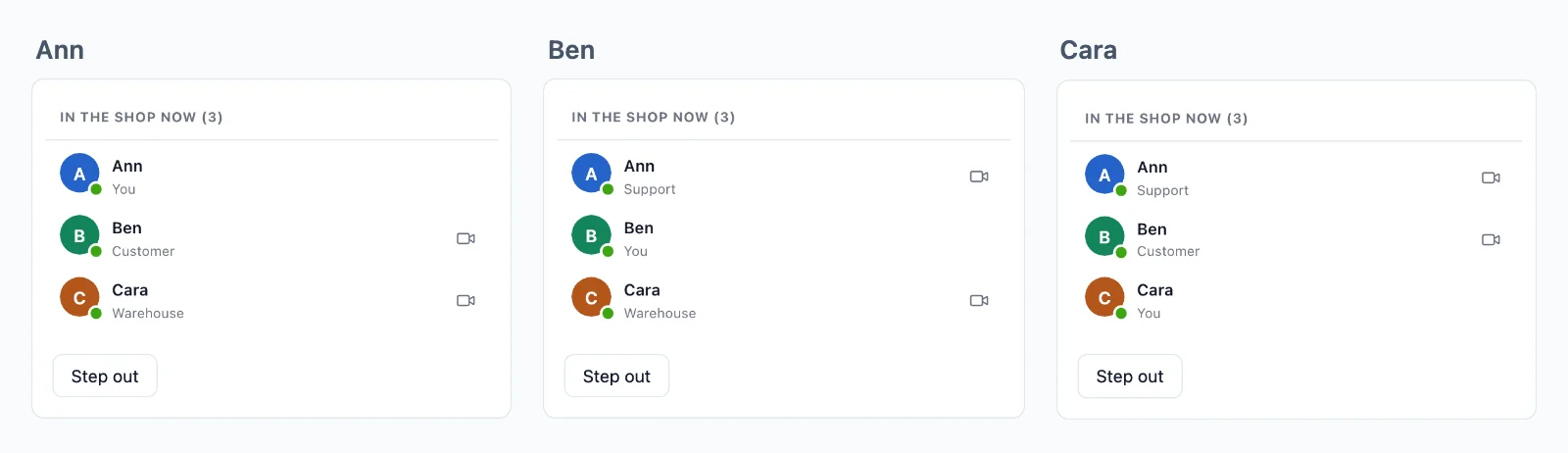
Niente si perde in una riconnessione
Una stanza può conservare i suoi ultimi eventi, e una pagina che torna riceve ciò che ha perso, in ordine, prima di ciò che viene dopo.
Chi è online
Una stanza può mostrare chi c’è dentro, con ciò che scegli di mostrare di ogni persona. Un contatore dice quanti stanno guardando una pagina, a qualsiasi scala, e chi è online è noto in tutta la tua app.
Eventi dalla pagina
Le pagine inviano alle stanze in cui si trovano, senza alcuna richiesta al tuo server: messaggi di chat, scrittura in corso, un cursore. La regola dice quali eventi si possono inviare e un webhook consegna al tuo server quelli che deve conservare.
A una persona, ovunque
Invia a un utente e arriva su ogni scheda e dispositivo che ha aperto, senza alcuna stanza da configurare.
Crittografato, con chiavi che non abbiamo mai
Eventi, presenza e cronologia viaggiano sigillati con chiavi che ha il tuo server, e le chiamate tra due persone sono crittografate end-to-end. Il cloud li trasporta senza poterli leggere.
Una connessione per tutte le schede
Le schede di un browser condividono una sola connessione, quindi una persona con tre schede aperte conta una volta.
Casi d’uso
Cosa si costruisce con i WebSocket
Ognuno è un’app completa nella documentazione, con il suo server in Node.js, PHP e Python.
Aggiornamenti dal vivo e notifiche
Un ordine che avanza nella sua pagina, una dashboard, l’avanzamento di un lavoro e un avviso a un utente in ogni scheda e app.
Chat
Conversazioni tra due persone e di gruppo, con indicatore di scrittura, spunte di lettura e reazioni, conservate nel tuo database.
Chi è online e chi è qui
Un puntino su ogni avatar, le persone in una stanza con i loro ruoli e quante guardano una pagina.
Modifiche condivise
Chi è in un documento, i suoi cursori e le modifiche, inviate in binario e conservate per una riconnessione.
Sondaggi, quiz e domande
Voti e domande che arrivano solo al tuo server, risultati inviati a tutti e un punteggio per ogni giocatore.
Aste dal vivo
Offerte che il tuo server decide una alla volta, il nuovo prezzo a tutti e un timer che si sposta con un’offerta tardiva.
Prezzi
Prezzo per connessioni, mai per messaggi
Da $11.99 al mese per 1000 connessioni simultanee, con fatturazione annuale, o $14.99 con fatturazione mensile.
Il prezzo dipende dalle connessioni simultanee, a partire da 1.000, fatturate al mese o all’anno. Messaggi e banda non vengono mai addebitati, e ciò che invia il tuo server non usa nessuna delle tue connessioni.
Lo stesso piano e lo stesso SDK portano videochiamate e streaming dal vivo, sulla stessa connessione.
Domande
Domande frequenti
Mi serve un server WebSocket mio?
No. Browser e app tengono le loro connessioni aperte verso i nostri server, e ne partono altri man mano che la tua app cresce. Il tuo server si limita a dire chi può entrare dove e a inviare ogni evento con una breve richiesta HTTP.
Funziona su hosting serverless?
Sì. Una funzione serverless non può tenere aperta una connessione e qui non deve farlo: invia ogni evento con una breve richiesta e le connessioni restano da noi. Le funzioni edge e qualsiasi altro host funzionano allo stesso modo.
Quali stack possono usare l’API WebSocket?
Next.js ed Express, Laravel e PHP semplice, Django, FastAPI e Flask, Capacitor, iOS e Android, ciascuno con una guida. Anche le app React Native e Flutter hanno stanze e presenza. Un server in qualsiasi altro linguaggio usa l’API HTTP.
Devo scrivere io il codice WebSocket?
No. L’SDK apre la connessione, si ricollega da solo e rientra nelle tue stanze, e tu ascolti gli eventi per nome. In Laravel è un driver di broadcasting, quindi broadcast() e il tuo file dei canali restano come sono.
Che cosa conta come connessione?
Un browser o un dispositivo collegato al cloud in quel momento. Le schede di un browser condividono una connessione quando la tua app serve il worker dell’SDK, e ciò che il tuo server invia tramite l’API non conta.
Cosa succede al raggiungimento del limite di connessioni?
Fino al 20% in più si collega comunque, e il titolare dell’account riceve un’email all’80% e al 100% delle connessioni, in tempo per passare a un piano più grande.
Cosa succede quando una pagina perde la connessione?
Si ricollega da sola. Una stanza che conserva la cronologia le restituisce ciò che ha perso, in ordine, fino a 5 minuti, e una pagina assente più a lungo viene avvisata, così può rileggere dal tuo server. La cronologia serve solo alle riconnessioni: i tuoi dati li conserva il tuo database.
Chi decide chi entra in una stanza?
Il tuo server, con una regola per ogni tipo di stanza: chi entra, cosa può inviare e chi può solo leggere. Il cloud fa rispettare ogni risposta, e il tuo server può togliere qualcuno da una stanza in qualsiasi momento.
Potete leggere ciò che invia la mia app?
Non in una stanza privata o di presenza. I suoi eventi, la sua cronologia e chi c’è dentro viaggiano sigillati con chiavi create dal tuo server, e il cloud li trasporta senza poterli leggere. Una stanza pubblica, a cui chiunque può unirsi, viaggia in chiaro.
Dove sono i vostri server?
I server in tempo reale che trasportano i tuoi eventi si trovano in Germania. I relay e i server multimediali per le chiamate si trovano in più paesi.
Domande sulla tua integrazione? Scrivici: ti aiutiamo con gli SDK, la schermata di chiamata e il tuo stack.