
 English
 Deutsch
 Español
 Français
 Italiano
 Nederlands
' d='M48 28h24v18a12 12 0 0 1-24 0z'/%3E%3Cpath fill='%230093DD' d='M47.5 21.5h4.6V28h-4.6zm10.2-2.5h4.6v9h-4.6zm10.2 2.5h4.6V28h-4.6z'/%3E%3Cpath fill='%23171796' d='M52.6 20h4.6v8h-4.6zm10.2 0h4.6v8h-4.6z'/%3E%3C/svg%3E) Hrvatski
 עברית
Dla aplikacji
WebSocket API bez serwera do utrzymania
API czasu rzeczywistego na hostowanych WebSockets, dla Next.js, Laravel, Django i każdego innego stacku. Twój serwer wysyła zdarzenie jednym krótkim żądaniem, a każda strona w pokoju dostaje je od razu. To my utrzymujemy połączenia, więc nie musisz uruchamiać, skalować ani restartować żadnego serwera WebSocket.
Albo wypróbuj demo na żywo: mały sklep, w którym zamówienie zmienia się na wysłane w innym oknie, gdy klikasz.
Najlepsze ceny za WebSockets. Od $11.99 miesięcznie za 1000 jednoczesnych połączeń przy rozliczeniu rocznym lub $14.99 przy rozliczeniu miesięcznym.
Next.js na serwerze i React na stronie.
'use server';

import { realtime } from '@/lib/realtime';

export async function markShipped( id: string ) {
    await saveStatus( id, 'shipped' );
    await realtime.to( `order:${ id }` )
        .emit( 'updated', { status: 'shipped' } );
}app.post( '/orders/:id/ship', async ( req, res ) => {
await saveStatus( req.params.id, 'shipped' );
await realtime.to( `order:${ req.params.id }` )
.emit( 'updated', { status: 'shipped' } );
res.json( { ok: true } );
} );import { createServer } from 'node:http';
const routes = realtime.node( userOf );
createServer( async ( req, res ) => {
if ( req.url.startsWith( '/api/realtime/' ) ) {
return routes( req, res );
}
await saveStatus( '1042', 'shipped' );
await realtime.to( 'order:1042' )
.emit( 'updated', { status: 'shipped' } );
res.end( 'ok' );
} ).listen( 3000 );public function ship( Order $order )
{
$order->update( [ 'status' => 'shipped' ] );
// Your event, as for any broadcaster.
broadcast( new OrderUpdated( $order ) );
}save_status( $id, 'shipped' );
$realtime->to( "order:{$id}" )
->emit( 'updated', [ 'status' => 'shipped' ] );from django.db import transaction
from wordplus_realtime.django import realtime
order.status = "shipped"
order.save()
# Once it commits, so nobody sees a change rolled back.
transaction.on_commit(lambda: realtime.to(f"order:{order.pk}")
.emit("updated", {"status": order.status}))@app.post("/orders/{pk}/ship")
async def ship(pk: int):
await save_status(pk, "shipped")
await realtime.to(f"order:{pk}").aemit(
"updated", {"status": "shipped"}
)
return {"ok": True}@app.post("/orders/<int:pk>/ship")
def ship(pk):
save_status(pk, "shipped")
realtime.to(f"order:{pk}").emit(
"updated", {"status": "shipped"}
)
return {"ok": True}# A signed JSON request, from any language.
# wordplus is a signed curl, on the signing page of the docs.
wordplus POST /wordplus/realtime/emit '{
"rooms": ["order:1042"],
"event": "updated",
"data": {"status": "shipped"}
}'Hooki i komponenty dla każdej aplikacji React, z dowolnym serwerem powyżej.
import { connect } from '@wordplus/realtime';

const rt = await connect();

const order = rt.join( 'order:1042' );
order.on( 'updated', ( data ) => showStatus( data.status ) );import { connect } from '@wordplus/realtime';
const rt = await connect();
const order = rt.join( 'order:1042' );
order.on( 'updated', ( data ) => showStatus( data.status ) );import { connect } from '@wordplus/realtime';
const rt = await connect();
const order = rt.join( 'order:1042' );
order.on( 'updated', ( data ) => showStatus( data.status ) );import { connect } from '@wordplus/realtime';
const rt = await connect( window.wordplusRealtimeConfig );
const order = rt.join( 'order:1042' );
order.on( 'updated', ( data ) => showStatus( data.status ) );import { connect } from '@wordplus/realtime';
const rt = await connect( window.wordplusRealtimeConfig );
const order = rt.join( 'order:1042' );
order.on( 'updated', ( data ) => showStatus( data.status ) );import { connect } from '@wordplus/realtime';
const rt = await connect( window.wordplusRealtimeConfig );
const order = rt.join( 'order:1042' );
order.on( 'updated', ( data ) => showStatus( data.status ) );import { connect } from '@wordplus/realtime';
const rt = await connect( window.wordplusRealtimeConfig );
const order = rt.join( 'order:1042' );
order.on( 'updated', ( data ) => showStatus( data.status ) );import { connect } from '@wordplus/realtime';
const rt = await connect( window.wordplusRealtimeConfig );
const order = rt.join( 'order:1042' );
order.on( 'updated', ( data ) => showStatus( data.status ) );import { connect } from '@wordplus/realtime';
const settings = await fetch( '/api/realtime/config' );
const rt = await connect( await settings.json() );
const order = rt.join( 'order:1042' );
order.on( 'updated', ( data ) => showStatus( data.status ) );import Echo from 'laravel-echo';
import { WordplusConnector } from '@wordplus/realtime/echo';
window.Echo = new Echo( {
broadcaster: WordplusConnector,
...window.wordplusRealtimeConfig,
} );
window.Echo.private( 'order:1042' )
.listen( '.updated', ( data ) => showStatus( data.status ) );'use client'; // in Next.js
import { useState } from 'react';
import { useRoom } from '@wordplus/realtime/react';
// Inside <RealtimeProvider>, once for the whole app.
export function Status( { id, initial } ) {
const [ status, setStatus ] = useState( initial );
useRoom( `order:${ id }`, {
updated: ( data ) => setStatus( data.status ),
} );
return <p>{ status }</p>;
}<script setup>
import { ref } from 'vue';
import { useRoom } from '@wordplus/realtime/vue';
// provideRealtime() once, in your root component.
const props = defineProps( [ 'id', 'initial' ] );
const status = ref( props.initial );
useRoom( () => `order:${ props.id }`, {
updated: ( data ) => { status.value = data.status; },
} );
</script>
<template>
<p>{{ status }}</p>
</template><script>
import { useRoom } from '@wordplus/realtime/svelte';
// provideRealtime() once, in your root component.
let { id } = $props();
let status = $state( 'new' );
useRoom( () => `order:${ id }`, {
updated: ( data ) => { status = data.status; },
} );
</script>
<p>{ status }</p>import { Component, Input, signal } from '@angular/core';
// realtime.ts, one connection for the whole app:
// export const realtime = connect();
import { realtime } from './realtime';
@Component( {
selector: 'app-status',
template: '<p>{{ status() }}</p>',
} )
export class StatusComponent {
@Input( { required: true } ) id!: number;
status = signal( 'new' );
async ngOnInit() {
const rt = await realtime;
rt.join( `order:${ this.id }` ).on( 'updated', ( data ) => {
this.status.set( data.status );
} );
}
async ngOnDestroy() {
( await realtime ).leave( `order:${ this.id }` );
}
}import WordPlusRealtime
let rt = Realtime(RealtimeOptions(
app: "s1500000007",
endpoint: URL(string: "https://shop.example.com/api/realtime")!,
headers: { ["Authorization": "Bearer \(session.token)"] }
))
rt.connect()
let order = rt.join("order:1042")
order.on("updated") { data, _ in
showStatus(data["status"]?.string ?? "")
}import cloud.wordplus.realtime.*
import kotlinx.serialization.json.*
val rt = Realtime(RealtimeOptions(
app = "s1500000007",
endpoint = "https://shop.example.com/api/realtime",
headers = {
mapOf("Authorization" to "Bearer ${session.token}")
},
))
rt.connect()
val order = rt.join("order:1042")
order.on("updated") { data, _ ->
val status = data.jsonObject["status"]?.jsonPrimitive?.content
showStatus(status ?: "")
}// First in index.js, which sealing needs:
// import 'react-native-get-random-values';
import { useState } from 'react';
import { Text } from 'react-native';
import { RealtimeProvider, useRoom } from '@wordplus/realtime/react';
const options = {
app: 's1500000007',
endpoint: 'https://app.example.com/api/realtime',
headers: { Authorization: 'Bearer ' + session.token },
};
export const App = () => (
<RealtimeProvider options={ options }>
<Status id={ 1042 } initial="new" />
</RealtimeProvider>
);
function Status( { id, initial } ) {
const [ status, setStatus ] = useState( initial );
useRoom( `order:${ id }`, {
updated: ( data ) => setStatus( data.status ),
} );
return <Text>{ status }</Text>;
}import 'package:wordplus_realtime/wordplus_realtime.dart';
final rt = await WordPlusRealtime.connect(
app: 's1500000007',
endpoint: 'https://app.example.com/api/realtime',
headers: {'Authorization': 'Bearer ${session.token}'},
);
final order = rt.join('order:1042');
order.on('updated', (data, _) => showStatus(data['status']));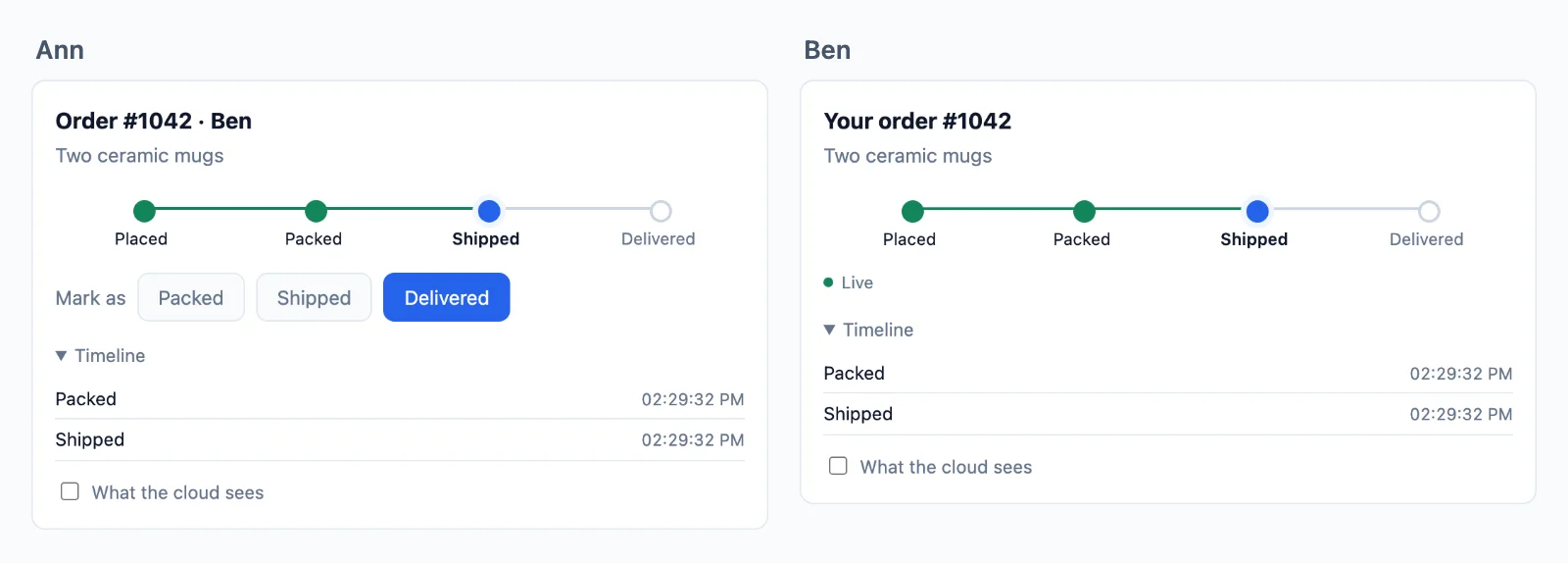
Hostowane
Część, której już nie utrzymujesz
Serwer WebSocket działa na Twoim laptopie. Na produkcji musi godzinami utrzymywać każde połączenie, przekazywać każde zdarzenie między maszynami i przetrwać Twoje wdrożenia, a hosting serverless w ogóle nie utrzyma połączenia. Tutaj połączenia zostają u nas, a Twój serwer pozostaje taki, jaki jest.
Twój serwer wysyła jedno żądanie
- Next.js, Express, Node.js, Laravel, PHP, Django, FastAPI, Flask
- Funkcje serverless i edge
- Dowolny inny stack
Twoi użytkownicy pozostają połączeni
- Karty przeglądarki
- Aplikacje mobilne
- Zdarzenia w czasie rzeczywistym
- Pokoje
- Obecność
- Ponowne połączenia
Żadnych serwerów websocket do utrzymania
Własny serwer websocket musi utrzymać każde połączenie, wyjść poza jedną maszynę i działać podczas wdrożeń. Chmura robi to za Ciebie, dokładając serwery wraz ze wzrostem ruchu, a strona przechodzi na inny serwer bez przerwy.
Dowolny hosting dla Twojego serwera
Twój serwer tylko podpisuje i wysyła, więc działa wszędzie, także w funkcjach serverless i edge, które same nie utrzymają otwartego połączenia.
Twoje logowanie zostaje Twoje
Użytkownik to dowolny identyfikator, pod którym zna go Twoja aplikacja, odczytany na Twoim serwerze, więc sesja i ciasteczka działają tak jak dotąd.
Decyduje Twój serwer
Wysyłaj do kogo chcesz, zobacz, kto jest online, i zarządzaj pokojami
Pokój to tylko nazwa, na przykład chat:7, i nic nie trzeba tworzyć w chmurze. Twoja baza danych mówi, jakie pokoje istnieją i kto w nich jest, jedna reguła na Twoim serwerze ją czyta, a chmura pilnuje, by każda strona trzymała się odpowiedzi. Oto czat zespołu, od początku do końca.
Next.js na serwerze i React na stronie.
Utwórz pokój
Zapisz to w swojej bazie danych i napisz jedną regułę, która ją czyta. Reguła działa, gdy ktoś prosi o dołączenie: false nie wpuszcza, true wpuszcza, a readOnly pozwala tylko czytać i nic nie wysyłać. Tutaj db to Twoja własna baza danych, a me to zalogowana osoba.
// A room is a row of yours. Nothing is created in the cloud.
const room = await db.room.create( { data: { name: 'Team' } } );

await db.member.create( { data: { roomId: room.id, userId: me, role: 'member' } } );

// Its name is yours to choose: row 7 is the room chat:7.// Once, for every chat. When someone asks to join chat:7, id is '7'.
realtime.room( 'chat:{id}', async ( user, { id } ) => {
const room = await db.room.findUnique( { where: { id: Number( id ) } } );
if ( !room || room.closed ) return false; // no such room, or closed
const member = await db.member.findFirst( { where: { roomId: room.id, userId: user } } );
if ( !member || member.banned ) return false; // not a member, or banned
return member.role === 'reader' ? { readOnly: true } : true;
}, { presence: true, emit: [ 'message' ] } );// A room is a row of yours. Nothing is created in the cloud.
const room = await db.room.create( { data: { name: 'Team' } } );
await db.member.create( { data: { roomId: room.id, userId: req.session.userId, role: 'member' } } );
// Its name is yours to choose: row 7 is the room chat:7.// Once, for every chat. When someone asks to join chat:7, id is '7'.
realtime.room( 'chat:{id}', async ( user, { id } ) => {
const room = await db.room.findUnique( { where: { id: Number( id ) } } );
if ( !room || room.closed ) return false; // no such room, or closed
const member = await db.member.findFirst( { where: { roomId: room.id, userId: user } } );
if ( !member || member.banned ) return false; // not a member, or banned
return member.role === 'reader' ? { readOnly: true } : true;
}, { presence: true, emit: [ 'message' ] } );// A room is a row of yours. Nothing is created in the cloud.
const room = await db.room.create( { data: { name: 'Team' } } );
await db.member.create( { data: { roomId: room.id, userId: me, role: 'member' } } );
// Its name is yours to choose: row 7 is the room chat:7.// Once, for every chat. When someone asks to join chat:7, id is '7'.
realtime.room( 'chat:{id}', async ( user, { id } ) => {
const room = await db.room.findUnique( { where: { id: Number( id ) } } );
if ( !room || room.closed ) return false; // no such room, or closed
const member = await db.member.findFirst( { where: { roomId: room.id, userId: user } } );
if ( !member || member.banned ) return false; // not a member, or banned
return member.role === 'reader' ? { readOnly: true } : true;
}, { presence: true, emit: [ 'message' ] } );// A room is a row of yours. Nothing is created in the cloud.
$room = Room::create( [ 'name' => 'Team' ] );
$room->members()->create( [ 'user_id' => auth()->id(), 'role' => 'member' ] );
// Its name is yours to choose: row 7 is the room chat:7.// Once, for every chat. When someone asks to join chat:7, $p['id'] is '7'.
$this->callAfterResolving( Realtime::class, function ( Realtime $realtime ) {
$realtime->room( 'chat:{id}', function ( $user, array $p ) {
$room = Room::find( $p['id'] );
if ( ! $room || $room->closed ) {
return false; // no such room, or closed
}
$member = $room->members()->where( 'user_id', $user )->first();
if ( ! $member || $member->banned ) {
return false; // not a member, or banned
}
return $member->role === 'reader' ? [ 'readOnly' => true ] : true;
}, [ 'presence' => true, 'emit' => [ 'message' ] ] );
} );// A room is a row of yours. Nothing is created in the cloud.
$db->prepare( 'INSERT INTO rooms (name) VALUES (?)' )->execute( [ 'Team' ] );
$room = $db->lastInsertId();
$db->prepare( 'INSERT INTO members (room_id, user_id, role) VALUES (?, ?, ?)' )
->execute( [ $room, $_SESSION['user_id'], 'member' ] );
// Its name is yours to choose: row 7 is the room chat:7.// Once, for every chat. When someone asks to join chat:7, $p['id'] is '7'.
$realtime->room( 'chat:{id}', function ( $user, array $p ) use ( $db ) {
$query = $db->prepare( 'SELECT closed FROM rooms WHERE id = ?' );
$query->execute( [ $p['id'] ] );
$room = $query->fetch();
if ( ! $room || $room['closed'] ) {
return false; // no such room, or closed
}
$query = $db->prepare( 'SELECT role, banned FROM members WHERE room_id = ? AND user_id = ?' );
$query->execute( [ $p['id'], $user ] );
$member = $query->fetch();
if ( ! $member || $member['banned'] ) {
return false; // not a member, or banned
}
return $member['role'] === 'reader' ? [ 'readOnly' => true ] : true;
}, [ 'presence' => true, 'emit' => [ 'message' ] ] );# A room is a row of yours. Nothing is created in the cloud.
room = Room.objects.create(name="Team")
room.members.create(user=request.user, role="member")
# Its name is yours to choose: row 7 is the room chat:7.# Once, for every chat. When someone asks to join chat:7, p["id"] is "7".
def may_join_chat(user, p):
room = Room.objects.filter(pk=p["id"]).first()
if room is None or room.closed:
return False # no such room, or closed
member = room.members.filter(user_id=user).first()
if member is None or member.banned:
return False # not a member, or banned
return {"readOnly": True} if member.role == "reader" else True
realtime.room("chat:{id}", may_join_chat, presence=True, emit=["message"])# A room is a row of yours. Nothing is created in the cloud.
room = Room(name="Team", members=[Member(user_id=me, role="member")])
db.add(room)
db.commit()
# Its name is yours to choose: row 7 is the room chat:7.# Once, for every chat. When someone asks to join chat:7, p["id"] is "7".
def may_join_chat(user, p):
with SessionLocal() as db:
room = db.get(Room, int(p["id"]))
if room is None or room.closed:
return False # no such room, or closed
member = db.query(Member).filter_by(room_id=room.id, user_id=user).first()
if member is None or member.banned:
return False # not a member, or banned
return {"readOnly": True} if member.role == "reader" else True
realtime.room("chat:{id}", may_join_chat, presence=True, emit=["message"])# A room is a row of yours. Nothing is created in the cloud.
room = Room(name="Team", members=[Member(user_id=session["user_id"], role="member")])
db.session.add(room)
db.session.commit()
# Its name is yours to choose: row 7 is the room chat:7.# Once, for every chat. When someone asks to join chat:7, p["id"] is "7".
def may_join_chat(user, p):
room = db.session.get(Room, int(p["id"]))
if room is None or room.closed:
return False # no such room, or closed
member = Member.query.filter_by(room_id=room.id, user_id=user).first()
if member is None or member.banned:
return False # not a member, or banned
return {"readOnly": True} if member.role == "reader" else True
realtime.room("chat:{id}", may_join_chat, presence=True, emit=["message"])-- A room is a row of yours. Nothing is created in the cloud.
INSERT INTO rooms (name) VALUES ('Team');
INSERT INTO members (room_id, user_id, role) VALUES (7, 42, 'member');
-- Its name is yours to choose: row 7 is the room chat:7.// In Go, on the example in the docs. Any language does the same, and sealing is one step more.
// Your /auth route asks this for each room a page wants. For chat:7, id is "7".
func roomRule(room, user string) (*wordplus.Room, string) {
id, isChat := strings.CutPrefix(room, "chat:")
if !isChat {
return nil, "no_rule"
}
row := findRoom(id)
if row == nil || row.Closed {
return nil, "forbidden" // no such room, or closed
}
member := findMember(id, user)
if member == nil || member.Banned {
return nil, "forbidden" // not a member, or banned
}
return &wordplus.Room{
Presence: true,
Emit: []string{"message"},
ReadOnly: member.Role == "reader",
Info: profile(user),
}, ""
}Dołącz i wysyłaj
Strona dołącza po nazwie, a Twoja reguła odpowiada. Potem słyszy to, co trafia do pokoju, i sama do niego wysyła, tak jak pozwala reguła. draw i pozostałe to Twoje własne funkcje.
Hooki i komponenty dla każdej aplikacji React, z dowolnym serwerem powyżej.
import { connect } from '@wordplus/realtime';

const rt = await connect();

const chat = rt.join( 'chat:7' );

chat.on( 'message', ( data, meta ) => draw( data.text, meta.from ) );
chat.on( 'error', ( e ) => showOut( e.code ) );   // forbidden: your rule said no
chat.on( 'kicked', () => showOut( 'kicked' ) );

chat.emit( 'message', { text: 'Hi' } );import { connect } from '@wordplus/realtime';
const config = document.getElementById( 'realtime' ).textContent;
const rt = await connect( JSON.parse( config ) );
const chat = rt.join( 'chat:7' );
chat.on( 'message', ( data, meta ) => draw( data.text, meta.from ) );
chat.on( 'error', ( e ) => showOut( e.code ) ); // forbidden: your rule said no
chat.on( 'kicked', () => showOut( 'kicked' ) );
chat.emit( 'message', { text: 'Hi' } );import { connect } from '@wordplus/realtime';
const config = document.getElementById( 'realtime' ).textContent;
const rt = await connect( JSON.parse( config ) );
const chat = rt.join( 'chat:7' );
chat.on( 'message', ( data, meta ) => draw( data.text, meta.from ) );
chat.on( 'error', ( e ) => showOut( e.code ) ); // forbidden: your rule said no
chat.on( 'kicked', () => showOut( 'kicked' ) );
chat.emit( 'message', { text: 'Hi' } );import { connect } from '@wordplus/realtime';
const rt = await connect( window.wordplusRealtimeConfig );
const chat = rt.join( 'chat:7' );
chat.on( 'message', ( data, meta ) => draw( data.text, meta.from ) );
chat.on( 'error', ( e ) => showOut( e.code ) ); // forbidden: your rule said no
chat.on( 'kicked', () => showOut( 'kicked' ) );
chat.emit( 'message', { text: 'Hi' } );import { connect } from '@wordplus/realtime';
const rt = await connect( window.wordplusRealtimeConfig );
const chat = rt.join( 'chat:7' );
chat.on( 'message', ( data, meta ) => draw( data.text, meta.from ) );
chat.on( 'error', ( e ) => showOut( e.code ) ); // forbidden: your rule said no
chat.on( 'kicked', () => showOut( 'kicked' ) );
chat.emit( 'message', { text: 'Hi' } );import { connect } from '@wordplus/realtime';
const rt = await connect( window.wordplusRealtimeConfig );
const chat = rt.join( 'chat:7' );
chat.on( 'message', ( data, meta ) => draw( data.text, meta.from ) );
chat.on( 'error', ( e ) => showOut( e.code ) ); // forbidden: your rule said no
chat.on( 'kicked', () => showOut( 'kicked' ) );
chat.emit( 'message', { text: 'Hi' } );import { connect } from '@wordplus/realtime';
const rt = await connect( window.wordplusRealtimeConfig );
const chat = rt.join( 'chat:7' );
chat.on( 'message', ( data, meta ) => draw( data.text, meta.from ) );
chat.on( 'error', ( e ) => showOut( e.code ) ); // forbidden: your rule said no
chat.on( 'kicked', () => showOut( 'kicked' ) );
chat.emit( 'message', { text: 'Hi' } );import { connect } from '@wordplus/realtime';
const rt = await connect( window.wordplusRealtimeConfig );
const chat = rt.join( 'chat:7' );
chat.on( 'message', ( data, meta ) => draw( data.text, meta.from ) );
chat.on( 'error', ( e ) => showOut( e.code ) ); // forbidden: your rule said no
chat.on( 'kicked', () => showOut( 'kicked' ) );
chat.emit( 'message', { text: 'Hi' } );import { connect } from '@wordplus/realtime';
const settings = await fetch( '/api/realtime/config' );
const rt = await connect( await settings.json() );
const chat = rt.join( 'chat:7' );
chat.on( 'message', ( data, meta ) => draw( data.text, meta.from ) );
chat.on( 'error', ( e ) => showOut( e.code ) ); // forbidden: your rule said no
chat.on( 'kicked', () => showOut( 'kicked' ) );
chat.emit( 'message', { text: 'Hi' } );const rt = window.Echo.connector.rt; // the connection Echo made
const chat = rt.join( 'chat:7' );
chat.on( 'message', ( data, meta ) => draw( data.text, meta.from ) );
chat.on( 'error', ( e ) => showOut( e.code ) ); // forbidden: your rule said no
chat.on( 'kicked', () => showOut( 'kicked' ) );
chat.emit( 'message', { text: 'Hi' } );'use client'; // in Next.js
import { useRoom } from '@wordplus/realtime/react';
// Inside <RealtimeProvider>, once for the whole app.
export function Chat( { id } ) {
const chat = useRoom( `chat:${ id }`, {
message: ( data, meta ) => draw( data.text, meta.from ),
} );
// forbidden when your rule says no, kicked when they are taken out.
if ( chat.error ) return <p>You are not in this room.</p>;
return <SendBox onSend={ ( text ) => chat.emit( 'message', { text } ) } />;
}<script setup>
import { useRoom } from '@wordplus/realtime/vue';
// provideRealtime() once, in your root component.
const { error, emit } = useRoom( 'chat:7', {
message: ( data, meta ) => draw( data.text, meta.from ),
} );
</script>
<template>
<!-- forbidden when your rule says no, kicked when they are taken out -->
<p v-if="error">You are not in this room.</p>
<SendBox v-else @send="( text ) => emit( 'message', { text } )" />
</template><script>
import { useRoom } from '@wordplus/realtime/svelte';
import SendBox from './SendBox.svelte';
// provideRealtime() once, in your root component.
const chat = useRoom( 'chat:7', {
message: ( data, meta ) => draw( data.text, meta.from ),
} );
</script>
<!-- forbidden when your rule says no, kicked when they are taken out -->
{#if chat.error}
<p>You are not in this room.</p>
{:else}
<SendBox onsend={ ( text ) => chat.emit( 'message', { text } ) } />
{/if}import { Component, signal } from '@angular/core';
import type { Room } from '@wordplus/realtime';
// realtime.ts, one connection for the whole app:
// export const realtime = connect();
import { realtime } from './realtime';
import { SendBox } from './send-box';
@Component( {
selector: 'app-chat',
imports: [ SendBox ],
template: `
@if ( out() ) {
<p>You are not in this room.</p>
} @else {
<app-send-box (send)="send( $event )" />
}
`,
} )
export class ChatComponent {
chat?: Room;
out = signal( false );
async ngOnInit() {
this.chat = ( await realtime ).join( 'chat:7' );
this.chat.on( 'message', ( data, meta ) => draw( data.text, meta.from ) );
this.chat.on( 'error', () => this.out.set( true ) ); // forbidden: your rule said no
this.chat.on( 'kicked', () => this.out.set( true ) );
}
send( text: string ) {
this.chat?.emit( 'message', { text } );
}
async ngOnDestroy() {
( await realtime ).leave( 'chat:7' );
}
}let chat = rt.join("chat:7")
chat.on("message") { data, meta in draw(data["text"]?.string ?? "", meta.from) }
chat.on("error") { error, _ in showOut(error["code"]?.string ?? "") } // forbidden: your rule said no
chat.on("kicked") { _, _ in showOut("kicked") }
chat.emit("message", ["text": "Hi"])val chat = rt.join("chat:7")
chat.on("message") { data, meta -> draw(data.jsonObject["text"]?.jsonPrimitive?.content ?: "", meta.from) }
chat.on("error") { error, _ -> showOut(error.jsonObject["code"]?.jsonPrimitive?.content ?: "") } // forbidden: your rule said no
chat.on("kicked") { _, _ -> showOut("kicked") }
chat.emit("message", buildJsonObject { put("text", "Hi") })import { Text } from 'react-native';
import { useRoom } from '@wordplus/realtime/react';
// Inside <RealtimeProvider>, once for the whole app.
export function Chat( { id } ) {
const chat = useRoom( `chat:${ id }`, {
message: ( data, meta ) => draw( data.text, meta.from ),
} );
// forbidden when your rule says no, kicked when they are taken out.
if ( chat.error ) return <Text>You are not in this room.</Text>;
return <SendBox onSend={ ( text ) => chat.emit( 'message', { text } ) } />;
}final chat = rt.join('chat:7');
chat.on('message', (data, meta) => draw(data['text'], meta.from));
chat.on('error', (error, _) => showOut(error['code'])); // forbidden: your rule said no
chat.on('kicked', (_, _) => showOut('kicked'));
chat.emit('message', {'text': 'Hi'});// Your server sends to the room too.
await realtime.to( 'chat:7' ).emit( 'message', { text: 'Welcome' } );// Your server sends to the room too.
await realtime.to( 'chat:7' ).emit( 'message', { text: 'Welcome' } );// Your server sends to the room too.
await realtime.to( 'chat:7' ).emit( 'message', { text: 'Welcome' } );// Your server sends to the room too.
Realtime::to( 'chat:7' )->emit( 'message', [ 'text' => 'Welcome' ] );// Your server sends to the room too.
$realtime->to( 'chat:7' )->emit( 'message', [ 'text' => 'Welcome' ] );# Your server sends to the room too.
realtime.to("chat:7").emit("message", {"text": "Welcome"})# Your server sends to the room too. In an async route, await aemit().
realtime.to("chat:7").emit("message", {"text": "Welcome"})# Your server sends to the room too.
realtime.to("chat:7").emit("message", {"text": "Welcome"})# Your server sends to the room too. wordplus is a signed curl, on the signing page of the docs.
wordplus POST /wordplus/realtime/emit '{"rooms":["chat:7"],"event":"message","data":{"text":"Welcome"}}'Potwierdź i zachowaj wiadomość
Wysyłanie z ack mówi stronie, kiedy chmura przyjęła wiadomość albo dlaczego Twoja reguła ją odrzuciła. Webhook przekazuje następnie każdą Twojemu serwerowi, aby zachował ją w Twojej bazie danych, bo chmura trzyma zdarzenia tylko na potrzeby ponownych połączeń. markSent i db należą do Ciebie.
Hooki i komponenty dla każdej aplikacji React, z dowolnym serwerem powyżej.
// Once the cloud has checked it, kept it and sent it on: its id and time.
// Your rule saying no rejects it, with a code.
const { id, at } = await chat.emitWithAck( 'message', { text: 'Hi' } );

markSent( id, at );// Once the cloud has checked it, kept it and sent it on: its id and time.
// Your rule saying no rejects it, with a code.
const { id, at } = await chat.emitWithAck( 'message', { text: 'Hi' } );
markSent( id, at );// Once the cloud has checked it, kept it and sent it on: its id and time.
// Your rule saying no rejects it, with a code.
const { id, at } = await chat.emitWithAck( 'message', { text: 'Hi' } );
markSent( id, at );// Once the cloud has checked it, kept it and sent it on: its id and time.
// Your rule saying no rejects it, with a code.
const { id, at } = await chat.emitWithAck( 'message', { text: 'Hi' } );
markSent( id, at );// Once the cloud has checked it, kept it and sent it on: its id and time.
// Your rule saying no rejects it, with a code.
const { id, at } = await chat.emitWithAck( 'message', { text: 'Hi' } );
markSent( id, at );// Once the cloud has checked it, kept it and sent it on: its id and time.
// Your rule saying no rejects it, with a code.
const { id, at } = await chat.emitWithAck( 'message', { text: 'Hi' } );
markSent( id, at );// Once the cloud has checked it, kept it and sent it on: its id and time.
// Your rule saying no rejects it, with a code.
const { id, at } = await chat.emitWithAck( 'message', { text: 'Hi' } );
markSent( id, at );// Once the cloud has checked it, kept it and sent it on: its id and time.
// Your rule saying no rejects it, with a code.
const { id, at } = await chat.emitWithAck( 'message', { text: 'Hi' } );
markSent( id, at );// Once the cloud has checked it, kept it and sent it on: its id and time.
// Your rule saying no rejects it, with a code.
const { id, at } = await chat.emitWithAck( 'message', { text: 'Hi' } );
markSent( id, at );const rt = window.Echo.connector.rt; // the connection Echo made
const chat = rt.join( 'chat:7' );
// Once the cloud has checked it, kept it and sent it on: its id and time.
const { id, at } = await chat.emitWithAck( 'message', { text: 'Hi' } );const chat = useRoom( 'chat:7' );
// Once the cloud has checked it, kept it and sent it on: its id and time.
const { id, at } = await chat.emitWithAck( 'message', { text: 'Hi' } );<script setup>
import { useRoom } from '@wordplus/realtime/vue';
const { emitWithAck } = useRoom( 'chat:7' );
// Once the cloud has checked it, kept it and sent it on: its id and time.
const send = async ( text ) => markSent( await emitWithAck( 'message', { text } ) );
</script><script>
import { useRoom } from '@wordplus/realtime/svelte';
const chat = useRoom( 'chat:7' );
// Once the cloud has checked it, kept it and sent it on: its id and time.
const send = async ( text ) => markSent( await chat.emitWithAck( 'message', { text } ) );
</script>// Once the cloud has checked it, kept it and sent it on: its id and time.
async send( text: string ) {
const { id, at } = await this.chat!.emitWithAck( 'message', { text } );
markSent( id, at );
}// Once the cloud has checked it, kept it and sent it on: ack.id, ack.at.
let ack = try await chat.emitWithAck("message", ["text": "Hi"])// Once the cloud has checked it, kept it and sent it on: ack.id, ack.at.
val ack = chat.emitWithAck("message", buildJsonObject { put("text", "Hi") })const chat = useRoom( 'chat:7' );
// Once the cloud has checked it, kept it and sent it on: its id and time.
const { id, at } = await chat.emitWithAck( 'message', { text: 'Hi' } );// Once the cloud has checked it, kept it and sent it on: ack.id, ack.at.
final ack = await chat.emitWithAck('message', {'text': 'Hi'});// The webhook gives your server what pages send. Keep it once, by the id the pages saw.
realtime.on( 'message', async ( { room, from, data, event_id, at } ) => {
await db.message.upsert( { id: event_id, room, from, text: data.text, at } );
} );// The webhook gives your server what pages send. Keep it once, by the id the pages saw.
realtime.on( 'message', async ( { room, from, data, event_id, at } ) => {
await db.message.upsert( { id: event_id, room, from, text: data.text, at } );
} );// The webhook gives your server what pages send. Keep it once, by the id the pages saw.
realtime.on( 'message', async ( { room, from, data, event_id, at } ) => {
await db.message.upsert( { id: event_id, room, from, text: data.text, at } );
} );$this->callAfterResolving( Realtime::class, function ( Realtime $realtime ) {
// The webhook gives your server what pages send. Keep it once, by the id the pages saw.
$realtime->on( 'message', function ( array $e ) {
Message::updateOrCreate( [ 'id' => $e['event_id'] ], [ 'room' => $e['room'], 'from' => $e['from'], 'text' => $e['data']['text'] ] );
} );
} );// The webhook gives your server what pages send. Keep it once, by the id the pages saw.
$realtime->on( 'message', function ( array $e ) {
save_message( $e['event_id'], $e['room'], $e['from'], $e['data']['text'], $e['at'] );
} );# The webhook gives your server what pages send. Keep it once, by the id the pages saw.
def keep_message(e):
save_message(e["event_id"], e["room"], e["from"], e["data"]["text"], e["at"])
realtime.on("message", keep_message)# The webhook gives your server what pages send. Keep it once, by the id the pages saw.
def keep_message(e):
save_message(e["event_id"], e["room"], e["from"], e["data"]["text"], e["at"])
realtime.on("message", keep_message)# The webhook gives your server what pages send. Keep it once, by the id the pages saw.
def keep_message(e):
save_message(e["event_id"], e["room"], e["from"], e["data"]["text"], e["at"])
realtime.on("message", keep_message)// In your webhook route, once its signature is checked as the docs say.
// Keep it once, by the id the pages saw.
if event.Type == "message" {
saveMessage(event.EventID, event.Room, event.From, event.Data["text"], event.At)
}Pokaż, kto pisze
To, co liczy się tylko teraz, idzie jako volatile: jest odrzucane zamiast czekać w kolejce offline i nigdy nie jest zachowywane. Dociera do wszystkich pozostałych w pokoju, także do innych kart nadawcy. showTyping to Twoja własna funkcja.
// Pages may send what your rule lists.
realtime.room( 'chat:{id}', mayJoin, { presence: true, emit: [ 'message', 'typing' ] } );// Pages may send what your rule lists.
realtime.room( 'chat:{id}', mayJoin, { presence: true, emit: [ 'message', 'typing' ] } );// Pages may send what your rule lists.
realtime.room( 'chat:{id}', mayJoin, { presence: true, emit: [ 'message', 'typing' ] } );$this->callAfterResolving( Realtime::class, function ( Realtime $realtime ) {
// Pages may send what your rule lists.
$realtime->room( 'chat:{id}', $mayJoin, [ 'presence' => true, 'emit' => [ 'message', 'typing' ] ] );
} );// Pages may send what your rule lists.
$realtime->room( 'chat:{id}', $may_join, [ 'presence' => true, 'emit' => [ 'message', 'typing' ] ] );# Pages may send what your rule lists.
realtime.room("chat:{id}", may_join, presence=True, emit=["message", "typing"])# Pages may send what your rule lists.
realtime.room("chat:{id}", may_join, presence=True, emit=["message", "typing"])# Pages may send what your rule lists.
realtime.room("chat:{id}", may_join, presence=True, emit=["message", "typing"])// In your /auth route, in Go on the example in the docs. Pages may send what the room lists.
room := wordplus.Room{Presence: true, Emit: []string{"message", "typing"}}Hooki i komponenty dla każdej aplikacji React, z dowolnym serwerem powyżej.
// Volatile: dropped rather than queued while offline, and never kept.
chat.volatile.emit( 'typing', { on: true } );

chat.on( 'typing', ( data, meta ) => showTyping( meta.from, data.on ) );// Volatile: dropped rather than queued while offline, and never kept.
chat.volatile.emit( 'typing', { on: true } );
chat.on( 'typing', ( data, meta ) => showTyping( meta.from, data.on ) );// Volatile: dropped rather than queued while offline, and never kept.
chat.volatile.emit( 'typing', { on: true } );
chat.on( 'typing', ( data, meta ) => showTyping( meta.from, data.on ) );// Volatile: dropped rather than queued while offline, and never kept.
chat.volatile.emit( 'typing', { on: true } );
chat.on( 'typing', ( data, meta ) => showTyping( meta.from, data.on ) );// Volatile: dropped rather than queued while offline, and never kept.
chat.volatile.emit( 'typing', { on: true } );
chat.on( 'typing', ( data, meta ) => showTyping( meta.from, data.on ) );// Volatile: dropped rather than queued while offline, and never kept.
chat.volatile.emit( 'typing', { on: true } );
chat.on( 'typing', ( data, meta ) => showTyping( meta.from, data.on ) );// Volatile: dropped rather than queued while offline, and never kept.
chat.volatile.emit( 'typing', { on: true } );
chat.on( 'typing', ( data, meta ) => showTyping( meta.from, data.on ) );// Volatile: dropped rather than queued while offline, and never kept.
chat.volatile.emit( 'typing', { on: true } );
chat.on( 'typing', ( data, meta ) => showTyping( meta.from, data.on ) );// Volatile: dropped rather than queued while offline, and never kept.
chat.volatile.emit( 'typing', { on: true } );
chat.on( 'typing', ( data, meta ) => showTyping( meta.from, data.on ) );const chat = window.Echo.connector.rt.join( 'chat:7' );
// Volatile: dropped rather than queued while offline, and never kept.
chat.volatile.emit( 'typing', { on: true } );

chat.on( 'typing', ( data, meta ) => showTyping( meta.from, data.on ) );const chat = useRoom( 'chat:7' );
const typing = useTyping( chat ); // the ids of those typing, gone when they stop
// Volatile: dropped rather than queued while offline, and never kept.
const onKey = () => chat.room?.volatile.emit( 'typing', { on: true } );<script setup>
import { useRoom, useTyping } from '@wordplus/realtime/vue';
const chat = useRoom( 'chat:7' );
const typing = useTyping( chat ); // the ids of those typing, gone when they stop
// Volatile: dropped rather than queued while offline, and never kept.
const onKey = () => chat.room.value?.volatile.emit( 'typing', { on: true } );
</script><script>
import { useRoom, useTyping } from '@wordplus/realtime/svelte';
const chat = useRoom( 'chat:7' );
const typing = useTyping( chat ); // typing.current: the ids of those typing
// Volatile: dropped rather than queued while offline, and never kept.
const onKey = () => chat.room?.volatile.emit( 'typing', { on: true } );
</script>// Volatile: dropped rather than queued while offline, and never kept.
onKey() {
this.chat?.volatile.emit( 'typing', { on: true } );
}// Volatile: dropped rather than queued while offline, and never kept.
chat.volatile.emit("typing", ["on": true])
chat.on("typing") { data, meta in showTyping(meta.from, data["on"]?.bool ?? false) }// Volatile: dropped rather than queued while offline, and never kept.
chat.volatile.emit("typing", buildJsonObject { put("on", true) })
chat.on("typing") { data, meta -> showTyping(meta.from, data.jsonObject["on"]) }const chat = useRoom( 'chat:7' );
const typing = useTyping( chat ); // the ids of those typing, gone when they stop
// Volatile: dropped rather than queued while offline, and never kept.
const onChangeText = () => chat.room?.volatile.emit( 'typing', { on: true } );// Volatile: dropped rather than queued while offline, and never kept.
chat.volatile.emit('typing', {'on': true});
chat.on('typing', (data, meta) => showTyping(meta.from, data['on']));Nadrób zaległości po ponownym połączeniu
Pokój, któremu Twoja reguła daje historię, przechowuje swoje ostatnie zdarzenia do 5 minut. Strona, która wraca, dostaje to, co ją ominęło, po kolei, zanim dotrze to, co nastąpi dalej, także gdy wraca na inny z naszych serwerów. mayJoin i draw należą do Ciebie.
// Keeps its last 50 events, for 5 minutes at most.
realtime.room( 'chat:{id}', mayJoin, { history: { last: 50, seconds: 300 }, emit: [ 'message' ] } );// Keeps its last 50 events, for 5 minutes at most.
realtime.room( 'chat:{id}', mayJoin, { history: { last: 50, seconds: 300 }, emit: [ 'message' ] } );// Keeps its last 50 events, for 5 minutes at most.
realtime.room( 'chat:{id}', mayJoin, { history: { last: 50, seconds: 300 }, emit: [ 'message' ] } );$this->callAfterResolving( Realtime::class, function ( Realtime $realtime ) {
// Keeps its last 50 events, for 5 minutes at most.
$realtime->room( 'chat:{id}', $mayJoin, [ 'history' => [ 'last' => 50, 'seconds' => 300 ], 'emit' => [ 'message' ] ] );
} );// Keeps its last 50 events, for 5 minutes at most.
$realtime->room( 'chat:{id}', $may_join, [ 'history' => [ 'last' => 50, 'seconds' => 300 ], 'emit' => [ 'message' ] ] );# Keeps its last 50 events, for 5 minutes at most.
realtime.room("chat:{id}", may_join, history={"last": 50, "seconds": 300}, emit=["message"])# Keeps its last 50 events, for 5 minutes at most.
realtime.room("chat:{id}", may_join, history={"last": 50, "seconds": 300}, emit=["message"])# Keeps its last 50 events, for 5 minutes at most.
realtime.room("chat:{id}", may_join, history={"last": 50, "seconds": 300}, emit=["message"])// In your /auth route, in Go on the example in the docs. Its last 50 events, for 5 minutes.
room := wordplus.Room{History: 50, Emit: []string{"message"}}Hooki i komponenty dla każdej aplikacji React, z dowolnym serwerem powyżej.
// A page back on the line gets what it missed first, in order, with meta.replayed.
chat.on( 'message', ( data, meta ) => draw( data.text, meta.from, meta.replayed ) );

// Or read back through it yourself, the newest first by pages.
const { events, more } = await chat.history( { limit: 50 } );// A page back on the line gets what it missed first, in order, with meta.replayed.
chat.on( 'message', ( data, meta ) => draw( data.text, meta.from, meta.replayed ) );
// Or read back through it yourself, the newest first by pages.
const { events, more } = await chat.history( { limit: 50 } );// A page back on the line gets what it missed first, in order, with meta.replayed.
chat.on( 'message', ( data, meta ) => draw( data.text, meta.from, meta.replayed ) );
// Or read back through it yourself, the newest first by pages.
const { events, more } = await chat.history( { limit: 50 } );// A page back on the line gets what it missed first, in order, with meta.replayed.
chat.on( 'message', ( data, meta ) => draw( data.text, meta.from, meta.replayed ) );
// Or read back through it yourself, the newest first by pages.
const { events, more } = await chat.history( { limit: 50 } );// A page back on the line gets what it missed first, in order, with meta.replayed.
chat.on( 'message', ( data, meta ) => draw( data.text, meta.from, meta.replayed ) );
// Or read back through it yourself, the newest first by pages.
const { events, more } = await chat.history( { limit: 50 } );// A page back on the line gets what it missed first, in order, with meta.replayed.
chat.on( 'message', ( data, meta ) => draw( data.text, meta.from, meta.replayed ) );
// Or read back through it yourself, the newest first by pages.
const { events, more } = await chat.history( { limit: 50 } );// A page back on the line gets what it missed first, in order, with meta.replayed.
chat.on( 'message', ( data, meta ) => draw( data.text, meta.from, meta.replayed ) );
// Or read back through it yourself, the newest first by pages.
const { events, more } = await chat.history( { limit: 50 } );// A page back on the line gets what it missed first, in order, with meta.replayed.
chat.on( 'message', ( data, meta ) => draw( data.text, meta.from, meta.replayed ) );
// Or read back through it yourself, the newest first by pages.
const { events, more } = await chat.history( { limit: 50 } );// A page back on the line gets what it missed first, in order, with meta.replayed.
chat.on( 'message', ( data, meta ) => draw( data.text, meta.from, meta.replayed ) );
// Or read back through it yourself, the newest first by pages.
const { events, more } = await chat.history( { limit: 50 } );const chat = window.Echo.connector.rt.join( 'chat:7' );
// A page back on the line gets what it missed first, in order, with meta.replayed.
chat.on( 'message', ( data, meta ) => draw( data.text, meta.from, meta.replayed ) );// A page back on the line gets what it missed first, in order, with meta.replayed.
useRoom( 'chat:7', {
message: ( data, meta ) => draw( data.text, meta.from, meta.replayed ),
} );<script setup>
import { useRoom } from '@wordplus/realtime/vue';
// A page back on the line gets what it missed first, in order, with meta.replayed.
useRoom( 'chat:7', {
    message: ( data, meta ) => draw( data.text, meta.from, meta.replayed ),
} );
</script><script>
import { useRoom } from '@wordplus/realtime/svelte';
// A page back on the line gets what it missed first, in order, with meta.replayed.
useRoom( 'chat:7', {
message: ( data, meta ) => draw( data.text, meta.from, meta.replayed ),
} );
</script>async ngOnInit() {
this.chat = ( await realtime ).join( 'chat:7' );
// A page back on the line gets what it missed first, in order, with meta.replayed.
this.chat.on( 'message', ( data, meta ) => draw( data.text, meta.from, meta.replayed ) );
}// An app back on the line gets what it missed first, in order, with meta.replayed.
chat.on("message") { data, meta in draw(data["text"]?.string ?? "", meta.from, meta.replayed) }// An app back on the line gets what it missed first, in order, with meta.replayed.
chat.on("message") { data, meta ->
draw(data.jsonObject["text"]?.jsonPrimitive?.content ?: "", meta.from, meta.replayed)
}// An app back on the line gets what it missed first, in order, with meta.replayed.
useRoom( 'chat:7', {
message: ( data, meta ) => draw( data.text, meta.from, meta.replayed ),
} );// An app back on the line gets what it missed first, in order, with meta.replayed.
chat.on('message', (data, meta) => draw(data['text'], meta.from, meta.replayed));Wyślij do jednej osoby
Twój serwer wysyła do użytkownika po jego id, na każdą kartę i każde urządzenie, które ma otwarte, bez dołączania do pokoju. Kto nie ma nic otwartego, nie dostaje nic, więc to, co ważne, trzymaj w swojej bazie danych. showNotice to Twoja własna funkcja.
// To every tab and device they have open. 'notice' is a name of your own.
await realtime.toUser( 43 ).emit( 'notice', { text: 'Your order shipped' } );

// To several people at once, up to 1,000.
await realtime.toUser( [ 34, 43 ] ).emit( 'notice', { text: 'Starting soon' } );// To every tab and device they have open. 'notice' is a name of your own.
await realtime.toUser( 43 ).emit( 'notice', { text: 'Your order shipped' } );
// To several people at once, up to 1,000.
await realtime.toUser( [ 34, 43 ] ).emit( 'notice', { text: 'Starting soon' } );// To every tab and device they have open. 'notice' is a name of your own.
await realtime.toUser( 43 ).emit( 'notice', { text: 'Your order shipped' } );
// To several people at once, up to 1,000.
await realtime.toUser( [ 34, 43 ] ).emit( 'notice', { text: 'Starting soon' } );// To every tab and device they have open. 'notice' is a name of your own.
Realtime::toUser( 43 )->emit( 'notice', [ 'text' => 'Your order shipped' ] );
// To several people at once, up to 1,000.
Realtime::toUser( [ 34, 43 ] )->emit( 'notice', [ 'text' => 'Starting soon' ] );// To every tab and device they have open. 'notice' is a name of your own.
$realtime->toUser( 43 )->emit( 'notice', [ 'text' => 'Your order shipped' ] );
// To several people at once, up to 1,000.
$realtime->toUser( [ 34, 43 ] )->emit( 'notice', [ 'text' => 'Starting soon' ] );# To every tab and device they have open. "notice" is a name of your own.
realtime.to_user(43).emit("notice", {"text": "Your order shipped"})
# To several people at once, up to 1,000.
realtime.to_user([34, 43]).emit("notice", {"text": "Starting soon"})# In a def route, as these calls block.
# To every tab and device they have open. "notice" is a name of your own.
realtime.to_user(43).emit("notice", {"text": "Your order shipped"})

# To several people at once, up to 1,000.
realtime.to_user([34, 43]).emit("notice", {"text": "Starting soon"})# To every tab and device they have open. "notice" is a name of your own.
realtime.to_user(43).emit("notice", {"text": "Your order shipped"})
# To several people at once, up to 1,000.
realtime.to_user([34, 43]).emit("notice", {"text": "Starting soon"})# To every tab and device they have open. "notice" is a name of your own.
wordplus POST /wordplus/realtime/emit \
'{"users":["43"],"event":"notice","data":{"text":"Your order shipped"}}'
# To several people at once, up to 1,000.
wordplus POST /wordplus/realtime/emit \
'{"users":["34","43"],"event":"notice","data":{"text":"Starting soon"}}'Hooki i komponenty dla każdej aplikacji React, z dowolnym serwerem powyżej.
// On the connection, with no room to join.
rt.on( 'notice', ( data ) => showNotice( data.text ) );// On the connection, with no room to join.
rt.on( 'notice', ( data ) => showNotice( data.text ) );// On the connection, with no room to join.
rt.on( 'notice', ( data ) => showNotice( data.text ) );// On the connection, with no room to join.
rt.on( 'notice', ( data ) => showNotice( data.text ) );// On the connection, with no room to join.
rt.on( 'notice', ( data ) => showNotice( data.text ) );// On the connection, with no room to join.
rt.on( 'notice', ( data ) => showNotice( data.text ) );// On the connection, with no room to join.
rt.on( 'notice', ( data ) => showNotice( data.text ) );// On the connection, with no room to join.
rt.on( 'notice', ( data ) => showNotice( data.text ) );// On the connection, with no room to join.
rt.on( 'notice', ( data ) => showNotice( data.text ) );window.Echo.connector.rt.on( 'notice', ( data ) => showNotice( data.text ) );useUserEvent( 'notice', ( data ) => showNotice( data.text ) );<script setup>
import { useUserEvent } from '@wordplus/realtime/vue';
useUserEvent( 'notice', ( data ) => showNotice( data.text ) );
</script><script>
import { useUserEvent } from '@wordplus/realtime/svelte';
useUserEvent( 'notice', ( data ) => showNotice( data.text ) );
</script>async ngOnInit() {
( await realtime ).on( 'notice', ( data ) => showNotice( data.text ) );
}rt.on("notice") { data, _ in showNotice(data["text"]?.string ?? "") }rt.on("notice") { data, _ -> showNotice(data.jsonObject["text"]?.jsonPrimitive?.content ?: "") }useUserEvent( 'notice', ( data ) => showNotice( data.text ) );rt.on('notice', (data, _) => showNotice(data['text']));Wyślij do wszystkich
Twój serwer wysyła do każdej strony i aplikacji połączonej w tej chwili, zalogowanej lub nie, bez pokoju, do którego trzeba dołączyć. Połączony może być każdy, więc to, co przenosi, nie jest zapieczętowane: używaj tego do tego, co każdy może przeczytać. showNotice to Twoja własna funkcja.
// Every page and app connected now, signed in or not.
await realtime.toEveryone().emit( 'notice', { text: 'New version is out' } );// Every page and app connected now, signed in or not.
await realtime.toEveryone().emit( 'notice', { text: 'New version is out' } );// Every page and app connected now, signed in or not.
await realtime.toEveryone().emit( 'notice', { text: 'New version is out' } );// Every page and app connected now, signed in or not.
Realtime::toEveryone()->emit( 'notice', [ 'text' => 'New version is out' ] );// Every page and app connected now, signed in or not.
$realtime->toEveryone()->emit( 'notice', [ 'text' => 'New version is out' ] );# Every page and app connected now, signed in or not.
realtime.to_everyone().emit("notice", {"text": "New version is out"})# In a def route, as these calls block.
# Every page and app connected now, signed in or not.
realtime.to_everyone().emit("notice", {"text": "New version is out"})# Every page and app connected now, signed in or not.
realtime.to_everyone().emit("notice", {"text": "New version is out"})# Every page and app connected now, signed in or not.
wordplus POST /wordplus/realtime/emit \
'{"everyone":true,"event":"notice","data":{"text":"New version is out"}}'Hooki i komponenty dla każdej aplikacji React, z dowolnym serwerem powyżej.
// With no room to join.
rt.on( 'notice', ( data ) => showNotice( data.text ) );// With no room to join.
rt.on( 'notice', ( data ) => showNotice( data.text ) );// With no room to join.
rt.on( 'notice', ( data ) => showNotice( data.text ) );// With no room to join.
rt.on( 'notice', ( data ) => showNotice( data.text ) );// With no room to join.
rt.on( 'notice', ( data ) => showNotice( data.text ) );// With no room to join.
rt.on( 'notice', ( data ) => showNotice( data.text ) );// With no room to join.
rt.on( 'notice', ( data ) => showNotice( data.text ) );// With no room to join.
rt.on( 'notice', ( data ) => showNotice( data.text ) );// With no room to join.
rt.on( 'notice', ( data ) => showNotice( data.text ) );// With no room to join.
window.Echo.connector.rt.on( 'notice', ( data ) => showNotice( data.text ) );// With no room to join.
useUserEvent( 'notice', ( data ) => showNotice( data.text ) );<script setup>
import { useUserEvent } from '@wordplus/realtime/vue';
// With no room to join.
useUserEvent( 'notice', ( data ) => showNotice( data.text ) );
</script><script>
import { useUserEvent } from '@wordplus/realtime/svelte';
// With no room to join.
useUserEvent( 'notice', ( data ) => showNotice( data.text ) );
</script>async ngOnInit() {
// With no room to join.
( await realtime ).on( 'notice', ( data ) => showNotice( data.text ) );
}// With no room to join.
rt.on("notice") { data, _ in showNotice(data["text"]?.string ?? "") }// With no room to join.
rt.on("notice") { data, _ ->
showNotice(data.jsonObject["text"]?.jsonPrimitive?.content ?: "")
}// With no room to join.
useUserEvent( 'notice', ( data ) => showNotice( data.text ) );// With no room to join.
rt.on('notice', (data, _) => showNotice(data['text']));Zobacz, kto jest w pokoju
Pokój, którego reguła mówi presence, pokazuje wszystkim w nim, kto w nim jest, każdego z nazwą i obrazem z Twojego profilu. Osoba z kilkoma kartami to jeden członek. Wypisywanych jest pierwszych 1000, a licznik działa przy każdym rozmiarze.
Hooki i komponenty dla każdej aplikacji React, z dowolnym serwerem powyżej.
// The rule of chat:7 says presence: true, so the room lists who is in it.
const chat = rt.join( 'chat:7' );
// Who is in it now, as [ id, info ], and again after each reconnect.
chat.on( 'joined', () => showMembers( [ ...chat.members ] ) );
// Who comes and goes. info is your profile: their name and avatar.
chat.on( 'join', ( { id, info } ) => addMember( id, info.name ) );
chat.on( 'leave', ( { id } ) => removeMember( id ) );
// How many, at any size, at most once a second.
chat.on( 'count', ( n ) => showCount( n ) );// The rule of chat:7 says presence: true, so the room lists who is in it.
const chat = rt.join( 'chat:7' );
// Who is in it now, as [ id, info ], and again after each reconnect.
chat.on( 'joined', () => showMembers( [ ...chat.members ] ) );
// Who comes and goes. info is your profile: their name and avatar.
chat.on( 'join', ( { id, info } ) => addMember( id, info.name ) );
chat.on( 'leave', ( { id } ) => removeMember( id ) );
// How many, at any size, at most once a second.
chat.on( 'count', ( n ) => showCount( n ) );// The rule of chat:7 says presence: true, so the room lists who is in it.
const chat = rt.join( 'chat:7' );
// Who is in it now, as [ id, info ], and again after each reconnect.
chat.on( 'joined', () => showMembers( [ ...chat.members ] ) );
// Who comes and goes. info is your profile: their name and avatar.
chat.on( 'join', ( { id, info } ) => addMember( id, info.name ) );
chat.on( 'leave', ( { id } ) => removeMember( id ) );
// How many, at any size, at most once a second.
chat.on( 'count', ( n ) => showCount( n ) );// The rule of chat:7 says presence: true, so the room lists who is in it.
const chat = rt.join( 'chat:7' );
// Who is in it now, as [ id, info ], and again after each reconnect.
chat.on( 'joined', () => showMembers( [ ...chat.members ] ) );
// Who comes and goes. info is your profile: their name and avatar.
chat.on( 'join', ( { id, info } ) => addMember( id, info.name ) );
chat.on( 'leave', ( { id } ) => removeMember( id ) );
// How many, at any size, at most once a second.
chat.on( 'count', ( n ) => showCount( n ) );// The rule of chat:7 says presence: true, so the room lists who is in it.
const chat = rt.join( 'chat:7' );
// Who is in it now, as [ id, info ], and again after each reconnect.
chat.on( 'joined', () => showMembers( [ ...chat.members ] ) );
// Who comes and goes. info is your profile: their name and avatar.
chat.on( 'join', ( { id, info } ) => addMember( id, info.name ) );
chat.on( 'leave', ( { id } ) => removeMember( id ) );
// How many, at any size, at most once a second.
chat.on( 'count', ( n ) => showCount( n ) );// The rule of chat:7 says presence: true, so the room lists who is in it.
const chat = rt.join( 'chat:7' );
// Who is in it now, as [ id, info ], and again after each reconnect.
chat.on( 'joined', () => showMembers( [ ...chat.members ] ) );
// Who comes and goes. info is your profile: their name and avatar.
chat.on( 'join', ( { id, info } ) => addMember( id, info.name ) );
chat.on( 'leave', ( { id } ) => removeMember( id ) );
// How many, at any size, at most once a second.
chat.on( 'count', ( n ) => showCount( n ) );// The rule of chat:7 says presence: true, so the room lists who is in it.
const chat = rt.join( 'chat:7' );
// Who is in it now, as [ id, info ], and again after each reconnect.
chat.on( 'joined', () => showMembers( [ ...chat.members ] ) );
// Who comes and goes. info is your profile: their name and avatar.
chat.on( 'join', ( { id, info } ) => addMember( id, info.name ) );
chat.on( 'leave', ( { id } ) => removeMember( id ) );
// How many, at any size, at most once a second.
chat.on( 'count', ( n ) => showCount( n ) );// The rule of chat:7 says presence: true, so the room lists who is in it.
const chat = rt.join( 'chat:7' );
// Who is in it now, as [ id, info ], and again after each reconnect.
chat.on( 'joined', () => showMembers( [ ...chat.members ] ) );
// Who comes and goes. info is your profile: their name and avatar.
chat.on( 'join', ( { id, info } ) => addMember( id, info.name ) );
chat.on( 'leave', ( { id } ) => removeMember( id ) );
// How many, at any size, at most once a second.
chat.on( 'count', ( n ) => showCount( n ) );// The rule of chat:7 says presence: true, so the room lists who is in it.
const chat = rt.join( 'chat:7' );
// Who is in it now, as [ id, info ], and again after each reconnect.
chat.on( 'joined', () => showMembers( [ ...chat.members ] ) );
// Who comes and goes. info is your profile: their name and avatar.
chat.on( 'join', ( { id, info } ) => addMember( id, info.name ) );
chat.on( 'leave', ( { id } ) => removeMember( id ) );
// How many, at any size, at most once a second.
chat.on( 'count', ( n ) => showCount( n ) );// Each member as your profile gives them.
window.Echo.join( 'chat:7' )
.here( ( members ) => showMembers( members ) )
.joining( ( member ) => addMember( member ) )
.leaving( ( member ) => removeMember( member ) );'use client'; // in Next.js
import { usePresence } from '@wordplus/realtime/react';
// Inside <RealtimeProvider>, once for the whole app.
export function Members() {
const members = usePresence( 'chat:7' );
return (
<ul>
{ members.map( ( member ) => <li key={ member.id }>{ member.info.name }</li> ) }
</ul>
);
}<script setup>
import { usePresence } from '@wordplus/realtime/vue';
// provideRealtime() once, in your root component.
const members = usePresence( 'chat:7' );
</script>
<template>
<ul>
<li v-for="member in members" :key="member.id">{{ member.info.name }}</li>
</ul>
</template><script>
import { usePresence } from '@wordplus/realtime/svelte';
// provideRealtime() once, in your root component.
const members = usePresence( 'chat:7' );
</script>
<ul>
{#each members.current as member (member.id)}
<li>{ member.info.name }</li>
{/each}
</ul>import { Component, signal } from '@angular/core';
import { realtime } from './realtime';
@Component( {
selector: 'app-members',
template: `
<ul>
@for ( member of members(); track member[ 0 ] ) {
<li>{{ member[ 1 ].name }}</li>
}
</ul>
`,
} )
export class MembersComponent {
members = signal<[ string, any ][]>( [] );
async ngOnInit() {
const chat = ( await realtime ).join( 'chat:7' );
const update = () => this.members.set( [ ...chat.members ] );
chat.on( 'joined', update );
chat.on( 'join', update );
chat.on( 'leave', update );
}
}let chat = rt.join("chat:7")
for event in ["joined", "join", "leave"] {
chat.on(event) { _, _ in
showMembers(chat.members.map { id, info in info["name"]?.string ?? id })
}
}val chat = rt.join("chat:7")
for (event in listOf("joined", "join", "leave")) {
chat.on(event) { _, _ ->
showMembers(chat.members.map { (id, info) ->
info.jsonObject["name"]?.jsonPrimitive?.content ?: id
})
}
}import { Text } from 'react-native';
import { usePresence } from '@wordplus/realtime/react';
// Inside <RealtimeProvider>, once for the whole app.
export function Members() {
const members = usePresence( 'chat:7' );
return members.map( ( member ) => <Text key={ member.id }>{ member.info.name }</Text> );
}final chat = rt.join('chat:7');
for (final event in ['joined', 'join', 'leave']) {
chat.on(event, (_, _) {
showMembers([
for (final MapEntry(key: id, value: info) in chat.members.entries)
info?['name'] ?? id,
]);
});
}// Ask from your server: [ { id, info } ], with their info opened for you.
const { count, list } = await realtime.room( 'chat:7' ).members();// Ask from your server: [ { id, info } ], with their info opened for you.
const { count, list } = await realtime.room( 'chat:7' ).members();// Ask from your server: [ { id, info } ], with their info opened for you.
const { count, list } = await realtime.room( 'chat:7' ).members();// Ask from your server: [ [ 'id', 'info' ] ], with their info opened for you.
$members = Realtime::room( 'chat:7' )->members();
$members['count'];
$members['list'];// Ask from your server: [ [ 'id', 'info' ] ], with their info opened for you.
$members = $realtime->room( 'chat:7' )->members();
$members['count'];
$members['list'];# Ask from your server: [{"id", "info"}], with their info opened for you.
members = realtime.room("chat:7").members()
members["count"]
members["list"]# In a def route, as these calls block.
# Ask from your server: [{"id", "info"}], with their info opened for you.
members = realtime.room("chat:7").members()
members["count"]
members["list"]# Ask from your server: [{"id", "info"}], with their info opened for you.
members = realtime.room("chat:7").members()
members["count"]
members["list"]# Ask from your server: count, and each member's id and info.
wordplus GET '/wordplus/realtime/rooms/chat%3A7?members=1'Zobacz, kto jest online
Osoba zalogowana przez Twój serwer jest online, dopóki połączona jest któraś z jej stron lub aplikacji, i offline 10 sekund po zamknięciu ostatniej. Każdy zalogowany może obserwować do 1000 osób. Funkcja hidden w Twojej konfiguracji pomija tych, którzy wybrali ukrycie swojego statusu.
Hooki i komponenty dla każdej aplikacji React, z dowolnym serwerem powyżej.
// Their status now, then each change, for up to 1,000 people.
rt.online.watch( [ 34, 43 ] ).on( 'change', ( { id, online } ) => showDot( id, online ) );
// How many are online across your app, live.
rt.online.on( 'count', ( n ) => showCount( n ) );
// Everyone online, a page at a time.
const { ids, next } = await rt.online.list();
showOnline( ids );// Their status now, then each change, for up to 1,000 people.
rt.online.watch( [ 34, 43 ] ).on( 'change', ( { id, online } ) => showDot( id, online ) );
// How many are online across your app, live.
rt.online.on( 'count', ( n ) => showCount( n ) );
// Everyone online, a page at a time.
const { ids, next } = await rt.online.list();
showOnline( ids );// Their status now, then each change, for up to 1,000 people.
rt.online.watch( [ 34, 43 ] ).on( 'change', ( { id, online } ) => showDot( id, online ) );
// How many are online across your app, live.
rt.online.on( 'count', ( n ) => showCount( n ) );
// Everyone online, a page at a time.
const { ids, next } = await rt.online.list();
showOnline( ids );// Their status now, then each change, for up to 1,000 people.
rt.online.watch( [ 34, 43 ] ).on( 'change', ( { id, online } ) => showDot( id, online ) );
// How many are online across your app, live.
rt.online.on( 'count', ( n ) => showCount( n ) );
// Everyone online, a page at a time.
const { ids, next } = await rt.online.list();
showOnline( ids );// Their status now, then each change, for up to 1,000 people.
rt.online.watch( [ 34, 43 ] ).on( 'change', ( { id, online } ) => showDot( id, online ) );
// How many are online across your app, live.
rt.online.on( 'count', ( n ) => showCount( n ) );
// Everyone online, a page at a time.
const { ids, next } = await rt.online.list();
showOnline( ids );// Their status now, then each change, for up to 1,000 people.
rt.online.watch( [ 34, 43 ] ).on( 'change', ( { id, online } ) => showDot( id, online ) );
// How many are online across your app, live.
rt.online.on( 'count', ( n ) => showCount( n ) );
// Everyone online, a page at a time.
const { ids, next } = await rt.online.list();
showOnline( ids );// Their status now, then each change, for up to 1,000 people.
rt.online.watch( [ 34, 43 ] ).on( 'change', ( { id, online } ) => showDot( id, online ) );
// How many are online across your app, live.
rt.online.on( 'count', ( n ) => showCount( n ) );
// Everyone online, a page at a time.
const { ids, next } = await rt.online.list();
showOnline( ids );// Their status now, then each change, for up to 1,000 people.
rt.online.watch( [ 34, 43 ] ).on( 'change', ( { id, online } ) => showDot( id, online ) );
// How many are online across your app, live.
rt.online.on( 'count', ( n ) => showCount( n ) );
// Everyone online, a page at a time.
const { ids, next } = await rt.online.list();
showOnline( ids );// Their status now, then each change, for up to 1,000 people.
rt.online.watch( [ 34, 43 ] ).on( 'change', ( { id, online } ) => showDot( id, online ) );
// How many are online across your app, live.
rt.online.on( 'count', ( n ) => showCount( n ) );
// Everyone online, a page at a time.
const { ids, next } = await rt.online.list();
showOnline( ids );const rt = window.Echo.connector.rt; // the connection Echo made
rt.online.watch( [ 34, 43 ] ).on( 'change', ( { id, online } ) => showDot( id, online ) );
rt.online.on( 'count', ( n ) => showCount( n ) );'use client'; // in Next.js
import { useOnline } from '@wordplus/realtime/react';
// Inside <RealtimeProvider>, once for the whole app.
export function Team() {
const { online, count } = useOnline( [ 34, 43 ], { count: true } );
return (
<>
<p>Ann is { online[ 34 ] ? 'online' : 'away' }</p>
<p>{ count } online now</p>
</>
);
}<script setup>
import { useOnline } from '@wordplus/realtime/vue';
// provideRealtime() once, in your root component.
const { online, count } = useOnline( [ 34, 43 ], { count: true } );
</script>
<template>
<p>Ann is {{ online[ 34 ] ? 'online' : 'away' }}</p>
<p>{{ count }} online now</p>
</template><script>
import { useOnline } from '@wordplus/realtime/svelte';
// provideRealtime() once, in your root component.
const team = useOnline( [ 34, 43 ], { count: true } );
</script>
<p>Ann is { team.online[ 34 ] ? 'online' : 'away' }</p>
<p>{ team.count } online now</p>import { Component, signal } from '@angular/core';
import { realtime } from './realtime';
@Component( {
selector: 'app-team',
template: `
<p>Ann is {{ annOnline() ? 'online' : 'away' }}</p>
<p>{{ count() }} online now</p>
`,
} )
export class TeamComponent {
annOnline = signal( false );
count = signal( 0 );
async ngOnInit() {
const rt = await realtime;
rt.online.watch( [ 34, 43 ] ).on( 'change', ( change ) => {
if ( change.id === '34' ) this.annOnline.set( change.online );
} );
rt.online.on( 'count', ( n ) => this.count.set( n ) );
}
}let people = ["34", "43"]
rt.online.watch(people).on("change") { _ in
showOnline(people.filter { rt.online.has($0) })
}
rt.online.on("count") { data in showCount(data["n"]?.number ?? 0) }
// Once connected: everyone online, a page at a time.
let (ids, next) = try await rt.online.list()val people = listOf("34", "43")
rt.online.watch(people).on("change") {
showOnline(people.filter { rt.online.has(it) })
}
rt.online.on("count") { data ->
showCount(data.jsonObject["n"]?.jsonPrimitive?.int ?: 0)
}
// Once connected: everyone online, a page at a time.
val (ids, next) = rt.online.list()import { Text } from 'react-native';
import { useOnline } from '@wordplus/realtime/react';
// Inside <RealtimeProvider>, once for the whole app.
export function Team() {
const { online, count } = useOnline( [ 34, 43 ], { count: true } );
return (
<>
<Text>Ann is { online[ 34 ] ? 'online' : 'away' }</Text>
<Text>{ count } online now</Text>
</>
);
}final people = ['34', '43'];
rt.online.watch(people).on('change', (_) {
showOnline(people.where(rt.online.has).toList());
});
rt.online.on('count', (data) => showCount(data['n']));
// Once connected: everyone online, a page at a time.
final page = await rt.online.list();// Ask from your server.
const isOnline = await realtime.online.has( 43 );
const states = await realtime.online.states( [ 34, 43 ] ); // [ { id, online, at? } ]
const count = await realtime.online.count();
const { ids, next } = await realtime.online.list();// Ask from your server.
const isOnline = await realtime.online.has( 43 );
const states = await realtime.online.states( [ 34, 43 ] ); // [ { id, online, at? } ]
const count = await realtime.online.count();
const { ids, next } = await realtime.online.list();// Ask from your server.
const isOnline = await realtime.online.has( 43 );
const states = await realtime.online.states( [ 34, 43 ] ); // [ { id, online, at? } ]
const count = await realtime.online.count();
const { ids, next } = await realtime.online.list();// Ask from your server.
$is_online = Realtime::online()->has( 43 );
$states = Realtime::online()->states( [ 34, 43 ] ); // [ [ 'id', 'online', 'at'? ] ]
$count = Realtime::online()->count();
$page = Realtime::online()->list(); // [ 'ids', 'next' ]// Ask from your server.
$is_online = $realtime->online()->has( 43 );
$states = $realtime->online()->states( [ 34, 43 ] ); // [ [ 'id', 'online', 'at'? ] ]
$count = $realtime->online()->count();
$page = $realtime->online()->list(); // [ 'ids', 'next' ]# Ask from your server.
is_online = realtime.online.has(43)
states = realtime.online.states([34, 43]) # [{"id", "online", "at"?}]
count = realtime.online.count()
page = realtime.online.list() # {"ids", "next"}# In a def route, as these calls block.
# Ask from your server.
is_online = realtime.online.has(43)
states = realtime.online.states([34, 43]) # [{"id", "online", "at"?}]
count = realtime.online.count()
page = realtime.online.list() # {"ids", "next"}# Ask from your server.
is_online = realtime.online.has(43)
states = realtime.online.states([34, 43]) # [{"id", "online", "at"?}]
count = realtime.online.count()
page = realtime.online.list() # {"ids", "next"}# Whether each is online, and how many are across your app.
wordplus GET '/wordplus/realtime/online?ids=34,43'
# Everyone online, a page at a time.
wordplus GET '/wordplus/realtime/online'Dodaj osobę
Dodaj ją do swojej tabeli, a Twoja reguła będzie ją od tej pory wpuszczać. Aby wprowadzić stronę, którą osoba ma już otwartą, wyślij jej własne zdarzenie.
await db.member.create( { data: { roomId: 7, userId: 43, role: 'member' } } );
// Tell their open pages. 'added' is a name of your own.
await realtime.toUser( 43 ).emit( 'added', { room: 'chat:7' } );await db.member.create( { data: { roomId: 7, userId: 43, role: 'member' } } );
// Tell their open pages. 'added' is a name of your own.
await realtime.toUser( 43 ).emit( 'added', { room: 'chat:7' } );await db.member.create( { data: { roomId: 7, userId: 43, role: 'member' } } );
// Tell their open pages. 'added' is a name of your own.
await realtime.toUser( 43 ).emit( 'added', { room: 'chat:7' } );RoomMember::create( [ 'room_id' => 7, 'user_id' => 43, 'role' => 'member' ] );
// Tell their open pages. 'added' is a name of your own.
Realtime::toUser( 43 )->emit( 'added', [ 'room' => 'chat:7' ] );$db->prepare( 'INSERT INTO members (room_id, user_id, role) VALUES (?, ?, ?)' )
->execute( [ 7, 43, 'member' ] );
// Tell their open pages. 'added' is a name of your own.
$realtime->toUser( 43 )->emit( 'added', [ 'room' => 'chat:7' ] );Member.objects.create(room_id=7, user_id=43, role="member")
# Tell their open pages. "added" is a name of your own.
realtime.to_user(43).emit("added", {"room": "chat:7"})# In a def route, as these calls block.
db.add(Member(room_id=7, user_id=43, role="member"))
db.commit()
# Tell their open pages. "added" is a name of your own.
realtime.to_user(43).emit("added", {"room": "chat:7"})db.session.add(Member(room_id=7, user_id=43, role="member"))
db.session.commit()
# Tell their open pages. "added" is a name of your own.
realtime.to_user(43).emit("added", {"room": "chat:7"})# In your database: INSERT INTO members (room_id, user_id, role) VALUES (7, 43, 'member')
# Tell their open pages. "added" is a name of your own.
wordplus POST /wordplus/realtime/emit '{"users":["43"],"event":"added","data":{"room":"chat:7"}}'Hooki i komponenty dla każdej aplikacji React, z dowolnym serwerem powyżej.
rt.on( 'added', ( data ) => openChat( data.room ) );rt.on( 'added', ( data ) => openChat( data.room ) );rt.on( 'added', ( data ) => openChat( data.room ) );rt.on( 'added', ( data ) => openChat( data.room ) );rt.on( 'added', ( data ) => openChat( data.room ) );rt.on( 'added', ( data ) => openChat( data.room ) );rt.on( 'added', ( data ) => openChat( data.room ) );rt.on( 'added', ( data ) => openChat( data.room ) );rt.on( 'added', ( data ) => openChat( data.room ) );window.Echo.connector.rt.on( 'added', ( data ) => openChat( data.room ) );useUserEvent( 'added', ( data ) => openChat( data.room ) );<script setup>
import { useUserEvent } from '@wordplus/realtime/vue';
useUserEvent( 'added', ( data ) => openChat( data.room ) );
</script><script>
import { useUserEvent } from '@wordplus/realtime/svelte';
useUserEvent( 'added', ( data ) => openChat( data.room ) );
</script>async ngOnInit() {
( await realtime ).on( 'added', ( data ) => openChat( data.room ) );
}rt.on("added") { data, _ in openChat(data["room"]?.string ?? "") }rt.on("added") { data, _ -> openChat(data.jsonObject["room"]?.jsonPrimitive?.content ?: "") }useUserEvent( 'added', ( data ) => openChat( data.room ) );rt.on('added', (data, _) => openChat(data['room']));Zrób z kogoś czytelnika
Czytelnik dołącza i słyszy wszystko, a to, co wyśle, jest odrzucane. Gdy ktoś jest już w pokoju, zmień jego rolę, a potem każ ponownie zapytać regułę: jego strony same wrócą z nową odpowiedzią, tylko w tym pokoju.
// A new reader.
await db.member.create( { data: { roomId: 7, userId: 44, role: 'reader' } } );
// Someone already in: change the role, then their pages ask your rule again.
await db.member.updateMany( { where: { roomId: 7, userId: 43 }, data: { role: 'reader' } } );
await realtime.room( 'chat:7' ).recheck( 43 );// A new reader.
await db.member.create( { data: { roomId: 7, userId: 44, role: 'reader' } } );
// Someone already in: change the role, then their pages ask your rule again.
await db.member.updateMany( { where: { roomId: 7, userId: 43 }, data: { role: 'reader' } } );
await realtime.room( 'chat:7' ).recheck( 43 );// A new reader.
await db.member.create( { data: { roomId: 7, userId: 44, role: 'reader' } } );
// Someone already in: change the role, then their pages ask your rule again.
await db.member.updateMany( { where: { roomId: 7, userId: 43 }, data: { role: 'reader' } } );
await realtime.room( 'chat:7' ).recheck( 43 );// A new reader.
RoomMember::create( [ 'room_id' => 7, 'user_id' => 44, 'role' => 'reader' ] );
// Someone already in: change the role, then their pages ask your rule again.
RoomMember::where( [ 'room_id' => 7, 'user_id' => 43 ] )->update( [ 'role' => 'reader' ] );
Realtime::room( 'chat:7' )->recheck( 43 );// A new reader.
$db->prepare( 'INSERT INTO members (room_id, user_id, role) VALUES (?, ?, ?)' )
->execute( [ 7, 44, 'reader' ] );
// Someone already in: change the role, then their pages ask your rule again.
$db->prepare( 'UPDATE members SET role = ? WHERE room_id = ? AND user_id = ?' )
->execute( [ 'reader', 7, 43 ] );
$realtime->room( 'chat:7' )->recheck( 43 );# A new reader.
Member.objects.create(room_id=7, user_id=44, role="reader")
# Someone already in: change the role, then their pages ask your rule again.
Member.objects.filter(room_id=7, user_id=43).update(role="reader")
realtime.room("chat:7").recheck(43)# In a def route, as these calls block.
# A new reader.
db.add(Member(room_id=7, user_id=44, role="reader"))
db.commit()
# Someone already in: change the role, then their pages ask your rule again.
db.query(Member).filter_by(room_id=7, user_id=43).update({"role": "reader"})
db.commit()
realtime.room("chat:7").recheck(43)# A new reader.
db.session.add(Member(room_id=7, user_id=44, role="reader"))
db.session.commit()
# Someone already in: change the role, then their pages ask your rule again.
Member.query.filter_by(room_id=7, user_id=43).update({"role": "reader"})
db.session.commit()
realtime.room("chat:7").recheck(43)# A new reader.
# In your database: INSERT INTO members (room_id, user_id, role) VALUES (7, 44, 'reader')
# Someone already in: change the role, then their pages ask your rule again.
# In your database: UPDATE members SET role = 'reader' WHERE room_id = 7 AND user_id = 43
wordplus POST /wordplus/realtime/rooms/chat%3A7/recheck '{"user":"43"}'Usuń kogoś
Usunięcie wyprowadza osobę od razu, a jej strona słyszy kicked. Członek może od razu dołączyć ponownie, więc aby go nie wpuszczać, najpierw usuń go ze swojej tabeli.
// Out now. They are still a member, so they may come back.
await realtime.room( 'chat:7' ).remove( 43 );
// Out for good: remove them first, and your rule says no from then on.
await db.member.deleteMany( { where: { roomId: 7, userId: 43 } } );
await realtime.room( 'chat:7' ).remove( 43 );// Out now. They are still a member, so they may come back.
await realtime.room( 'chat:7' ).remove( 43 );
// Out for good: remove them first, and your rule says no from then on.
await db.member.deleteMany( { where: { roomId: 7, userId: 43 } } );
await realtime.room( 'chat:7' ).remove( 43 );// Out now. They are still a member, so they may come back.
await realtime.room( 'chat:7' ).remove( 43 );
// Out for good: remove them first, and your rule says no from then on.
await db.member.deleteMany( { where: { roomId: 7, userId: 43 } } );
await realtime.room( 'chat:7' ).remove( 43 );// Out now. They are still a member, so they may come back.
Realtime::room( 'chat:7' )->remove( 43 );
// Out for good: remove them first, and your rule says no from then on.
RoomMember::where( [ 'room_id' => 7, 'user_id' => 43 ] )->delete();
Realtime::room( 'chat:7' )->remove( 43 );// Out now. They are still a member, so they may come back.
$realtime->room( 'chat:7' )->remove( 43 );
// Out for good: remove them first, and your rule says no from then on.
$db->prepare( 'DELETE FROM members WHERE room_id = ? AND user_id = ?' )->execute( [ 7, 43 ] );
$realtime->room( 'chat:7' )->remove( 43 );# Out now. They are still a member, so they may come back.
realtime.room("chat:7").remove(43)
# Out for good: remove them first, and your rule says no from then on.
Member.objects.filter(room_id=7, user_id=43).delete()
realtime.room("chat:7").remove(43)# In a def route, as these calls block.
# Out now. They are still a member, so they may come back.
realtime.room("chat:7").remove(43)
# Out for good: remove them first, and your rule says no from then on.
db.query(Member).filter_by(room_id=7, user_id=43).delete()
db.commit()
realtime.room("chat:7").remove(43)# Out now. They are still a member, so they may come back.
realtime.room("chat:7").remove(43)
# Out for good: remove them first, and your rule says no from then on.
Member.query.filter_by(room_id=7, user_id=43).delete()
db.session.commit()
realtime.room("chat:7").remove(43)# Out now. They are still a member, so they may come back.
wordplus POST /wordplus/realtime/rooms/chat%3A7/kick '{"user":"43"}'
# Out for good: remove them first, and your rule says no from then on.
# In your database: DELETE FROM members WHERE room_id = 7 AND user_id = 43
wordplus POST /wordplus/realtime/rooms/chat%3A7/kick '{"user":"43"}'Zablokuj kogoś
Blokada to znacznik w Twojej tabeli, który czyta Twoja reguła, razem z usunięciem, aby wyprowadzić osobę od razu. Usuń znacznik, a będzie mogła dołączyć ponownie.
// The mark your rule reads, then out now.
await db.member.updateMany( { where: { roomId: 7, userId: 43 }, data: { banned: true } } );
await realtime.room( 'chat:7' ).remove( 43 );
// Lift it: they can join again.
await db.member.updateMany( { where: { roomId: 7, userId: 43 }, data: { banned: false } } );// The mark your rule reads, then out now.
await db.member.updateMany( { where: { roomId: 7, userId: 43 }, data: { banned: true } } );
await realtime.room( 'chat:7' ).remove( 43 );
// Lift it: they can join again.
await db.member.updateMany( { where: { roomId: 7, userId: 43 }, data: { banned: false } } );// The mark your rule reads, then out now.
await db.member.updateMany( { where: { roomId: 7, userId: 43 }, data: { banned: true } } );
await realtime.room( 'chat:7' ).remove( 43 );
// Lift it: they can join again.
await db.member.updateMany( { where: { roomId: 7, userId: 43 }, data: { banned: false } } );// The mark your rule reads, then out now.
RoomMember::where( [ 'room_id' => 7, 'user_id' => 43 ] )->update( [ 'banned' => true ] );
Realtime::room( 'chat:7' )->remove( 43 );
// Lift it: they can join again.
RoomMember::where( [ 'room_id' => 7, 'user_id' => 43 ] )->update( [ 'banned' => false ] );// The mark your rule reads, then out now.
$db->prepare( 'UPDATE members SET banned = 1 WHERE room_id = ? AND user_id = ?' )->execute( [ 7, 43 ] );
$realtime->room( 'chat:7' )->remove( 43 );
// Lift it: they can join again.
$db->prepare( 'UPDATE members SET banned = 0 WHERE room_id = ? AND user_id = ?' )->execute( [ 7, 43 ] );# The mark your rule reads, then out now.
Member.objects.filter(room_id=7, user_id=43).update(banned=True)
realtime.room("chat:7").remove(43)
# Lift it: they can join again.
Member.objects.filter(room_id=7, user_id=43).update(banned=False)# In a def route, as these calls block.
# The mark your rule reads, then out now.
db.query(Member).filter_by(room_id=7, user_id=43).update({"banned": True})
db.commit()
realtime.room("chat:7").remove(43)
# Lift it: they can join again.
db.query(Member).filter_by(room_id=7, user_id=43).update({"banned": False})
db.commit()# The mark your rule reads, then out now.
Member.query.filter_by(room_id=7, user_id=43).update({"banned": True})
db.session.commit()
realtime.room("chat:7").remove(43)
# Lift it: they can join again.
Member.query.filter_by(room_id=7, user_id=43).update({"banned": False})
db.session.commit()# The mark your rule reads, then out now.
# In your database: UPDATE members SET banned = 1 WHERE room_id = 7 AND user_id = 43
wordplus POST /wordplus/realtime/rooms/chat%3A7/kick '{"user":"43"}'
# Lift it: they can join again.
# In your database: UPDATE members SET banned = 0 WHERE room_id = 7 AND user_id = 43Zamknij i otwórz ponownie
Zamknij pokój w swojej tabeli, aby Twoja reguła odmawiała wszystkim, i usuń naraz wszystkich, którzy w nim są. Usuń znacznik, aby otworzyć pokój ponownie.
// Close: your rule now says no to everyone, and whoever is in it goes out.
await db.room.update( { where: { id: 7 }, data: { closed: true } } );
await realtime.room( 'chat:7' ).removeEveryone();
// Reopen: your rule says yes again, and people can join.
await db.room.update( { where: { id: 7 }, data: { closed: false } } );// Close: your rule now says no to everyone, and whoever is in it goes out.
await db.room.update( { where: { id: 7 }, data: { closed: true } } );
await realtime.room( 'chat:7' ).removeEveryone();
// Reopen: your rule says yes again, and people can join.
await db.room.update( { where: { id: 7 }, data: { closed: false } } );// Close: your rule now says no to everyone, and whoever is in it goes out.
await db.room.update( { where: { id: 7 }, data: { closed: true } } );
await realtime.room( 'chat:7' ).removeEveryone();
// Reopen: your rule says yes again, and people can join.
await db.room.update( { where: { id: 7 }, data: { closed: false } } );// Close: your rule now says no to everyone, and whoever is in it goes out.
Room::whereKey( 7 )->update( [ 'closed' => true ] );
Realtime::room( 'chat:7' )->removeEveryone();
// Reopen: your rule says yes again, and people can join.
Room::whereKey( 7 )->update( [ 'closed' => false ] );// Close: your rule now says no to everyone, and whoever is in it goes out.
$db->prepare( 'UPDATE rooms SET closed = 1 WHERE id = ?' )->execute( [ 7 ] );
$realtime->room( 'chat:7' )->removeEveryone();
// Reopen: your rule says yes again, and people can join.
$db->prepare( 'UPDATE rooms SET closed = 0 WHERE id = ?' )->execute( [ 7 ] );# Close: your rule now says no to everyone, and whoever is in it goes out.
Room.objects.filter(pk=7).update(closed=True)
realtime.room("chat:7").remove_everyone()
# Reopen: your rule says yes again, and people can join.
Room.objects.filter(pk=7).update(closed=False)# In a def route, as these calls block.
# Close: your rule now says no to everyone, and whoever is in it goes out.
db.query(Room).filter_by(id=7).update({"closed": True})
db.commit()
realtime.room("chat:7").remove_everyone()
# Reopen: your rule says yes again, and people can join.
db.query(Room).filter_by(id=7).update({"closed": False})
db.commit()# Close: your rule now says no to everyone, and whoever is in it goes out.
Room.query.filter_by(id=7).update({"closed": True})
db.session.commit()
realtime.room("chat:7").remove_everyone()
# Reopen: your rule says yes again, and people can join.
Room.query.filter_by(id=7).update({"closed": False})
db.session.commit()# Close: your rule now says no to everyone, and whoever is in it goes out.
# In your database: UPDATE rooms SET closed = 1 WHERE id = 7
wordplus POST /wordplus/realtime/rooms/chat%3A7/kick '{"everyone":true}'
# Reopen: your rule says yes again, and people can join.
# In your database: UPDATE rooms SET closed = 0 WHERE id = 7Usuń pokój
Usuń swoje wiersze, usuń wszystkich, którzy są w pokoju, i skasuj to, co chmura zachowała na potrzeby ponownych połączeń. Z pokoju nic nie zostaje.
// Your rows first, so your rule says no from here on.
await db.member.deleteMany( { where: { roomId: 7 } } );
await db.room.delete( { where: { id: 7 } } );
// Then whoever is in it goes out, and what was kept for reconnects goes too.
await realtime.room( 'chat:7' ).removeEveryone();
await realtime.room( 'chat:7' ).forget();// Your rows first, so your rule says no from here on.
await db.member.deleteMany( { where: { roomId: 7 } } );
await db.room.delete( { where: { id: 7 } } );
// Then whoever is in it goes out, and what was kept for reconnects goes too.
await realtime.room( 'chat:7' ).removeEveryone();
await realtime.room( 'chat:7' ).forget();// Your rows first, so your rule says no from here on.
await db.member.deleteMany( { where: { roomId: 7 } } );
await db.room.delete( { where: { id: 7 } } );
// Then whoever is in it goes out, and what was kept for reconnects goes too.
await realtime.room( 'chat:7' ).removeEveryone();
await realtime.room( 'chat:7' ).forget();// Your rows first, so your rule says no from here on.
RoomMember::where( 'room_id', 7 )->delete();
Room::destroy( 7 );
// Then whoever is in it goes out, and what was kept for reconnects goes too.
Realtime::room( 'chat:7' )->removeEveryone();
Realtime::room( 'chat:7' )->forget();// Your rows first, so your rule says no from here on.
$db->prepare( 'DELETE FROM members WHERE room_id = ?' )->execute( [ 7 ] );
$db->prepare( 'DELETE FROM rooms WHERE id = ?' )->execute( [ 7 ] );
// Then whoever is in it goes out, and what was kept for reconnects goes too.
$realtime->room( 'chat:7' )->removeEveryone();
$realtime->room( 'chat:7' )->forget();# Your rows first, so your rule says no from here on.
Member.objects.filter(room_id=7).delete()
Room.objects.filter(pk=7).delete()
# Then whoever is in it goes out, and what was kept for reconnects goes too.
realtime.room("chat:7").remove_everyone()
realtime.room("chat:7").forget()# In a def route, as these calls block.
# Your rows first, so your rule says no from here on.
db.query(Member).filter_by(room_id=7).delete()
db.query(Room).filter_by(id=7).delete()
db.commit()
# Then whoever is in it goes out, and what was kept for reconnects goes too.
realtime.room("chat:7").remove_everyone()
realtime.room("chat:7").forget()# Your rows first, so your rule says no from here on.
Member.query.filter_by(room_id=7).delete()
Room.query.filter_by(id=7).delete()
db.session.commit()
# Then whoever is in it goes out, and what was kept for reconnects goes too.
realtime.room("chat:7").remove_everyone()
realtime.room("chat:7").forget()# Your rows first, so your rule says no from here on.
# In your database: DELETE FROM members WHERE room_id = 7
# In your database: DELETE FROM rooms WHERE id = 7
# Then whoever is in it goes out, and what was kept for reconnects goes too.
wordplus POST /wordplus/realtime/rooms/chat%3A7/kick '{"everyone":true}'
wordplus DELETE /wordplus/realtime/rooms/chat%3A7/historyCzat zespołu tutaj to dopiero początek: API czatu dodaje gotowy czat, historię, potwierdzenia odczytu, pliki i moderację.
Pokoje w każdym stacku, z całą konfiguracją:
WebSockets w Next.js
WebSockets w Express
WebSockets w Laravel
WebSockets w PHP
WebSockets w Django
WebSockets w FastAPI
WebSockets w Flask
WebSockets w iOS
WebSockets w Android
Dlaczego websockety robią się trudne w Twoim frameworku: Next.js, Laravel, Django i Flask, FastAPI.
Masz własny serwer WebSocket? Nasz test WebSocket sprawdzi go z Twojej przeglądarki.
Na każdym połączeniu
Więcej niż gniazdo
Gniazdo przenosi bajty. Wszystko, co aplikacja buduje wokół niego, od ponownych połączeń po to, kto jest online, jest już gotowe.
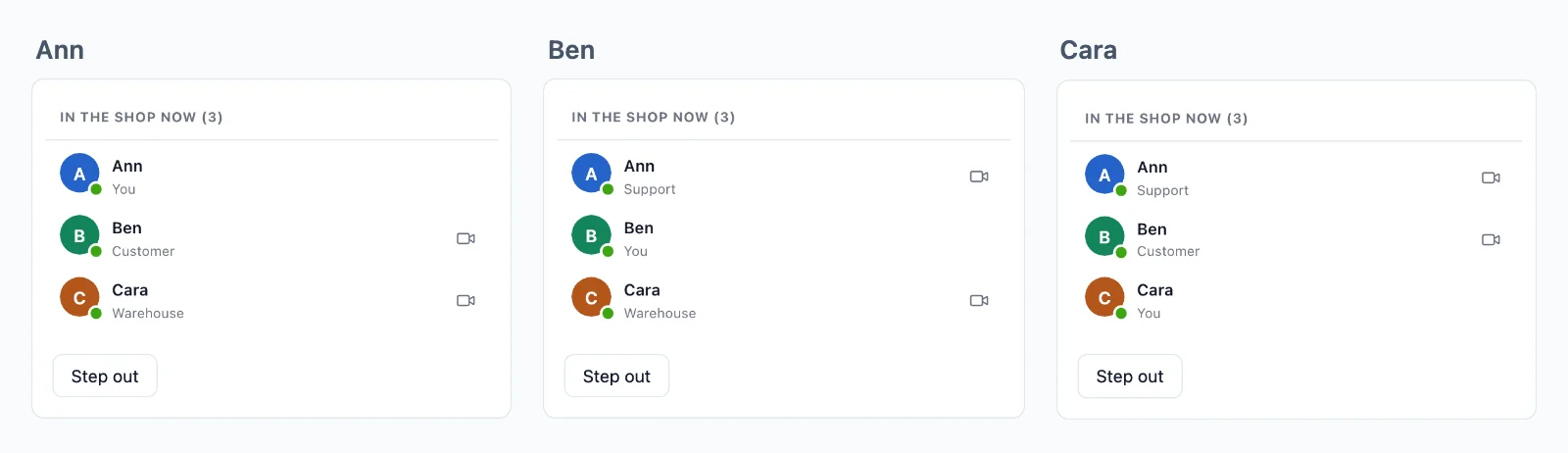
Nic nie ginie przy ponownym połączeniu
Pokój może przechowywać swoje ostatnie zdarzenia, a strona, która wraca, dostaje to, co ją ominęło, po kolei, zanim dotrze to, co nastąpi dalej.
Kto jest online
Pokój może pokazywać, kto w nim jest, z tym, co zechcesz pokazać o każdej osobie. Licznik mówi, ile osób ogląda stronę, w każdej skali, a to, kto jest online, jest znane w całej Twojej aplikacji.
Zdarzenia ze strony
Strony wysyłają do pokoi, w których są, bez żądania do Twojego serwera: wiadomości czatu, pisanie, kursor. Reguła mówi, które zdarzenia można wysłać, a webhook przekazuje Twojemu serwerowi te, które ma zachować.
Do jednej osoby, wszędzie
Wyślij do użytkownika, a dotrze do każdej karty i urządzenia, które ma otwarte, bez tworzenia pokoju.
Zaszyfrowane kluczami, których nigdy nie mamy
Zdarzenia, obecność i historia podróżują zapieczętowane kluczami, które ma Twój serwer, a połączenia między dwiema osobami są szyfrowane end-to-end. Chmura je przenosi, nie mogąc ich odczytać.
Jedno połączenie dla wszystkich kart
Karty przeglądarki dzielą jedno połączenie, więc osoba z trzema otwartymi kartami liczy się raz.
Zastosowania
Co ludzie budują na WebSockets
Każde to cała aplikacja w dokumentacji, z serwerem w Node.js, PHP i Pythonie.
Aktualizacje na żywo i powiadomienia
Zamówienie, które przesuwa się na swojej stronie, panel, postęp zadania i powiadomienie dla jednego użytkownika w każdej karcie i aplikacji.
Czat
Rozmowy między dwiema osobami i w grupach, z pisaniem, znacznikami odczytu i reakcjami, przechowywane w Twojej własnej bazie danych.
Kto jest online i kto tu jest
Kropka przy każdym awatarze, osoby w pokoju wraz z rolami i liczba osób, które oglądają stronę.
Wspólna edycja
Kto jest w dokumencie, ich kursory i zmiany, wysyłane jako dane binarne i przechowywane na wypadek ponownego połączenia.
Ankiety, quizy i pytania
Głosy i pytania, które trafiają tylko do Twojego serwera, wyniki wysyłane do wszystkich i wynik każdego gracza.
Aukcje na żywo
Oferty, o których Twój serwer rozstrzyga po kolei, nowa cena dla wszystkich i zegar, który przesuwa się po spóźnionej ofercie.
Cennik
Cena według połączeń, nigdy według wiadomości
Od $11.99 miesięcznie za 1000 jednoczesnych połączeń przy rozliczeniu rocznym lub $14.99 przy rozliczeniu miesięcznym.
Cena zależy od jednoczesnych połączeń, od 1000, rozliczana miesięcznie lub rocznie. Wiadomości i transfer nigdy nie są rozliczane, a to, co wysyła Twój serwer, nie zużywa żadnych Twoich połączeń.
Ten sam plan i SDK dają też rozmowy wideo i transmisje na żywo, na tym samym połączeniu.
Pytania
Najczęstsze pytania
Czy potrzebuję własnego serwera WebSocket?
Nie. Przeglądarki i aplikacje utrzymują połączenia z naszymi serwerami, a w miarę wzrostu Twojej aplikacji uruchamia się ich więcej. Twój serwer tylko mówi, kto może do czego dołączyć, i wysyła każde zdarzenie jednym krótkim żądaniem HTTP.
Czy działa na hostingu serverless?
Tak. Funkcja serverless nie utrzyma otwartego połączenia i tutaj nie musi: wysyła każde zdarzenie jednym krótkim żądaniem, a połączenia zostają u nas. Funkcje edge i każdy inny hosting działają tak samo.
Które stacki mogą korzystać z WebSocket API?
Next.js i Express, Laravel i zwykłe PHP, Django, FastAPI i Flask, Capacitor, iOS i Android, każdy z przewodnikiem. Aplikacje React Native i Flutter też mają pokoje i obecność. Serwer w dowolnym innym języku używa HTTP API.
Czy sam piszę kod WebSocket?
Nie. SDK otwiera połączenie, samo łączy się ponownie i znów dołącza do Twoich pokoi, a Ty nasłuchujesz zdarzeń po nazwie. W Laravel jest to sterownik broadcastingu, więc broadcast() i Twój plik kanałów zostają bez zmian.
Co liczy się jako połączenie?
Przeglądarka lub urządzenie połączone w danej chwili z chmurą. Karty jednej przeglądarki dzielą jedno połączenie, gdy Twoja aplikacja udostępnia worker SDK, a to, co Twój serwer wysyła przez API, się nie liczy.
Co się dzieje przy limicie połączeń?
Do 20% więcej połączeń nadal się łączy, a właściciel konta dostaje e-mail przy 80% i przy 100% limitu, w porę, by przejść na większy plan.
Co się dzieje, gdy strona traci połączenie?
Łączy się ponownie sama. Pokój z historią przekazuje jej to, co ją ominęło, po kolei, do 5 minut, a strona nieobecna dłużej dostaje o tym informację, więc może znów odczytać dane z Twojego serwera. Historia służy tylko ponownym połączeniom: Twoje dane przechowuje Twoja własna baza.
Kto decyduje, kto dołącza do pokoju?
Twój serwer, z regułą dla każdego rodzaju pokoju: kto dołącza, co może wysyłać i kto tylko czyta. Chmura egzekwuje każdą odpowiedź, a Twój serwer może w dowolnej chwili usunąć kogoś z pokoju.
Czy możecie czytać to, co wysyła moja aplikacja?
Nie w pokoju prywatnym ani pokoju obecności. Jego zdarzenia, historia i lista osób podróżują zapieczętowane kluczami, które tworzy Twój serwer, a chmura przenosi je bez możliwości odczytu. Pokój publiczny, do którego może dołączyć każdy, działa bez szyfrowania.
Gdzie są Wasze serwery?
Serwery czasu rzeczywistego, które przenoszą Twoje zdarzenia, działają w Niemczech. Przekaźniki i serwery multimediów dla rozmów działają w większej liczbie krajów.
Pytania o Twoją integrację? Napisz do nas: pomagamy z SDK, ekranem rozmowy i Twoim stackiem.