
 English
 Deutsch
 Español
 Français
 Italiano
 Nederlands
' d='M48 28h24v18a12 12 0 0 1-24 0z'/%3E%3Cpath fill='%230093DD' d='M47.5 21.5h4.6V28h-4.6zm10.2-2.5h4.6v9h-4.6zm10.2 2.5h4.6V28h-4.6z'/%3E%3Cpath fill='%23171796' d='M52.6 20h4.6v8h-4.6zm10.2 0h4.6v8h-4.6z'/%3E%3C/svg%3E) Hrvatski
 עברית
Dla aplikacji
Transmisje na żywo dla Twojej aplikacji
API i SDK do transmisji na żywo dla Next.js, Laravel, Django i każdego innego stacku. Prowadzący nadaje na żywo z przeglądarki, telefonu lub OBS, nasze serwery mediów przekazują obraz wszystkim oglądającym, a odtwarzacz z czatem jest gotowy do użycia, więc nie musisz utrzymywać żadnego serwera mediów.
Najlepsze ceny za WebSockets, nielimitowane rozmowy 1 na 1 z serwerami TURN na całym świecie oraz rozmowy grupowe i transmisje na żywo z pakietem w cenie. Od $11.99 miesięcznie za 1000 jednoczesnych połączeń przy rozliczeniu rocznym lub $14.99 przy rozliczeniu miesięcznym.
Widzowie ponad Twój plan: $0.20 za 1000 minut.
Next.js na serwerze i React na stronie.
export async function GET( request: Request ) {
    const me = await currentUserId();   // null for a visitor
    const id = new URL( request.url ).searchParams.get( 'id' )!;

    // Your own check: its host goes live, the rest watch.
    const token = await realtime.streamToken( me, 'live:' + id, {
        role: me && await isHostOf( id, me ) ? 'host' : 'viewer',
    } );

    return Response.json( { token } );
}app.get( '/api/stream-token', async ( req, res ) => {
const me = userOf( req ); // null for a visitor
const { id } = req.query;
// Your own check: its host goes live, the rest watch.
const token = await realtime.streamToken( me, 'live:' + id, {
role: me && await isHostOf( id, me ) ? 'host' : 'viewer',
} );
res.json( { token } );
} );import { createServer } from 'node:http';
createServer( async ( req, res ) => {
const url = new URL( req.url, 'http://localhost' );
if ( url.pathname === '/api/stream-token' ) {
const me = userOf( req ); // null for a visitor
const id = url.searchParams.get( 'id' );
// Your own check: its host goes live, the rest watch.
const token = await realtime.streamToken( me, 'live:' + id, {
role: me && await isHostOf( id, me ) ? 'host' : 'viewer',
} );
res.writeHead( 200, { 'Content-Type': 'application/json' } );
return res.end( JSON.stringify( { token } ) );
}
// Your pages, and realtime.node( userOf ) for the SDK's routes.
} ).listen( 3000 );use Illuminate\Http\Request;
use WordPlus\Realtime\Laravel\Facades\Realtime;
Route::get( '/api/stream-token', function ( Request $request ) {
$me = $request->user()?->id; // null for a visitor
$id = $request->query( 'id' );
// Your own check: its host goes live, the rest watch.
return [ 'token' => Realtime::streamToken( $me, 'live:' . $id, [
'role' => $me && is_host_of( $id, $me ) ? 'host' : 'viewer',
] ) ];
} );require __DIR__ . '/../src/realtime.php';
$me = current_user_id(); // null for a visitor
$id = $_GET['id'] ?? '';
header( 'Content-Type: application/json' );
// Your own check: its host goes live, the rest watch.
echo json_encode( [
'token' => $realtime->streamToken( $me, 'live:' . $id, [
'role' => $me && is_host_of( $id, $me ) ? 'host' : 'viewer',
] ),
] );from django.http import JsonResponse
from .realtime import realtime
# In urls.py: path("api/stream-token", views.stream_token)
def stream_token(request):
me = request.user.id if request.user.is_authenticated else None
id = request.GET["id"]
# Your own check: its host goes live, the rest watch.
token = realtime.stream_token(
me,
"live:" + id,
role="host" if me and is_host_of(id, me) else "viewer",
)
return JsonResponse({"token": token})from fastapi import Depends
from realtime import realtime
# current_user_id answers None for a visitor.
@app.get("/api/stream-token")
def stream_token(id: str, me: int | None = Depends(current_user_id)):
# Your own check: its host goes live, the rest watch.
token = realtime.stream_token(
me,
"live:" + id,
role="host" if me and is_host_of(id, me) else "viewer",
)
return {"token": token}from flask import request, session
from realtime import realtime
@app.get("/api/stream-token")
def stream_token():
me = session.get("user_id") # None for a visitor
id = request.args["id"]
# Your own check: its host goes live, the rest watch.
token = realtime.stream_token(
me,
"live:" + id,
role="host" if me and is_host_of(id, me) else "viewer",
)
return {"token": token}// http.HandleFunc("GET /api/stream-token", streamToken)
func streamToken(w http.ResponseWriter, r *http.Request) {
me := userOf(r) // empty for a visitor
id := r.URL.Query().Get("id")
// Your own check: its host goes live, the rest watch.
role := "viewer"
if me != "" && isHostOf(id, me) {
role = "host"
}
token := app.StreamToken(wordplus.Stream{
Name: "live:" + id,
Role: role,
User: me,
})
reply(w, map[string]string{"token": token})
}Hooki i komponenty dla każdej aplikacji React, z dowolnym serwerem powyżej.
import { connect } from '@wordplus/realtime';

const rt = await connect();

// The player and the studio.
await rt.streamScreen();

// And in the page:
// <live-stream name="live:12"
//     token-url="/api/stream-token?id=12"
// title="Opening night"></live-stream>import { connect } from '@wordplus/realtime';
const rt = await connect();
// The player and the studio.
await rt.streamScreen();
// And in the page:
// <live-stream name="live:12"
// token-url="/api/stream-token?id=12"
// title="Opening night"></live-stream>import { connect } from '@wordplus/realtime';
const rt = await connect();
// The player and the studio.
await rt.streamScreen();
// And in the page:
// <live-stream name="live:12"
// token-url="/api/stream-token?id=12"
// title="Opening night"></live-stream>import { connect } from '@wordplus/realtime';
const rt = await connect( window.wordplusRealtimeConfig );
// The player and the studio.
await rt.streamScreen();
// And in the page:
// <live-stream name="live:12"
// token-url="/api/stream-token?id=12"
// title="Opening night"></live-stream><live-stream name="live:12"
token-url="/api/stream-token?id=12"
title="Opening night"></live-stream>
<script type="module">
import { connect } from '@wordplus/realtime';
const rt = await connect( window.wordplusRealtimeConfig );
// The player and the studio.
await rt.streamScreen();
</script><live-stream name="live:12"
token-url="/api/stream-token?id=12"
title="Opening night"></live-stream>
<script type="module">
import { connect } from '@wordplus/realtime';
const rt = await connect( window.wordplusRealtimeConfig );
// The player and the studio.
await rt.streamScreen();
</script><live-stream name="live:12"
token-url="/api/stream-token?id=12"
title="Opening night"></live-stream>
<script type="module">
import { connect } from '@wordplus/realtime';
const rt = await connect( window.wordplusRealtimeConfig );
// The player and the studio.
await rt.streamScreen();
</script><live-stream name="live:12"
token-url="/api/stream-token?id=12"
title="Opening night"></live-stream>
<script type="module">
import { connect } from '@wordplus/realtime';
const rt = await connect( window.wordplusRealtimeConfig );
// The player and the studio.
await rt.streamScreen();
</script>import { connect } from '@wordplus/realtime';
const settings = await fetch( '/api/realtime/config' );
const rt = await connect( await settings.json() );
// The player and the studio.
await rt.streamScreen();
// And in the page:
// <live-stream name="live:12"
// token-url="/api/stream-token?id=12"
// title="Opening night"></live-stream><live-stream name="live:{{ $event->id }}"
token-url="/api/stream-token?id={{ $event->id }}"
title="{{ $event->title }}"></live-stream>
<script type="module">
// The player and the studio.
await window.Echo.connector.rt.streamScreen();
</script>'use client'; // in Next.js
import { LiveStream } from '@wordplus/realtime/react';
// Inside <RealtimeProvider>, once for the whole app.
export function Stream( { id, title } ) {
return (
<LiveStream name={ `live:${ id }` } title={ title }
tokenUrl={ `/api/stream-token?id=${ id }` } />
);
}<script setup>
import { onMounted } from 'vue';
// realtime.js, one connection for the whole app:
// export const realtime = connect();
import { realtime } from './realtime';
defineProps( [ 'id', 'title' ] );
onMounted( async () => {
// The player and the studio.
( await realtime ).streamScreen();
} );
</script>
<!-- isCustomElement for this tag, in vite.config.js -->
<template>
<live-stream :name="`live:${ id }`" :title="title"
:token-url="`/api/stream-token?id=${ id }`"></live-stream>
</template><script>
import { onMount } from 'svelte';
// realtime.js, one connection for the whole app:
// export const realtime = connect();
import { realtime } from './realtime';
let { id, title } = $props();
onMount( async () => {
// The player and the studio.
( await realtime ).streamScreen();
} );
</script>
<live-stream name="live:{ id }" { title }
token-url="/api/stream-token?id={ id }"></live-stream>import {
Component, CUSTOM_ELEMENTS_SCHEMA, Input,
} from '@angular/core';
// realtime.ts, one connection for the whole app:
// export const realtime = connect();
import { realtime } from './realtime';
@Component( {
selector: 'app-stream',
schemas: [ CUSTOM_ELEMENTS_SCHEMA ],
template: `
<live-stream [attr.name]="'live:' + id"
[attr.token-url]="'/api/stream-token?id=' + id"
[attr.title]="title"></live-stream>
`,
} )
export class StreamComponent {
@Input( { required: true } ) id!: number;
@Input( { required: true } ) title!: string;
async ngOnInit() {
// The player and the studio.
( await realtime ).streamScreen();
}
}import WordPlusRealtimeCalls
import WordPlusRealtimeUI
// Your own request to your route, asked again as tokens run out.
let stream = try await rt.joinStream {
try await api.streamToken(id: 12)
}
present(LiveStreamScreen(stream: stream, title: "Opening night"),
animated: true)import cloud.wordplus.realtime.calls.joinStream
import cloud.wordplus.realtime.ui.LiveStreamScreen
// Your own request to your route, asked again as tokens run out.
val stream = rt.joinStream(context) {
api.streamToken(id = 12)
}
LiveStreamScreen.open(activity, stream, title = "Opening night")import { LiveStreamButton } from '@wordplus/realtime-react-native';
// Your server, in full, as an app has no address of its own.
const API = 'https://app.example.com/api';
// Inside <RealtimeProvider>, once for the whole app.
export function Stream( { id, title } ) {
return (
<LiveStreamButton name={ `live:${ id }` } title={ title }
tokenUrl={ `${ API }/stream-token?id=${ id }` }>
Watch
</LiveStreamButton>
);
}import 'package:flutter/material.dart';
import 'package:wordplus_realtime/wordplus_realtime.dart';
// Your server, in full, as an app has no address of its own.
const api = 'https://app.example.com/api';
// In your build. It asks your route again as tokens run out.
LiveStreamButton(
rt: rt,
stream: 'live:12',
tokenUrl: '$api/stream-token?id=12',
title: 'Opening night',
child: const Text('Watch'),
)
Wypróbuj transmisję na żywo
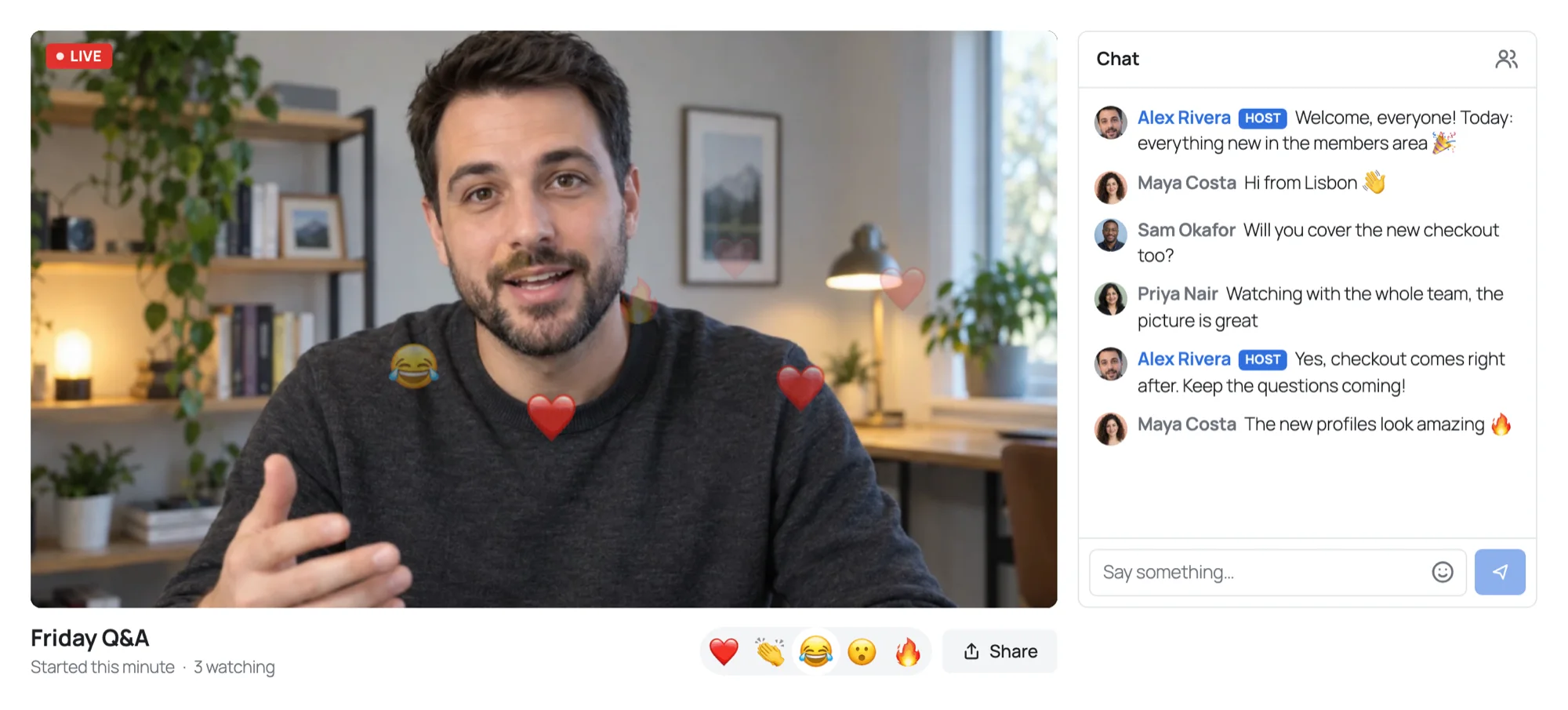
Rozpocznij transmisję z tej strony i oglądaj ją na telefonie lub w drugim oknie. Konto nie jest potrzebne.
To ekrany, które SDK daje Twojej aplikacji. Przeglądarka poprosi o kamerę i mikrofon, nic nie jest nagrywane, a demo kończy się po 10 minutach.
Prowadzący i moderatorzy
Nadawaj na żywo z przeglądarki, telefonu lub OBS
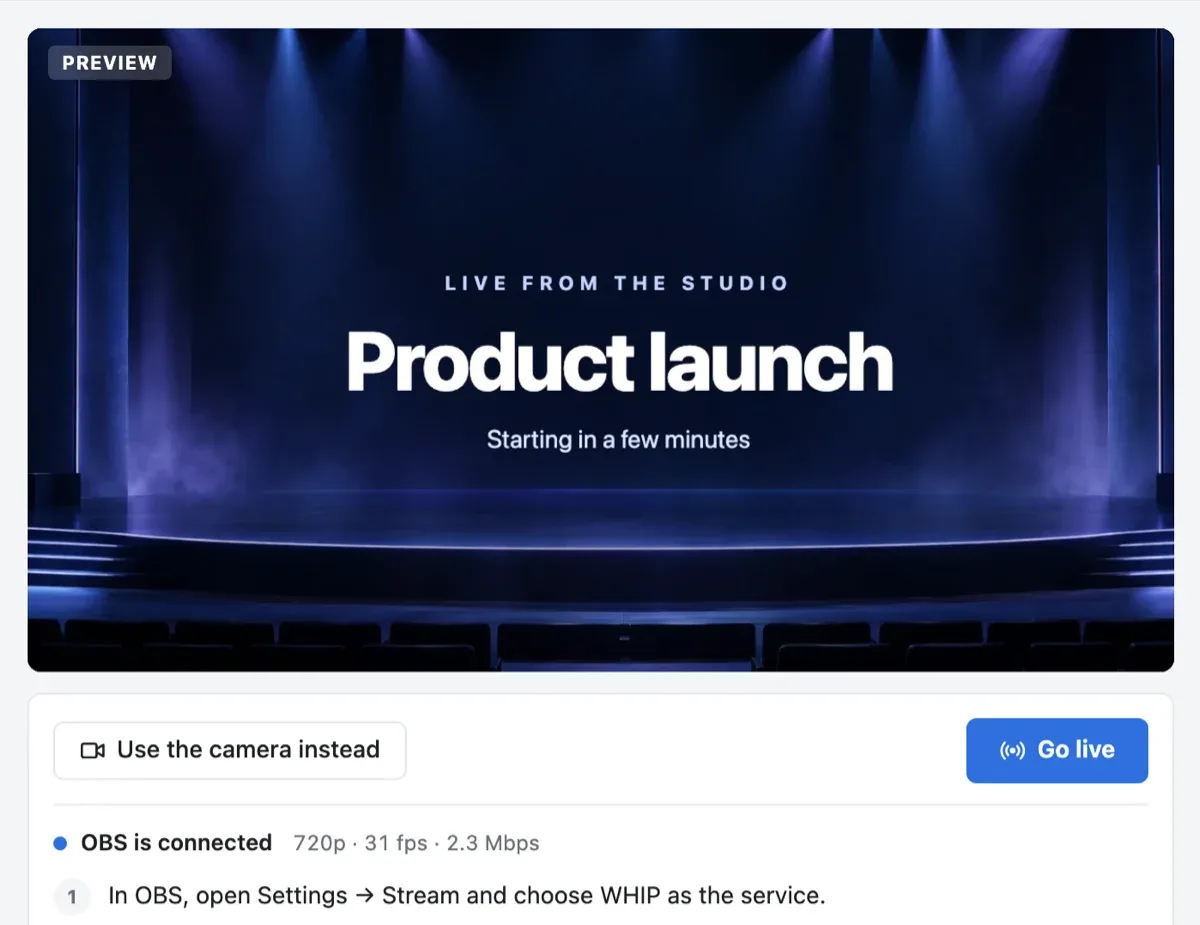
Studio i czat są dołączone do odtwarzacza, dla prowadzącego i moderatorów wskazanych przez Twój serwer.
Kamera, ekran lub OBS
Prowadzący widzi obraz, zanim zacznie nadawać, potem jednym kliknięciem rozpoczyna transmisję i kończy ją dla wszystkich. Nadaje z kamery i mikrofonu przeglądarki lub telefonu, udostępnia ekran albo wysyła obraz z OBS lub dowolnego innego enkodera przez WHIP.
Czat, w którym panuje porządek
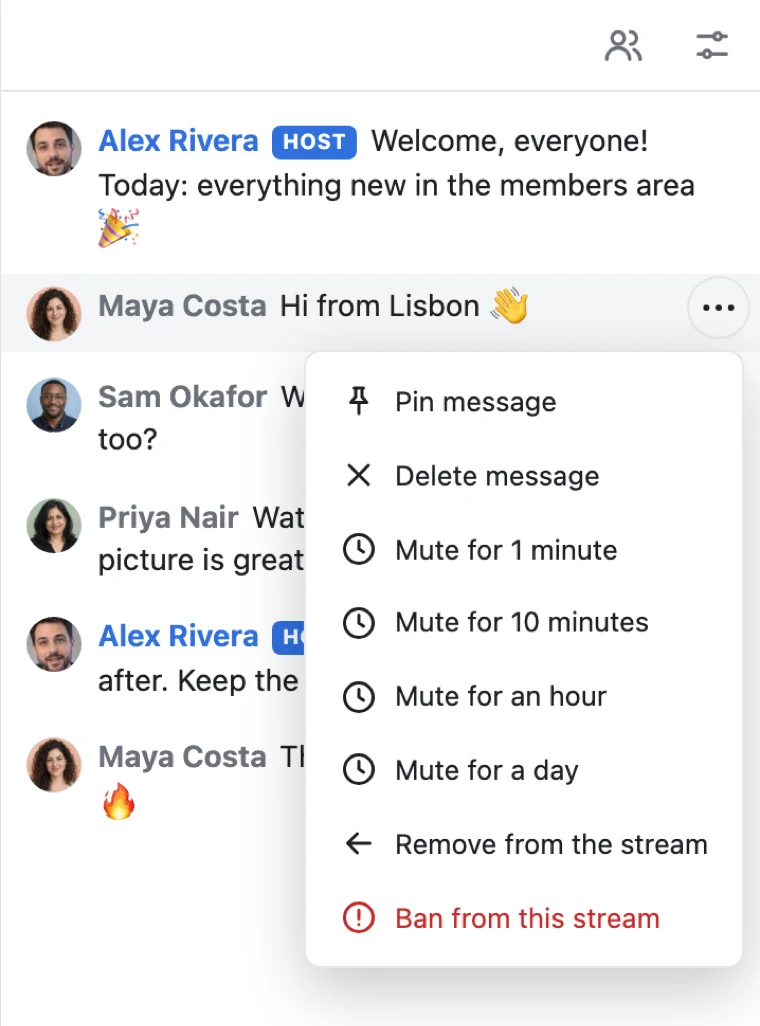
Widzowie piszą na czacie obok obrazu i wysyłają reakcje, które pojawiają się na obrazie. Prowadzący i moderatorzy wskazani przez Twój serwer przypinają i usuwają wiadomości, spowalniają czat, wyciszają kogoś na jakiś czas, wyrzucają go lub blokują. Twój serwer może robić to samo i pisać na czacie pod własną nazwą.
Widzowie
Wszyscy oglądający, zalogowani czy nie
Widzowi wystarczy link do strony. Ogląda, pisze na czacie i reaguje, a wszyscy widzą, ile osób ogląda.
Oglądanie bez konta
Twój serwer sprawia, że odwiedzający jest widzem, więc każdy, kto ma link, ogląda, a żeby pisać na czacie, loguje się. Możesz też udostępnić transmisję tylko członkom.
Obraz na każdy ekran
Każdy widz dostaje obraz w rozmiarze, jaki obsłużą jego ekran i łącze, w przeglądarce, na iOS i Androidzie, z licznikiem oglądających na żywo.
Goście na scenie
Widz podnosi rękę, a prowadzący zaprasza go na scenę z kamerą i mikrofonem, na pytanie, wywiad czy panel.
Decyduje Twój serwer
Kilka linii w Twoim stacku
Twój serwer mówi, kto prowadzi każdą transmisję, kto ogląda i kto moderuje czat. Strona pokazuje transmisję jednym elementem albo Twoim własnym kodem.
Next.js na serwerze i React na stronie.
export async function GET( request: Request ) {
const me = await currentUserId(); // null for a visitor
const id = new URL( request.url ).searchParams.get( 'id' )!;
// Your own check: its host goes live, the rest watch.
const token = await realtime.streamToken( me, 'live:' + id, {
role: me && await isHostOf( id, me ) ? 'host' : 'viewer',
mod: me && await isModerator( me ),
settings: { reactions: true },
} );
return Response.json( { token } );
}app.get( '/api/stream-token', async ( req, res ) => {
const me = userOf( req ); // null for a visitor
const { id } = req.query;
// Your own check: its host goes live, the rest watch.
const token = await realtime.streamToken( me, 'live:' + id, {
role: me && await isHostOf( id, me ) ? 'host' : 'viewer',
mod: me && await isModerator( me ),
settings: { reactions: true },
} );
res.json( { token } );
} );import { createServer } from 'node:http';
createServer( async ( req, res ) => {
const url = new URL( req.url, 'http://localhost' );
if ( url.pathname === '/api/stream-token' ) {
const me = userOf( req ); // null for a visitor
const id = url.searchParams.get( 'id' );
// Your own check: its host goes live, the rest watch.
const token = await realtime.streamToken( me, 'live:' + id, {
role: me && await isHostOf( id, me ) ? 'host' : 'viewer',
mod: me && await isModerator( me ),
settings: { reactions: true },
} );
res.writeHead( 200, { 'Content-Type': 'application/json' } );
return res.end( JSON.stringify( { token } ) );
}
// Your pages, and realtime.node( userOf ) for the SDK's routes.
} ).listen( 3000 );use Illuminate\Http\Request;
use WordPlus\Realtime\Laravel\Facades\Realtime;
Route::get( '/api/stream-token', function ( Request $request ) {
$me = $request->user()?->id; // null for a visitor
$id = $request->query( 'id' );
// Your own check: its host goes live, the rest watch.
return [ 'token' => Realtime::streamToken( $me, 'live:' . $id, [
'role' => $me && is_host_of( $id, $me ) ? 'host' : 'viewer',
'mod' => $me && is_moderator( $me ),
'settings' => [ 'reactions' => true ],
] ) ];
} );require __DIR__ . '/../src/realtime.php';
$me = current_user_id(); // null for a visitor
$id = $_GET['id'] ?? '';
header( 'Content-Type: application/json' );
// Your own check: its host goes live, the rest watch.
echo json_encode( [
'token' => $realtime->streamToken( $me, 'live:' . $id, [
'role' => $me && is_host_of( $id, $me ) ? 'host' : 'viewer',
'mod' => $me && is_moderator( $me ),
'settings' => [ 'reactions' => true ],
] ),
] );from django.http import JsonResponse
from .realtime import realtime
# In urls.py: path("api/stream-token", views.stream_token)
def stream_token(request):
me = request.user.id if request.user.is_authenticated else None
id = request.GET["id"]
# Your own check: its host goes live, the rest watch.
token = realtime.stream_token(
me,
"live:" + id,
role="host" if me and is_host_of(id, me) else "viewer",
mod=bool(me and is_moderator(me)),
settings={"reactions": True},
)
return JsonResponse({"token": token})from fastapi import Depends
from realtime import realtime
# current_user_id answers None for a visitor.
@app.get("/api/stream-token")
def stream_token(id: str, me: int | None = Depends(current_user_id)):
# Your own check: its host goes live, the rest watch.
token = realtime.stream_token(
me,
"live:" + id,
role="host" if me and is_host_of(id, me) else "viewer",
mod=bool(me and is_moderator(me)),
settings={"reactions": True},
)
return {"token": token}from flask import request, session
from realtime import realtime
@app.get("/api/stream-token")
def stream_token():
me = session.get("user_id") # None for a visitor
id = request.args["id"]
# Your own check: its host goes live, the rest watch.
token = realtime.stream_token(
me,
"live:" + id,
role="host" if me and is_host_of(id, me) else "viewer",
mod=bool(me and is_moderator(me)),
settings={"reactions": True},
)
return {"token": token}// http.HandleFunc("GET /api/stream-token", streamToken)
func streamToken(w http.ResponseWriter, r *http.Request) {
me := userOf(r) // empty for a visitor
id := r.URL.Query().Get("id")
// Your own check: its host goes live, the rest watch.
role := "viewer"
if me != "" && isHostOf(id, me) {
role = "host"
}
token := app.StreamToken(wordplus.Stream{
Name: "live:" + id,
Role: role,
User: me,
Mod: me != "" && isModerator(me),
React: wordplus.Yes,
})
reply(w, map[string]string{"token": token})
}Hooki i komponenty dla każdej aplikacji React, z dowolnym serwerem powyżej.
import { connect } from '@wordplus/realtime';

const rt = await connect();

// The player and the studio.
await rt.streamScreen();

// And in the page:
// <live-stream name="live:12"
//     token-url="/api/stream-token?id=12"
// title="Opening night"></live-stream>import { connect } from '@wordplus/realtime';
const rt = await connect();
// The player and the studio.
await rt.streamScreen();
// And in the page:
// <live-stream name="live:12"
// token-url="/api/stream-token?id=12"
// title="Opening night"></live-stream>import { connect } from '@wordplus/realtime';
const rt = await connect();
// The player and the studio.
await rt.streamScreen();
// And in the page:
// <live-stream name="live:12"
// token-url="/api/stream-token?id=12"
// title="Opening night"></live-stream>import { connect } from '@wordplus/realtime';
const rt = await connect( window.wordplusRealtimeConfig );
// The player and the studio.
await rt.streamScreen();
// And in the page:
// <live-stream name="live:12"
// token-url="/api/stream-token?id=12"
// title="Opening night"></live-stream><live-stream name="live:12"
token-url="/api/stream-token?id=12"
title="Opening night"></live-stream>
<script type="module">
import { connect } from '@wordplus/realtime';
const rt = await connect( window.wordplusRealtimeConfig );
// The player and the studio.
await rt.streamScreen();
</script><live-stream name="live:12"
token-url="/api/stream-token?id=12"
title="Opening night"></live-stream>
<script type="module">
import { connect } from '@wordplus/realtime';
const rt = await connect( window.wordplusRealtimeConfig );
// The player and the studio.
await rt.streamScreen();
</script><live-stream name="live:12"
token-url="/api/stream-token?id=12"
title="Opening night"></live-stream>
<script type="module">
import { connect } from '@wordplus/realtime';
const rt = await connect( window.wordplusRealtimeConfig );
// The player and the studio.
await rt.streamScreen();
</script><live-stream name="live:12"
token-url="/api/stream-token?id=12"
title="Opening night"></live-stream>
<script type="module">
import { connect } from '@wordplus/realtime';
const rt = await connect( window.wordplusRealtimeConfig );
// The player and the studio.
await rt.streamScreen();
</script>import { connect } from '@wordplus/realtime';
const settings = await fetch( '/api/realtime/config' );
const rt = await connect( await settings.json() );
// The player and the studio.
await rt.streamScreen();
// And in the page:
// <live-stream name="live:12"
// token-url="/api/stream-token?id=12"
// title="Opening night"></live-stream><live-stream name="live:{{ $event->id }}"
token-url="/api/stream-token?id={{ $event->id }}"
title="{{ $event->title }}"></live-stream>
<script type="module">
// The player and the studio.
await window.Echo.connector.rt.streamScreen();
</script>'use client'; // in Next.js
import { LiveStream } from '@wordplus/realtime/react';
// Inside <RealtimeProvider>, once for the whole app.
export function Stream( { id, title } ) {
return (
<LiveStream name={ `live:${ id }` } title={ title }
tokenUrl={ `/api/stream-token?id=${ id }` } />
);
}<script setup>
import { onMounted } from 'vue';
// realtime.js, one connection for the whole app:
// export const realtime = connect();
import { realtime } from './realtime';
defineProps( [ 'id', 'title' ] );
onMounted( async () => {
// The player and the studio.
( await realtime ).streamScreen();
} );
</script>
<!-- isCustomElement for this tag, in vite.config.js -->
<template>
<live-stream :name="`live:${ id }`" :title="title"
:token-url="`/api/stream-token?id=${ id }`"></live-stream>
</template><script>
import { onMount } from 'svelte';
// realtime.js, one connection for the whole app:
// export const realtime = connect();
import { realtime } from './realtime';
let { id, title } = $props();
onMount( async () => {
// The player and the studio.
( await realtime ).streamScreen();
} );
</script>
<live-stream name="live:{ id }" { title }
token-url="/api/stream-token?id={ id }"></live-stream>import {
Component, CUSTOM_ELEMENTS_SCHEMA, Input,
} from '@angular/core';
// realtime.ts, one connection for the whole app:
// export const realtime = connect();
import { realtime } from './realtime';
@Component( {
selector: 'app-stream',
schemas: [ CUSTOM_ELEMENTS_SCHEMA ],
template: `
<live-stream [attr.name]="'live:' + id"
[attr.token-url]="'/api/stream-token?id=' + id"
[attr.title]="title"></live-stream>
`,
} )
export class StreamComponent {
@Input( { required: true } ) id!: number;
@Input( { required: true } ) title!: string;
async ngOnInit() {
// The player and the studio.
( await realtime ).streamScreen();
}
}import WordPlusRealtimeCalls
import WordPlusRealtimeUI
// Your own request to your route, asked again as tokens run out.
let stream = try await rt.joinStream {
try await api.streamToken(id: 12)
}
present(LiveStreamScreen(stream: stream, title: "Opening night"),
animated: true)import cloud.wordplus.realtime.calls.joinStream
import cloud.wordplus.realtime.ui.LiveStreamScreen
// Your own request to your route, asked again as tokens run out.
val stream = rt.joinStream(context) {
api.streamToken(id = 12)
}
LiveStreamScreen.open(activity, stream, title = "Opening night")import { LiveStreamButton } from '@wordplus/realtime-react-native';
// Your server, in full, as an app has no address of its own.
const API = 'https://app.example.com/api';
// Inside <RealtimeProvider>, once for the whole app.
export function Stream( { id, title } ) {
return (
<LiveStreamButton name={ `live:${ id }` } title={ title }
tokenUrl={ `${ API }/stream-token?id=${ id }` }>
Watch
</LiveStreamButton>
);
}import 'package:flutter/material.dart';
import 'package:wordplus_realtime/wordplus_realtime.dart';
// Your server, in full, as an app has no address of its own.
const api = 'https://app.example.com/api';
// In your build. It asks your route again as tokens run out.
LiveStreamButton(
rt: rt,
stream: 'live:12',
tokenUrl: '$api/stream-token?id=12',
title: 'Opening night',
child: const Text('Watch'),
)Transmisje na żywo w każdym stacku, z całą konfiguracją:
Zastosowania
Co się buduje z transmisjami na żywo
Każde to cała aplikacja w dokumentacji, z serwerem w Node.js, PHP i Pythonie.
Wydarzenia na żywo
Premiera, lekcja, wykład czy koncert, na żywo dla każdego, kto otworzy stronę.
Transmisje tylko dla członków
Transmisja, którą mogą oglądać tylko członkowie klubu, posiadacze biletu lub uczestnicy kursu.
Wywiady i pytania na scenie
Widzowie podnoszą rękę, a prowadzący zaprasza ich na scenę obok siebie, w układzie, który sam wybiera.
Cennik
Cena według połączeń, nigdy według wiadomości
Od $11.99 miesięcznie za 1000 jednoczesnych połączeń przy rozliczeniu rocznym lub $14.99 przy rozliczeniu miesięcznym.
Widzowie ponad Twój plan: $0.20 za 1000 minut.
Jedna cena przy każdej rozdzielczości. Przepustowość, przekaźniki i wiadomości nigdy nie są naliczane, a rozmowy we dwoje są w cenie. Sami utrzymujemy przekaźniki i serwery mediów, dzięki czemu te ceny pozostają niskie.
Cena według jednoczesnych połączeń, od 1000 wzwyż, rozliczana miesięcznie lub rocznie.
Przy 1000 połączeń transmisje na żywo nie są naliczane do 50 widzów jednocześnie, a każde kolejne 1000 połączeń dodaje 20 widzów. Powyżej każdy dodatkowy widz zużywa kredyt na minutę, liczony tylko wtedy, gdy transmisja trwa, a Twój plan dodaje 5000 kredytów miesięcznie na każde 1000 połączeń.
Pytania
Najczęstsze pytania
Czy potrzebuję własnego serwera mediów?
Nie. Prowadzący wysyła obraz do naszych serwerów mediów, które przekazują go wszystkim oglądającym. OBS i inne enkodery wysyłają go przez WHIP. Nie musisz niczego hostować.
Które stacki mogą korzystać z SDK do transmisji na żywo?
Next.js i Express, Laravel i czyste PHP, Django, FastAPI i Flask, Capacitor, iOS i Android, każdy z przewodnikiem. Serwer w innym języku korzysta z HTTP API. Aplikacje Flutter mają transmisje na żywo na iOS i Androidzie, a aplikacje React Native na razie na iOS.
Czy można oglądać bez konta?
Tak. Twój serwer sprawia, że niezalogowany odwiedzający jest widzem, więc każdy, kto ma link, ogląda, a żeby pisać na czacie, loguje się. Możesz też udostępnić transmisję tylko członkom, a wtedy przekazany dalej link niczego nie otwiera.
Czy mogę nadawać z OBS?
Tak. Studio daje prowadzącemu adres i klucz dla OBS lub dowolnego innego enkodera, który wysyła przez WHIP, a obraz z enkodera zastępuje kamerę. Nowy klucz unieważnia stary.
Ile osób może oglądać?
Przy 1000 połączeń do 50 widzów jednocześnie nie zużywa kredytów, a każde kolejne 1000 połączeń dodaje 20. Powyżej każdy dodatkowy widz zużywa kredyt na minutę, liczony tylko wtedy, gdy transmisja trwa.
Kto moderuje czat?
Prowadzący i każdy, kogo Twój serwer uczyni moderatorem. Przypinają i usuwają wiadomości, spowalniają czat, wyciszają kogoś na czas od minuty do doby oraz wyrzucają kogoś z transmisji lub go blokują. Twój serwer też może to wszystko robić, bez otwartej strony.
Czy mogę zbudować własny odtwarzacz?
Tak. Odtwarzacz, czat i studio są opcjonalne. Umieść każdą część tam, gdzie pasuje Twojej stronie, albo sam wyświetlaj transmisję w SDK: obraz, widzów, czat i reakcje.
Czy mogę rozliczać widzów za oglądanie?
Tak. Twój serwer decyduje, kto może oglądać, więc bilet lub członkostwo otwiera transmisję. WordPlus Cloud przekazuje Twojemu serwerowi przez webhook, kiedy każdy zalogowany widz zaczyna i kończy oglądanie, liczone na własnych serwerach, aby Twoja aplikacja mogła rozliczać za wyświetlenie lub za minutę.
Pytania o Twoją integrację? Napisz do nas: pomagamy z SDK, odtwarzaczem i Twoim stackiem.