
 English
 Español
 Français
 Italiano
 Nederlands
 Polski
' d='M48 28h24v18a12 12 0 0 1-24 0z'/%3E%3Cpath fill='%230093DD' d='M47.5 21.5h4.6V28h-4.6zm10.2-2.5h4.6v9h-4.6zm10.2 2.5h4.6V28h-4.6z'/%3E%3Cpath fill='%23171796' d='M52.6 20h4.6v8h-4.6zm10.2 0h4.6v8h-4.6z'/%3E%3C/svg%3E) Hrvatski
 עברית
Für Apps
Live-Streaming für Ihre App
Eine Live-Streaming-API und ein SDK für Next.js, Laravel, Django und jeden anderen Stack. Ein Host geht aus dem Browser, vom Handy oder mit OBS live, unsere Medienserver bringen das Bild zu allen Zuschauern, und der Player mit seinem Chat ist sofort nutzbar, sodass Sie keinen Medienserver betreiben müssen.
Die besten Preise für WebSockets, unbegrenzte 1:1-Anrufe mit TURN-Servern weltweit sowie Gruppenanrufe und Live-Streaming mit inklusivem Kontingent. Ab $11.99 im Monat für 1.000 gleichzeitige Verbindungen, jährlich abgerechnet, oder $14.99 bei monatlicher Abrechnung.
Zuschauer über Ihren Plan hinaus: $0.20 pro 1.000 Minuten.
Next.js auf dem Server und React auf der Seite.
export async function GET( request: Request ) {
    const me = await currentUserId();   // null for a visitor
    const id = new URL( request.url ).searchParams.get( 'id' )!;

    // Your own check: its host goes live, the rest watch.
    const token = await realtime.streamToken( me, 'live:' + id, {
        role: me && await isHostOf( id, me ) ? 'host' : 'viewer',
    } );

    return Response.json( { token } );
}app.get( '/api/stream-token', async ( req, res ) => {
const me = userOf( req ); // null for a visitor
const { id } = req.query;
// Your own check: its host goes live, the rest watch.
const token = await realtime.streamToken( me, 'live:' + id, {
role: me && await isHostOf( id, me ) ? 'host' : 'viewer',
} );
res.json( { token } );
} );import { createServer } from 'node:http';
createServer( async ( req, res ) => {
const url = new URL( req.url, 'http://localhost' );
if ( url.pathname === '/api/stream-token' ) {
const me = userOf( req ); // null for a visitor
const id = url.searchParams.get( 'id' );
// Your own check: its host goes live, the rest watch.
const token = await realtime.streamToken( me, 'live:' + id, {
role: me && await isHostOf( id, me ) ? 'host' : 'viewer',
} );
res.writeHead( 200, { 'Content-Type': 'application/json' } );
return res.end( JSON.stringify( { token } ) );
}
// Your pages, and realtime.node( userOf ) for the SDK's routes.
} ).listen( 3000 );use Illuminate\Http\Request;
use WordPlus\Realtime\Laravel\Facades\Realtime;
Route::get( '/api/stream-token', function ( Request $request ) {
$me = $request->user()?->id; // null for a visitor
$id = $request->query( 'id' );
// Your own check: its host goes live, the rest watch.
return [ 'token' => Realtime::streamToken( $me, 'live:' . $id, [
'role' => $me && is_host_of( $id, $me ) ? 'host' : 'viewer',
] ) ];
} );require __DIR__ . '/../src/realtime.php';
$me = current_user_id(); // null for a visitor
$id = $_GET['id'] ?? '';
header( 'Content-Type: application/json' );
// Your own check: its host goes live, the rest watch.
echo json_encode( [
'token' => $realtime->streamToken( $me, 'live:' . $id, [
'role' => $me && is_host_of( $id, $me ) ? 'host' : 'viewer',
] ),
] );from django.http import JsonResponse
from .realtime import realtime
# In urls.py: path("api/stream-token", views.stream_token)
def stream_token(request):
me = request.user.id if request.user.is_authenticated else None
id = request.GET["id"]
# Your own check: its host goes live, the rest watch.
token = realtime.stream_token(
me,
"live:" + id,
role="host" if me and is_host_of(id, me) else "viewer",
)
return JsonResponse({"token": token})from fastapi import Depends
from realtime import realtime
# current_user_id answers None for a visitor.
@app.get("/api/stream-token")
def stream_token(id: str, me: int | None = Depends(current_user_id)):
# Your own check: its host goes live, the rest watch.
token = realtime.stream_token(
me,
"live:" + id,
role="host" if me and is_host_of(id, me) else "viewer",
)
return {"token": token}from flask import request, session
from realtime import realtime
@app.get("/api/stream-token")
def stream_token():
me = session.get("user_id") # None for a visitor
id = request.args["id"]
# Your own check: its host goes live, the rest watch.
token = realtime.stream_token(
me,
"live:" + id,
role="host" if me and is_host_of(id, me) else "viewer",
)
return {"token": token}// http.HandleFunc("GET /api/stream-token", streamToken)
func streamToken(w http.ResponseWriter, r *http.Request) {
me := userOf(r) // empty for a visitor
id := r.URL.Query().Get("id")
// Your own check: its host goes live, the rest watch.
role := "viewer"
if me != "" && isHostOf(id, me) {
role = "host"
}
token := app.StreamToken(wordplus.Stream{
Name: "live:" + id,
Role: role,
User: me,
})
reply(w, map[string]string{"token": token})
}Hooks und Komponenten für jede React-App, auf jedem der Server oben.
import { connect } from '@wordplus/realtime';

const rt = await connect();

// The player and the studio.
await rt.streamScreen();

// And in the page:
// <live-stream name="live:12"
//     token-url="/api/stream-token?id=12"
// title="Opening night"></live-stream>import { connect } from '@wordplus/realtime';
const rt = await connect();
// The player and the studio.
await rt.streamScreen();
// And in the page:
// <live-stream name="live:12"
// token-url="/api/stream-token?id=12"
// title="Opening night"></live-stream>import { connect } from '@wordplus/realtime';
const rt = await connect();
// The player and the studio.
await rt.streamScreen();
// And in the page:
// <live-stream name="live:12"
// token-url="/api/stream-token?id=12"
// title="Opening night"></live-stream>import { connect } from '@wordplus/realtime';
const rt = await connect( window.wordplusRealtimeConfig );
// The player and the studio.
await rt.streamScreen();
// And in the page:
// <live-stream name="live:12"
// token-url="/api/stream-token?id=12"
// title="Opening night"></live-stream><live-stream name="live:12"
token-url="/api/stream-token?id=12"
title="Opening night"></live-stream>
<script type="module">
import { connect } from '@wordplus/realtime';
const rt = await connect( window.wordplusRealtimeConfig );
// The player and the studio.
await rt.streamScreen();
</script><live-stream name="live:12"
token-url="/api/stream-token?id=12"
title="Opening night"></live-stream>
<script type="module">
import { connect } from '@wordplus/realtime';
const rt = await connect( window.wordplusRealtimeConfig );
// The player and the studio.
await rt.streamScreen();
</script><live-stream name="live:12"
token-url="/api/stream-token?id=12"
title="Opening night"></live-stream>
<script type="module">
import { connect } from '@wordplus/realtime';
const rt = await connect( window.wordplusRealtimeConfig );
// The player and the studio.
await rt.streamScreen();
</script><live-stream name="live:12"
token-url="/api/stream-token?id=12"
title="Opening night"></live-stream>
<script type="module">
import { connect } from '@wordplus/realtime';
const rt = await connect( window.wordplusRealtimeConfig );
// The player and the studio.
await rt.streamScreen();
</script>import { connect } from '@wordplus/realtime';
const settings = await fetch( '/api/realtime/config' );
const rt = await connect( await settings.json() );
// The player and the studio.
await rt.streamScreen();
// And in the page:
// <live-stream name="live:12"
// token-url="/api/stream-token?id=12"
// title="Opening night"></live-stream><live-stream name="live:{{ $event->id }}"
token-url="/api/stream-token?id={{ $event->id }}"
title="{{ $event->title }}"></live-stream>
<script type="module">
// The player and the studio.
await window.Echo.connector.rt.streamScreen();
</script>'use client'; // in Next.js
import { LiveStream } from '@wordplus/realtime/react';
// Inside <RealtimeProvider>, once for the whole app.
export function Stream( { id, title } ) {
return (
<LiveStream name={ `live:${ id }` } title={ title }
tokenUrl={ `/api/stream-token?id=${ id }` } />
);
}<script setup>
import { onMounted } from 'vue';
// realtime.js, one connection for the whole app:
// export const realtime = connect();
import { realtime } from './realtime';
defineProps( [ 'id', 'title' ] );
onMounted( async () => {
// The player and the studio.
( await realtime ).streamScreen();
} );
</script>
<!-- isCustomElement for this tag, in vite.config.js -->
<template>
<live-stream :name="`live:${ id }`" :title="title"
:token-url="`/api/stream-token?id=${ id }`"></live-stream>
</template><script>
import { onMount } from 'svelte';
// realtime.js, one connection for the whole app:
// export const realtime = connect();
import { realtime } from './realtime';
let { id, title } = $props();
onMount( async () => {
// The player and the studio.
( await realtime ).streamScreen();
} );
</script>
<live-stream name="live:{ id }" { title }
token-url="/api/stream-token?id={ id }"></live-stream>import {
Component, CUSTOM_ELEMENTS_SCHEMA, Input,
} from '@angular/core';
// realtime.ts, one connection for the whole app:
// export const realtime = connect();
import { realtime } from './realtime';
@Component( {
selector: 'app-stream',
schemas: [ CUSTOM_ELEMENTS_SCHEMA ],
template: `
<live-stream [attr.name]="'live:' + id"
[attr.token-url]="'/api/stream-token?id=' + id"
[attr.title]="title"></live-stream>
`,
} )
export class StreamComponent {
@Input( { required: true } ) id!: number;
@Input( { required: true } ) title!: string;
async ngOnInit() {
// The player and the studio.
( await realtime ).streamScreen();
}
}import WordPlusRealtimeCalls
import WordPlusRealtimeUI
// Your own request to your route, asked again as tokens run out.
let stream = try await rt.joinStream {
try await api.streamToken(id: 12)
}
present(LiveStreamScreen(stream: stream, title: "Opening night"),
animated: true)import cloud.wordplus.realtime.calls.joinStream
import cloud.wordplus.realtime.ui.LiveStreamScreen
// Your own request to your route, asked again as tokens run out.
val stream = rt.joinStream(context) {
api.streamToken(id = 12)
}
LiveStreamScreen.open(activity, stream, title = "Opening night")import { LiveStreamButton } from '@wordplus/realtime-react-native';
// Your server, in full, as an app has no address of its own.
const API = 'https://app.example.com/api';
// Inside <RealtimeProvider>, once for the whole app.
export function Stream( { id, title } ) {
return (
<LiveStreamButton name={ `live:${ id }` } title={ title }
tokenUrl={ `${ API }/stream-token?id=${ id }` }>
Watch
</LiveStreamButton>
);
}import 'package:flutter/material.dart';
import 'package:wordplus_realtime/wordplus_realtime.dart';
// Your server, in full, as an app has no address of its own.
const api = 'https://app.example.com/api';
// In your build. It asks your route again as tokens run out.
LiveStreamButton(
rt: rt,
stream: 'live:12',
tokenUrl: '$api/stream-token?id=12',
title: 'Opening night',
child: const Text('Watch'),
)
Livestream ausprobieren
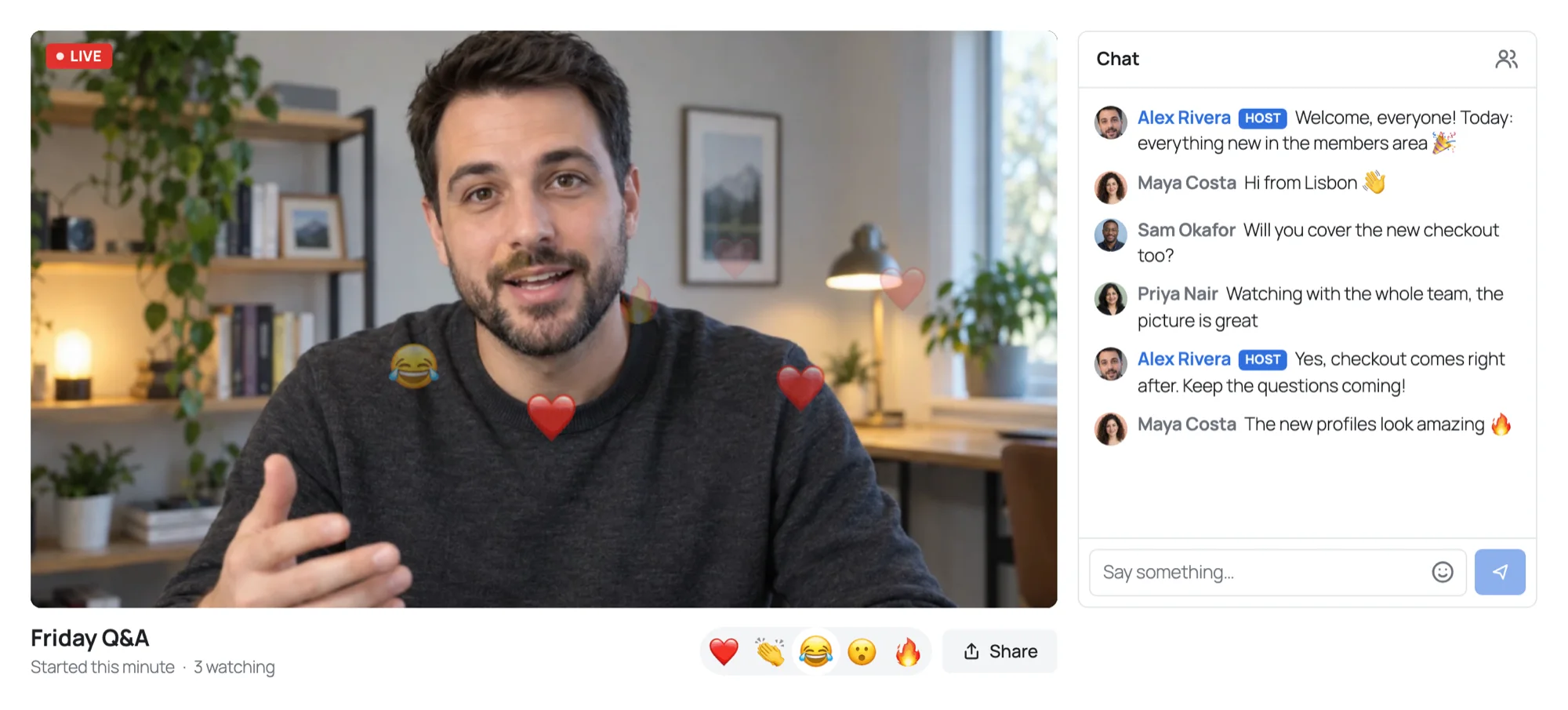
Gehen Sie von dieser Seite aus live und sehen Sie zu, auf Ihrem Smartphone oder in einem zweiten Fenster. Kein Konto nötig.
Das sind die Bildschirme, die das SDK Ihrer App gibt. Ihr Browser fragt nach Kamera und Mikrofon, nichts wird aufgezeichnet, und die Demo endet nach 10 Minuten.
Hosts und Moderatoren
Live aus dem Browser, vom Handy oder mit OBS
Studio und Chat gehören zum Player, für den Host und die Moderatoren, die Ihr Server bestimmt.
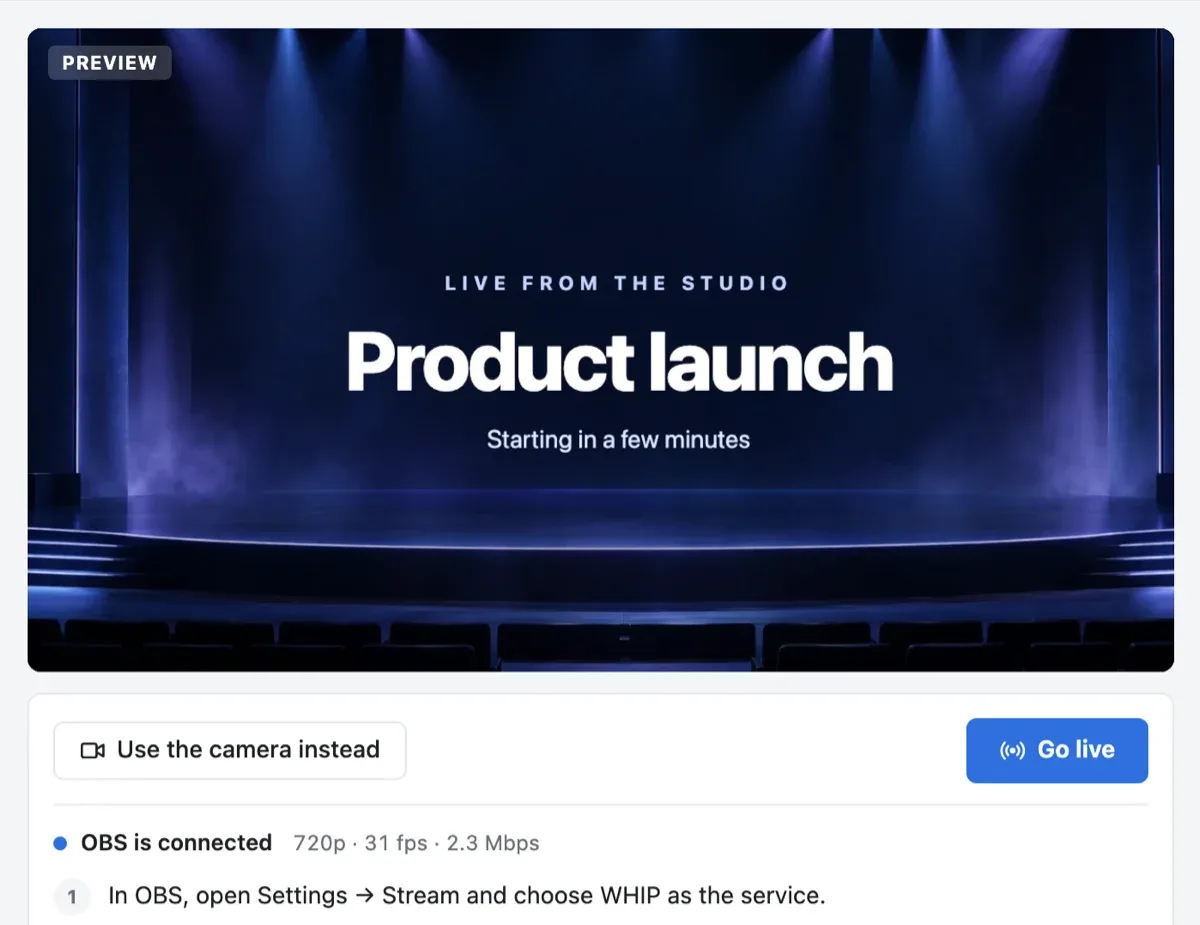
Die Kamera, ein Bildschirm oder OBS
Der Host sieht das Bild vor dem Start, geht dann mit einem Klick live und beendet den Stream für alle. Er streamt mit Kamera und Mikrofon des Browsers oder eines Handys, teilt einen Bildschirm oder sendet das Bild aus OBS oder einem anderen Encoder über WHIP.
Ein Chat, der aufgeräumt bleibt
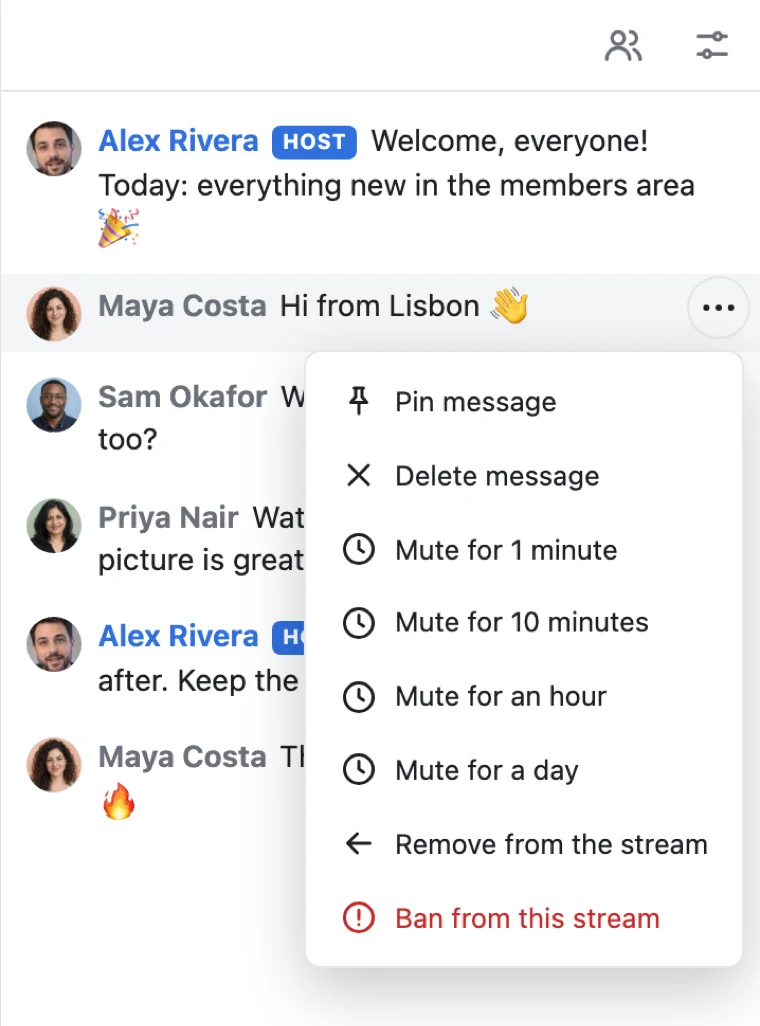
Zuschauer schreiben im Chat neben dem Bild und schicken Reaktionen, die über dem Bild erscheinen. Der Host und die Moderatoren, die Ihr Server bestimmt, heften Nachrichten an und löschen sie, verlangsamen den Chat, schalten jemanden vorübergehend stumm und entfernen oder sperren ihn. Ihr Server kann dasselbe und unter einem eigenen Namen im Chat schreiben.
Zuschauer
Alle Zuschauer, angemeldet oder nicht
Ein Link zur Seite ist alles, was ein Zuschauer braucht. Er schaut zu, schreibt im Chat und reagiert, und alle sehen, wie viele zuschauen.
Zuschauen ohne Konto
Ihr Server macht einen Besucher zum Zuschauer, sodass jeder mit dem Link zuschauen kann und sich anmeldet, um im Chat zu schreiben. Oder Sie behalten einen Stream Mitgliedern vor.
Ein Bild für jeden Bildschirm
Jeder Zuschauer bekommt das Bild in der Größe, die sein Bildschirm und seine Verbindung hergeben, im Web, unter iOS und Android, mit einem Live-Zähler der Zuschauer.
Gäste auf der Bühne
Ein Zuschauer meldet sich per Handzeichen, und der Host holt ihn mit Kamera und Mikrofon auf die Bühne, für eine Frage, ein Interview oder ein Podiumsgespräch.
Ihr Server entscheidet
Ein paar Zeilen in Ihrem Stack
Ihr Server legt fest, wer welchen Stream leitet, wer zuschaut und wer den Chat betreut. Die Seite zeigt den Stream mit einem Element oder mit Ihrem eigenen Code.
Next.js auf dem Server und React auf der Seite.
export async function GET( request: Request ) {
const me = await currentUserId(); // null for a visitor
const id = new URL( request.url ).searchParams.get( 'id' )!;
// Your own check: its host goes live, the rest watch.
const token = await realtime.streamToken( me, 'live:' + id, {
role: me && await isHostOf( id, me ) ? 'host' : 'viewer',
mod: me && await isModerator( me ),
settings: { reactions: true },
} );
return Response.json( { token } );
}app.get( '/api/stream-token', async ( req, res ) => {
const me = userOf( req ); // null for a visitor
const { id } = req.query;
// Your own check: its host goes live, the rest watch.
const token = await realtime.streamToken( me, 'live:' + id, {
role: me && await isHostOf( id, me ) ? 'host' : 'viewer',
mod: me && await isModerator( me ),
settings: { reactions: true },
} );
res.json( { token } );
} );import { createServer } from 'node:http';
createServer( async ( req, res ) => {
const url = new URL( req.url, 'http://localhost' );
if ( url.pathname === '/api/stream-token' ) {
const me = userOf( req ); // null for a visitor
const id = url.searchParams.get( 'id' );
// Your own check: its host goes live, the rest watch.
const token = await realtime.streamToken( me, 'live:' + id, {
role: me && await isHostOf( id, me ) ? 'host' : 'viewer',
mod: me && await isModerator( me ),
settings: { reactions: true },
} );
res.writeHead( 200, { 'Content-Type': 'application/json' } );
return res.end( JSON.stringify( { token } ) );
}
// Your pages, and realtime.node( userOf ) for the SDK's routes.
} ).listen( 3000 );use Illuminate\Http\Request;
use WordPlus\Realtime\Laravel\Facades\Realtime;
Route::get( '/api/stream-token', function ( Request $request ) {
$me = $request->user()?->id; // null for a visitor
$id = $request->query( 'id' );
// Your own check: its host goes live, the rest watch.
return [ 'token' => Realtime::streamToken( $me, 'live:' . $id, [
'role' => $me && is_host_of( $id, $me ) ? 'host' : 'viewer',
'mod' => $me && is_moderator( $me ),
'settings' => [ 'reactions' => true ],
] ) ];
} );require __DIR__ . '/../src/realtime.php';
$me = current_user_id(); // null for a visitor
$id = $_GET['id'] ?? '';
header( 'Content-Type: application/json' );
// Your own check: its host goes live, the rest watch.
echo json_encode( [
'token' => $realtime->streamToken( $me, 'live:' . $id, [
'role' => $me && is_host_of( $id, $me ) ? 'host' : 'viewer',
'mod' => $me && is_moderator( $me ),
'settings' => [ 'reactions' => true ],
] ),
] );from django.http import JsonResponse
from .realtime import realtime
# In urls.py: path("api/stream-token", views.stream_token)
def stream_token(request):
me = request.user.id if request.user.is_authenticated else None
id = request.GET["id"]
# Your own check: its host goes live, the rest watch.
token = realtime.stream_token(
me,
"live:" + id,
role="host" if me and is_host_of(id, me) else "viewer",
mod=bool(me and is_moderator(me)),
settings={"reactions": True},
)
return JsonResponse({"token": token})from fastapi import Depends
from realtime import realtime
# current_user_id answers None for a visitor.
@app.get("/api/stream-token")
def stream_token(id: str, me: int | None = Depends(current_user_id)):
# Your own check: its host goes live, the rest watch.
token = realtime.stream_token(
me,
"live:" + id,
role="host" if me and is_host_of(id, me) else "viewer",
mod=bool(me and is_moderator(me)),
settings={"reactions": True},
)
return {"token": token}from flask import request, session
from realtime import realtime
@app.get("/api/stream-token")
def stream_token():
me = session.get("user_id") # None for a visitor
id = request.args["id"]
# Your own check: its host goes live, the rest watch.
token = realtime.stream_token(
me,
"live:" + id,
role="host" if me and is_host_of(id, me) else "viewer",
mod=bool(me and is_moderator(me)),
settings={"reactions": True},
)
return {"token": token}// http.HandleFunc("GET /api/stream-token", streamToken)
func streamToken(w http.ResponseWriter, r *http.Request) {
me := userOf(r) // empty for a visitor
id := r.URL.Query().Get("id")
// Your own check: its host goes live, the rest watch.
role := "viewer"
if me != "" && isHostOf(id, me) {
role = "host"
}
token := app.StreamToken(wordplus.Stream{
Name: "live:" + id,
Role: role,
User: me,
Mod: me != "" && isModerator(me),
React: wordplus.Yes,
})
reply(w, map[string]string{"token": token})
}Hooks und Komponenten für jede React-App, auf jedem der Server oben.
import { connect } from '@wordplus/realtime';

const rt = await connect();

// The player and the studio.
await rt.streamScreen();

// And in the page:
// <live-stream name="live:12"
//     token-url="/api/stream-token?id=12"
// title="Opening night"></live-stream>import { connect } from '@wordplus/realtime';
const rt = await connect();
// The player and the studio.
await rt.streamScreen();
// And in the page:
// <live-stream name="live:12"
// token-url="/api/stream-token?id=12"
// title="Opening night"></live-stream>import { connect } from '@wordplus/realtime';
const rt = await connect();
// The player and the studio.
await rt.streamScreen();
// And in the page:
// <live-stream name="live:12"
// token-url="/api/stream-token?id=12"
// title="Opening night"></live-stream>import { connect } from '@wordplus/realtime';
const rt = await connect( window.wordplusRealtimeConfig );
// The player and the studio.
await rt.streamScreen();
// And in the page:
// <live-stream name="live:12"
// token-url="/api/stream-token?id=12"
// title="Opening night"></live-stream><live-stream name="live:12"
token-url="/api/stream-token?id=12"
title="Opening night"></live-stream>
<script type="module">
import { connect } from '@wordplus/realtime';
const rt = await connect( window.wordplusRealtimeConfig );
// The player and the studio.
await rt.streamScreen();
</script><live-stream name="live:12"
token-url="/api/stream-token?id=12"
title="Opening night"></live-stream>
<script type="module">
import { connect } from '@wordplus/realtime';
const rt = await connect( window.wordplusRealtimeConfig );
// The player and the studio.
await rt.streamScreen();
</script><live-stream name="live:12"
token-url="/api/stream-token?id=12"
title="Opening night"></live-stream>
<script type="module">
import { connect } from '@wordplus/realtime';
const rt = await connect( window.wordplusRealtimeConfig );
// The player and the studio.
await rt.streamScreen();
</script><live-stream name="live:12"
token-url="/api/stream-token?id=12"
title="Opening night"></live-stream>
<script type="module">
import { connect } from '@wordplus/realtime';
const rt = await connect( window.wordplusRealtimeConfig );
// The player and the studio.
await rt.streamScreen();
</script>import { connect } from '@wordplus/realtime';
const settings = await fetch( '/api/realtime/config' );
const rt = await connect( await settings.json() );
// The player and the studio.
await rt.streamScreen();
// And in the page:
// <live-stream name="live:12"
// token-url="/api/stream-token?id=12"
// title="Opening night"></live-stream><live-stream name="live:{{ $event->id }}"
token-url="/api/stream-token?id={{ $event->id }}"
title="{{ $event->title }}"></live-stream>
<script type="module">
// The player and the studio.
await window.Echo.connector.rt.streamScreen();
</script>'use client'; // in Next.js
import { LiveStream } from '@wordplus/realtime/react';
// Inside <RealtimeProvider>, once for the whole app.
export function Stream( { id, title } ) {
return (
<LiveStream name={ `live:${ id }` } title={ title }
tokenUrl={ `/api/stream-token?id=${ id }` } />
);
}<script setup>
import { onMounted } from 'vue';
// realtime.js, one connection for the whole app:
// export const realtime = connect();
import { realtime } from './realtime';
defineProps( [ 'id', 'title' ] );
onMounted( async () => {
// The player and the studio.
( await realtime ).streamScreen();
} );
</script>
<!-- isCustomElement for this tag, in vite.config.js -->
<template>
<live-stream :name="`live:${ id }`" :title="title"
:token-url="`/api/stream-token?id=${ id }`"></live-stream>
</template><script>
import { onMount } from 'svelte';
// realtime.js, one connection for the whole app:
// export const realtime = connect();
import { realtime } from './realtime';
let { id, title } = $props();
onMount( async () => {
// The player and the studio.
( await realtime ).streamScreen();
} );
</script>
<live-stream name="live:{ id }" { title }
token-url="/api/stream-token?id={ id }"></live-stream>import {
Component, CUSTOM_ELEMENTS_SCHEMA, Input,
} from '@angular/core';
// realtime.ts, one connection for the whole app:
// export const realtime = connect();
import { realtime } from './realtime';
@Component( {
selector: 'app-stream',
schemas: [ CUSTOM_ELEMENTS_SCHEMA ],
template: `
<live-stream [attr.name]="'live:' + id"
[attr.token-url]="'/api/stream-token?id=' + id"
[attr.title]="title"></live-stream>
`,
} )
export class StreamComponent {
@Input( { required: true } ) id!: number;
@Input( { required: true } ) title!: string;
async ngOnInit() {
// The player and the studio.
( await realtime ).streamScreen();
}
}import WordPlusRealtimeCalls
import WordPlusRealtimeUI
// Your own request to your route, asked again as tokens run out.
let stream = try await rt.joinStream {
try await api.streamToken(id: 12)
}
present(LiveStreamScreen(stream: stream, title: "Opening night"),
animated: true)import cloud.wordplus.realtime.calls.joinStream
import cloud.wordplus.realtime.ui.LiveStreamScreen
// Your own request to your route, asked again as tokens run out.
val stream = rt.joinStream(context) {
api.streamToken(id = 12)
}
LiveStreamScreen.open(activity, stream, title = "Opening night")import { LiveStreamButton } from '@wordplus/realtime-react-native';
// Your server, in full, as an app has no address of its own.
const API = 'https://app.example.com/api';
// Inside <RealtimeProvider>, once for the whole app.
export function Stream( { id, title } ) {
return (
<LiveStreamButton name={ `live:${ id }` } title={ title }
tokenUrl={ `${ API }/stream-token?id=${ id }` }>
Watch
</LiveStreamButton>
);
}import 'package:flutter/material.dart';
import 'package:wordplus_realtime/wordplus_realtime.dart';
// Your server, in full, as an app has no address of its own.
const api = 'https://app.example.com/api';
// In your build. It asks your route again as tokens run out.
LiveStreamButton(
rt: rt,
stream: 'live:12',
tokenUrl: '$api/stream-token?id=12',
title: 'Opening night',
child: const Text('Watch'),
)Livestreams in jedem Stack, mit der ganzen Einrichtung:
Anwendungsfälle
Was mit Livestreams gebaut wird
Jeder ist eine ganze App in der Dokumentation, mit ihrem Server in Node.js, PHP und Python.
Live-Events
Ein Launch, ein Kurs, ein Vortrag oder ein Konzert, live für alle, die die Seite öffnen.
Streams nur für Mitglieder
Ein Stream, den nur die Mitglieder eines Clubs, die Inhaber eines Tickets oder die Teilnehmer eines Kurses sehen dürfen.
Interviews und Fragen auf der Bühne
Zuschauer melden sich per Handzeichen, und der Host holt sie zu sich auf die Bühne, im Layout, das der Host wählt.
Preise
Preise nach Verbindungen, nie nach Nachrichten
Ab $11.99 im Monat für 1.000 gleichzeitige Verbindungen, jährlich abgerechnet, oder $14.99 bei monatlicher Abrechnung.
Zuschauer über Ihren Plan hinaus: $0.20 pro 1.000 Minuten.
Ein Preis für jede Auflösung. Bandbreite, Relays und Nachrichten werden nie berechnet, und Anrufe zwischen zwei Personen sind inklusive. Wir betreiben unsere Relays und Medienserver selbst, deshalb bleiben diese Preise niedrig.
Preise nach gleichzeitigen Verbindungen, ab 1.000, monatlich oder jährlich abgerechnet.
Mit 1.000 Verbindungen sind Livestreams bis zu 50 Zuschauern gleichzeitig ohne Abrechnung, und mit jeweils 1.000 weiteren Verbindungen kommen 20 Zuschauer hinzu. Darüber verbraucht jeder weitere Zuschauer ein Credit pro Minute, gezählt nur, solange der Stream live ist, und Ihr Plan fügt je 1.000 Verbindungen 5.000 Credits pro Monat hinzu.
Fragen
Häufige Fragen
Brauche ich einen eigenen Medienserver?
Nein. Der Host sendet das Bild an unsere Medienserver, die es zu allen Zuschauern bringen. OBS und andere Encoder senden es über WHIP. Sie müssen nichts selbst hosten.
Welche Stacks können das Live-Streaming-SDK nutzen?
Next.js und Express, Laravel und reines PHP, Django, FastAPI und Flask, Capacitor, iOS und Android, jeweils mit Anleitung. Ein Server in einer anderen Sprache nutzt die HTTP-API. Flutter-Apps haben Live-Streams auf iOS und Android, React-Native-Apps vorerst auf iOS.
Kann man ohne Konto zuschauen?
Ja. Ihr Server macht einen nicht angemeldeten Besucher zum Zuschauer, sodass jeder mit dem Link zuschauen kann und sich anmeldet, um im Chat zu schreiben. Oder Sie behalten einen Stream Mitgliedern vor, dann öffnet ein weitergegebener Link nichts.
Kann ich mit OBS streamen?
Ja. Das Studio gibt dem Host eine Adresse und einen Schlüssel für OBS oder einen anderen Encoder, der über WHIP sendet, und das Bild des Encoders tritt an die Stelle der Kamera. Ein neuer Schlüssel sperrt den alten.
Wie viele Personen können zuschauen?
Mit 1.000 Verbindungen verbrauchen bis zu 50 Zuschauer gleichzeitig keine Credits, und mit jeweils 1.000 weiteren Verbindungen kommen 20 hinzu. Darüber verbraucht jeder weitere Zuschauer ein Credit pro Minute, gezählt nur, solange der Stream live ist.
Wer betreut den Chat?
Der Host und jeder, den Ihr Server zum Moderator macht. Sie heften Nachrichten an und löschen sie, verlangsamen den Chat, schalten jemanden für eine Minute bis zu einem Tag stumm und entfernen jemanden aus dem Stream oder sperren ihn. Ihr Server kann das alles auch, ohne dass eine Seite geöffnet ist.
Kann ich meinen eigenen Player bauen?
Ja. Player, Chat und Studio sind optional. Platzieren Sie jeden Teil dort, wo Ihre Seite ihn braucht, oder zeichnen Sie den Stream selbst mit dem SDK: das Bild, die Zuschauer, den Chat und die Reaktionen.
Kann ich das Zuschauen berechnen?
Ja. Ihr Server entscheidet, wer zuschauen darf, sodass ein Ticket oder eine Mitgliedschaft den Stream öffnet. WordPlus Cloud teilt Ihrem Server per Webhook mit, wann jeder angemeldete Zuschauer zu schauen beginnt und aufhört, gezählt auf den eigenen Servern, sodass Ihre App pro Abruf oder minutengenau abrechnen kann.
Fragen zu Ihrer Integration? Schreiben Sie uns: Wir helfen mit den SDKs, dem Player und Ihrem Stack.