
 English
 Deutsch
 Español
 Italiano
 Nederlands
 Polski
' d='M48 28h24v18a12 12 0 0 1-24 0z'/%3E%3Cpath fill='%230093DD' d='M47.5 21.5h4.6V28h-4.6zm10.2-2.5h4.6v9h-4.6zm10.2 2.5h4.6V28h-4.6z'/%3E%3Cpath fill='%23171796' d='M52.6 20h4.6v8h-4.6zm10.2 0h4.6v8h-4.6z'/%3E%3C/svg%3E) Hrvatski
 עברית
Pour les applications
Diffusion en direct pour votre application
Une API et un SDK de diffusion en direct pour Next.js, Laravel, Django et tout autre stack. Un hôte passe en direct depuis le navigateur, un téléphone ou OBS, nos serveurs multimédias portent l’image jusqu’à tous ceux qui regardent, et le lecteur avec son chat est prêt à l’emploi : vous n’avez aucun serveur multimédia à faire tourner.
Les meilleurs tarifs pour les WebSockets, des appels 1 à 1 illimités avec des serveurs TURN dans le monde entier, et des appels de groupe et la diffusion en direct avec un quota inclus. À partir de $11.99 par mois pour 1 000 connexions simultanées, facturé à l’année, ou $14.99 facturé au mois.
Spectateurs au-delà de votre formule : $0.20 pour 1 000 minutes.
Next.js sur le serveur et React sur la page.
export async function GET( request: Request ) {
    const me = await currentUserId();   // null for a visitor
    const id = new URL( request.url ).searchParams.get( 'id' )!;

    // Your own check: its host goes live, the rest watch.
    const token = await realtime.streamToken( me, 'live:' + id, {
        role: me && await isHostOf( id, me ) ? 'host' : 'viewer',
    } );

    return Response.json( { token } );
}app.get( '/api/stream-token', async ( req, res ) => {
const me = userOf( req ); // null for a visitor
const { id } = req.query;
// Your own check: its host goes live, the rest watch.
const token = await realtime.streamToken( me, 'live:' + id, {
role: me && await isHostOf( id, me ) ? 'host' : 'viewer',
} );
res.json( { token } );
} );import { createServer } from 'node:http';
createServer( async ( req, res ) => {
const url = new URL( req.url, 'http://localhost' );
if ( url.pathname === '/api/stream-token' ) {
const me = userOf( req ); // null for a visitor
const id = url.searchParams.get( 'id' );
// Your own check: its host goes live, the rest watch.
const token = await realtime.streamToken( me, 'live:' + id, {
role: me && await isHostOf( id, me ) ? 'host' : 'viewer',
} );
res.writeHead( 200, { 'Content-Type': 'application/json' } );
return res.end( JSON.stringify( { token } ) );
}
// Your pages, and realtime.node( userOf ) for the SDK's routes.
} ).listen( 3000 );use Illuminate\Http\Request;
use WordPlus\Realtime\Laravel\Facades\Realtime;
Route::get( '/api/stream-token', function ( Request $request ) {
$me = $request->user()?->id; // null for a visitor
$id = $request->query( 'id' );
// Your own check: its host goes live, the rest watch.
return [ 'token' => Realtime::streamToken( $me, 'live:' . $id, [
'role' => $me && is_host_of( $id, $me ) ? 'host' : 'viewer',
] ) ];
} );require __DIR__ . '/../src/realtime.php';
$me = current_user_id(); // null for a visitor
$id = $_GET['id'] ?? '';
header( 'Content-Type: application/json' );
// Your own check: its host goes live, the rest watch.
echo json_encode( [
'token' => $realtime->streamToken( $me, 'live:' . $id, [
'role' => $me && is_host_of( $id, $me ) ? 'host' : 'viewer',
] ),
] );from django.http import JsonResponse
from .realtime import realtime
# In urls.py: path("api/stream-token", views.stream_token)
def stream_token(request):
me = request.user.id if request.user.is_authenticated else None
id = request.GET["id"]
# Your own check: its host goes live, the rest watch.
token = realtime.stream_token(
me,
"live:" + id,
role="host" if me and is_host_of(id, me) else "viewer",
)
return JsonResponse({"token": token})from fastapi import Depends
from realtime import realtime
# current_user_id answers None for a visitor.
@app.get("/api/stream-token")
def stream_token(id: str, me: int | None = Depends(current_user_id)):
# Your own check: its host goes live, the rest watch.
token = realtime.stream_token(
me,
"live:" + id,
role="host" if me and is_host_of(id, me) else "viewer",
)
return {"token": token}from flask import request, session
from realtime import realtime
@app.get("/api/stream-token")
def stream_token():
me = session.get("user_id") # None for a visitor
id = request.args["id"]
# Your own check: its host goes live, the rest watch.
token = realtime.stream_token(
me,
"live:" + id,
role="host" if me and is_host_of(id, me) else "viewer",
)
return {"token": token}// http.HandleFunc("GET /api/stream-token", streamToken)
func streamToken(w http.ResponseWriter, r *http.Request) {
me := userOf(r) // empty for a visitor
id := r.URL.Query().Get("id")
// Your own check: its host goes live, the rest watch.
role := "viewer"
if me != "" && isHostOf(id, me) {
role = "host"
}
token := app.StreamToken(wordplus.Stream{
Name: "live:" + id,
Role: role,
User: me,
})
reply(w, map[string]string{"token": token})
}Des hooks et des composants pour toute app React, avec n'importe lequel des serveurs ci-dessus.
import { connect } from '@wordplus/realtime';

const rt = await connect();

// The player and the studio.
await rt.streamScreen();

// And in the page:
// <live-stream name="live:12"
//     token-url="/api/stream-token?id=12"
// title="Opening night"></live-stream>import { connect } from '@wordplus/realtime';
const rt = await connect();
// The player and the studio.
await rt.streamScreen();
// And in the page:
// <live-stream name="live:12"
// token-url="/api/stream-token?id=12"
// title="Opening night"></live-stream>import { connect } from '@wordplus/realtime';
const rt = await connect();
// The player and the studio.
await rt.streamScreen();
// And in the page:
// <live-stream name="live:12"
// token-url="/api/stream-token?id=12"
// title="Opening night"></live-stream>import { connect } from '@wordplus/realtime';
const rt = await connect( window.wordplusRealtimeConfig );
// The player and the studio.
await rt.streamScreen();
// And in the page:
// <live-stream name="live:12"
// token-url="/api/stream-token?id=12"
// title="Opening night"></live-stream><live-stream name="live:12"
token-url="/api/stream-token?id=12"
title="Opening night"></live-stream>
<script type="module">
import { connect } from '@wordplus/realtime';
const rt = await connect( window.wordplusRealtimeConfig );
// The player and the studio.
await rt.streamScreen();
</script><live-stream name="live:12"
token-url="/api/stream-token?id=12"
title="Opening night"></live-stream>
<script type="module">
import { connect } from '@wordplus/realtime';
const rt = await connect( window.wordplusRealtimeConfig );
// The player and the studio.
await rt.streamScreen();
</script><live-stream name="live:12"
token-url="/api/stream-token?id=12"
title="Opening night"></live-stream>
<script type="module">
import { connect } from '@wordplus/realtime';
const rt = await connect( window.wordplusRealtimeConfig );
// The player and the studio.
await rt.streamScreen();
</script><live-stream name="live:12"
token-url="/api/stream-token?id=12"
title="Opening night"></live-stream>
<script type="module">
import { connect } from '@wordplus/realtime';
const rt = await connect( window.wordplusRealtimeConfig );
// The player and the studio.
await rt.streamScreen();
</script>import { connect } from '@wordplus/realtime';
const settings = await fetch( '/api/realtime/config' );
const rt = await connect( await settings.json() );
// The player and the studio.
await rt.streamScreen();
// And in the page:
// <live-stream name="live:12"
// token-url="/api/stream-token?id=12"
// title="Opening night"></live-stream><live-stream name="live:{{ $event->id }}"
token-url="/api/stream-token?id={{ $event->id }}"
title="{{ $event->title }}"></live-stream>
<script type="module">
// The player and the studio.
await window.Echo.connector.rt.streamScreen();
</script>'use client'; // in Next.js
import { LiveStream } from '@wordplus/realtime/react';
// Inside <RealtimeProvider>, once for the whole app.
export function Stream( { id, title } ) {
return (
<LiveStream name={ `live:${ id }` } title={ title }
tokenUrl={ `/api/stream-token?id=${ id }` } />
);
}<script setup>
import { onMounted } from 'vue';
// realtime.js, one connection for the whole app:
// export const realtime = connect();
import { realtime } from './realtime';
defineProps( [ 'id', 'title' ] );
onMounted( async () => {
// The player and the studio.
( await realtime ).streamScreen();
} );
</script>
<!-- isCustomElement for this tag, in vite.config.js -->
<template>
<live-stream :name="`live:${ id }`" :title="title"
:token-url="`/api/stream-token?id=${ id }`"></live-stream>
</template><script>
import { onMount } from 'svelte';
// realtime.js, one connection for the whole app:
// export const realtime = connect();
import { realtime } from './realtime';
let { id, title } = $props();
onMount( async () => {
// The player and the studio.
( await realtime ).streamScreen();
} );
</script>
<live-stream name="live:{ id }" { title }
token-url="/api/stream-token?id={ id }"></live-stream>import {
Component, CUSTOM_ELEMENTS_SCHEMA, Input,
} from '@angular/core';
// realtime.ts, one connection for the whole app:
// export const realtime = connect();
import { realtime } from './realtime';
@Component( {
selector: 'app-stream',
schemas: [ CUSTOM_ELEMENTS_SCHEMA ],
template: `
<live-stream [attr.name]="'live:' + id"
[attr.token-url]="'/api/stream-token?id=' + id"
[attr.title]="title"></live-stream>
`,
} )
export class StreamComponent {
@Input( { required: true } ) id!: number;
@Input( { required: true } ) title!: string;
async ngOnInit() {
// The player and the studio.
( await realtime ).streamScreen();
}
}import WordPlusRealtimeCalls
import WordPlusRealtimeUI
// Your own request to your route, asked again as tokens run out.
let stream = try await rt.joinStream {
try await api.streamToken(id: 12)
}
present(LiveStreamScreen(stream: stream, title: "Opening night"),
animated: true)import cloud.wordplus.realtime.calls.joinStream
import cloud.wordplus.realtime.ui.LiveStreamScreen
// Your own request to your route, asked again as tokens run out.
val stream = rt.joinStream(context) {
api.streamToken(id = 12)
}
LiveStreamScreen.open(activity, stream, title = "Opening night")import { LiveStreamButton } from '@wordplus/realtime-react-native';
// Your server, in full, as an app has no address of its own.
const API = 'https://app.example.com/api';
// Inside <RealtimeProvider>, once for the whole app.
export function Stream( { id, title } ) {
return (
<LiveStreamButton name={ `live:${ id }` } title={ title }
tokenUrl={ `${ API }/stream-token?id=${ id }` }>
Watch
</LiveStreamButton>
);
}import 'package:flutter/material.dart';
import 'package:wordplus_realtime/wordplus_realtime.dart';
// Your server, in full, as an app has no address of its own.
const api = 'https://app.example.com/api';
// In your build. It asks your route again as tokens run out.
LiveStreamButton(
rt: rt,
stream: 'live:12',
tokenUrl: '$api/stream-token?id=12',
title: 'Opening night',
child: const Text('Watch'),
)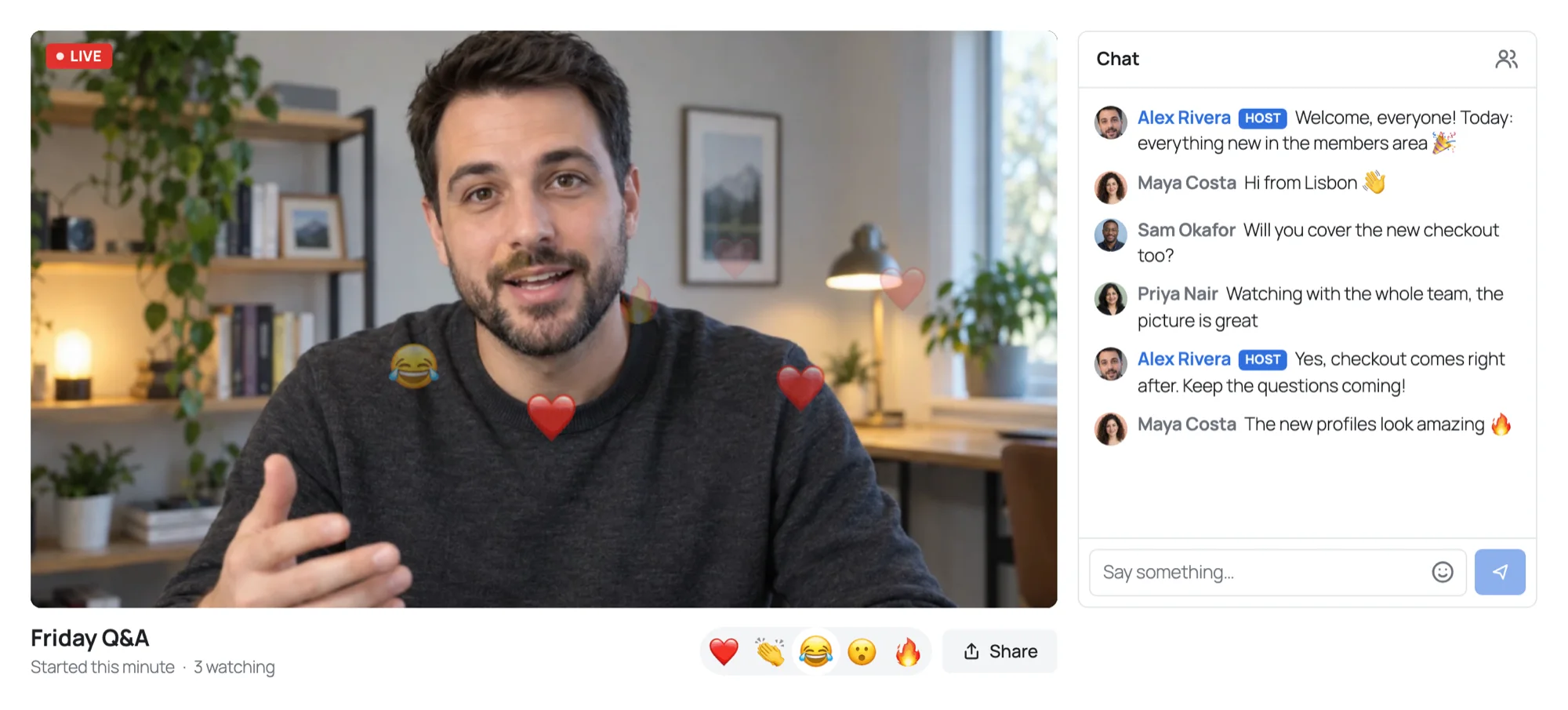
Essayez une diffusion en direct
Passez en direct depuis cette page, puis regardez depuis votre téléphone ou une seconde fenêtre. Aucun compte requis.
Ce sont les écrans que le SDK donne à votre application. Votre navigateur demande la caméra et le micro, rien n’est enregistré, et la démo se termine après 10 minutes.
Hôtes et modérateurs
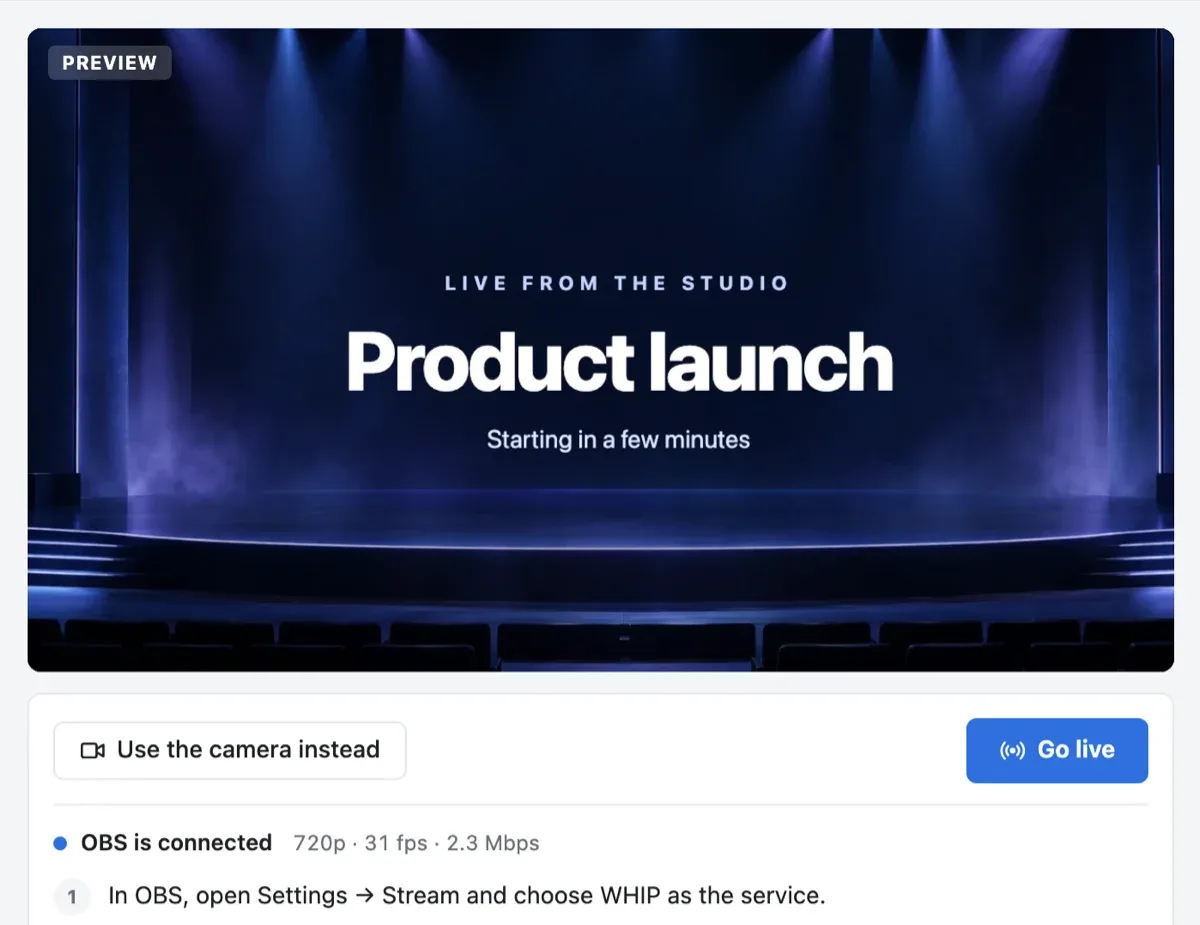
Passez en direct depuis le navigateur, un téléphone ou OBS
Le studio et le chat sont fournis avec le lecteur, pour l’hôte et les modérateurs que désigne votre serveur.
La caméra, un écran ou OBS
L’hôte voit l’image avant de passer en direct, puis lance la diffusion d’un clic et la termine pour tout le monde. Il diffuse depuis la caméra et le micro du navigateur ou d’un téléphone, partage un écran, ou envoie l’image depuis OBS ou tout autre encodeur via WHIP.
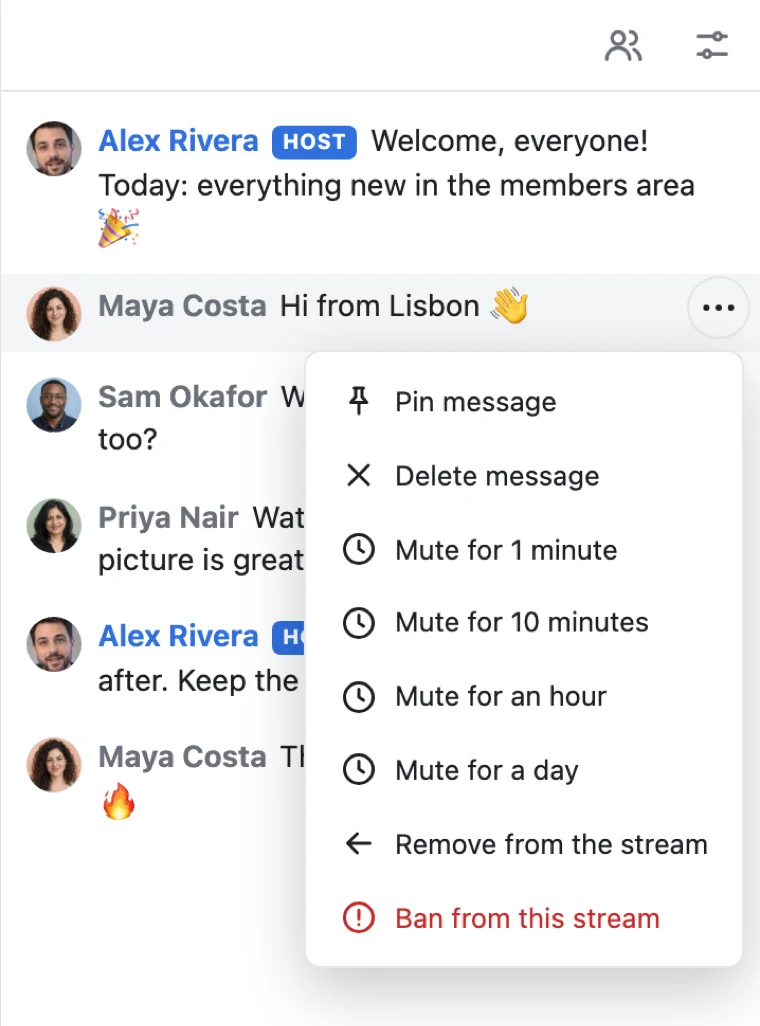
Un chat qui reste bien tenu
Les spectateurs écrivent dans le chat à côté de l’image et envoient des réactions par-dessus. L’hôte et les modérateurs que désigne votre serveur épinglent et suppriment des messages, ralentissent le chat, rendent quelqu’un muet un moment, le retirent ou le bannissent. Votre serveur peut faire de même, et écrire dans le chat sous un nom qui lui est propre.
Spectateurs
Tous ceux qui regardent, connectés ou non
Un lien vers la page suffit à un spectateur. Il regarde, écrit dans le chat et réagit, et chacun voit combien de personnes regardent.
Aucun compte pour regarder
Votre serveur fait d’un visiteur un spectateur : toute personne qui a le lien regarde, et se connecte pour écrire dans le chat. Ou réservez une diffusion aux membres.
Une image pour chaque écran
Chaque spectateur reçoit l’image dans la taille que permettent son écran et sa connexion, sur le web, iOS et Android, avec le nombre de spectateurs en direct.
Des invités sur scène
Un spectateur lève la main, et l’hôte le fait monter sur scène avec sa caméra et son micro, pour une question, une interview ou une table ronde.
Votre serveur décide
Quelques lignes dans votre stack
Votre serveur dit qui anime chaque diffusion, qui regarde et qui modère le chat. La page affiche la diffusion avec un seul élément, ou avec votre propre code.
Next.js sur le serveur et React sur la page.
export async function GET( request: Request ) {
const me = await currentUserId(); // null for a visitor
const id = new URL( request.url ).searchParams.get( 'id' )!;
// Your own check: its host goes live, the rest watch.
const token = await realtime.streamToken( me, 'live:' + id, {
role: me && await isHostOf( id, me ) ? 'host' : 'viewer',
mod: me && await isModerator( me ),
settings: { reactions: true },
} );
return Response.json( { token } );
}app.get( '/api/stream-token', async ( req, res ) => {
const me = userOf( req ); // null for a visitor
const { id } = req.query;
// Your own check: its host goes live, the rest watch.
const token = await realtime.streamToken( me, 'live:' + id, {
role: me && await isHostOf( id, me ) ? 'host' : 'viewer',
mod: me && await isModerator( me ),
settings: { reactions: true },
} );
res.json( { token } );
} );import { createServer } from 'node:http';
createServer( async ( req, res ) => {
const url = new URL( req.url, 'http://localhost' );
if ( url.pathname === '/api/stream-token' ) {
const me = userOf( req ); // null for a visitor
const id = url.searchParams.get( 'id' );
// Your own check: its host goes live, the rest watch.
const token = await realtime.streamToken( me, 'live:' + id, {
role: me && await isHostOf( id, me ) ? 'host' : 'viewer',
mod: me && await isModerator( me ),
settings: { reactions: true },
} );
res.writeHead( 200, { 'Content-Type': 'application/json' } );
return res.end( JSON.stringify( { token } ) );
}
// Your pages, and realtime.node( userOf ) for the SDK's routes.
} ).listen( 3000 );use Illuminate\Http\Request;
use WordPlus\Realtime\Laravel\Facades\Realtime;
Route::get( '/api/stream-token', function ( Request $request ) {
$me = $request->user()?->id; // null for a visitor
$id = $request->query( 'id' );
// Your own check: its host goes live, the rest watch.
return [ 'token' => Realtime::streamToken( $me, 'live:' . $id, [
'role' => $me && is_host_of( $id, $me ) ? 'host' : 'viewer',
'mod' => $me && is_moderator( $me ),
'settings' => [ 'reactions' => true ],
] ) ];
} );require __DIR__ . '/../src/realtime.php';
$me = current_user_id(); // null for a visitor
$id = $_GET['id'] ?? '';
header( 'Content-Type: application/json' );
// Your own check: its host goes live, the rest watch.
echo json_encode( [
'token' => $realtime->streamToken( $me, 'live:' . $id, [
'role' => $me && is_host_of( $id, $me ) ? 'host' : 'viewer',
'mod' => $me && is_moderator( $me ),
'settings' => [ 'reactions' => true ],
] ),
] );from django.http import JsonResponse
from .realtime import realtime
# In urls.py: path("api/stream-token", views.stream_token)
def stream_token(request):
me = request.user.id if request.user.is_authenticated else None
id = request.GET["id"]
# Your own check: its host goes live, the rest watch.
token = realtime.stream_token(
me,
"live:" + id,
role="host" if me and is_host_of(id, me) else "viewer",
mod=bool(me and is_moderator(me)),
settings={"reactions": True},
)
return JsonResponse({"token": token})from fastapi import Depends
from realtime import realtime
# current_user_id answers None for a visitor.
@app.get("/api/stream-token")
def stream_token(id: str, me: int | None = Depends(current_user_id)):
# Your own check: its host goes live, the rest watch.
token = realtime.stream_token(
me,
"live:" + id,
role="host" if me and is_host_of(id, me) else "viewer",
mod=bool(me and is_moderator(me)),
settings={"reactions": True},
)
return {"token": token}from flask import request, session
from realtime import realtime
@app.get("/api/stream-token")
def stream_token():
me = session.get("user_id") # None for a visitor
id = request.args["id"]
# Your own check: its host goes live, the rest watch.
token = realtime.stream_token(
me,
"live:" + id,
role="host" if me and is_host_of(id, me) else "viewer",
mod=bool(me and is_moderator(me)),
settings={"reactions": True},
)
return {"token": token}// http.HandleFunc("GET /api/stream-token", streamToken)
func streamToken(w http.ResponseWriter, r *http.Request) {
me := userOf(r) // empty for a visitor
id := r.URL.Query().Get("id")
// Your own check: its host goes live, the rest watch.
role := "viewer"
if me != "" && isHostOf(id, me) {
role = "host"
}
token := app.StreamToken(wordplus.Stream{
Name: "live:" + id,
Role: role,
User: me,
Mod: me != "" && isModerator(me),
React: wordplus.Yes,
})
reply(w, map[string]string{"token": token})
}Des hooks et des composants pour toute app React, avec n'importe lequel des serveurs ci-dessus.
import { connect } from '@wordplus/realtime';

const rt = await connect();

// The player and the studio.
await rt.streamScreen();

// And in the page:
// <live-stream name="live:12"
//     token-url="/api/stream-token?id=12"
// title="Opening night"></live-stream>import { connect } from '@wordplus/realtime';
const rt = await connect();
// The player and the studio.
await rt.streamScreen();
// And in the page:
// <live-stream name="live:12"
// token-url="/api/stream-token?id=12"
// title="Opening night"></live-stream>import { connect } from '@wordplus/realtime';
const rt = await connect();
// The player and the studio.
await rt.streamScreen();
// And in the page:
// <live-stream name="live:12"
// token-url="/api/stream-token?id=12"
// title="Opening night"></live-stream>import { connect } from '@wordplus/realtime';
const rt = await connect( window.wordplusRealtimeConfig );
// The player and the studio.
await rt.streamScreen();
// And in the page:
// <live-stream name="live:12"
// token-url="/api/stream-token?id=12"
// title="Opening night"></live-stream><live-stream name="live:12"
token-url="/api/stream-token?id=12"
title="Opening night"></live-stream>
<script type="module">
import { connect } from '@wordplus/realtime';
const rt = await connect( window.wordplusRealtimeConfig );
// The player and the studio.
await rt.streamScreen();
</script><live-stream name="live:12"
token-url="/api/stream-token?id=12"
title="Opening night"></live-stream>
<script type="module">
import { connect } from '@wordplus/realtime';
const rt = await connect( window.wordplusRealtimeConfig );
// The player and the studio.
await rt.streamScreen();
</script><live-stream name="live:12"
token-url="/api/stream-token?id=12"
title="Opening night"></live-stream>
<script type="module">
import { connect } from '@wordplus/realtime';
const rt = await connect( window.wordplusRealtimeConfig );
// The player and the studio.
await rt.streamScreen();
</script><live-stream name="live:12"
token-url="/api/stream-token?id=12"
title="Opening night"></live-stream>
<script type="module">
import { connect } from '@wordplus/realtime';
const rt = await connect( window.wordplusRealtimeConfig );
// The player and the studio.
await rt.streamScreen();
</script>import { connect } from '@wordplus/realtime';
const settings = await fetch( '/api/realtime/config' );
const rt = await connect( await settings.json() );
// The player and the studio.
await rt.streamScreen();
// And in the page:
// <live-stream name="live:12"
// token-url="/api/stream-token?id=12"
// title="Opening night"></live-stream><live-stream name="live:{{ $event->id }}"
token-url="/api/stream-token?id={{ $event->id }}"
title="{{ $event->title }}"></live-stream>
<script type="module">
// The player and the studio.
await window.Echo.connector.rt.streamScreen();
</script>'use client'; // in Next.js
import { LiveStream } from '@wordplus/realtime/react';
// Inside <RealtimeProvider>, once for the whole app.
export function Stream( { id, title } ) {
return (
<LiveStream name={ `live:${ id }` } title={ title }
tokenUrl={ `/api/stream-token?id=${ id }` } />
);
}<script setup>
import { onMounted } from 'vue';
// realtime.js, one connection for the whole app:
// export const realtime = connect();
import { realtime } from './realtime';
defineProps( [ 'id', 'title' ] );
onMounted( async () => {
// The player and the studio.
( await realtime ).streamScreen();
} );
</script>
<!-- isCustomElement for this tag, in vite.config.js -->
<template>
<live-stream :name="`live:${ id }`" :title="title"
:token-url="`/api/stream-token?id=${ id }`"></live-stream>
</template><script>
import { onMount } from 'svelte';
// realtime.js, one connection for the whole app:
// export const realtime = connect();
import { realtime } from './realtime';
let { id, title } = $props();
onMount( async () => {
// The player and the studio.
( await realtime ).streamScreen();
} );
</script>
<live-stream name="live:{ id }" { title }
token-url="/api/stream-token?id={ id }"></live-stream>import {
Component, CUSTOM_ELEMENTS_SCHEMA, Input,
} from '@angular/core';
// realtime.ts, one connection for the whole app:
// export const realtime = connect();
import { realtime } from './realtime';
@Component( {
selector: 'app-stream',
schemas: [ CUSTOM_ELEMENTS_SCHEMA ],
template: `
<live-stream [attr.name]="'live:' + id"
[attr.token-url]="'/api/stream-token?id=' + id"
[attr.title]="title"></live-stream>
`,
} )
export class StreamComponent {
@Input( { required: true } ) id!: number;
@Input( { required: true } ) title!: string;
async ngOnInit() {
// The player and the studio.
( await realtime ).streamScreen();
}
}import WordPlusRealtimeCalls
import WordPlusRealtimeUI
// Your own request to your route, asked again as tokens run out.
let stream = try await rt.joinStream {
try await api.streamToken(id: 12)
}
present(LiveStreamScreen(stream: stream, title: "Opening night"),
animated: true)import cloud.wordplus.realtime.calls.joinStream
import cloud.wordplus.realtime.ui.LiveStreamScreen
// Your own request to your route, asked again as tokens run out.
val stream = rt.joinStream(context) {
api.streamToken(id = 12)
}
LiveStreamScreen.open(activity, stream, title = "Opening night")import { LiveStreamButton } from '@wordplus/realtime-react-native';
// Your server, in full, as an app has no address of its own.
const API = 'https://app.example.com/api';
// Inside <RealtimeProvider>, once for the whole app.
export function Stream( { id, title } ) {
return (
<LiveStreamButton name={ `live:${ id }` } title={ title }
tokenUrl={ `${ API }/stream-token?id=${ id }` }>
Watch
</LiveStreamButton>
);
}import 'package:flutter/material.dart';
import 'package:wordplus_realtime/wordplus_realtime.dart';
// Your server, in full, as an app has no address of its own.
const api = 'https://app.example.com/api';
// In your build. It asks your route again as tokens run out.
LiveStreamButton(
rt: rt,
stream: 'live:12',
tokenUrl: '$api/stream-token?id=12',
title: 'Opening night',
child: const Text('Watch'),
)Les diffusions en direct dans chaque stack, avec toute la mise en place :
Cas d’usage
Ce que l’on construit avec les diffusions en direct
Chacun est une application complète dans la documentation, avec son serveur en Node.js, PHP et Python.
Événements en direct
Un lancement, un cours, une conférence ou un concert, en direct pour tous ceux qui ouvrent la page.
Diffusions réservées aux membres
Une diffusion que seuls les membres d’un club, les détenteurs d’un billet ou les élèves d’un cours peuvent regarder.
Interviews et questions sur scène
Les spectateurs lèvent la main, et l’hôte les fait monter sur scène à ses côtés, dans la disposition qu’il choisit.
Tarifs
Un prix selon les connexions, jamais selon les messages
À partir de $11.99 par mois pour 1 000 connexions simultanées, facturé à l’année, ou $14.99 facturé au mois.
Spectateurs au-delà de votre formule : $0.20 pour 1 000 minutes.
Un seul prix quelle que soit la résolution. La bande passante, les relais et les messages ne sont jamais facturés, et les appels à deux sont inclus. Nous exploitons nos propres relais et serveurs multimédias, ce qui garde ces prix bas.
Un prix selon les connexions simultanées, à partir de 1 000, facturé au mois ou à l’année.
Avec 1 000 connexions, les diffusions en direct ne sont pas décomptées jusqu’à 50 spectateurs à la fois, et chaque tranche de 1 000 connexions en plus ajoute 20 spectateurs. Au-delà, chaque spectateur de plus prend un crédit par minute, compté seulement pendant que la diffusion est en direct, et votre formule ajoute 5 000 crédits par mois pour 1 000 connexions.
Questions
Questions fréquentes
Ai-je besoin de mon propre serveur multimédia ?
Non. L’hôte envoie l’image à nos serveurs multimédias, qui la portent jusqu’à tous ceux qui regardent. OBS et les autres encodeurs l’envoient via WHIP. Vous n’avez rien à héberger.
Quels stacks peuvent utiliser le SDK de diffusion en direct ?
Next.js et Express, Laravel et PHP sans framework, Django, FastAPI et Flask, Capacitor, iOS et Android, chacun avec un guide. Un serveur dans un autre langage utilise l’API HTTP. Les applications Flutter ont les diffusions en direct sur iOS et Android, et les applications React Native sur iOS pour l’instant.
Peut-on regarder sans compte ?
Oui. Votre serveur fait d’un visiteur non connecté un spectateur : toute personne qui a le lien regarde, et se connecte pour écrire dans le chat. Ou réservez une diffusion aux membres, et un lien qui circule n’ouvre rien.
Puis-je diffuser depuis OBS ?
Oui. Le studio donne à l’hôte une adresse et une clé pour OBS ou tout autre encodeur qui envoie via WHIP, et l’image de l’encodeur prend la place de la caméra. Une nouvelle clé désactive l’ancienne.
Combien de personnes peuvent regarder ?
Avec 1 000 connexions, jusqu’à 50 spectateurs à la fois ne prennent aucun crédit, et chaque tranche de 1 000 connexions en plus en ajoute 20. Au-delà, chaque spectateur de plus prend un crédit par minute, compté seulement pendant que la diffusion est en direct.
Qui modère le chat ?
L’hôte, et toute personne dont votre serveur fait un modérateur. Ils épinglent et suppriment des messages, ralentissent le chat, rendent quelqu’un muet d’une minute à une journée, et retirent quelqu’un de la diffusion ou l’en bannissent. Votre serveur peut tout faire aussi, sans aucune page ouverte.
Puis-je construire mon propre lecteur ?
Oui. Le lecteur, le chat et le studio sont facultatifs. Placez chaque partie là où votre page en a besoin, ou affichez vous-même la diffusion avec le SDK : l’image, les spectateurs, le chat et les réactions.
Puis-je facturer le visionnage ?
Oui. Votre serveur décide qui peut regarder, si bien qu’un billet ou une adhésion ouvre la diffusion. WordPlus Cloud indique à votre serveur par webhook quand chaque spectateur connecté commence et arrête de regarder, compté sur ses propres serveurs, pour que votre application facture à la vue ou à la minute.
Des questions sur votre intégration ? Écrivez-nous : nous vous aidons avec les SDK, le lecteur et votre stack.