
 Deutsch
 Español
 Français
 Italiano
 Nederlands
 Polski
' d='M48 28h24v18a12 12 0 0 1-24 0z'/%3E%3Cpath fill='%230093DD' d='M47.5 21.5h4.6V28h-4.6zm10.2-2.5h4.6v9h-4.6zm10.2 2.5h4.6V28h-4.6z'/%3E%3Cpath fill='%23171796' d='M52.6 20h4.6v8h-4.6zm10.2 0h4.6v8h-4.6z'/%3E%3C/svg%3E) Hrvatski
 עברית
Voice calls and audio rooms in a web app: how they work
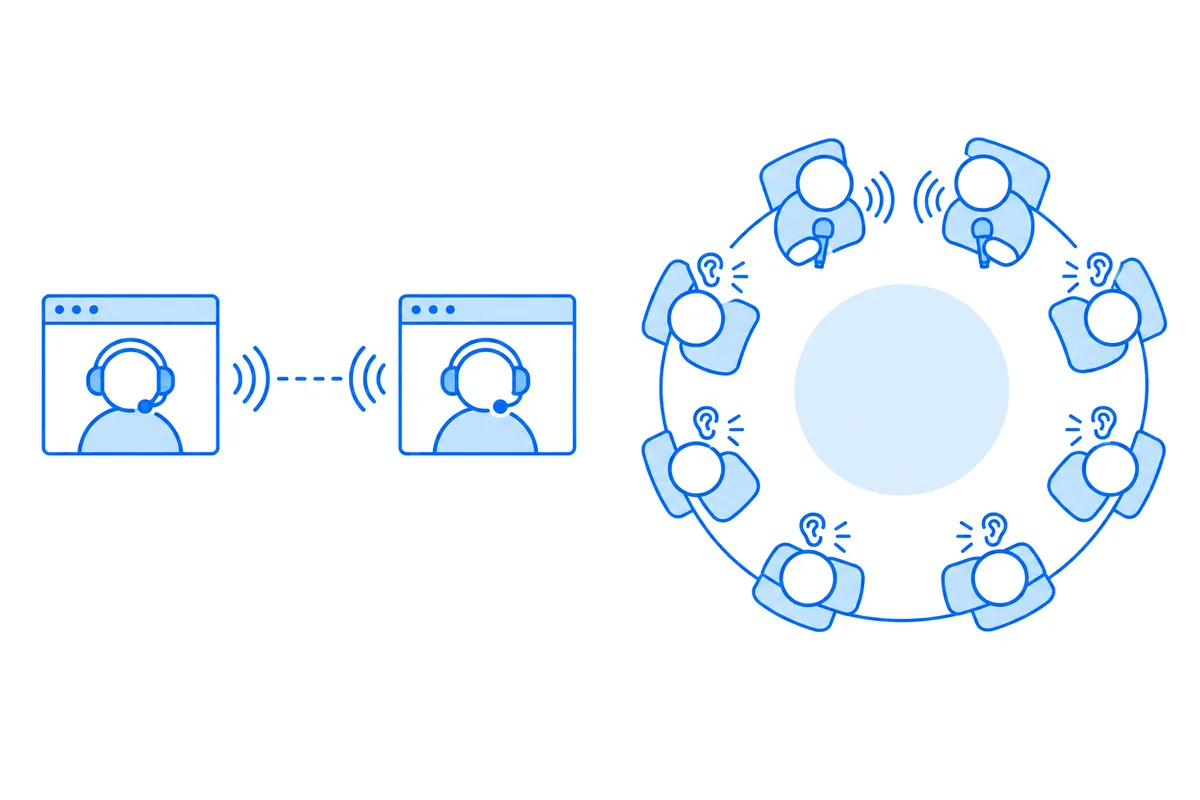
A voice call in a web app is a WebRTC call with a microphone track and no camera: the same connection as a video call, carrying a few dozen kilobits a second in place of hundreds. An audio room is a group call where a few people speak and everyone else listens, and that takes a media server and a rule on your server about who may speak.
Both are calls between the users of your app, by their accounts, over the internet. There are no phone numbers and no telephone network in them. This post shows what a voice call sends, measured in Chromium, the browser code it needs, how an audio room differs from a call between two, and how an app adds both without building the media side.
A voice call is a video call without the camera
Every browser that speaks WebRTC has to support two audio codecs: Opus, and G.711 as PCMA and PCMU for older phone systems (RFC 7874). Where both sides can, Opus comes first. Opus covers everything from 6 kbit/s for narrowband speech to 510 kbit/s for stereo music, and its own specification gives 16 to 20 kbit/s as the sweet spot for wideband speech (RFC 6716).
We placed an audio-only call between two connections in Chromium 156, with its fake microphone, and read what the sender reported:
| What we read | Voice call | Video call |
|---|---|---|
| Codec | Opus, 48 kHz, mono | VP8 |
| Sound or picture | about 21 kbit/s | near 480 kbit/s |
| RTP headers | about 12 kbit/s |
The voice call sent 50 packets a second, one for each 20 milliseconds of sound, and the headers of those packets came to more than half as much again as the sound in them. IP and UDP add more on the wire. The video call, a 640 by 480 picture from the fake camera, was near 480 kbit/s after 20 seconds and still climbing as the browser found more room, so its figure says more about the start of a call than about its end.
So a voice call carries far fewer bits than a video call, and that is why it holds up on a weak mobile network where video stutters. Everything else is the same: an offer and an answer, the addresses of both sides, and a relay for networks that block a direct path.
The browser code
A voice call asks for the microphone alone, and plays what comes back in an <audio> element:
// call.js: the microphone, with the browser's echo cancelling, noise and level control asked for
const stream = await navigator.mediaDevices.getUserMedia({
  audio: { echoCancellation: true, noiseSuppression: true, autoGainControl: true },
});

const pc = new RTCPeerConnection({ iceServers: [{ urls: 'stun:stun.example.com:3478' }] });
pc.addTrack(stream.getAudioTracks()[0], stream);

pc.ontrack = ({ streams }) => {
  const audio = document.getElementById('them');
  audio.srcObject = streams[0];
  // A browser plays sound only after the person has clicked or typed on the page.
  audio.play().catch(() => showTurnSoundOn());
};

// Mute: the track keeps going, and the far side hears silence.
document.getElementById('mute').onclick = () => {
  const track = stream.getAudioTracks()[0];
  track.enabled = !track.enabled;
};<audio id="them" autoplay></audio>
<button id="mute">Mute</button>The offer, the answer and the candidates go through a signaling server, exactly as for video: how WebRTC connects two browsers has that relay, a few lines of Node.js, and the page around it. Three things matter more in a voice call than in a video one:
- Echo. With no headset, the speaker of a laptop plays the other person into its own microphone. RFC 7874 asks every WebRTC endpoint to cancel that echo, and Chromium had all three of the options above on by default when we read
track.getSettings()on a plain{ audio: true }. Ask for them anyway, and leave them on unless the app plays music. - Sound that does not start. Browsers hold sound back until the person has used the page. A call answered with a click is fine. A call joined from a link opened in a new tab may connect in silence, so give the page a button that starts the sound when
play()refuses. - Mute without hanging up. Turning
track.enabledoff sends silence and keeps the connection, so turning it on again is instant and asks for nothing. Stopping the track would mean asking for the microphone again.
If the microphone itself is the problem, the microphone test finds out which part fails, in the browser, before any call.
An audio room is a group call with listeners
A call between two people goes from one browser to the other. A room of twenty can't work that way: in a mesh, every speaker sends a copy of their voice to every other person, so the upload grows with each one who joins. Group calls send each voice once to a media server, which passes it on to everyone else (how group video calls work).
An audio room adds roles to that:
| Call between two | Audio room | |
|---|---|---|
| Who speaks | both | the speakers, a few |
| Where sound goes | browser to browser | through a media server |
| Who decides | the two of them | the host and your server |
The listeners send nothing at all. They receive the voices of the speakers, each one forwarded by the server, and their microphones stay closed. A listener raises a hand, the host lets them speak, and later makes them a listener again.
That last part has to be decided on a server. A button that only hides the microphone in the page is no rule: anyone can open the browser console and send sound anyway. The media server has to refuse what a listener sends, and take it back from someone who stops being a speaker, on a proof that only your server can give.
What still applies
Going without the camera saves bandwidth and nothing else. A voice call still needs:
- STUN and TURN. Some networks block a direct path between two devices, for voice as for video. A relay on port 443 gets those calls through (STUN and TURN servers, explained).
- The ring. The person called has to hear it in whichever tab or device they have open, and stop hearing it in the others once they answer.
- A connection that survives a move. A phone that goes from Wi-Fi to mobile data drops the path the call was on, so the call has to find a new one without hanging up.
Voice calls and audio rooms with WordPlus Cloud
With the @wordplus/realtime package, a voice call is a video call with type: 'audio'. Your app decides who may call whom in a route of its own, which answers a token for the call. In Express:
// server.mjs: GET /call-token?to=34&type=audio, which the button asks as it is pressed.
app.get('/call-token', async (req, res) => {
  // Your own check goes here: who may call whom.
  const me = req.session.userId;
  if (!me) return res.sendStatus(401);
  res.json({ token: await realtime.callToken(me, req.query.to, { type: req.query.type }) });
});await rt.callScreen(); // the ring and the call window, on every page a call may ring on<call-button to="34" token-url="/call-token" type="audio" name="Ann">Call Ann</call-button>The call rings in every tab and on every device Ann has open. It goes straight between the two browsers when their networks allow it, through our relays on ports 443 and 80 when they don't, and through our media servers when even those can't reach, moving from one to the next without hanging up. Calls between two people are encrypted end to end on every path, and take no credits on any of them.
An audio room is a group call whose tokens say type: 'audio', with publish: false for the listeners. Here the host of room 7 speaks and runs it, and the others listen until let speak:
// GET /room-token?id=7, which <group-call-button call="room:7" token-url="/room-token?id=7" type="audio"> asks.
app.get('/room-token', async (req, res) => {
  const me = req.session.userId;
  if (!me) return res.sendStatus(401);
  const host = await isHostOf(req.query.id, me); // yours, from your data
  res.json({
    token: await realtime.groupCallToken(me, `room:${req.query.id}`, {
      type: 'audio',
      admin: host,
      publish: host || (await maySpeak(req.query.id, me)),
    }),
  });
});

// The host lets someone speak, or makes them a listener again, while the room runs.
await realtime.call('room:7').permit(34, { publish: true });
The call screen gives the host Promote to Speaker and Demote to Viewer on each person, and the media servers refuse sound from anyone your token or permit() made a listener. A group call is encrypted end to end when its tokens say encrypt: true. In group calls, a number of people on video at once take no credits with your plan, a person on audio counting half, and each one above takes a credit a minute, on audio half (limits). What a month of calls comes to: how to estimate the cost of video calls.
Classes, webinars and audio rooms shows raised hands and a Let speak button of your own in Node, PHP and Python, and the calls page of the Express guide the rest: who may call, a call interface of your own, and calls in a chat.
Voice calls for your app
WordPlus Cloud for Apps is priced by concurrent connections, starting from 1,000, billed monthly or yearly, and calls between two people take no credits on any path. See calls and group calls for apps, or the apps pricing. Questions about your integration? Write to us.