
 Deutsch
 Español
 Français
 Italiano
 Nederlands
 Polski
' d='M48 28h24v18a12 12 0 0 1-24 0z'/%3E%3Cpath fill='%230093DD' d='M47.5 21.5h4.6V28h-4.6zm10.2-2.5h4.6v9h-4.6zm10.2 2.5h4.6V28h-4.6z'/%3E%3Cpath fill='%23171796' d='M52.6 20h4.6v8h-4.6zm10.2 0h4.6v8h-4.6z'/%3E%3C/svg%3E) Hrvatski
 עברית
End-to-end encrypted chat API: who holds the keys
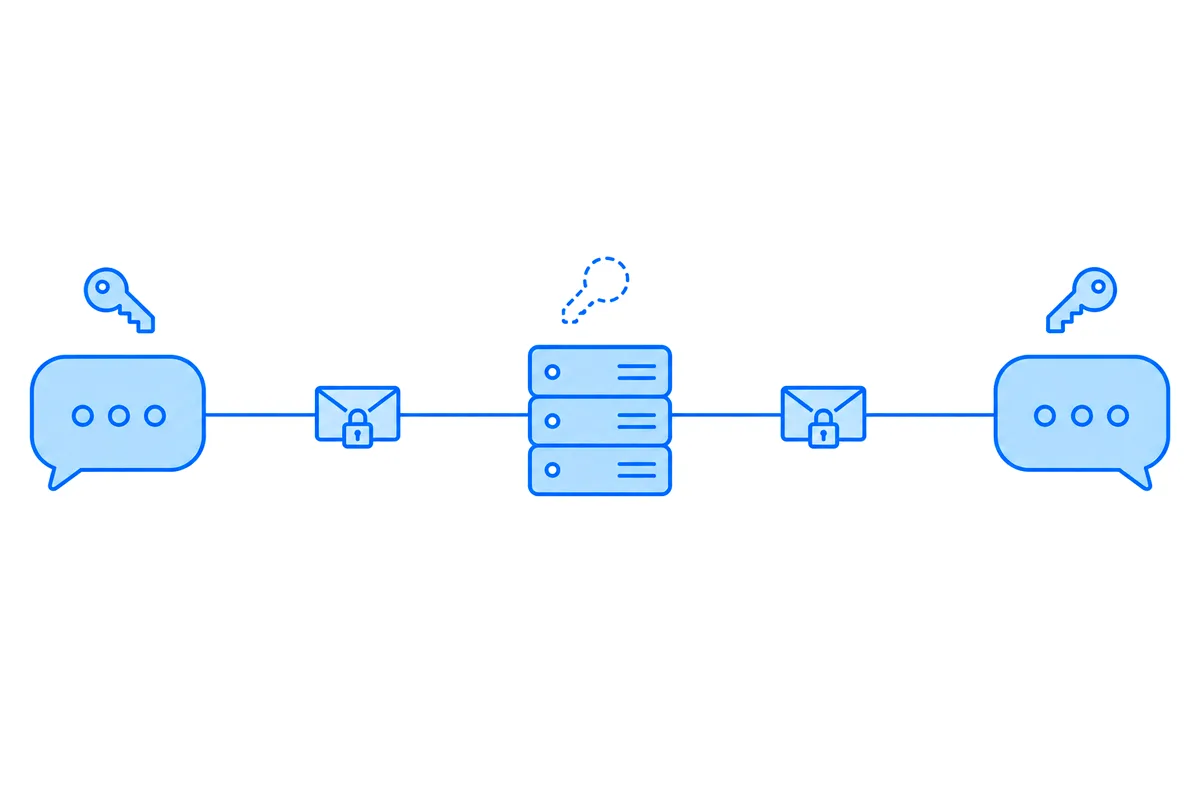
An end-to-end encrypted chat API carries every message sealed with a key it never holds, so the service in the middle can deliver and store messages without being able to read or change them. Which "ends" hold the keys decides what that promise is worth: your own server and your users, or only the devices of the people talking.
This post sorts out the three things "encrypted" can mean in a chat, then seals and opens real events with a realtime SDK, changes them on the way, moves them to another room and takes a user out, to show what holds. Last, what the service still sees, and what calls and live streams add.
Three kinds of "encrypted"
Every chat service worth using encrypts the connection with TLS (RFC 8446), so nobody on the network between a browser and the service reads along. That says nothing about the service itself. The question is who can open a message once it arrives:
| What is encrypted | Who can read the message | Who holds the keys |
|---|---|---|
| The connection only | the service, your server, the people talking | the service |
| The message, by your server | your server, the people talking | your server |
| The message, on the devices | only the people talking | their devices |
- The connection only. The service sees each message as plain text when it arrives and when it stores it. Most chat services work this way, which is what lets them search messages, filter them and keep a full history on their side.
- Sealed by your server. Your server makes the keys and gives each user the ones they may have. The service carries sealed values and keeps them sealed in its history. Someone who reads the service, its logs or its disks gets nothing they can open.
- Keys on the devices. Each device makes its own keys and they never leave it. Not even your own server can read a message. RFC 9420, the Messaging Layer Security standard, describes this for groups from two people to thousands, with the messages open only to the members and never to the servers that deliver them.
The second and third both protect you from the service in the middle. Only the third protects your users from you. Most apps need the second: the realtime service never sees their data, while their server still checks who may read what, keeps the messages in its own database and recovers a user who lost their phone. An app whose whole promise is that its company can never read anything needs the third, and has to solve what comes with it: devices that join later, lost devices and history on a new phone.
What a sealed event looks like
We sent an order update from a Node.js server through WordPlus Cloud, with the request captured just before it left. The server declares the room, says who may join it, and sends the event:
import { createRealtime } from '@wordplus/realtime/server';

export const realtime = createRealtime(); // WORDPLUS_SITE, WORDPLUS_SECRET and WORDPLUS_LOCAL_KEY from the environment

// Who may join order:1042. mayView() is your own query: the buyer and the seller of the order.
realtime.room('order:{id}', (user, { id }) => mayView(user, id), { history: 20 });

await realtime.room('order:1042').emit('order.updated', {
  id: 1042,
  status: 'delivered',
  note: 'Left with the neighbour at number 12',
});
This is what reached the cloud, the sealed value cut short:
{
  "rooms": ["order:1042"],
  "event": "order.updated",
  "data": "ch:order:1042:1:1.BOaG0BDPKL_8qXdmwmziBDml…AbDgbKr3z8DU6Z05B2k4O",
  "history": { "order:1042": [20, 0.003472222222222222] }
}
The room, the event name and how much history to keep (the last 20 events, for 5 minutes) travel in plain text, as the cloud needs them to deliver the event and keep it. The data is one string: the label of the key that opens it (ch:order:1042:1, the key of that room, its first generation), then 24 random bytes and the ciphertext with its 16-byte tag, sealed with XChaCha20-Poly1305, the version with a longer nonce of the ChaCha20-Poly1305 in RFC 8439. The 78 characters of the order became 176.
On the buyer's page, the event arrives already opened:
import { connect } from '@wordplus/realtime';

const rt = await connect({ app: 's1500000007' });
const order = rt.join('order:1042'); // your server's rule says yes, and hands the page the key of the room

order.on('order.updated', (data) => {
  showStatus(data.status); // 'delivered'. The page opened it before your listener ran.
});
You write no encryption code on either side. Each key is HMAC-SHA256 of your local key and its label, so the Node, PHP and Python packages make the same keys from the same WORDPLUS_LOCAL_KEY, and the page takes keys only from your server, never from the cloud. A key the cloud slipped in would open what the page seals next, so the page refuses any.
What the test showed
We ran the real SDK in Node.js: the server package above, and the keyring a browser uses, with the key of the room as your server hands it to a page:
| Test | Result |
|---|---|
| A page with the room key | opens the order |
| A page with no key | opens nothing |
| One character changed on the way | opens nothing |
The value moved to order:1043 |
opens nothing |
| The same order sent twice | two different strings |
| The room key rotated | the old key opens nothing new |
| A public room | plain text |
- Changed on the way. Poly1305 checks every byte, so a value changed by one character doesn't open. The page drops it rather than showing something altered.
- Moved to another room. The label is part of what the tag checks. A value copied from
order:1042intoorder:1043fails even for a page that holds both keys, so a relay can't replay one conversation into another. - Sent twice. A fresh random nonce each time means the same message never looks the same twice, so nobody can tell from the traffic that two messages match.
- Rotated. We gave a second page the first key, then called
realtime.rotateRoom('order:1042')and sent a refund. The update came sealed underch:order:1042:2. The page that only had the first key opened nothing, while it could still open the earlier update. In an app, the pages still let in ask your server for the new key when the first event under it arrives, and open both. - A public room (
public: true) is not sealed, as anyone with your app key may join it. Keep it to what anyone may read.
When someone loses access
Sealing only helps if the key stops reaching people who should not have it. Two things do that:
- Your rule decides who gets the key. The page asks to join, your server answers, and only a yes hands over the key of the room. Once your rule says no for a user, from your own data such as the order, no later join gives them a key.
- The key moves on. Removing a user with
room.remove(userId)takes them out now and, with generations kept, rotates the key of the room too.rotateRoom()does it without removing anyone, androtateUser()for the own key of a user. Rotating needs somewhere every instance of your server shares to keep the generations, such as Redis.
What a removed user already opened stays with them, as with any encryption: rotation protects what comes next. History kept before the rotation stays sealed with the key it was sent with, which those still in the room hold too.
What the service still sees
Sealing hides the content. A service in the middle still sees the shape of the traffic, which is worth knowing before you promise anything:
- Room names and event names. Name rooms by ids (
order:1042), never by something private, such as a customer's email in the name. - User ids, as your server gives them, and which key each value needs.
- When, how often and how big. Sealing hides what a message says, not that it was sent.
Your server is the one place that sees everything. Webhooks reach it opened, since it holds the local key, so it can still keep messages, moderate them and send its own notifications. The service can't search or filter for you, so that work stays on your side. How to choose a chat API puts the same question to any service you consider.
The small events are sealed too. The data of a typing indicator sent to a sealed room is sealed like a message, and so is the info of each member in a room with presence. The service still sees that a user sent typing to a room, as it sees every event name, but not what the data says.
Calls and live streams
A chat often grows a call button, and media has its own layers:
- A call between two people is end to end on every path. WebRTC encrypts media between the two browsers with DTLS-SRTP, which RFC 8827 makes mandatory. The negotiation that sets it up is sealed with a key your server makes, so the relay can't swap itself in. When the call goes through our relays or media servers, it stays encrypted with a key your server makes and gives only to its two people.
- A group call goes through a media server, which has to forward each stream without decrypting it. Each frame is encrypted in the browser before it leaves, the idea behind SFrame (RFC 9605): one layer for the hop to the server, one for the people in the call. With the SDK that is a group call whose rule says
encrypt: true, or one that grew from a call between two people. How group video calls work shows why the server is there at all. - A live stream is not end to end. Its picture and chat are for everyone watching, so they are encrypted on the way and the media servers see them.
Video calls in JavaScript walks through how two browsers set up the call itself.
If only the devices may hold the keys
The SDK's keys come from your server's local key, the second model above. If your app needs the third, with keys that never leave the devices, that is a protocol such as MLS on the devices, with your server and the realtime service both carrying what they can't open. The SDK doesn't make device keys today: tell us about your case if you need it.
On WordPress, Better Messages already works the third way: its end-to-end encrypted conversations keep the keys in the browsers of the people talking, so neither the site nor we can read them.
Sealed rooms, for your app
Every key, label and rule, with the same code in Node, PHP and Python: encryption and your users in the docs. WordPlus Cloud for Apps is priced by concurrent connections, starting from 1,000, billed monthly or yearly, with sealed rooms from the first one and nothing to run on your servers. See chat for apps, all of the cloud for apps, or the apps pricing. Questions about your integration? Write to us.